---
title: "Automatic Driver Assignment"
url: "https://www.upperinc.com/ai-dispatch-software/automatic-driver-assignment/"
date: "2026-09-28T08:33:01+00:00"
modified: "2026-10-30T09:53:25+00:00"
type: "WebPage"
resource: "https://www.upperinc.com/ai-dispatch-software/automatic-driver-assignment/"
timestamp: "2026-10-30T09:53:25+00:00"
author:
name: "Riddhi Patel"
word_count: 941
reading_time: "5 min read"
summary: "For delivery and service teams
Automatic driver assignment: spend less of your day deciding who gets the next job.
Upper AI Dispatcher checks who can take the work, where it fits and what..."
description: "Automatic driver assignment by skills, availability, workload and route fit. Review suggestions or let Autopilot approve routine matches."
keywords: "automatic driver assignment,automatic driver assignment software,AI driver assignment"
language: "en"
schema_type: "WebPage"
---
# Automatic Driver Assignment
_Published: September 28, 2026_
_Author: Riddhi Patel_

For delivery and service teams
# Automatic driver assignment: spend less of your day deciding *who gets the next job.*
[Upper AI Dispatcher](https://www.upperinc.com/ai-dispatch-software/) checks who can take the work, where it fits and what it does to the rest of the day. Start with recommendations you can review, then let Autopilot approve routine matches under your settings.
[Book a Demo](https://calendly.com/upper/demo)See Upper work through a sample of your jobs and driver schedules.
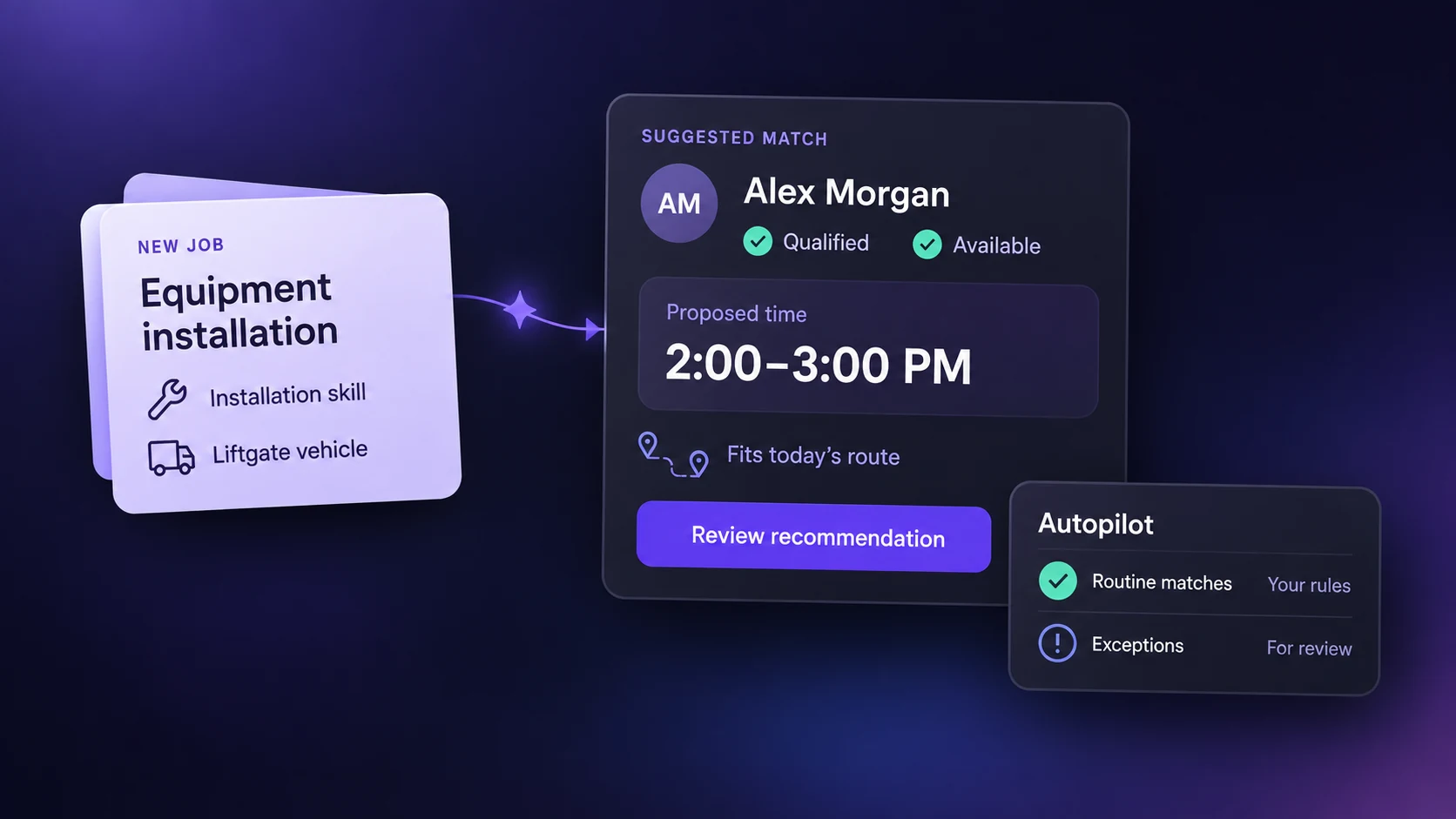
## Get the next job assigned *with fewer checks*
Your calendar shows the openings. Your map shows the drivers.
You still have to work out who can take the job without overloading their day or disrupting the next stop.
That comparison holds up the answer to the customer—and repeats every time another request comes in.
Upper compares eligible drivers against the job and the day’s schedule. You start with a recommended person and time, ready to review, instead of working through each possible match yourself.
## Find capacity *you can actually use*
A 30-minute opening cannot fit a 30-minute job plus 20 minutes of travel. And the nearest driver cannot take the job if they lack a required skill.
Apparently availableDoes not fit30-min opening 30-min job+20 min travel Nearest driver Required skill missing Upper’s matching accounts for the conditions behind an apparently available slot.
- **Job fit:**
[Required skills](https://www.upperinc.com/ai-dispatch-software/skill-based-driver-assignment/), recorded equipment access and service areas determine who is eligible.
- **Schedule fit:**
Working hours, [existing bookings](https://www.upperinc.com/features/delivery-route-scheduling/), expected duration and daily job limits determine where work can fit.
- **Route fit:**
Travel and the effect on the full day help determine which assignment makes sense. Overlaps and impossible travel gaps are flagged.
[Workload balancing](https://www.upperinc.com/features/capacity-optimization/) considers capacity across eligible drivers, helping you find someone with room for the work as well as the qualifications to do it.
## Automate the routine matches. *Keep the judgment calls.*
Start with a recommendation you can inspect: the driver, proposed start and end times, estimated travel, confidence score and reasons for the match. You can accept or reject individual suggestions and approve suitable suggestions in batches.
SKSam K.Recommended driver ✦ AI suggestion Proposed09:40 – 10:25 Travel18 min est. Confidence86 - Skills matched
- Within shift
- Capacity available
AcceptRejectApprove batch · 6 With Autopilot, routine matches above your chosen confidence threshold are accepted automatically. Suggestions below that threshold remain for review. Critical conflicts, including overlaps and impossible travel gaps, are never automatically accepted.
Autopilot Confidence threshold**80** - 86Above thresholdAccepted automatically- 72Below thresholdStays for review- !Overlap / travel gapNever auto-accepted
Your dispatcher can give attention to work that needs qualified cover, a different time or a conversation with the customer, while routine assignments move forward.
[Book a Demo](https://calendly.com/upper/demo)
## Find cover without starting *the matching process again*
### Replace an unavailable driver
A driver is unavailable, but their jobs still need covering. Update availability and Upper suggests replacements using the job requirements, remaining schedules and workload. You can assess the alternatives without checking the whole team from scratch.

### Fit an urgent job or recover a late visit
For an urgent request, set the job’s priority and review where it can fit. For visits running late, Upper proposes recovery changes. Your dispatcher reviews and approves those changes.

### When no suitable option exists
If no suitable option exists, the job stays visible with an explanation. You can arrange qualified cover or offer another time with a clear view of what is blocking the work.

## Start with the work *you already need to assign*
[Import jobs and team records from CSV](https://www.upperinc.com/features/spreadsheet-import/). Add the details you already use to assign work: driver skills, equipment access, territories, hours and daily limits, plus each job’s location, duration and requirements.
You can keep approvals manual while you review a sample day. Check a straightforward match, a difficult stop and a driver replacement before deciding how much to automate.
Keep availability and team records current as the operation changes.
SetupSample dayImport
jobs.csv*Imported* team.csv*Imported* Sample day checks
- Straightforward matchMatched- Difficult stopChecked- Driver replacementCovered
How much to automate
ManualBatch approveAutopilot
## Frequently asked *questions*
**How does automatic driver assignment work?+**
Automatic driver assignment matches jobs to drivers using requirements, availability and scheduling rules. Upper checks eligible candidates, evaluates workload and route fit, and produces a recommendation. You can approve it yourself or enable automatic approval for routine matches above your confidence threshold.
**How is AI driver assignment different from route optimization?+**
[Route optimization](https://www.upperinc.com/route-optimization-software/) focuses on stop order and travel. Assignment decides who takes the work. Upper evaluates both the driver and the effect on their route when placing a job.
**Can assignments follow our territories and driver requirements?+**
Yes. Set service areas, required skills, [equipment access](https://www.upperinc.com/features/vehicle-profiles/) and driver schedules. Upper uses these records when matching jobs. Keep them up to date when qualifications, available equipment or working hours change.
**What if my dispatcher disagrees with the recommendation?+**
They can inspect the reasoning and reject the suggestion. You can keep approvals manual while using Upper to do the matching. Recovery changes remain subject to dispatcher review even when routine approvals are automated.
**How are customer arrival windows handled?+**
Upper considers [preferred arrival windows](https://www.upperinc.com/blog/what-is-delivery-time-window/) and flags deviations for review. These preferences are not guarantees, so check the proposed time before confirming it with the customer.
**Can we keep our existing job system?+**
CSV import is available for jobs and team records. Confirm available connections and the process for keeping dispatch updated during the demo.
## Bring your assignment queue. *See what Upper would do with it.*
Start with a sample day, an extra job and an unavailable driver. See the proposed assignments, the reasons behind them and the work that still needs a decision.
Judge it against your own dispatch decisions before changing how you assign work.
[Book a Demo](https://calendly.com/upper/demo)
---
_View the original post at: [https://www.upperinc.com/ai-dispatch-software/automatic-driver-assignment/](https://www.upperinc.com/ai-dispatch-software/automatic-driver-assignment/)_
_Served as markdown by [Third Audience](https://github.com/third-audience) v3.6.1.1_
_Generated: 2026-10-30 09:53:26 UTC_