---
title: "Dispatch Exception Management Software"
url: "https://www.upperinc.com/ai-dispatch-software/dispatch-exception-management/"
date: "2026-09-28T10:15:31+00:00"
modified: "2026-10-30T09:53:47+00:00"
type: "WebPage"
resource: "https://www.upperinc.com/ai-dispatch-software/dispatch-exception-management/"
timestamp: "2026-10-30T09:53:47+00:00"
author:
name: "Riddhi Patel"
word_count: 1110
reading_time: "6 min read"
summary: "For delivery and service teams
Dispatch exception management
Know which jobs still need you—and what is holding them up.
With dispatch exception management, see which assignments a..."
description: "Dispatch exception management that shows blocked assignments, stale jobs, rejected matches and schedule conflicts, with the reason each is stuck."
keywords: "dispatch exception management,dispatch exceptions,exception management software"
language: "en"
schema_type: "WebPage"
---
# Dispatch Exception Management Software
_Published: September 28, 2026_
_Author: Riddhi Patel_

For delivery and service teams
# Dispatch exception *management*
Know which jobs still need you—and what is holding them up.
With dispatch exception management, see which assignments are blocked, which suggestions need a decision and which jobs have stopped progressing. [Upper AI Dispatcher](https://www.upperinc.com/ai-dispatch-software/) flags dispatch exceptions and checks for overlooked work, giving your team a clear starting point for follow-up.
[Book a Demo](https://calendly.com/upper/demo)See how dispatch exception management surfaces unresolved work in a sample of your dispatch day.
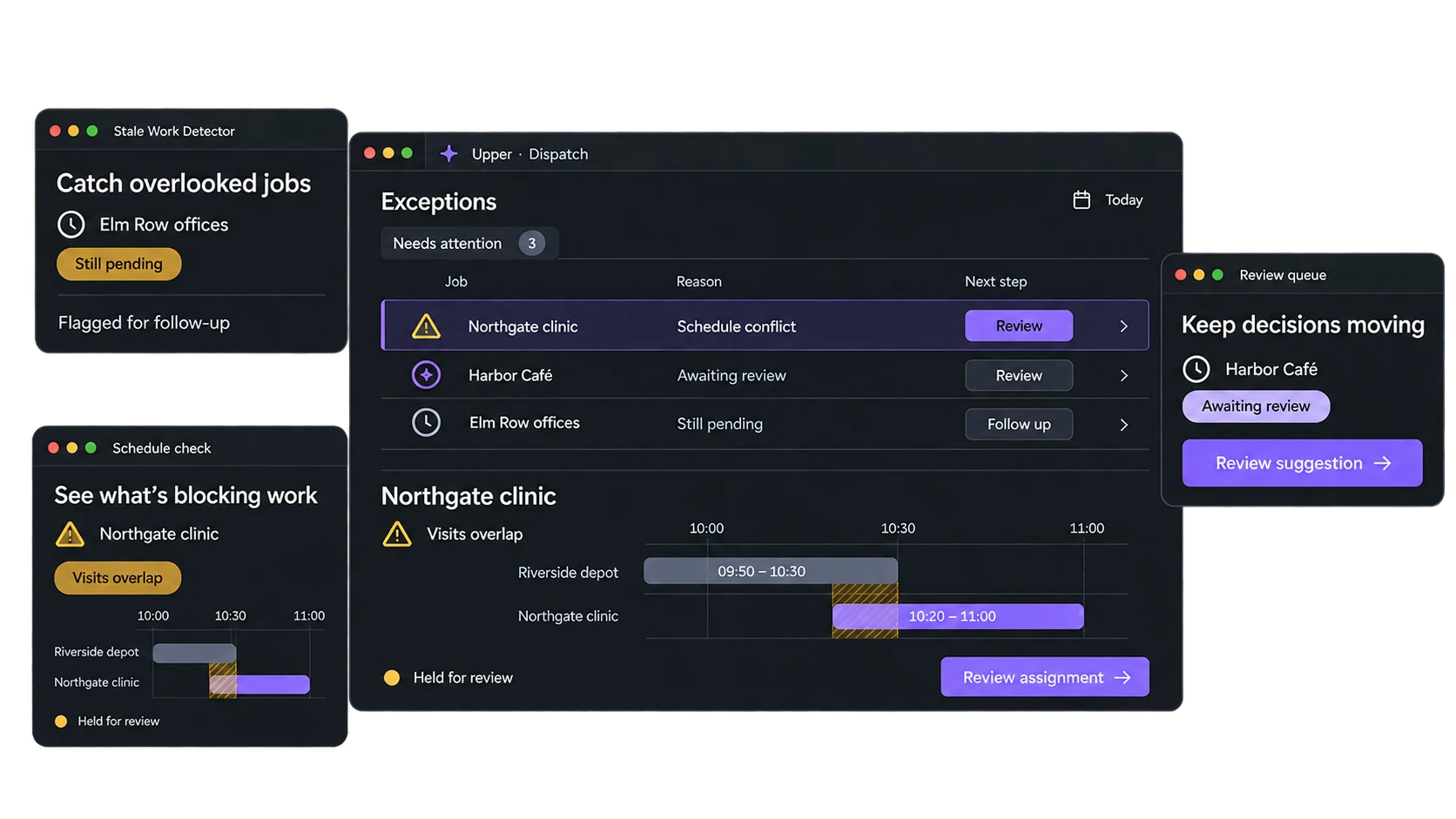
## Rejecting a bad match should not leave *the job forgotten*
You reject a suggestion because the driver cannot make it.
Before you find another option, the phone rings. The decision about that match is finished, but the job still needs someone to take it.
An approval can wait for the same reason. So can a job with no suitable driver. Unless someone returns to it, the next update may come from a customer asking why nobody arrived.
Upper’s **Stale Work Detector** checks for pending jobs, unreviewed suggestions and rejected visits that have not been dispatched again. Spend less of the day checking whether anything was missed, and more of it dealing with the jobs the checks uncover.
## See what is blocking *the next step*
Upper’s dispatch exception management shows the reason for a dispatch escalation and flags schedule conflicts. Your dispatcher can assess the issue before deciding what to change.
| What needs attention | The decision to make |
|---|---|
| A suggestion does not meet automatic approval settings | Review the reason against your dispatch rules before approving or seeking another match |
| Jobs overlap or the travel gap is impossible | Resolve the schedule conflict before dispatching |
| Work remains pending, unreviewed or rejected | Check what is holding it up and get the assignment process moving again |
Put effort into the right fix: resolving a conflict, reviewing a match or finding cover for work that cannot be assigned.
Escalation · Quarry Road siteNeeds reviewDM**Dan M.**Suggested · 09:10–10:40Cert · HazMatConfidence**64**Escalation reason
!**Below automatic approval setting**Confidence 64 · approve above 80Schedule conflict
!**Overlaps Northgate clinic**10:20–11:30 · travel gap not possibleApproveFind another match
## Let routine approvals run. *Review the exceptions.*
Use **Plan Review** to approve suggestions that meet your configured checks for [skills](https://www.upperinc.com/ai-dispatch-software/skill-based-driver-assignment/), confidence, travel and schedule conflicts. Uncertain matches are escalated for review.
Critical conflicts are never automatically accepted. Your dispatcher keeps the decisions that need operational judgment, while [routine approvals](https://www.upperinc.com/ai-dispatch-software/automatic-driver-assignment/) can move through.
Plan Review · after dispatch run11:00 runSkillsConfidence ≥ 80Travel ≤ 25 minNo conflicts✓**Riverside depot → Sam K.**Confidence 91 · travel 12 min est.Approved✓**Bayview market → Lena O.**Confidence 86 · travel 18 min est.Approved!**Harbor Café → Priya R.**Travel 34 min est. · over the 25 min limitEscalated!**Northgate clinic → Dan M.**Overlap · never auto-acceptedCritical
## Put rejected work back into *the assignment process*
With **auto-resync** enabled, Stale Work Detector can return rejected and unassigned visits to pending for another dispatch run. Requeueing gives the job another opportunity to be assigned; it does not remove the original blocker.
If no suitable assignment exists, use the explanation to arrange qualified cover, correct outdated records or agree another time with the customer.
[Book a Demo](https://calendly.com/upper/demo) Requeued · Harbor CaféAuto-resync Rejected10:05 Pending10:30 Next dispatch run13:00 Original blocker · still applies
!**Priya R. can’t make the 14:00 window**Rejected by the dispatcher at 10:05↺**In the queue for the 13:00 run**Harbor Café · 14:00–15:00 · Lift gatePending
## Give the next shift *a clear starting point*
End-of-day dispatch exception management helps the next dispatcher pick up unfinished work without reconstructing the whole day.
Upper’s **end-of-day audit** checks for jobs still in progress, visits never dispatched and suggestions waiting for review.
End-of-day audit · 18:003 found●**Northgate clinic**Dan M. · started 15:10Still in progress●**Quarry Road site**Rejected at 10:05 · not sent againNever dispatched●**Elm Row offices**Suggested for Lena O.Waiting for reviewSummary ready for the next shiftOpen summary Use the summary to check unfinished work and prepare the next shift’s follow-up.
Summary · next shift follow-upFor 07:00**1**in progress**1**not dispatched**1**to reviewFollow-up
**Confirm Northgate clinic status**Ask Dan M. what happened**Send Quarry Road site to the next run**Cert · HazMat still required**Review Elm Row offices suggestion**Lena O. · 13:00–13:40 A job marked in progress may need a status update rather than another visit. Your team verifies what happened before deciding the next action.
Status check · Northgate clinicNeeds verificationDM**Dan M.**Marked in progress at 15:10 · no update since?**Verify with the driver first**Was the visit finished but not closed?**Update status**Mark completed**Plan another visit**Send to the next run
## Set the checks *around your dispatch process*
Choose how often stale-work checks run and when end-of-day reviews take place.
Stale-work checksEvery 30 minEnd-of-day review18:00 If you enable automatic approvals, set the confidence and travel limits alongside the required matching checks.
Confidence limit80Travel limit25 minChecksSkillsSchedule conflicts Review results using your own pending, rejected and conflicted jobs before enabling routine approvals or automatic requeueing.
✓Pending jobs ✓Rejected jobs ✓Conflicted jobs Automatic requeueingOff Keep job statuses, availability and requirements current, because dispatch exception management works from the records it has.
## Dispatch exception management *FAQs*
**What is dispatch exception management?+**
Dispatch exception management identifies and addresses work that cannot follow the normal assignment process or has stopped progressing. Upper supports this with escalation reasons, conflict flags, stale-work checks and end-of-day audits.
**When are exceptions surfaced?+**
Plan Review evaluates suggestions after a dispatch run. Stale-work detection scans on a configured schedule, while end-of-day audits run at the times you set. Detection depends on those checks and the status information available to Upper.
**Where can dispatchers see the exceptions?+**
Escalated suggestions appear in Dispatch Watch with the reason and suggested action. Stale-work and end-of-day checks produce run summaries, with critical findings also surfaced in Dispatch Watch.
**Does putting a job back in the queue resolve the exception?+**
No. Returning it to pending makes it available for another dispatch run. Missing skills, lack of [capacity](https://www.upperinc.com/features/capacity-optimization/) or incorrect job details still need attention before a workable assignment can be made.
**How does dispatch exception management differ from reoptimization?+**
Exception management surfaces unresolved work and the reasons it needs attention. [Reoptimization](https://www.upperinc.com/ai-dispatch-software/dynamic-dispatch-reoptimization/) evaluates changes to assignments and timing after a disruption. A flagged issue may call for a new plan, a review decision or a corrected record.
**Can we use our existing job system?+**
[CSV import](https://www.upperinc.com/features/spreadsheet-import/) is available for jobs and team records. Confirm available connections and how ongoing status and availability updates would reach Upper. Dispatch exception management depends on current records, not just the initial import.
## Put your unresolved jobs *in front of Upper*
Bring a rejected match, an overlooked approval or a job still marked in progress at the end of the day.
See what Upper’s dispatch exception management flags, where it appears and what your dispatcher can do next. Test it against the follow-up your team handles today.
[Book a Demo](https://calendly.com/upper/demo)
---
_View the original post at: [https://www.upperinc.com/ai-dispatch-software/dispatch-exception-management/](https://www.upperinc.com/ai-dispatch-software/dispatch-exception-management/)_
_Served as markdown by [Third Audience](https://github.com/third-audience) v3.6.1.1_
_Generated: 2026-10-30 09:53:49 UTC_