---
title: "How to Add Snow Accounts Mid-Season Without Rebuilding Your Plow Route"
url: "https://www.upperinc.com/blog/add-snow-accounts-mid-season/"
date: "2026-11-21T01:10:55+00:00"
modified: "2026-11-21T01:10:59+00:00"
type: "Article"
resource: "https://www.upperinc.com/blog/add-snow-accounts-mid-season/"
timestamp: "2026-11-21T01:10:59+00:00"
author:
name: "Riddhi Patel"
categories:
- "Blogs"
- "Snow removal"
word_count: 4030
reading_time: "21 min read"
summary: "To add snow accounts mid-season without rebuilding your plow route, start with the route, not the new address. Rebuilds start when the route has no spare minutes, or when a lead gets a yes before a..."
description: "Add snow accounts mid-season without breaking plow routes: zone properties, keep a buffer, test each lead and update routes when customers cancel."
keywords: "add snow accounts mid-season,adding snow removal clients mid-season,update snow plow routes when customers cancel,mid-season snow account,snow plow route, Blogs, Snow removal"
language: "en"
schema_type: "Article"
related_posts:
- title: "Best Routing Software for Small Roll-Off Fleets in 2026: 9 Tools"
url: "https://www.upperinc.com/blog/best-routing-software-for-small-roll-off-fleets/"
- title: "Badger Maps Pricing Breakdown for 2026"
url: "https://www.upperinc.com/blog/badger-maps-pricing/"
- title: "Best Snow Plow Tracking App for Contractors (2026)"
url: "https://www.upperinc.com/blog/best-snow-plow-tracking-app-for-contractors/"
---
# How to Add Snow Accounts Mid-Season Without Rebuilding Your Plow Route
_Published: November 21, 2026_
_Author: Riddhi Patel_

To add snow accounts mid-season without rebuilding your plow route, start with the route, not the new address. Rebuilds start when the route has no spare minutes, or when a lead gets a yes before anyone times it. This guide shows snow contractors and dispatchers how to zone every property, keep a buffer on each truck, test each lead against that buffer, and reoptimize and log each cancellation. It also shows where [snow removal route planning software](https://www.upperinc.com/snow-removal-route-planning-software/) such as Upper Crew can place the new stop and send drivers the revised order.
Even a lot that adds only 15 minutes pushes back every property after it when it is inserted mid-route. In a storm, the sites at the end of the route absorb the delay, and the office hears about it when a client calls. The sections below show how to find room before you sign, how to price the lots that barely fit and how to handle the cancellations that open room again. Every step works in a spreadsheet too, and the software sections show what changes once routes live in a planner.
Key Takeaways - A new snow account breaks a route through time first, because every minute it adds makes every later stop that much later.
- Geographic zones keep the damage local, so a new property changes 1 cluster instead of the whole route.
- A new account goes at the end of its zone as a holding step, and that zone is resequenced in a weekly batch on a dry day.
- Before you say yes, add the lead's detour minutes and service minutes and compare the total with the buffer left on the route. Decline if any hard rule breaks.
- When a customer cancels, mark the stop, reoptimize the remaining stops, push the revised route to drivers, then log the cancellation against the contract terms.
- Upper treats preferred time windows as preferences, not promised arrival times, and it does not create invoices, so cancellation fees stay in your contract and billing system.
Add mid-season snow accounts without rebuilding routes: plan plow routes, push changes to drivers and keep photo proof of every property.
[Start your free trial](https://www.upperinc.com/snow-removal-route-planning-software/?utm_source=blog&utm_medium=cta&utm_campaign=add-snow-accounts-mid-season)
## Why Do Mid-Season Snow Accounts Break Plow Routes?
Mid-season snow accounts break plow routes because a route built in the fall is balanced to the minute, and a new property spends minutes the route never had. Most contractors set their routes during [preseason snow removal route planning](https://www.upperinc.com/blog/preseason-snow-removal-route-planning/), with every truck sized to its storm window. When a new lot lands on that full route in January, the damage arrives in this order:
- **Timing cascade.** Each added stop moves every later stop back. A 20-minute addition near the start of a route pushes every property after it about 20 minutes later, unless the route had idle time to absorb it. That delay can push them past trigger times or contract deadlines.
- **Material and equipment.** An extra lot draws down the salt already loaded. It may also need a blade, a sidewalk crew or a smaller machine the truck does not carry.
- **Deadhead and density.** A property off the existing path adds windshield time on the way out and again on the way back. That cost repeats every storm for the rest of the season.
- **Unfamiliar site.** No driver has seen the lot under snow. Islands, drains, speed bumps and push-pile spots are hidden, so clearing is slower and the damage risk is higher.
- **Static lists.** Routes kept in spreadsheets, paper binders or basic maps hold a fixed order set by hand. An insertion means reordering the list, and that is why the route gets rebuilt. Reordering stops by location, service time and priority is the core of [snow plow route optimization](https://www.upperinc.com/blog/how-to-optimize-snow-plow-routes/).
## How Do You Add Snow Accounts Mid-Season Without Rebuilding the Route?
Adding snow removal clients mid-season without a rebuild comes down to limiting how much of the route each new account can touch. Three structural fixes, zones, spare capacity and saved templates, contain the change to one part of the map. Three operating rules, a new-client rule, a floater truck and a daylight dry run, control when that change reaches a storm night. Put the structure in place first, because the rules only work when you can see how many minutes each zone has left. The sections below cover both sets, plus the tactics that keep a spreadsheet route working longer.
### Which Structural Fixes Keep the Change Local?
- **Geographic zones.** Group commercial and residential accounts into zones, also called territories or pods. Draw the borders along natural boundaries such as rivers, highways and rail lines. A new property then changes 1 local cluster and leaves the rest of the route alone.
- **Spare capacity.** Leave room on every truck. Plan each truck below what it can clear in a storm window, and track the buffer in minutes so it can be compared with a new account’s minutes.
- **Saved templates.** Keep 1 master route per zone, and per storm type if your triggers differ. Add the new stop to the saved route and reuse it instead of drawing the plan again.
How much room is enough? The [Snow and Ice Management Association (SIMA)](https://resources.sima.org/hubfs/SB21_Snow%20Startup/SB0921_SnowStartup.pdf?hsLang=en) says that, while every company is different, a good rule of thumb is to keep at least 10% of capacity in reserve. Its example is 1 piece of equipment in every 5 to 10 held back as backup for breakdowns, larger storms or a new client midseason. With zones, a reserve and templates in place, a mid-season account becomes a question about 1 zone, not about the whole season.
### Which Rules Keep a New Account From Wrecking a Storm Night?
**1. A new-client rule.** Write it down once and apply it to every lead. It has 4 parts:
- **Onboarding premium:** a mid-season surcharge, set as a percentage on top of your regular rate.
- **Cutoff:** a date or a weekday after which new accounts wait for the next batch.
- **Weekly batch:** all new accounts enter their zones together, on a dry day.
- **Storm freeze:** no route changes once a storm is forecast inside your activation window.
**2. Floater truck.** An overflow or B-list truck covers new accounts until the batch lands. Your anchored priority accounts keep their slots, and late additions sit in a secondary service tier behind them.
**3. Daylight dry run.** Send the assigned driver to walk or drive the property before the next storm. Stake edges, mark drains and islands, and agree on where the piles go.
The floater and the dry run both cost time on a dry day, and that cost is easy to resent when the phone is ringing with new leads. Compare it with the alternative. A missed trigger on a priority account during the first storm after a rushed add can cost you the client, and the new lot often earns less than the account it puts at risk. Treat both steps as part of the onboarding price, not as extra work.
### What if Your Plow Routes Live in a Spreadsheet?
A spreadsheet holds up while the plow list is stable. It fails when changes arrive faster than one person can reorder rows, or when the printed copy in the truck no longer matches the office file. That point tends to arrive when new accounts and cancellations land in the same week. These 3 tactics keep it working longer:
- **Gap numbering.** Number stops 10, 20, 30 so a new account slots in as 25 without renumbering the route.
- **Zone column and color-coded maps.** Give each row a zone and match the map colors to it, so a new address shows its cluster at a glance.
- **Status column.** Mark each row active, holding or canceled, so a driver’s printed copy and the office copy can be checked against each other.
Whatever tool holds your routes, the real test is what happens after the truck has left the yard. A spreadsheet can place a new account before dispatch. It cannot tell a driver who is already out that the order changed, so every mid-storm change still depends on a phone call or a text that someone has to remember to send.
## Should a New Snow Account Go at the End of the Route or Into a Resequence?
A new snow account should go at the end of its zone first, then into a resequence of that zone in the next batch. Tail-end placement is a holding step. No existing stop moves later, so every current client keeps its trigger time. This only works when the detour and service minutes fit inside the zone’s buffer, which is why the accept-or-decline test in the next section comes before any placement decision.
The tail costs you deadhead. If the new property sits nowhere near the zone’s last stop, the truck drives past it early in the loop and comes back later. Resequencing removes that waste, but doing it the night before a storm hands drivers an order they have never run, at the worst possible time. So split the decision by timing:
- **Storm forecast inside your freeze window:** tail of the zone, or the floater truck.
- **Dry stretch ahead:** resequence the affected zone only, with every new account from the week added together.
- **Account landing in the middle of a zone:** resequence, because the tail detour would cost more than the order change.
## Should You Accept, Price Up or Decline a Mid-Season Snow Lead?
Accept a mid-season lead when its added minutes fit inside the route’s buffer and no hard rule breaks. Price it up when it fits but uses most of the buffer, or would push other accounts past their preferred time windows. Decline it when it breaks a hard rule, such as a priority account’s contract deadline. Measure 4 things before you quote:
- **Detour minutes:** the extra drive time from the new lot’s nearest neighbor on the route and back to the path, counted per visit.
- **Service minutes:** time on site for 1 push at your usual trigger depth.
- **Buffer left:** the minutes between the route’s projected finish and your latest committed trigger time, before and after the addition.
- **Hard rules vs. preferred windows:** which commitments cannot move (a contract deadline, a full truck) and which can bend (a preferred window).
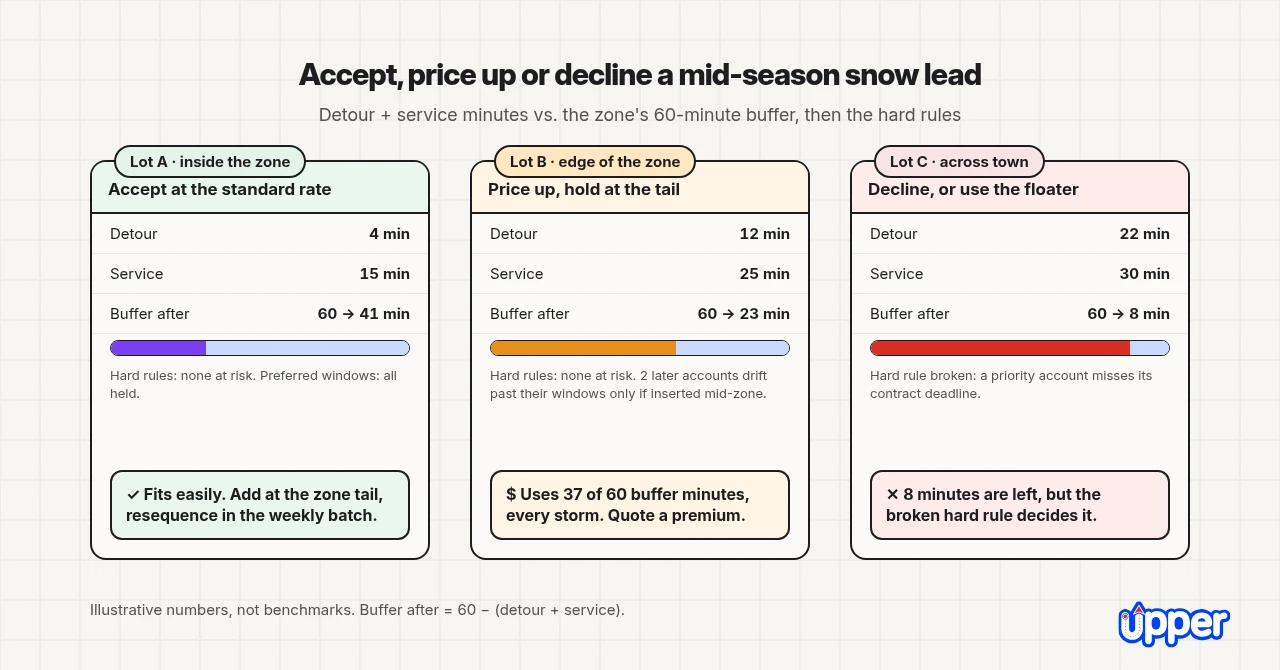
A fixed detour cap is a blunt test, so the table below weighs the detour against the buffer instead. All numbers here are illustrations, not benchmarks, and the zone in the example starts with a 60-minute buffer. Buffer after = 60 − (detour + service). Swap in your own minutes from a past storm log to run the same test on a real lead.
| **Illustrative lead** | **Detour min** | **Service min** | **Buffer before → after (min)** | **Hard rules** | **Preferred windows** | **Decision** |
|---|---|---|---|---|---|---|
| **Lot A, inside the zone** | 4 | 15 | 60 → 41 | None at risk | All held | Accept at the standard rate |
| **Lot B, edge of the zone** | 12 | 25 | 60 → 23 | None at risk | 2 later accounts drift past their windows if inserted mid-zone; all held at the tail | Price up; hold at the tail of the zone |
| **Lot C, across town** | 22 | 30 | 60 → 8 | A priority account misses its contract deadline | Not applicable | Decline, or quote it onto the floater truck |
Lot B fits, but it spends 37 of the zone’s 60 buffer minutes, and its 12-minute detour repeats every storm for the rest of the season. That is why it costs more than Lot A. At the tail it moves no existing stop, so the 2 accounts that would drift mid-zone keep their windows. The premium pays for the deadhead you accept until the next weekly batch puts Lot B in its proper place in the sequence.
Lot C still ends with 8 minutes of buffer, yet it fails. Its 22-minute detour only holds when the lot is inserted mid-route, ahead of a priority account whose deadline falls early in the route. The buffer measures the end of the route, so a single account can miss its deadline while the route-end buffer stays above zero. In this example, moving Lot C to the tail would lengthen the detour and spend the rest of the buffer, so the floater truck is the only clean yes.
## What Happens in Upper Crew When the Route Changes After Dispatch?
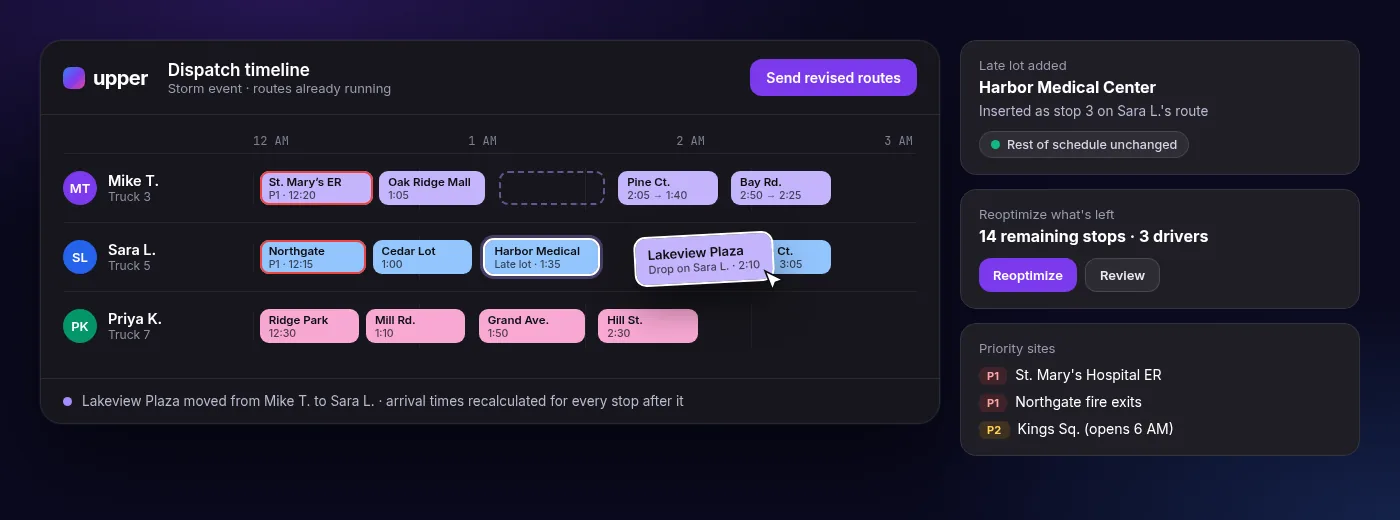
When a route changes after dispatch, Upper Crew reoptimizes the remaining stops and, on the Professional plan and above, sends the revised route to the Upper driver app. The dispatcher still makes the call on what moves and when it goes out. That split matters for mid-season accounts, because the software can find the best slot for a new lot, but only you know which contract deadlines are firm, which clients will accept a later arrival and whether tonight is inside your storm freeze.
### What Does Upper Crew Decide, and What Do You Still Decide?
Upper Crew handles route planning and reoptimization, while you keep control of priorities, route approval and dispatch decisions. You can upload your current plow list from CSV or Excel, with addresses, notes and service times. It plans plow and salt routes around:
- stop priorities (all plans)
- service duration (all plans)
- preferred time windows (Professional and above)
- zones and vehicle capacity (Optimize and above)
Say 3 retail lots sign after the trucks have left. You enter them, reoptimize the stops still ahead and push the update. Drivers receive the new stop order and stop notes in the Upper driver app, with navigation through Google Maps, Apple Maps or Waze. From the Professional plan, you can track trucks live, and each property’s photos are stamped with GPS location and time, which helps with [snow removal photo documentation](https://www.upperinc.com/snow-removal-photo-documentation-app/) when a client disputes a visit.
You decide whether to approve and dispatch each plan. Upper treats preferred time windows as preferences, not hard rules, so before adding a mid-season lot, mark accounts with contract deadlines as priority stops, because priority stops are planned ahead of other stops. Keep 2 limits in mind. Upper does not create invoices, so what a canceled account owes is settled in your contract and billing system. And a stable list that never changes mid-storm may only need a spreadsheet.
The video below shows how a dispatcher handles last-minute changes without reshuffling the whole fleet, the same move a mid-season add or a cancellation needs.
See it in action
See a mid-season add on your own plow route.
Bring your plow list and one new lot. See Upper Crew place it, reoptimize the stops still ahead and send the revised route to your drivers.
[Book a demo](https://calendly.com/upper/demo)
## What Results Do Snow Contractors Report With Upper?
[ClearWay Snow Solutions](https://www.upperinc.com/success-stories/clearway-snow-solutions/), an Ontario landscaping and snow removal company with 8 drivers, reports that its on-time completion rate rose from 76% to 94% after it began using Upper. It also reports handling 140 to 160 stops per shift, up from 80 to 100, and cutting manual dispatch from 2 to 3 hours per shift to 15 to 20 minutes. These figures come from ClearWay’s customer story on Upper’s site, not from an independent test, and they are not a promise for your route.
[Northern Clearways](https://www.upperinc.com/success-stories/northern-clearways-landscaping-snow-removal-business/), a landscaping and snow removal company in Duluth, Minnesota, with 550+ regular clients, reports cutting route planning from over 400 hours a season to under 50. That is also a customer-reported outcome, not a guarantee. How much time you save depends on how many properties you run, how often new accounts and cancellations arrive, and how you plan routes today.
## How Much Does Upper Crew Cost for a Snow Contractor?
These prices come from [Upper pricing](https://www.upperinc.com/pricing/) as of November 20, 2026. Every plan charges per user, and the yearly price is 20% lower than paying monthly. Your final cost depends on how many people use the account and on add-ons: customer text notifications start at $0.01 per text, and live tracking links for customers cost $20 per driver.
| **Plan** | **Billed yearly (per user per month)** | **Billed monthly** | **Stops per route** |
|---|---|---|---|
| **Starter** | $40 | $50 | 250 |
| **Professional** | $48 | $60 | 500 |
| **Optimize** | $71 | $89 | 1,500 |
Live truck tracking, route updates after dispatch and proof stamped with location and time begin on Professional. Zone-based routing and vehicle capacity planning begin on Optimize. Every plan includes unlimited routes, and you can cancel anytime with no cancellation fee. To run a mid-season add on your own list first, use the free trial of 7 days: it gives up to 5 users the Professional features except customer text notifications, and it needs no credit card.
## How Do You Update Snow Plow Routes When Customers Cancel?
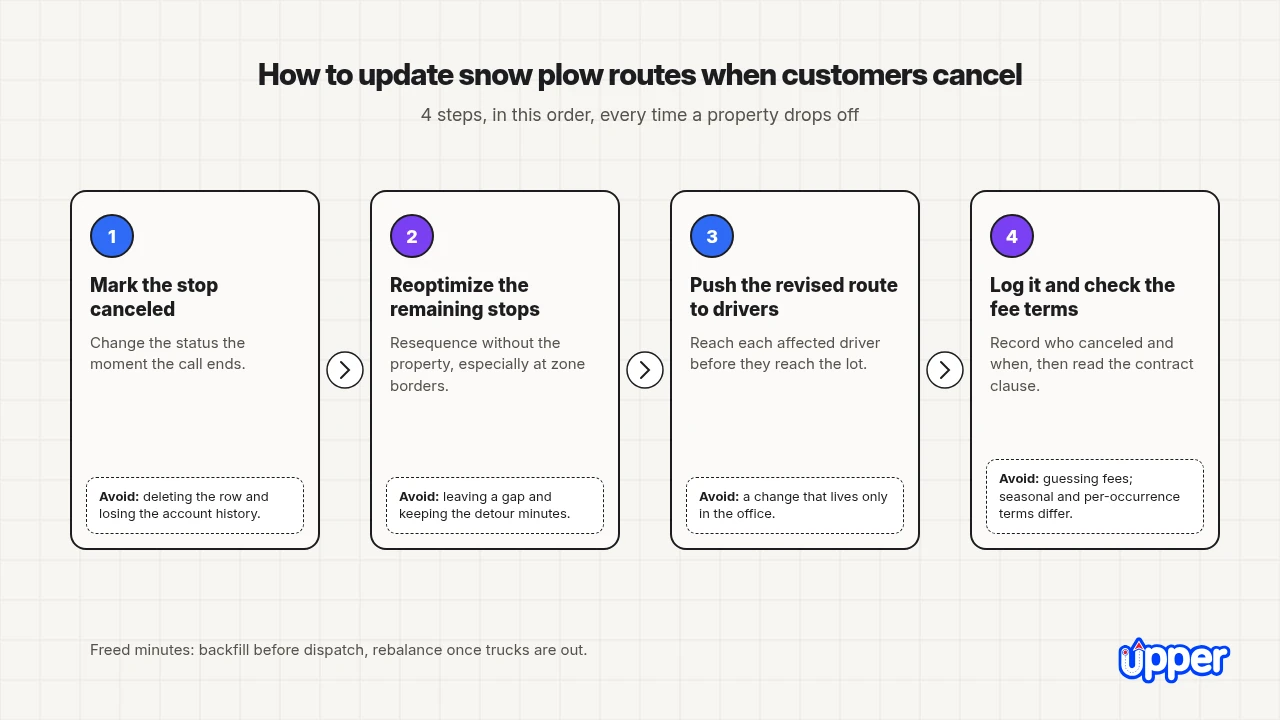
To update snow plow routes when customers cancel, follow 4 steps:
1. Mark the stop canceled at once.
2. Reoptimize the remaining stops.
3. Push the revised route to the driver app.
4. Log the cancellation and check your contract terms.
The goal is to save time and fuel, so no truck drives to a property that no longer pays. A cancellation is also the cheapest room you will get all season for the next mid-season account, so handle it with the same care as an add. Each step below covers what to do and the mistake that makes it go wrong.
### Step 1: Mark the Stop Canceled
Update the dispatch system, CRM or spreadsheet the moment the call ends. Change the stop’s status rather than deleting the row, so the account history survives for the log in step 4. A canceled status also keeps the property visible if the client calls back to reinstate service. If the stop sits on a printed route sheet, mark the change on the office copy at once.
### Step 2: Reoptimize the Remaining Stops
Recalculate the sequence without the canceled property. Removing a stop can change the best order for the stops around it, especially if it sat at a zone border. Do not just leave a gap where the property used to be. A gap saves the service minutes, but a fresh sequence can also save the detour minutes, and those minutes are the buffer your next mid-season account will need.
### Step 3: Push the Revised Route to Drivers
Send the new order to each affected driver’s phone or tablet before they reach the canceled property. A route that changed in the office but not in the cab has not changed. See how [snow removal dispatch software](https://www.upperinc.com/snow-removal-dispatch-software/) handles this step, from moving stops between trucks to updating the driver app. If you still dispatch by text, confirm that each driver has read the change before the next stop.
### Step 4: Log It and Check the Fee Terms
Record who canceled, when, and how that time relates to dispatch. Then check the contract. A service fee or breach-of-contract charge may apply under a seasonal contract or a per-occurrence agreement. Seasonal and per-occurrence terms usually treat cancellations differently, so read the clause that applies. Take legal questions to your attorney, and keep the log even when no fee applies, since it shows which accounts cancel often.
### What Changes Before Dispatch, After Dispatch and Mid-Storm?
What you do with the freed time depends on when the cancellation lands. Before dispatch, the freed minutes are a slot you can sell to an account waiting on your holding list. Once trucks are out, the answer shifts from backfilling the gap to rebalancing across drivers, and mid-storm the minutes belong to the priority accounts running late.
| **When the cancellation lands** | **What to do with the freed minutes** | **Backfill or rebalance** |
|---|---|---|
| **Before dispatch** | Reoptimize the zone, then offer the slot to an account waiting on your holding list | Backfill from the same zone |
| **After the truck has left** | Push the revised route so later stops move earlier and the driver skips the gap | Rebalance only if another driver in the zone is behind |
| **Mid-storm** | Push immediately and spend the minutes on late priority accounts first | Rebalance toward the truck furthest behind its trigger times |
### Is a Spreadsheet or a Routing App Better for Handling Cancellations?
A spreadsheet handles an occasional cancellation, but a routing app handles cancellations that arrive while trucks are moving. The difference shows up in the 4 steps above. In a spreadsheet, each step is a separate manual job that someone has to remember, and the printed driver copy is out of date the moment a row changes. In a routing app, the status change, the new sequence and the driver update happen in one place.
| **Step** | **Spreadsheet or paper binder** | **Routing app** |
|---|---|---|
| **Mark canceled** | Strike the row; printed driver copies still show it | Status changes once, everywhere |
| **Reoptimize** | Dispatcher reorders by hand or leaves the gap | Software recalculates the remaining stops |
| **Reach the driver** | Call or text each driver | Revised route pushed to the driver app |
| **Log** | Separate note or column | Stays with the stop record |
If cancellations reach you mostly between storms, the spreadsheet status column is enough, because nobody is waiting on the change. If they reach you mid-storm, the “Reach the driver” row decides it. A driver who does not hear about a cancellation still drives to the lot, and that wasted trip costs the same minutes a new account would have used.
## How Do You Choose the Right Fix for Your Plow Routes?
The right fix depends on 3 things: your account mix, how often your day changes, and how you hold routes today. Fleet size can matter less than you might expect, because a 3-truck company that signs new lots every week feels more route pressure than a 10-truck company with a fixed list. Check each:
- **Account mix.** If most accounts are commercial lots with contract deadlines, hard rules dominate. Start with zones, anchored priority accounts and the accept/decline test. If most are residential driveways, density matters more, so focus on zones and gap numbering.
- **Stops and how often the day changes.** Count stops per truck and changes per storm. A stable list of mostly fixed accounts may never need more than saved templates. When new accounts arrive weekly and cancellations arrive mid-storm, changes after dispatch become the problem.
- **Routing method.** Spreadsheets and binders work for stable routes; use gap numbering and a status column. A route planner fixes the morning plan. If the revised route also has to reach drivers mid-storm with proof saved per property, test a tool on that specific moment. Our comparison of [snow removal business software](https://www.upperinc.com/blog/best-snow-removal-business-software/) shows which tools handle changes after dispatch.
Choose the approach that matches your worst storm night, not your average one. The numbers in this guide are illustrations, so the only test that counts is your own plow list with your own hardest account and the mid-season add that went wrong last time. Run that test before the next lead calls, not during the storm it arrives in.
See it in action
#### Test a mid-season add on your own plow route
Bring your current plow list, your hardest priority account and 1 mid-season add that went wrong. We will load the list, set the priority stop, add the problem lot and show the route before and after.
[Book a Demo →](javascript:void(0)) 
## Frequently Asked Questions
Place each new account at the tail of its zone as a holding step, then resequence that zone in a weekly batch on a dry day. Before you say yes, add the lead’s detour and service minutes and compare the total with the buffer left on the route. Decline or move the lead to a floater truck if it would push a priority account past its contract deadline.
Deadhead (windshield) time is the drive time spent getting to and from properties instead of clearing them. For a new account, count it per visit and multiply by the storms left in the season. Count service time too, because detour and service together spend the buffer. In this guide’s illustration, a lot with a 12-minute detour and 25 minutes of service uses 37 minutes of a 60-minute buffer, so it should be priced up and held at the zone’s tail.
Yes, but only as a holding step. If the storm is forecast inside your freeze window, place the account at the tail of its zone or on the floater truck, and only if it fits the buffer without breaking a priority deadline. Do not resequence the route that night. The full resequence waits for the next weekly batch on a dry day.
Keep enough buffer to absorb at least 1 typical new lot in its zone without pushing any account past its trigger time or contract deadline. Track it in minutes: the gap between the route’s projected finish and your latest committed trigger time. SIMA suggests keeping at least 10% of capacity in reserve as a rule of thumb. If a typical new lot costs about 35 minutes, a truck with less buffer sends the next account to the floater truck.
Usually, yes. A mid-season snow account costs more to serve than a fall signup. It needs a daylight dry run, it may need a floater truck until the weekly batch, and its detour minutes repeat every storm for the rest of the season. Set an onboarding premium as a percentage on top of your regular rate, and raise the quote further when the lot uses most of the zone’s buffer.
Mark the stop canceled instead of deleting it, reoptimize the remaining stops, push the revised route to each affected driver and log the cancellation against the contract terms. Before dispatch, offer the freed slot to an account on your holding list. Mid-storm, spend the freed minutes on priority accounts that are running late.
---
_View the original post at: [https://www.upperinc.com/blog/add-snow-accounts-mid-season/](https://www.upperinc.com/blog/add-snow-accounts-mid-season/)_
_Served as markdown by [Third Audience](https://github.com/third-audience) v3.6.1.1_
_Generated: 2026-11-21 01:11:01 UTC_