---
title: "Live GPS Driver Tracking Software"
url: "https://www.upperinc.com/features/driver-fleet-tracking/live-gps-driver-tracking-software/"
date: "2026-05-15T10:33:24+00:00"
modified: "2026-10-29T12:20:46+00:00"
type: "WebPage"
resource: "https://www.upperinc.com/features/driver-fleet-tracking/live-gps-driver-tracking-software/"
timestamp: "2026-10-29T12:20:46+00:00"
author:
name: "Riddhi Patel"
word_count: 2373
reading_time: "12 min read"
summary: "See Every Driver's Exact Location, ETA, and Status on One Live Map
Delayed deliveries, missed ETAs, and frustrated customers all trace back to the same root cause: you're dispatching with out..."
description: "Upper's live GPS driver tracking software shows every driver's exact location, status, and ETA in real time. See your whole fleet on one map."
keywords: "Live GPS Driver Tracking Software"
language: "en"
schema_type: "WebPage"
---
# Live GPS Driver Tracking Software
_Published: May 15, 2026_
_Author: Riddhi Patel_
# See Every Driver’s Exact Location, ETA, and Status on One Live Map
Delayed deliveries, missed ETAs, and frustrated customers all trace back to the same root cause: you’re dispatching with outdated information. Upper Route Planner puts every driver on a live GPS map, updated continuously, so you see exact locations, real-time ETAs, and current status across your entire fleet, and act on it before problems escalate.
[Book a Demo  ](https://calendly.com/upper/demo) Start Free Trial 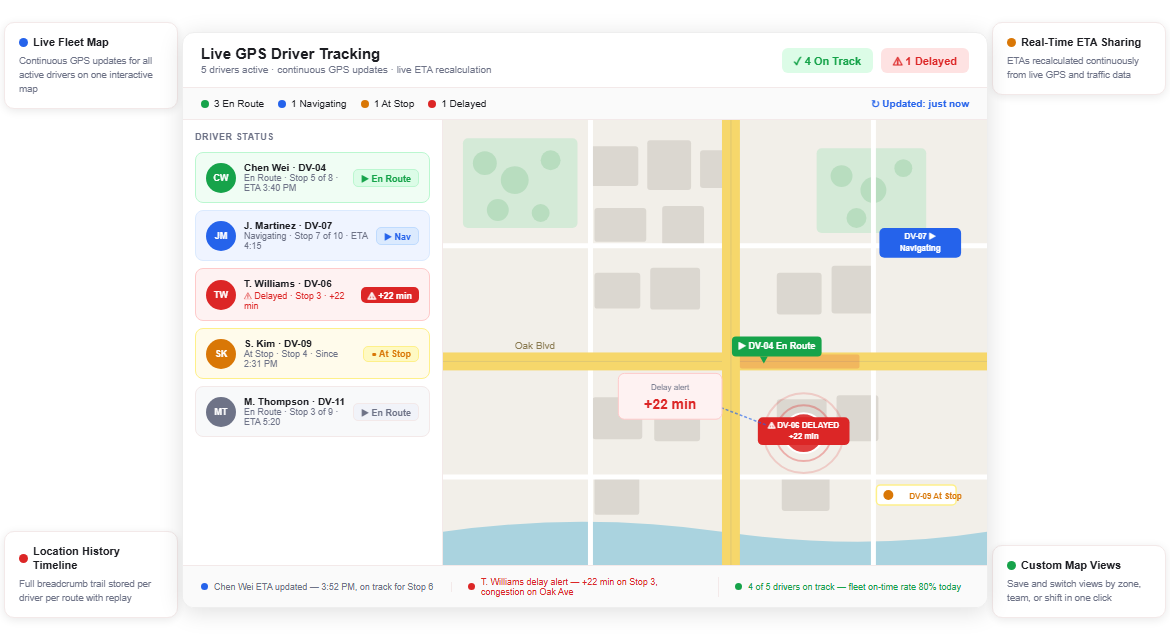 
### What GPS Tracking Promises
-  See every driver’s location the moment you need it-  Real-time ETAs surface automatically for every stop-  Driver status updates flow without manual check-ins-  Dispatch decisions are grounded in live data
### What Actually Happens
-  The map refreshes every 5-10 minutes and the data is already stale-  ETAs are calculated at route start and never update for delays-  Dispatchers call drivers for status because the software doesn’t show it-  You’re making decisions about a fleet that no longer looks like what’s on your screen
### Live Fleet Map
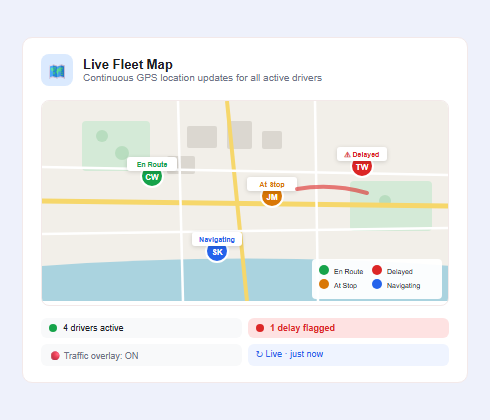
Most GPS tools refresh every few minutes. Upper’s live fleet map updates continuously, showing every driver’s precise location as they move through their route. You see who’s on track, who’s running behind, and who needs attention, without waiting for a refresh cycle or calling the driver.
- Continuous GPS location updates for all active drivers- Color-coded driver pins by status (en route, at stop, delayed)- Clickable driver pins showing current stop, ETA, and progress- Live traffic overlay to spot congestion affecting routes- Auto-zoom to show the full fleet or drill into a single driver- Map filtering by driver, vehicle, or zone- Browser-based dashboard and mobile app access for dispatchers
### Driver Status Updates
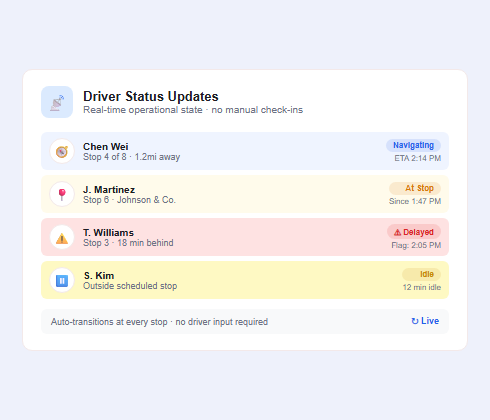
Knowing where a driver is only tells half the story. Upper surfaces live status for every driver in the fleet (whether they’re navigating, completing a stop, running ahead, or delayed) without requiring drivers to manually check in. You see operational state alongside location, so you can make informed dispatch decisions instantly.
- Real-time status: navigating, at stop, idle, or off-route- Automatic status transitions as drivers progress through stops- Delay flags when a driver falls behind ETA by a set threshold- Idle time alerts when a vehicle stops outside a scheduled stop- Stop completion timestamps logged automatically- Status visible in both the fleet map and the driver list view- No manual driver check-ins required
### Real-Time ETA Sharing
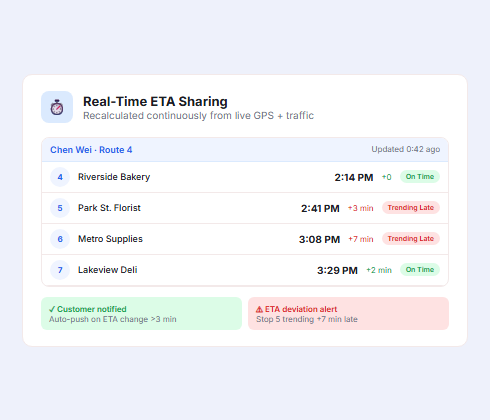
Static ETAs calculated at route start are wrong within an hour. Upper recalculates estimated arrival times continuously, factoring in live traffic, stop completion pace, and driver location. Updated ETAs flow to your dispatch dashboard and can be shared with customers automatically via Upper’s customer notification software, so recipients always know when to expect their delivery.
- ETAs recalculated continuously using live GPS and traffic data- Automatic ETA updates pushed to customer notifications- Per-stop ETA visible in the dispatch dashboard and driver app- ETA deviation alerts when a stop is trending late- Integrates with customer-facing tracking links for self-service visibility- ETA accuracy improves throughout the day as real pace data accumulates
### Multi-Vehicle Overview
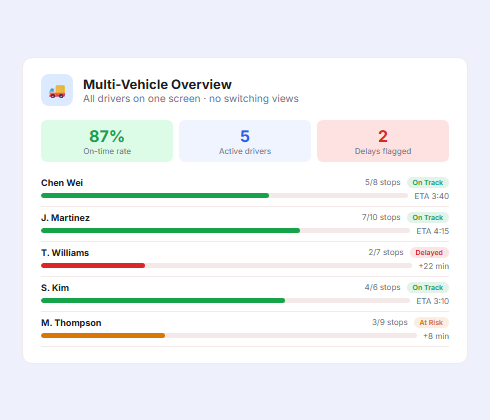
Managing a single driver is easy. Managing 20 is a different operation entirely. Upper’s fleet overview gives dispatchers a single screen showing every active driver, their current location, stop progress, and remaining workload, without switching between individual driver views. When something needs attention, it surfaces automatically so you’re not manually scanning the map.
- Fleet-wide view with all drivers visible simultaneously- Per-driver progress bars showing stops completed vs. remaining- Summary panel with fleet-level on-time rate and delay count- Sort and filter drivers by status, zone, or stop count- Direct route reassignment from the fleet overview screen- Works across all vehicle types in mixed fleets- Scales from 2 drivers to 50+ without interface changes
### Location History Timeline
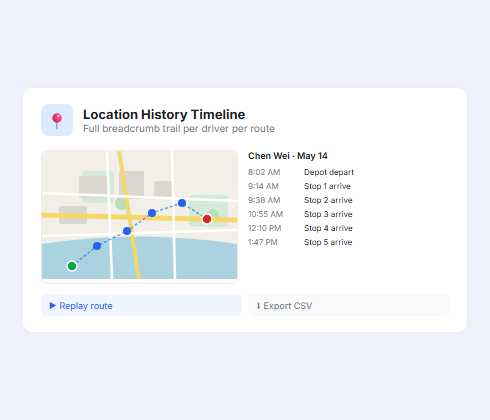
Sometimes the question isn’t where a driver is. It’s where they were. Upper stores a full location history for every driver and route, giving you a timestamped breadcrumb trail to review after deliveries complete. Dispute a missed delivery claim, verify a driver followed the planned route, or analyze where a delay originated.
- Full location history stored per driver per route- Timestamped breadcrumb trail with stop-level resolution- Replay route playback to review driver path chronologically- Deviation tracking when drivers go significantly off-route- Exportable location data for compliance or reporting needs- History accessible from the dispatch dashboard after route completion- Retention period configurable by account settings

### Custom Map Views
Not every dispatcher needs to see the same thing. Upper lets you configure the fleet map to show the data that matters most for your operation: filter by driver group, vehicle type, or geographic zone, and save those views for one-click access. Teams managing multiple regions or shift schedules can segment their view without creating separate accounts.
- Save custom map views by team, zone, or shift- Filter active drivers by vehicle type or assignment group- Toggle traffic, delivery zones, and route lines on or off- Set default map view for each dispatcher profile- Color-code drivers by zone or team for visual separation- Full-screen mode for dispatch office wall monitors- View shared across desktop and mobile without reconfiguration
## See Every Driver’s Location the Moment It Matters
Upper’s live GPS driver tracking software delivers continuous fleet visibility — not a 10-minute-old snapshot.
See Upper in Action  “We used to spend 2 hours every morning planning routes in spreadsheets. Now it takes 10 minutes. Upper paid for itself in the first week.”
[Read More →](https://www.upperinc.com/success-stories/winwaste-waste-management/)
Tracy S
Owner, WinWaste Solutions
 “What sold me was how easy it is to make changes. My schedules change a lot and I drag & drop stops and we’re back on track in 30 seconds. With our old software, that would’ve been an hour of replanning.”
[Read More →](https://www.upperinc.com/success-stories/a2z-logistics-third-party-logistics/)
Harry D
Dispatcher, a2zlogistics
 “Our drivers actually follow the routes now. The app is simple, the navigation works, and they’re not calling me every 10 minutes asking where to go next.”
[Read More →](https://www.upperinc.com/success-stories/poolpros-pool-maintenance-and-service/)
Kim M
Dispatch Lead, PoolPros
## Live GPS Driver Tracking Features for Smarter Fleet Operations
Track drivers in real time with live GPS, route visibility, ETAs, and status updates to improve fleet coordination, accountability, and delivery performance.
- Route Progress Monitoring
- Geofence Triggers
- Off-Route Detection
- Driver Mobile App
- Fleet Performance Reporting
- Dispatch-to-Driver Messaging
### Route Progress Monitoring
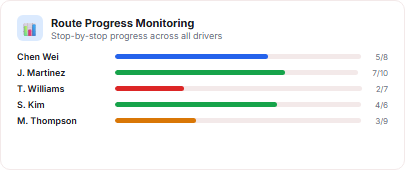
Track each driver’s stop-by-stop progress against the planned route. Upper shows stops completed, stops remaining, and time variance per driver, so you know at a glance which routes are on track and which need attention, without interrupting drivers.
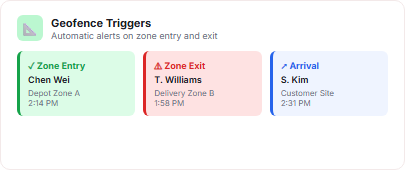
### Geofence Triggers
Set geographic boundaries around delivery zones, depots, or customer locations. Upper fires automatic alerts when a driver enters or exits a defined zone, enabling hands-free status updates, automated customer notifications, and depot arrival detection.

### Off-Route Detection
When a driver deviates significantly from the assigned route, Upper flags it in the dispatch dashboard. You see the deviation on the map in real time, with the option to contact the driver or reassign stops to another vehicle without losing progress data.
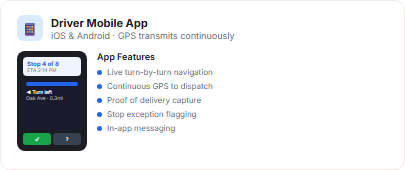
### Driver Mobile App
Drivers access their live route, navigation, and stop details in Upper’s iOS and Android app. GPS location transmits continuously from the driver’s device to the dispatch dashboard, with no separate hardware required. The app also captures proof of delivery and flags stop exceptions.
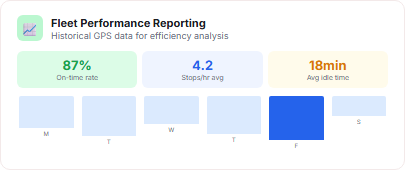
### Fleet Performance Reporting
After routes complete, Upper generates performance reports showing time on road, stops per hour, on-time rates, and idle time per driver. Use historical GPS data to identify recurring delays, compare driver efficiency, and build the case for operational changes.
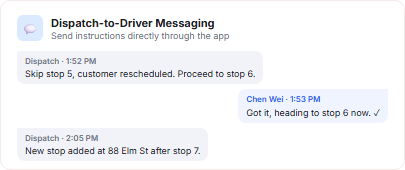
### Dispatch-to-Driver Messaging
Dispatchers can send notes, updated instructions, or stop changes directly to drivers through Upper’s in-app messaging. Drivers confirm receipt without leaving the app, and message history ties to the route record for accountability.
## Why Leading Delivery Businesses Choose Upper for Live Fleet Tracking

### Catch Delays Before Customers Do
Upper’s ETA deviation alerts surface late-running drivers automatically in real time. You know about a delay when it starts trending — not after the customer calls.

### Eliminate Costly Blind Dispatching
Stop making decisions based on where you think drivers are. Upper’s live map gives every dispatcher a shared, accurate picture of the fleet in real time, every time.

### Reduce Inbound Status Calls
When customers can track their delivery in real time, they stop calling your dispatch line. Upper’s live ETAs and customer-facing tracking links cut inbound “where’s my delivery?” calls significantly.

### Full Accountability Across the Fleet
Every location, status transition, and stop completion is logged with a timestamp. Location history and route playback give you the data to verify routes were followed and deliveries were attempted.

### No Additional Hardware Required
Upper’s live GPS driver tracking software runs from the driver’s existing iOS or Android device. No tracking hardware to install, configure, or maintain. Drivers already have everything they need.

### Scales from 2 Drivers to 50+
Whether you’re tracking a two-truck operation or a regional fleet, Upper’s fleet map and driver overview scale without adding complexity. Every new driver you add is visible the moment their route goes active.
## Sync Your Live GPS Tracking Data with the Tools You Already Use
[
### Fleet Management Integration
Upper’s live GPS driver tracking feeds directly into Upper’s fleet management software, connecting real-time driver location with route assignments, vehicle records, and performance data. Your dispatch and fleet ops teams work from the same live data layer without switching tools. ](https://www.upperinc.com/integrations/grazecart/) [
### Customer Notification Sync
Live GPS location and continuously updated ETAs flow directly into Upper’s driver fleet tracking and notification system. When a driver’s ETA changes by more than a set threshold, Upper can automatically push an updated notification to the customer, with no dispatcher action required. ](https://www.upperinc.com/integrations/shopify/) [
### API and Webhooks
Upper’s API makes live driver location and route status data available to external systems. Integrate GPS tracking feeds with your warehouse management system, customer portal, or operations dashboard using structured webhooks that fire on location updates, stop completions, and ETA changes. ](https://www.upperinc.com/integrations/woocommerce/)
## Know Where Every Driver Is. React Before Problems Escalate.
Upper’s live GPS driver tracking software gives your dispatch team continuous fleet visibility: live locations, real-time ETAs, and automatic delay alerts all in one place.
Start Your Free Trial - How does Upper’s driver idle time tracking software detect and log idle events?**Upper uses GPS movement data combined with engine status signals to identify when a vehicle has stopped moving while the engine remains on. When a vehicle’s speed drops to zero and stays there past your configured threshold, Upper logs a timestamped idle event tied to the driver, vehicle, location, and route. Every event is stored in the idle history log and feeds into driver scorecards and fleet analytics automatically.
- Can I set different idle thresholds for different vehicle types or route types?**Yes. Upper’s idle threshold settings are configurable by vehicle category, route type, or fleet-wide policy. If your refrigerated vehicles need to run longer during loading or unloading, you can set a higher threshold for that vehicle class while keeping a tighter limit for standard delivery vans. Thresholds can also be overridden temporarily for approved operational scenarios without losing event history.
- Does Upper send idle time alerts to managers in real time?**Upper pushes idle threshold breach alerts to the manager dashboard the moment a driver crosses the configured limit. You can also enable optional in-app notifications to the driver so they’re aware in the moment. Alert history is stored in the system for review, and repeat idle events within a single shift can be escalated to trigger additional notifications if you configure that behavior.
- How does Upper calculate the fuel cost impact of idle time?**Upper’s idle cost calculator uses your vehicle’s fuel consumption rate, fuel type, and your current local fuel price to convert idle minutes into dollar estimates. Each idle event gets a cost attribution, which rolls up into driver-level and fleet-level cost summaries. You can also run projections that show how much you’d save monthly and annually if your fleet hit a lower idle threshold target.
- How does fleet idle time monitoring work alongside Upper’s broader fleet tracking features?**Idle time tracking is built directly into Upper’s driver fleet tracking layer, not a separate module. Every idle event is pinned to the vehicle’s live position on the map and logs alongside the driver’s route progress, stop completions, and delivery activity. This means managers see idle events in context: parked at a stop, idling at a depot, or sitting between route segments.
- Is Upper’s idle time tracking suitable for small fleets, or is it built for larger operations?**Upper’s engine idle tracking works for any fleet size. A five-vehicle operation sees the same real-time alerts, driver scorecards, and idle cost data as a fifty-vehicle fleet. Smaller fleets often benefit most because the per-vehicle fuel waste is easier to trace directly to specific drivers, making coaching conversations faster and results easier to measure.
- Can drivers see their own idle time data in the Upper mobile app?**Drivers access their own performance data through Upper’s driver app, including idle time totals, frequency, and how their numbers compare to fleet averages. Giving drivers visibility into their own metrics is one of the most effective ways to reduce idling. Most drivers improve when they can see the numbers themselves rather than waiting for a manager to bring it up.
- What makes Upper different from standalone idle time monitoring tools?**Standalone idle monitors give you idle data in isolation. Upper connects idle time to everything else happening in your operation: route assignments, stop completion, driver performance scores, and fuel cost reporting — all within the same platform you use for route planning, dispatch, and analytics. That means idle reduction isn’t a separate initiative; it’s part of how you manage your fleet every day with Upper’s driver idle time tracking software.
---
_View the original post at: [https://www.upperinc.com/features/driver-fleet-tracking/live-gps-driver-tracking-software/](https://www.upperinc.com/features/driver-fleet-tracking/live-gps-driver-tracking-software/)_
_Served as markdown by [Third Audience](https://github.com/third-audience) v3.6.1.1_
_Generated: 2026-10-29 12:20:48 UTC_