---
title: "Route Optimization Software That Fits the Way You Already Work"
url: "https://www.upperinc.com/route-optimization-software/"
date: "2026-08-12T13:49:36+00:00"
modified: "2026-08-12T14:03:47+00:00"
type: "WebPage"
resource: "https://www.upperinc.com/route-optimization-software/"
timestamp: "2026-08-12T14:03:47+00:00"
author:
name: "Riddhi Patel"
word_count: 2373
reading_time: "12 min read"
summary: "Route Optimization Software That Fits the Way You Already Work
Upper turns your stop list into optimized, driver-ready routes — then runs the whole day: dispatch, live tracking, customer..."
description: "Plan, dispatch, track, and prove multi-stop routes with Upper — route optimization software that works with the spreadsheets, CRM, and GPS tools you alread..."
language: "en"
schema_type: "WebPage"
---
# Route Optimization Software That Fits the Way You Already Work
_Published: August 12, 2026_
_Author: Riddhi Patel_
# Route Optimization Software That Fits the Way You Already Work
Upper turns your stop list into optimized, driver-ready routes — then runs the whole day: dispatch, live tracking, customer updates, and proof of delivery. It works with the spreadsheet, CRM, or GPS tools you already use.
No IT team. No engineers. No implementation project.
[Book a workflow demo ](https://calendly.com/upper/demo/) [Start free trial](https://app.upperinc.com/signup) Bring a real stop list and the rule other route tools struggled with. We’ll run your day, not a clean sample.
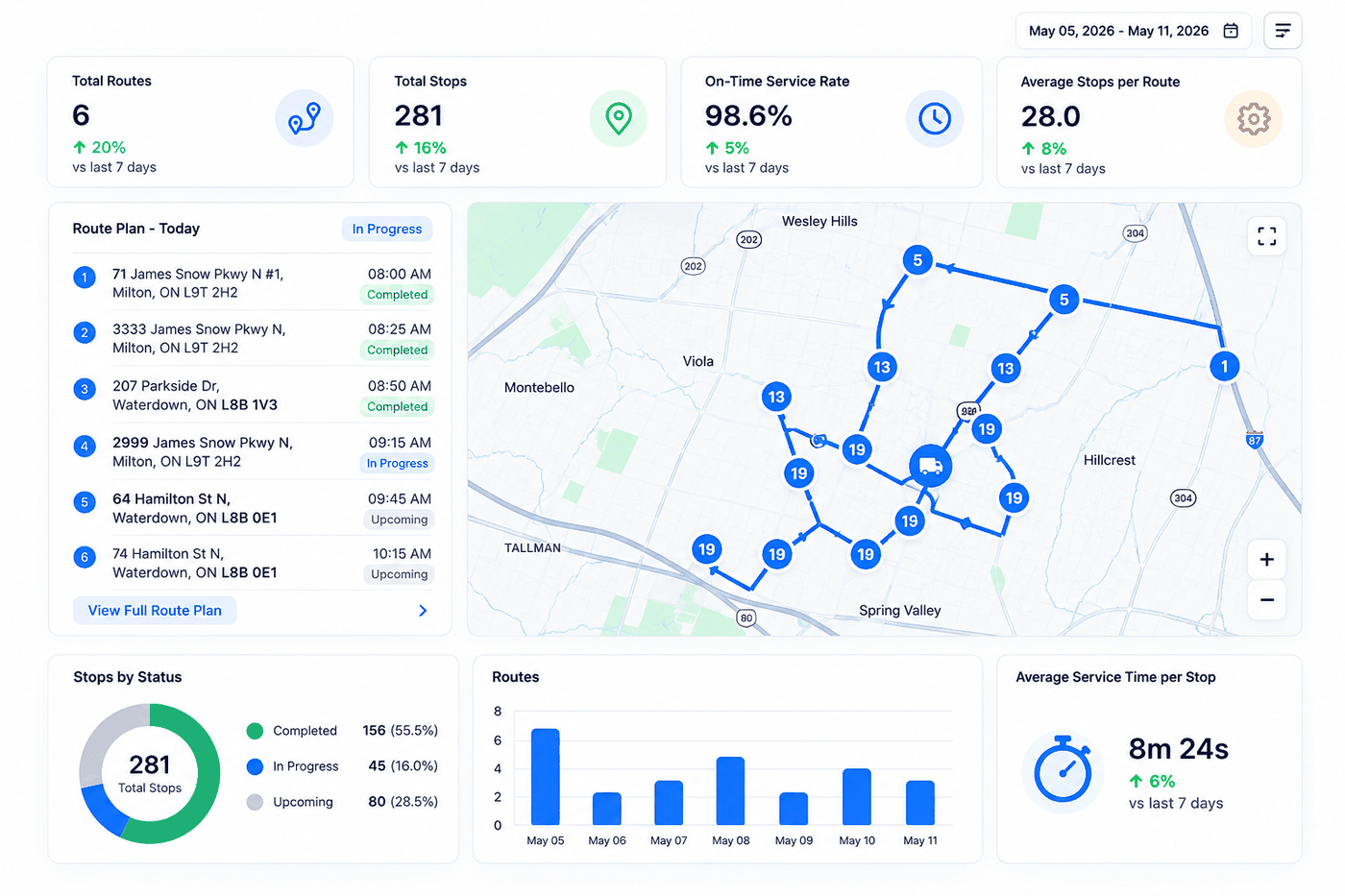 Plan*→*Optimize*→*Dispatch*→*Track*→*ProveYour dispatcher reviews one clear plan. Drivers get their route in the app. The office sees the day as it actually happens. And when the work is done, the proof is already attached to the stop.
Route optimization software assigns and sequences stops using the details that decide a real route: locations, service duration, vehicle capacity, priorities, driver availability, and preferred time windows. Upper does all of that — and keeps going after the plan leaves the office.
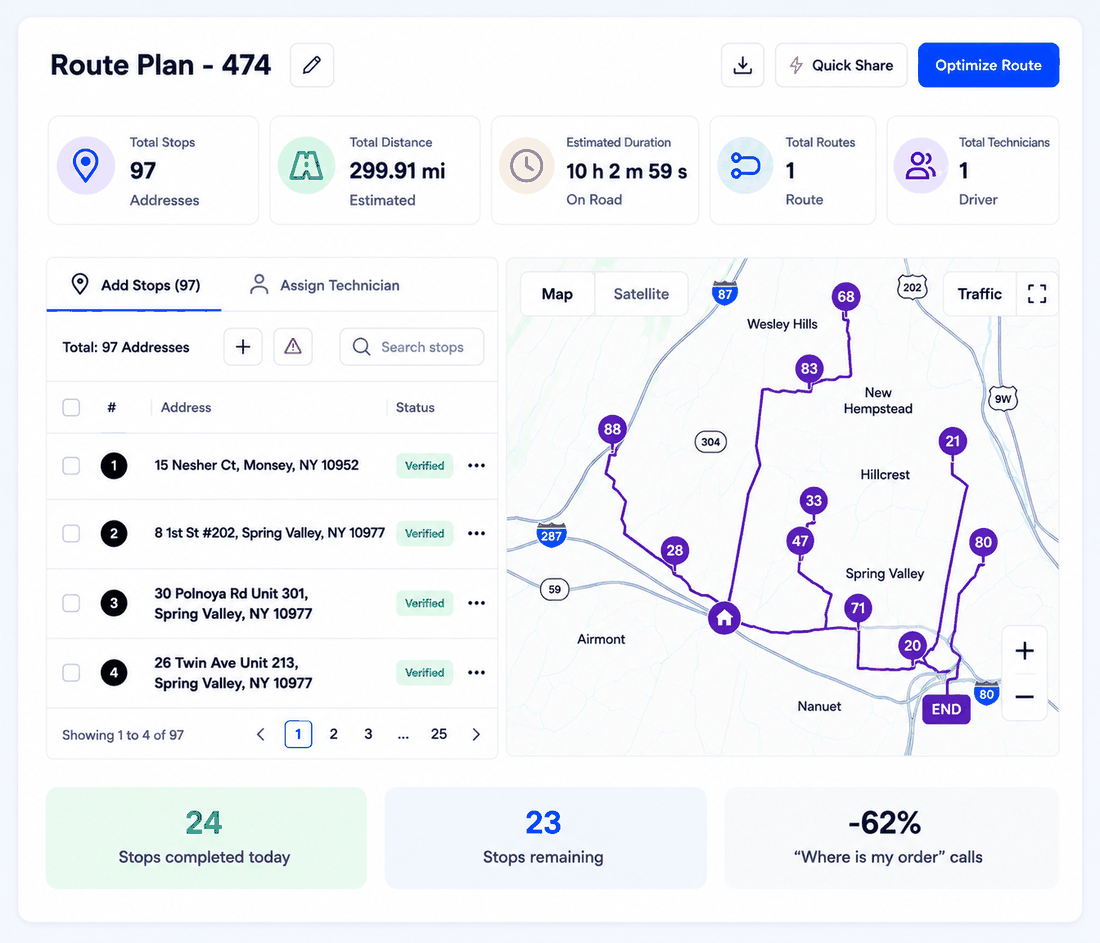
### Route planning and optimization
Import hundreds of stops and get efficient, balanced routes in minutes. Review every route on the map and timeline before it reaches the field — and change anything you don’t like.
[Explore route planning →](https://www.upperinc.com/features/route-planning/)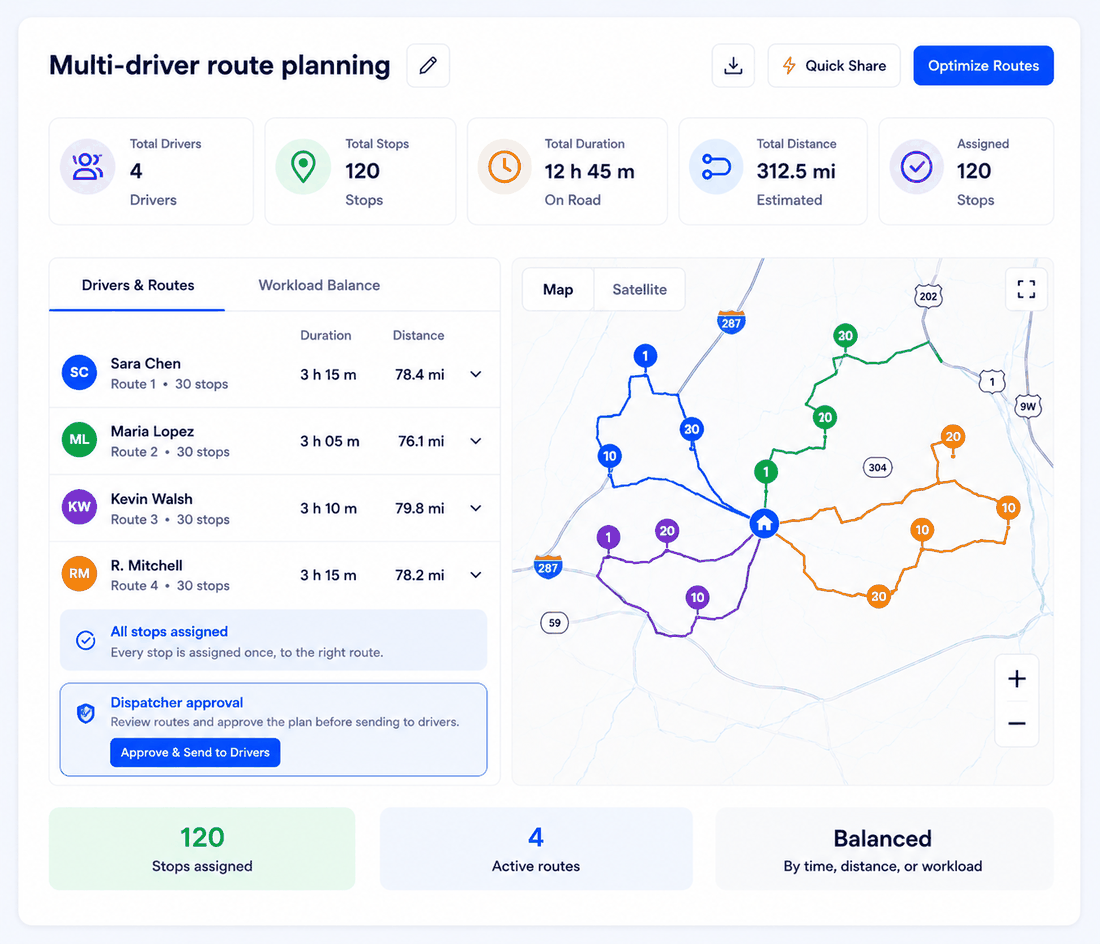
### Multi-driver route planning
One stop list, divided across your team in a single run — every stop assigned once, to the right route. Upper balances the work by time, distance, or workload; your dispatcher approves the split.
[Explore multi-driver route optimization →](https://www.upperinc.com/features/multi-driver-optimization/)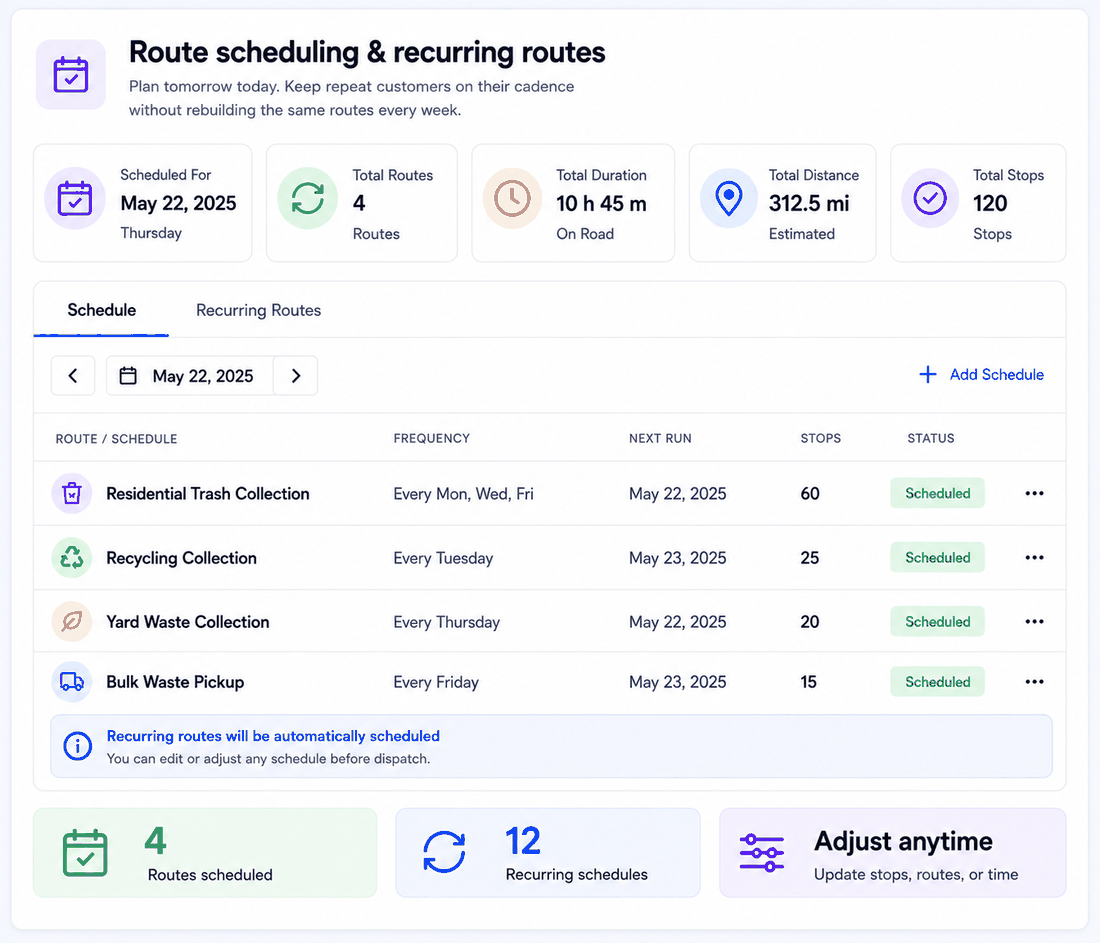
### Route scheduling and recurring routes
Plan tomorrow today. Keep repeat customers on their cadence without rebuilding the same routes every week — and adjust the plan when the week refuses to cooperate.
[Explore route scheduling and recurring routes →](https://www.upperinc.com/features/delivery-route-scheduling/)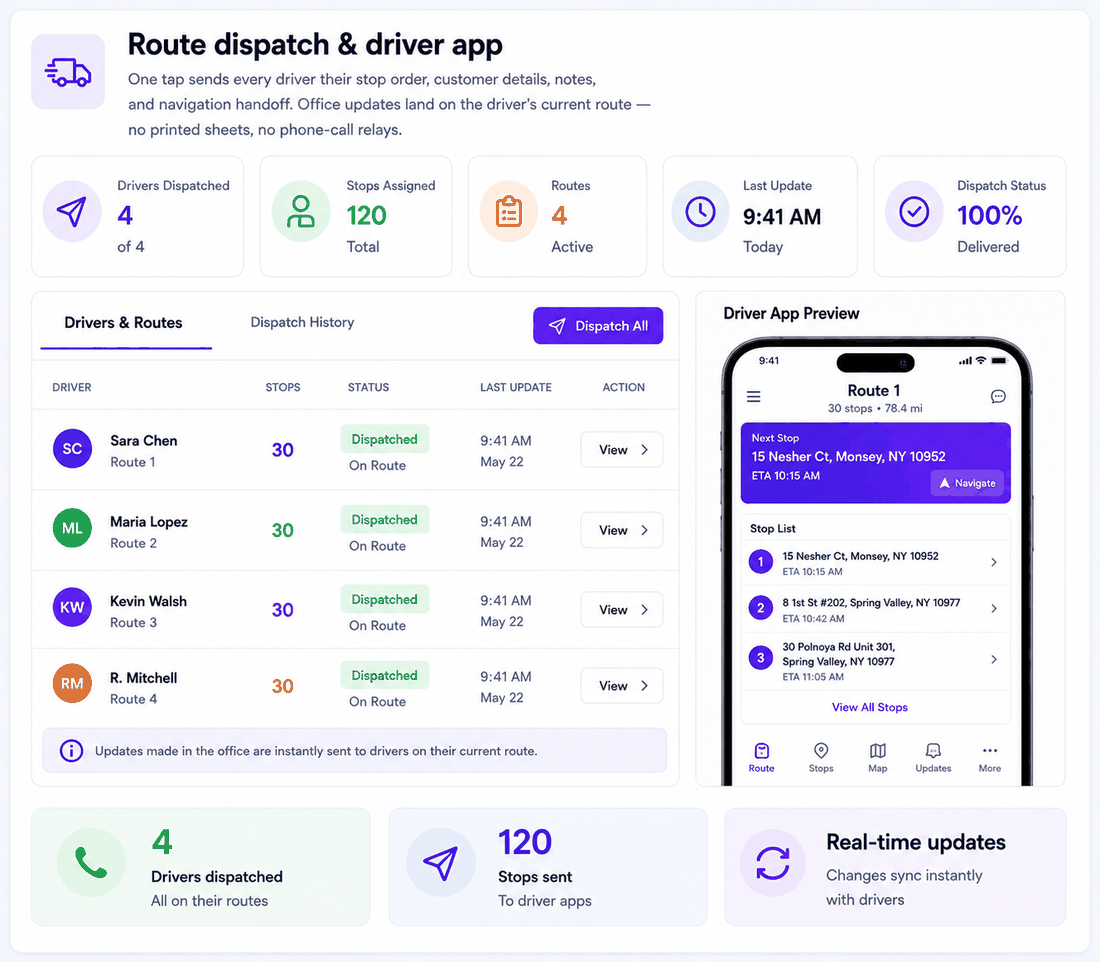
### Route dispatch and driver app
One tap sends every driver their stop order, customer details, notes, and navigation handoff. Office updates land on the driver’s current route — no printed sheets, no phone-call relays.
[Explore route dispatch and the driver app →](https://www.upperinc.com/features/driver-dispatch-management/)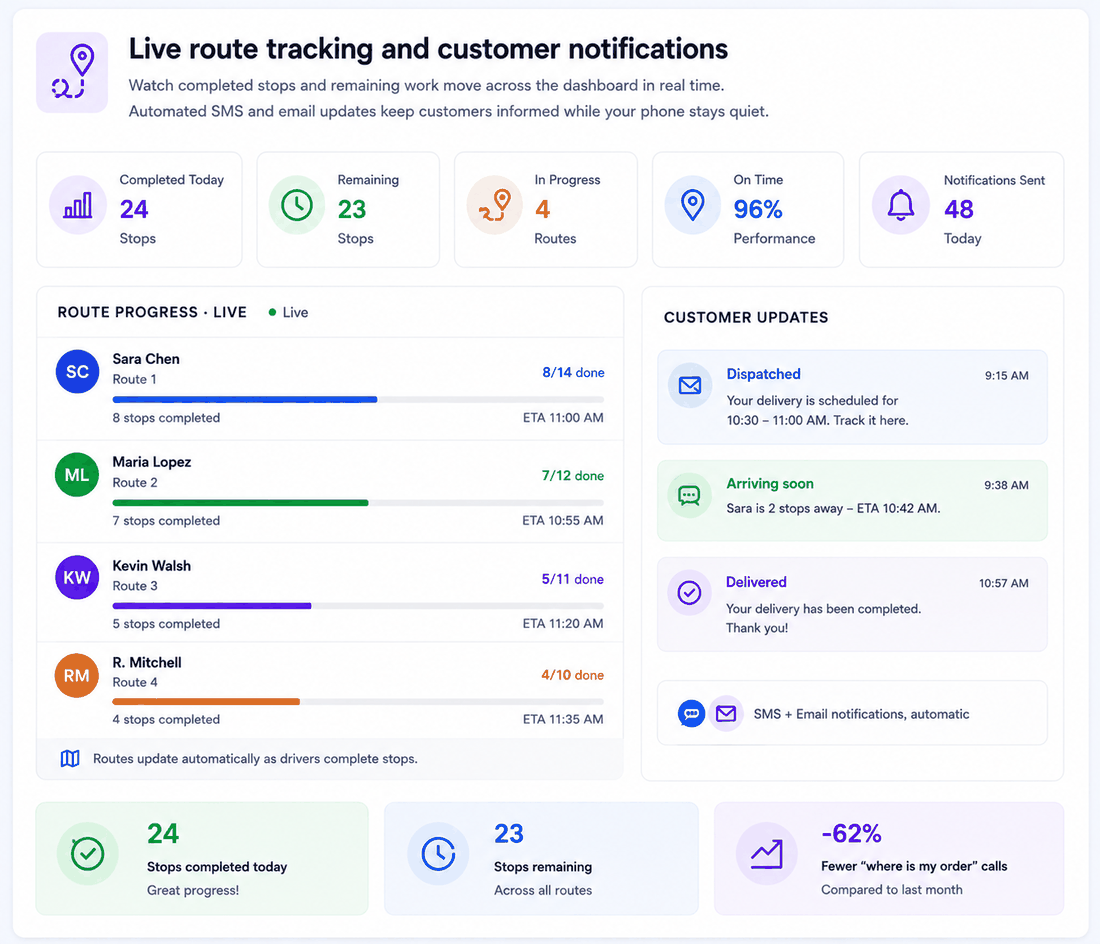
### Live route tracking and customer notifications
Watch completed stops and remaining work move across the dashboard in real time. Automated SMS and email updates keep customers informed while your phone stays quiet.
[Explore live route tracking and customer notifications →](https://www.upperinc.com/features/notification-software/)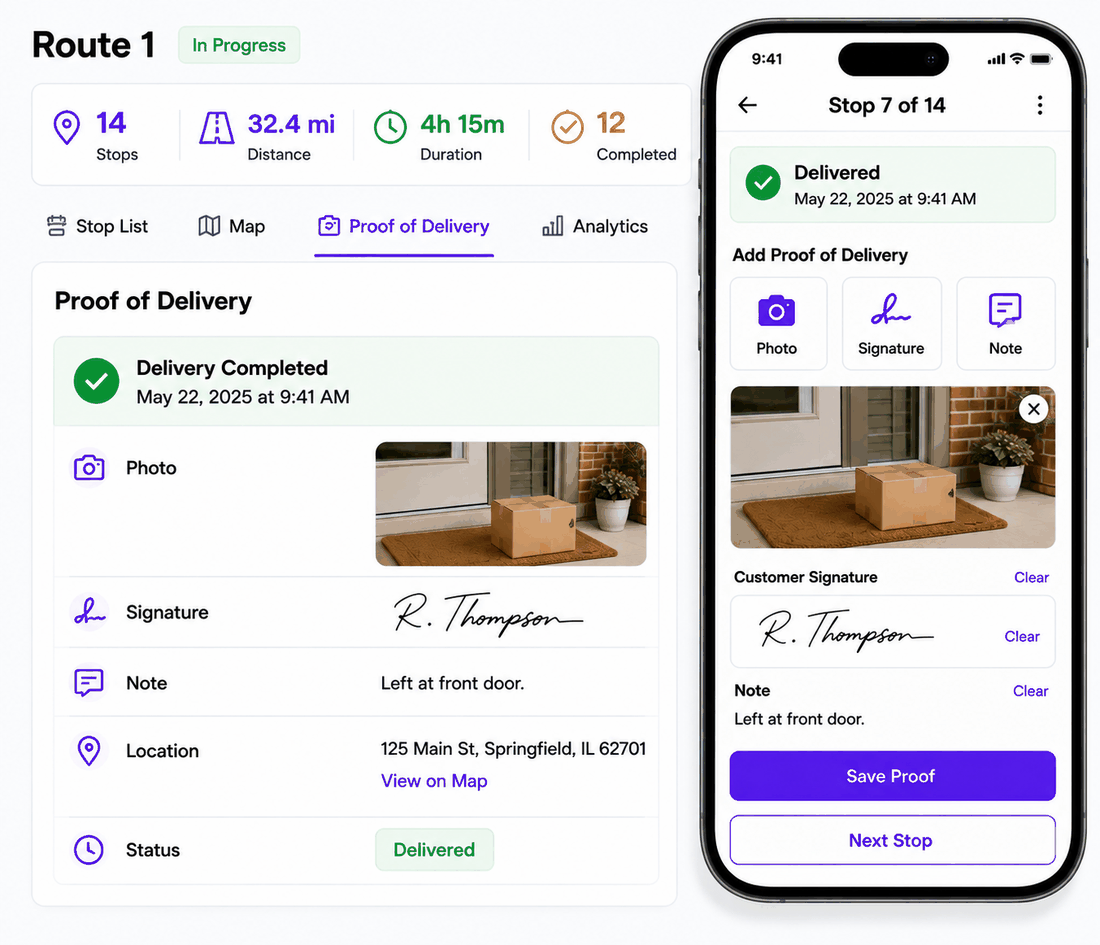
### Proof of delivery and route analytics
Photos, signatures, and notes captured at the stop — and still attached to that stop, that route, that customer, years later. With status, time, and location on every completion, “done” means done. Route history and analytics show how the operation is actually running.
[Explore proof of delivery and route analytics →](https://www.upperinc.com/features/proof-of-delivery-software/)Upper takes responsibility for one gap — the space between “work that needs to happen” and “routes completed and documented.” Everything else stays where it is.
### Your CRM or ERP owns orders and customers
It keeps owning them. Upper adds route planning, multi-driver assignment, dispatch, live progress, customer updates, and proof. Stops come in by spreadsheet upload, supported integration, or API.
### Your team plans in Excel
Keep the file your office already knows. Upload it as-is — addresses, notes, service times, and all — and Upper turns it into optimized routes across your team. What used to take the morning takes minutes.
### GPS or telematics already tracks your trucks
Keep the hardware, cameras, ELD, and compliance tools. They tell you where trucks are. Upper supplies what tracking can’t: the plan, the assignments, the customer communication, the proof.
### A scheduler already books the appointments
Keep the bookings and committed visit days. Upper sequences the scheduled work geographically, dispatches it, and brings back completion evidence — without touching the calendar your customers rely on.
### You want one platform for the whole route operation
Run it all in Upper Crew: stop import, planning, assignment, scheduling, dispatch, driver app, live tracking, customer updates, proof, and analytics.
[Explore API and integration options →](https://www.upperinc.com/features/route-planner-api/)
### Import, don’t re-enter.
Your existing spreadsheet is the setup. Columns map once; after that it’s upload and go.
### Optimize in minutes.
Win Waste Solutions plans 200–300 stops across its crews in under 10 minutes a day.
### Drivers just drive.
The app shows each driver their next stop, the details, and the navigation handoff. If they can use a phone, they can run their route.
### The dispatcher stays in charge.
Upper proposes; your dispatcher disposes. Review, drag, reorder, approve — local knowledge always wins.
[Start free trial](https://app.upperinc.com/signup)
### Stops
- Address and service location- Expected service duration- Stop priorities- Time-window preferences- Notes and instructions
### Drivers and crews
- Availability and working time- Start and end locations- Service areas and territories- Workload balance across routes
### Vehicles
- Vehicle assignment and type- Vehicle capacity- Route start and return points
### The plan itself
- Time or distance priority- Stop count and route duration- Zones and territories- Added, removed, or reassigned work
Upper Crew treats time windows as planning preferences it works to honor. If skills, certifications, or job dependencies decide who can do the work, that’s Upper AI Dispatcher — the constraint-rich scheduling product. Crew owns the route execution workflow on this page.
### The day that goes wrong
A customer cancels. New work lands. A driver calls in sick at 6 a.m. This is where spreadsheet routing collapses — and where Upper is calmest.
Office and field stay on the same version of the day. No reprints, no group texts, no calling a driver mid-route to ask what’s left.
[See Upper with your route data →](https://calendly.com/upper/demo/)
### Your dispatcher updates one active plan:
- Add or remove stops.- Move work between routes.- Reorder the sequence.- See the effect before committing.- Send the revised route to the driver’s app — instantly.
Win Waste Solutions replaces damaged residential waste carts for municipalities — high-volume daily work where every stop needs a photo record that might be requested years later.
Spreadsheet stop list*→*route assignment*→*driver app*→*live progress*→*address-linked proof**200–300**daily stops**Under 10 minutes**of route planning per day**2+ years**of photo records, instantly retrievable “Every photo is tied to the address, the date, the crew member.”
Tracy S
Owner, WinWaste Solutions
[Read the Win Waste Solutions story →](https://www.upperinc.com/success-stories/winwaste-waste-management/)
### Delivery and distribution
Daily orders become routes; drivers get dispatched; recipients stay informed; completion gets recorded. Your order system keeps owning the commercial side.
[Explore delivery routing →](https://www.upperinc.com/businesses/local-delivery-route-planning-optimization-app-software/)
### Waste and collection
Dense, recurring collection routes planned around capacity, service areas, cadence, and the proof your municipal contracts demand.
[Explore waste routing →](https://www.upperinc.com/businesses/waste-collection-route-planning-software/)
### Field service
Service calls coordinated across technicians and crews using service duration, territories, timing, and availability.
[Explore field service routing →](https://www.upperinc.com/field-service-route-optimization/)
### Food and catering
Routes built around pickup points, delivery timing, vehicle capacity, and the sequence the day requires.
[Explore food delivery routing →](https://www.upperinc.com/businesses/food-delivery-route-planner-optimization-software/)
### Medical and courier
Time-sensitive pickup and delivery with live dispatch visibility and a completion record on every stop.
[Explore courier routing →](https://www.upperinc.com/businesses/medical-supply-distribution-software/)
### Recurring route operations
Pool service, landscaping, laundry, bottled water, maintenance — repeat visits on a cadence, planned once and kept efficient.
[Explore recurring routing →](https://www.upperinc.com/businesses/pool-service-maintenance-routing-software/)[See all industries](https://www.upperinc.com/businesses/)1
### Add your stops
Import a spreadsheet, connect a supported system, or type them in. Addresses, service times, notes, and priorities come along for the ride.
2
### Set the day’s rules
Pick the available drivers and vehicles. Add capacity, timing preferences, territories, and workload settings.
3
### Optimize and review
Upper builds balanced routes across the team. Your dispatcher inspects the map and timeline, adjusts anything, and approves.
4
### Dispatch and follow through
Routes hit the driver app. The office tracks progress, handles changes, keeps customers updated, and collects proof at every stop.
[Book a workflow demo](https://calendly.com/upper/demo/)
### It does the whole route job — and stays in its lane
Planning, dispatch, driver app, tracking, notifications, proof, analytics — one platform, one plan, nothing to stitch together. And no bloat you didn’t ask for: your CRM, billing, and inventory stay exactly where they are.
### It fits the operation you have
Sized for real operations, honestly. Enterprise fleet software bills like enterprise; consumer route apps stop at one driver. Upper is built for the operation in between — and for the tools it already runs.
### Your dispatcher stays in control
Upper proposes the plan and shows its work. Your dispatcher reviews, edits, and decides what reaches the field. Software that replaces the busywork, not the judgment.
### It’s honest about limits
If a rule can’t be honored or a fit isn’t there, Upper says so — in the product and in the demo. You’ll know what works before rollout, not after.
### Your integrations:
exact source, fields, and direction. Stops reach Upper by spreadsheet upload, supported integration, API, or a configured process — confirm yours specifically.
### Your hard rules:
Crew treats time windows as preferences. Test any appointment or condition that genuinely cannot move.
### Your assignment logic:
if skills, certifications, or job dependencies decide who does the work, evaluate Upper AI Dispatcher.
### Your field reality:
run the driver app, the mid-route change, and the proof capture with your own crew’s workflow.
[Talk through your workflow →](https://calendly.com/upper/demo/)
### Upper Crew
The operations suite for teams running multiple vehicles or crews — route optimization plus dispatch, driver app, live tracking, customer updates, proof of delivery, and analytics.
[See Upper Crew →](https://www.upperinc.com/how-it-works/)
### Upper AI Dispatcher
The scheduling brain for constraint-rich operations — skills, certifications, capacity, territories, and recurring cadence — especially when you already run tracking or telematics.
[See Upper AI Dispatcher →](https://www.upperinc.com/features/ai-dispatcher-software/)
### Upper Solo
The route planner for one person who plans and drives their own day.
[See Upper Solo →](https://www.upperinc.com/upper-solo-download/)- What is route optimization software?**Route optimization software assigns and sequences stops across one or more drivers or vehicles using inputs such as location, service duration, vehicle capacity, priority, working time, and preferred time windows. Business platforms like Upper also connect the route plan to dispatch, live tracking, customer notifications, and proof of delivery.
- Can Google Maps do route optimization?**The Google Maps app handles navigation and lets one person manually reorder a limited stop list. It doesn’t assign stops across multiple drivers or apply business constraints like capacity and service duration. Google Maps Platform offers developer route-optimization APIs, but those require building a product around them — Upper is the finished product.
- Can Upper optimize routes for multiple drivers?**Yes. Upper Crew distributes and sequences stops across your selected drivers or vehicles in one planning run, then shows every route for dispatcher review before anything reaches the field.
- Which route constraints can Upper use?**Vehicle capacity, time-window preferences, stop priorities, service duration, zones and territories, start and end locations, and driver availability. For skills, certifications, and job dependencies, use Upper AI Dispatcher.
- Can routes be changed after dispatch?**Yes. Dispatchers add or remove stops, move work between routes, reorder sequences, and push the revised plan straight to the driver app. Everyone stays on the current version of the day.
- Does Upper include a driver app and proof of delivery?**Yes. Routes dispatch to the Upper driver app with stop order, customer details, and navigation handoff. Drivers capture photos, signatures, and notes that stay attached to the stop, alongside live route visibility and customer updates.
- Can Upper work with our CRM, ERP, scheduler, or GPS platform?**Yes — that’s the normal case. Your existing systems keep owning customers, orders, appointments, or vehicle hardware; Upper handles routing and execution beside them. Stops arrive by spreadsheet upload, supported integration, or API, validated for your exact setup.
- How do we know Upper will fit our workflow?**Test it with a real route day, not sample data. Bring your stop list, your hardest rule, and a typical disruption to the workflow demo — you’ll see where work enters, how routes get built, what drivers experience, and what proof comes back, before you change anything about your process.
## Bring the Route Day Other Tools Couldn’t Handle
Show us where work begins, how your team divides it, what changes mid-day, and what must come back after every stop. We’ll run it in Upper — and tell you honestly what fits. Prove it on your own routes before you change anything about your process.
[Book a workflow demo](https://calendly.com/upper/demo/) [Start free trial](https://app.upperinc.com/signup)
---
_View the original post at: [https://www.upperinc.com/route-optimization-software/](https://www.upperinc.com/route-optimization-software/)_
_Served as markdown by [Third Audience](https://github.com/third-audience) v3.6.1_
_Generated: 2026-08-12 14:03:49 UTC_