- Transfer only verified unfinished work. Keep completed orders and uncertain statuses separate.
- Check the receiving driver's eligibility, load access, and remaining commitments before releasing a revised route.
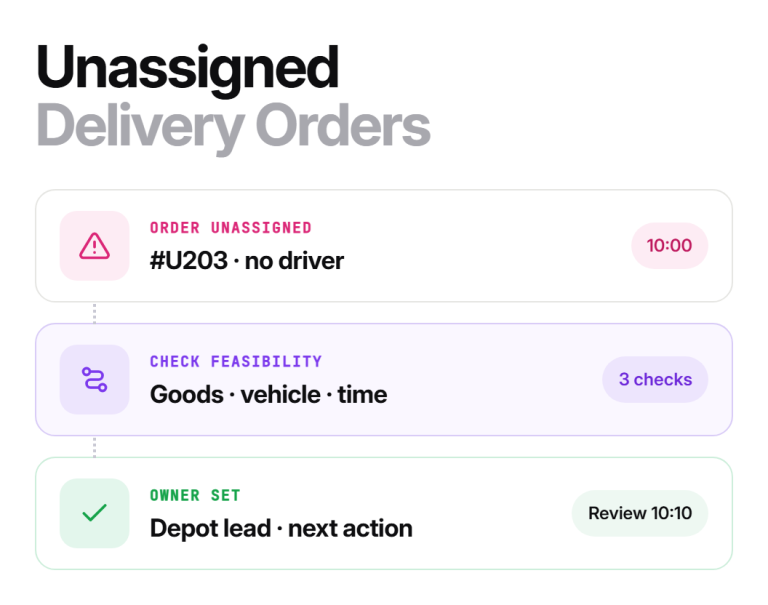
- Give unresolved orders a dispatch owner even when they have no delivery driver.
- Close the handoff after the route, goods, driver confirmation, and customer update agree.
A driver reassignment handoff transfers unfinished delivery work from one driver to another. To finish the handoff, you need to match up the orders, confirm who has the goods, update the dispatch plan, and check that the receiving driver has the current instructions.
Changing a driver’s name on a route is only one step. Whether you use a shared sheet or AI dispatch software, the record must match what the drivers and loading team will actually do. This guide covers the transfer itself, sometimes called a route handover, including partial handoffs and work that cannot yet move.
Using Upper Crew and only need the click path? See reassign a live route to a different driver. The rest of this guide covers the process around that click.
What are the steps in a driver reassignment handoff?
A complete handoff has five steps: confirm the work, choose a receiving driver who can actually do it, match the goods to the vehicle, update dispatch and confirm the route, then update customers and record the outcome.
1. Confirm the work and its current status
Save the outgoing route’s identifier and update time. Match each affected order against the driver’s latest report, completion evidence, and the goods physically present. Do not assume every stop after the last completed stop is unfinished: a driver may have changed sequence or completed work while offline.
Separate completed deliveries, open deliveries, collected pickups, returns, and orders whose status needs checking. If the change starts with an absence or breakdown, use the broader driver no-show recovery process to establish what is available before you promise cover.
2. Choose the receiving driver and a feasible transfer
Check qualifications, vehicle and equipment suitability, available working time, and the commitments already on the receiving route. Then add the travel to collect the goods, transfer time, additional service, and return travel. A nearby driver with an empty calendar slot may still be unable to complete the work.
Working time is a legal limit, not only a scheduling preference. For US commercial drivers, the federal hours-of-service rules in 49 CFR Part 395 cap driving and on-duty time, so check the receiving driver’s remaining hours before adding work.
Physical capacity and time are separate checks. Google’s vehicle-capacity routing example illustrates how loads constrain a route. In your operation, also verify the actual weight, space, handling needs, and goods location; a stop count alone does not establish loading feasibility.
If no driver can take an order, keep it visible with a named dispatch owner and a next decision time. Do not force an unsuitable assignment merely to clear the queue.
3. Match the goods to the vehicle before releasing the change
Match order IDs and item counts to the receiving vehicle. Record discrepancies and returns separately. If only part of a load moves, identify the goods left behind and who is responsible for them.
A vehicle handoff also needs keys, access instructions, and any checks required by your operating procedure. A roadside or specialist-load transfer needs an appropriate recovery plan; a route edit does not authorize the physical transfer.
4. Update dispatch and confirm the current route
Assign the verified work to the receiving driver, retain the completed history, and make clear which instructions replace the old plan. Tell the outgoing driver which orders have moved. Send the revised route through your normal dispatch channel.
Upper Crew’s route dispatch documentation describes a Reassign Route action in the driver row menu, and a separate guide covers re-assigning routes between drivers before dispatch. Its driver guide says shared routes appear without an accept-or-reject button. If your process needs a confirmation, obtain and record it through an agreed channel; do not assume the app supplies an acceptance event.
Documented stop notes make this step easier. Upper’s published CrispLinen customer story describes replacing routes held in drivers’ memory with written stop notes that replacement drivers could follow. That is a route-documentation example, not a measured recovery result.
Ask the receiving driver to confirm the route’s update time, first stop, added orders, and changed commitments. If either driver cannot see the update, resolve the difference before both act on competing instructions.
5. Update customers and record the outcome
Recheck estimated arrival times for both transferred orders and existing orders on the receiving route. Tell affected customers what has changed. If you cannot yet confirm a feasible arrival window, give a time for the next update rather than a promise based on an untested plan.
Record who approved the transfer, when the goods changed hands, driver confirmation, and customer communication. A completed handoff can still leave a return or deferred delivery open. Keep its owner and next action attached to the incident.
What should dispatch software do at each step?
Software does not replace the checks above, but it should make each one faster. Use this table to judge any tool, including Upper.
| Step | What the software should do | Where Upper documents it |
| 1. Confirm the work | Show per-stop completion status and proof of delivery so unfinished work is visible without calling the driver | Crew dispatch and tracking docs |
| 2. Choose the receiver | Compare eligible drivers on qualifications, vehicle fit, and remaining commitments, and show the reasoning | Automatic driver assignment |
| 3. Match the goods | Keep order IDs and item counts attached to each stop so counts can be checked at the vehicle | Stop notes and order details in the driver app |
| 4. Update dispatch | Move the route or stops to the receiving driver and re-sequence the receiving route around existing commitments | Dynamic dispatch reoptimization |
| 5. Update customers | Recalculate arrival windows after the change and send customer notifications from the revised route | Customer notifications in Crew |
Anything a tool cannot do from this table stays a manual check in your procedure.
What does a partial handoff record look like?
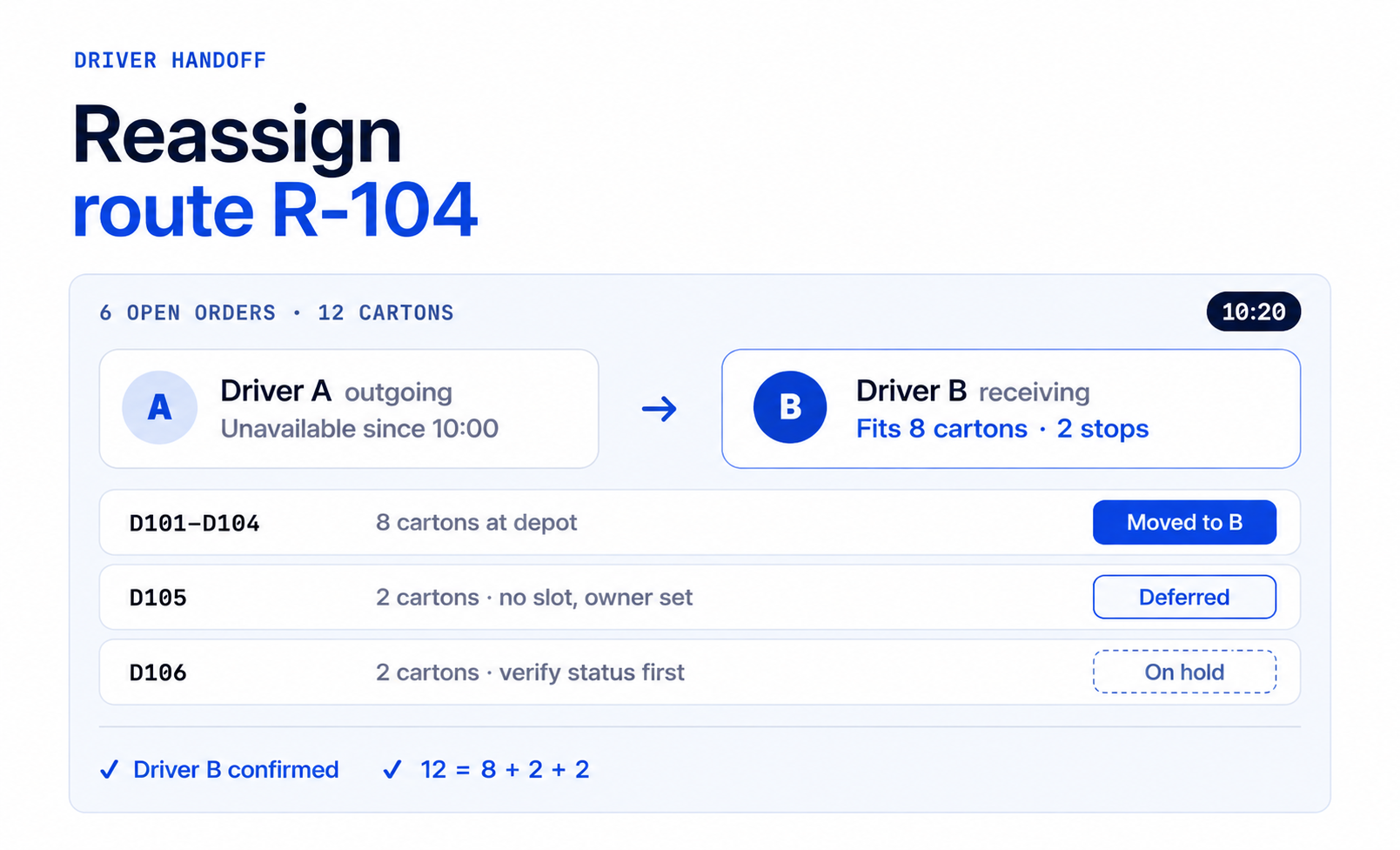
The following is an illustrative record, not customer data or a product screenshot. At 10:00 a.m., Driver A’s route has 6 open orders containing 12 cartons, and the receiving vehicle can take 8.
| Work | Verified status | Recorded action |
| Orders D101 through D104 | 8 cartons ready at the depot | Transfer to Driver B; record counts and revised route |
| Order D105 | 2 cartons at the depot; no feasible slot today | Dispatch owner contacts customer and records the agreed next date |
| Order D106 | 2 cartons listed; current delivery status unclear | Hold for status verification; do not create a second delivery |
Dispatch has separately checked Driver B’s eligibility, route timing, and the loading arrangement at the depot.
The reconciliation is 12 cartons = 8 transferred + 2 deferred + 2 awaiting verification.
That arithmetic balances the record; it does not prove the 2 uncertain cartons are physically at the depot. Resolve that question before closing the incident.
At 10:20 a.m., the record can say that Driver B confirmed the 4 transferred orders and current route. It cannot say all 6 orders were recovered. D105 and D106 remain open with dispatch until their next actions are complete.
What is the minimum handoff checklist?
Use this as a release check after every transfer:
- The order list separates completed, open, returned, and uncertain work.
- The receiving driver and vehicle are named and suitable for the proposed work.
- Goods location, counts, condition, and transfer arrangements are verified.
- Vehicle condition, fuel or charge, and any defects are noted at the moment of handover.
- The receiving route has been checked against existing commitments.
- The receiving driver has enough legal working time for the added stops. If not, go back to step 2 or use the driver no-show recovery process to defer work.
- Both drivers understand which instructions are current.
- Both drivers have signed off the transfer through the agreed channel, and the record names who confirmed what.
- Affected customers have an update or a promised update time.
- Every unresolved order has a dispatch owner, next action, and review time.
Keep the record accessible to the next dispatcher. For how a route can be re-planned when orders move during the day, see dynamic dispatch reoptimization.
Finish the transfer with a confirmed plan
A reliable handoff leaves you with one current route and an explicit outcome for every affected order. Upper’s automatic driver assignment can help compare eligible replacements and show the reasoning behind suggestions. Recovery changes remain subject to dispatcher review. Your team still checks the goods and confirms the field handoff.
Book an Upper demo and bring a real scenario: a partial transfer, an uncertain order status, and a receiving route with existing commitments. We will walk through the handoff with you.

See it in action
Finish the transfer with a confirmed plan
Bring a real scenario: a partial transfer, an uncertain order status, and a receiving route with existing commitments. We will walk through the handoff with you.

Frequently asked questions
No. The transferred portion can close after confirmation. Work that cannot transfer should retain a dispatch owner, status, and next action. Do not mark the whole incident complete while unresolved orders remain.
Transfer the whole route when one driver can take it; split only when no single driver can. A whole-route transfer keeps one owner and one set of instructions. Split the work only after checking the goods and timing for each receiving route, and include the additional coordination and handling in that decision.
No. Assignment identifies who should do the work. Delivery completion needs its own recorded status and proof of delivery under your normal process.
A handoff is the transfer of specific unfinished orders between two drivers. A no-show recovery is the wider incident response when a driver is absent or a vehicle breaks down, which may involve several handoffs, deferred work, and customer rescheduling.
| Driver handoff | No-show recovery | |
| Trigger | Any reason work moves between two drivers, planned or not | Driver absent or vehicle out of service |
| Scope | The orders being transferred | The whole route plus deferred and cancelled work |
| Closes when | Receiving driver confirms the transferred orders | Every affected order has an outcome or an owner |