
Prevent Fleet Breakdowns Before They Disrupt Your Operations

Teams That Switched Save 11+ Hours a Week on Route Planning






Planning Fleet Maintenance Is Easy. Keeping Up With It Isn’t.
What Fleet Maintenance Software Promises:
-
 Automated maintenance schedules
-
Timely service reminders
-
Complete vehicle service history
-
Reduced vehicle breakdowns

What
Actually Happens
-
Service reminders get ignored during busy days
-
Vehicles miss maintenance because schedules change
-
Service records live in different systems
-
Breakdowns still happen at the worst possible time
Fleet Maintenance Software for Proactive, Not Reactive, Operations
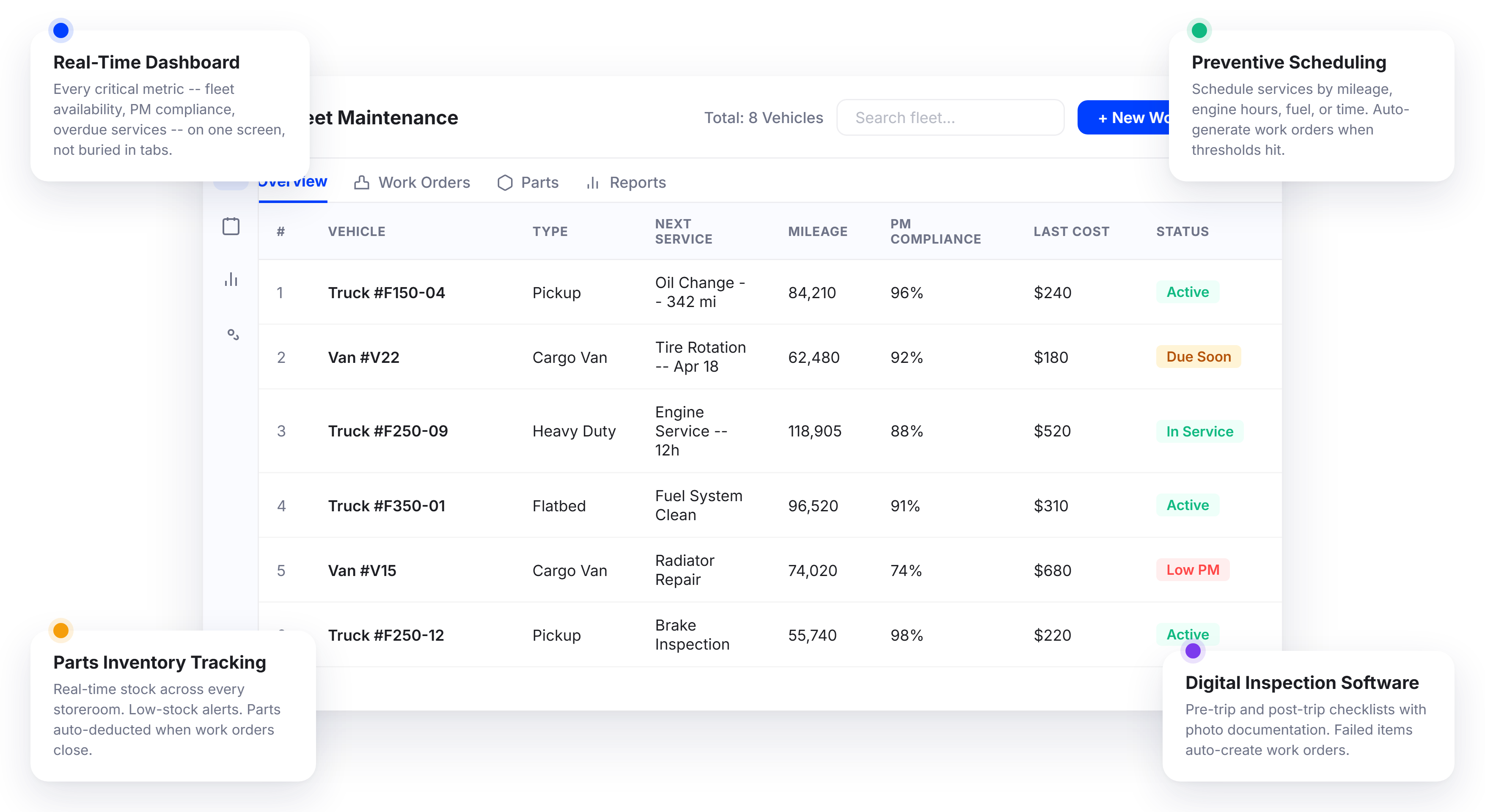
Upper’s fleet management software includes a full fleet maintenance system that replaces the guesswork with structure. Preventive maintenance schedules trigger automatically based on mileage, time, engine hours, or fuel consumption.
Fleet Maintenance Dashboard with Real-Time Visibility
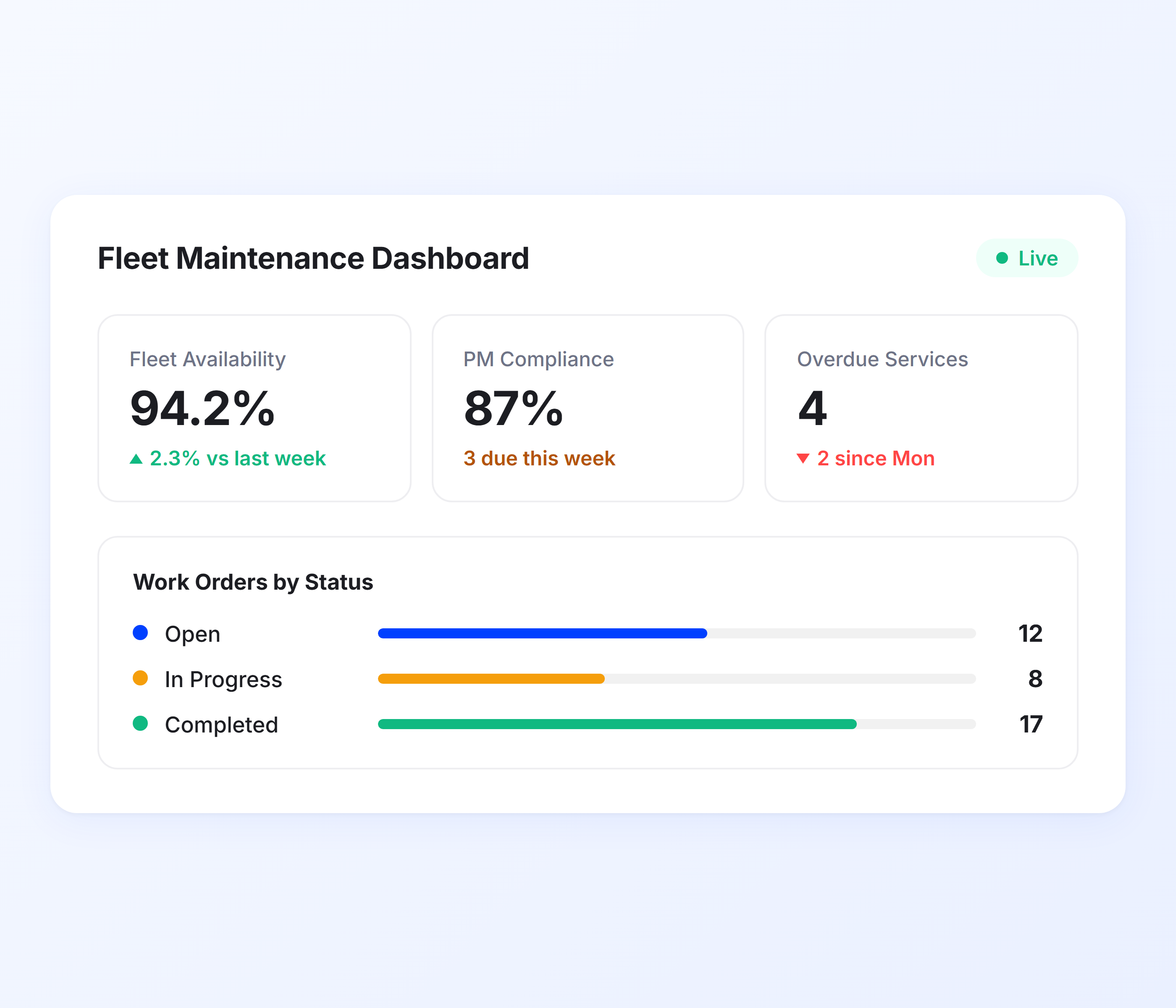
You should not have to dig through five reports to figure out which vehicles need service this week. Upper’s maintenance dashboard puts every critical metric on one screen the moment you log in. Fleet availability, PM compliance rate, overdue services, active work orders, parts inventory levels, and cost trends are all visible at a glance, not buried behind tabs and CSV exports. Every widget is interactive with drill-down into underlying data. For teams that want route-level visibility, Upper’s route management analytics connects operational and maintenance data.
-
 Real-time KPI cards for fleet availability, PM compliance, and overdue services
-
Work orders by status with color-coded priority indicators
-
Maintenance cost trends and downtime analysis with interactive charts and graphs
-
Parts inventory levels with low-stock indicators
-
Top maintenance issues across the fleet
-
Service history and maintenance trends dashboards to spot emerging issues early
-
Drill-down from any widget to underlying vehicle-level data
-
Customizable views per user role

Preventive Maintenance Scheduling
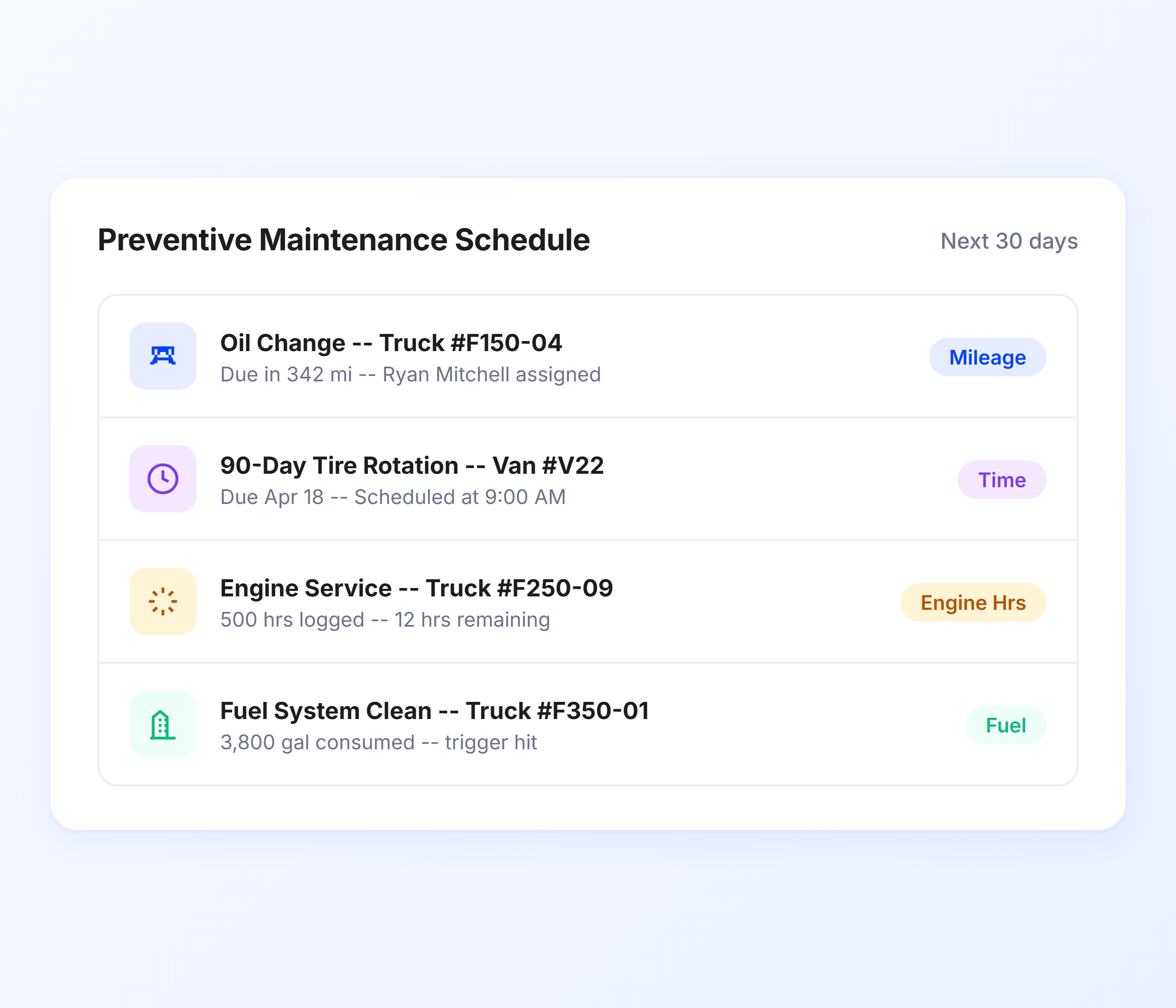
The cheapest repair is the one you never need. Upper’s preventive maintenance system lets you schedule services based on the triggers that match your fleet’s actual operating conditions, not just calendar dates. Set up PM schedules by mileage intervals, time intervals, engine hours, fuel consumption, or any custom metric you define. When a threshold is hit, Upper automatically generates a work order and notifies the right people.
-
Five PM trigger types: mileage, time intervals, engine hours, fuel consumption, and custom metrics
-
Automated recurring service programs with auto work order generation
-
Odometer tracking with actual readings, estimated calculations, and last updated date
-
Oil change, tire condition, and brake service tracking with service type categorization
-
Complete service history with last service date and type recorded per vehicle
-
Multi-stage email reminders at 30, 15, and 7 days with scheduled 9:00 AM delivery
-
Master toggle plus individual controls for each alert type
Fleet Maintenance Work Order Management
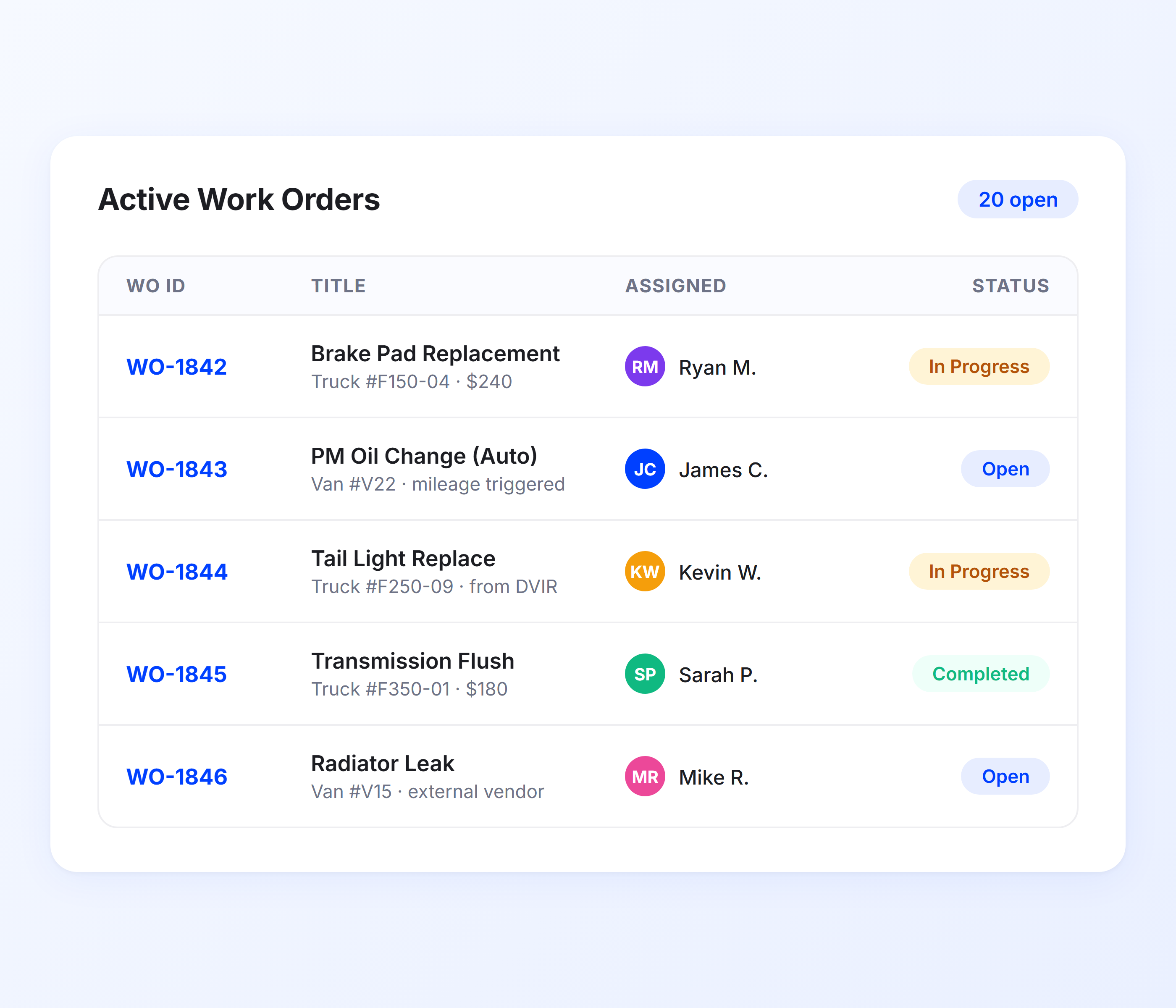
Paperwork orders get lost. Verbal assignments get forgotten. Emails get buried. Upper replaces all of it with a digital work order system that tracks every maintenance task from creation to completion. Create work orders manually, or let the system generate them automatically from PM schedules, failed inspections, or ravine reports.
Every work order has a unique number, an assigned technician or vendor, a status, and a complete audit trail. Your driver dispatch management team sees vehicle maintenance status in real time, so they can reassign routes before a breakdown causes missed deliveries.
-
Digital work orders with automatic numbering and status tracking (Open, In Progress, Completed)
-
Assign work orders to internal technicians or external vendors
-
Parts and labor cost breakdown with time tracking per work order
-
Team collaboration with comments and push notifications for status changes
-
Auto work order creation from failed inspections and PM schedules
-
Mobile work order access and updates from any device
Fleet Parts and Inventory Management
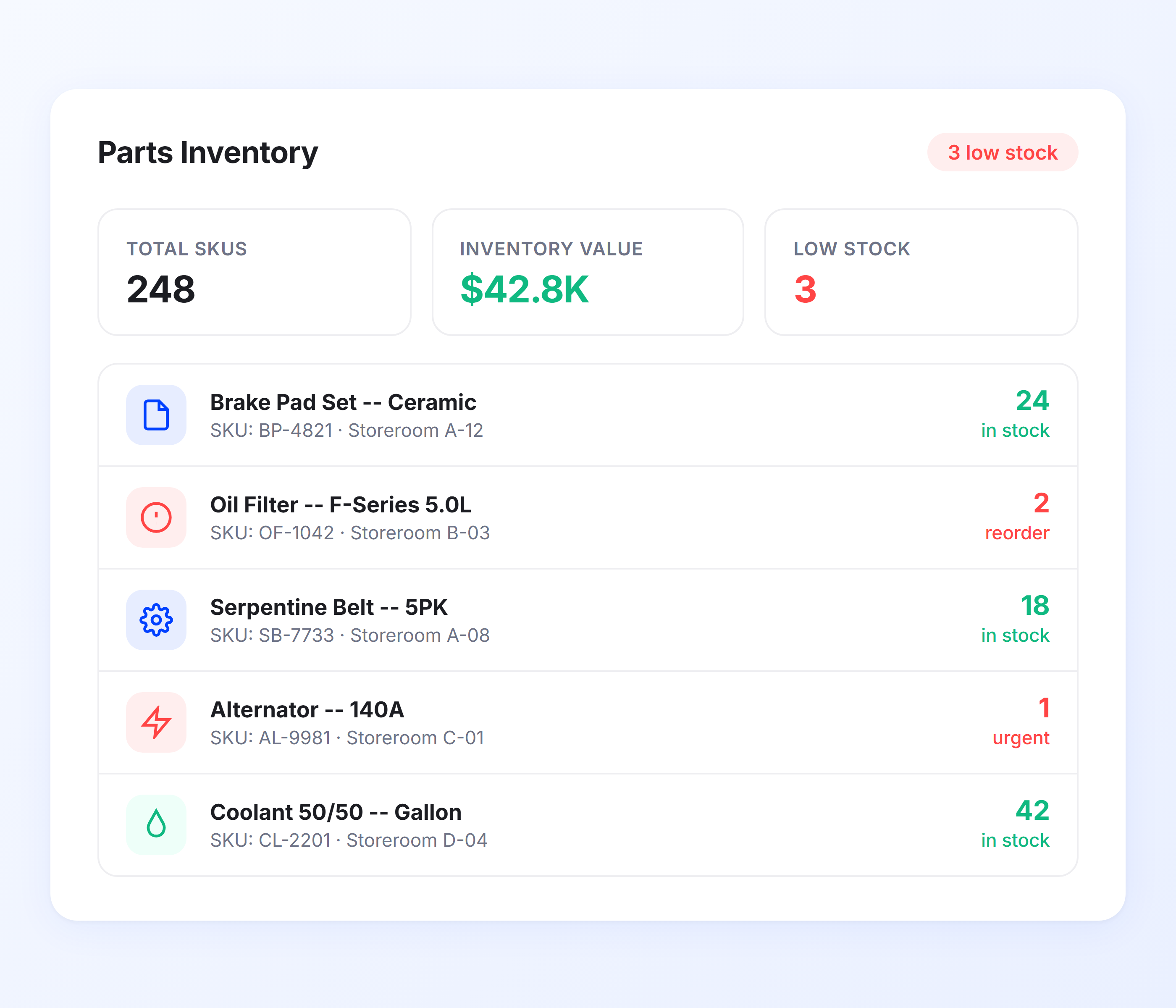
A repair should never wait for a missing part. Upper’s parts inventory system gives you real-time visibility into every part across every storage location, so you always know what you have, where it is, and when to reorder. When a technician completes a work order, the parts used are automatically deducted from inventory. No manual counting. No surprise shortages.
-
Centralized parts catalog with specifications and details
-
Real-time stock tracking across multiple storeroom locations
-
Low inventory alerts with automated email and push notifications
-
Parts cost tracking with vendor price comparisons
-
Inventory valuation using FIFO, LIFO, or Average Cost methods
-
Parts linked directly to work orders, repairs, and vehicle history
-
Automatic inventory deduction when work orders close
-
Complete parts movement tracking in and out of every storeroom
Fleet Maintenance Cost Tracking and Reporting
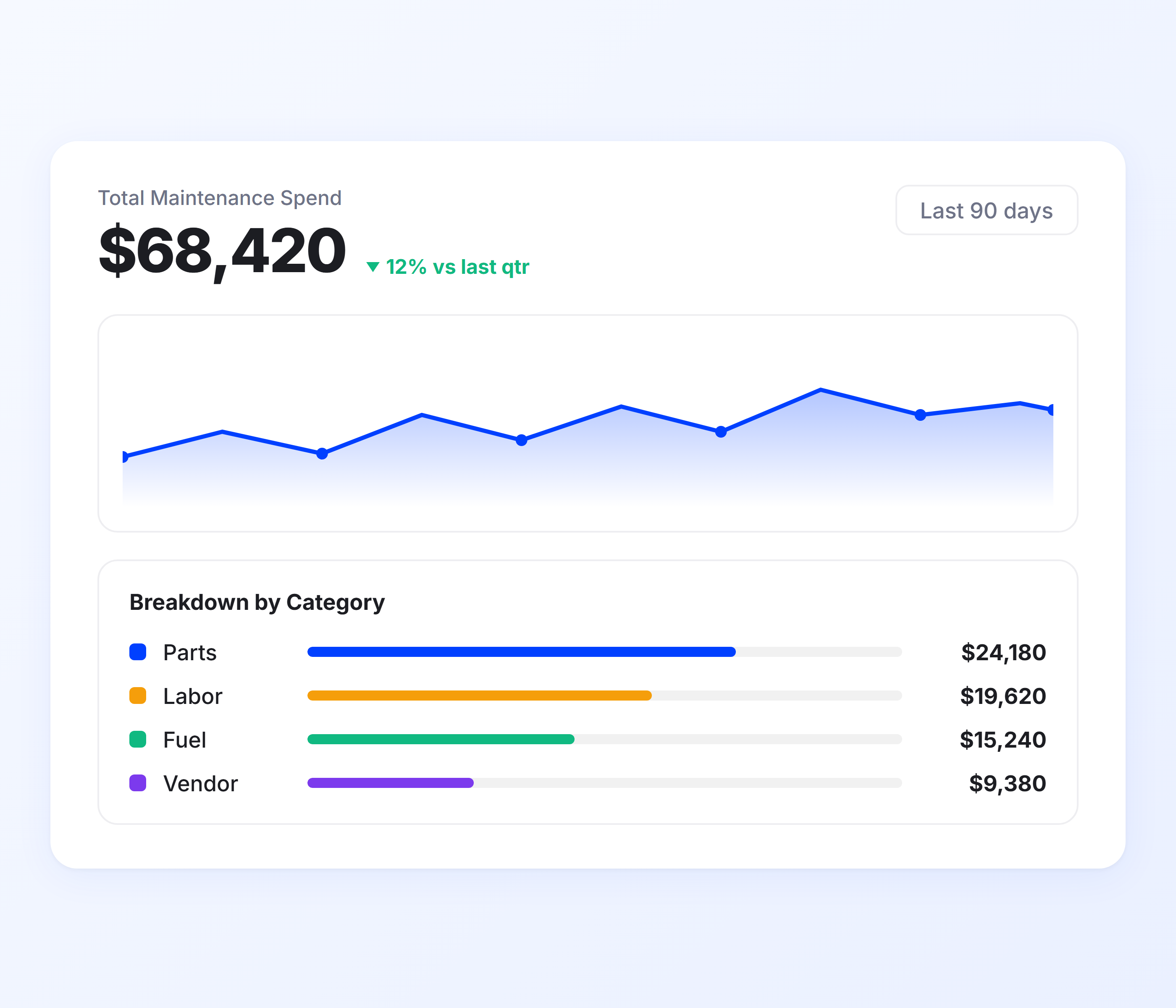
You cannot reduce maintenance costs if you cannot see them clearly. Upper breaks down every dollar spent on fleet maintenance by vehicle, by work order, by cost category, and by time period. From oil changes to engine overhauls, every expense is recorded, categorized, and available for analysis.
Combined with vehicle tracking data from Upper’s driver fleet tracking system, you get a complete picture of how maintenance costs relate to vehicle usage patterns. Build custom dashboards and give every stakeholder the specific metrics they need without manual report pulls.
-
Total cost of ownership (TCO) analysis per vehicle
-
Cost per mile and cost per kilometer metrics
-
Parts and labor cost breakdown per work order
-
Total maintenance spend with vehicle-by-vehicle comparison
-
Downtime tracking and cost reporting
-
Fuel and operational expense tracking per asset
-
Detailed fleet maintenance reports exportable in PDF, Excel, and CSV
-
Scheduled report delivery via email
Digital Fleet Inspection Software
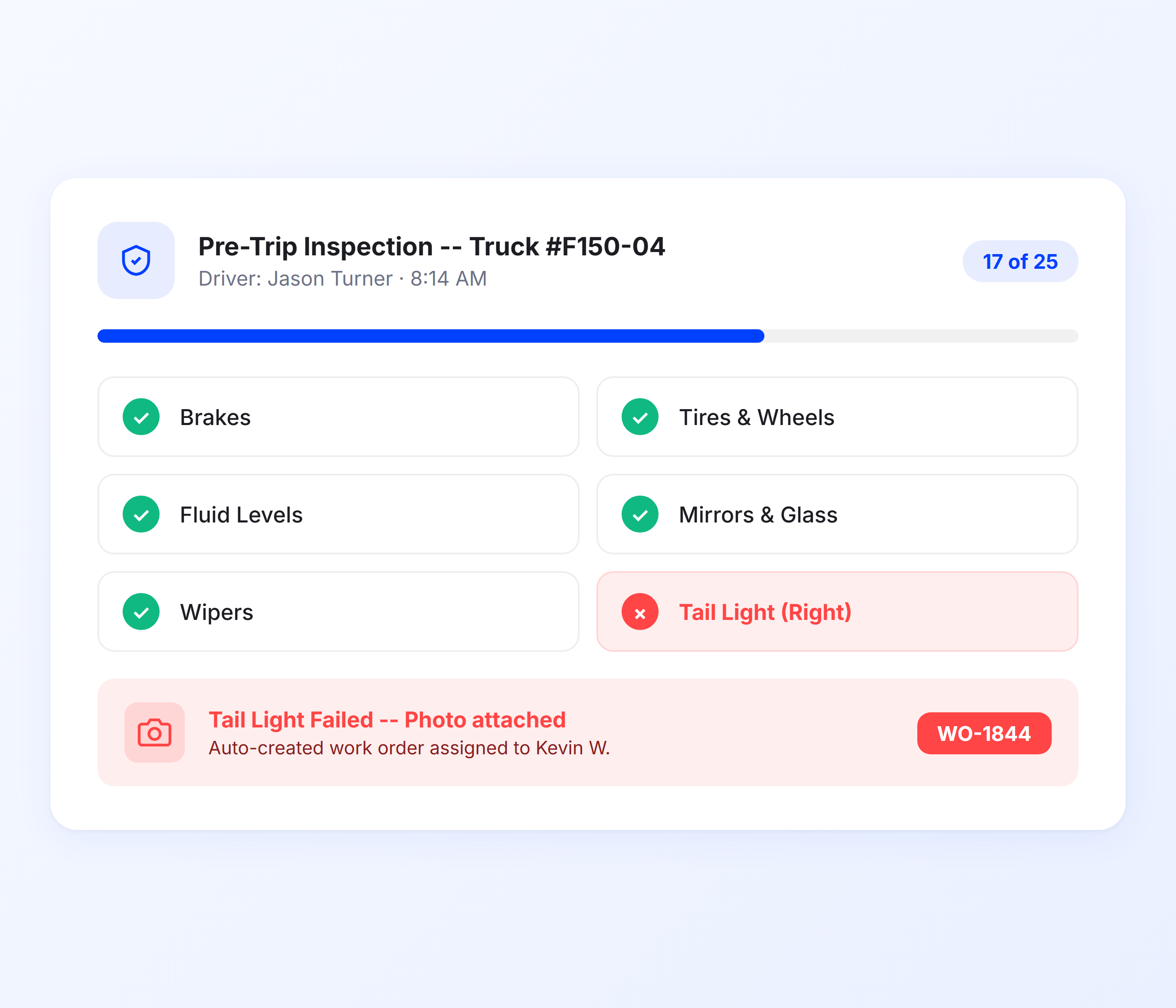
Paper inspection forms are unreliable. They get lost, they get filled out at the end of the day from memory, and they miss the details that matter. Upper digitizes your entire inspection process so every vehicle gets checked properly, every issue gets documented with photos, and every failed item triggers a work order automatically.
For operations that rely on optimized routing, Upper’s route planning features ensure that vehicles pulled for repairs get their stops reassigned automatically.
-
Digital driver vehicle inspection reports (DVIR)
-
Pre-trip and post-trip inspection checklists
-
Mobile inspection capability from any device
-
Photo documentation within inspections
-
Assign inspections to specific vehicles
-
Automatic work order creation from failed items
-
Inspection history tracked per vehicle
-
Offline inspections with automatic sync
Keep Your Fleet Road-Ready at All Times
Automate service reminders and track vehicle health with Upper.
Client Success Stories

“We used to spend 2 hours every morning planning routes in spreadsheets. Now it takes 10 minutes. Upper paid for itself in the first week.”


“What sold me was how easy it is to make changes. My schedules change a lot and I drag & drop stops and we’re back on track in 30 seconds. With our old software, that would’ve been an hour of replanning.”


“Our drivers actually follow the routes now. The app is simple, the navigation works, and they’re not calling me every 10 minutes asking where to go next.”

Fleet Maintenance Software Features for Complete Vehicle Lifecycle Control
- Vehicle Lifecycle Management
- Vendor Management
- Mobile App for Technicians
- Issue-to-Work-Order Automation
- Maintenance Compliance Tracking

Vehicle Lifecycle Management
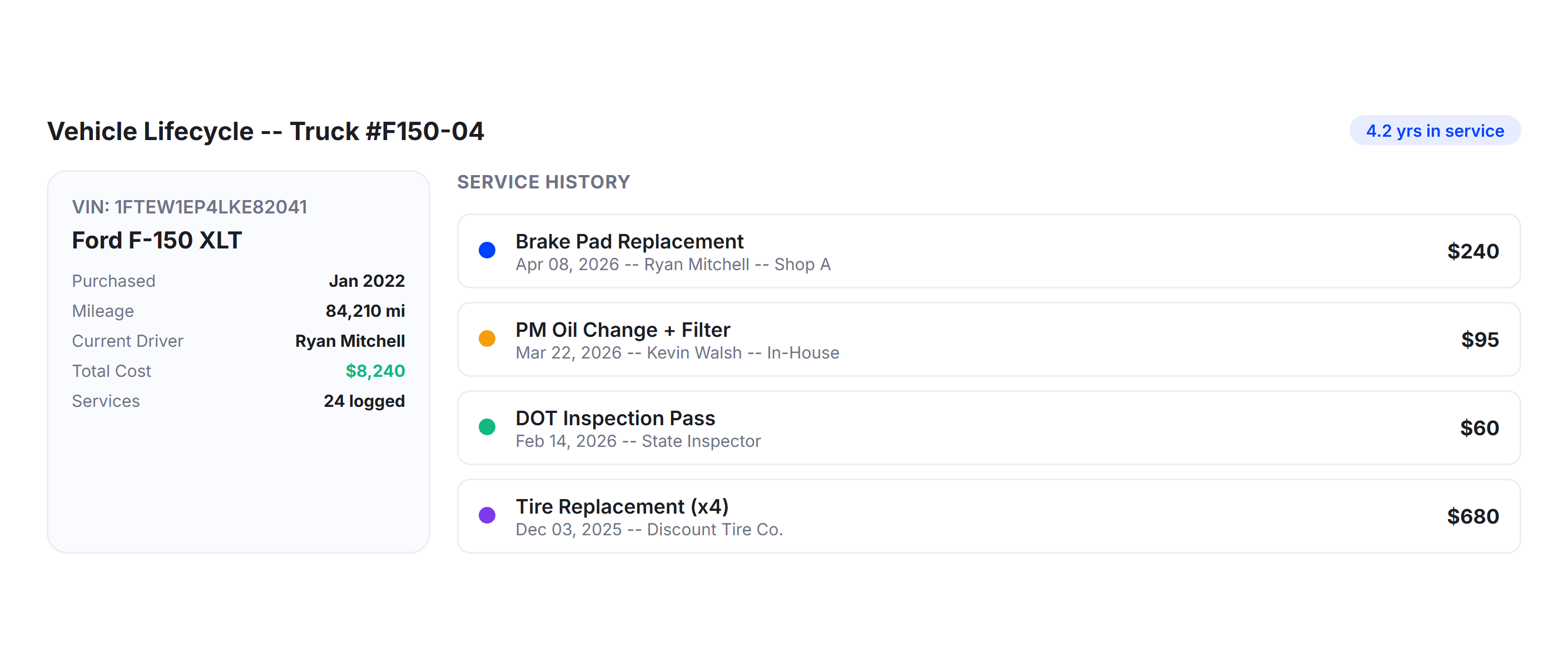
Track every vehicle from purchase to disposal. Upper maintains a complete service history per asset, including every repair, inspection, PM service, and parts replacement. Monitor assignment and location history so you know which drivers used which vehicles and where they were deployed. When it’s time for a replacement decision, you have the full cost and service history to back it up, not a folder of scattered invoices.
Vendor Management
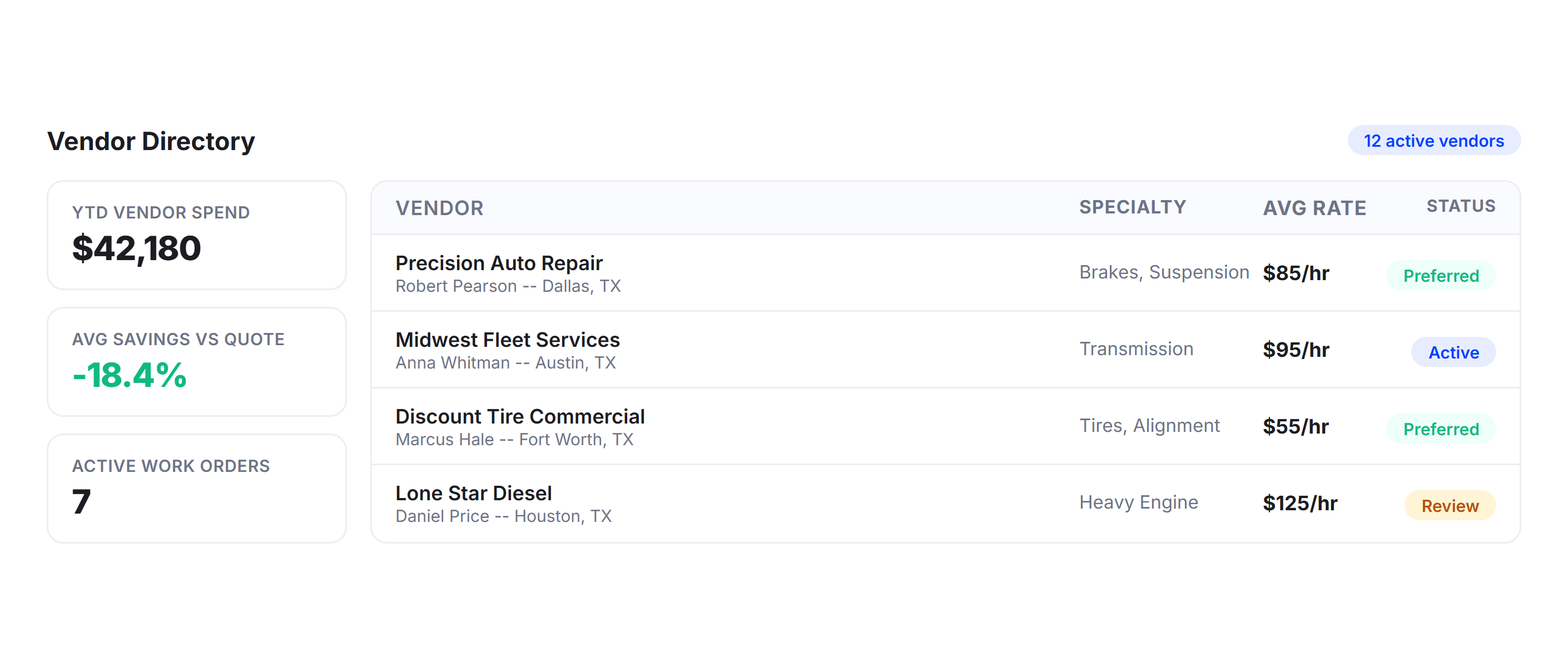
Not every repair happens in-house. Upper’s vendor management system gives you a centralized directory of every service provider with contact details, pricing, and service history per vehicle. Compare vendor pricing for the same part or service, track every outsourced repair, and know exactly which vendors worked on which vehicles. When a vendor quotes $800 for a brake job, and another charges $550, the decision takes seconds.
Mobile App for Technicians
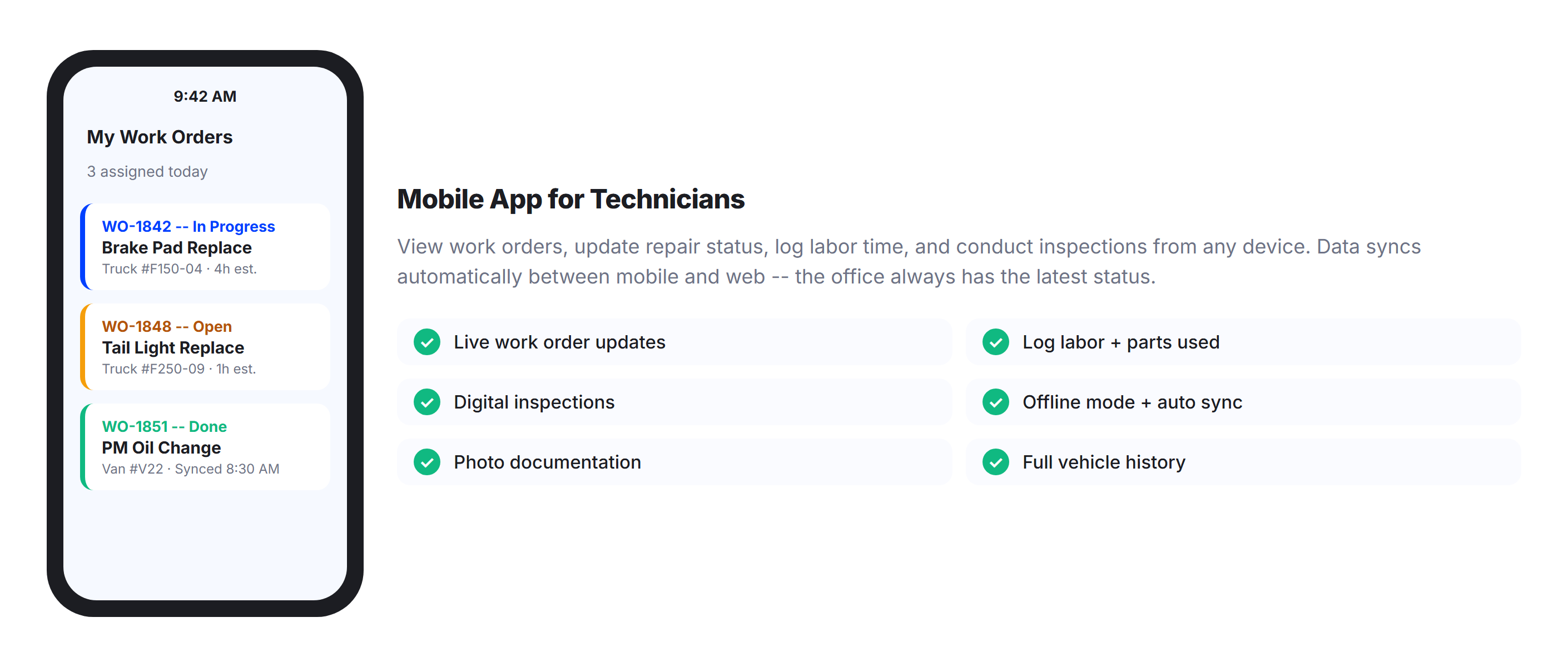
Your maintenance team is not always at a desk. Upper’s mobile app lets technicians view work orders, update repair status, log labor time, conduct inspections, and access vehicle history from any smartphone or tablet. Data syncs automatically between mobile and web, so the office always has the latest status without phone calls or walkie-talkies. Cloud-based access means your team can work from the shop, the field, or the road.
Issue-to-Work-Order Automation
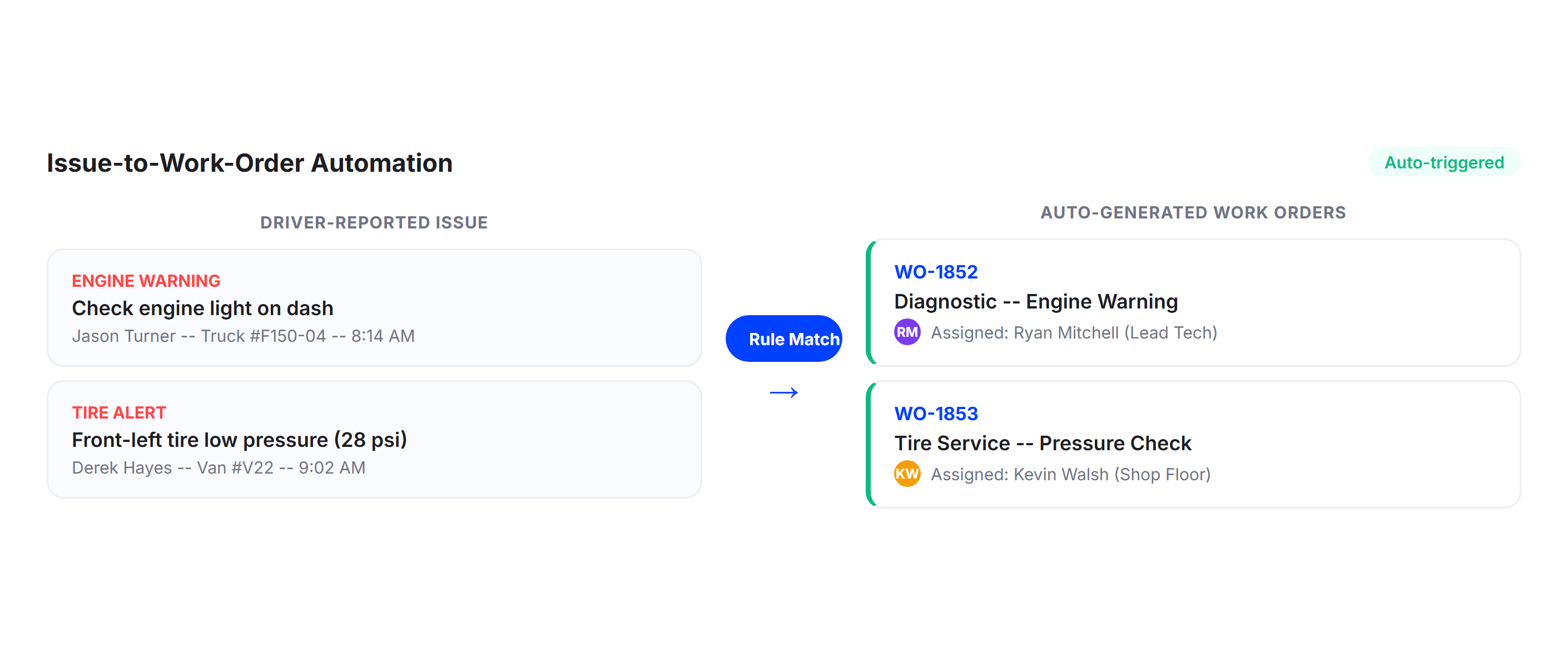
When a driver reports an issue, Upper does not wait for someone to read it and act. The system automatically converts reported issues into work orders based on rules you define. A reported engine warning becomes a work order assigned to your lead technician. A tire pressure alert triggers a shop visit. Every issue is linked to its corresponding work order for full traceability, so nothing gets reported and forgotten.
Maintenance Compliance Tracking
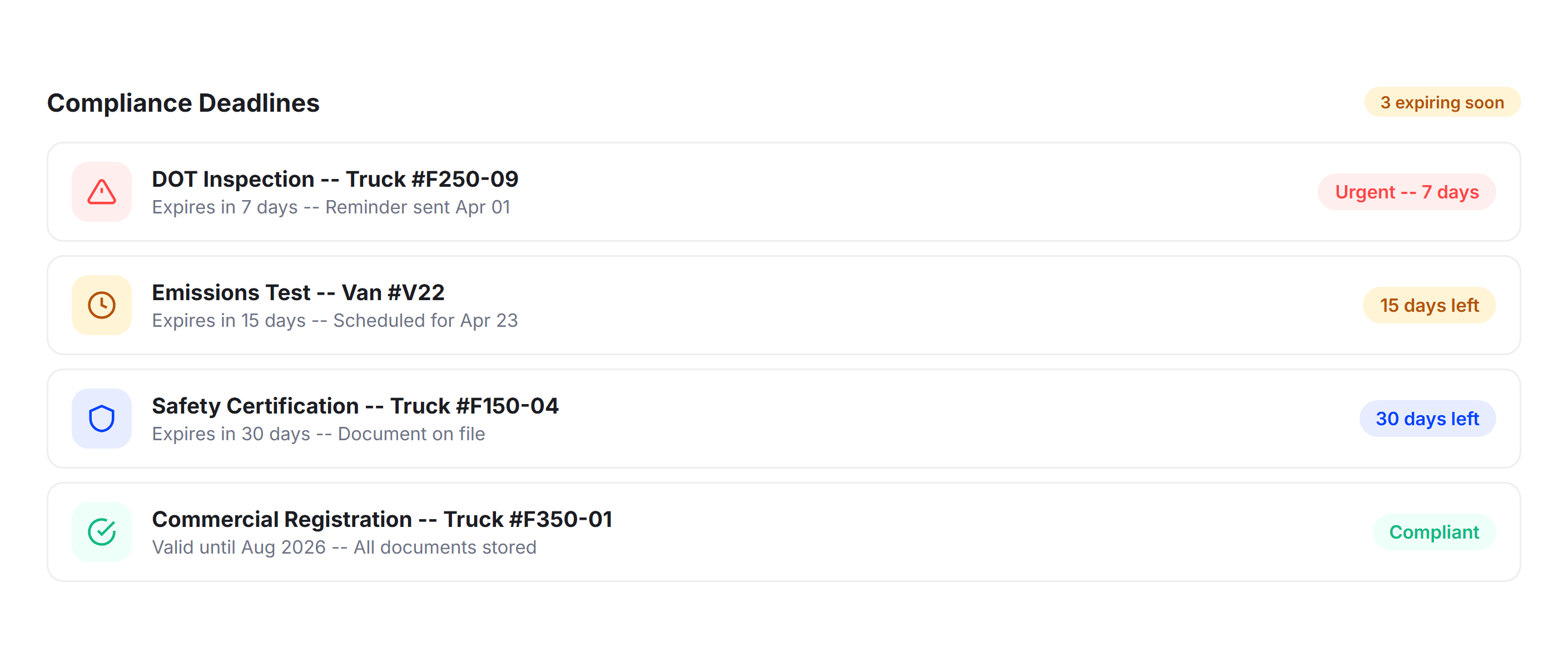
DOT inspections, emissions tests, safety certifications: miss any of them and your vehicle is off the road. Upper tracks every maintenance-related compliance deadline and sends multi-stage email reminders at 30, 15, and 7 days before expiry. Individual and master toggles let you control exactly which alerts you receive. Upload and store all compliance documents centrally so they are accessible during roadside inspections or audits without digging through filing cabinets.
Why Delivery Teams Trust Upper for Fleet Maintenance

Reduce Vehicle Downtime
Automated PM scheduling catches problems early. Work orders move from creation to completion faster. Vehicles spend less time in the shop and more time generating revenue.

Cut Maintenance Costs
TCO analysis and cost-per-mile tracking show exactly where money goes. Preventive maintenance costs a fraction of emergency repairs. Data-backed decisions replace expensive guesswork.

Stay PM Compliant
Five trigger types ensure every service happens on time. Multi-stage reminders, automatic work orders, and compliance tracking mean nothing slips through the cracks.

Extend Vehicle Lifespan
Consistent preventive maintenance extends the useful life of every asset. Complete service histories make replacement timing a data decision, not a guess.

Eliminate Paperwork
Digital work orders, mobile inspections, and automated inventory updates replace clipboards, paper forms, and manual data entry. Every record is searchable and permanent.

Scale Without Complexity
Whether you maintain 10 vehicles or 500, Upper’s fleet maintenance platform handles the volume without adding administrative overhead or extra headcount.
Connect Your Maintenance Data with the Tools You Already Use


Stop Losing Money to Preventable Fleet Breakdowns
Join thousands of fleet managers who use Upper to automate maintenance schedules, manage work orders, track parts inventory, and keep every vehicle running at peak performance.
Frequently Asked Questions
-
What features are included in Upper’s fleet maintenance software?
Upper includes preventive maintenance scheduling with five trigger types, digital work order management, parts and inventory tracking across multiple locations, vehicle inspections with DVIR templates, maintenance cost tracking with TCO analysis, a real-time dashboard, vendor management, vehicle lifecycle tracking, mobile app access for technicians, and issue-to-work-order automation.
-
How does Upper’s preventive maintenance scheduling work?
Upper lets you set PM schedules based on mileage, time intervals, engine hours, fuel consumption, or custom metrics. When a threshold is reached, the system automatically generates a work order and sends notifications. Multi-stage email reminders go out at 30, 15, and 7 days before service is due, with individual and master toggle controls.
-
Can Upper manage work orders for fleet maintenance?
Yes. Upper provides a complete digital work order system. Work orders can be created manually or generated automatically from PM schedules, failed inspections, or reported issues. Each includes a unique number, assigned technician or vendor, parts and labor breakdown, status tracking, team comments, and push notifications. Technicians can update work orders from mobile devices.
-
How does Upper track parts inventory?
Upper maintains a centralized parts catalog with real-time stock levels across multiple storage locations. When parts are used on a work order, inventory is automatically deducted. The system sends low-stock alerts, tracks costs per unit, compares vendor pricing, and logs every part movement. You can also view consumption history per vehicle to spot high-use assets.
-
Does Upper support digital vehicle inspections?
Yes. Upper replaces paper forms with digital checklists that drivers complete on mobile devices. The system includes pre-trip and post-trip templates, DVIR formats, and photo documentation. Drivers can complete inspections offline, and results sync automatically when connectivity returns. Failed inspection items automatically trigger work orders, so issues get addressed immediately.
-
How does Upper help reduce fleet maintenance costs?
Upper reduces costs in three ways. Automated preventive maintenance catches problems before they become expensive emergency repairs. TCO analysis and cost-per-mile reporting identify high-cost vehicles for informed replacement decisions. Parts inventory tracking with vendor price comparisons ensures you are not overpaying for parts or holding excess stock.
-
Can I track the total cost of ownership for each vehicle?
Yes. Upper calculates TCO per vehicle by aggregating maintenance costs, parts expenses, labor charges, and downtime costs over the vehicle’s lifecycle. Cost-per-mile and cost-per-kilometer metrics let you compare vehicles regardless of age or usage. When a vehicle’s costs consistently exceed the fleet average, the data justifies a replacement decision.
-
How does Upper handle vendor management for fleet maintenance?
Upper includes a vendor directory with contact details, service history, and pricing for every external provider. You can compare vendor pricing for the same part or service, track outsourced repairs by vehicle and vendor, and maintain a complete history of which vendors worked on which vehicles. This makes evaluating performance and negotiating rates straightforward.
-
Is Upper’s fleet maintenance software suitable for small fleets?
Yes. Upper is designed for small to medium-sized fleets and scales as your operation grows. Whether you maintain five vehicles or 500, the platform provides the same automation, visibility, and control. You do not need a dedicated IT team to get started. The interface is built for fleet managers who need results without complexity.