
Real-Time Notifications That Get Customers to the Door Before the Food Arrives

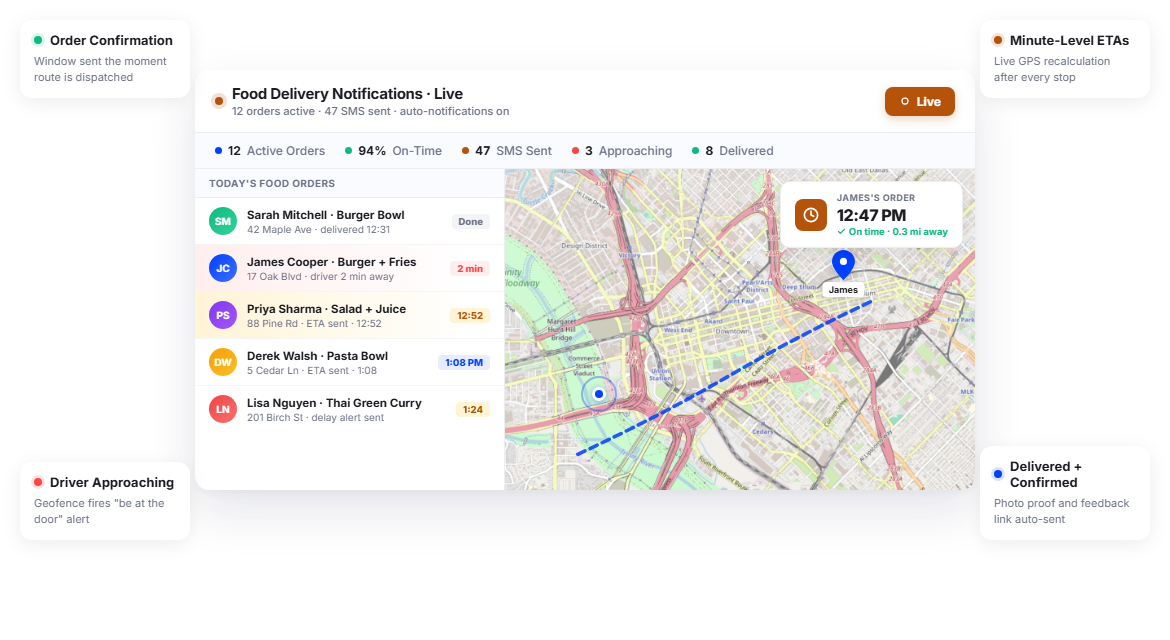
Food Delivery Teams Using Upper Keep ETAs Tight and Customer Satisfaction High






From Order Placed to Door Opened, Perfectly Timed Notifications
What Food Delivery Notifications Promise
-
 Customers know exactly when their meal will arrive
-
Food is delivered at the right temperature every time
-
No missed deliveries because the customer stepped out
-
Your drivers handle deliveries, not customer phone calls

What Actually Happens
-
Customers get a vague “30-45 minutes” estimate that means nothing
-
Nobody is at the door, so the driver waits while the food cools
-
Customers call asking, “Where’s my food?” before the driver even starts
-
The driver texts from the parking lot, and the customer is in the shower
Every Notification Your Food Delivery Operation Needs
Upper’s customer notifications software for food delivery automates customer communication with the precision that perishable delivery demands. From order confirmation to doorstep handoff, every customer receives updates timed to keep food fresh and customers ready.
Order Confirmation and Delivery Window
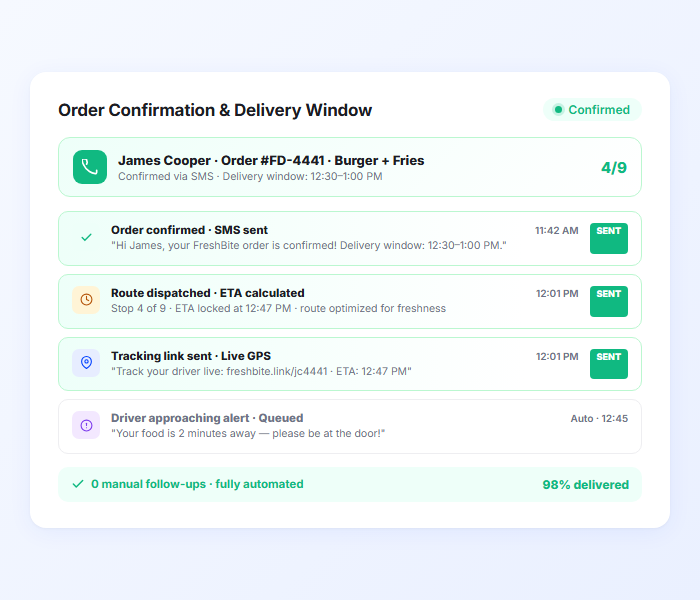
When a food delivery is scheduled and assigned to a route, Upper sends the customer an automated confirmation with their delivery window. The notification lets customers know their order is confirmed, on a route, and heading their way within a specific timeframe. This first touchpoint sets expectations and reduces premature “where’s my food?” calls.
- Automatic order confirmation via SMS and email
- Delivery window based on optimized route sequence
- Estimated arrival time for the customer’s position on the route
- Customizable templates for different meal types or service levels
- Confirmation sent when route is optimized and dispatched
- Reduces premature status inquiries

Minute-Level Delivery ETAs
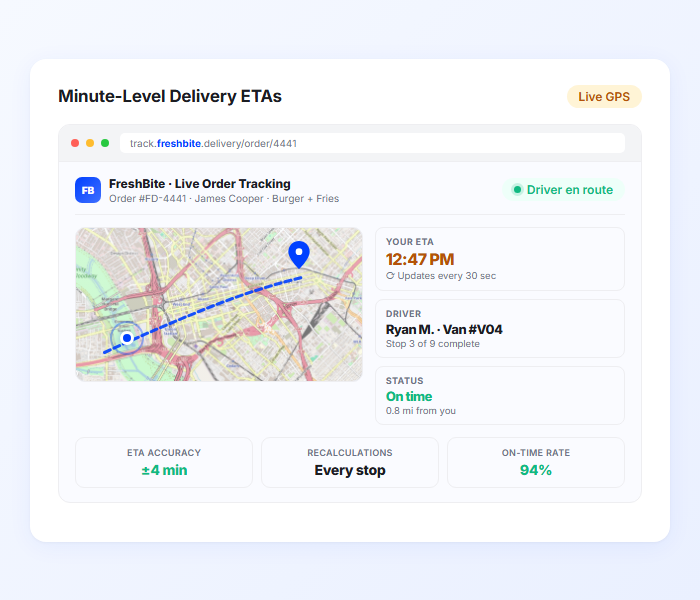
Upper calculates food delivery ETAs from live route optimization data and driver GPS positions. For food delivery, where five minutes can be the difference between hot and lukewarm, Upper provides minute-level accuracy that updates in real time as the driver progresses. Customers know exactly when to be at the door.
- Minute-level ETA from live route and GPS data
- Real-time recalculation as the driver completes earlier stops
- Precise enough for customers to time their availability
- Factors in actual stop times, not just driving distance
- SMS and email notification with tracking link
- Accuracy that matches the freshness window of the food
Customer Tracking Links
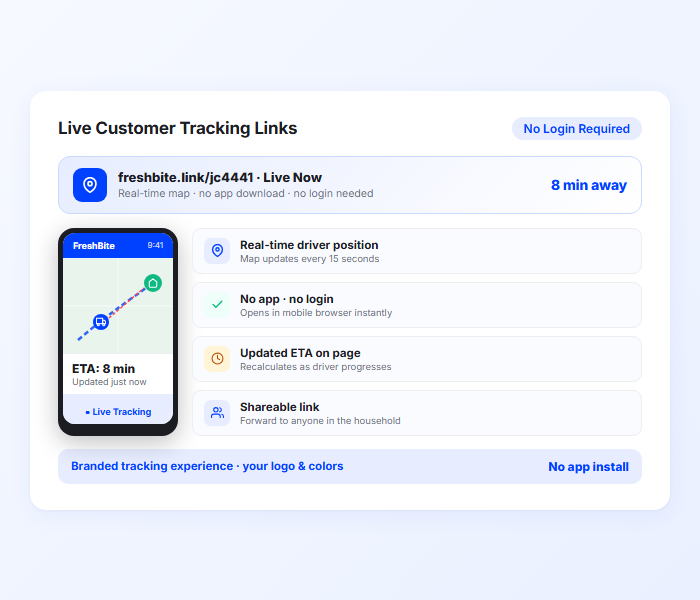
Every notification includes a tracking link that opens in a mobile browser. Customers watch the driver’s approach in real time, see an updated ETA, and know exactly when to step outside. No app required, no login needed. For food delivery, this real-time visibility is what prevents the “driver arrived, customer not ready, food getting cold” scenario.
- Real-time driver position on a mobile-optimized map
- Updated ETA visible on tracking page
- No app download or login required
- Customers can time their readiness to driver proximity
- Shareable with other household members
- Branded tracking experience with your company info
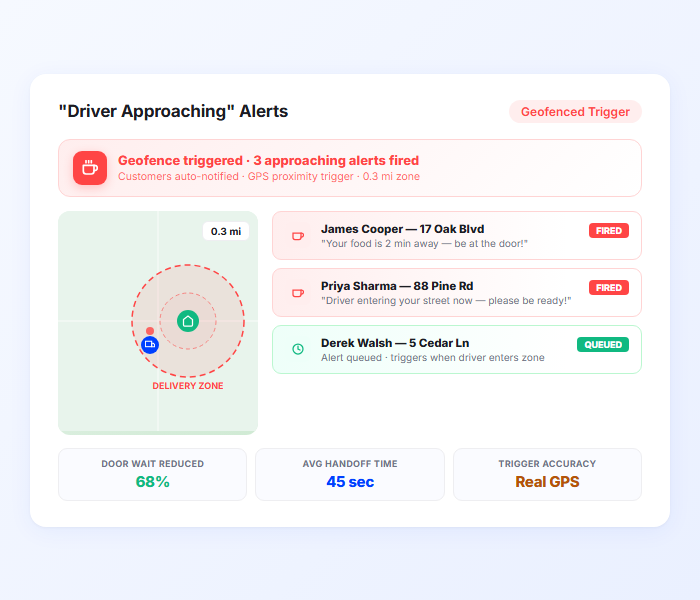
“Driver Approaching” Alerts
When the driver enters the customer’s geofenced delivery zone, Upper sends a proximity alert. For food delivery, this is the critical notification: it tells the customer, “your food is two minutes away, be at the door.” The alert is timed to real GPS proximity, not a scheduled estimate.
- Automatic alert when the driver enters the geofenced zone
- Configurable proximity radius for the trigger
- Gives customers 2-5 minutes to get to the door
- Integrated with GPS tracking for accurate triggers
- Reduces driver wait time at the door
- Keeps food at serving temperature through faster handoffs
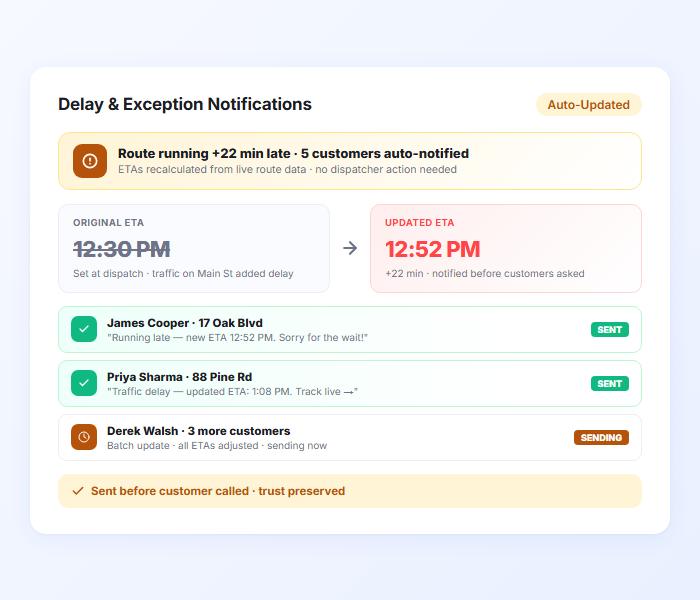
Delay and Exception Notifications
When a route runs behind schedule due to traffic, weather, or an unexpected stop, Upper automatically recalculates ETAs and sends updated notifications to affected customers. For food delivery, proactive delay communication is the difference between an understanding customer and a canceled order. Customers know the revised timeline before they have to ask.
- Automatic delay alerts when ETA shifts beyond a set threshold
- Updated arrival window recalculated from live route data
- Triggered by real-time traffic, weather, or stop-time overruns
- Sent before customers notice the delay themselves
- Customizable delay threshold for when notifications trigger
- Preserves customer trust during unavoidable disruptions
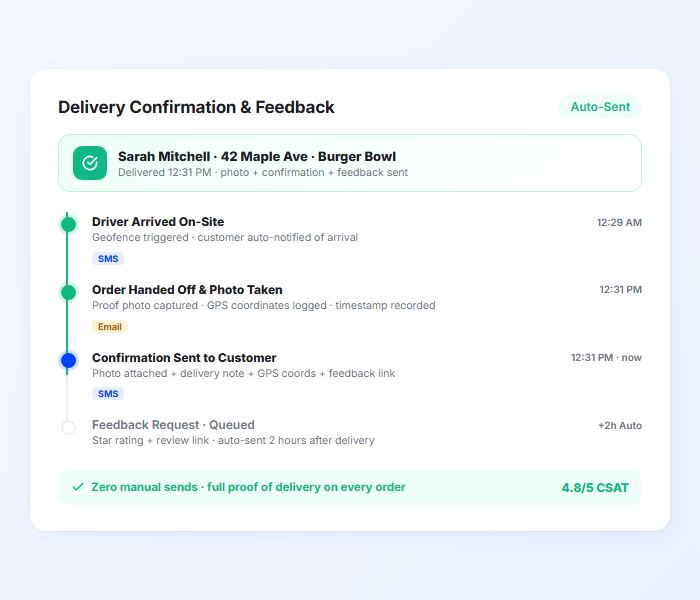
Delivery Confirmation and Feedback
When the delivery is complete, Upper sends an automatic confirmation with proof of delivery details. For food delivery, the confirmation can include a delivery photo, a timestamp, and a link for customer feedback. This closes the loop on every order and gives you data on delivery quality.
- Automatic delivery confirmation notification
- Delivery photo for contactless drop-offs
- Timestamp with GPS coordinates
- Customer feedback link in confirmation
- Delivery notes for any special handling
- Complete digital record per order
Send Minute-Level ETAs and “Driver Approaching” Alerts Instantly
Upper calculates precise arrival times from live route data and sends proximity alerts when the driver is minutes away.
Client Success Stories

“We used to spend 2 hours every morning planning routes in spreadsheets. Now it takes 10 minutes. Upper paid for itself in the first week.”


“What sold me was how easy it is to make changes. My schedules change a lot and I drag & drop stops and we’re back on track in 30 seconds. With our old software, that would’ve been an hour of replanning.”


“Our drivers actually follow the routes now. The app is simple, the navigation works, and they’re not calling me every 10 minutes asking where to go next.”

Food Delivery Notification Features for Fresher, Faster Service
- Notification Templates
- Contactless Delivery Workflow
- Batch Order Notifications
- Route-Synced ETAs
- Delivery Analytics

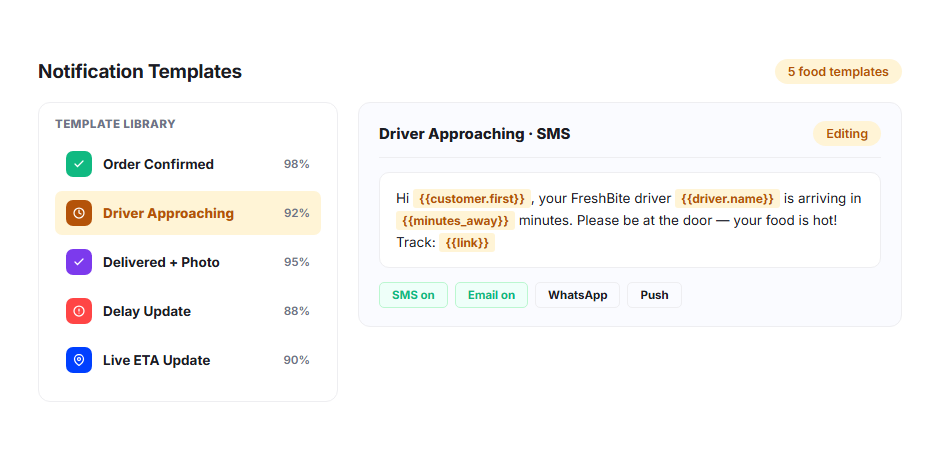
Notification Templates
Build custom notification templates for different meal types, service levels, or delivery methods. Hot meals might include a “be ready at the door” instruction. Contactless deliveries might include a “we’ll leave your order and send a photo” message. Templates keep communication consistent across every driver and route.
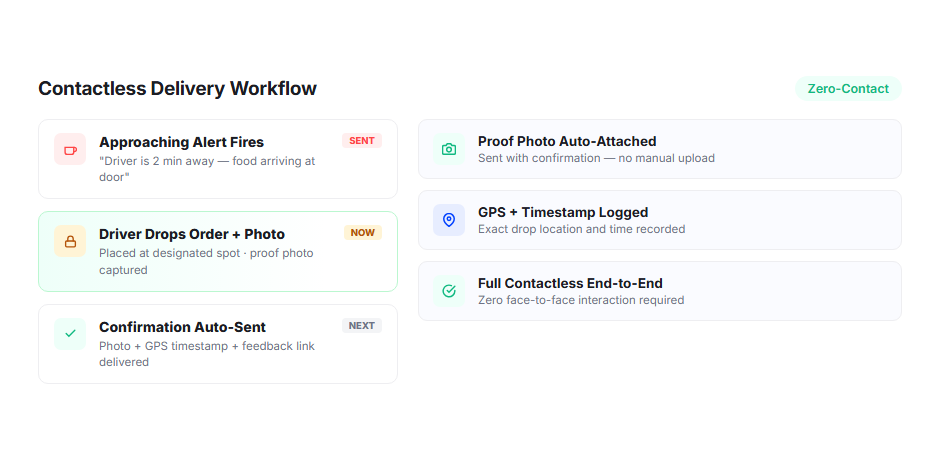
Contactless Delivery Workflow
For contactless food deliveries, Upper sends a “driver approaching” alert, the driver leaves the order at the designated spot, captures a delivery photo, and the customer receives an automatic confirmation with the photo attached. The entire handoff happens without face-to-face interaction.
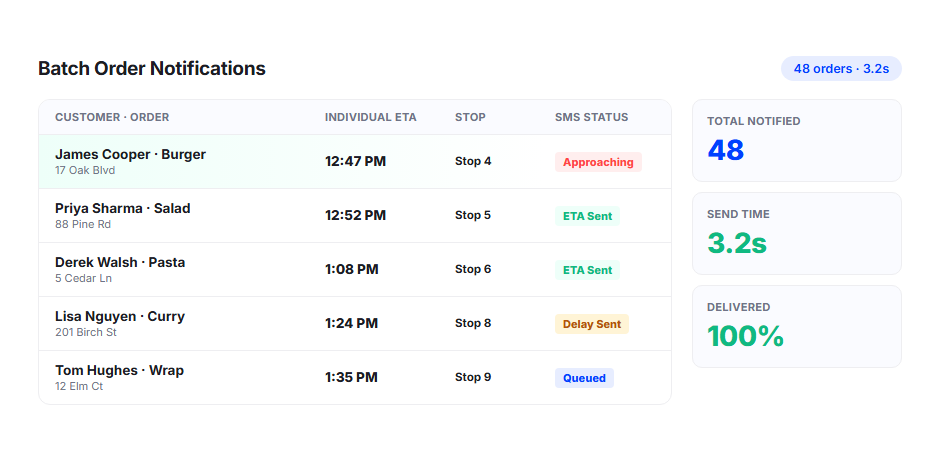
Batch Order Notifications
For meal prep and subscription services delivering dozens or hundreds of orders per route, Upper sends individual notifications to every customer with their specific ETA. Batch processing ensures notifications go out efficiently, even on high-volume routes without delays or notification bottlenecks.
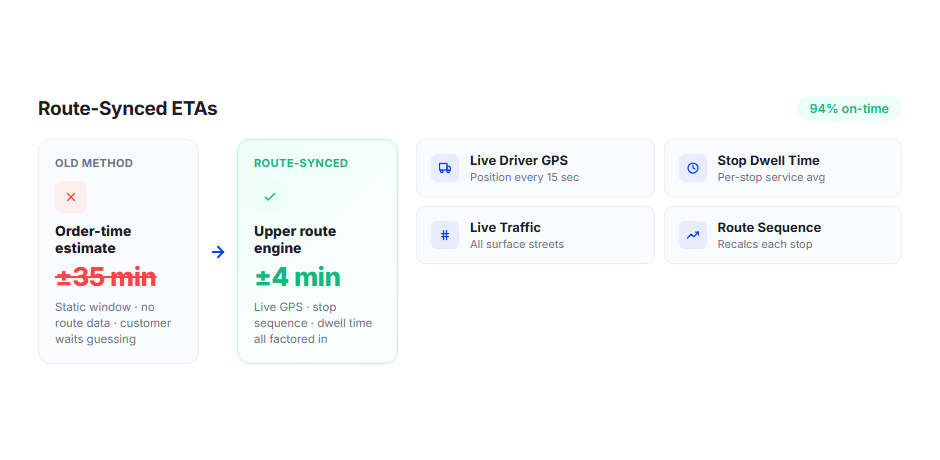
Route-Synced ETAs
ETAs are calculated from Upper’s route optimization engine, not estimated from order time. For food delivery routes where stop times vary (apartment buildings take longer than houses, contactless is faster than handoff), Upper factors in actual per-stop time when calculating downstream ETAs.
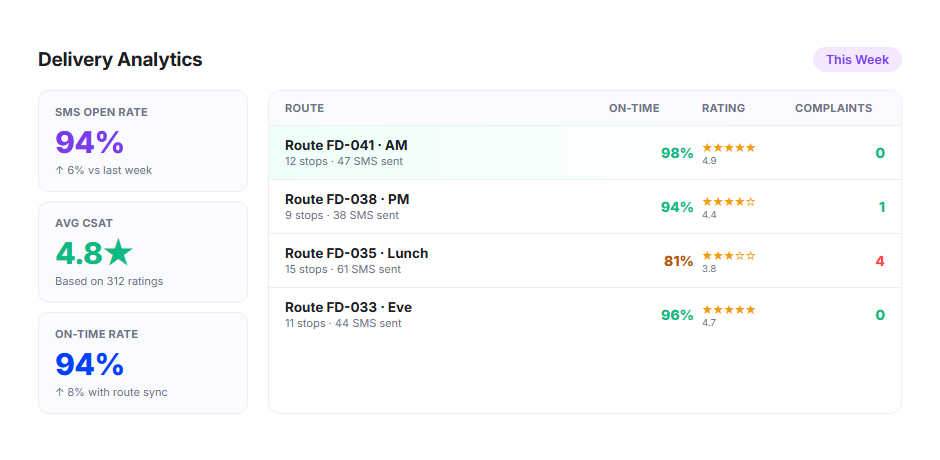
Delivery Analytics
Track delivery times, customer satisfaction correlations, and notification engagement through Upper’s analytics dashboard. Identify routes or time slots where food quality complaints are highest and correlate them with delivery times and notification patterns.
Why Food Delivery Businesses Choose Upper for Customer Notifications

Keep Food Hot
The fastest way to ensure food quality on delivery is to minimize the time between arrival and handoff. Proximity alerts and minute-level ETAs get customers to the door the moment the driver pulls up.

Eliminate “Where’s My Food?” Calls
Tracking links and real-time ETAs answer the question before customers call. Your team manages operations instead of relaying delivery status one call at a time.

Handle High-Volume Meal Delivery Routes
Whether you deliver 20 meals or 200 per route, every customer gets an individual ETA, a tracking link, and a delivery confirmation. The notification system scales with your volume.

Support Contactless Delivery Professionally
Proximity alerts, delivery photos, and automatic confirmations make contactless delivery seamless. Customers know when the food is at their door without the driver needing to knock or call.

Reduce Quality Refunds
When food arrives cold because the customer wasn’t ready, that’s a refund. When the customer is at the door because they got a two-minute proximity alert, that’s a five-star review. The difference is one automated notification.

Build a Professional Delivery Brand
Branded tracking links, precise ETAs, and automatic confirmations give your food delivery service the same highly professional and reliable experience customers expect from major delivery platforms.
Connect Food Delivery Notifications with Your Existing Tools


Keep Every Food Delivery Customer Informed from Kitchen to Doorstep
Upper automates order confirmations, minute-level ETAs, proximity alerts, delivery photos, and completion notifications for every meal on every route.
Frequently Asked Questions
-
How does the “driver approaching” alert work?
When the driver enters a configurable geofenced zone around the customer’s address, Upper automatically sends a proximity notification via SMS or email. For food delivery, this alert gives customers two to five minutes of advance notice to get to the door. The trigger is based on actual GPS proximity, not a time estimate, so it fires when the driver is genuinely approaching.
-
Does Upper support contactless food delivery?
Yes. Upper’s notification workflow supports contactless delivery: the customer receives a proximity alert, the driver leaves the order at the designated location, captures a delivery photo through the mobile app, and the customer receives an automatic confirmation with the photo attached. The entire process happens without face-to-face interaction.
-
Can I send different notification templates for different meal types?
Yes. Upper supports multiple notification templates that you can assign by delivery type, service level, or route. Hot meal deliveries might include a “be at the door” instruction, while meal prep subscriptions might use a different message. Templates are fully customizable for content, channel, and timing.
-
How does Upper handle high-volume food delivery routes?
Upper calculates individual ETAs and sends personalized notifications for every customer on the route, regardless of size. A 150-stop meal delivery route gets 150 sets of customer notifications with per-stop ETAs that recalculate as the driver progresses. The system processes notifications efficiently even at high volume.
-
Does Upper capture proof of delivery for food orders?
Yes. Drivers capture delivery photos, timestamps, and optional customer signatures through Upper’s mobile app. For contactless delivery, the photo serves as confirmation that the order was placed at the designated location. Every delivery creates a digital record for quality tracking and dispute resolution.
-
Can customers track their food delivery in real time?
Yes. Every notification includes a tracking link that opens in the customer’s mobile browser. The page shows the driver’s real-time position on a map and an updated ETA. Customers can watch the driver approach and time their readiness accordingly. No app download or account required.