
Customer Notification Software To Simplify Plumbing Service Communication

Pharmacy Delivery Teams Using Upper Keep Patients Informed and Every Delivery Documented






The Customer Called in a Panic About a Leak. Now They’re Asking When You’ll Actually Get There.
What Plumbing Appointment Communication Promises
-
 Customers know exactly when the plumber will arrive
-
Emergency callers get a real ETA, not “we’ll get there when we can.”
-
Homeowners prepare the work area before the technician walks in
-
Your office manages the schedule, not the phone

What Actually Happens
-
Customers get a four-hour service window and can’t leave the house, waiting around without clear arrival updates.
-
Emergency callers repeatedly call back every 20 minutes asking for an update due to lack of real-time communication.
-
The plumber arrives, and the area under the sink is packed with cleaning supplies and not cleared for work.
-
Scheduled customers get bumped for emergencies, and nobody informs them in advance, leading to frustration and complaints.
Every Notification Your Plumbing Business Needs
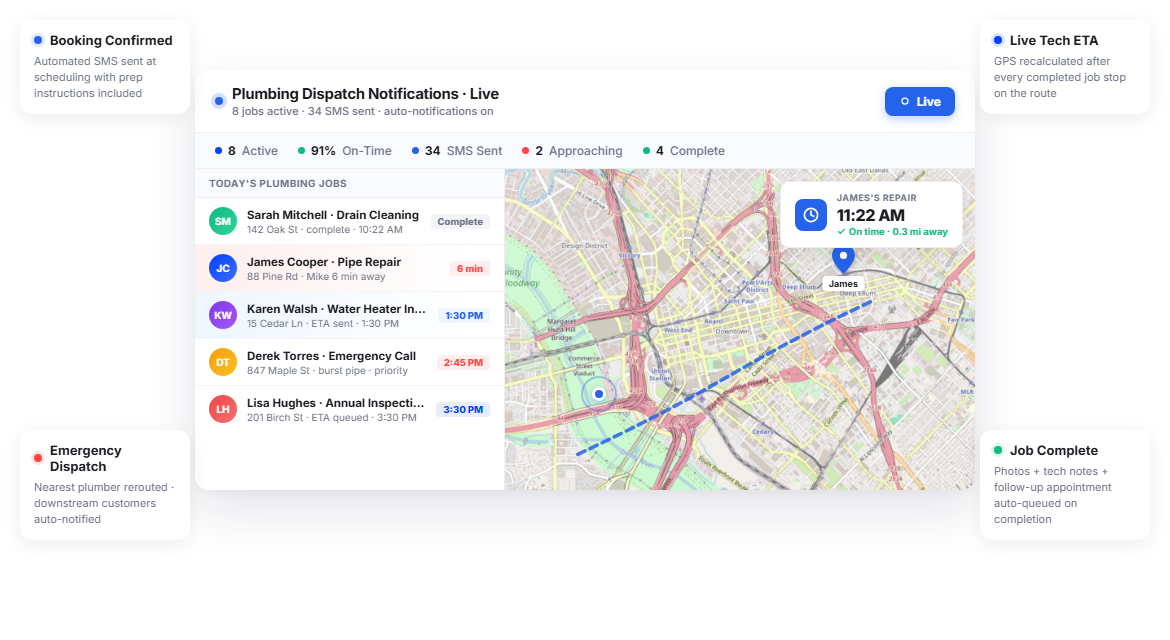
Upper’s customer notifications software for plumbing automates communication for both scheduled appointments and emergency dispatches. Every customer, whether they booked a week ago or called 20 minutes ago, stays informed without your office making a single manual call.
Appointment Booking Confirmations
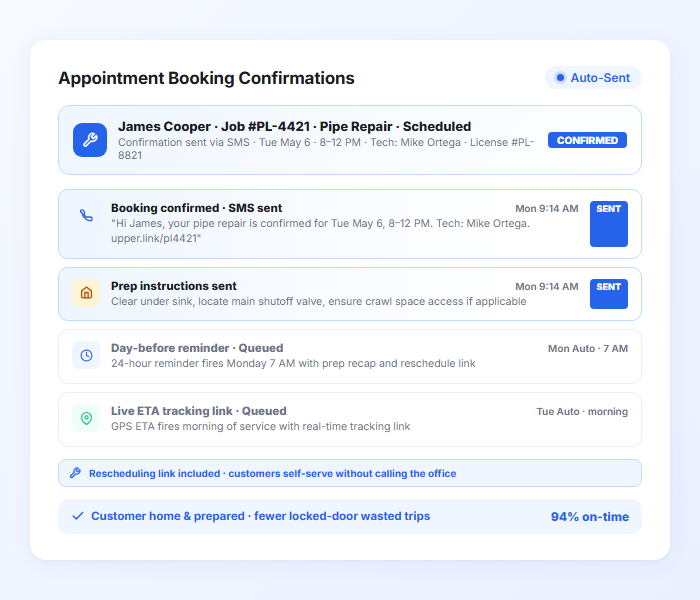
When a plumbing job is scheduled, Upper sends the customer an automated confirmation with the date, time window, and preparation instructions. For plumbing work where customers need to clear under sinks, know the water shutoff location, or ensure access to crawl spaces, this first notification prevents on-site delays.
- Automatic booking confirmation via SMS and email
- Appointment date, time window, and technician details
- Preparation instructions (clear under sink, locate shutoff valve)
- Rescheduling link for customers who need to change the date
- Customizable templates for different job types
- Confirmation sent when the route is finalized

Day-Before Reminders
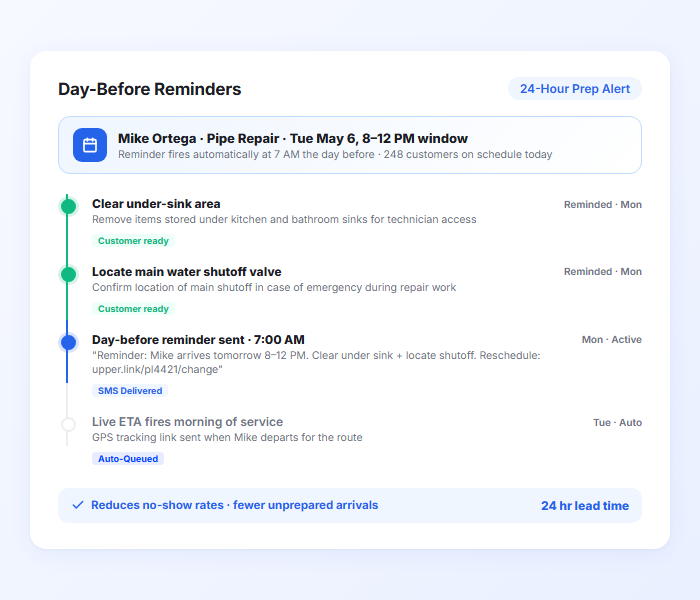
Upper sends an automated reminder 24 hours before the appointment. The reminder puts the appointment back on the customer’s radar with enough time to prepare the work area. Plumbing companies using automated reminders see significantly fewer no-shows and unprepared arrivals.
- Automated reminder 24 hours before the appointment
- Preparation recap and time window confirmation
- Reschedule link to reduce last-minute cancellations
- Customers can confirm availability
- Sent via SMS, email, or both
- Reduces no-show rates measurably
Real-Time Technician ETAs
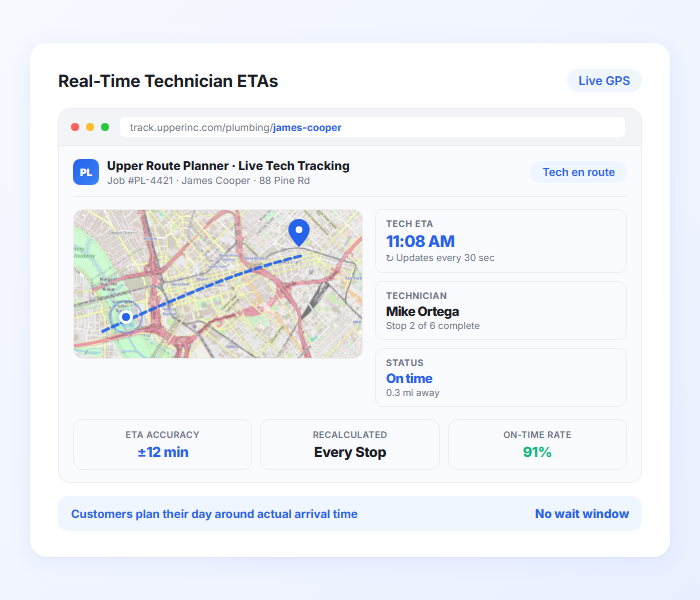
On service day, Upper sends customers a live ETA calculated from route optimization data and technician GPS position. As the plumber completes earlier jobs (which vary from 30-minute fixes to half-day installations), downstream ETAs recalculate automatically. Customers see when the plumber will actually arrive.
- Live ETA from route optimization and GPS data
- Auto-recalculation as the technician completes earlier jobs
- Factors in variable job durations per stop
- Automatic update when emergencies cause reroutes
- SMS and email notification with tracking link
- Narrows service windows to precise arrival estimates
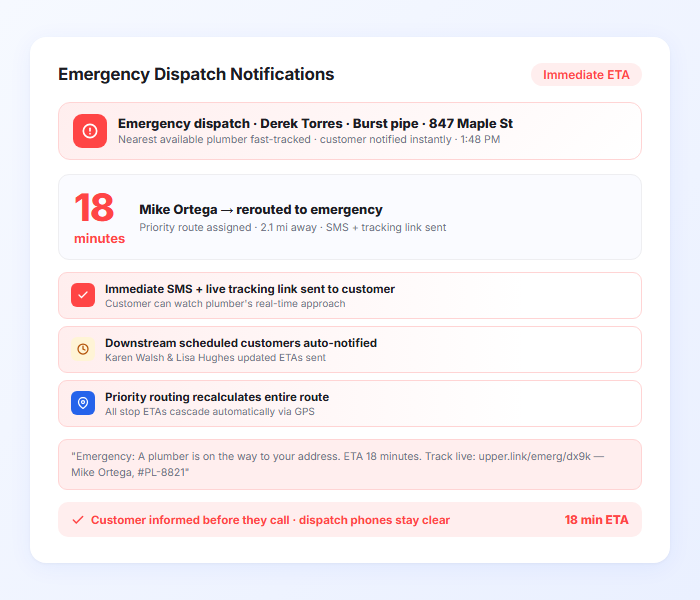
Emergency Dispatch Notifications
When an emergency call comes in, Upper fast-tracks the nearest available plumber and sends the customer an immediate ETA with a live tracking link. The customer knows help is on the way and can track the plumber’s approach in real time instead of calling your office every 20 minutes.
- Immediate ETA notification for emergency dispatch
- Live tracking link showing plumber’s real-time position
- Emergency notification template conveys urgency
- Integrates with dispatch management for priority routing
- Affected scheduled customers notified automatically with updated ETAs
- Reduces repeat calls from anxious emergency customers
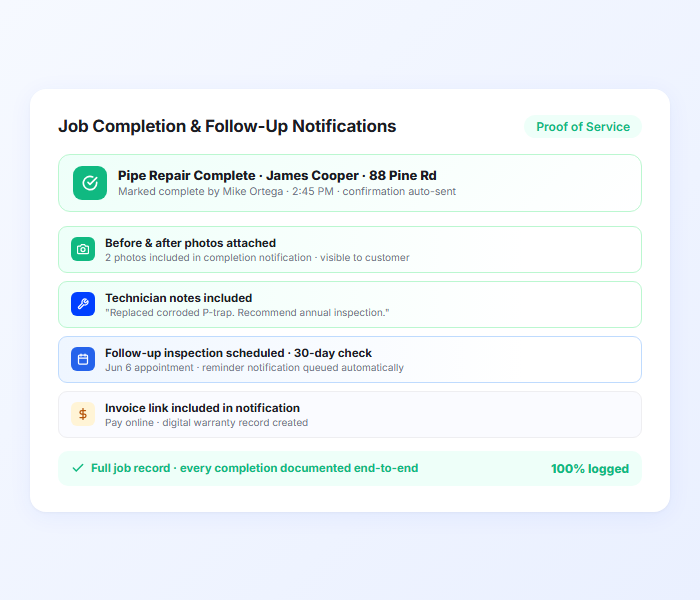
Job Completion and Follow-Up Notifications
When the plumber marks a job complete, Upper sends the customer a confirmation with proof of service photos, technician notes, and any follow-up recommendations. For plumbing work requiring follow-up inspections or second visits, Upper schedules the next appointment notification automatically.
- Automatic job completion notification
- Before/after photos of completed work
- Technician notes and recommendations
- Follow-up appointment scheduling for multi-visit jobs
- Digital record for warranty and customer files
- Invoice or payment link option in notification
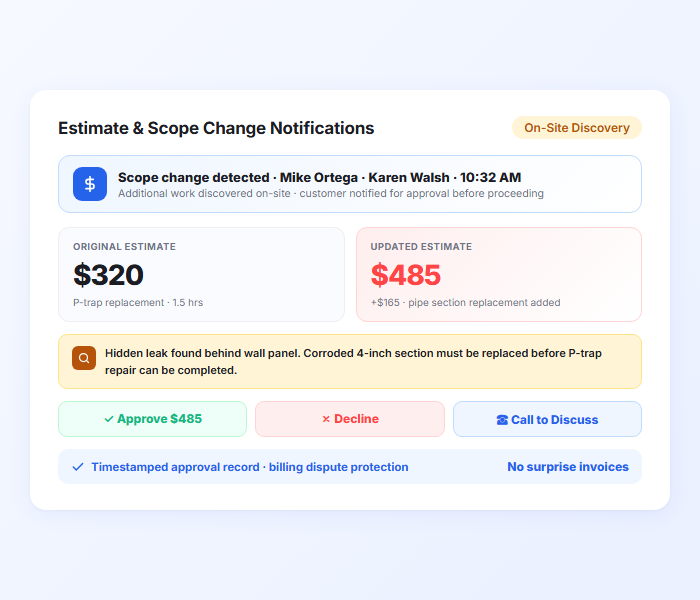
Estimate and Scope Change Notifications
When a plumber discovers additional issues on-site — a hidden leak behind the wall, corroded pipes that need replacing beyond the original fix, or code violations that must be addressed — Upper sends the customer a notification with the expanded scope, updated estimate, and approval options. The customer can approve, decline, or call to discuss before the plumber proceeds, eliminating surprise invoices.
- Automatic notification when the plumber flags additional work needed
- Updated estimate with description of the expanded scope
- Customer can approve or decline from the notification
- Timestamped approval record for billing disputes
- Keeps the job moving without the plumber waiting on hold with your office
- Digital documentation of scope changes for warranty and compliance
Reduce Missed Plumbing Appointments With Automated Notifications
Upper automates booking confirmations, day-before reminders, real-time technician ETAs, emergency dispatch alerts, and job completion notifications.
Client Success Stories

“We used to spend 2 hours every morning planning routes in spreadsheets. Now it takes 10 minutes. Upper paid for itself in the first week.”


“What sold me was how easy it is to make changes. My schedules change a lot and I drag & drop stops and we’re back on track in 30 seconds. With our old software, that would’ve been an hour of replanning.”


“Our drivers actually follow the routes now. The app is simple, the navigation works, and they’re not calling me every 10 minutes asking where to go next.”

Plumbing Notification Features for Tighter Schedules and Faster Emergency Response
- Service Templates
- Geofenced Arrival Alerts
- Emergency Dispatch
- Multi-Visit Job Tracking
- Service Analytics

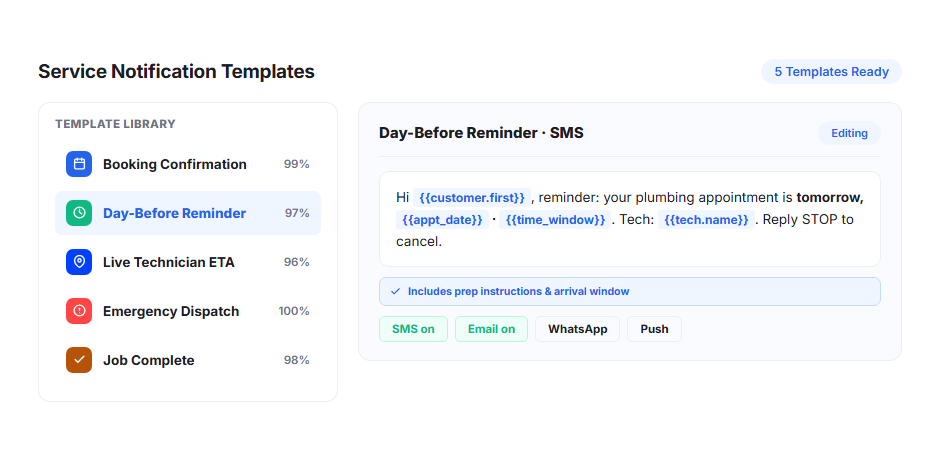
Service Templates
Build separate templates for different plumbing services: routine repairs, installations, inspections, emergency calls, and drain cleaning. Each template includes job-specific preparation instructions and appropriate notification timing.
Geofenced Arrival Alerts
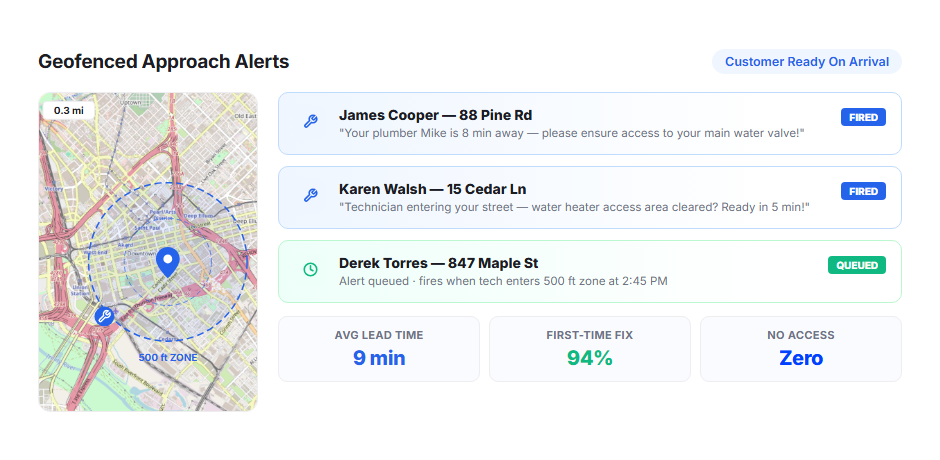
Trigger automatic “plumber approaching” notifications when the service vehicle enters a customer’s geofenced zone. Give homeowners 10-15 minutes to clear work areas, locate shutoff valves, and prepare for the technician’s arrival.
Emergency Dispatch
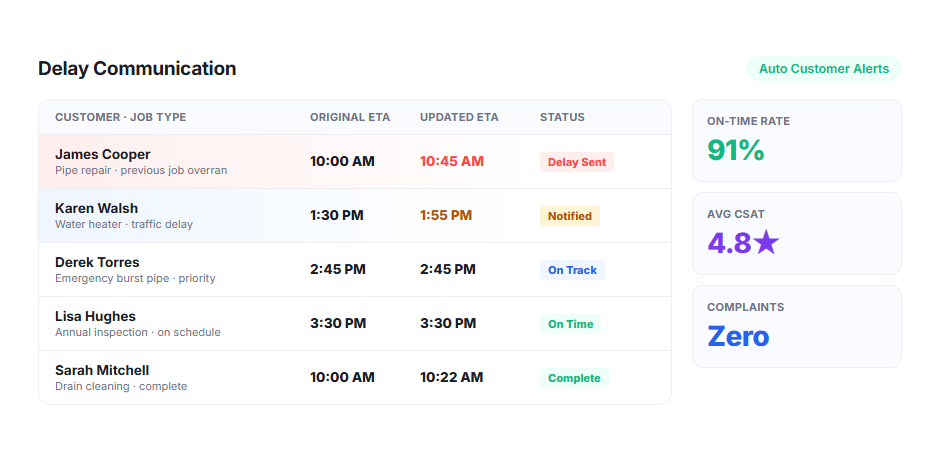
When an emergency plumbing call comes in, Upper sends the customer an immediate ETA and tracking link. Emergency templates convey urgency and give the customer real-time visibility. Affected scheduled customers receive automatic updates with new arrival times.
Multi-Visit Job Tracking
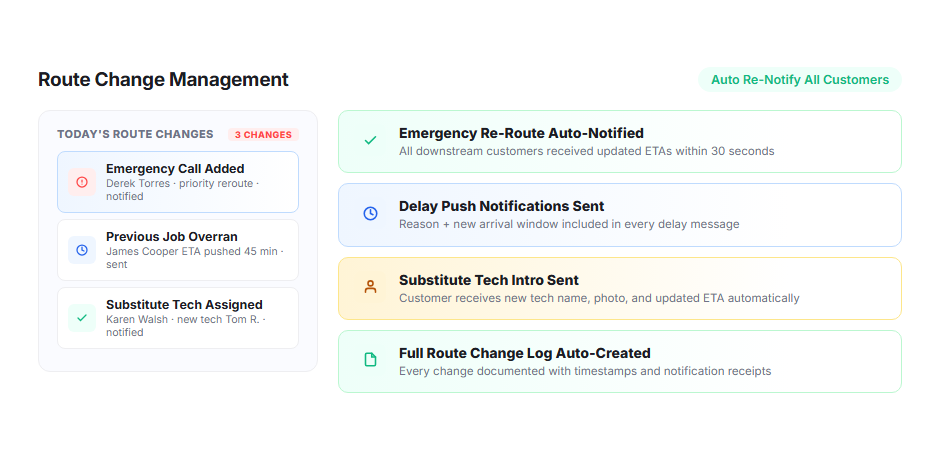
For plumbing projects requiring multiple visits (initial repair, inspection, final work), Upper tracks the full job across all visits. Customers receive notifications for each scheduled visit, and plumbers see the complete job history when they arrive for the next phase.
Service Analytics
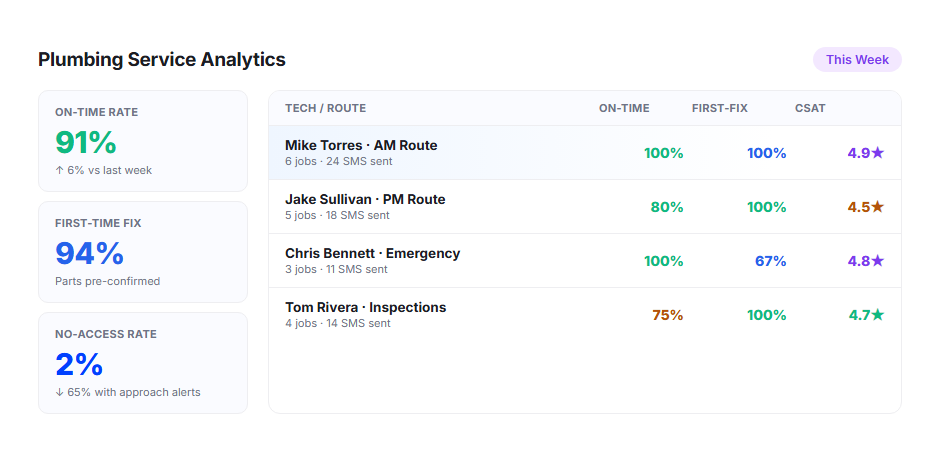
Track on-time rates, job durations, no-show rates, emergency response times, and notification engagement through Upper’s analytics dashboard. Identify bottlenecks and measure how notifications affect customer availability.
Why Plumbing Companies Choose Upper for Customer Notifications

Eliminate Appointment No-Shows
Day-before reminders and day-of ETAs keep appointments on the customer’s radar. When homeowners know the plumber is 10 minutes away, they stay home.

Handle Emergencies Without Losing Scheduled Customers
When an emergency reroutes a plumber, affected scheduled customers get instant updates with new ETAs. Transparent communication during disruptions prevents cancellations.

Give Emergency Callers Real-Time Visibility
Instead of calling back every 20 minutes, emergency customers track the plumber’s approach on a live map. Your office handles dispatching, not repeat status calls.

Get Customers to Prepare the Work Area
Preparation instructions in booking confirmations and reminders ensure the area under the sink is cleared, shutoff valves are accessible, and the plumber can start work immediately.

Document Every Job for Warranty and Disputes
Photos, technician notes, timestamps, and customer signatures create a complete record. When a customer disputes the work or a warranty claim arises, you have documentation.

Scale Your Service Territory
Whether you run three trucks or 30, every customer gets the same consistent automated notification experience across every route. Add plumbers and the system easily scales without adding office staff.
Connect Plumbing Notifications with Your Existing Tools


Streamline Plumbing Scheduling With Proactive Customer Updates
Upper sends booking confirmations, day-before reminders, live technician ETAs, emergency dispatch alerts, and job completion notifications for every service call on every route.
Frequently Asked Questions
-
How does Upper handle emergency plumbing dispatches?
When an emergency call comes in, Upper sends the customer an immediate ETA and live tracking link. The emergency notification template conveys urgency and gives the customer real-time visibility into the plumber’s approach. Affected scheduled customers receive automatic updates with new arrival times so they know about the delay before they start wondering.
-
Can I include preparation instructions in the appointment notification?
Yes. Templates are fully customizable. For plumbing, you can include instructions like “clear the area under the kitchen sink,” “locate your main water shutoff valve,” or “ensure access to the crawl space.” Different templates can be set for different job types.
-
How accurate are the technician ETAs when plumbing jobs vary in duration?
Upper lets you set estimated service times per stop. A 30-minute faucet repair and a four-hour water heater installation create very different downstream schedules. The route optimization engine uses per-stop durations to calculate accurate ETAs for later customers. As plumbers complete jobs, remaining ETAs recalculate automatically.
-
Does Upper work for both scheduled repairs and emergency calls?
Yes. Scheduled appointments follow the full notification sequence (booking, reminder, ETA, completion). Emergency calls use a priority workflow with immediate ETA, live tracking, and urgent notification templates. Both run through the same system.
-
Can customers track the plumber’s arrival?
Yes. Every notification includes a tracking link that opens in a mobile browser. Customers see the plumber’s real-time position and updated ETA without downloading an app. For emergency customers, the tracking link replaces the repeated “when will you be here?” calls.
-
Does Upper handle multi-visit plumbing projects?
Yes. For projects requiring multiple visits, Upper tracks the full job. Customers receive notifications for each scheduled visit, and plumbers see the complete job history when they arrive for the next phase.