
Recover 45+ Minutes Per Driver Per Day with Automatic Stop Time Tracking

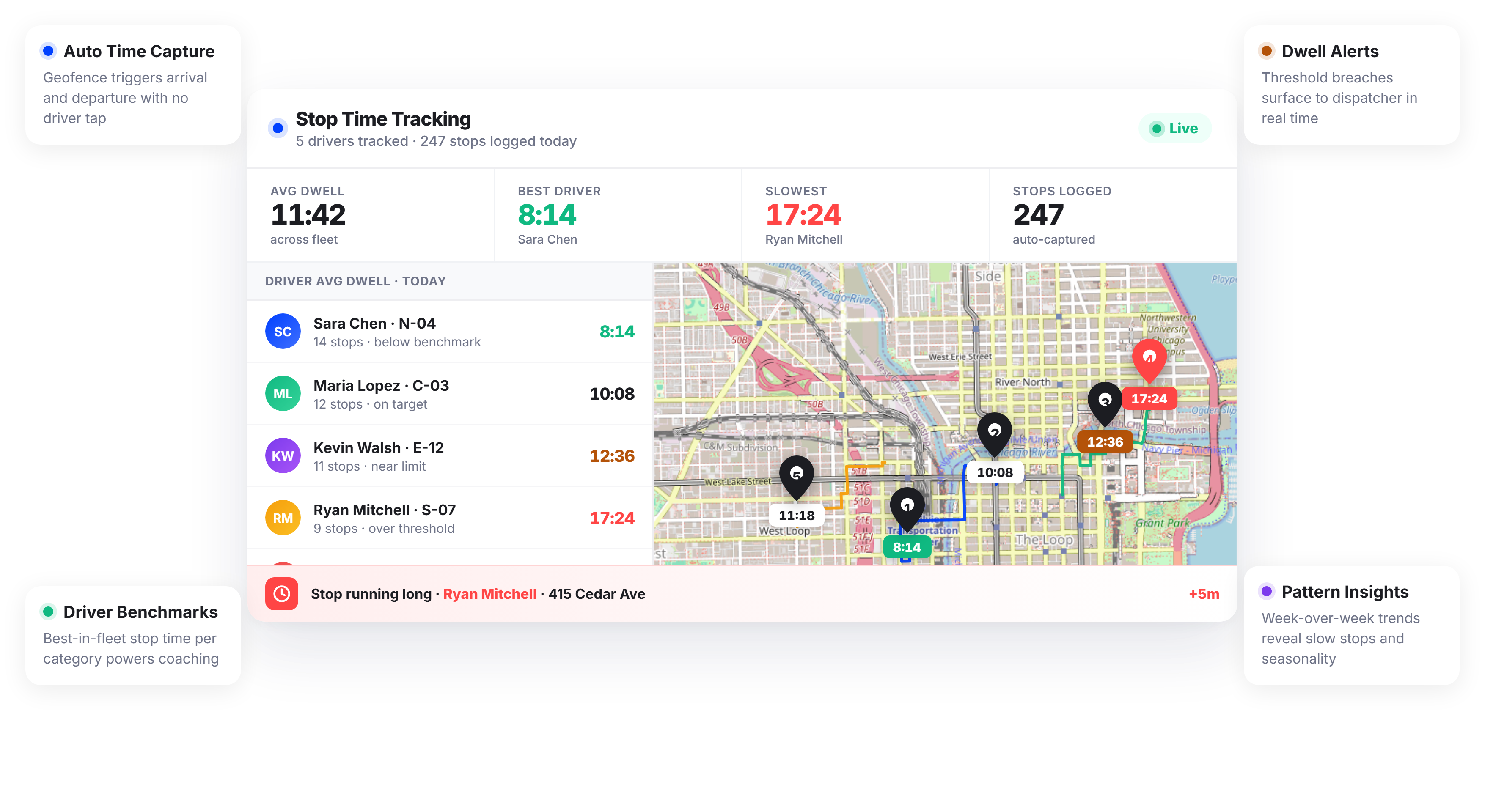
Fleets Using Upper Recover an Average of 45+ Minutes Per Driver Daily






Stop Time Visibility Sounds Simple. Operationalizing It Isn’t.
What Stop Time Visibility Promises
-
 Know exactly how long every driver spends at each stop
-
Catch time overruns before they cascade into late deliveries
-
Coach drivers with real data, not impressions
-
Build route schedules around actual stop durations

What Actually Happens
-
Drivers check in and check out with no time recorded between
-
Route plans assume stop times that bear no relation to reality
-
Overruns aren’t caught until a customer calls about a late delivery
-
Coaching conversations are guesswork without numbers to back them up
Every Stop Time Tracking Tool Your Fleet Operation Needs
Upper’s driver fleet tracking platform automatically captures stop duration data at every stop across every driver and every route. No manual logging, no driver check-in forms; the data is captured from the moment a driver arrives until the moment they depart.
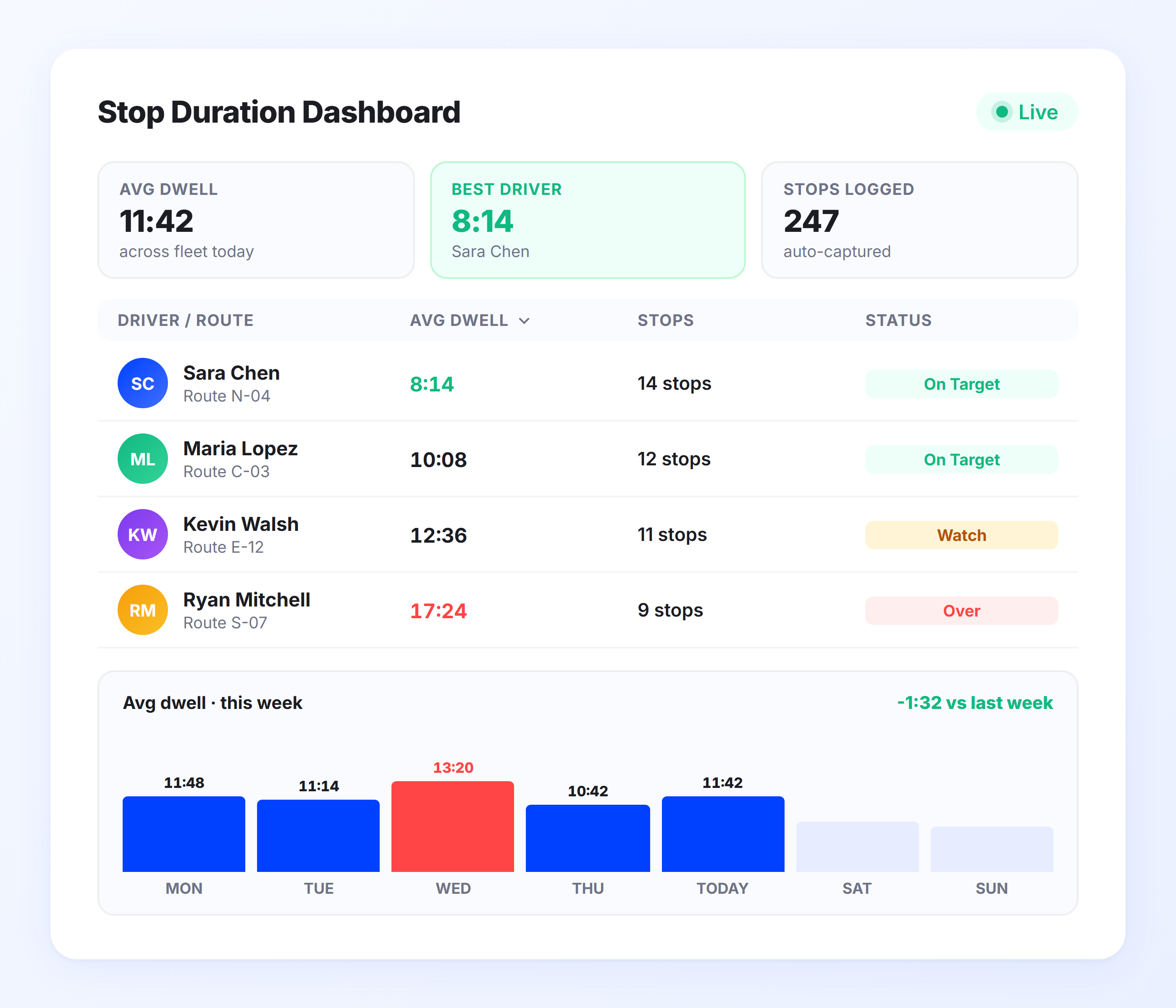
Stop Duration Dashboard
Your dispatchers shouldn’t have to ask drivers how long stops took. Upper’s Stop Duration Dashboard shows real-time and historical dwell time for every stop on every route, organized by driver, date, route, and customer location. Spot the stops consuming the most time at a glance.
- Live stop duration display per driver and route
- Historical stop time data by location and date
- Sortable views by longest average stop, driver, or customer
- Stop duration overlaid on route map for geographic patterns
- Filterable by fleet, driver group, or territory
- Exportable stop time data for payroll and reporting

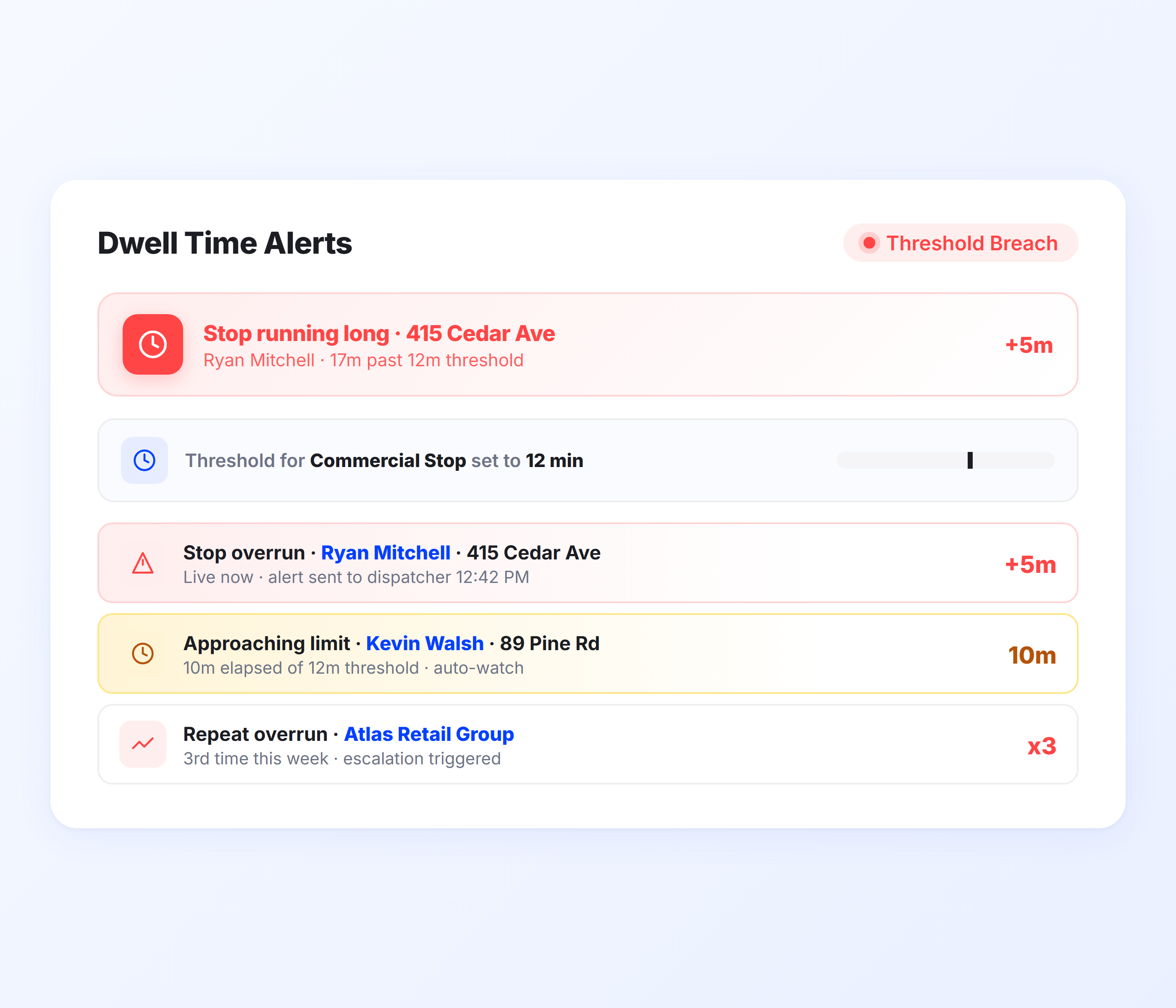
Automated Dwell Time Alerts
When a driver exceeds your expected stop duration, you need to know immediately, not when the next customer calls to complain. Upper’s automated dwell time alerts notify dispatchers the moment a stop runs past its threshold. Set custom alert windows per stop type, customer, or driver.
- Configurable dwell time thresholds per stop or route type
- Instant dispatcher alerts when stops exceed set duration
- In-app and email notification delivery
- Repeat alert escalation for extended overruns
- Alert suppression for pre-approved extended stops
- Full alert history log per stop and driver
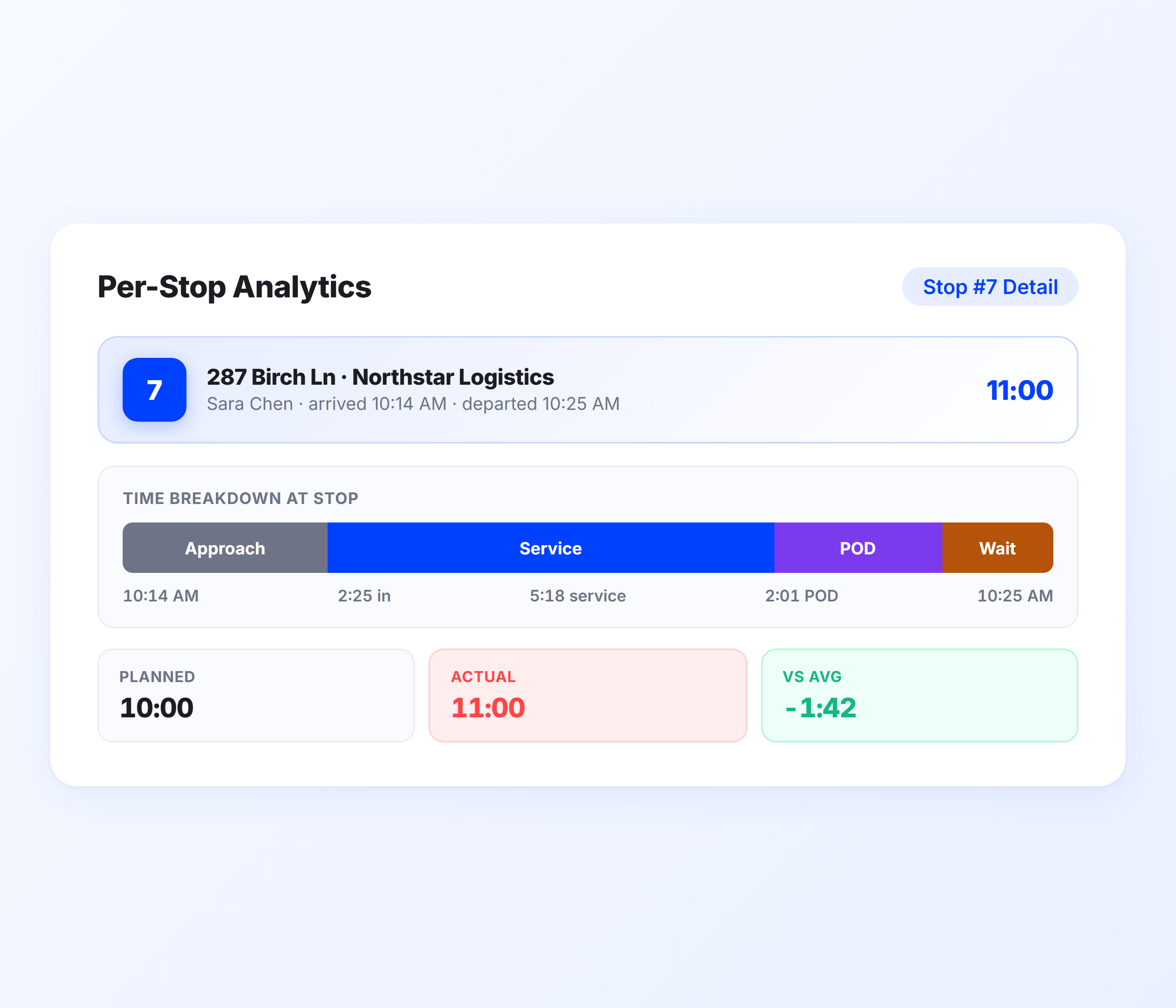
Per-Stop Time Analytics
Aggregate stop duration data only tells part of the story. Upper’s per-stop analytics break down time at each individual stop, including arrival time, departure time, total dwell time, and any associated proof of delivery activity. See whether time is being lost during service, loading, or access wait.
- Individual stop arrival and departure timestamps
- Total dwell time broken down by stop activity
- Correlation with proof of delivery capture time
- Comparison of planned stop time vs. actual stop time
- Stop-level data accessible from the route detail view
- Trend lines per stop location over time
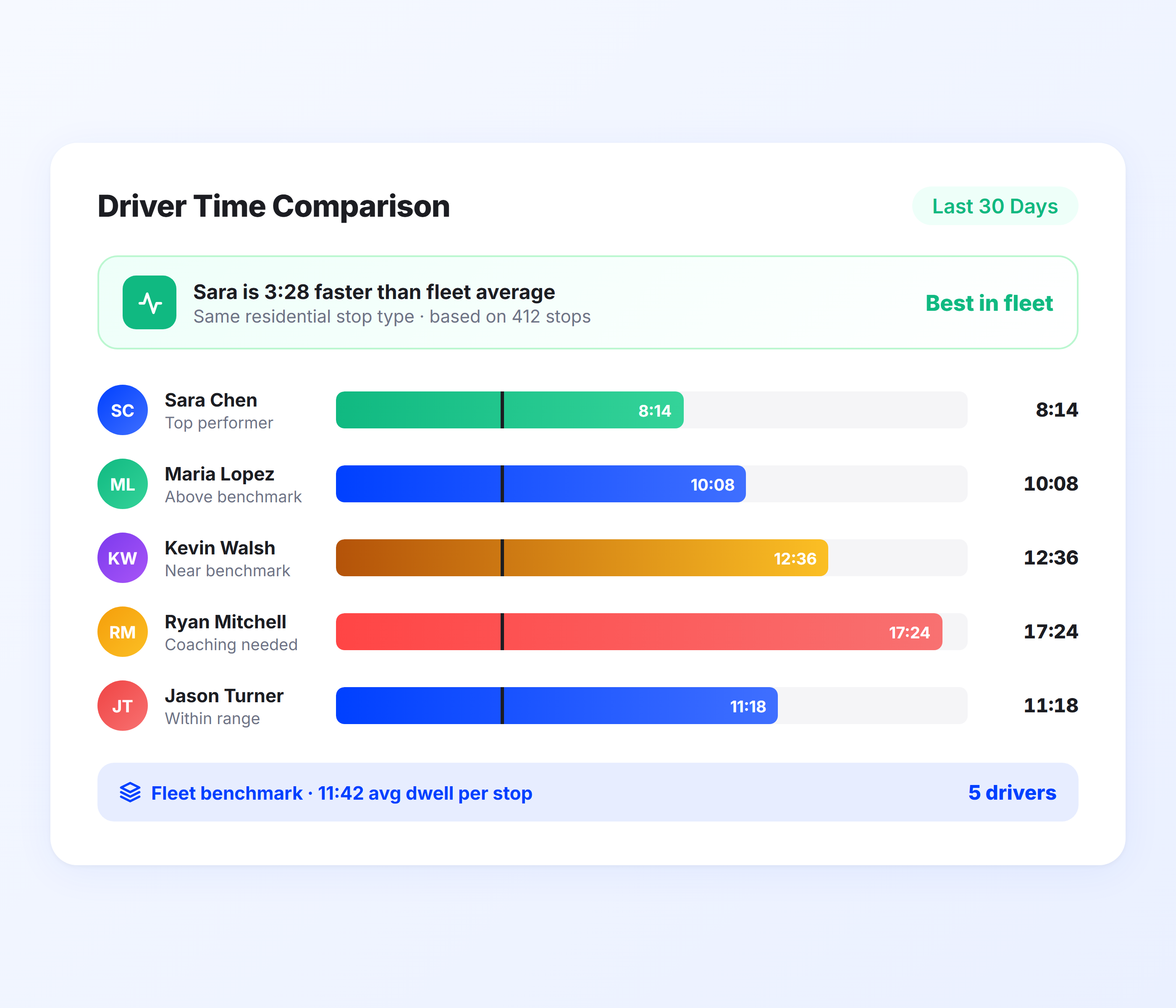
Driver Time Comparison Reports
Not every driver takes the same amount of time at similar stops. Upper’s Driver Time Comparison Reports show you exactly how stop duration varies across your fleet; so you can identify your most efficient drivers, understand what they’re doing differently, and build better training around real benchmarks.
- Side-by-side driver stop time comparison by route type
- Average dwell time per driver across date ranges
- Best-in-fleet stop time benchmarks per stop category
- Performance delta between drivers on similar routes
- Drill-down from team average to individual stop records
- Scheduled weekly or monthly report delivery
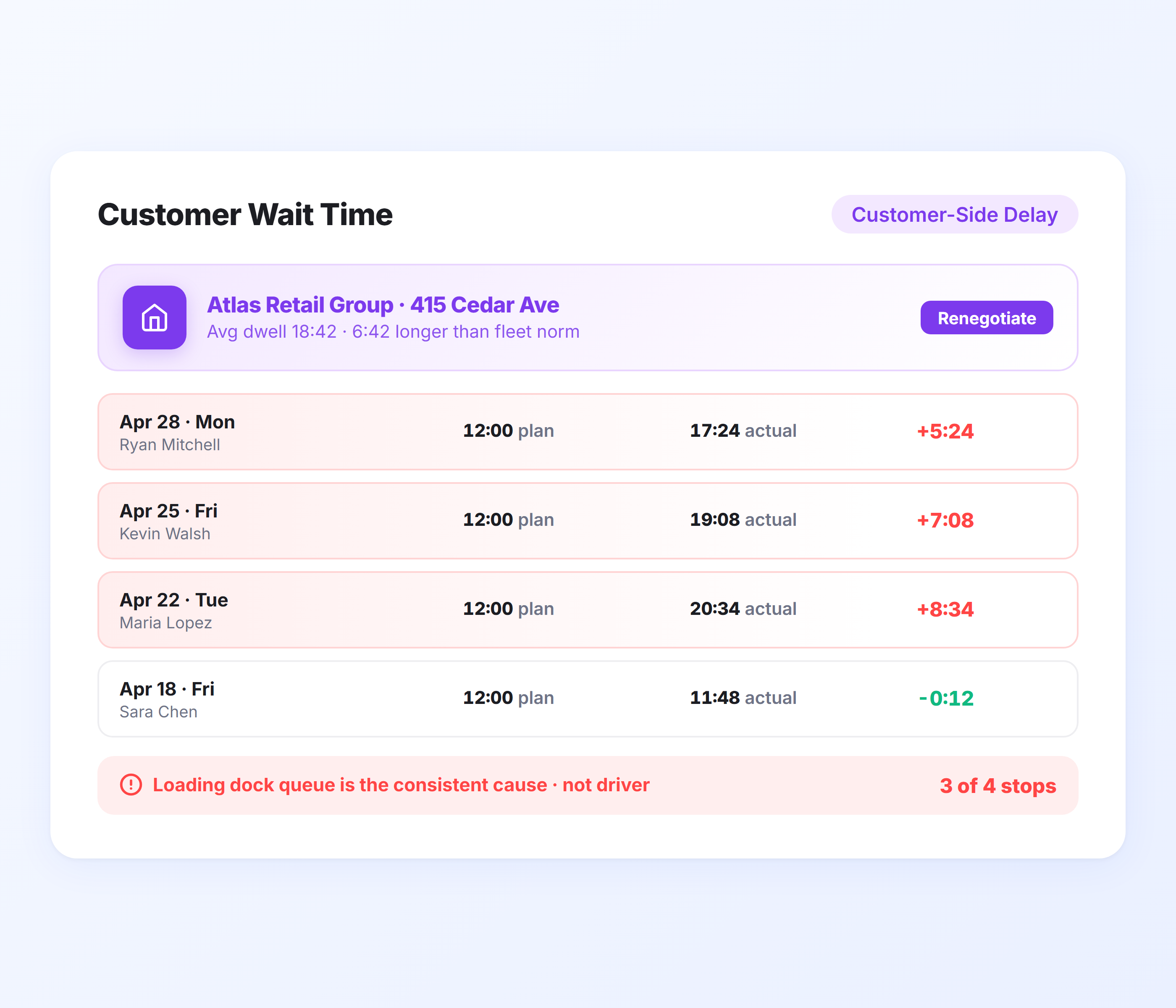
Customer Wait Time Tracking
Some stops run long because of the customer, not the driver; waiting for a signature, navigating a loading dock, or queuing behind other deliveries. Upper captures total stop duration regardless of cause, so you can distinguish operational inefficiency from customer-side delays when reviewing delivery stop time monitoring data.
- Total stop time logged independent of driver or customer cause
- Side-by-side view of planned vs. actual customer service time
- Identification of stops with consistently high wait times
- Customer-level dwell time history across delivery dates
- Insight data for renegotiating service windows with customers
- Stop notes from drivers logged alongside time data
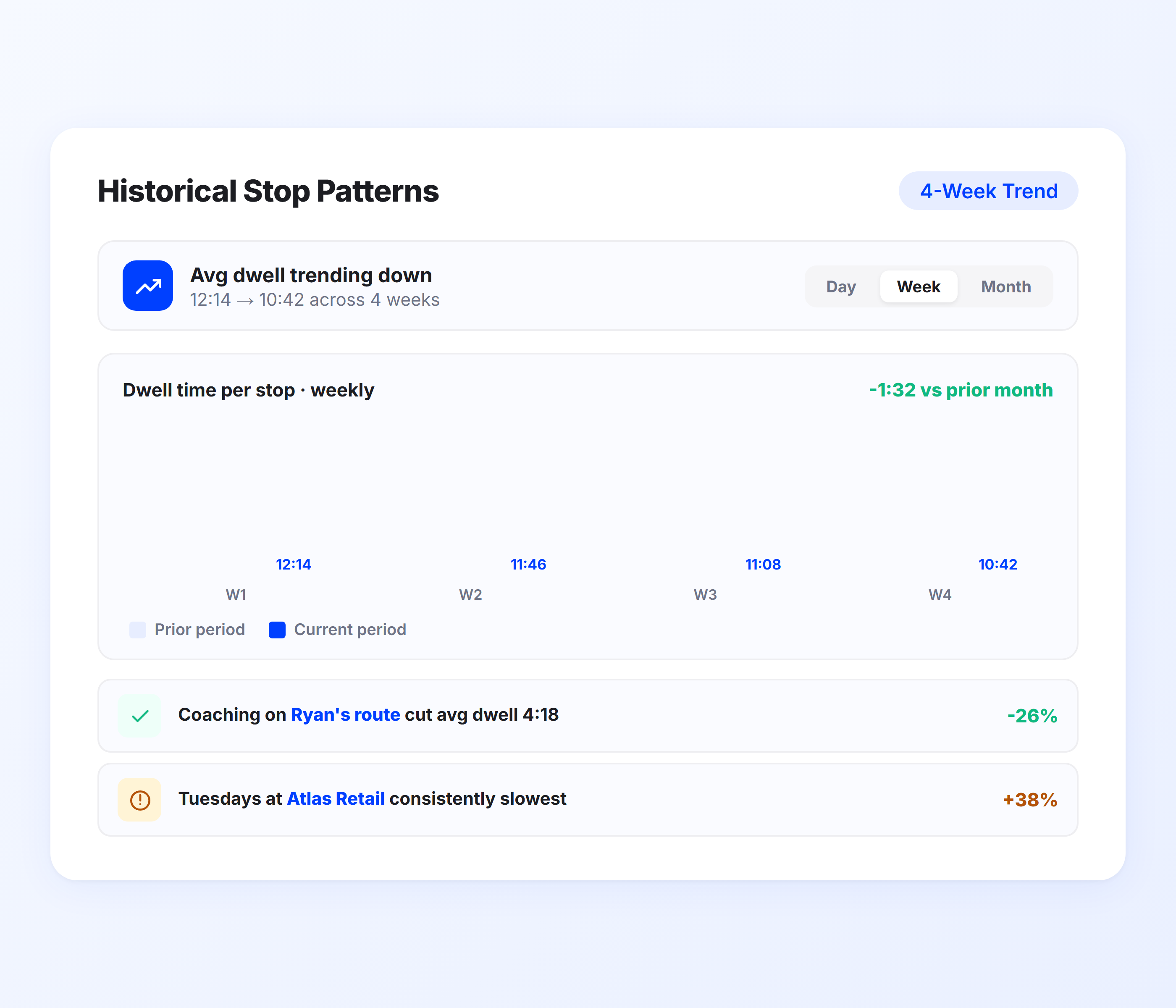
Historical Stop Patterns
Single-day stop time data tells you what happened. Historical stop duration tracking tells you why. Upper’s Historical Stop Patterns give you week-over-week and month-over-month views of dwell time per stop, per driver, and per route — so you can spot seasonal patterns, identify problem locations, and validate whether coaching improvements are sticking.
- Multi-week and multi-month stop time trend views
- Pattern analysis per stop location across drivers
- Seasonal and time-of-day dwell time breakdowns
- Before/after comparison for coaching or process changes
- Route efficiency tracking tied to stop duration improvement
- Data export to CSV for deeper external analysis
See Every Second Drivers Spend at Every Stop, in Real Time
Upper logs stop duration automatically across your entire fleet and alerts dispatchers the moment a stop runs long. No manual check-ins, just accurate delivery stop time monitoring.
Client Success Stories

“We used to spend 2 hours every morning planning routes in spreadsheets. Now it takes 10 minutes. Upper paid for itself in the first week.”


“What sold me was how easy it is to make changes. My schedules change a lot and I drag & drop stops and we’re back on track in 30 seconds. With our old software, that would’ve been an hour of replanning.”


“Our drivers actually follow the routes now. The app is simple, the navigation works, and they’re not calling me every 10 minutes asking where to go next.”

Stop Time Tracking Features for Smarter Fleet Operations
- Geofencing
- Proof of Delivery Timestamps
- Route Replay
- Stop Time Export
- Driver Mobile App

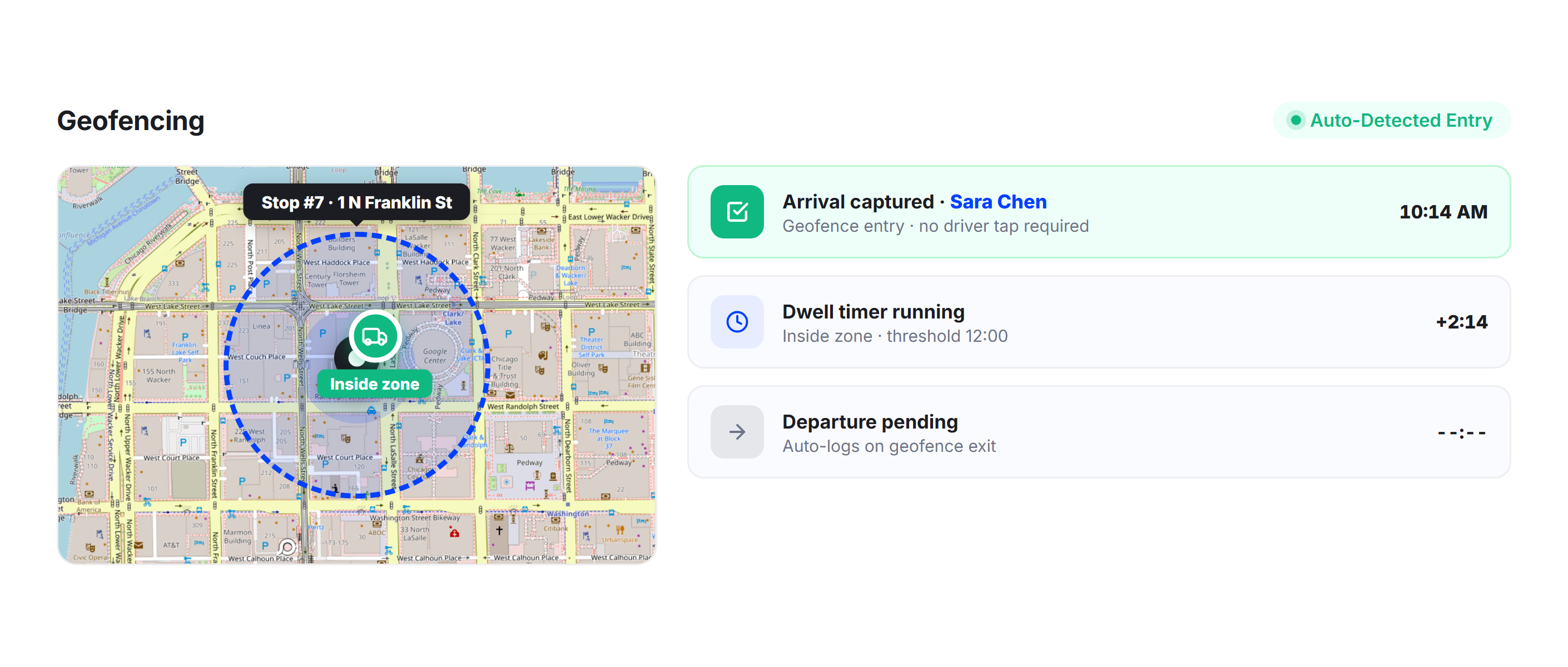
Geofencing
Upper uses geofencing to automatically detect when a driver enters and exits a stop zone, triggering precise arrival and departure timestamps without any manual input from the driver. Stop duration is calculated from these geofence events, giving you accurate dwell time data even when drivers forget to tap complete.
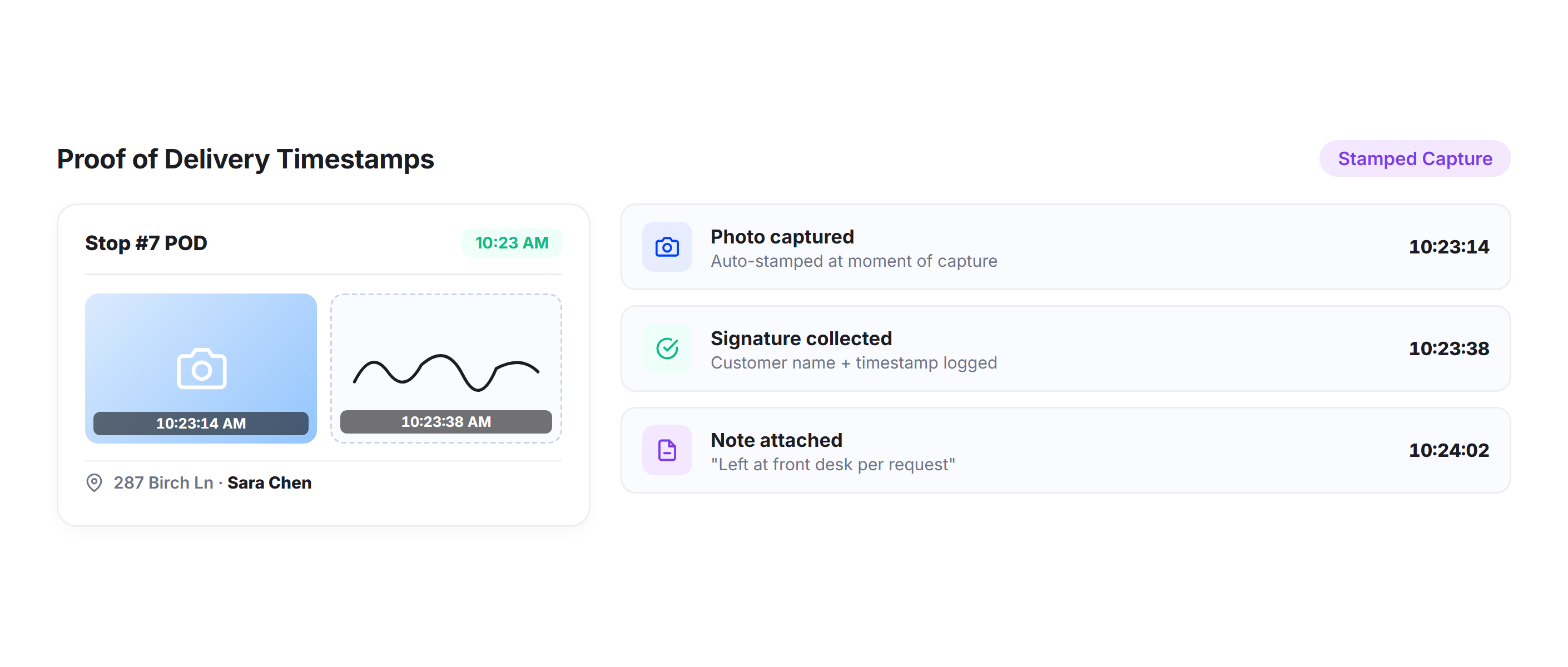
Proof of Delivery Timestamps
Every proof of delivery capture in Upper, photos, signatures, and delivery notes, is automatically timestamped. Dispatchers can see exactly when a driver collected POD at each stop and how that activity correlates with total stop time, creating a complete record for every delivery.
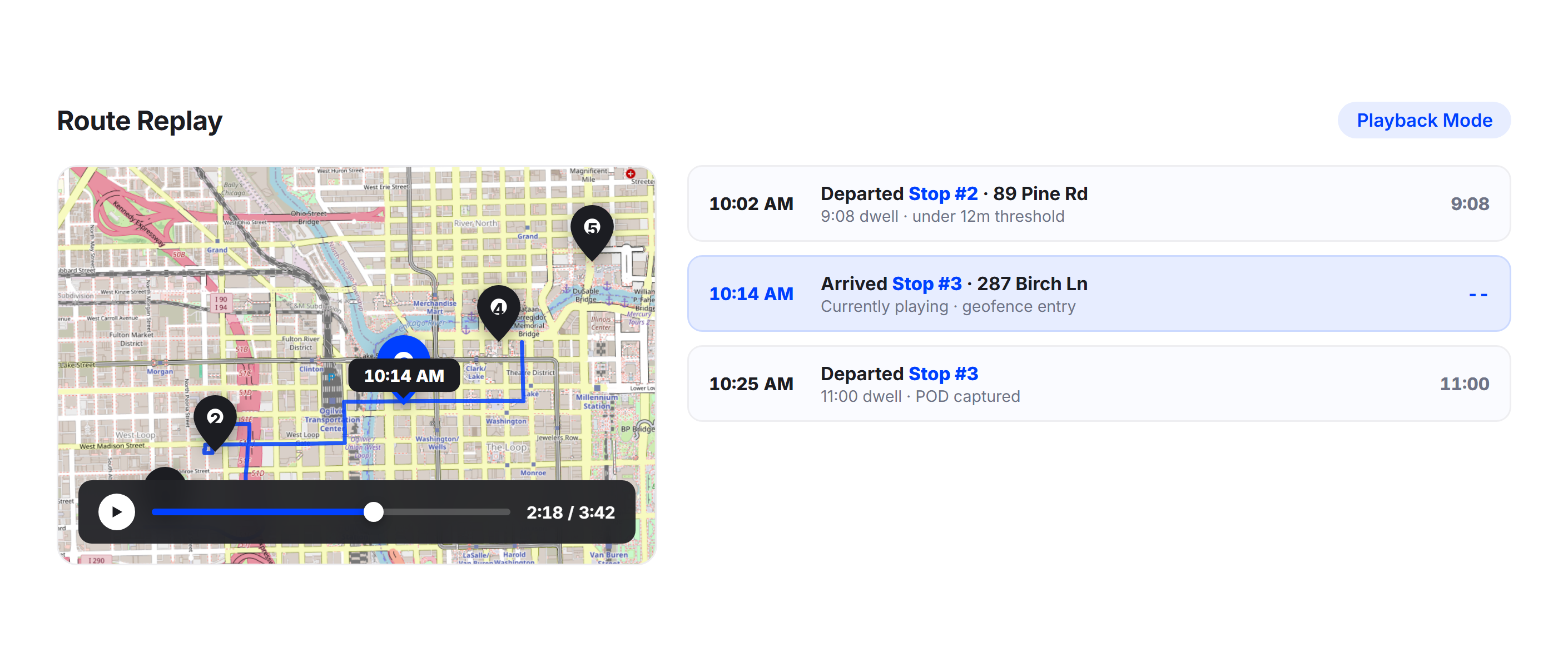
Route Replay
Upper’s Route Replay lets dispatchers rewind and replay a driver’s complete route history, including time spent at each stop. Use route replay to investigate specific delays, validate driver reports, and understand the sequence of events on any given route.
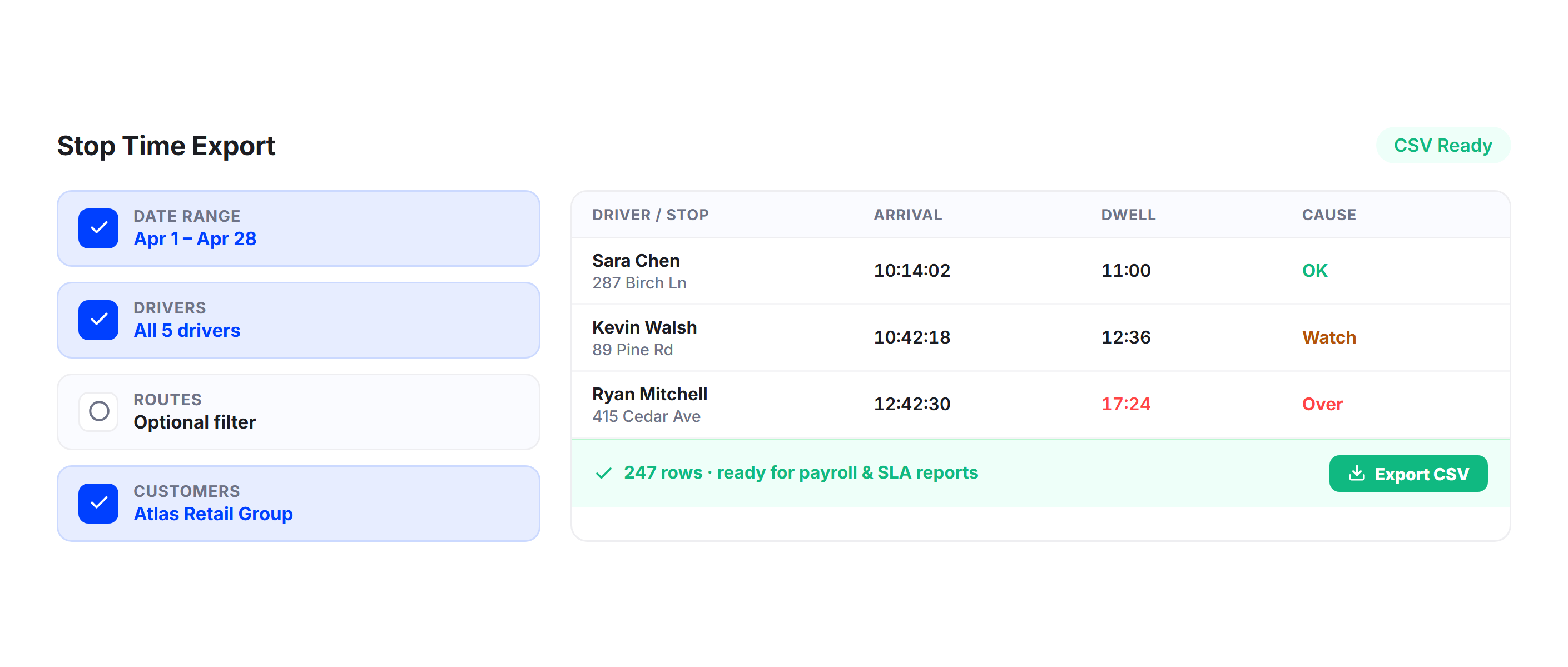
Stop Time Export
Export complete stop duration data to CSV for payroll reconciliation, customer billing, SLA reporting, or external analysis. Filter by driver, date range, route, or customer before exporting so you only pull the data you need.
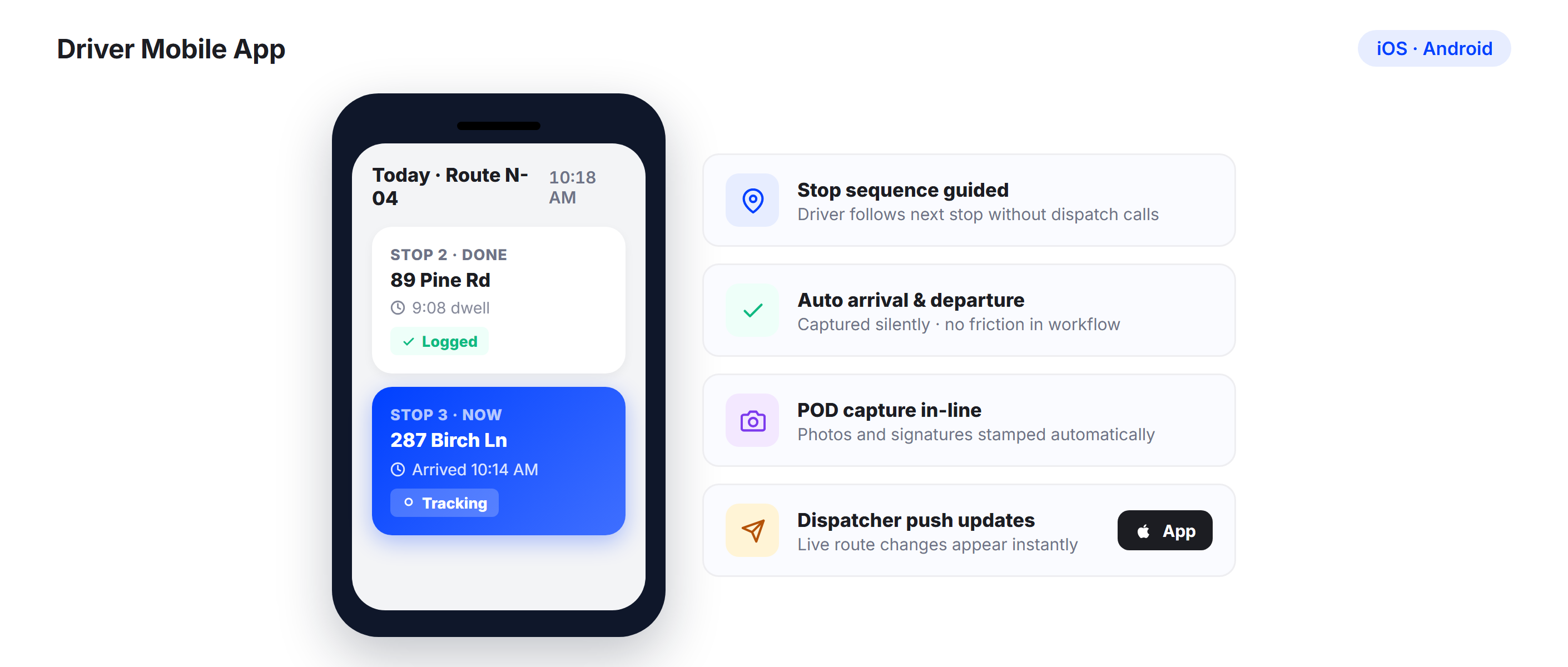
Driver Mobile App
Drivers interact with Upper through the iOS and Android mobile app, which guides them through each stop in sequence. The app captures arrival and departure events automatically, keeping the data accurate without adding friction to their workflow.
Why High-Volume Delivery Fleets Choose Upper for Stop Time Tracking

Recover Lost Time Across Every Route
Every untracked minute at a stop adds up. When you know exact stop durations, you can tighten route schedules, eliminate unnecessary dwell, and get more deliveries done per shift.

Coach with Benchmarks
Stop comparing drivers to vague expectations. Upper’s Driver Time Comparison Reports give real stop duration benchmarks so coaching conversations are grounded in data, not impressions.

Catch Overruns Before They Cascade
Automated dwell time alerts let dispatchers intervene on long stops in real time, before a single overrun turns into three late deliveries and a customer complaint.

Plan Routes Around Actual Stop Times
Planned route schedules based on real stop duration data are far more accurate than those using guessed averages. Upper’s route management analytics uses your stop time history to build tighter, more reliable schedules.

Identify Problem Stops and Customer Sites
Not all stop time issues are driver-related. Upper’s per-stop analytics show which customer locations consistently run long, giving you the data to adjust service windows or address access and wait time issues at source.

Build Strong Fleet-Wide Accountability
When every driver knows their stop times are being tracked and compared, performance naturally tightens. Upper surfaces stop time data in driver-facing reports too, reinforcing accountability without micromanagement.
Sync Your Stop Time Data with the Tools You Already Use


Know Exactly How Long Every Driver Spends at Every Stop
Upper’s driver stop time tracking logs dwell time automatically across your entire fleet, alerts dispatchers to overruns the moment they happen, and gives you the historical data to plan smarter routes.
Frequently Asked Questions
-
How does Upper track driver stop time without drivers manually logging their time?
Upper uses geofencing to detect when a driver enters and exits the defined zone for each stop. Arrival and departure timestamps are captured automatically from these geofence events, so stop duration is calculated without drivers needing to tap a start or stop button. This keeps the data accurate even on busy routes where drivers are moving quickly between stops.
-
Can I set different dwell time alert thresholds for different stop types?
Yes. Upper lets you configure dwell time thresholds at the stop level, route level, or globally across your fleet. You can set a tighter alert threshold for standard drop-off stops and a longer one for stops that involve assembly, unloading, or customer service interactions. Alerts trigger the moment a driver exceeds the configured duration for that specific stop.
-
How does Upper compare planned stop time against actual stop time?
When you upload your route stops, you can include planned service times per location. Upper logs actual dwell time at each stop and displays the planned-vs-actual comparison in the per-stop analytics view. Over time, this data gives you a clear picture of which stops consistently run over, which run under, and where your planning assumptions need to be adjusted.
-
Can I use stop time data to compare driver performance across my fleet?
Yes. Upper’s Driver Time Comparison Reports show average dwell time per driver across comparable routes and stop types. You can see which drivers are consistently efficient, which are running long, and how individual performance stacks up against the fleet average. These reports can be scheduled for weekly or monthly delivery to your management team.
-
How far back does Upper store historical stop time data?
Upper retains your stop duration history so you can build week-over-week and month-over-month trend views. This historical data is accessible through the Stop Duration Dashboard and can be exported to CSV for external analysis. Longer retention windows depend on your plan. Contact us for details specific to your fleet size and data needs.