- Automation changes tasks; a task-saving estimate is not a staffing forecast.
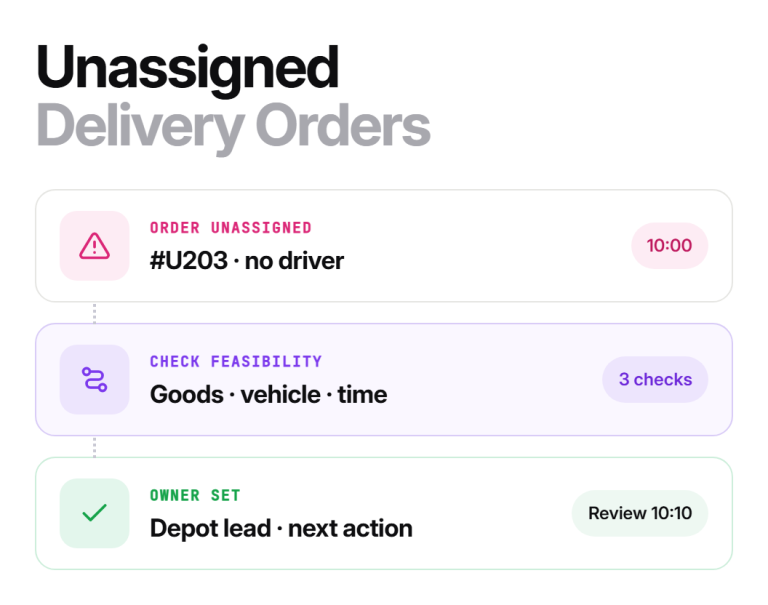
- Keep customer commitments, unresolved work, and escalation decisions under named ownership.
- Check the human effort left after automation, including corrections and follow-up.
- Judge a pilot on service quality and total workload, not just how quickly it generates a plan.
AI can automate parts of dispatch, including comparing assignments and preparing revised plans. That does not establish that the whole dispatcher role will disappear or that every business will keep the same staffing. The practical question is which tasks your software can handle reliably and which decisions still need an accountable person.
For delivery and field service teams, AI dispatch software is worth evaluating against the work your dispatcher actually does. Count preparation, review, exception handling, and communication as well as the time spent building routes.
Will AI Replace Dispatchers? The Short Answer
Not as a whole role, on the evidence in this guide. Software can take over repeatable comparisons, while decisions that change commitments still need a named person. How much work remains depends on your operation and your tool.
- Software can assist with: checking driver availability, comparing route placement, preparing a revised sequence, and surfacing jobs that do not fit.
- Still needs an owner: confirming incomplete requirements, agreeing a revised customer commitment, and arranging cover when no feasible assignment exists.
What does the dispatcher role include?
The U.S. O*NET occupational profile for dispatchers outside police, fire, and ambulance services includes preparing schedules, transmitting assignments, maintaining records, monitoring resources, and handling customer questions. Its scope is broader than local delivery alone, but it makes a useful point: dispatch is a collection of activities.
Your own role may also include warehouse coordination, checking a customer’s receiving access, or arranging a vehicle replacement. Write those tasks down before deciding what automation removes. An application can generate a route while leaving much of the coordination workload intact.
Which dispatch work can software take on?
Software can help with repeatable comparisons when the inputs and requirements are available. Examples include checking driver availability, comparing route placement, preparing a revised sequence, and surfacing jobs that do not fit.
Some time savings do not require AI. Importing structured orders instead of retyping them, sharing routes digitally, and keeping customer instructions in one place can improve the workflow through ordinary software features. Identify the feature responsible rather than attributing every improvement to an AI model.
Route calculations also have limits. Google’s vehicle-routing documentation describes capacity and timing restrictions and notes that larger routing problems can be difficult to solve optimally. A fast calculation should be checked for feasibility and useful results, not treated as proof of the best possible plan.
Which dispatch decisions need a named owner?
Keep explicit ownership of decisions that change commitments or require information outside the system. The person may be the dispatcher, a supervisor, customer service, or another authorized team member.
| Situation | Software can assist with | Human ownership to define |
| New order | Compare eligible resources and schedule placement | Confirm incomplete requirements and approve exceptions |
| Driver unavailable | Prepare alternative assignments | Confirm availability, goods access, and field handoff |
| Customer changes a window | Recalculate affected work | Agree the revised commitment and customer message |
| No feasible assignment | Expose the conflicting requirements | Arrange suitable cover or an agreed deferral |
| Questionable recommendation | Show the available reasons and inputs | Check missing context, reject when needed, record why |
This table is an operating design recommendation. It is not a prediction that software can never perform any particular task. The purpose is to prevent a decision from losing its owner as tools change.
For disrupted work, the driver no-show recovery guide explains why goods, timing, and confirmation still matter after a route has been reassigned.
How do you measure the work left after automation?
Use a task log that captures the full dispatch day. Record active staff time separately from elapsed waiting time. Include input cleanup, reviewing recommendations, correcting mistakes, contacting customers, and closing unresolved work.
Here is an illustrative daily time study. These values are invented to demonstrate the calculation; they are not a customer result or forecast.
| Activity | Current process | Assisted process |
| Prepare and correct inputs | 35 minutes | 50 minutes |
| Build and review assignments | 90 minutes | 40 minutes |
| Resolve exceptions and confirm handoffs | 60 minutes | 50 minutes |
| Customer and driver communication | 45 minutes | 45 minutes |
| Total active staff time | 230 minutes | 185 minutes |
The assignment activity falls by 50 minutes, but input work rises by 15 and exception work falls by 10. The net change is 45 minutes, about 19.6% of the original 230 minutes. Reporting only the assignment activity would overstate the effect on the whole job.
That 45 minutes is released capacity under the example’s assumptions. It does not establish a payroll saving, a whole position removed, or the ability to leave a shift uncovered. Check when work arrives, how much coverage is required, and whether quality held before making a staffing decision.
Repeat the log across comparable normal and difficult days. A tool that saves time on a quiet morning may create more review work during a breakdown or an unusually busy period.
What does a public example of changing dispatch work show?
Upper’s published PoolPros story describes moving from spreadsheets and group texts to shared routes, tracking, and documented completed visits.
| Before, as described in the story | After, as described in the story |
| Dispatch repeatedly relayed route and stop information | Technicians accessed their route instructions directly |
| The dispatch lead handled frequent route-status calls | More of the lead’s attention went to managing the operation |
This is an attributed customer account of a routing and communication workflow. It does not show that AI Dispatcher replaced a role, establish an AI-specific saving, or predict your staffing requirements.
How can you test Upper while keeping control?
Upper’s automatic driver assignment documentation describes recommendations with reasons and confidence scores. You can review suggestions manually before allowing Autopilot to accept routine matches above your chosen threshold. Critical conflicts stay outside automatic acceptance, and recovery changes require dispatcher review.
Test a straightforward match, an unsuitable candidate, an unavailable driver, and a job that should remain unassigned. Check the explanation as well as the result. A confidence score cannot establish that data missing from the system is correct.
Preferred arrival windows are not guarantees. Confirm any requirement the product cannot represent through your own process, including the actual handling and capacity needs of transferred goods.
Use the manual-versus-AI dispatch comparison to plan a matched evaluation. Keep the staff time spent reviewing and communicating changes in the result.
How should you prepare the team for a different mix of work?
Dispatchers can contribute directly to a useful pilot by documenting exceptions, maintaining resource records, and identifying when a recommended plan will fail in the field. Train backup staff to read the same decision record so knowledge does not remain with one person.
Before changing responsibilities, name who owns the operating rules, review queue, customer commitments, and unresolved work. Also define what happens when the tool or its data feed is unavailable. A documented fallback remains useful even when routine automation performs well.
Evaluate tasks before making staffing assumptions
AI can reduce some repeated comparisons, but the amount of work left depends on the operation and the tool. Measure the whole process, preserve accountable decisions, and use observed results to decide what responsibilities should change.
Bring your task log and a difficult operating day to assess where Upper can help. Book an Upper demo.
Frequently asked questions
No. Released time may be used for customer communication, growth, or better exception handling. A staffing decision also depends on required coverage, timing of demand, service quality, and the work left outside the tool.
Importing structured data can save time without using AI. Separate ordinary workflow improvements from prediction or optimization so you can identify what produced the benefit.
Start with clean input records, the difference between required rules and preferences, and how to review and reject recommendations. Learn how to document the reason for a change and confirm that drivers have the current plan.
This guide does not forecast a date. The evidence here is task-level: software can reduce some repeated comparisons, but staffing depends on required coverage, service quality, and the work left outside the tool. Measure your own task log rather than relying on a general prediction.
Decisions that change commitments or need information outside the system, such as confirming goods access, agreeing a revised customer window, and arranging cover when no feasible assignment exists.