- Fixed driver lists can prevent you from grouping nearby stops across the team.
- Include driver availability, required skills, vehicle capacity, and service time before optimizing routes.
- Keep assignments flexible where possible, but preserve genuine requirements such as restricted territories or specialist equipment.
- After dispatch, check remaining work, current locations, and goods already loaded before moving stops.
- Upper AI Dispatcher can automate routine assignments within your settings; recovery changes require dispatcher review.
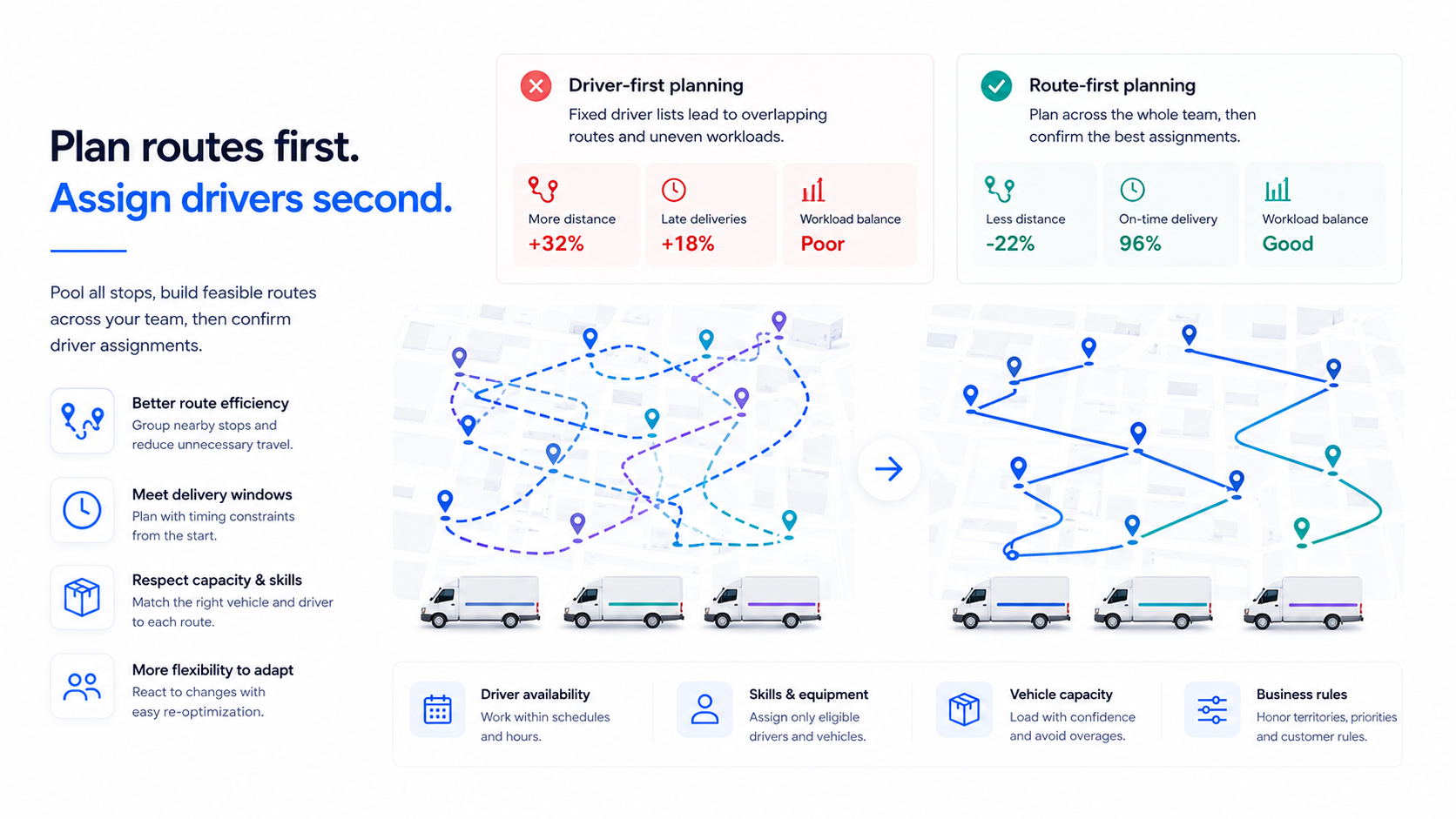
Assigning drivers before routes often fails because it locks stops into separate driver lists too early. At that point, you haven’t checked geography, delivery windows, and vehicle capacity across the whole team. Once those lists are fixed, even a well-sequenced route can leave 2 drivers covering the same neighborhood. Meanwhile, another driver struggles to finish.
You see the consequences at dispatch: extra driving, uneven workloads, late deliveries, and last-minute stop swaps. The problem starts when yesterday’s assignments become today’s planning limits without checking whether they still fit.
The better approach is to plan the day’s stops together, build feasible routes, and then confirm driver assignments. Driver availability, skills, and vehicle limits still belong in the planning inputs. Route optimization needs those details to produce routes your team can actually run.
How does driver-first planning compare with route-first planning?
Driver-first planning gives each driver ownership of stops before you assess the whole day. Route-first planning keeps that ownership flexible while you evaluate routes against the resources available.
| Planning decision | Driver-first: assign, then route | Route-first: plan, then confirm assignments |
| Geography and mileage | Fixed lists can split nearby stops across drivers and create overlapping journeys. | Stops can be grouped across eligible drivers to reduce unnecessary travel. |
| Delivery windows | You may discover timing conflicts after dividing the work. | Timing requirements influence grouping and sequencing from the start. |
| Capacity and working hours | You may have to move stops when a driver’s list exceeds available capacity or time. | Routes are checked against available vehicles and working schedules while being built. |
| Skills and equipment | A familiar driver may receive work they cannot perform with today’s vehicle or equipment. | Eligibility limits which drivers and vehicles can serve each stop. |
| Midday changes | Fixed ownership can make reassignment harder. | Flexible assignments give you more recovery options, provided you recheck feasibility. |
Route-first planning does not guarantee lower mileage or on-time arrivals. It gives the planning process more valid options. A route-first plan still needs updating when conditions change.
What goes wrong when you assign drivers before routes?
Assigning drivers first typically causes overlapping routes, overloaded vehicles, missed delivery windows, overtime, and morning rework. These problems arise when stop ownership is treated as fixed without a business reason. They are especially relevant when your daily orders, vehicle availability, or customer receiving hours change.
Stops lose their geographic clustering
When each driver’s list is locked, the optimizer can only rearrange stops within that list. You can end up sending 2 drivers along the same streets even though combining nearby stops would reduce travel. Pool the work first and allow stops to move between eligible drivers unless a territory or customer requirement prevents it.
Vehicle capacity does not match the assigned work
A familiar territory does not always produce the same load, so yesterday’s vehicle assignment may not fit today’s orders. Discovering the mismatch at loading time can mean another trip, a vehicle swap, or delayed deliveries. Check the load against the available vehicle before confirming the route. Include any loading restrictions your planning software does not model. For more on this check, see capacity-aware auto-assignment.
Delivery windows become harder to meet
Dividing stops by driver before checking travel and service time can place a time-sensitive delivery in an infeasible sequence. A customer’s receiving deadline may then conflict with earlier stops on that driver’s list. Include timing requirements during planning, distinguish firm commitments from preferences, and review any proposed arrival outside an acceptable window.
Routes exceed the time available
A list that looks manageable by stop count can still exceed a driver’s shift. Travel, unloading, breaks, and return travel all add time. That leaves you moving work after the route has already been assigned. Use realistic service durations and available working time when building routes. Then review any applicable driving-hour requirements through your compliance process.
The morning turns into manual rework
If capacity, timing, and eligibility checks happen after assignment, the dispatcher has to repair conflicts between several lists. Moving one stop can create a new timing problem on another route. Evaluate the whole plan before release so you can resolve those conflicts while the work is still flexible.
Why must routes and driver constraints be planned together?
Plan them together because a route is only useful if an available driver and vehicle can run it. Planning multi-stop work is a vehicle routing problem (VRP): deciding how a fleet should visit locations while meeting relevant constraints. Google’s vehicle-routing documentation explains how routing problems can include vehicle capacities and customer time windows.
This is why “route first, assign second” needs a qualification. You should delay unnecessary commitments about who owns each stop, but you cannot ignore who is available to serve it.
Suppose only one driver has the certification needed for several jobs. Those jobs must influence that driver’s route during planning. Building unrestricted routes and checking certifications afterward could leave you with a plan no available team can carry out. Skill-based driver assignment treats those requirements as planning inputs rather than an afterthought.
The same applies to different vehicle sizes, start locations, territories, and shifts. Some systems solve assignment and sequencing together. The useful principle is to evaluate the whole workload before locking avoidable boundaries between drivers.
What is the right order for planning and assigning routes?
Pool the stops first, build feasible routes across the available team, then confirm who runs each route. Use these 3 steps to replace habitual stop ownership with a plan based on today’s work.
Pool the stops and collect the operating limits. Bring the day’s work into one list with addresses, service durations, load requirements, priorities, and delivery windows. Add available drivers, shifts, skills, vehicles, and start and end locations. Keep genuinely required assignments identified.
Build feasible routes across the available team. Group and sequence stops using geography, timing, capacity, and eligibility. Review work that does not fit instead of forcing it onto an overloaded route. If your software treats arrival windows as preferences, separately check firm customer commitments.
Confirm assignments and release the plan. Check that each driver and vehicle can carry out the proposed route. Resolve exceptions, verify loading arrangements, and send drivers the approved version. Automatic driver assignment can handle the routine matches in this step.
You do not need to abandon every recurring assignment. Customer familiarity and stable territories can be valuable. Retain them where they serve a clear purpose, then test whether they still work when orders or staffing change. Deciding whether a route belongs to a person or a truck? Read assigning routes to a vehicle vs a driver.
How do you keep the plan workable after dispatch?
A route-first plan needs a recovery process for delays, absences, and new orders. Before reassigning a stop, check what has already happened and what the receiving driver can still do.
Start with current driver locations, completed stops, remaining working time, and where the goods are. Reassess the affected work, compare the effect on both routes, and release a revised plan only after resolving practical handoffs. Dynamic dispatch reoptimization covers how the remaining plan is recalculated during the day.
A delayed delivery: an illustrative example
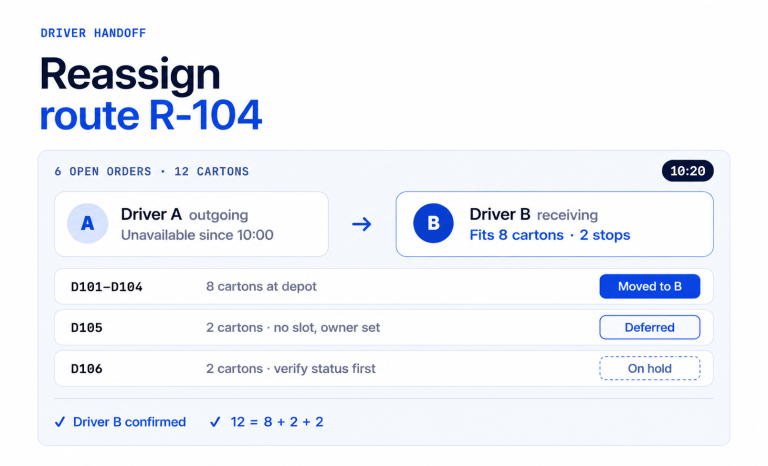
Imagine Driver A is held at a loading dock. Driver B is nearby and appears to have time for A’s next delivery. This is a planning example, not a customer result or a test of Upper.
| Check before moving the stop | Why it changes the decision |
| Where are the goods? | If they are already on A’s vehicle, B needs a feasible transfer or depot collection. Proximity alone is insufficient. |
| Can B perform the delivery? | Vehicle fit, equipment, skills, and any customer access requirements must still match. |
| What happens to B’s later stops? | Add travel, transfer time, and service time before deciding whether the extra delivery fits. |
| Can both routes still finish? | Recheck remaining commitments and working time on both routes. |
| What if no option works? | Keep the stop visible for a decision: arrange cover, agree another time, or contact the customer. |
Only move the delivery if the revised plan works in practice. A spare slot on a screen does not establish that another driver can complete it. For the handoff itself, see our guide to driver reassignment handoffs.
Apply the same checks when a driver becomes unavailable or a rush order arrives. For a new order, assess the impact before promising an arrival time. For an absence, review the whole remaining workload rather than distributing stops by count alone.
How can Upper help you plan routes before assigning drivers?
Upper helps by checking the work across your available team before it recommends who runs each route. The planning change itself is straightforward. Assess the work across your team, confirm feasible assignments, and revisit the remaining plan when the day changes.
Upper AI Dispatcher supports this workflow by checking skills, equipment, availability, configured capacity, workload, and travel when recommending assignments. Recommendations include visible reasoning and a confidence score. Autopilot can accept routine matches above your chosen threshold, while critical conflicts remain subject to review.
When delays or absences affect the plan, Upper can suggest reassignments and changes to remaining work. Your dispatcher reviews recovery changes before they are applied, including practical details such as transferring goods. Upper’s dispatch exception management keeps those conflicts visible until someone decides. The confidence score describes match quality; it is not a probability of on-time delivery.
Upper treats arrival windows as preferences and flags significant deviations. Check firm commitments before releasing the plan, and keep applicable compliance checks in your existing process.
Bring a representative stop list, your assignment rules, and a disruption your team regularly faces. Book an Upper demo to review the proposed assignments and see which decisions stay with your dispatcher.

See it in action
How can Upper help you plan routes before assigning drivers?
Bring a representative stop list, your assignment rules, and a disruption your team regularly faces.

Frequently asked questions
Route first, assign second means you plan the day’s stops as one pool. You build feasible routes against the drivers and vehicles available. Only then do you confirm who runs each route. Availability, skills, and capacity still shape the routes. What you delay is the habit of giving each driver a fixed stop list before the whole workload is checked.
No. Fixed assignments can work for stable routes, specialist work, or customers who require a particular driver. Problems arise when you keep those assignments after demand or available resources change. Check each fixed assignment against the whole day’s plan. Keep it only when it still serves a clear purpose, such as a territory or certification.
No. Availability, shifts, skills, vehicle fit, and starting locations are planning inputs, so include them before you optimize. Route-first planning only delays avoidable stop ownership. Stops stay free to move between eligible drivers while the routes respect real resource limits. Ignoring availability produces routes that look efficient but that no available driver can run.
Route optimization allocates stops across vehicles and sets the order of each route. AI dispatch adds assignment recommendations, dispatcher review, routine automation, and exception handling during the day. The two work together. Route optimization is not limited to rearranging a fixed driver list. It can also decide which vehicle serves each stop when assignments stay flexible.
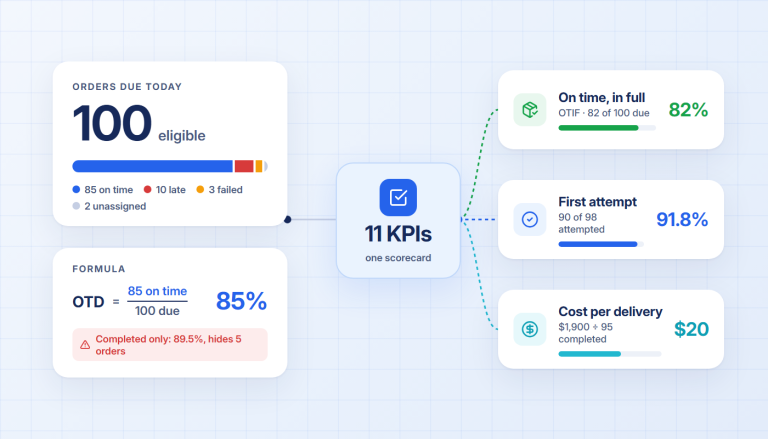
That depends on your current routes, stop distribution, and operating constraints, so no single figure applies. Compare the same workload under both approaches, including required assignments. Then track actual distance alongside late stops, unfinished work, and planning time. A shorter proposed route is not useful if it cannot meet the day’s requirements.
Prepare stop addresses, realistic service durations, delivery windows, load requirements, and priorities. Add driver availability, skills, vehicle details, start and end locations, and any assignments that must stay fixed. Begin with a representative day before changing the process across your operation. Then compare the results with your current plan.