


Snow plow route optimization means ordering plow routes so priority sites clear first and trucks stay inside their limits. It also means fewer deadhead miles, the miles a truck drives with the blade up. To optimize snow plow routes, rank sites into priority tiers and record each truck’s hard limits. Then cut deadhead, re-plan the remaining work during the storm, and review every route after it. City streets and a contractor’s property list need different routing methods, so pick the right model first.
- Start with priority tiers. Centennial, Colorado, plows major arterials first and plows local streets only when the City Manager authorizes it.
- Plan drive time at storm speeds, not map speeds. The FHWA reports average arterial speeds fall 30 to 40 percent on snowy or slushy pavement.
- City plowing covers road segments (arc routing). A contractor visits addresses (stop routing). Use the method that matches your work.
- Deadhead miles cost fuel and time. In the made-up example below, 7 fewer deadhead miles per loop save about $1,188 and 126 truck hours a season.
- Measure every storm. Review loop time, deadhead miles and missed sites, then change the next plan.
Want to see your property list planned, dispatched and re-planned mid-storm?
Book a demoWhat Is Snow Plow Route Optimization?
Snow plow route optimization is building and adjusting plow routes so the right roads or properties clear first. The goal is the fewest miles and hours your fleet can manage. It balances 3 things: the order of work, truck limits, and changes once the storm starts.
It is not the same as building your first routes. For a new season, start with our guide on how to build snow removal routes. Then use the preseason snow removal route planning checklist. This guide is about making those routes better, storm by storm.
What it is not:
- It is not a faster map. A route that ignores salt reloads or turning limits fails on storm night.
- It is not a one-time job. Each storm shows you where the plan was wrong.
- It is not the same problem for a city and a contractor.
Disclosure: Upper makes route optimization software, including Upper Crew, which is covered near the end of this guide.
Do You Plow City Streets or a Contractor’s Property List?
Decide this first, because it sets the routing method. A city covers every street segment inside a boundary. A contractor services a list of lots, driveways and walkways.
| City streets | Contractor property list | |
|---|---|---|
| What gets served | Road segments (edges) | Addresses (stops) |
| Routing model | Arc routing | Stop routing (vehicle routing) |
| Typical tools | GIS and arc routing platforms for public works | Multi-stop route optimization software |
| What “done” means | Every lane mile plowed | Every site cleared by its clear-by time |
| Proof needed | Plow coverage and passes | Photo, time and location per property |
City plowing is a Capacitated Arc Routing Problem (CARP). Each truck has limited capacity and must cover a set of road segments. Researchers at Carnegie Mellon University modelled Pittsburgh this way in a 2020 paper. In a test pilot with actual vehicles, they report routes 3 to 156 percent shorter. The comparison was against routes Pittsburgh generated with commercial routing software. The abstract does not define how that range was measured, so treat the upper end with care.
A contractor’s list is different. Each property is a stop with a service time, a priority and often a clear-by time. Multi-stop route optimization software is built for exactly that.
How Do You Optimize Snow Plow Routes?
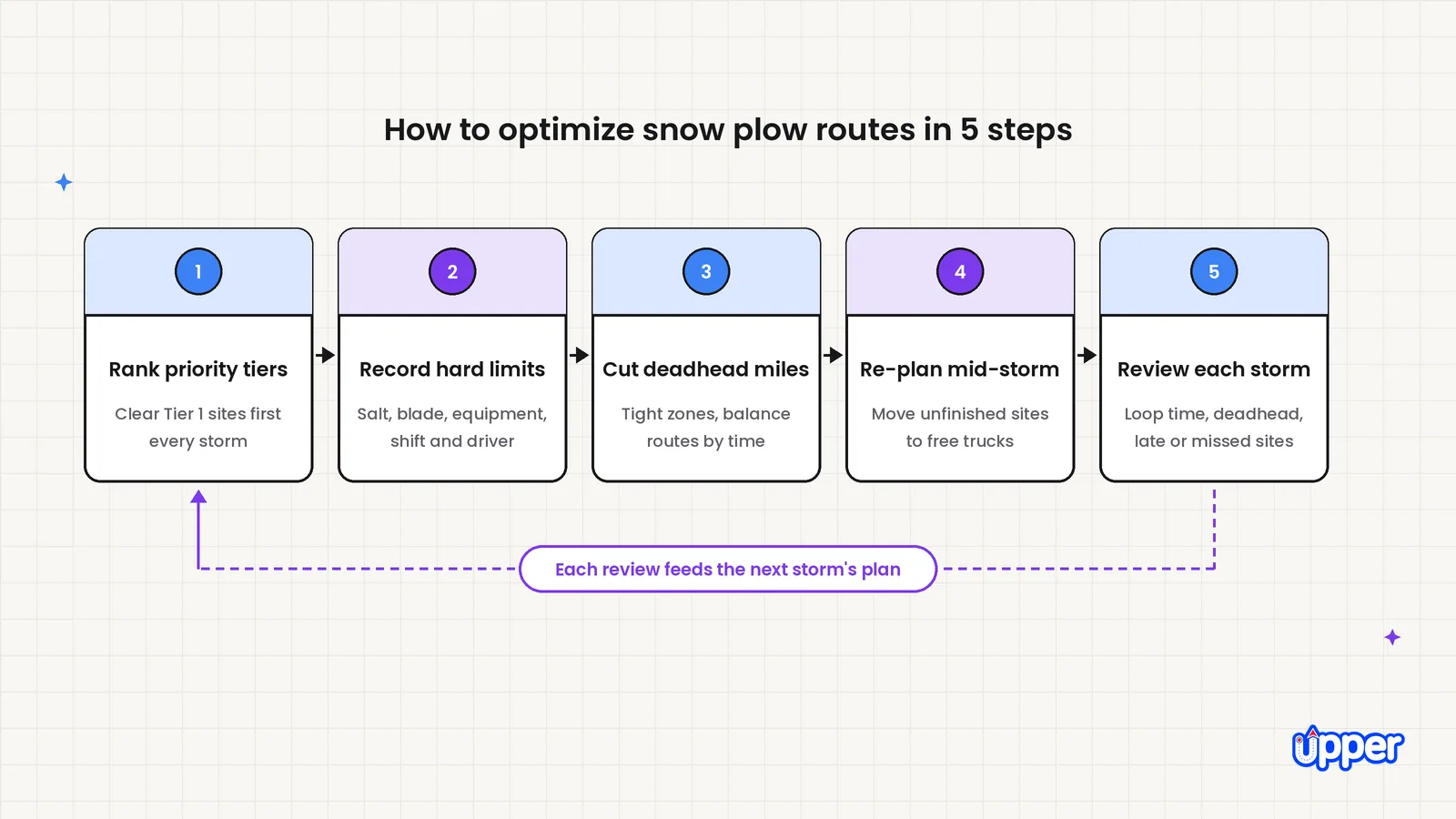
You optimize snow plow routes in 5 steps. Set the order of work, record each truck’s limits and cut wasted miles. Then re-plan during the storm and review the result.
Step 1: Rank every street or property into priority tiers
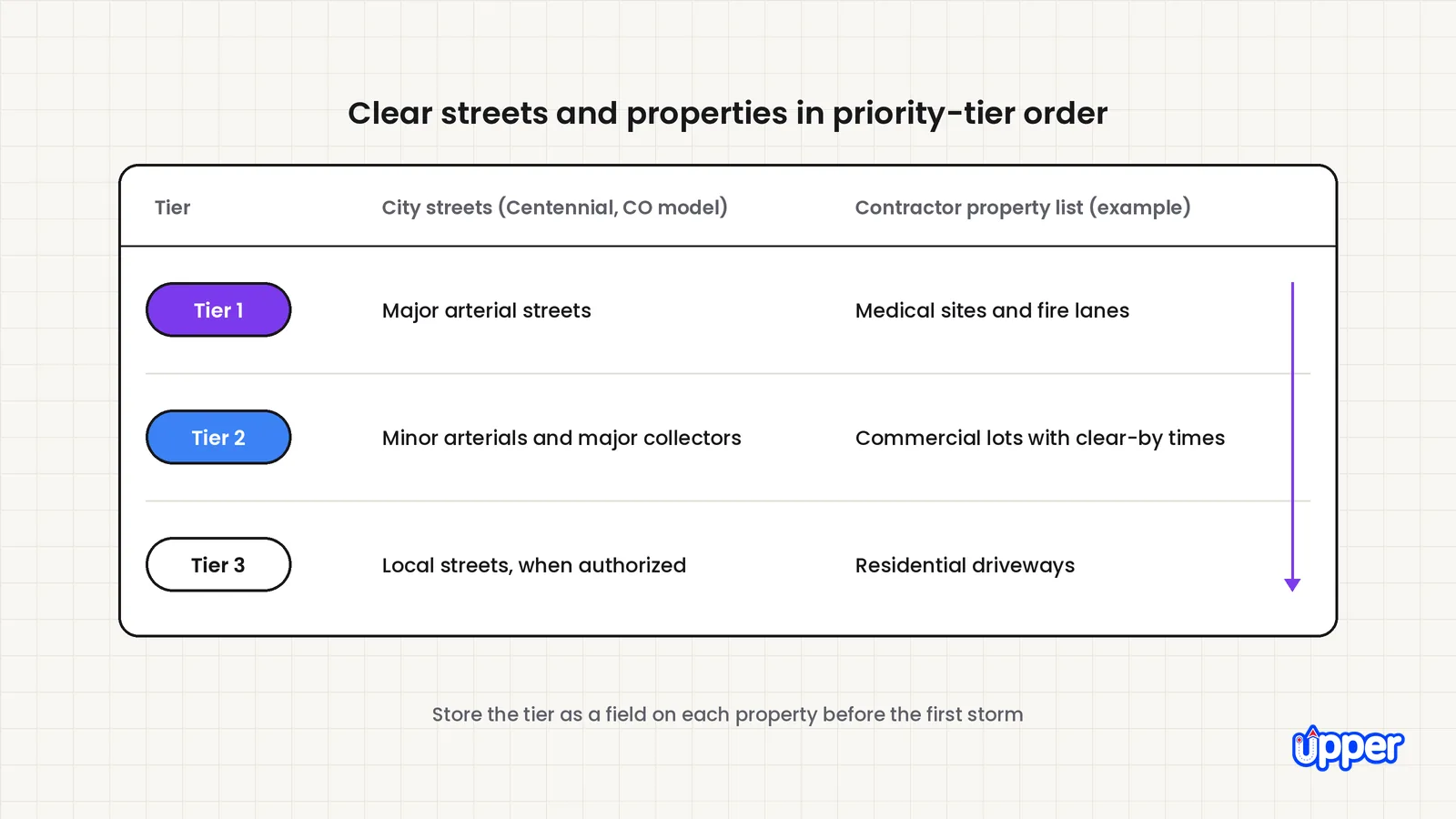
Put every street or site into 3 tiers before the first storm, and clear them in that order. The City of Centennial, Colorado, publishes a clear model on its snow plow routes page:
- Priority 1: Major arterial streets with 4 or more travel lanes, plus streets that give access for emergency services such as fire stations, medical facilities and the Sheriff’s Office.
- Priority 2: Minor arterials and major collectors that connect major arterials to Priority 3 streets.
- Priority 3: All remaining local streets, plowed only when the City Manager or a designee authorizes it. A forecast of 6 or more inches of street snow is one of three guidelines the City Manager weighs.
A contractor uses the same idea for properties. Tier 1 might be medical sites and fire lanes. Tier 2 is commercial contracts with clear-by times. Tier 3 is residential driveways. Store the tier as a field on each property. Then nobody has to decide it at 3 AM.
Step 2: Record each truck’s and driver’s hard limits
A hard limit is a rule the route cannot break. A preference can bend. List these for every truck and driver:
- Salt capacity and reloads: Reload stops belong inside the route, not after it.
- Blade width and turning room: A wide blade or long truck cannot fit every lot.
- Equipment type: A pickup, a loader and a sidewalk crew work at different speeds.
- Shift length: A driver 10 hours into a storm is not a fresh driver.
- Who can drive what: A truck with no qualified driver free cannot run.
Mark each item as hard or preference before you plan. That label decides what you can bend when the storm forces a trade-off.
Step 3: Cut deadhead miles and balance the longest route
Deadhead miles are miles a plow drives without plowing. They come from the yard run, gaps between distant sites and trips to reload. They burn fuel and, more important, time. Cut them in 3 ways:
- Group sites into tight zones. Give each zone to one truck so trucks stop crossing paths.
- Sequence within each zone. Order sites by tier, then by driving order, so trucks do not double back.
- Balance by time, not site count. Twelve spread-out lots can take longer than 20 close ones. Shorten the longest route first, because the storm ends when the last truck finishes.
Plan drive time at storm speeds. The FHWA Road Weather Management Program reports average arterial speeds falling 30 to 40 percent. That applies to snowy or slushy pavement. Take a loop with 2 hours of driving on dry roads. At a 30 percent drop it takes about 2 hours 50 minutes. At a 40 percent drop it takes about 3 hours 20 minutes. A dry-road map hides those 50 to 80 extra minutes.
Step 4: Re-plan the remaining work during the storm
A static route breaks the first time a truck fails, a driver calls out or a new site calls in. Re-plan what is left, not the whole day.
- Track every truck. Live GPS tracking shows which sites are done and which trucks are free.
- Move work, not routes. Shift a stalled truck’s unfinished sites to nearby trucks with time left.
- Send the change to the driver’s phone. A re-plan that stays on the office screen does not help.
- Plan repeat passes. In a long storm, Tier 1 sites need a second pass while lower tiers wait.
Step 5: Review every route after the storm
Measure each storm so the next plan is better. Track 5 numbers per route:
| Metric | What it tells you |
|---|---|
| Loop time (first site to last) | Whether the route fits inside your clear-by times |
| Deadhead miles | How much driving was wasted between sites |
| Longest route versus shortest | Whether work is balanced across trucks |
| Sites missed or late | Where tiers or clear-by times were not met |
| Mid-storm changes | How often the plan broke, and why |
If a route is late every storm, split it or move its farthest sites to a neighboring zone. If a truck always finishes early, give it more work.
See it in action
See Upper Crew re-plan your next storm.
Bring your property list and see it split across your trucks.
How Much Can Optimizing Plow Routes Save?
Here is a simple, made-up example for a contractor. The numbers are illustrative, not a benchmark.
A contractor runs 6 trucks. Each truck runs 3 loops per storm, across 15 plowable storms. That is 270 loops a season. After zoning and re-sequencing, deadhead drops from 12 miles to 5 miles per loop.
| Item | Calculation | Result |
|---|---|---|
| Deadhead miles saved per loop | 12 minus 5 | 7 miles |
| Diesel saved per loop (assumed 10 mpg) | 0.7 gallons × $6.292 | about $4.40 |
| Diesel saved per season | $4.40 × 270 loops | $1,188 |
| Time saved per loop (assumed 15 mph storm speed) | 7 miles ÷ 15 mph | 28 minutes |
| Truck hours saved per season | 28 minutes × 270 loops | 126 hours |
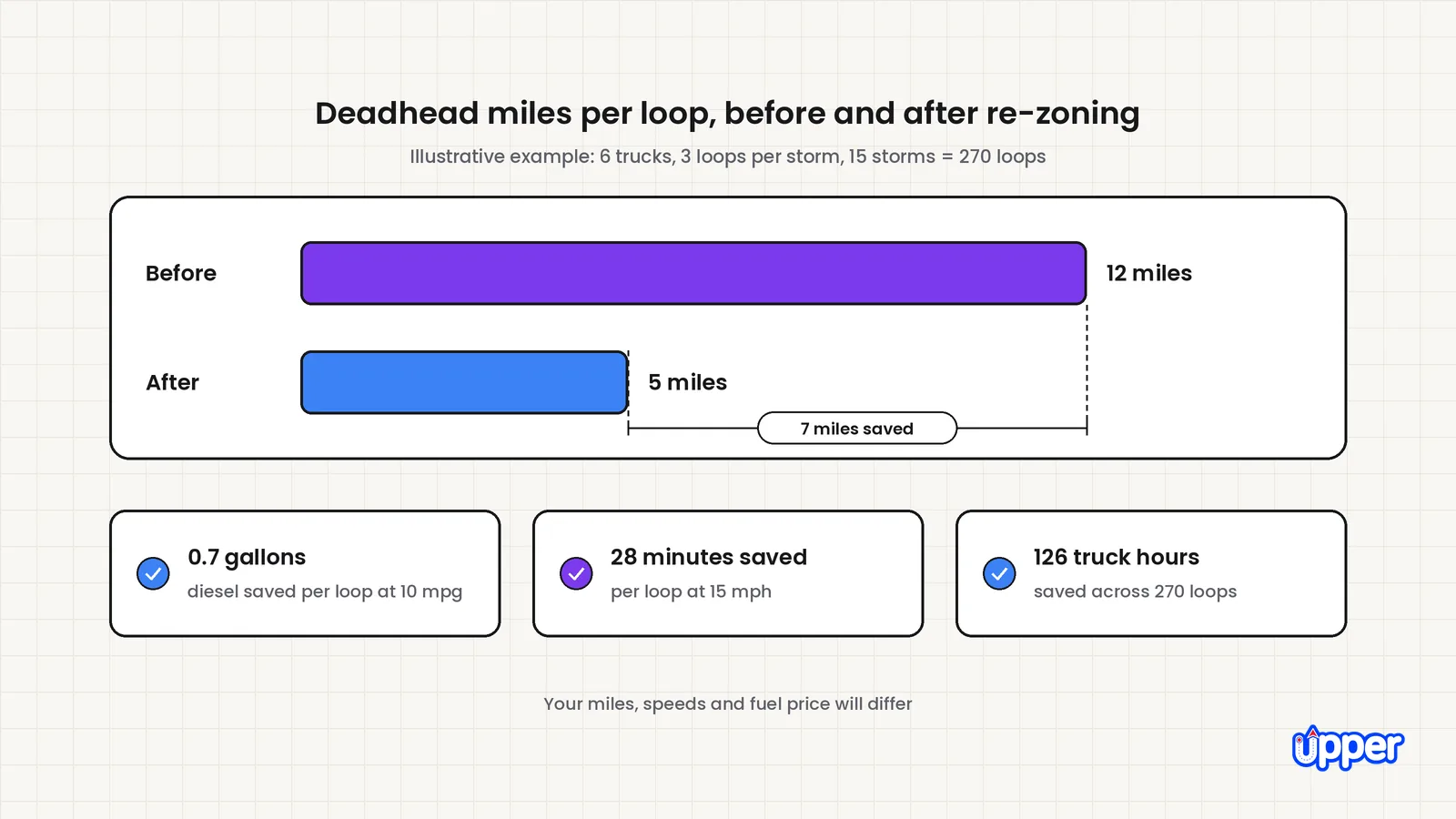
The diesel price is the U.S. on-highway average for the week of November 2, 2026. It comes from the EIA Gasoline and Diesel Fuel Update. Your mileage and local fuel price will differ. The bigger saving is time: earlier clear-by times, less overtime and fewer late sites.
Crew time is also getting harder to find. In the SIMA Foundation’s 2025 snow and ice economics survey of 161 companies, 50% said a tight labor market or rising wage expectations was an economic challenge in the 2024–2025 winter season (SIMA Foundation, 2025). Hours freed from deadhead driving let the same crew cover more sites.
Verified city-side numbers are hard to find. Most published results come from vendors and are not independent studies. The Carnegie Mellon pilot above is the clearest published academic example.
What Software Helps You Optimize Plow Routes?
The right software depends on your problem.
- City and public works fleets: Look at GIS-based arc routing platforms built for street networks. They model lane miles, turn limits and repeat passes.
- Private contractors: Look at multi-stop route optimization software with a driver app, live tracking and proof at each site. OptimoRoute lists Lite at $35.10 and Pro at $44.10 per driver per month, billed annually. It offers a 30-day free trial (read November 9, 2026). Route4Me sells its packages by quote.
Test any tool with your own property list. Make one change after dispatch and check that it reaches the driver’s phone. Then pull the record for one disputed property. It should show a photo, a time and a location.
How Can Upper Help With Snow Plow Route Optimization?
Upper Crew is route optimization software for teams. It fits contractors who plow a list of properties, as Upper’s snow removal route planning software page shows. It does not do street-segment arc routing, so city fleets should look at arc routing platforms.
You upload the spreadsheet you already use, with addresses, notes and service times. Every plan handles stop priorities and service duration. On Professional and higher plans, multi-driver route optimization splits one property list across your trucks. Balancing work by time, distance or workload, zone-based routing and vehicle capacity planning need the Optimize plan or higher. Capacity optimization is also sold as a $25 per driver add-on on other plans. Your dispatcher reviews, edits and approves the plan before it goes out.
On Professional and higher plans, office updates land on the driver’s current route in the driver app during the storm. Live GPS tracking shows completed and remaining sites. At each property, drivers capture photos, signatures and notes through proof of delivery. Each record keeps its status, time and location. Upper Crew treats time windows as planning preferences it works to honor. Upper’s own advice is to test any condition that genuinely cannot move. Flag the few properties where lateness breaks a contract.
ClearWay Snow Solutions is an Ontario landscaping and snow removal company with 8 drivers. It reports manual dispatch time fell from 2 to 3 hours per shift to 15 to 20 minutes. On-time completion rose from 76 percent to 94 percent. Stops managed per shift rose from 80–100 to 140–160. These results are customer-reported, not a controlled study or a guarantee.
Upper Crew costs $40, $48 or $71 per user per month, billed yearly, on Starter, Professional and Optimize. Monthly billing is $50, $60 or $89. Prices were read on November 9, 2026. See current plans on the Upper pricing page. Bring your property list and one storm-night change to a demo, so the talk is about your real routes.
Pages published by Upper are Upper’s own marketing. A customer result is that customer’s reported outcome, not a promise. Worked examples are illustrations, not benchmarks, and time windows are planning preferences, not guarantees.

See it in action
Plan your next storm before it starts
Bring your property list and see Upper Crew plan, dispatch and re-plan it.

Frequently asked questions
Rank every street or property into priority tiers and record each truck’s hard limits. Group sites into tight zones to cut deadhead, re-plan remaining work mid-storm, and review loop times after it. Each review shows what to change next time.
Snow plow route optimization is building and adjusting plow routes so priority sites clear first. The aim is the fewest miles and hours your fleet can manage. It balances the order of work, truck and driver limits, and changes once the storm starts. It is not a one-time job, because each storm shows where the plan was wrong.
Deadhead miles are miles a plow drives without plowing. Examples are the yard run, gaps between distant sites and trips to reload salt. Cutting them saves fuel and the hours that decide whether sites clear on time.
Delivery tools visit addresses, while city plowing covers road segments, a Capacitated Arc Routing Problem. A stop-based tool isn’t built for street-segment coverage, so test whether it can cover every lane mile before you use it on a street grid. It fits a contractor’s property list well, because each lot is a stop.
There is no fixed number, because routes should be sized by time, not site count. Add service time and drive time at storm speeds, and keep the loop inside your earliest clear-by time. The FHWA reports average arterial speeds fall 30 to 40 percent on snowy or slushy pavement.
Track every truck live and move a stalled truck’s unfinished sites to nearby trucks with time left. Send the new stop order to the driver app. Re-plan only the remaining work so drivers keep familiar routes.
Measure loop time, deadhead miles, the longest versus shortest route, late sites and mid-storm changes. Loop time tells you whether the route fits inside your clear-by times. If a route is late every storm, split it or move its farthest sites to another zone. If a truck always finishes early, give it more work.


