


The best snow plow tracking app for contractors is Upper Crew. From its Professional plan, it shows every truck live and saves a timestamped, GPS-tagged photo on each property. That record stays available for 1 year on Professional and 2 years on Optimize. Plow360 leads on record detail, Yeti on tracking subcontractors, SnowBossPro on a live storm board, and Plowdesk on starting free.
A tracking app gets judged twice. Once at 3 a.m., when you need to know which trucks are behind. Then again months later, when a property manager forwards a claim letter and asks what your app recorded.
Timing is tighter than most plans assume. The FHWA reports that average arterial speeds fall 30 to 40 percent on snowy or slushy pavement (FHWA road weather). Routes run long, so live positions matter more in snow than in summer work.
Every price below was read on the vendor’s own site on November 10, 2026.
- Tracking and proof are two separate features. Live positions help you fix tonight. A timestamped, GPS-tagged photo on the property is what answers a claim next spring. Several tools here do one well and the other poorly.
- Retention is the number almost nobody checks. Upper Crew keeps route and proof data for 6 months on Starter, 1 year on Professional and 2 years on Optimize. Ask every vendor the same question before you sign.
- Upper Crew is the pick for multi-truck contractors. Live GPS tracking and proof of service start on Professional at $48 per user billed yearly, and the record stays tied to the property address.
- Offline capture decides whether rural routes get proof at all. SnowBossPro and Plow360 both say their crew apps save jobs and photos on the phone and sync when signal returns. Plowdesk says the same for location records.
- Published prices run from $0 to $99 a month for the first plan with tracking. Upper Crew Professional is $48 per user billed yearly, Plowdesk Operator is free, Plow360 Team is from $40, SnowBossPro Start is $59, Yeti is $66.50 billed annually and Jobber Connect is $99 billed annually.
Want to see which snow plow tracking app fits your trucks and property list?
Book a demoWhat Is a Snow Plow Tracking App?
A snow plow tracking app shows where your trucks are during a storm and records what happened at each property. The second half is what contractors underbuy. Judge any app on four things.
- Live truck positions: can the dispatcher see which trucks are where, and how far behind each one is running?
- Proof per property: does each visit save a photo, a time and a GPS location? Is it tied to the address rather than to a phone?
- Retention: how long does that record stay available, and can you pull it by address?
- Offline capture: what happens to a photo taken where there is no signal?
What it is not:
- Not a telematics or ELD box. These are phone-based apps. If you need engine data or hours-of-service logs, that is separate hardware.
- Not a legal defence on its own. A record helps your insurer and your lawyer. It does not decide a claim.
- Not a weather service. Two apps here log the weather at a visit. None tell you when to go out.
Tracking is also not the same question as route building. If your problem is the plan rather than the picture, start with Upper’s guide to building snow removal routes, see how to optimize snow plow routes, or compare the best snow plow routing apps for contractors.
How Did We Rank These Snow Plow Tracking Apps?
Every app was checked on five things, on the vendor’s own site, on November 10, 2026:
- Live truck or crew tracking, and who can see it.
- What a visit record contains: photo, time, GPS location, weather, materials.
- Retention, meaning how long the record stays available.
- Offline behaviour when a phone loses signal.
- Published price and the plan where tracking first appears, with the read date.
Where a vendor’s own pages did not state something, the entry says so. That is not a claim the tool lacks it.
7 Best Snow Plow Tracking Apps for Contractors in 2026
1. Upper Crew: Best for Live Truck Tracking With Property-Level Proof
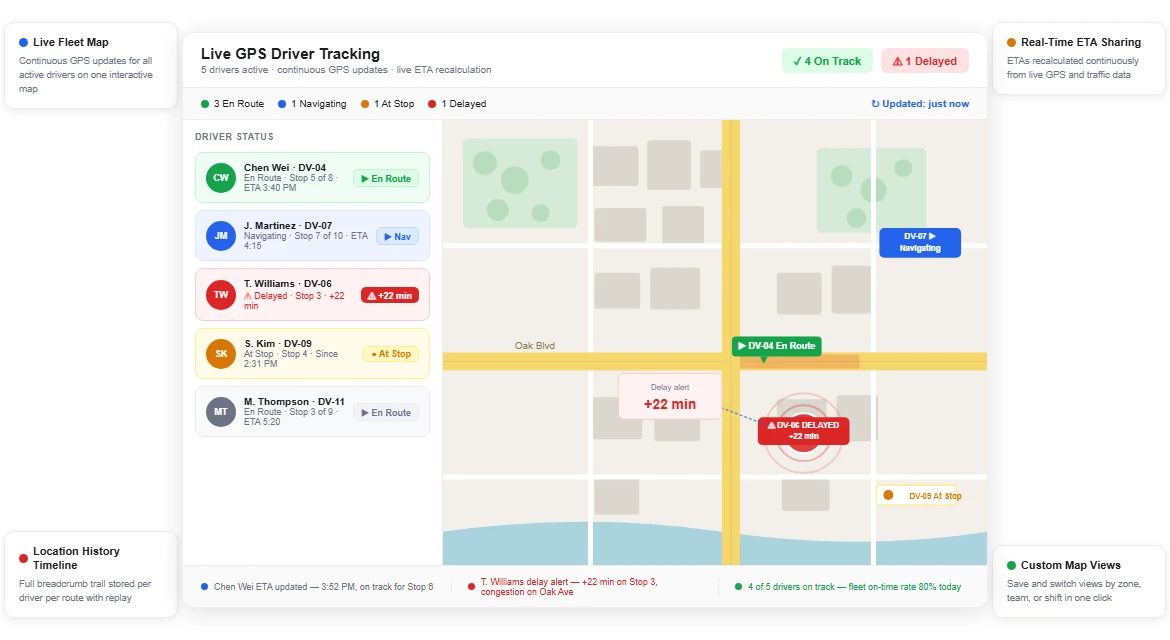
Upper Crew is Upper’s route optimization software for teams. For tracking, the useful part is where the records sit. The plan, the live position and the proof all attach to the same stop.
What the dispatcher sees: from Professional, live GPS tracking of every truck, route progress and a breadcrumb trail of where each driver went. Routes can be changed after dispatch, and the revised route reaches the driver app. Customer tracking links are a paid add-on and update with live ETAs.
What each property gets: from Professional, photos, an e-signature and notes, each stamped with the time and GPS location and attached to the stop address. Upper explains how this works in geotagged proof of delivery. Records stay available for 6 months on Starter, 1 year on Professional and 2 years on Optimize.
- Price: Starter $50, Professional $60 and Optimize $89 per user per month. Yearly billing makes those $40, $48 and $71. Enterprise is “Let’s Talk” (Upper pricing, read November 10, 2026).
- Plan note: live GPS tracking and proof of service start on Professional, not Starter. Starter covers route optimization, the driver app and CSV import only.
- Add-ons: customer live tracking $20 per driver and capacity optimization $25 per driver. Barcode scanning is $50 per company.
- Free trial: 7 days on Professional, up to 5 users, no credit card. Customer SMS is not included.
- Best suited for: contractors running several trucks who need live positions and a defensible record on one plan. Skip it if you want invoicing in the same app, because Upper does not bill.
Upper publishes this comparison and sells Upper Crew. Weigh this entry against the vendor pages linked in each competitor entry.
2. Plow360: Best for Detailed Records per Visit
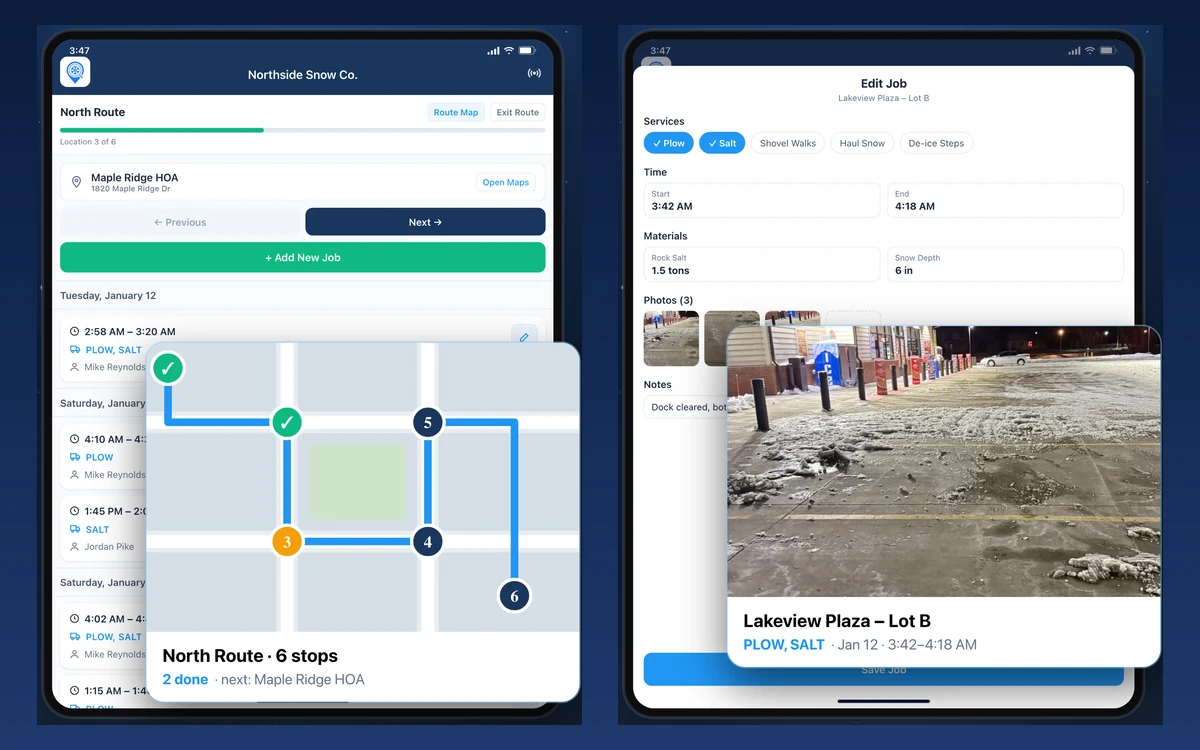
Plow360 is built for snow and ice crews. Its site says every job record captures the GPS location, the timestamp and the weather at that moment, on every plan. Photos, services and materials save with it, which is the fullest single-visit record in this list.
From Team, a live dispatch map shows where every operator is, the trail they drove and their route progress. Plow360 says positions refresh every 2 minutes. Team also records geofenced arrival and departure times at each site. Pro adds a progress board and shift replay for the last 30 days. Plow360 says job data stays saved even if you cancel.
The App Store listing says jobs save on the phone when service drops and sync when it returns. That matters on rural routes.
- Price: Solo is $20 a month for 1 user and 25 sites. Team starts at $40 a month for 100 to 400 sites, with unlimited users. Pro starts at $140 a month and adds storm dispatch events, work orders, a time clock and subcontractors. Team and Pro are priced in steps of 100 sites (plow360.com/pricing, read November 10, 2026). Solo, Team and Pro include a 14-day free trial.
- Plan note: the live dispatch map starts on Team. Solo records GPS, photos and weather on each job but does not show trucks live.
- Best suited for: crews whose first concern is defending a slip-and-fall claim with weather on the record. Skip it if you service more than 400 sites, because that needs an Enterprise quote.
3. Yeti: Best for Tracking Subcontractors Across Many Sites
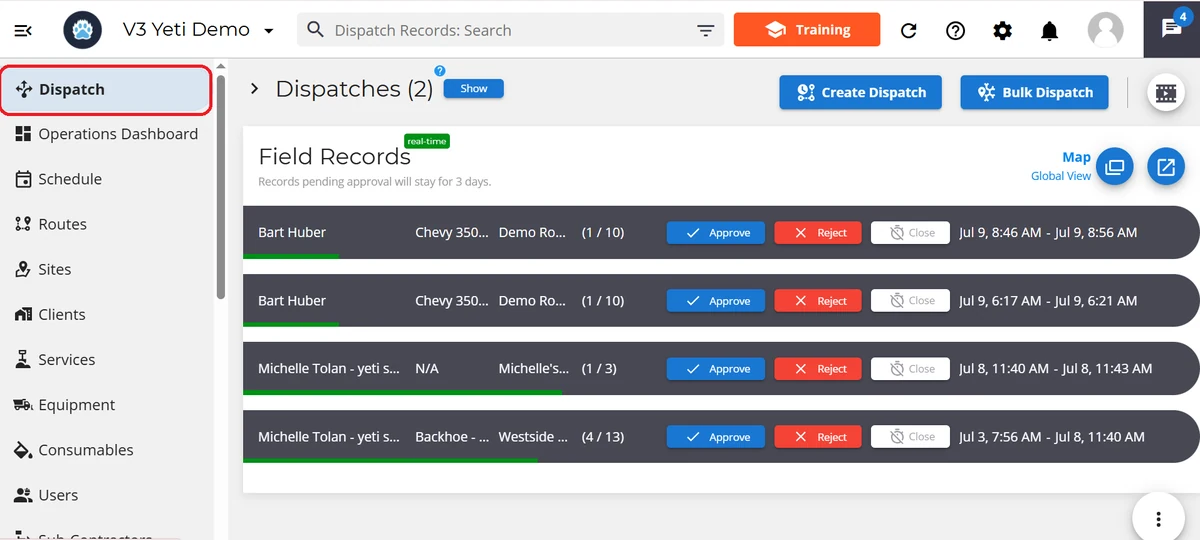
Yeti is a snow operations platform rather than landscaping software with a snow module. Its site says GPS tracks crews and subcontractors, with required photos and geofence rules on each site. Every work order carries a GPS-verified service history and an audit trail.
Subcontractors get controlled access to complete work orders while you keep visibility. That is the part general field service apps rarely cover. Yeti’s help centre shows a Dispatch page with live crew shift records and a global map of crew locations, and clients get automatic arrival and completion notifications.
- Price: one plan, priced by site count. It starts at $66.50 a month billed annually for 1 to 25 sites, or $798 a year. Users and clients are unlimited, service history storage is unlimited, and Yeti says annual billing saves 30 percent. Weather reporting is an add-on (yetisoftware.com/pricing, read November 10, 2026).
- Free trial: none listed on the pricing page. Yeti’s home page offers a 60-day money-back period instead.
- Best suited for: larger snow companies that need to see subcontractor work as clearly as their own. Skip it if you want to try before you buy.
4. SnowBossPro: Best Live Storm Board for Small Crews
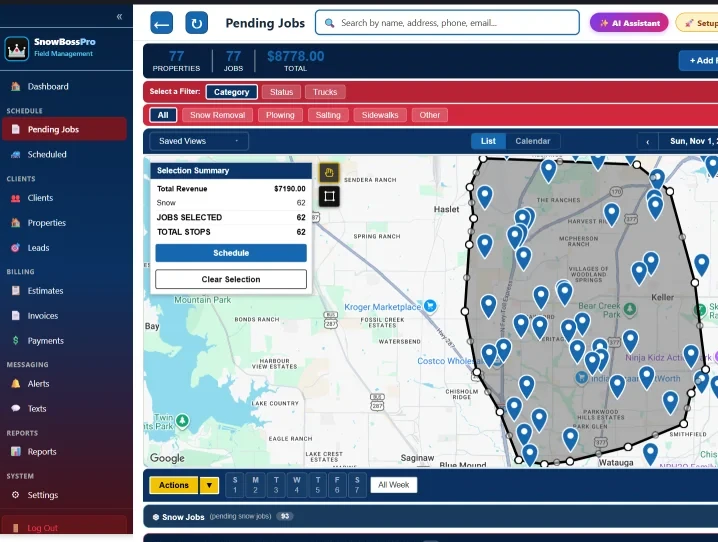
SnowBossPro runs a storm as an event. You start a storm, accounts queue, and the live map and dispatch board show the push as it runs. GPS crew tracking shows where every truck and crew is during the storm. Customers can sign in by text and see where they sit on today’s route.
Its crew app works offline. SnowBossPro says jobs, notes, photos and estimates save on the phone and sync the moment the signal returns. The crew app also logs snow depth and material used, alongside before and after photos.
- Price: Start is $59 a month for 2 users and 1 truck. Pro is $89 for 3 users and 2 trucks. Crew is $199 with no user or truck caps, billed month to month (snowbosspro.com/pricing FAQ, read November 10, 2026). The plan card on the same page shows one $59 plan with unlimited crews, so confirm your tier before you sign.
- Free trial: 14 days, no card, cancel anytime.
- Best suited for: small crews that want a live board and per-push billing in one $59 to $89 plan. Skip it if you run more than a handful of trucks.
5. Plowdesk: Best Free Snow Plow Tracking App
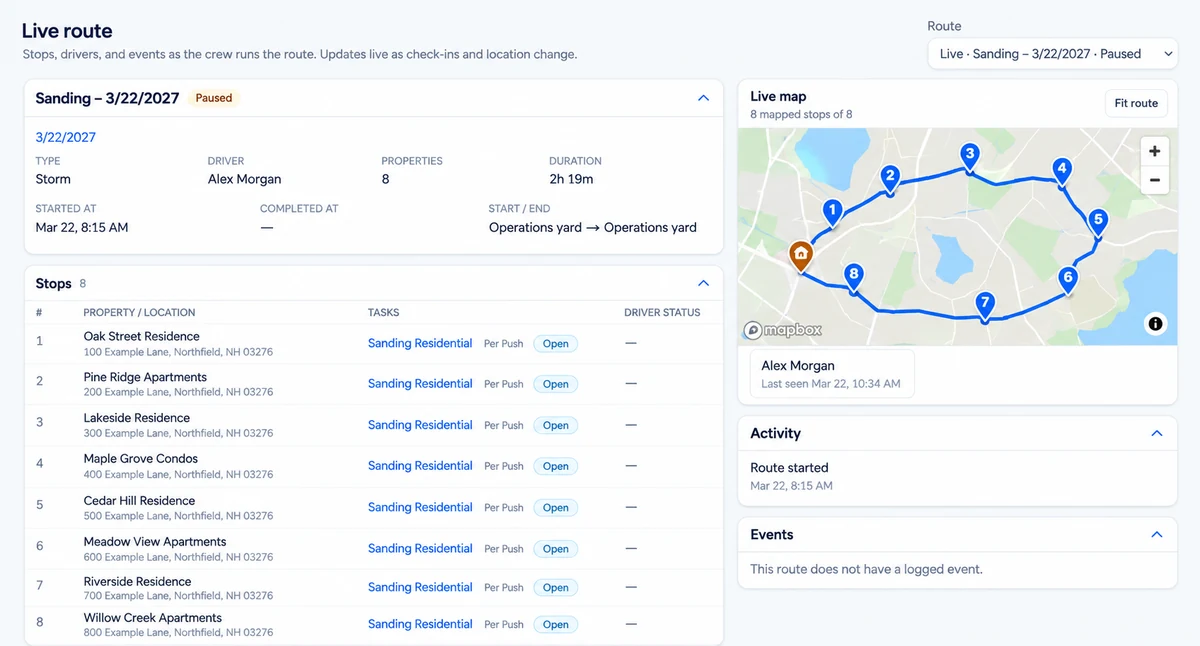
Plowdesk lists GPS breadcrumbs, route history, site photos and check-in and check-out times among its proof-of-service features. Its live route view updates as check-ins and locations change. Plowdesk says location records taken without signal are held on the phone and sync when it returns. Its Operator plan is free forever, with unlimited users and customers and up to three storm routes.
Read the plan lists carefully. The free Operator plan names site photos and service logging. GPS and route history are product features and are not listed under Operator. Confirm with Plowdesk before you rely on them at $0.
- Price: Operator free. Contractor is $95 a month. It adds unlimited storm routes for residential customers, automated notifications, a customer portal and task scheduling. Plowdesk says discounts are available for prepaid subscriptions (plowdesk.com/#pricing, read November 10, 2026).
- Best suited for: small operations moving off paper that want photos on the record today. Skip it if you need live truck positions on the free plan.
6. OptimoRoute: Best Live Tracking Priced per Driver
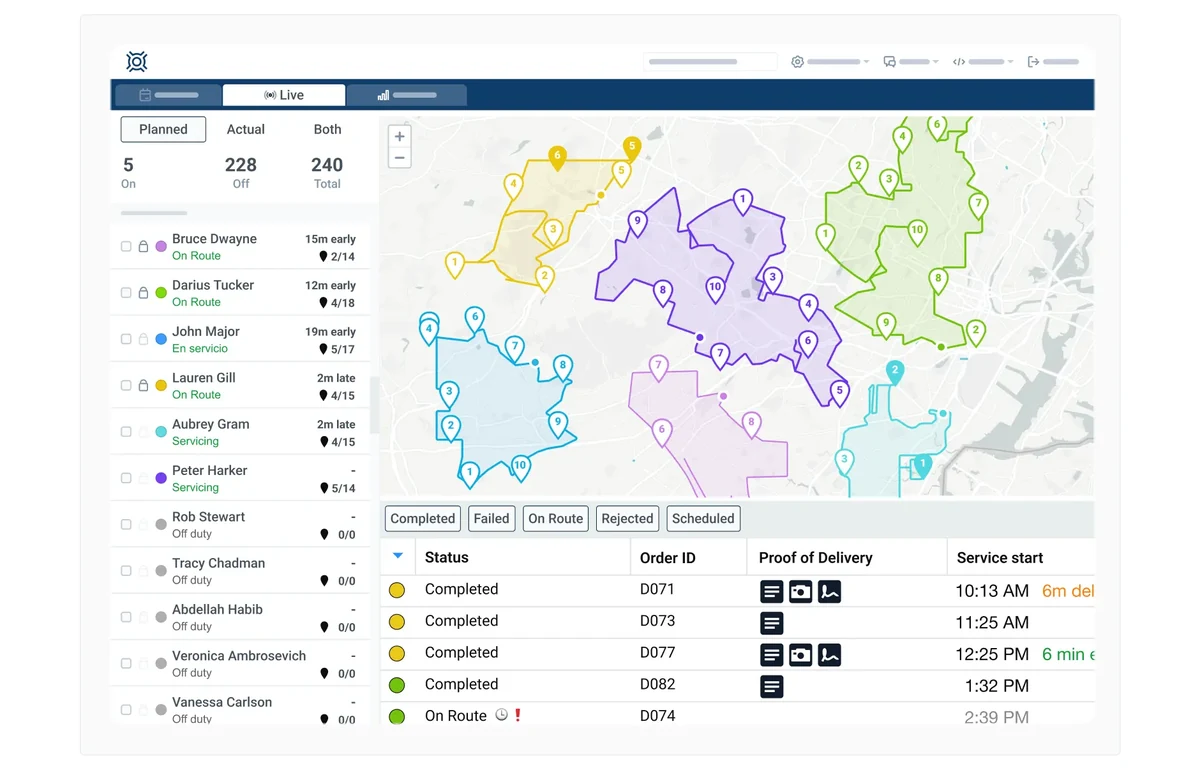
OptimoRoute is a general route planner with live tracking, live ETAs and breadcrumbs on its entry plan. It has no snow-specific logging, so no snow depth, materials or storm events.
The split between its plans matters here. Live tracking is on Lite. Proof of delivery is not.
- Price: Lite $35.10 and Pro $44.10 per driver per month, billed annually (optimoroute.com/pricing, read November 10, 2026).
- Plan note: proof of delivery starts on Pro. Lite tracks trucks but does not capture the photo. Customer-facing real-time order tracking is also Pro only.
- Free trial: 30 days, no credit card.
- Best suited for: contractors who want tracking beside existing billing and price by driver. Skip it if the visit record is why you are shopping.
7. Jobber: Best for Year-Round Crew Tracking
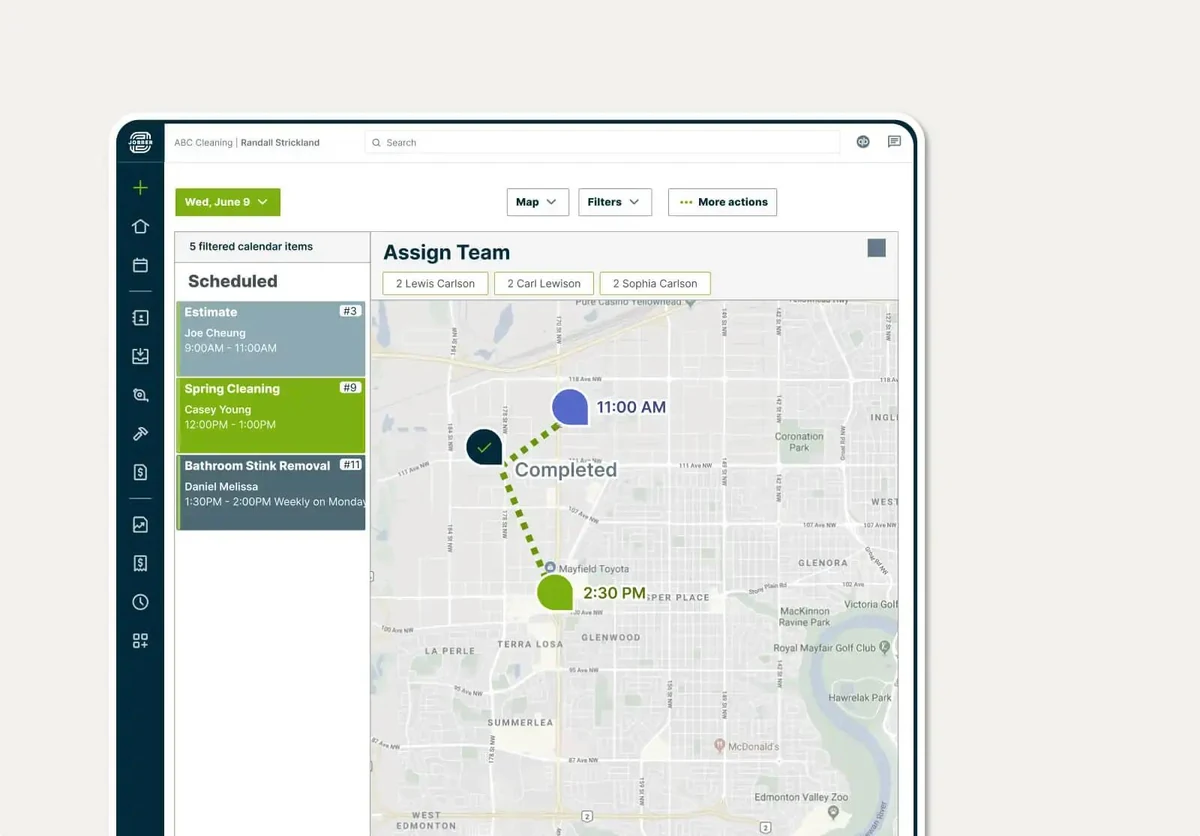
Jobber is a field service app with quoting, scheduling, invoicing and GPS crew tracking. For a contractor who mows in summer and plows in winter, one app across both seasons has real value.
Know what its tracking is. In the app, Jobber records GPS waypoints: a pin each time a crew member clocks in or out, adds a note or photo, or completes a visit. A continuous live map of trucks needs FleetSharp tracking devices installed in the vehicles.
- Price: Core, 1 user, is $49 a month with no commitment, $39 on a one-year commitment, or $29 billed annually. Connect, 1 user, is $139, $119 or $99 on the same three terms. Extra users are $29 a month each (getjobber.com/pricing, read November 10, 2026).
- Plan note: GPS tracking is not on Core. Jobber’s plan matrix lists it on Connect, Grow and Plus, so the cheapest tracking plan is Connect at $99 a month billed annually.
- Free trial: 14 days on the Grow plan, no credit card.
- Best suited for: year-round service businesses where snow is one season. Skip it if snow-specific logging is what you need.
What Proof Does a Slip-and-Fall Claim Ask For?
This is the test that decides which app you keep. A claim arrives months after the storm and asks narrow questions.
| What gets asked | What your app has to produce | What to check before you buy |
|---|---|---|
| Were you there that night? | A visit record with a date and a time | Is the time the app’s own stamp, or typed by the driver? |
| Were you at the right address? | A GPS location on the visit | Is the location saved with the photo, or only on the route? |
| What did the surface look like? | Before and after photos | Can a driver add more than one photo per visit? |
| Did you salt, and how much? | A material or snow depth log | Is this a free-text note or a structured field? |
| Can you show it eight months later? | The record, found by address | How long is retention, and can you search by property? |
| Who was there? | The crew member on the stop | Is the driver’s name on the record? |
Row five is the one that catches people. A tool can capture everything and still fail you. The record may have aged out, or be findable only by scrolling a date.
Snow Plow Tracking Apps Compared: Features and Prices
“Not listed” means the vendor’s own pages did not state it on November 10, 2026. It does not mean the feature is missing.
| App | Live truck tracking | Record per visit | Retention stated | Offline capture | Cheapest tracking-capable plan |
|---|---|---|---|---|---|
| Upper Crew | Yes, from Professional, with breadcrumbs | Photos, e-signature, notes, time and GPS, from Professional | 6 months to 2 years by plan | Not listed | $48 per user per month, yearly (Professional) |
| Plow360 | Yes, live dispatch map from Team | GPS, time, weather, photos; geofenced arrival and departure from Team | No limit stated; data kept if you cancel | Yes, syncs on reconnect | From $40 per month (Team) |
| Yeti | Yes, crews and subcontractors | GPS-verified history, required photos, geofences | Unlimited storage of service history records | Not listed | $66.50 per month, yearly |
| SnowBossPro | Yes, GPS crew tracking and live route map | Before and after photos, snow depth, materials | Not listed | Yes, syncs on reconnect | $59 per month (Start) |
| Plowdesk | GPS breadcrumbs and live route view, no plan named | Site photos, service logging, check-in and check-out times | Not listed | Location records sync on reconnect | Free (Operator), with the caveat above |
| OptimoRoute | Yes, on Lite | Proof of delivery from Pro only | Not listed | Not listed | $35.10 per driver per month, yearly |
| Jobber | GPS waypoints from Connect; live truck map needs FleetSharp devices | Job notes and photos | Not listed | Not listed | $99 per month, yearly (Connect) |
Prices checked November 2026.
Prices read November 10, 2026. Plans change, so confirm on the vendor’s site before you buy.
See it in action
See Upper Crew track trucks live mid-storm.
Bring your property list and watch live GPS and the proof record.
Which Snow Plow Tracking App Fits Your Operation?
| Your operation | Start with | Why |
|---|---|---|
| 2 to 5 trucks, disputes are the worry | Upper Crew Professional, or Plow360 Team | Live tracking plus proof tied to the address, or weather on every record |
| One person, one truck | Upper Solo | $19.99 per user per month, up to 500 stops, timestamped and GPS-tagged photo proof, 3-day trial |
| 2 to 5 trucks, no system at all yet | SnowBossPro | A live board, offline capture and billing in one plan |
| Moving off paper on no budget | Plowdesk Operator | Free, with photos on the record from day one |
| Commercial lots, claims arrive late | Upper Crew Optimize | Two-year retention, searchable by property |
| Subcontractors doing part of the work | Yeti | Controlled subcontractor access with geofenced photo rules |
| Tracking only, beside existing billing | OptimoRoute Lite | Live tracking and ETAs at $35.10 per driver |
| Landscaping in summer, plowing in winter | Jobber Connect | One app across both seasons, with GPS waypoints from Connect |
| Skills or certifications decide who takes a site | Upper AI Dispatcher | Recommends the assignment with visible reasoning for the dispatcher to approve |
Prices checked November 2026.
Choose on how a dispute would actually reach you, not on truck count. A contractor with twelve commercial lots carries more record risk than one with sixty driveways.
How Much Does Upper Cost for Snow Plow Tracking?
Live GPS tracking and geotagged proof of service both start on Professional. Starter will plan and dispatch routes, but it will not show you the trucks or stamp the photo with a GPS location.
| Snow tracking need | Starter ($50 / $40 yearly) | Professional ($60 / $48 yearly) | Optimize ($89 / $71 yearly) |
|---|---|---|---|
| Stops per route | 250 | 500 | 1,500 |
| Driver profiles | 10 | 15 | 30 |
| Route optimization and driver app | Yes | Yes | Yes |
| Live GPS tracking of trucks | No | Yes | Yes |
| Proof of service (photos, e-signature, notes) | No | Yes | Yes |
| Customer notifications and ETA links | No | Yes | Yes |
| Territory management | No | Yes | Yes |
| AI driver assignment, avoidance zones, business rules | No | No | Yes |
| Data retention | 6 months | 1 year | 2 years |
Prices checked November 2026.
Prices are per user per month, monthly and yearly billing, from upperinc.com/pricing, read November 10, 2026. Customer live tracking links are a $20 per driver add-on. A single operator who plows their own route should look at Upper Solo instead. It is $19.99 per user per month, with a 3-day free trial. For a full season budget across vendors, see how much snow removal route software costs.
What Results Do Upper Customers Report?
Northern Clearways is a landscaping and snow removal company in Duluth, Minnesota, serving more than 550 regular clients. It reports 81 percent of route planning time saved and 85 percent automation in assigning jobs. It also reports a 90 percent reduction in its communication gap. Real-time visibility and GPS tracking are listed among the features it uses (Northern Clearways story).
Win Waste Solutions is a waste-cart replacement operation, not a snow business, but its record problem is the same one. Its counties require photo records to stay accessible for up to two years. It reports daily route planning falling from 45 to 60 minutes down to under 10 minutes. It also reports 2 years of photo records stored and accessible. Stops completed per crew member daily rose 30 percent (Win Waste story).
Both are the customers’ own reported results. They are not controlled studies and not a promise for your operation.
Other Snow Plow Tracking Apps We Considered
| Tool | Why it is not on the list |
|---|---|
| Orderry | A field service and repair-shop CRM. Its pricing page describes scheduling, work orders and time tracking, but no live vehicle tracking. Paid plans are $39 to $199 a month, with a 7-day free trial (read November 10, 2026) |
| Housecall Pro | Phone-based employee GPS tracking starts on Essentials at $189 a month, or $149 billed annually, with 5 users. It has no snow-specific logging, and route optimization waits for Max at $329, or $299 billed annually (read November 10, 2026) |
| Service Autopilot | Route optimization and employee tracking first appear on Pro at $199 a month on annual subscription rates, and every plan adds a sign-up fee whose amount it does not list (read November 10, 2026) |
| CrewNest | Free and $29.99 plans. It lists route planning, but no vehicle or crew tracking is published (read November 10, 2026) |
| Telematics boxes | Hardware fleet tracking shows the truck but does not record the property visit. Useful alongside an app here, not instead of one |
Prices checked November 2026.
How to Test a Snow Plow Tracking App Before the First Storm
Test on your own property list, not on sample data. Two phones and one afternoon is enough.
- Put one phone in airplane mode, complete a stop, then restore signal. Did the photo arrive, and with the right time?
- Move a property to the other driver mid-route. How long until it shows on their phone?
- Search for a completed stop by its street address, not by date. How many taps?
- Lock the phone and leave it in a pocket for twenty minutes mid-route. Does the trail keep recording? Some apps only log location while the app is open.
- Check what the customer sees. Does the tracking link still match the plan after you changed it?
Write down the answers for each trial. These are the things you will wish you had measured when a claim letter arrives.
Pages published by Upper are Upper’s own marketing. Competitor prices come from each vendor’s own pricing page on the date shown and can change, so check the vendor’s page before you sign. A customer result is that customer’s reported outcome, not a promise, and worked examples are illustrations, not benchmarks.

See it in action
See tracking and proof on your own lots
Bring your property list and one storm change you actually get. We will track the trucks live, move a priority lot mid-route, and show the proof record a client would see.

Frequently asked questions
Upper Crew is the best snow plow tracking app for contractors with several trucks. Live GPS tracking and geotagged proof of service start on Professional, and the photo stays tied to the property address. Plow360 is the pick for record detail, Yeti for subcontractors and Plowdesk for starting free.
Yes. Upper Crew, Plow360, Yeti, SnowBossPro, Plowdesk and OptimoRoute track through the driver’s phone rather than an installed box. Jobber records phone GPS waypoints, but its continuous live map needs FleetSharp devices. Phone tracking shows position and progress, and it attaches photos to the stop. It will not give you engine data, fuel use or hours-of-service logs, which still need telematics hardware.
Keep them at least as long as a client can dispute a visit under your contract. Upper Crew keeps data for 6 months on Starter, 1 year on Professional, 2 years on Optimize and up to 5 years on Enterprise. Win Waste Solutions reports a two-year requirement from the counties it serves, which is a useful benchmark.
It depends on the app, so test it. SnowBossPro says jobs, notes and photos save on the phone and sync when signal returns. Plow360’s App Store listing says the same, and Plowdesk says location records sync on reconnect. For the others, the public pages do not say, so run a trial stop in airplane mode.
Not always, but it settles arguments early. Upper Crew sends customer tracking links with live ETAs, as a $20 per driver add-on. SnowBossPro lets a customer sign in by text and see their place on today’s route. Decide whether your clients want this before you pay for it.
The first plan with tracking runs from $0 to $99 a month. Upper Crew’s tracking tier is Professional, at $48 per user billed yearly. Plowdesk Operator is free, Plow360 Team is from $40, SnowBossPro Start is $59, Yeti is $66.50 billed annually and Jobber Connect is $99 billed annually. Price the plan where tracking actually appears.
Rules on tracking employees differ by state and province, and some require notice or consent. This is not legal advice. Check your own state or provincial labour rules, and tell your drivers what is tracked and when. Confirm your policy with your advisor before the season.
One tool is usually enough, and it is cheaper. Upper Crew, Plow360, Yeti and SnowBossPro each plan work and record it. Pair two tools only when your routing already works and you are adding proof, or the reverse. For the routing side, see the best snow plow routing apps for contractors.


