
Snow removal dispatch software for storm-day route changes
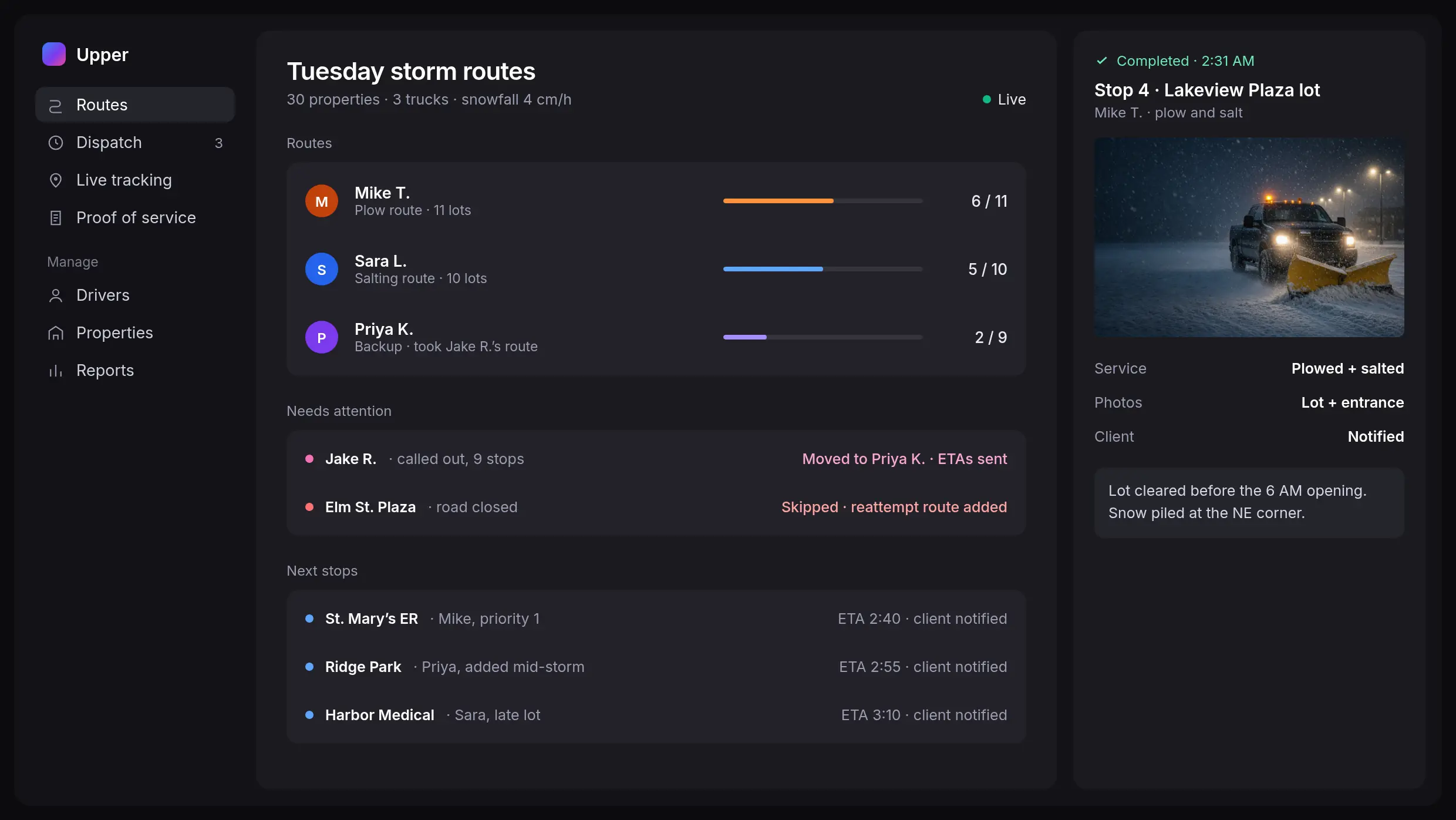
Change the route mid-storm and put it on every driver’s phone
Upper Crew is snow removal dispatch software that puts every truck, route and property on one live dispatch board. Move stops between drivers, cover a call-out or add a late lot, and the change goes straight to the driver app. Clients get the revised ETA as soon as the change goes out.
Bring your property list. See a driver call-out, a truck breakdown and a late lot handled live.


Storms don’t wait for the route you planned
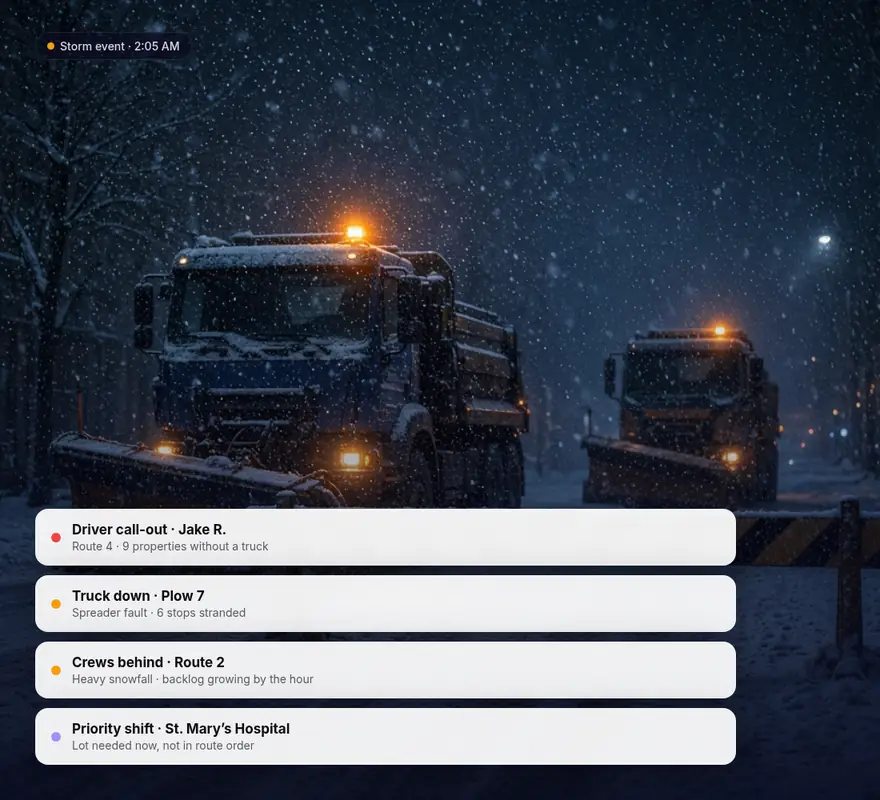
A snow day rewrites the plan in ways a fixed route can’t absorb:
A driver doesn’t show: One call-out leaves every property on that route without a truck.
A truck goes down: A broken plow or spreader strands the rest of its stops.
Crews fall behind: Heavy snowfall stretches time at each lot, and the backlog grows by the hour.
Priorities shift: A hospital or retail client needs its lot cleared now, not in route order.
When each change happens by phone, drivers work from an outdated plan and nobody keeps a record of what moved. With Upper, you can put every change on one plan and send it only to the drivers it affects.
Change snow removal routes after your trucks leave the yard
Move stops between trucks
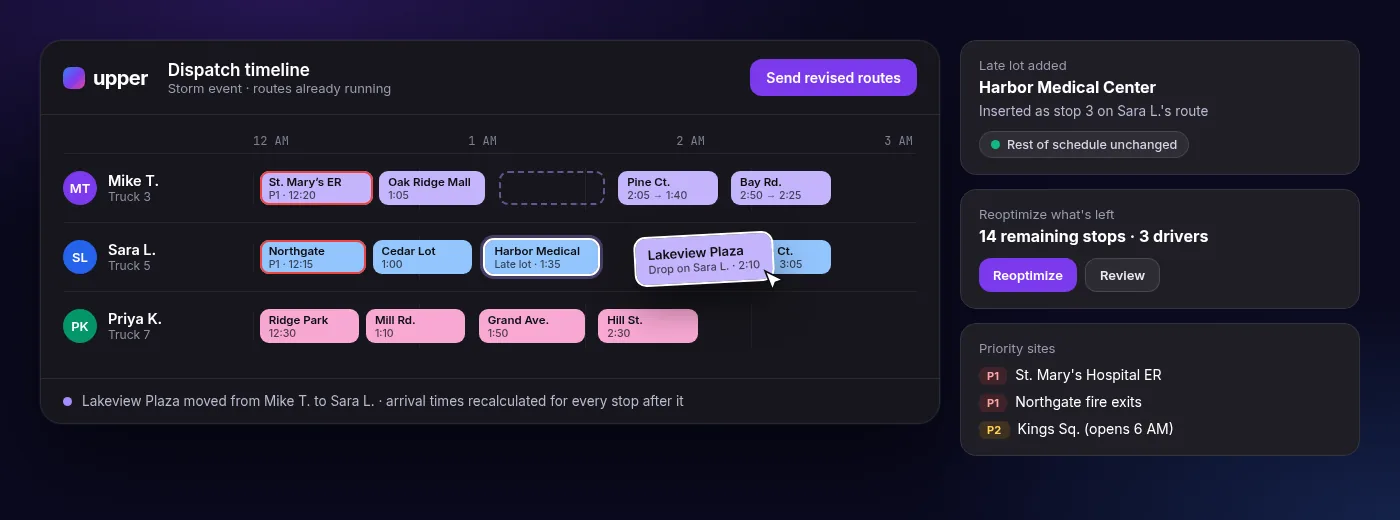
Drag a stop from one driver’s route to another on the dispatch timeline. The arrival time for every stop that follows recalculates. Send the revised routes, and they reach the driver app even after trucks have left the yard. Clients get the revised ETA by SMS or email.
Fit in a late lot
Insert an urgent stop into a route that’s already running without rebuilding the rest of the schedule. The driver sees the new stop in the app, in its place in the sequence.
Reoptimize what’s left
When conditions shift, reoptimize the remaining stops across available drivers instead of planning the night again from scratch.
Keep priority sites at the front
Set stop priorities before the season, so hospitals, emergency exits and early-opening lots stay ahead of other stops when you re-plan.
Who decides what
Upper recalculates the routes. Your dispatcher decides which stops move, which sites can wait and when the change goes out. Preferred time windows are preferences, not hard rules.
Drag-and-drop changes, multi-driver reoptimization, real-time route updates, live tracking, route chat and customer notifications are on the Professional plan and above.
Cover a no-show without rebuilding the route
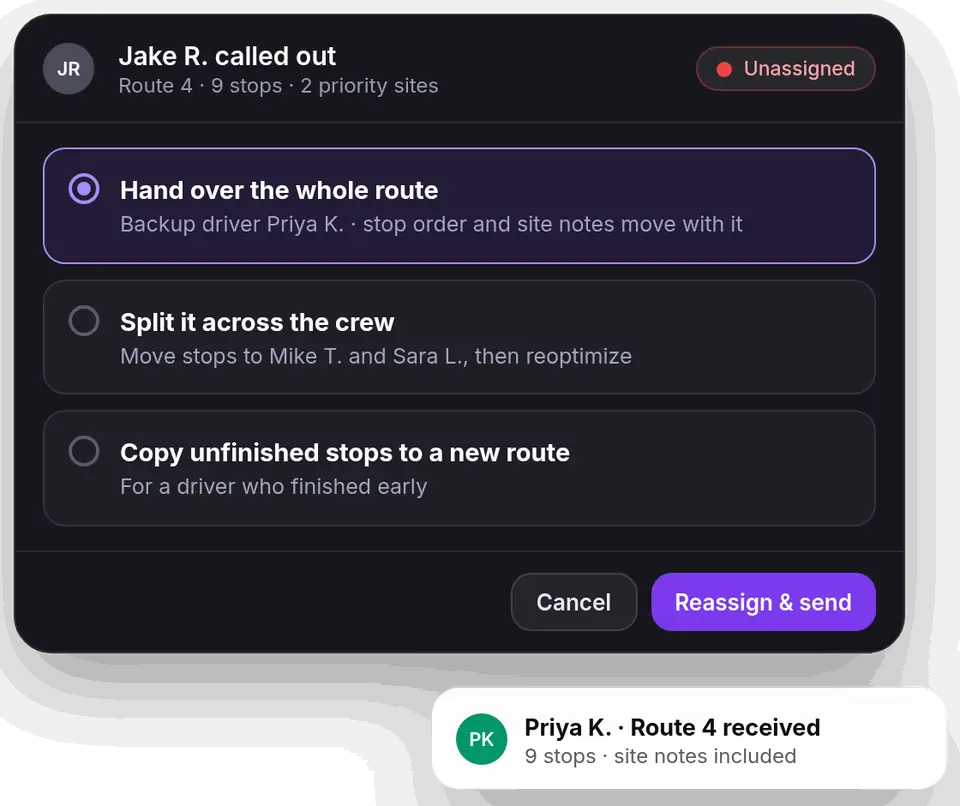
Crew no-shows and call-outs hit hardest when the route lives in one driver’s head. With Upper, every route stays on the dispatch board, so another driver can pick it up.
- Hand over the whole route: Reassign it to a backup driver. The stop order and site notes move to their app with it.
- Split it across the crew: Move the missing driver’s stops to other routes and reoptimize what’s left.
- Pass on the unfinished stops: Copy the remaining stops into a new route for a driver who finished early.
Before the season
Add backup drivers and set stop priorities before the first snowfall in Upper’s snow removal route planning software. When a call-out comes in, you already know who can cover and which sites come first.
A snow removal dispatch app in every truck
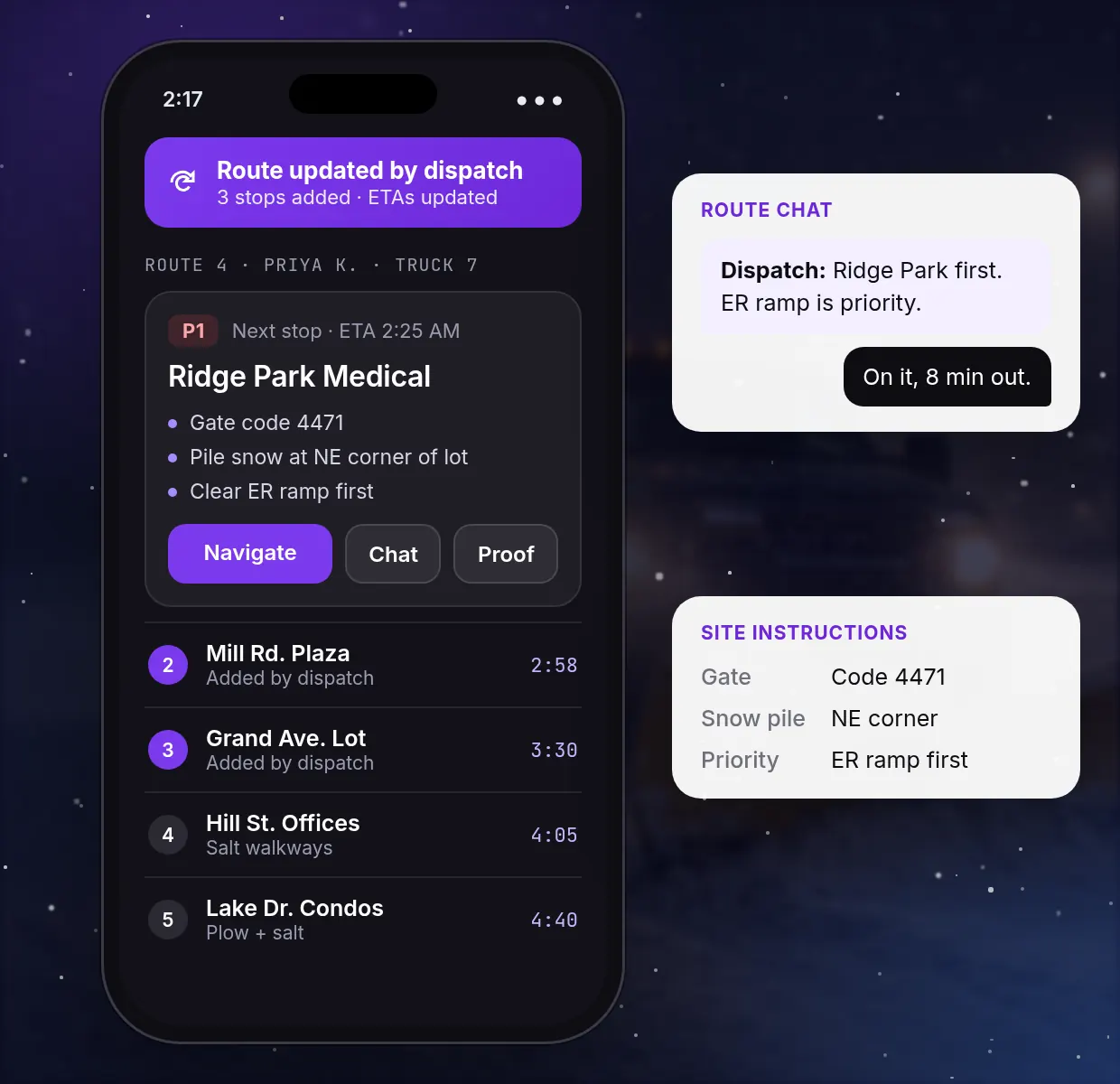
Your dispatcher works from the web dashboard. Drivers work from the Upper driver app for iOS and Android, which shows:
-
The current route: Stop order and arrival times, updated when you push a change.
-
Site instructions: Gate codes, priority notes and where to pile snow, through stop notes and custom fields.
-
Route chat: A direct line to the dispatcher for questions that would otherwise be a phone call.
-
Navigation: One tap opens Google Maps, Apple Maps or Waze.
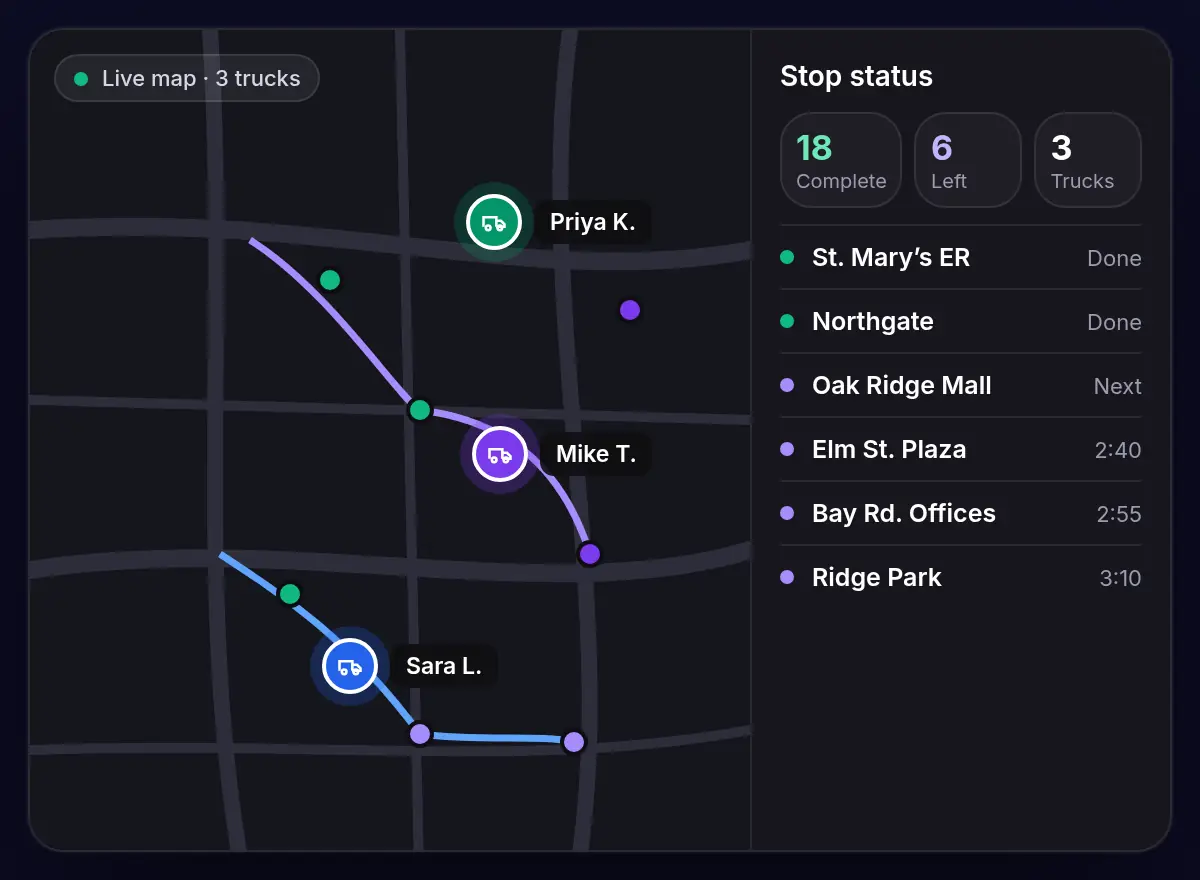
Know where every truck is before a client asks
Follow every driver on a live map and see which stops are complete and which are left. When a client calls about a lot, you can answer from the board instead of radioing the truck. Every completed stop keeps its photo, signature and notes, stamped with the time and location.
Upper plans, dispatches and records the routes. It doesn’t create quotes or invoices, so billing stays in the tools you already use.
How Upper took a snow team from fixed routes to live storm dispatch
ClearWay Snow Solutions runs 8 snow removal drivers across Ontario. Working from six separate routes made it hard to balance the work or react when plans changed. Upper moved the team to one master route, so dispatchers see every stop on one board and drag stops between drivers the moment conditions shift or a truck goes down.
Read the ClearWay Snow Solutions story ClearWay Snow SolutionsOntario, Canada
“Before Upper, adjusting routes during heavy snowstorms was chaotic. Now we can make live updates, optimize workloads, and communicate directly with drivers. It saves hours every week and reduces stress on the team.”
- Industry
- Landscaping and Snow Removal
- Headquarters
- Ontario, Canada
- Fleet size
- 8 drivers
- Key features used
- Route Planning
- Driver Tracking
- Route Scheduling
- 15-20 minutesManual dispatch time per shift, down from 2-3 hours
- 140-160Stops managed per shift, up from 80-100
- 94%On-time completion, up from 76%
- 25%More customers accommodated
Set up dispatch before the first trigger
- 1
Import your properties.
Upload your client list from CSV or Excel with addresses, notes and service times.
- 2
Set priorities and drivers.
Mark priority sites, add backup drivers and set each driver’s start and end address.
- 3
Run a practice change.
Dispatch a route to the driver app, then move a few stops between drivers.
- 4
Check the proof.
Review progress and the photos, signatures and notes from each stop.
The 7-day free trial needs no credit card. It runs on the Professional plan, and you can add up to 5 users at no cost.
Snow removal dispatch software FAQs
What is snow removal dispatch software?
Snow removal dispatch software lets a dispatcher change plow routes mid-shift and send each change straight to the driver’s phone. Upper Crew adds truck tracking, updated client ETAs and proof at every property.
How do I add an urgent lot to a route that’s already running?
Insert the stop into the active route from the dispatch board, without rebuilding the rest of the schedule. Arrival times for the stops after it recalculate, and the driver sees the new lot in the app in its place in the sequence.
What should you do when a plow driver doesn’t show up or a crew calls out?
Before the season, add backup drivers and set stop priorities for your sites. When a call-out comes in, reassign the route to a backup or move the stops to available drivers and reoptimize what’s left, keeping priority sites first. Then let affected clients know about the delay and record any property that couldn’t be reached.
Can I import my property list from a spreadsheet?
Yes. Upload your property list from CSV or Excel with addresses, notes and service times, and it becomes optimized routes. There’s no IT team or implementation project, so you can test it with your own properties during the 7-day free trial.
Can Upper change routes after drivers leave the yard?
Yes. On the Professional plan and above, changes you push from the dispatch board reach the driver app in real time. Arrival times for the stops that follow are recalculated automatically.
How much does Upper Crew cost?
Plans are billed per user per month: Starter $50, Professional $60 and Optimize $89, or 20% less billed yearly. Enterprise pricing is by request, and you can start with a 7-day free trial. See Upper pricing for plan limits.
Can drivers message the dispatcher during a snow event?
Yes. Route chat in the driver app gives each driver a direct line to the dispatcher, so a question doesn’t turn into a phone call. Route chat is on the Professional plan and above.
Put your next storm-day change on the driver’s screen
Bring your property list, your priority sites and the change that broke your last big snowfall. See how snow removal dispatch software moves the stops, updates the driver app and keeps proof at every property.