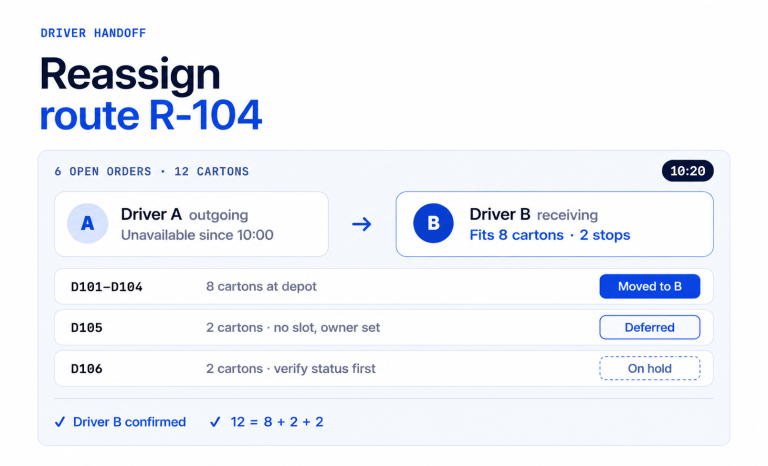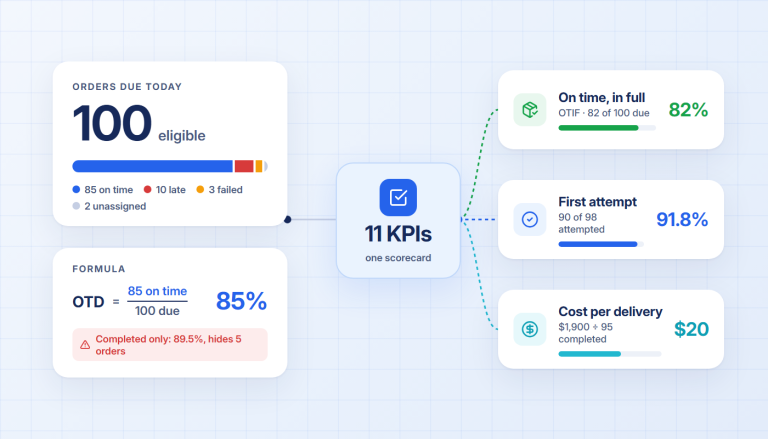
- Technician scheduling decides when work should happen, dispatching decides who receives it, and route optimization determines how assigned work fits into an efficient travel plan.
- Clean job types, accurate technician qualifications, working hours, service territories, and realistic service durations must exist before automation can make dependable decisions.
- Certifications, availability, and hard capacity limits should block an assignment. Preferences such as technician continuity or a preferred arrival window should influence the score without quietly making the plan impossible.
- A safe rollout begins in shadow mode, where software proposes assignments and dispatchers compare them with the live board before any recommendation reaches the field.
- Override rate matters only when you record the reason. A high rate may reveal bad data, weak rules, or missing dispatcher context.
- Measure your own baseline and pilot results. Generic claims about jobs per technician or payback periods cannot predict the result in your territory and job mix.
Automating technician scheduling and dispatch means turning the decisions your dispatcher makes every day into data, rules, and approval steps a system can apply consistently. The goal is not to remove your dispatcher. It is to stop making them rebuild the day one job at a time.
The case for fixing the workflow is strong. In Salesforce’s 2025 surveys of 6,500 service professionals and 350 U.S. mobile workers, 47% of field service appointments did not go as scheduled, and technicians reported spending 18% of their working hours on administrative tasks. A better dispatch process protects scarce technical time by making routine assignments repeatable and giving people a clear way to handle exceptions.
This guide shows you how to build that process. You will learn how field service auto dispatch differs from service scheduling software, which data and rules it needs, how to test it without handing over the whole operation, and which metrics reveal whether it is working. If travel between appointments is the larger problem, start with field service route optimization and connect assignment once the route data is dependable.
What Is the Difference Between Scheduling, Dispatching, and Route Optimization?
Technician scheduling chooses a feasible time, dispatching assigns a qualified person or crew, and route optimization evaluates the travel sequence created by those decisions.
These decisions are connected, but they are not interchangeable. A calendar can show that Jordan is free at 2 p.m. It cannot prove Jordan has the required certification, is working in the correct territory, has enough time to reach the customer, and can accept the job without damaging the rest of the day.
| Decision | Question it answers | Typical inputs | Output |
| Scheduling | When can the job happen? | Working hours, duration, existing appointments, preferred windows | A feasible time slot |
| Dispatching | Who should take the job? | Skills, certifications, territory, availability, priority, workload | A technician or crew assignment |
| Route optimization | How should the assigned work be traveled? | Locations, drive times, service times, route start and end points | A workable stop order and route |
Auto dispatch joins the three decisions. It filters out technicians who cannot take the job, scores the remaining choices, and evaluates what each assignment does to the schedule and route. The dispatcher then reviews the recommendation or allows routine, high-confidence decisions to proceed under predefined rules.
This distinction matters because automating the wrong layer first creates a faster version of a bad process. Before you configure software, document the decision you actually need it to make.
What Must Be Ready Before You Automate Technician Dispatch?
Field service auto dispatch is ready to test when every job and technician has enough structured data to prove whether an assignment is feasible.
Start with the smallest dependable data model. More fields do not automatically produce better decisions. Accurate fields do.
Job data
Every incoming job should have:
- A validated address or service location.
- A standardized job type.
- A realistic service-duration range.
- Required skills, licenses, equipment, or vehicle type.
- A priority level.
- A preferred or committed service window, clearly labeled.
- Any customer or site notes the technician needs before arrival.
Technician and crew data
Every service resource should have:
- Current skills and certifications.
- Normal working hours plus date-specific changes.
- Primary and allowed service territories.
- Starting location or route origin.
- Daily workload or job-cap rules.
- Assigned equipment or vehicle capabilities.
- Planned absences, training, and other unavailable time.
Qualification data can carry legal consequences. For example, the U.S. EPA says technicians who maintain, service, repair, or dispose of equipment that could release regulated refrigerants must hold Section 608 certification. The certification test is specific to the equipment type, and the credential does not expire. An HVAC dispatch rule should therefore treat the appropriate certification as a hard eligibility test, not a preference that can be traded for proximity.
Finally, assign an owner to each field. If no one owns certification updates, service-duration estimates, or time-off data, the schedule will decay after launch. Once the data has an owner, you can convert dispatcher judgment into explicit rules.
How Do You Turn Dispatcher Judgment Into Assignment Rules?
Write dispatch logic in two layers: hard rules decide whether an assignment is allowed, while soft preferences rank the allowed options.
Dispatchers already use this model informally. They reject impossible matches first, then choose the best practical option from what remains. Writing those decisions down makes them reviewable and testable.
| Hard rule: must be true | Soft preference: improve the plan when possible |
| The technician holds the required certification. | Prefer the technician who has visited the customer before. |
| The technician is working and available. | Prefer the shorter route impact. |
| The job is inside an allowed service territory. | Prefer a customer’s requested arrival window. |
| Required equipment or vehicle type is available. | Balance work across qualified technicians. |
| The assignment does not exceed a hard daily cap. | Keep lower-priority work from crowding the day. |
For an HVAC operation, a rule stack might work like this:
- Exclude anyone without the required Section 608 certification for the equipment.
- Exclude technicians who are unavailable, outside their allowed territory, or at a hard daily limit.
- Give urgent no-cooling calls a higher priority than routine maintenance.
- Compare the whole-day route effect of each remaining assignment.
- Prefer customer continuity and the requested window when the rest of the plan remains feasible.
- Flag the job for a dispatcher when no valid option exists.
Do not hide conflicts to make the board look full. “Unassigned, because no qualified technician can reach the customer within the allowed day” is more useful than a confident-looking plan that breaks a rule. That principle leads directly to the level of control you choose for the rollout.
Which Dispatch Control Model Should You Use?
Use assisted dispatch first, then allow bounded auto-acceptance only for routine decisions that meet clear confidence and conflict rules.
There are three practical control models:
Rules-based automation
The system performs a fixed action when clearly defined conditions are met. For example, a recurring maintenance visit can enter the planning queue automatically with its job type, duration, territory, and required skill already attached.
This model is easy to audit, but it becomes brittle when several rules interact or the day changes.
Assisted dispatch
The system proposes a technician, time, and route placement. The dispatcher sees why the recommendation was made and approves or changes it.
This is the safest starting point for most teams because it exposes missing data and rule conflicts without pushing every mistake into the field.
Guardrailed auto dispatch
The system accepts routine recommendations above a chosen confidence threshold while holding conflicts and unusual jobs for review. Human approval remains mandatory for conditions such as missing qualifications, major timing conflicts, or no feasible assignment.
The control model should follow the risk of the decision. A standard recurring visit with complete data can tolerate more automation than an emergency repair with uncertain duration and specialized equipment. Now that the decision rights are clear, you can implement the workflow in a controlled sequence.
How Do You Automate Technician Scheduling and Dispatch Step by Step?
Automate technician scheduling and dispatch in 7 steps: map the current decision, structure the data, classify the rules, choose approval boundaries, connect handoffs, shadow-test the recommendations, and release a measured pilot.
The sequence matters. Starting with a software configuration before documenting the work usually preserves hidden problems.
1. Map the current dispatch decision
Follow several jobs from intake to completion. Record where the request enters, who classifies it, how duration is estimated, how a technician is chosen, when the customer is contacted, and how completion returns to the system of record.
Capture exceptions as well as the happy path. The most useful examples are a late-running job, a technician call-out, a customer cancellation, a missing part, and an urgent request arriving after routes have started.
2. Standardize the minimum data
Create a controlled list of job types and map each type to required qualifications, equipment, and an initial duration estimate. Clean technician profiles and define who maintains them. Validate addresses and service territories before relying on travel calculations.
Do not automate free-text ambiguity. If “AC issue” could mean 5 different types of work, fix the intake form or add a review step before assignment.
3. Separate hard rules from preferences
Write each rule in plain language and test whether it blocks an assignment or merely changes its score. Ask a dispatcher to explain real examples where the rule should and should not apply.
Limit the first version to the rules that determine feasibility: qualifications, availability, territory, equipment, time, and hard capacity. Add preferences after the system can consistently avoid impossible assignments.
4. Define approval and override boundaries
Decide which recommendations can be released automatically, which require approval, and which conditions must stop the workflow. Require a reason when a dispatcher overrides a recommendation, using a short list such as bad duration, missing skill, customer context, parts unavailable, territory exception, or priority change.
The reason matters more than the raw override count. It tells you whether to repair data, change a rule, or keep a category of decisions human-led.
5. Connect the handoffs
Define one source of truth for jobs, schedules, technicians, and completion status. Document what happens if a sync is late or fails. A dispatch recommendation should never depend on a field that can silently be hours out of date.
Keep the handoff visible: job received, classified, scheduled, assigned, released, accepted, started, completed, or returned for review. Customer messages should use these confirmed events rather than guesswork.
6. Run in shadow mode
For a representative set of days, let the system build a proposed plan without releasing it. Compare the recommendation with the dispatcher’s live board. Review every disagreement, including assignments the dispatcher prefers and errors the dispatcher catches.
Shadow mode should include difficult days, not only a clean schedule. Test a full workload, urgent insertions, absences, cancellations, long rural travel, and a job with no feasible match.
7. Pilot one bounded workflow and scale by evidence
Choose a repeatable job category or territory with reliable data. Establish the baseline before the pilot, then compare it with the released workflow. Expand only after the team can explain the recommendations, handle exceptions, and maintain the inputs.
This rollout replaces a vague “turn on auto dispatch” project with seven observable decisions. The next task is measuring whether those decisions improve the operation.
How Should You Measure an Auto-Dispatch Pilot?
Measure an auto-dispatch pilot against your own pre-launch baseline, with override reasons and data-quality failures reported beside operating outcomes.
Generic performance promises are poor planning inputs because every territory, job mix, service duration, and skill pool is different. Use at least 2 comparable operating periods and record the scope of each one.
| Metric | Baseline | Pilot | What to investigate |
| Time from ready-to-assign to released | Your value | Your value | Intake delays, approval queues, stale availability |
| Travel time or distance per completed job | Your value | Your value | Territory design, route impact, poor duration estimates |
| First-visit completion rate | Your value | Your value | Skill tags, job classification, parts or equipment readiness |
| Jobs completed within committed windows | Your value | Your value | Overpacked schedules, travel variance, incorrect priorities |
| Productive time by technician or crew | Your value | Your value | Workload balance and gaps in the schedule |
| Dispatcher overrides by reason | Your value | Your value | Missing context, incorrect data, weak rules |
| Unassigned jobs by reason | Your value | Your value | Capacity, coverage, qualification, or demand problems |
External research provides context, not a target. Salesforce’s 2025 U.S. mobile-worker sample found that technicians spent more than 7 hours per week on administrative tasks, 38% said scheduling was often mishandled, and 81% believed AI agents could help them work more efficiently. The same report says technicians estimated AI agents could save more than 2 hours per week. These are survey results, not guaranteed outcomes for your pilot.
A public Salesforce example shows why scope must stay attached to results. Unisys manages 7,300 technicians across more than 120 countries and more than 1 million appointments annually. Salesforce reports that its scheduling engine auto-schedules 70% of appointments and that Unisys has a 95% first-time visit fix rate. This is evidence that automation can operate at scale, but it does not establish what a smaller or differently configured field-service team should expect.
Review the pilot weekly at first. Improve the data or rule that caused a failure, then rerun comparable work. Do not lower a hard safety or qualification rule merely to increase the automatic-assignment rate.
When Should a Dispatcher Override Auto Dispatch?
A dispatcher should override auto dispatch when verified customer or field context is missing from the system, or when a recommendation exposes a risk the current rules do not represent.
Common reasons include:
- A technician has the formal skill tag but lacks the practical experience for an unusual job.
- A required part or tool is unavailable even though the technician is qualified.
- A customer has site-access or continuity needs that were not captured at intake.
- A job is running long and its updated duration has not reached the scheduling system.
- Severe weather, a road closure, or another local condition makes the travel plan unrealistic.
- The only feasible-looking option would break a legal, safety, or contractual requirement.
The system should make the override easy and record the reason. Review those reasons in groups. A repeated “missing part” override is not an algorithm problem. It is a data and inventory handoff problem. A repeated “wrong duration” override means the job model needs better estimates. A one-off customer emergency may remain a human decision.
Do not evaluate dispatchers by how rarely they override the system. Evaluate whether their overrides are well-founded and whether recurring reasons lead to better data or rules.
Public Customer Example: DesertCool HVAC
A public DesertCool HVAC case study shows what the hard-rule and emergency-dispatch process described above looks like once it moves off a wall-mounted pin map.
DesertCool is a 7-technician residential and light commercial HVAC operation in the Phoenix metro area. Before Upper, its operations manager assigned jobs by neighborhood and gut feel, then coordinated emergency no-cooling calls by phoning technicians one by one to find who was closest. The DesertCool case study reports that after adopting Upper, average service calls per technician per day rose from 5.6 to 7.8, emergency dispatch time fell from 15-plus minutes to under 2 minutes, and morning scheduling time dropped from 90 minutes to 15 minutes. As with any single customer’s reported numbers, treat this as an illustration of the mechanism, not a projection for your own territory and job mix.
| Metric | Before Upper | After Upper |
| Service calls per technician per day | 5.6 | 7.8 |
| Emergency dispatch time | 15+ minutes | Under 2 minutes |
| Morning scheduling time | 90 minutes | 15 minutes |
| “Where’s my tech?” calls per day | 8–12 | 2–3 |
If emergency and same-day dispatch decisions are the harder problem for your team, book a demo and bring a day that includes at least one emergency call.
How Does Upper Support Field Service Auto Dispatch?
Upper evaluates technician or crew fit, timing, and route impact together, then shows dispatchers the recommendation, confidence, and reasoning before approved work moves forward.
Upper is built for work in which people, vehicles, or crews serve locations under real operating constraints. You can apply hard skill and certification requirements, working hours, date overrides, service territories, equipment or vehicle rules, daily job caps, and priority levels. The planning engine considers the entire day’s route rather than choosing the nearest available person in isolation.
Dispatchers remain part of the workflow. Assisted recommendations expose their reasoning, and routine assignments can be auto-accepted above a threshold you control. Critical conflicts stay out of automatic release. When no assignment can satisfy the rules, Upper reports the infeasibility instead of silently breaking a constraint.
Upper also supports CSV import for jobs and technicians, browser-based review, bulk dispatch, recurring jobs, conflict detection, and replanning when cancellations or team availability change. Because integrations vary by system and setup, verify how your current job, technician, and status data will connect during evaluation.
The broader labor context makes dependable planning valuable. The U.S. Bureau of Labor Statistics counted 425,200 HVAC mechanics and installers in 2024, projects employment to grow 8% from 2024 to 2034, and expects about 40,100 openings per year over that period. Better scheduling cannot create qualified technicians, but it can help you use the available team without assigning work they cannot perform.
Start with one real day, including the awkward jobs and constraints your dispatcher usually carries in their head. Book a demo to see how Upper turns those rules into a dispatch plan your team can review.
Frequently Asked Questions
Auto dispatch for field service is the automated assignment of service jobs to qualified technicians or crews using rules such as skills, certifications, availability, territory, priority, capacity, and route impact. A dispatcher may approve recommendations or allow routine, high-confidence assignments to proceed under guardrails.
Parts of technician scheduling can be fully automated when the work is repeatable, the data is complete, and the decision has low operational risk. Exceptions, missing data, specialized jobs, and conflicts should remain in a human review queue.
At minimum, automated dispatch needs validated job locations, standardized job types, service durations, required skills or equipment, technician qualifications, working hours, availability, territories, and current workload. Priority and customer-window data improve the plan when they are defined consistently.
A hard rule makes an assignment invalid when it is not satisfied, such as a missing license or an unavailable technician. A preference helps rank valid options, such as sending a familiar technician or honoring a preferred arrival window.
Run long enough to include representative demand and common exceptions, and compare at least 2 similar operating periods. The calendar duration matters less than covering normal days, high-load days, cancellations, absences, urgent jobs, and infeasible work.
Compare the cost of the software and implementation with measured changes in assignment time, travel per completed job, first-visit completion, productive technician time, missed commitments, and dispatcher effort. Use your own baseline and state the period and job mix behind the result.
No. Auto dispatch handles repeatable comparisons across jobs, people, time, and routes. Dispatchers define the rules, review uncertain recommendations, contribute customer and field context, and manage exceptions the system cannot safely resolve.