


Dispatching plow drivers by group text not working? It breaks down once the snow starts because group chats lack structure, live tracking and accountability. The route list scrolls out of sight under newer replies, nobody can see who has which stop, and the owner’s phone fills with “what’s next?” calls. The fix is a dispatch board that shows each stop, its assigned crew, route order, status and property notes. Upper Crew carries that board past dispatch: it pushes route changes to the driver app and keeps proof for every property.
Scrolling a thread for the latest list is also a safety problem. The National Highway Traffic Safety Administration says sending or reading a text takes your eyes off the road for 5 second, which at 55 mph is like driving the length of a football field with your eyes closed (NHTSA distracted driving). A plow driver hunting for “the newest list” is doing exactly that.
- A group text can announce a storm, but it cannot hold a route, because every new reply pushes the instructions further out of view.
- The 4 failures that show up first are buried updates, no route visibility, no clean way to record proof and status, and an owner who spends the storm answering calls.
- A snow dispatch board fixes the start of the night by putting each stop, its assigned crew, route order, status and property notes on one screen every driver reads.
- Keep hazards and breakdowns in the crew chat. Anything that changes which stop a driver works next belongs in the plan.
- Upper Crew pushes route changes to the driver app and keeps photos, signatures and notes on each property from the Professional plan, at $48 per user per month billed yearly.
Want to see your plow routes on a dispatch board instead of a group text?
Book a demoWhy Is Dispatching Plow Drivers by Group Text Not Working?
Dispatching plow drivers by group text not working is a structure problem: a chat thread is built for quick messages, not for holding a multi-stop route that keeps changing while trucks are moving. The same 4 failures show up in almost every operation that runs a storm this way:
- Buried updates: every reply pushes the route list, a gate code or a priority change further up the thread. A driver who glances at the phone sees the newest messages, not the instruction that matters.
- No route visibility: nobody in the thread can tell who has which stop, what comes next or which properties are still open. Two trucks can end up on the same street while a third lot waits.
- Lack of proof and status: a group text gives drivers no clean way to mark a stop complete, attach photos or log notes such as ice treatment. The end-of-route count becomes a guess.
- Confusion and overload: when the thread cannot answer “what’s next,” drivers call the owner. The person who should be watching the whole storm spends it answering calls one at a time.
A typical night: a driver reports that a lot’s access has changed, but the message lands in a side conversation with one teammate. The dispatcher never sees it, and the next truck sent there finds the entrance blocked.
All 4 failures share one root cause: the route lives in a stream of messages instead of in one plan every driver reads from.
What Other Snow Removal Dispatch by Text Message Problems Show Up Mid-Storm?
Once the storm is under way, text dispatch adds two more problems on top of the first 4:
- Two lists at once: when the forecast shifts, the usual fix is a fresh list posted under the old one. Drivers now hold 2 versions with no reliable way to tell which is current.
- Customer and crew messages mixed together: customer replies, driver updates and crew requests land on the same phone in the same scroll, so a breakdown report can sit under a question about a mailbox.
Both come from the same place as the first 4: there is no single current version of the night.
What Should a Snow Dispatch Board Show?
A snow dispatch board should show 5 things for every stop, each readable from the cab without scrolling:
- The stop: the property address and service type, so the driver knows exactly where the truck is headed.
- The assigned crew: one named driver or crew per stop, so 2 trucks never assume the other one has it.
- The route order: the sequence the dispatcher set, with priority sites first, so “what’s next” is answered before anyone asks.
- The status: open, complete or skipped, updated from the field as each stop finishes.
- The property notes: access instructions, where snow gets stacked, trigger depth and ice-treatment instructions, attached to the property instead of a message thread.
If the board shows all 5, a driver never has to call the owner to find out what’s next. What is still missing is a way to change the plan after the trucks leave, which is where route software comes in. The route order itself is best set before the storm; Upper’s guide to building snow removal routes and how to optimize snow plow routes cover that step.
What Is the Best Alternative to Group Texts for Dispatching Snow Plow Crews?
The best alternative to group texts for dispatching snow plow crews is a dispatch board paired with automated route updates and GPS tracking, so assignments, order and status sit in one plan instead of a scrolling thread.
- A dedicated dispatch board: one view of assigned routes, property notes and the current status of every stop. Drivers check the board instead of the thread. Upper explains the wider idea in its guide to centralized dispatching.
- Route updates and GPS tracking: software that sends route changes to drivers without manual messaging and shows where each truck is, so the dispatcher can see who is nearby when a stop needs reassigning.
GPS works best as the second layer. A dot on a map tells you where a truck is, not which property it should clear next. Any telematics you already run can stay in place. Route optimization software sits under both: it sets the stop order before the first flake, so the board starts the night from a sensible sequence. For apps built for this job, compare the best snow plow routing apps for contractors and the best snow plow tracking apps for contractors.
What Should Stay in the Crew Chat After Dispatch?
Hazards, breakdowns and quick warnings can stay in the crew chat. Stop assignments, route order and completion status belong in the plan. The group text was never the problem for “black ice on the north ramp” or “truck 3 has a flat.” It became the problem when it was also carrying the route.
One rule separates the two: if a message changes which stop a driver works next, it goes in the plan. If it warns people without changing the work, it can stay in the chat. A reassigned lot, a dropped property or a new priority call belongs on the board, where the driver app picks it up.
| Channel | Use it for | Not for |
|---|---|---|
| Upper Crew plan and driver app | Who holds each stop, route order, property notes, route changes, proof | General chatter |
| Crew group chat | Road hazards, breakdowns, safety check-ins | Stop assignments and route order |
| Customer messages | ETAs, service updates, customer reports about the property | Crew coordination |
That split is why no route tool should promise to replace your crew chat. If you want the conversation in one place, Upper Crew includes team chat between dispatchers and drivers from the Professional plan, but the chat still is not where the route lives.
How Does Upper Crew Handle Snow Routes After Dispatch?
Upper Crew plans multi-stop plow and salt routes before the storm, tracks trucks live, and lets the dispatcher change routes mid-storm, with each change landing on the driver’s app. Upper Crew proposes the sequence; the dispatcher reviews, edits and approves it before any truck rolls, and stays in charge of every change after that.
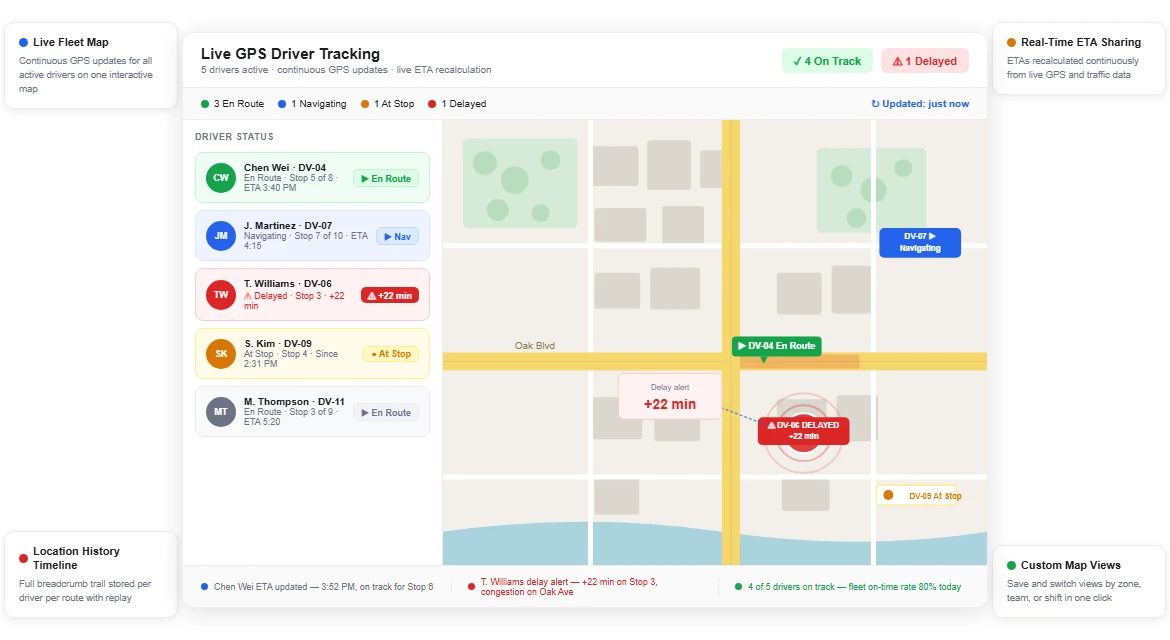
- When the storm shifts: the dispatcher adds or removes stops, moves work between drivers or reorders the sequence, and Upper Crew pushes the revised route to each affected driver app. Real-time route updates and live tracking start on the Professional plan.
- Customer updates: automated email notifications are included from Professional. SMS notifications (texts from $0.01 each) and customer live tracking links ($20 per driver per month) are paid add-ons on the pricing page. Upper explains the effect in how customer notifications reduce calls.
- Proof per property: from Professional, each stop keeps photos, a signature and notes stamped with time and GPS location and tied to the property, not to a driver’s camera roll. Route data stays available for 6 months on Starter, 1 year on Professional, 2 years on Optimize and longer on Enterprise. See geotagged proof of delivery for how that record works.
- When skills or equipment decide who goes: if certifications or equipment decide which driver takes a property, that is Upper AI Dispatcher, a separate product priced by quote. It recommends assignments with reasoning and a confidence score, and critical conflicts always come back to a person.
Upper Crew treats time windows as preferences it works to honor, not guarantees, so set your must-hit commercial lots as top priorities. The full snow workflow is on Upper’s snow removal route planning software page.
What Do Snow Contractors Report After Leaving Text-Based Dispatch?
ClearWay Snow Solutions, an Ontario snow removal company with 8 drivers, has published its before-and-after numbers. These are customer-reported results, not a promise for your season.
- Before: six separate fixed routes, customer disputes over whether a property was cleared, and route adjustments during storms that were “delayed and manual.”
- After: one master route in Upper with stops reassigned between drivers by drag and drop, updates sent through the route chat, and a time-stamped photo on every completed stop.
- Reported results: manual dispatch time per shift fell from 2 to 3 hours to 15 to 20 minutes, on-time completion rose from 76% to 94%, and service disputes went from “frequent” to “rare.”
Read the full ClearWay Snow Solutions story. One company’s result is direction, not a benchmark; your own storm night on the trial is the number that counts.
See it in action
Retire the route from your group text.
Bring your property list and watch a mid-storm change land on the driver app.
Group Text or Dispatch Board: Which Holds Up Through a Storm?
A group text handles warnings well. A plan-based board handles everything that has to be tracked, changed or proven.
| What the night needs | Upper Crew plan | Group text thread |
|---|---|---|
| Who has which stop | Each stop shows its assigned driver | Whoever scrolls far enough to find the list |
| What changes after dispatch | The dispatcher edits the route and it lands on the driver app (Professional and up) | A new message that may or may not get read |
| Proof per stop | Photos, signature and notes on the stop with time and GPS location (Professional and up) | Photos spread across personal phones, if anyone took them |
| Customer updates | Email from Professional; SMS and live tracking links as add-ons | The owner texts clients one by one |
| Hazard and breakdown warnings | Team chat from Professional, or keep your crew chat | Fast and familiar, so keep using it |
How Much Does Upper Crew Cost Compared With a Group Text?
A group text costs nothing. Upper Crew is priced per user per month on the Upper pricing page:
| Upper Crew plan | Billed monthly (per user per month) | Billed yearly (per user per month) |
|---|---|---|
| Starter | $50 | $40 |
| Professional | $60 | $48 |
| Optimize | $89 | $71 |
| Enterprise | Custom pricing | Custom pricing |
Prices checked November 2026.
- Which plan replaces the thread: Starter covers route optimization, the driver app and spreadsheet import. Live tracking, proof of delivery and real-time route updates start on Professional, so most plow crews moving off group texts compare against Professional.
- Free trial: 7 days of Professional features with no credit card; only SMS customer notifications are held back.
- Contract: Upper’s pricing page says annual billing takes a flat 20% off, and you can cancel any time without a multi-year contract.
Setup starts from the spreadsheet your team already uses, imported as-is (spreadsheet import). For the full cost picture across vendors, see how much snow removal route software costs. Upper Crew isn’t the right fit for every operation: if your routes rarely change once trucks leave and no client asks for proof, a spreadsheet and a group text may be enough.
Pages published by Upper are Upper’s own marketing. Upper prices come from upperinc.com/pricing and other vendors’ details from their own pages on the date shown, and both can change, so check before you sign. A customer result is that customer’s reported outcome, not a promise for your season.

See it in action
Bring tonight's group text to a demo
Bring your property list and the one change that always ends up on your phone at 4 a.m. We will build the routes, push a mid-storm change to the driver app and show the proof record a client would see.

Frequently asked questions
Group text dispatch stops working because every new message buries the route list, nobody can see who holds which stop, and there is no clean way to mark stops complete or keep proof. When dispatching plow drivers by group text is not working, the fix is a dispatch board or driver app that holds assignments, route order, status and property notes in one place.
The dispatcher sets assignments, route order and status in a shared plan that drivers read in a driver app, so route changes reach the driver without retyping. Quick warnings such as black ice or a flat tire can stay in the crew chat, and customers are updated separately by email or SMS.
A snow dispatch board should show 5 things for every stop: the property address, the assigned driver or crew, the route order, the current status and the property notes such as access, stacking and ice-treatment instructions. If a driver can read all 5 from the cab, nobody needs to call the owner to ask what’s next.
Change the existing plan instead of posting a new list in the thread. Move open stops to the crew best placed to take them, drop properties that no longer meet the trigger, and push the revised routes to each driver app. In Upper Crew, real-time route updates start on the Professional plan, and customers can be notified by email or by the SMS add-on.
Proof ends up scattered across personal phones and camera rolls, without a reliable link to the property, time or location. When a client disputes a visit, someone has to search those phones. In Upper Crew, from Professional, photos, signatures and notes are attached to the stop with time and GPS location, so the record is found by property.
It varies by vendor and pricing model. Upper Crew is $50, $60 or $89 per user per month billed monthly, or $40, $48 or $71 billed yearly, on Starter, Professional and Optimize, with Enterprise priced on request. Live tracking and proof of service start on Professional. SMS notifications and customer tracking links are add-ons.


