
Save Thousands in Fuel Costs with Fleet-Wide Idle Time Tracking

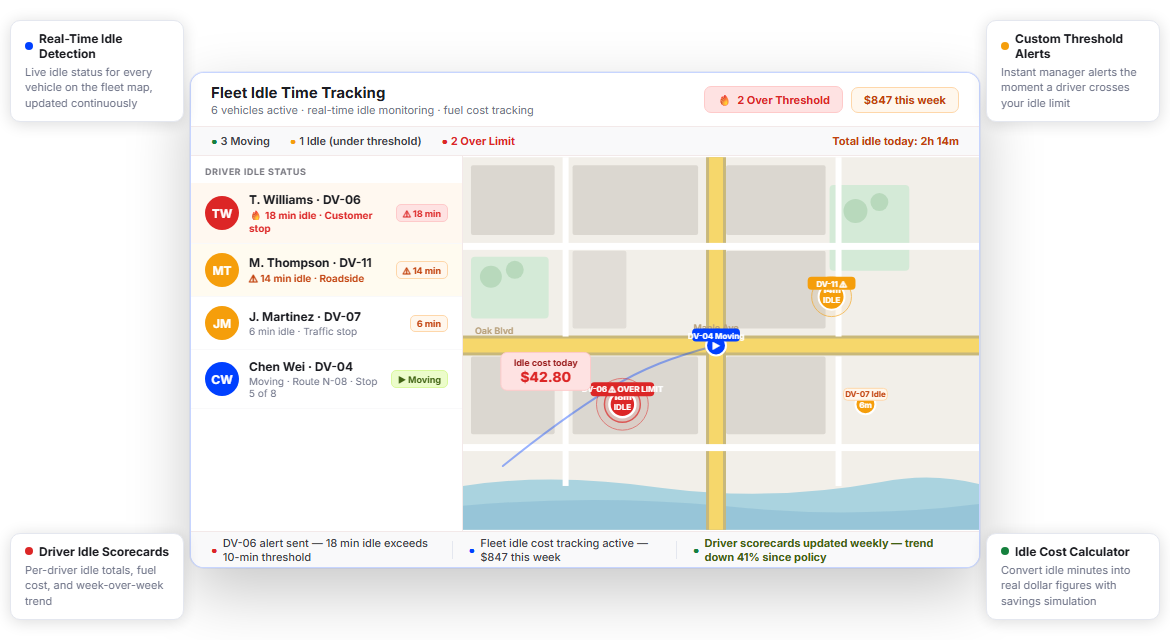
Fleets Using Upper Cut Idle Fuel Waste Before It Hits the Budget






Every Fleet Says They Monitor Idle Time. Few Actually Act on It.
What Fleet Idle Time Management Promises
-
 Full visibility into idle events across every vehicle
-
Instant alerts when a driver idles too long
-
Driver accountability through individual scorecards
-
Data-driven reduction in fuel waste and operating costs

What Actually Happens
-
Idle events often go unnoticed until rising fuel costs finally appear in the monthly operating reports.
-
Managers spend hours chasing idle data manually across disconnected systems, spreadsheets, and fleet reports.
-
Drivers rarely see their idle performance numbers until a formal review or coaching conversation takes place.
-
Nobody clearly agrees on what should actually count as “excessive” idling across the entire fleet operation.
Every Idle Event Tracked, Every Driver Accountable
Upper’s driver fleet tracking includes built-in idle time detection that logs every event, calculates fuel impact, and surfaces the patterns that cost you the most. No third-party add-ons. No manual data pulls. One platform covering idle time from the moment a driver parks to the moment they roll.
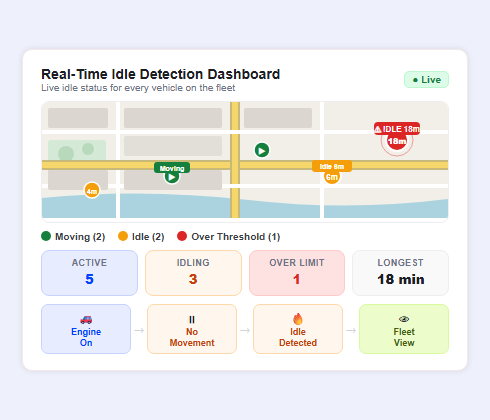
Real-Time Idle Detection Dashboard
You can’t manage what you can’t see. Upper’s idle detection dashboard shows every active vehicle, flags any engine that’s been running without movement for longer than your set threshold, and keeps a timestamped log of every idle event by driver, route, and location. Dispatch sees the full fleet picture at a glance — no refreshing, no guessing.
- Live idle status for every vehicle on the map
- Timestamped idle event log by driver and route
- Idle location tagging (depot, customer stop, roadside)
- Total idle time per vehicle per shift
- Fleet-wide idle minutes vs. drive minutes ratio
- Color-coded status indicators for at-a-glance monitoring
- Sortable event feed by idle duration and frequency

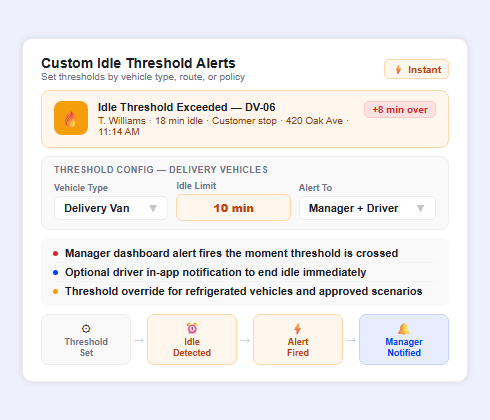
Custom Idle Threshold Alerts
Not every idle event is a problem — a two-minute stop at a traffic light isn’t the same as twenty minutes parked outside a convenience store. Upper lets you set custom idle thresholds by vehicle type, route type, or fleet-wide policy. When a driver crosses the line, Upper pushes an instant alert to the manager’s dashboard and, optionally, sends the driver an in-app notification to wrap it up.
- Configurable idle thresholds by minutes (1–60+)
- Separate thresholds for different vehicle categories
- Manager dashboard alerts on threshold breach
- Optional driver-facing in-app idle notifications
- Alert escalation for repeat idle events in a single shift
- Threshold override for approved idle scenarios (e.g., refrigerated vehicles)
- Alert history log for compliance review
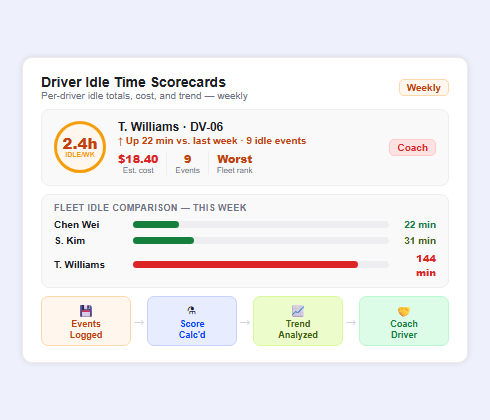
Driver Idle Time Scorecards
When drivers can see their own idle data, behavior changes. Upper generates individual idle time scorecards that rank each driver by total idle minutes, idle frequency, and idle cost impact. Managers can review scorecards weekly or share them directly with drivers during one-on-ones. No more vague feedback — just numbers that tell the story.
- Per-driver idle time totals per day, week, and month
- Idle frequency ranking across the fleet
- Estimated fuel cost attributed to each driver’s idle events
- Idle trend line showing improvement or regression over time
- Comparison view against fleet average
- Exportable scorecard for performance documentation
- Integration with broader driver performance metrics in Upper
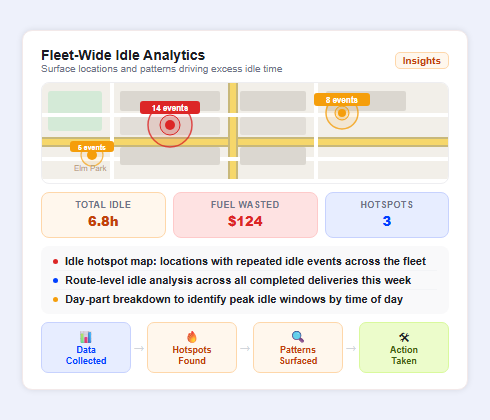
Fleet-Wide Idle Analytics
One driver idling is a coaching conversation. A fleet pattern is a process problem. Upper’s fleet-wide idle analytics aggregate data across all vehicles and all routes, surfacing the locations, time windows, and route segments where idle time consistently spikes. Use it to redesign stops, adjust dispatch timing, or flag routes that consistently generate excessive idle events.
- Total fleet idle time and fuel cost summary dashboard
- Idle hotspot map: locations with repeated idle events
- Route-level idle analysis across completed deliveries
- Day-part breakdown (morning, midday, afternoon, evening idle patterns)
- Idle cost impact estimate based on fleet fuel type and local fuel prices
- Comparison across drivers, vehicles, and route assignments
- Exportable data for fleet cost reporting
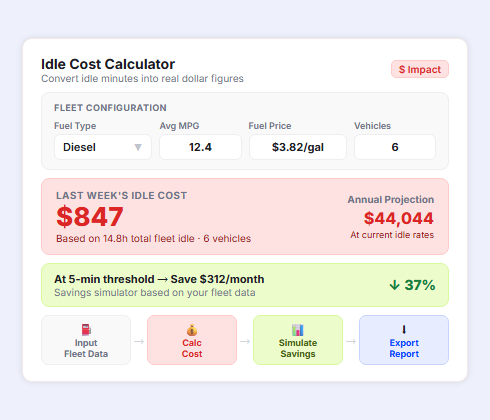
Idle Cost Calculator
Knowing you have an idle problem is step one. Knowing what it costs you is step two. Upper’s built-in idle cost calculator converts idle minutes into dollar figures using your fleet’s fuel consumption rate and current fuel price. See the real cost of last week’s idle events, and what you’d save if you hit your target threshold.
- Input fields for vehicle fuel type, MPG, and local fuel price
- Automatic cost calculation per idle event and per driver
- Monthly and annual idle cost projection at current idle rates
- “If we hit X threshold” savings simulator
- Cost breakdown by vehicle class and route type
- Historical cost trend comparing month-over-month idle spend
- Exportable summary for budget and ops reporting
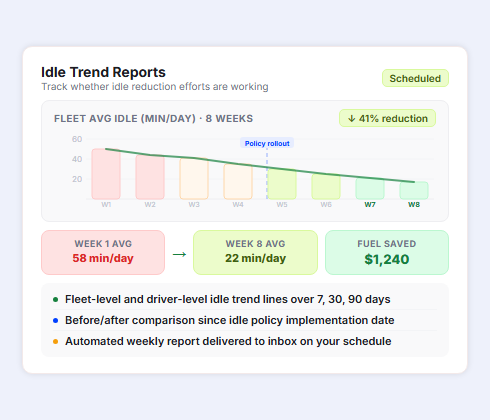
Idle Trend Reports
Tracking idle time once is a snapshot. Tracking it over weeks and months is a system. Upper’s idle trend reports show whether your idle reduction effort is working, where you’ve improved, and where idling has quietly crept back up. Schedule weekly or monthly reports to land in your inbox automatically.
- Weekly and monthly idle trend summaries
- Fleet-level and driver-level trend lines
- Before/after comparison since policy implementation
- Alert frequency trend: are drivers crossing thresholds less often?
- Fuel cost savings realized vs. baseline period
- Automated report delivery via email on your schedule
- Year-over-year idle performance for annual fleet reviews
Cut Idle Time Fuel Costs with Upper’s Engine Idle Tracking
Real-time idle alerts, driver scorecards, and fleet-wide analytics — all in one platform built for delivery and field service fleets.
Client Success Stories

“We used to spend 2 hours every morning planning routes in spreadsheets. Now it takes 10 minutes. Upper paid for itself in the first week.”


“What sold me was how easy it is to make changes. My schedules change a lot and I drag & drop stops and we’re back on track in 30 seconds. With our old software, that would’ve been an hour of replanning.”


“Our drivers actually follow the routes now. The app is simple, the navigation works, and they’re not calling me every 10 minutes asking where to go next.”

Idle Time Tracking Features for Smarter Fleet Operations
- Route-Optimized Dispatching
- Driver Performance Analytics
- Fleet Management Dashboard
- Real-Time GPS Tracking
- Driver Scorecards and Coaching Tools
- Automated Fleet Reporting

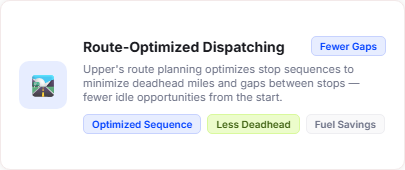
Route-Optimized Dispatching
Idle time often starts before a driver reaches their first stop. Upper’s route planning engine optimizes stop sequences to minimize deadhead miles and reduce the time vehicles spend running without purpose. Fewer gaps between stops means fewer opportunities to idle.
Driver Performance Analytics
Idle time is one piece of the driver performance picture. Upper’s route management analytics combine idle data with on-time rates, stop completion speed, and fuel efficiency metrics to give managers a full view of each driver’s efficiency profile.
Fleet Management Dashboard
Idle time data feeds directly into Upper’s fleet management software, where managers can cross-reference idle events against vehicle maintenance records, fuel logs, and route performance, all from a single operations hub.
Real-Time GPS Tracking
Every idle event is tied to a GPS location. Upper’s live tracking layer maps idle events to specific addresses, intersections, and route segments so you can see not just when idling happened, but exactly where, and whether it’s a driver habit or a systemic route problem.
Driver Scorecards and Coaching Tools
Idle scorecards work best when drivers are part of the conversation. Upper surfaces each driver’s idle data in their own profile view, giving managers a structured starting point for performance coaching conversations backed by objective numbers.
Automated Fleet Reporting
Manual fleet reporting is where idle data goes to die. Upper’s automated reporting engine schedules idle summaries, driver scorecards, and cost impact reports to deliver on your cadence (weekly, monthly, or on demand) without anyone pulling the data manually.
Why Leading Fleet Operations Teams Choose Upper

Reduce Fuel Costs Fleet-Wide
Upper’s idle time reduction software converts idle minutes into dollar estimates so you know exactly how much unnecessary engine runtime is costing you each month, and you can set targets to bring it down.

Catch Idle Problems Before They Compound
Real-time vehicle idle time alerts notify managers the moment a driver exceeds the threshold, so one idle event doesn’t turn into a habit that runs unchecked for weeks.

Build Driver Accountability
Driver idle scorecards give every team member visibility into their own performance data, creating natural accountability without managers needing to monitor every vehicle manually throughout the day.

Match Operational Thresholds
A refrigerated food delivery truck has different idle needs than a parcel van. Upper’s custom threshold settings let you define what acceptable idle looks like for each vehicle type, route profile, or business rule.

Connect Idle Data to the Full Fleet Picture
Idle time doesn’t exist in isolation. Upper ties idle events to specific routes, drivers, stops, and time windows so you can diagnose root causes, not just report the symptom.

Scale from One Vehicle to an Entire Fleet
Whether you’re running five trucks or fifty, Upper’s engine idle tracking architecture handles fleet-wide monitoring without performance lag, data gaps, or per-vehicle add-on costs.
Sync Your Idle Time Data with the Tools You Already Use


Stop Paying for Engines That Aren’t Moving
Upper’s driver idle time tracking software gives you real-time idle alerts, driver scorecards, and fleet-wide cost analytics, all in one platform. Thousands of fleet operators use Upper to cut idle time and put fuel savings straight back into the bottom line. Start your free trial today, no credit card required.
Frequently Asked Questions
-
How does Upper’s driver idle time tracking software detect and log idle events?
Upper uses GPS movement data combined with engine status signals to identify when a vehicle has stopped moving while the engine remains on. When a vehicle’s speed drops to zero and stays there past your configured threshold, Upper logs a timestamped idle event tied to the driver, vehicle, location, and route. Every event is stored in the idle history log and feeds into driver scorecards and fleet analytics automatically.
-
Can I set different idle thresholds for different vehicle types or route types?
Yes. Upper’s idle threshold settings are configurable by vehicle category, route type, or fleet-wide policy. If your refrigerated vehicles need to run longer during loading or unloading, you can set a higher threshold for that vehicle class while keeping a tighter limit for standard delivery vans. Thresholds can also be overridden temporarily for approved operational scenarios without losing event history.
-
Does Upper send idle time alerts to managers in real time?
Upper pushes idle threshold breach alerts to the manager dashboard the moment a driver crosses the configured limit. You can also enable optional in-app notifications to the driver so they’re aware in the moment. Alert history is stored in the system for review, and repeat idle events within a single shift can be escalated to trigger additional notifications if you configure that behavior.
-
How does Upper calculate the fuel cost impact of idle time?
Upper’s idle cost calculator uses your vehicle’s fuel consumption rate, fuel type, and your current local fuel price to convert idle minutes into dollar estimates. Each idle event gets a cost attribution, which rolls up into driver-level and fleet-level cost summaries. You can also run projections that show how much you’d save monthly and annually if your fleet hit a lower idle threshold target.
-
How does fleet idle time monitoring work alongside Upper’s broader fleet tracking features?
Idle time tracking is built directly into Upper’s driver fleet tracking layer, not a separate module. Every idle event is pinned to the vehicle’s live position on the map and logs alongside the driver’s route progress, stop completions, and delivery activity. This means managers see idle events in context: parked at a stop, idling at a depot, or sitting between route segments.
-
Is Upper’s idle time tracking suitable for small fleets, or is it built for larger operations?
Upper’s engine idle tracking works for any fleet size. A five-vehicle operation sees the same real-time alerts, driver scorecards, and idle cost data as a fifty-vehicle fleet. Smaller fleets often benefit most because the per-vehicle fuel waste is easier to trace directly to specific drivers, making coaching conversations faster and results easier to measure.
-
Can drivers see their own idle time data in the Upper mobile app?
Drivers access their own performance data through Upper’s driver app, including idle time totals, frequency, and how their numbers compare to fleet averages. Giving drivers visibility into their own metrics is one of the most effective ways to reduce idling. Most drivers improve when they can see the numbers themselves rather than waiting for a manager to bring it up.
-
What makes Upper different from standalone idle time monitoring tools?
Standalone idle monitors give you idle data in isolation. Upper connects idle time to everything else happening in your operation: route assignments, stop completion, driver performance scores, and fuel cost reporting — all within the same platform you use for route planning, dispatch, and analytics. That means idle reduction isn’t a separate initiative; it’s part of how you manage your fleet every day with Upper’s driver idle time tracking software.