- Route optimization can solve both stop sequence and vehicle assignment within the constraints supplied to it.
- A product's support for skills, equipment and mid-day changes matters more than whether it is labeled routing or dispatch software.
- AI dispatch should make its recommendations and approval boundaries clear.
- Assignment and sequencing must use compatible inputs; they may be solved together or refined in repeated passes.
- Start with the recurring failure in your current workflow and test that failure on a recent day's data.
Route optimization builds efficient stop sequences and can assign stops across vehicles. Dispatch manages who does the work, how it is sent out, and what changes during the day. AI dispatch tools can automate parts of that decision process. The capabilities overlap, so compare the actual rules, triggers and approvals a product supports.
If your routes look efficient but still need constant manual repair, the missing capability may be eligibility checking, reassignment, shared updates or exception handling. This guide helps you identify which one before buying another tool.
Where do routing and dispatch overlap?
Both can affect who serves a stop, the order of work and the response to a disruption. Google’s vehicle routing documentation describes assigning routes across vehicles. The vehicle routing problem is broader than drawing a path between already assigned stops.
A route optimization engine evaluates possible plans against the constraints represented in that product. Some products support a wider set of vehicle, driver and job rules than others. A system that lacks a particular rule is limited by its implementation, not by a universal boundary between routing and dispatch.
What can Upper Crew do?
Upper Crew distributes and sequences stops across selected drivers. Its workflow includes live route changes and moving stops between routes. Multi-driver optimization and capacity optimization help plan work across the selected fleet.
For matching jobs to required skills and equipment, evaluate Upper AI Dispatcher’s documented assignment workflow. Check the exact rule in a demonstration instead of assuming that every Crew function or AI Dispatcher function applies to both products.
What is an AI dispatch agent?
An AI dispatch agent is software that recommends which driver or crew should take each job. It applies routine matches within limits you set and suggests changes when the day shifts. An agent may monitor events during the day and propose actions, but its triggers and approval controls depend on the product.
The useful distinction is how the product makes and updates decisions. Ask which events it detects, which alternatives it evaluates, what it explains, and which changes a person must approve.
What rules does AI dispatch check?
Assignment rules and stop order interact. A long service visit can change who has room for the next job. Some are hard rules that can’t be broken. Others are preferences it tries to honor.
| Rule | Example | Usually |
| Skills and certifications | Only a forklift-certified driver takes a pallet drop that needs one | Hard rule |
| Vehicle and equipment fit | A liftgate truck for a bulky delivery | Hard rule |
| Working hours and time off | A driver near the end of a shift can’t take a long job | Hard rule |
| Territory and service area | A driver who knows the zone keeps it | Preference or hard rule, you decide |
| Start location | The closest eligible driver takes the first stop | Preference |
| Current workload | Work goes to the driver with room in their day | Preference |
| Priority and urgency | An urgent job is placed before routine work | Mixed |
| Preferred arrival windows | A customer prefers a morning visit | Preference, not a promise |
Upper’s skill-based driver assignment is built around this list. It matches jobs only to drivers who hold every required skill and have the needed vehicle or equipment.
How is AI dispatch different from rules-based automation?
A simple rules-based workflow may apply fixed logic, such as “if the zone is north, assign Driver A.” Other systems evaluate several constraints and trade-offs together. An AI label does not establish which method a product uses or how well it handles a difficult case. Ask it to show why an eligible driver was selected and which alternatives were rejected.
Upper’s guide to rules-based vs AI dispatch shows how to test each type against your own workflow. Use it if your team already runs on fixed assignment rules.
Workload is measured differently too. Upper’s AI Dispatcher counts travel and time on site, so a route with fewer stops can still be the fuller day.
Here is a simple, made-up example. Eight stops spread over 40 miles can take longer than 15 stops inside two miles. Balancing by stop count would get that wrong.
Who stays in control?
The dispatcher does. In Upper’s AI Dispatcher, each recommendation shows the proposed driver, start and finish, and travel estimate. It also shows a confidence score, which rates match quality, and the reasoning behind the match.
Autopilot is the mode that accepts matches for you. It takes only routine matches above the confidence threshold you set. Critical conflicts are never accepted automatically, and recovery suggestions are reviewed before they apply.
When no eligible driver can take a job, it stays unassigned. The blocking reason is shown, such as a missing skill or a full schedule. A confidence score describes match quality. It is not a probability of on-time delivery. For more on which decisions should stay with a person, see Upper’s guide on whether AI will replace dispatchers.
Which capabilities should you compare?
Use a capability checklist rather than assuming either category supplies every function.
| Capability | What to test | Why it matters |
| Sequencing and assignment | Can the tool allocate stops across vehicles and produce feasible sequences? | A short route is not useful if its vehicle cannot carry or serve the work. |
| Eligibility | Enter a job requiring a skill or piece of equipment that only one driver has. | Required qualifications must survive optimization and reassignment. |
| Mid-day changes | Remove a driver and add an urgent stop. | Check whether the product recalculates, proposes a reassignment or needs manual edits. |
| Explanations | Ask why one candidate was chosen and another rejected. | The dispatcher needs reasons that can be checked against the job. |
| Approval controls | Attempt a routine match and an impossible one. | Confirm what runs automatically and what remains in review. |
| Execution updates | Change an already shared route. | Drivers and dispatch need the same current version. |
| Data handoff | Move a sample job through the proposed setup. | Skills, durations and commitments must remain attached to the right job. |
How would you test both functions on the same morning?
Here is an illustrative test plan, not a measured customer result. A distributor has 6 drivers and 118 stops. Two trucks have liftgates, and one driver holds the certification needed for 4 pallet drops. Work starts from 2 depots.
| Event | Required test | Approval check |
| 5:30 a.m. import | Load jobs, driver availability, depot starts, load limits, skills and equipment together. | Confirm the 4 certified drops cannot go to an ineligible driver. |
| Morning plan | Evaluate assignments and stop sequences using those same rules. | Check route completion, hard commitments and any unassigned work. |
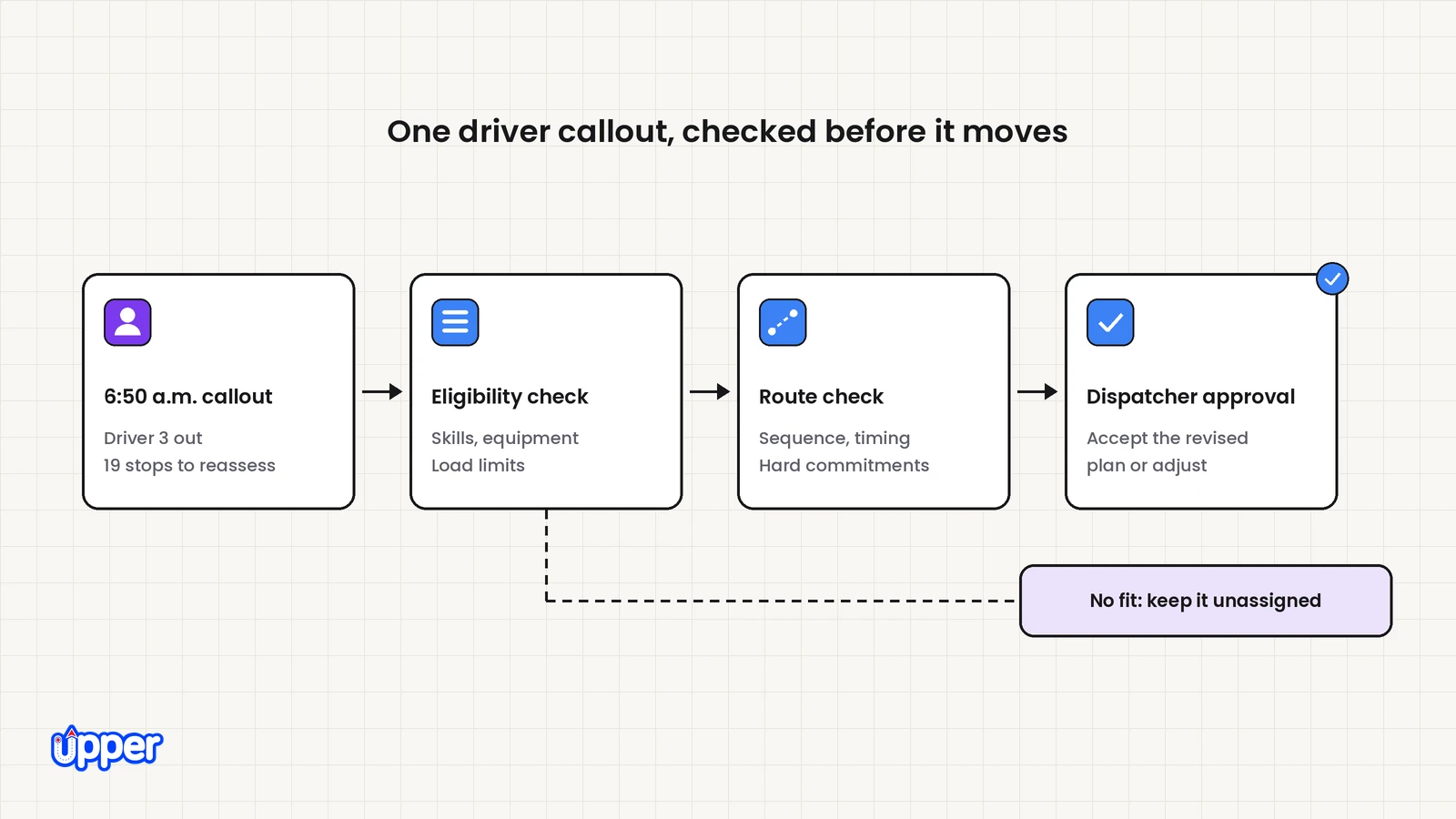
| 6:50 a.m. callout | Remove Driver 3 and reassess their 19 stops across eligible remaining drivers. | Keep work unassigned if capacity or qualifications do not fit. |
| 11:15 a.m. rush order | Test arrival, service finish, goods pickup and effects on later stops. | Accept only after the complete revised timeline fits. |
| 3:00 p.m. delay | Compare staying with the current driver against transferring work. | Include the physical goods handoff and the receiving driver’s remaining work. |
This is a set of acceptance checks for the products you are evaluating. It does not assume that adding an AI agent creates capacity or that a particular routing product lacks reassignment.
If every driver has the same skills, vehicle and service area, your current routing tool and manual review may be sufficient. Measure where the actual effort goes.
How much time does manual assignment take?
Here is a simple, made-up calculation you can redo with your own numbers.
- Assumption: assigning routes and handling changes by hand takes 40 minutes a day.
- Assumption: the team works 250 days a year.
- Assumption: the person doing it costs $30 an hour, including wage, benefits and payroll taxes.
40 minutes × 250 days = 10,000 minutes, or about 167 hours a year. At the assumed $30 an hour, that is about $5,000 of staff capacity. It becomes cash savings only if payroll, overtime or another avoidable expense changes.
Swap in your own minutes and wage. This shows the size of the assignment job. It does not predict what any software will save.
Do you need route optimization or AI dispatch first?
Start with the function causing the recurring failure. Test whether your current product already supports it before adding or replacing software.
| If this is true | Capability to test first |
| Drivers backtrack or visit stops in an inefficient order | Stop sequencing with actual travel and service times |
| Route building consumes too much planning time | Import quality, planning workflow and optimization |
| You keep hitting a map app’s stop limit | Multi-stop and multi-vehicle planning at your volume |
| Appointment commitments get missed | Explicit window handling and feasibility checks |
| Matching work to eligible drivers takes most of the morning | Skills, equipment and availability checks with assignment review |
| Some drivers run long while others finish early | Workload balancing using travel and service time |
| A callout requires rebuilding the day by hand | Reassignment and revised-route validation |
| Same-day jobs go to whoever answers the phone | Eligibility, insertion and approval controls |
| Frequent changes disrupt several drivers | Consistent assignment, routing and execution updates |
These capabilities may appear in routing products, dispatch products or both. Choose from demonstrated behavior, including the quality of the explanation and the effort required to review changes.
To evaluate Upper’s assignment workflow, book an AI Dispatcher demo and bring one recent day, so the walkthrough uses your own drivers and stops.
How do route optimization and AI dispatch work together?
Assignment and sequencing need to use the same current job and driver information. They can be solved jointly or refined in repeated passes. There is no universal requirement to optimize every route before checking eligibility, or to finalize every assignment before evaluating its route.
- Load the work and availability. Include service durations, job locations, existing commitments, skills and equipment.
- Define hard limits and preferences. Identify which requirements the proposed products actually enforce.
- Evaluate assignments and routes together. Recheck feasibility whenever one changes.
- Review exceptions and send the approved plan. Confirm how drivers receive the final version.
- Reassess disruptions. Update the data, compare alternatives and approve recovery changes where required.
Test this complete workflow before adoption. A feature on each product’s list does not by itself prove that the handoff between them works.
Why separate tools add friction
Separate planning and assignment systems may require an export, import or a supported connection. Rule context can get lost on the way. The optimizer knows a stop has a two-hour window, but a dispatch tool reading a plain CSV file may not.
Keeping both layers on the same rule data lets a mid-day change update the sequence and the assignment together. Route analytics with planned vs actual reports then show where the plan and the day split apart.
Upper’s AI Dispatcher runs in a browser, and you can keep the telematics you already use. Telematics are the GPS and vehicle data systems in your trucks. Jobs and team records come in by CSV. An ongoing link to your order system depends on the integration available, so check that before you buy.
What did A2Z Logistics change when sequencing wasn’t the problem?
A2Z Logistics, a Dallas third-party logistics (3PL) company with 10 drivers, could already build optimized routes. Its problem started after the plan existed. Customers canceled, stops were added and priorities shifted, often before drivers left the warehouse.
Changes went out by phone and text, so drivers and the office often worked from different versions of the route. “The manifest was useless by 9 AM,” said Harry D., A2Z Logistics’ founder, in the published success story.
The published story emphasizes faster route updates and reassignment. With Upper’s live tracking, Harry could see where each driver was. He could drag a stop from one driver’s route onto another, and every change synced to the driver app.
| Metric (reported by A2Z) | Before Upper | After Upper |
| Time spent on daily replanning | 45 to 60 minutes | 5 to 10 minutes |
| Manifest versions in circulation | 3 to 4 a day | One live version |
These results were reported by the customer. They are not from a controlled study and are not a guarantee.
A2Z made these assignment decisions by hand, not with AI Dispatcher. The story still shows the point of this article: after routes exist, the time goes into deciding who takes the work.
Is AI dispatch for delivery fleets different from freight dispatch?
Yes. Much writing on AI dispatch comes from long-haul freight, where one load is matched to one truck across several states. Last-mile delivery and field service routing work differently.
Each driver has dozens of short stops, and residential time windows are tight. Time on site varies by job, and customers expect an accurate ETA. Judge any tool against that kind of day, not a freight load board.
What should the quote include?
Compare the cost of the complete setup required for your workflow. Confirm the billing unit, included routing and assignment functions, setup, data connection, messaging and support. Check whether you need both products or whether one can work with the tools you already use.
Upper Crew and AI Dispatcher have different product scopes. Use the Upper pricing page and a workflow-specific quote to confirm what is included. Do not assume a plan name proves that skill matching, reviewed recovery and driver notifications are all part of the same purchase.
How can Upper help with route optimization and dispatch?
Upper is route planning, route optimization and AI dispatch software for multi-stop delivery, collection and service teams. It covers both layers as separate products. Upper Solo plans the route for one driver. Upper Crew plans and sequences multi-stop routes for a team, sends them to the driver app and tracks the day.
AI Dispatcher matches work to eligible drivers and crews and explains each match. It suggests reoptimization when the day changes. Its exception management view flags work that is blocked or waiting on a decision.
Know what automation will and won’t do. AI Dispatcher handles routine assignments under rules your team sets. Autopilot only accepts matches above your confidence threshold. Critical conflicts are never accepted automatically, and recovery suggestions are reviewed before they apply.
A confidence score describes match quality, not the chance of an on-time arrival. Preferred arrival windows are preferences, not promises, so check a customer’s firm deadline or booked appointment yourself. AI Dispatcher does not replace your dispatcher. It takes the routine matches off their desk.

See it in action
See both layers on your own day
Bring a recent stop list, your driver schedules and one disruption you deal with often, such as a callout or a rush order.

Frequently asked questions about AI dispatching vs route optimization
The terms describe overlapping work. Route optimization can assign stops across vehicles and sequence them. Dispatch manages assignments, communication and changes during execution. AI dispatch tools can automate some of those decisions. Compare actual constraints and workflows rather than treating the labels as separate technical boundaries.
Yes. Multi-vehicle optimization can distribute stops among vehicles or drivers. Which skills, equipment, availability and territory rules it supports depends on the product. Test a difficult eligibility requirement and a mid-day reassignment before deciding another tool is necessary.
Yes, some platforms do both, but some tools sold as dispatch software only assign and notify. Ask each vendor two things. Does it match jobs to drivers by skill, equipment and territory? Does it suggest reassignments when the day changes? Upper offers both layers as separate products: Upper Crew for routing and AI Dispatcher for assignment.
No, and it shouldn’t. In Upper’s AI Dispatcher, your team sets the rules. Autopilot accepts only routine matches above a confidence threshold you choose. Critical conflicts always go to a person, and recovery changes are reviewed before they apply. The agent clears routine decisions so the dispatcher can focus on exceptions.
Update the driver’s availability, then reassess their work against the remaining eligible drivers and routes. Some products support manual moves; others suggest or apply changes. Upper AI Dispatcher proposes recovery changes for review. Any work that cannot fit still needs an explicit decision, such as extra capacity or a new customer commitment.
A solo driver usually has less need for software that chooses between drivers. A single-driver route planner such as Upper Solo can help sequence the stops. The driver still needs to check job feasibility, changes and customer commitments. Evaluate an additional dispatch function only if it solves a recurring problem the current workflow cannot handle.
Both layers start from the same stop data: addresses, time windows, priorities, time on site and vehicle capacity. Assignment and eligibility checks also need people data, such as skills, certifications, equipment, working hours, time off, start locations and territories. A routing product may need these same inputs when it supports those constraints. Keep those records current. The matches can only be as good as the data behind them.