- Routes leaving late do not all need a new plan. Slack can absorb the delay, so recalculate first.
- Sort each at-risk stop by what constrains it: a fixed deadline, driver eligibility, vehicle capacity or a flexible preference.
- Re-sequencing helps with deadlines and preferences. It does not fix a missing certification or a full van.
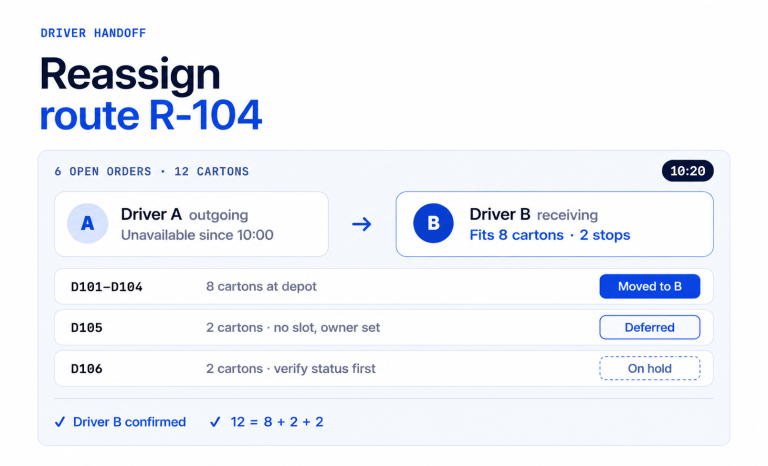
- When no order works, transfer or reschedule the stop, then confirm that drivers have the revised plan.
- AI Dispatcher proposes recovery options for your approval. Time windows stay preferences, so you check fixed deadlines yourself.
Routes leaving late means the van departs the depot after its planned time. Whether that matters depends on slack: the minutes between a stop’s planned arrival and its deadline. To recover, recalculate the route and sort the at-risk stops by constraint. Then re-sequence, and transfer or reschedule what no order can save.
Why do routes leave the depot late?
Most late departures come from a handful of causes:
- Traffic or road construction between the depot and the first stop.
- A late start at the depot, such as slow loading.
- A driver who calls out.
- New work added after the plan was built.
The Federal Highway Administration puts incidents at 25 percent of road congestion, weather at 15 percent and work zones at 10 percent (FHWA, Reducing Non-Recurring Congestion). These are national road figures, not depot departure data.
A late departure does not always grow. If the route has slack, the delay can be absorbed. If a stop waits for its window or runs long, the delay can persist. It grows only when nothing on the route can take it up.
What should a dispatcher do about routes leaving late?
Work through the route in a fixed order, so the first decision does not undo the next one. Re-sequencing is the default first move, not a universal rule.
- Recalculate. Re-time the remaining stops from the actual departure time and each stop’s service time. If every stop still meets its deadline, keep the plan.
- Classify each at-risk stop by constraint (see the next section).
- Re-sequence the remaining stops on the same route if that fixes the at-risk stops.
- Transfer or reschedule any stop that no order can save.
- Confirm the revised plan with the drivers, and tell customers whose stops now fall outside their preferred window.
How do you tell whether a late departure puts a stop at risk?
Compare the departure delay with each stop’s slack. Slack is the stop’s deadline (or the end of its window) minus its planned arrival time. A stop is at risk when the delay, plus any extra travel or service time, is larger than its slack. A stop with 55 minutes of slack absorbs a 40 minute delay. It misses by 5 minutes when the van leaves 60 minutes late.
Which constraint is holding the stop?
Four constraints behave differently, and only some respond to a new order.
| Constraint | Example | Does re-sequencing help? |
| Fixed customer deadline | A hospital dock that closes receiving at 10:00 | Yes, if the stop can move early enough |
| Driver eligibility | A stop that needs a certification the driver lacks | No. A different driver is needed |
| Physical capacity | A van that is already full | No. The load or vehicle has to change |
| Flexible preference | A preferred delivery window | Sometimes. A miss is a customer conversation |
A contractual receiving window is a fixed deadline for your operation. That is separate from how software treats a time window. Upper’s AI Dispatcher treats preferred windows as preferences and flags deviations for review. Check any fixed deadline yourself before you approve a change.
When should a stop move to another driver?
Move a stop when no order on the current route can meet its constraint. Check the receiving driver on 4 points: eligibility, capacity, travel time and arrival in time. If the goods are already loaded, check that they can physically be handed over.
If no feasible option exists, reschedule. Call the customer early, offer the next available slot, and keep the stop visible until it is resolved.
What does a recovery look like with real numbers?
Here is a simple, made-up example. The plan has 3 stops, with 10 minutes of service at each. Travel times in minutes:
- Depot to A: 20. Depot to B: 10.
- A to B: 15. B to A: 15.
- B to C: 15. C to A: 20.
- Stop A: a clinic with a fixed receiving deadline of 10:00.
- Stop B: a preferred window of 8:00 to 9:30.
- Stop C: a preferred window of 8:30 to 10:00.
The planned order is B, C, A, leaving at 8:00. That plan reaches B at 8:10, C at 8:35 and A at 9:05. A has 55 minutes of slack. The van leaves at 9:00 instead, 60 minutes late.
| Stop | Constraint | Planned arrival (leave 8:00) | Arrival if unchanged (B, C, A) | Arrival after re-sequence (A, B, C) |
| A | Fixed deadline 10:00 | 9:05 | 10:05 (5 minutes late) | 9:20 (on time) |
| B | Preferred window 8:00 to 9:30 | 8:10 | 9:10 (inside) | 9:45 (15 minutes outside) |
| C | Preferred window 8:30 to 10:00 | 8:35 | 9:35 (inside) | 10:10 (10 minutes outside) |
Leaving the order alone misses the clinic’s fixed deadline by 5 minutes. Moving A first meets the deadline. The price is that B and C now arrive outside their preferred windows. Those two customers should hear about it first.
Now a failure case. If the clinic’s deadline were 9:15, even going first arrives at 9:20. No order saves it. The stop needs another eligible driver who can reach the clinic by 9:15. Otherwise, reschedule the delivery with the clinic. Each late stop should carry its reason next to its proof of delivery (POD). A later dispute then has the record it needs.
What has one customer reported about delivery windows?
MedDirect Supply, a Philadelphia-area medical supply distributor, reported these results after it moved to Upper. Its story is about delivery windows overall, not a single late departure.
- Delivery window violations fell from 12% to 1.8%.
- On-time delivery rose from 88% to 98.2%.
- Hospital penalties dropped 89%, from about $45,000 per year to under $5,000.
- Average route time fell by 50 minutes per driver per day.
In MedDirect’s words, “Hospital dock delivery windows were not suggestions. They were contractual obligations.” The results are customer-reported, not a controlled study or a guarantee. Read the full MedDirect Supply story.
How can Upper help with routes leaving late?
Upper is route planning and dispatch software for multi-stop teams. Its AI Dispatcher proposes recovery options when a route no longer fits the plan. The dynamic dispatch reoptimization page describes how recovery works. For the wider workflow, see Dynamic Route Optimization: A Live-Change Guide.
In a recovery, AI Dispatcher:
- Re-optimizes the route when a driver falls behind.
- Weighs skills, equipment, capacity and travel when it suggests another driver.
- Favors the least disruptive change that resolves the problem.
- Flags later jobs that are now at risk.
- Keeps unassigned stops visible, so your team can arrange cover, offer another time or contact the customer.
- Leaves practical details, such as transferring goods already loaded onto another vehicle, for the dispatcher to confirm.
- Requires your approval before a recovery change applies.
Each recommendation shows the factors behind it and a confidence score. The score describes match quality. It is not a probability of on-time delivery. Autopilot accepts routine matches above the threshold you set, and critical conflicts are never auto-accepted.
Know what automation will and won’t do
AI Dispatcher works inside your rules and does not replace the dispatcher. It considers preferred windows and flags deviations, so a recovery recommendation does not guarantee the original arrival time. Confirm proposed times with customers before you promise them.
Upper is not the right fit for every operation. The deciding factor is not fleet size. It is how many rules interact on a route, and how often the day changes after dispatch. AI Dispatcher pricing is on request, and the other plans are on the Upper pricing page.
What should you bring to an Upper demo?
Bring a real day to the demo. Bring your stop list, your hardest deadline, and one of your routes leaving late recently. Seeing that exact day recalculated tells you more than any feature list. Which of your stops carry a fixed deadline, and how often does a route leave the depot late?
Book a demo and see your own late route recalculated.

See it in action
Bring a real late route to an Upper demo
See your own stop list, deadlines and late route recalculated in one session.

Frequently asked questions about routes leaving late
There is no single number. A departure is too late when the delay is larger than the slack on any stop with a deadline. Slack is the deadline minus the planned arrival. A stop with 55 minutes of slack absorbs a 40 minute delay. It misses by 5 minutes when the van leaves 60 minutes late.
Re-sequence first when the constraint is a deadline or a preference, because a new order on the same van needs no second driver. Go straight to a transfer when the constraint is eligibility or capacity. Before you transfer, check the receiving driver, travel time and whether loaded goods can be handed over.
Tell customers whose stops now fall outside their preferred window before the van reaches them. Give the new arrival time as an estimate, not a promise. Offer another time if the estimate does not work for them, and confirm what they choose.
Reschedule it. Contact the customer early and offer the next available slot. Keep the stop visible on the plan until it is resolved. Record why it moved, so the reason is on the stop if a question comes up later.
Attach the reason for the delay to the stop, next to its proof of delivery. If a dispute comes up later, the record it needs is already on the stop. Include the departure time, the cause and the new arrival time.
Send the revised route to each affected driver and ask for a confirmation. Check the first stop on each route before the van moves. A re-sequence that the driver has not seen is still the old plan on the road.