


Snow removal route optimization vs spreadsheets comes down to speed, scale, real-time adaptability and labor costs during a winter storm. A spreadsheet handles a short plow list that never changes. Once several crews share the work and the storm rewrites the plan, multi-stop route software earns its cost: it re-plans after dispatch, sends the change to the driver app and keeps a proof record for every property. Your sorted column stays right only until the first truck leaves the yard.
Snow makes that gap wider. The Federal Highway Administration reports that average arterial speeds fall 30 to 40 percent on snowy or slushy pavement (FHWA road weather management). Drive times that looked right in a summer spreadsheet run long on a storm night.
- A spreadsheet is enough for one operator plowing a short, static list where the same order works every storm.
- Route software pays off once several crews share the list, priority sites jump the queue, or the plan changes after the trucks leave.
- The real gap opens after dispatch: Upper Crew pushes route changes to the driver app and keeps photos, signatures and notes on each property from the Professional plan.
- Upper Crew is $40, $48 or $71 per user per month billed yearly on Starter, Professional and Optimize. Live tracking and proof start on Professional.
- Run 3 tests on any trial with your own property list: crew capacity, a mid-storm change and the property record.
Want to see how route optimization handles your own snow property list?
Book a demoSnow Removal Route Optimization vs Spreadsheets: What Are the Key Differences?
The difference is less about building the plan and more about what happens to it: how a change reaches the truck, whether customers hear about it, and what record each property keeps.
| Factor | Upper Crew | Spreadsheet |
|---|---|---|
| Pricing model | Per user per month, with published plans (see the cost section below) | No added software cost |
| Free trial | 7 days of Professional features, no card needed | Not applicable |
| Building the route | Plans multi-stop routes around service duration, stop priorities, start and end locations, driver availability, time-window preferences and vehicle capacity | You sort rows by hand |
| Re-plan after dispatch | Real-time route updates from Professional | Re-sort and resend by hand |
| Change reaches the driver | Pushed to the Upper driver app with stop order, customer details and navigation handoff | Phone call or text |
| Customer updates | Automated email notifications from Professional; SMS and customer live tracking links are paid add-ons | None; clients call the office |
| Photo, signature and notes per property | Captured at the stop with time and GPS location, from Professional | Not built in |
| Live truck locations | Live tracking on the dispatcher’s map, from Professional | Not built in |
| Crew workload balancing | Multi-driver load balancing from Professional; vehicle capacity planning on Optimize | Your judgment |
| Setup effort | Import the existing spreadsheet as-is | None, the file already exists |
The two tools look alike in the top rows. Both can hold the same property list in a sensible order. They separate from the moment a plan has to change. The full Crew feature set is on the route optimization software page, and the snow-specific workflow is on Upper’s snow removal route planning software page.
When Do Spreadsheets Make Sense for Snow Removal Routes?
Spreadsheets make sense when the route is short, the order rarely changes and nobody else needs to see the plan as it changes.
- Very small operations: one person plows a short list of properties, no property depends on another, and the same order works every storm.
- Static, predictable routes: the same properties run in the same loop, and no priority site jumps the queue when the snow starts.
- Zero software budget: the season’s margin can’t carry a per-user subscription, and the file you already have does the job.
If you plow your own list alone and have outgrown the file, Upper Solo is Upper’s single-driver route planner. It is a separate product from the multi-crew Upper Crew. For a general look at the spreadsheet method outside snow work, see Upper’s guide to the Excel route planner.
Fleet size alone isn’t the tipping point. The question is how many rules interact on one route and how often a storm forces you to change it. A handful of trucks juggling priority lots, preferred windows and separate salt runs has the harder problem. That is where software starts to pay.
When Does Snow Removal Route Optimization Software Make Sense?
Snow removal route optimization software makes sense once the plan has to bend during the storm and more than one crew has to bend with it.
- Scaling fleets: multiple crews, trucks or subcontractors share the property list, and workload balance decides whether every crew finishes at a sensible hour.
- Tiered snow triggers: a light event calls for salt on some properties while a deep one calls for full plowing on all of them, so each trigger needs its own route.
- Time, money and liability: on commercial properties, a late or undocumented visit becomes a contract and liability question, so both the order and the record matter.
The software builds the plan, but your rules decide it. Here is the split between Upper Crew and the dispatcher.
What Upper Crew does:
- Plans the season’s routes before the first storm. The step-by-step method is in Upper’s guide to building snow removal routes.
- Puts priority sites first, because stop priority is a planning input on every plan.
- Keeps routes within a vehicle’s weight or volume limits when you use vehicle capacity planning (Optimize plan).
- Tells you when a rule can’t be honored instead of hiding it.
- Treats time windows as preferences it works to honor, not as guarantees.
What the dispatcher does:
- Reviews, edits and approves each route before the first plow leaves the yard. The dispatcher stays in charge of what reaches the field.
- Keeps the call on which windows actually matter to a client.
What Happens After Dispatch: Spreadsheet vs Route Software?
With a spreadsheet, the plan ends when the trucks leave. Every later change travels by phone, and nothing records what happened at a property unless a driver writes it down.

In Upper Crew, the plan keeps going after the trucks leave:
- The dispatcher changes the live route. You might add a call-in property, move a priority lot forward or move a truck’s remaining work onto another route.
- That driver’s app updates. Nobody reads a re-sorted row list over the phone; the revised route lands in the driver app.
- Customers can see the change. With the customer live tracking add-on, a property manager checks a link with live ETAs instead of calling dispatch.
- Drivers capture proof at each property. Photos, signatures and notes stay attached to the stop with time and GPS location. Upper keeps route data for 6 months on Starter, 1 year on Professional, 2 years on Optimize and longer on Enterprise.
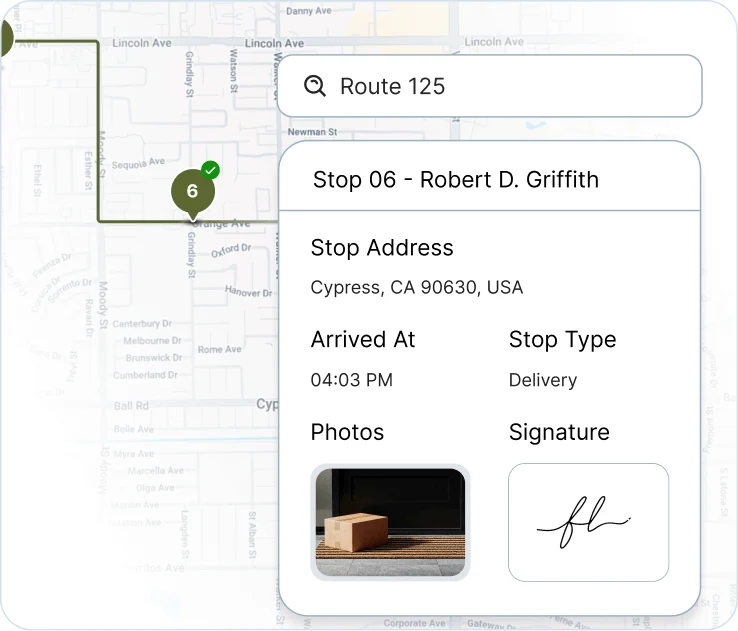
The software doesn’t decide when a change goes out. The dispatcher still makes that call.
The record matters most when a client disputes a visit. A spreadsheet row that says “done” is your word against theirs. A timestamped photo tied to the property is evidence. Upper explains how that works in geotagged proof of delivery, and the best snow plow tracking apps for contractors compares how other tools handle it.
What Results Do Snow Contractors Report After Leaving Static Routes?
Two Upper snow customers have published before-and-after numbers. These are customer-reported results, not a promise for your season.
- ClearWay Snow Solutions (Ontario, 8 drivers): the team ran six separate fixed routes before moving to one master route in Upper. It reports manual dispatch time per shift falling from 2 to 3 hours to 15 to 20 minutes, route adjustments during storms moving from “delayed and manual” to real time, and on-time completion rising from 76% to 94% (ClearWay Snow Solutions story).
- Northern Clearways (Duluth, Minnesota, 550+ regular clients): the company replaced manual, paper-based planning and reports route planning time falling from over 400 hours a season to under 50 hours. It also uses Upper for landscaping routes the rest of the year (Northern Clearways story).
Neither result came from a spreadsheet-only operation measured storm by storm, so treat them as direction, not a benchmark. Your own test on the trial is the number that counts.
See it in action
Run your plow spreadsheet through Upper Crew.
Bring your property list and watch a mid-storm change reach the driver app.
What Should You Test Before Choosing Snow Route Software?
Test first whether the tool can weight crews of different capacity, because the plan is wrong from the start if it can’t. Snow contractors raise this themselves. In a Reddit r/logistics thread about snow removal routing, one commenter framed the test this way: can you tell the optimizer one team handles twice the work of another, and have it split the properties to match?
Run these 3 tests on any trial:
- Crew capacity. Give a two-person crew and a solo driver the same property list and check whether the split reflects the difference. Upper Crew balances work across drivers by time, distance or workload from Professional, with vehicle capacity planning on Optimize. When equipment or certification decides who takes a property, such as a heavy plow versus a truck with a salt spreader, that is Upper AI Dispatcher. It checks skills, certifications, equipment, availability and workload, shows its reasoning with a confidence score, and lets Autopilot accept routine matches above a threshold you set, while critical conflicts always come back to a person. AI Dispatcher is priced by quote.
- Mid-storm change. Add a property after dispatch and time how long it takes to appear on the driver’s phone.
- Property record. Complete a stop and confirm the photo, signature and notes stay attached to that property with time and location.
Which Other Tools Come Up in This Comparison?
Three other vendors’ pages come up often when snow contractors compare options: Route4Me, Yardbook and Mapsly. None of the three argues spreadsheets versus software directly.
| Tool | What its own pages describe | Published price |
|---|---|---|
| Upper Crew | Multi-stop route optimization, dispatch to a driver app, real-time route updates, live tracking and proof per stop | $40 to $71 per user per month billed yearly; Enterprise by quote |
| Route4Me | A snow removal routing mode that puts high-traffic areas first, coordinates several crews and refreshes repeat routes after heavy snowfall | No public plan prices; its plans list “Contact us” |
| Yardbook | Snow workflows with property-based pricing (for example by snow depth), reusable snow route templates and Quick Dispatch | Business $34.99 a month, Enterprise $49.99 a month |
| Mapsly | Adding stops mid-trip and re-optimizing the remaining visits, plus two-way sync with a CRM or spreadsheets; routing in general rather than snow | Not checked for this page |
Vendor details read on route4me.com, support.route4me.com, yardbook.com, support.yardbook.com and mapsly.com on November 10, 2026.
Route templates for repeat routes show up in both the Route4Me and Yardbook documentation, so repeat routes are table stakes. The 3 tests above are what tell these tools apart. For a ranked list built for this decision, see the best snow plow routing apps for contractors.
What Does Switching From a Spreadsheet to Upper Crew Look Like?
Switching starts with the spreadsheet you already have. You upload it as-is, with addresses, notes and service times, and Upper Crew turns it into routes across your crews. Columns map once, and Upper flags duplicate or incomplete addresses before optimization (spreadsheet import). There is no IT team and no implementation project. The Upper Crew getting-started documentation walks through the first import.
Crew doesn’t replace the CRM, billing or telematics stack you run today. Invoices keep going out from your current system; Crew covers the routes, the dispatching and the property proof.
The import is the fast part even for large lists. GreenEdge Lawn, a lawn care company rather than a snow contractor, reports reorganizing all 800 customers into new territories in one afternoon after a merger by importing a CSV (GreenEdge Lawn story). That is one customer’s reported result, not a promise for a snow season. Once the routes are built, how to optimize snow plow routes covers the order and priority rules.
How Much Does Snow Removal Route Optimization Cost Compared With a Spreadsheet?
A spreadsheet costs nothing beyond the file. Upper Crew charges a published per-user price on the Upper pricing page.
| Upper Crew plan | Billed monthly (per user per month) | Billed yearly (per user per month) | Route data kept |
|---|---|---|---|
| Starter | $50 | $40 | 6 months |
| Professional | $60 | $48 | 1 year |
| Optimize | $89 | $71 | 2 years |
| Enterprise | Custom pricing | Custom pricing | Custom |
Prices checked November 2026.
Upper’s pricing page says annual billing takes a flat 20% off any plan.
- Which tier replaces a spreadsheet: Starter covers route optimization, the driver app and spreadsheet import. Live GPS tracking, proof of delivery, time windows and real-time route updates start on Professional, so most multi-crew snow operations compare against Professional.
- Free trial: run your own spreadsheet through Professional features for 7 days without entering a card; only SMS customer notifications are held back.
- Add-ons: SMS customer notifications (texts from $0.01 each) and customer live tracking ($20 per driver per month) are listed separately on the pricing page.
- Upper AI Dispatcher: priced by quote; Upper publishes no price for it.
The real comparison isn’t $0 against a subscription. It is the subscription against the hours your dispatcher spends re-sorting and phoning during a storm. Only your own storm nights can put a number on that. For the full cost picture across vendors, see how much snow removal route software costs.
Which Should You Choose for Your Snow Operation?
The snow removal route optimization vs spreadsheets decision comes down to whether your plan holds steady through a storm. Choose a spreadsheet while it does. Choose route software once it doesn’t. Answer 3 questions about your own storm night:
- Crews: how many crews must stay in step when the plan changes mid-storm?
- Properties: how many properties carry a rule, such as a priority, a preferred window or a specific piece of equipment?
- Mix: is your work residential, commercial or both? Commercial clients are the ones who ask for the record.
Answers of “one,” “almost none” and “residential” mean the spreadsheet stays, since Upper doesn’t suit every operation. Any other mix is worth testing on the 7-day trial: import your actual property list, enter the rule you find hardest, and push it through a disruption your storms really produce. You stay in charge of every route that goes out.
Pages published by Upper are Upper’s own marketing. Upper prices come from upperinc.com/pricing and other vendors’ details from their own pages on the date shown, and both can change, so check before you sign. A customer result is that customer’s reported outcome, not a promise for your season.

See it in action
Bring your plow spreadsheet to a demo
Upload the property list you already keep. We will build routes across your crews, move a priority lot mid-storm, and show the proof record a client would see.

Frequently asked questions
In snow removal route optimization vs spreadsheets, the better choice depends on how often your plan changes. For one operator with a short, static list, a spreadsheet is enough. Once several crews share the work or storms force changes after dispatch, snow removal route optimization is better because it pushes changes to the driver app and keeps proof on each property. In Upper Crew, those two features start on the Professional plan.
Switch when the spreadsheet stops surviving storm nights. Common signs are more than one crew working the same list, priority lots that jump the queue, call-in properties added mid-storm, and commercial clients asking for proof of each visit. If you re-sort and phone drivers several times a storm, test route software on your own property list before next season.
Most of the efficiency is won before the first flake. Build and save one route per snow trigger during the off-season, with priority sites first and work balanced across crews, so storm night is spent dispatching rather than sorting. The gain beyond that comes from a plan that can still change after the trucks leave the yard.
The dispatcher’s job doesn’t disappear; it shifts to reviewing and approving plans, so budget that review time alongside the subscription. Upper Crew starts at $40 per user per month billed yearly, and live tracking and proof start on Professional at $48. If one operator plows a static list and the spreadsheet order already survives every storm, that money buys nothing the file doesn’t already do.
Yes. Upper Crew imports Excel and CSV files as-is, with addresses, notes and service times. You map the columns once, and Upper flags duplicate, incomplete or unrecognized addresses before it builds routes. You can add priorities or time windows to any stop after the import without uploading the file again.
Proof captured in the Upper driver app belongs to the stop record, not to the phone, so photos, signatures and notes that were saved stay attached to the property with time and location. What happens to a photo taken while the phone is offline varies by app, so test a stop with no signal on your trial before you rely on it for client disputes.
Track the dispatcher time spent re-sorting and phoning during storms, the minutes it takes a change to reach drivers, and the share of properties with a saved proof record. Set a spreadsheet baseline first, then repeat the measurement on a trial with the same property list.


