Driver app for waste haulers
Every stop, gate code and pickup photo in the driver’s hand
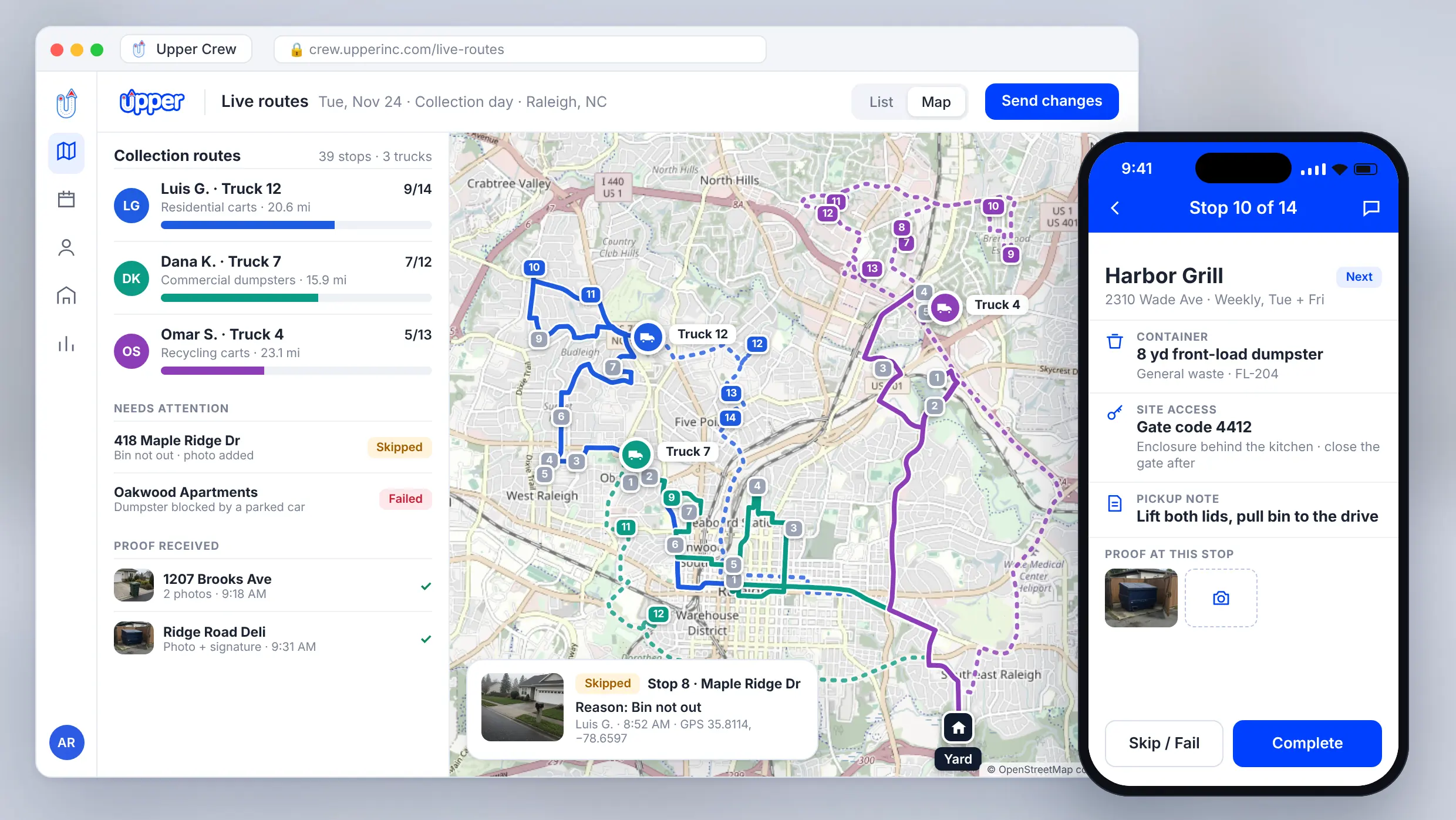
Upper Crew is a driver app for waste haulers on iOS and Android. Drivers get the day’s optimized route with gate codes and container notes. They record photos, signatures and skip reasons at every stop and keep working when the signal drops. Your office gets a record for each pickup before the customer calls.
Bring a collection route and one of your drivers. See the stops, instructions and proof the app would give them.


Why do pickup disputes and “where are you” calls keep happening?
The driver knows what happened at the stop, but the office doesn’t. When photos sit in phone galleries and text threads, the gate code lives in the regular driver’s head and nobody records why a bin was skipped, every complaint turns into one person’s word against another’s.
Proof gets lost. Before Upper, Win Waste Solutions had photos spread across phone galleries, text threads, shared drives and email. Finding one for a county request took hours.
Missed-pickup calls have no answer. CleanHaul Services had no GPS trail, no timestamps and no photos when a property manager reported a missed building.
Covering drivers start blind. The person running someone else’s round doesn’t know which enclosure to use or how to get through the gate.
What does the Upper driver app show at each stop?
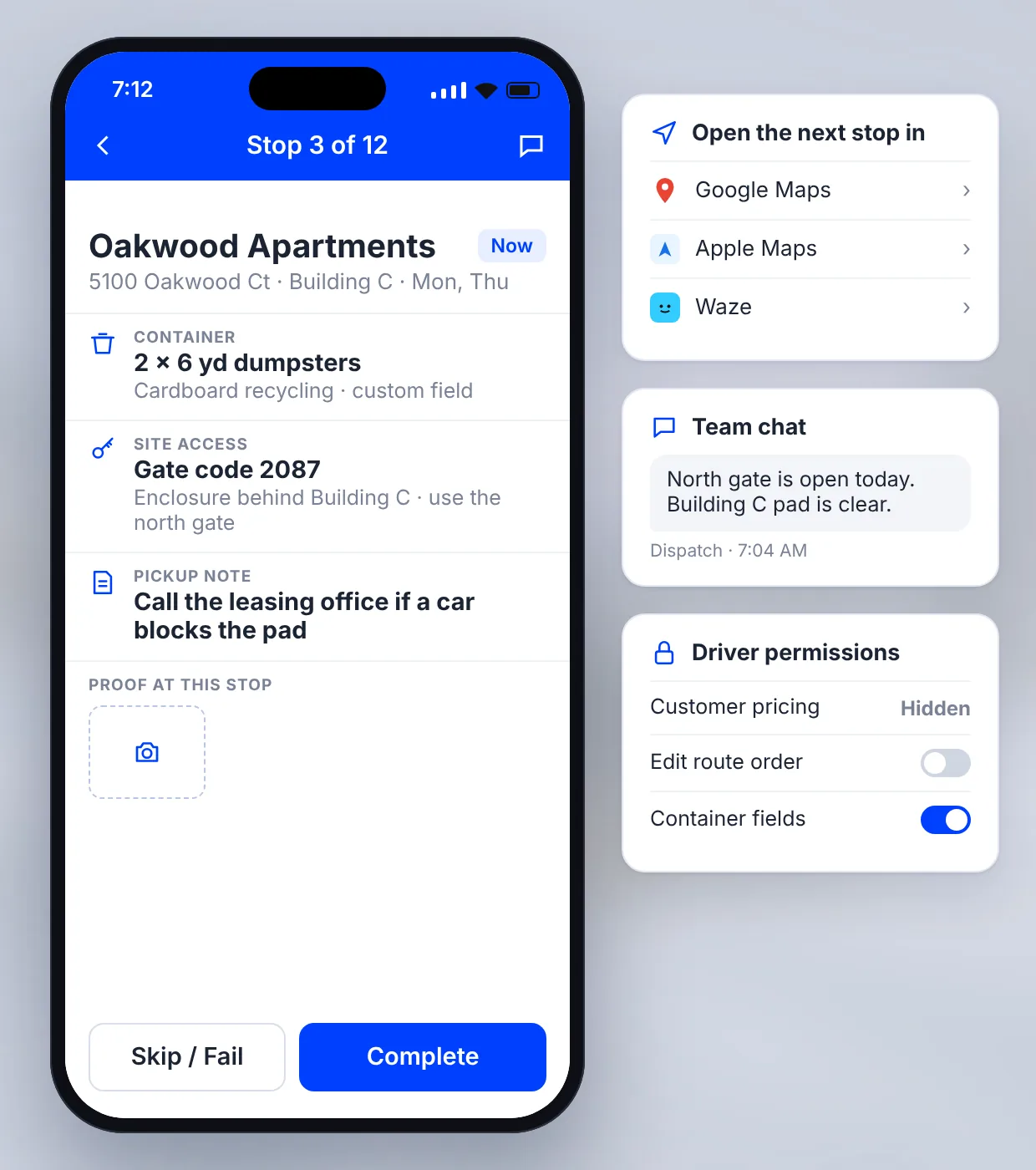
The Upper driver app for iOS and Android runs on the phones your drivers already carry and gives every driver the same view of the round:
Stop order: the day’s stops in optimized order, with customer details for each one.
Site instructions: gate codes, enclosure directions and pickup notes on the stop.
Container details: bin size and waste stream in custom fields (Professional and above).
Navigation: open the next stop in Google Maps, Apple Maps or Waze. In-app turn-by-turn navigation is available as an add-on.
Team chat: message dispatch instead of calling (Professional and above).
Only what drivers need: driver settings and permissions can hide pricing and stop drivers from editing the route (Professional and above).
How does a driver run a collection route in the app?
- 1
Open the route.
The day’s stops appear in order, with the instructions for each one.
- 2
Navigate.
Open the next stop in the driver’s preferred map app.
- 3
Record the pickup.
Take photos, collect a signature or add notes, then mark the stop complete.
- 4
Report a problem.
If a bin is blocked or not out, mark the stop as failed or skipped and add the reason.
How does the driver app prove every pickup?
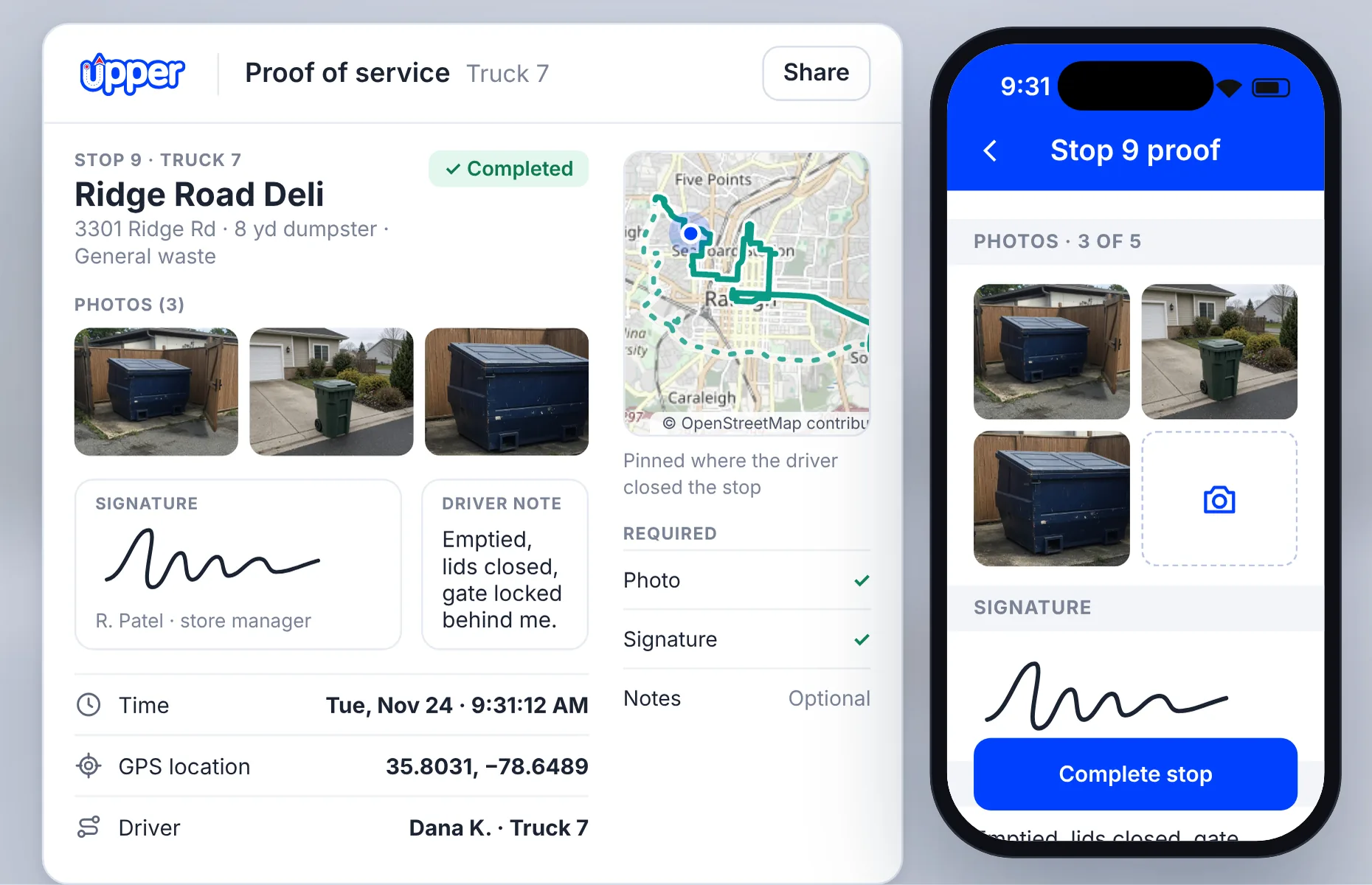
When a customer disputes a pickup, the office needs a record tied to that stop, not a photo on someone’s phone. In the Upper driver app, every record stays on the stop it belongs to.
Drivers capture photos, a signature and notes before closing the stop. You choose what’s required to complete a stop.
Starter: up to 3 photos, signature and notes. Route history kept 6 months.
Professional: up to 5 photos, plus GPS location and time on every record. Route history kept 1 year.
Optimize: up to 10 photos, GPS location and time. Route history kept 2 years.
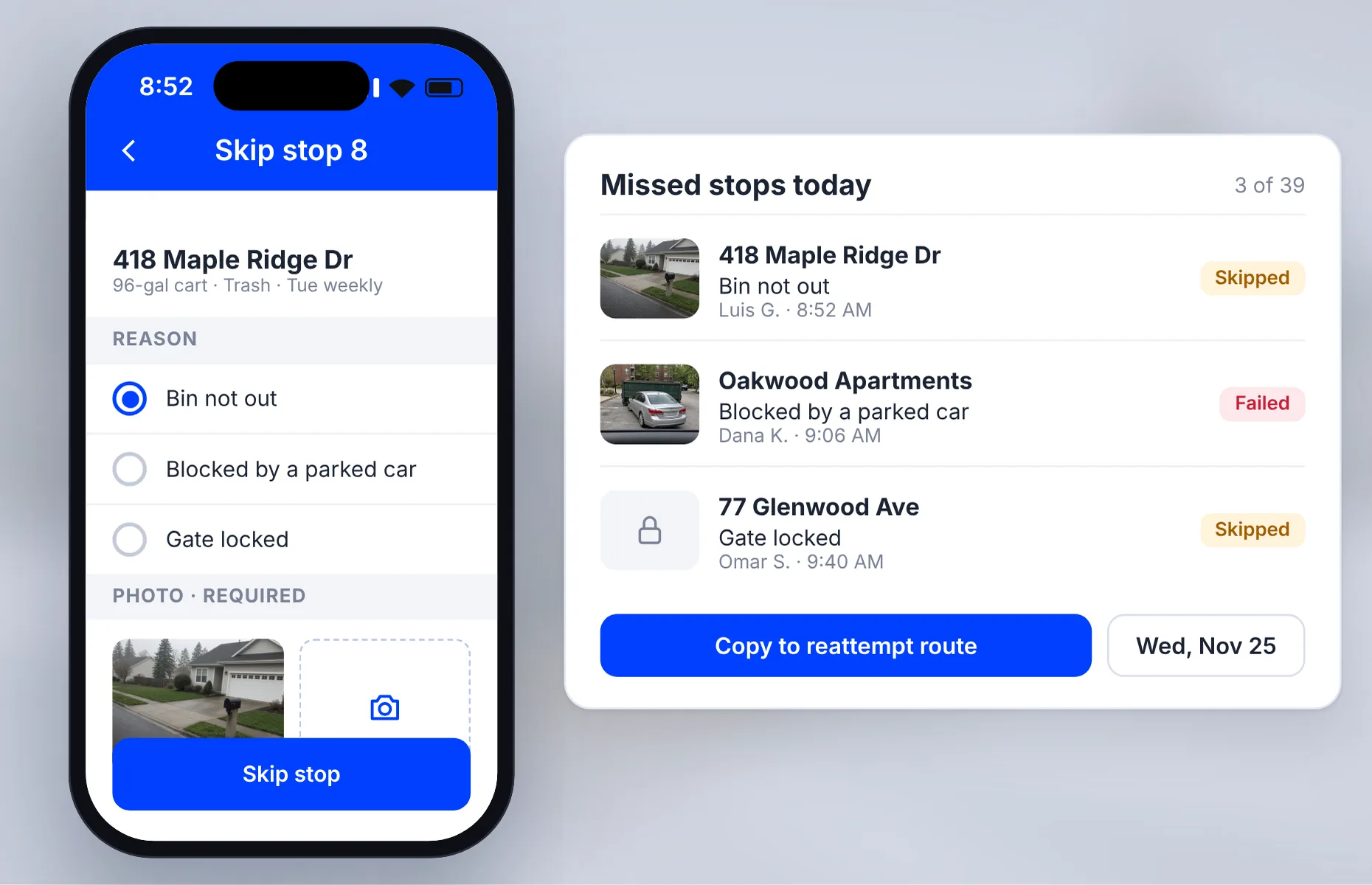
If a parked car blocks a dumpster, the driver marks the stop as failed or skipped and adds the reason, with a photo if your settings require one. Dispatch sees the reason and photo on that stop.
At the end of the round, copy the missed stops into a reattempt route.
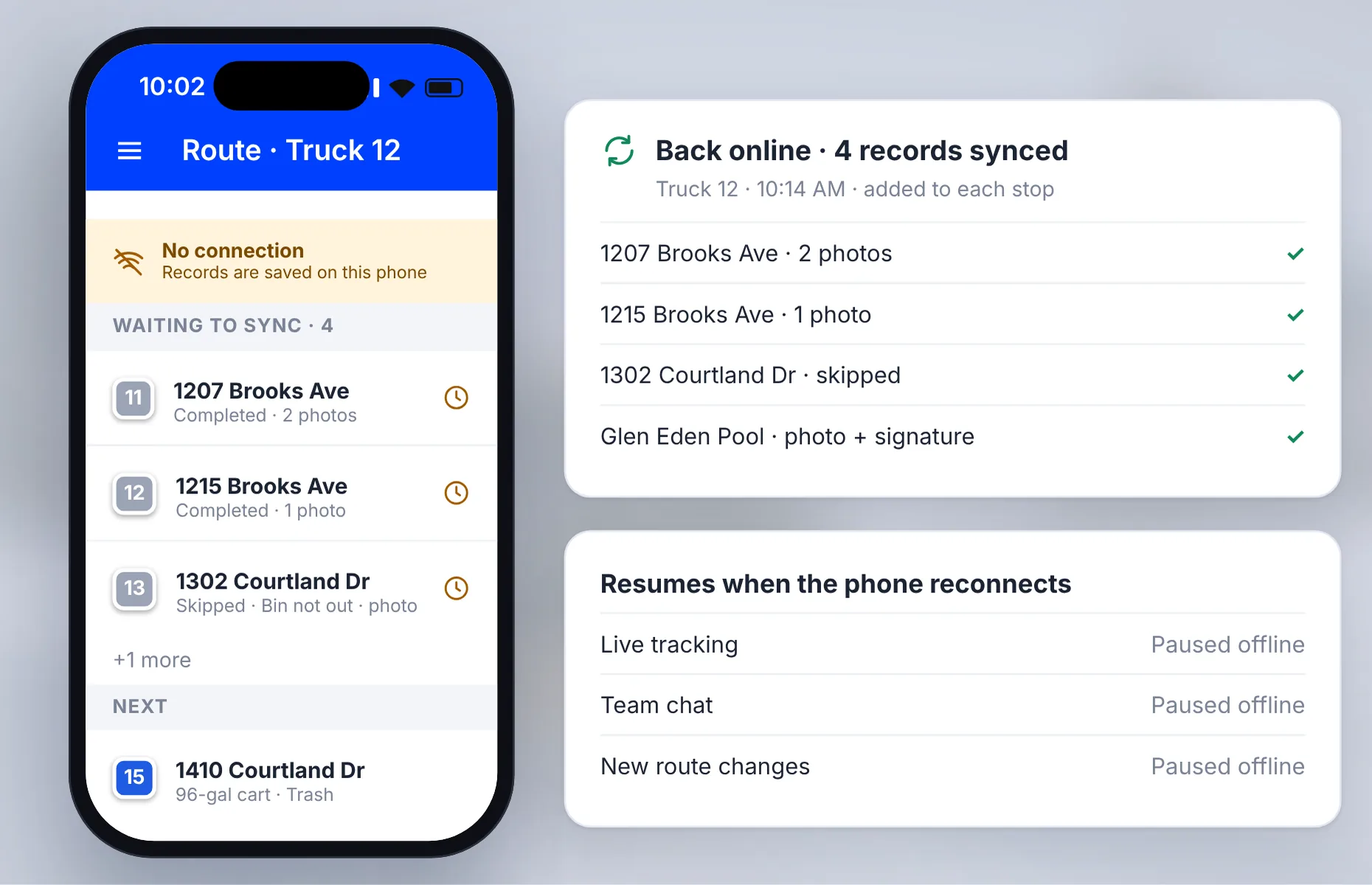
Underground garages, loading docks and rural rounds lose signal. Drivers open the route while connected, then keep completing and skipping stops and capturing photos, signatures and notes offline.
Upper syncs the records when coverage returns. Live tracking, chat and new route changes resume once the phone reconnects.
What does the office get back while drivers are out?
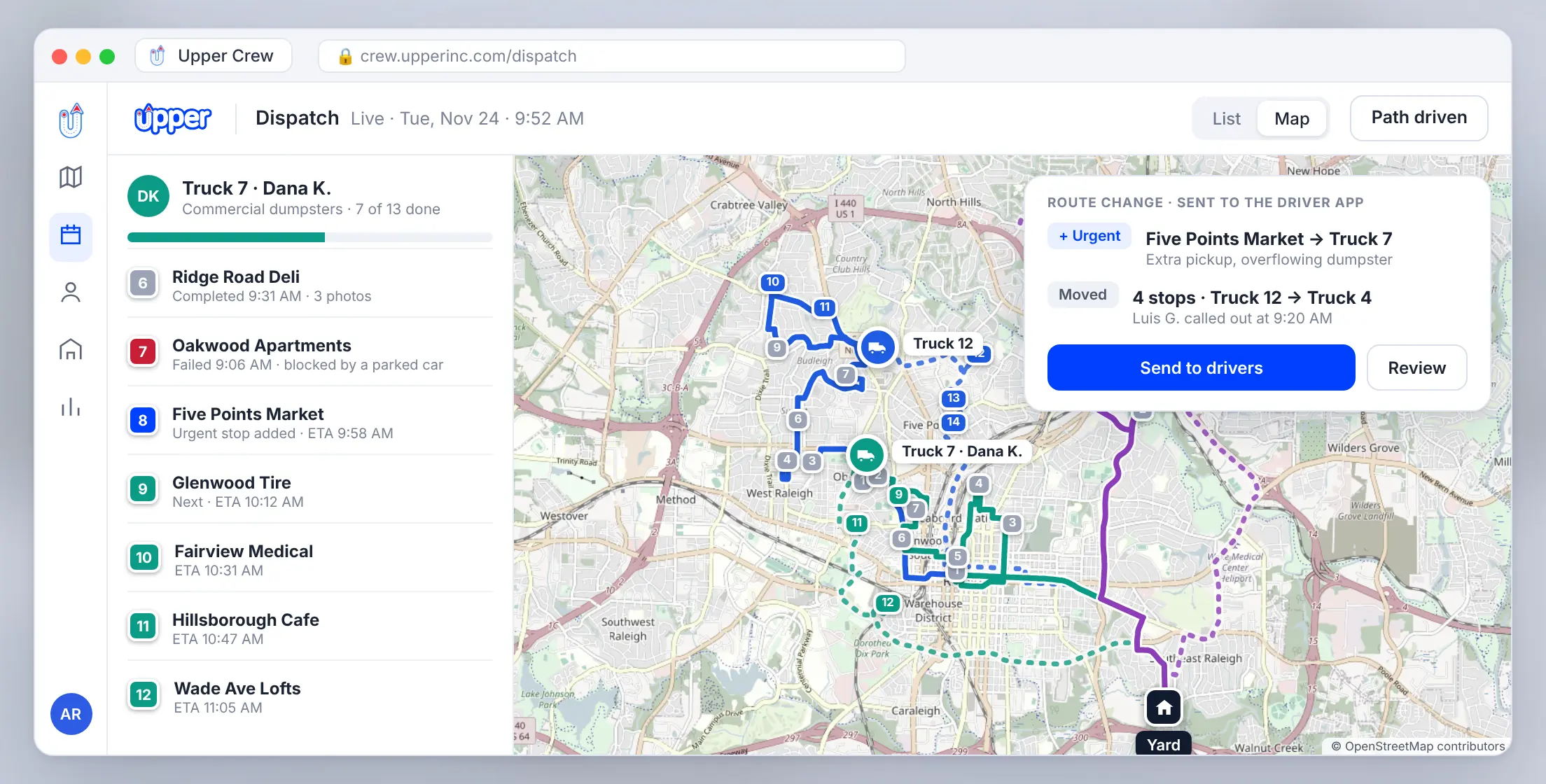
Every tap in the driver app shows up on the Upper Crew dashboard, so dispatch can answer a customer before calling the driver. On Professional and above, dispatch can:
See every truck: live driver locations and each stop’s status on a live route list.
Check the path driven: review the exact route a driver took.
Send changes to the truck: insert an urgent stop, or move stops between drivers when a driver calls out, and the revised route appears in the app without a phone call.
Upper recalculates the route. Your dispatcher decides which stops move and when the change goes out. For collection scheduling, recurring pickups and invoicing, see Upper’s waste management software.
How Win Waste Solutions replaced texted photos with in‑app proof
Win Waste Solutions replaces damaged residential waste carts for state and county governments. Crew members photograph the damaged cart and its replacement in the Upper app. Each photo is time-stamped, geo-tagged and tied to the stop address.


Win Waste SolutionsWaste Management · Charlotte, North Carolina · 5 Field Crew Members
“Before Upper, I’d finish a stop and have to text photos to three different people just to make sure someone saved them. Now I just snap it in the app and it’s done — tagged, saved, and I move on to the next stop.”

Marcus DField Crew Member, WinWaste Solutions
- 8New government contracts in 2 months
- 10 minOr less for daily route planning
- 2 yearsOf photo records stored and accessible
- 30%More stops completed per crew member daily
| Metric | Before Upper |  After Upper |
|---|---|---|
| Daily route planning time | 45–60 minutes | Under 10 minutes |
| Photo record retrieval time | Hours of searching | Seconds |
| Record storage reliability | Scattered across devices | Centralized, 2+ years accessible |
| Stops completed per crew per day | 40–50 | 55–65 |
Will drivers actually use it?
CleanHaul Services runs valet trash collection for 140+ apartment complexes in Dallas-Fort Worth. Its drivers stopped following their previous app’s routes within two weeks. With Upper, they followed the routes from the first night. With GPS trails and time-stamped photos on every visit, missed-pickup complaints dropped from about 40 a month to about 6, and all 12 at-risk property contracts were renewed. At Win Waste, the rollout took about two days.
Read the CleanHaul storyBring one route and the stop your drivers find hardest.
How much does the Upper driver app cost?
The driver app is included in every Upper Crew plan, billed per user per month, or 20% less billed yearly.
| Plan detail |  Starter | Professional | 2-year photo recordsOptimize | Enterprise |
|---|---|---|---|---|
| Monthly | $50/user/month | $60/user/month | $89/user/month | Custom |
| Billed yearly | $40/user/month | $48/user/month | $71/user/month | Custom |
| iOS and Android driver app | ✓Included | ✓Included | ✓Included | ✓Included |
| Photos per stop | ✓Up to 3, plus signature and notes | ✓Up to 5, plus signature and notes | ✓Up to 10, plus signature and notes | ✓Included |
| GPS location and time on each record | ✕Not included | ✓Included | ✓Included | ✓Included |
| Team chat, custom fields, live route changes and live tracking | ✕Not included | ✓Included | ✓Included | ✓Included |
| Route history kept | 6 months | 1 year | 2 years | 5 years |
| Connect other systems | ✕Not included | ✕Not included | ✓Zapier | ✓API and webhooks, custom integrations |
If a contract requires two years of photo records, choose Optimize. See Upper pricing for all plan limits.
Is Upper’s driver app right for your hauling team?
Good fit
- Haulers running daily or recurring collection rounds with several drivers
- Teams that need photo proof for customers, property managers or municipal contracts
- Rounds with gate codes, enclosures and site notes a covering driver must know
- Routes through garages, docks or rural areas with weak signal
Not the best fit
- You need scale tickets, load weights or container inventory and swaps recorded in the driver app. These aren’t listed in Upper’s plans, so check them in a demo.
- You need vehicle inspection checklists or waste transfer notes in the same app.
- You want one driver planning their own day. Upper’s route planner app fits that better.
Run one collection route in Upper’s 7-day free trial
- 1
Import your stops.
Upload a collection list from Excel or CSV.
- 2
Assign a driver.
Send one route to a driver’s phone.
- 3
Run the route.
The driver records photos, notes and any skipped stops in the app.
- 4
Check the records.
Open the stops in the office and review what came back.
The 7-day free trial needs no credit card and covers Professional plan features except customer SMS notifications.
Driver app for waste haulers FAQs
What is a driver app for waste haulers?
A mobile app that gives drivers the day’s route, the details for each stop and a way to record each pickup. Upper Crew connects that app to the office, so dispatch works from the same plan as the drivers.
What proof of pickup does the driver app record?
Photos, a signature and notes at each stop: up to 3 photos on Starter, 5 on Professional and 10 on Optimize. On Professional and above, every record is also stamped with the GPS location and time.
Do drivers need new phones or tablets?
No. The Upper driver app runs on iOS and Android phones on every plan.
Can drivers use the app without mobile coverage?
Yes, partly. Drivers open the route while connected, then can complete or skip stops and capture proof offline. Records sync when coverage returns.
Does the app have turn-by-turn navigation?
Drivers open each stop in Google Maps, Apple Maps or Waze on every plan. In-app turn-by-turn navigation is an add-on; ask during your demo.
Can drivers see customer prices?
On Professional and above, driver settings and permissions let you hide pricing and stop drivers from editing routes.
How does Upper Crew work with our billing system?
Upper Crew doesn’t create invoices, so you can keep your current billing system and connect it through Zapier on Optimize or the Platform API on Enterprise. If you want invoicing inside Upper, AI Dispatcher creates invoices from jobs and tracks payments.
How much does Upper Crew cost?
$50, $60 or $89 per user per month (Starter, Professional, Optimize), or 20% less billed yearly. The 7-day free trial needs no credit card.
See the driver app on your own route
Bring a collection list and the stop your drivers find hardest. See how Upper Crew puts it on the driver’s phone and records the pickup.