







- Google Maps is the most widely used navigation app and works seamlessly across both Android and iPhone devices.
- Waze uses community-powered, real-time traffic updates to help drivers avoid congestion and reach destinations faster.
- Apple Maps offers a simple, built-in navigation experience for iPhone users with seamless integration into the Apple ecosystem.
- MapQuest remains a free navigation app that provides reliable voice-guided directions on both Android and iOS devices.
- Standard navigation apps have limitations for multi-stop trips, making dedicated route optimization software the better choice for efficient route planning.
What is the best navigation app for your daily drives, long road trips, or delivery routes? With dozens of options available today on both Android and iPhone, picking the right one can feel overwhelming. Each app brings something different to the table, from real-time traffic alerts and community-driven hazard reporting to offline maps and privacy-first tracking.
Whether you are a commuter cutting through city traffic, a road-tripper exploring unfamiliar highways, or a delivery driver managing multiple stops, having the right app on your phone can save you hours every week. Platform-specific features, ecosystem integration, and data handling all play a role in which option fits you best.
In this guide, we break down the best navigation apps across every category: free and paid, everyday driving, truck-specific routing for commercial drivers, and outdoor trail navigators for off-road adventures. We’ve tested, compared, and ranked each option so you can confidently make the right call for your specific needs.
Table of Contents
- Why Does Your Navigation App Choice Matter More Than Ever?
- What to Look for When Picking a Navigation App in 2026?
- The Big Three: Comprehensive Analysis of Top Navigation Apps
- Specialized Navigation Solutions
- Best Navigation Apps for Commercial Drivers: Truck-Specific Navigation
- Best Navigation Apps for Outdoor Enthusiasts: Off-Road Navigation
- For Urban Commuters: Public Transit
- Emerging Trends in Navigation Technology
- Scenario-Based Recommendations: Making the Final Decision
- FAQs
- Beyond Standard Navigation: The Multi-Stop Advantage
- Conclusion: Your Navigation Journey Starts Here
Why Does Your Navigation App Choice Matter More Than Ever?
“I know a lot of people use multiple navigation apps depending on the situation, but if you could only have one, which would you choose and why?”
– Reddit user
This question perfectly shows the modern dilemma of choosing the right navigation app.
With numerous options available, choosing the right app isn’t just about getting from point A to point B. Rather, it’s about optimizing your entire journey experience.
Whether you want to locate a new address, find driving directions, or share a route map with travel partners, there are plenty of apps for maps that cover every use case, from daily commutes to complex multi-stop deliveries.
However, with so many apps out there, you must know what sets each app apart and how it suits your needs to make an informed choice.
The Multi-Stop Challenge
Quick Question: Making multiple stops daily?
While standard navigation apps work best for solo trips, multi-stop drivers may face difficulty optimizing routes. To overcome this, pair your favorite navigation app with route planning and navigation software that can handle hundreds of stops seamlessly. It’s because most popular apps confine you to 15 stops or fewer per route, leading to planning limitations. It, thus, results in wasted fuel and time.
The solution?
You can pair your top rated navigation app with dedicated route optimization software, like Upper. It will help you handle hundreds of stops while ensuring a seamless navigation experience.
What to Look for When Picking a Navigation App in 2026?
Not all navigation systems are created equal. Before downloading the first result you see, evaluate these four pillars.
1. Real-time intelligence
Modern navigation requires dynamic responsiveness. So, ensure your app uses crowd-sourced data, traffic sensors, and AI algorithms to provide:
- Live traffic updates and detailed information on traffic signs with alternative route suggestions: Look for a data refresh rate of sub-second to a few seconds for traffic information.
- Real-time incident reporting (accidents, road closures): Consider the average time from incident reporting by a user to its passing to relevant users under 30 seconds.
- Predictive routing based on historical patterns: Aim for less than 5% deviation between estimated and actual travel times.
- Weather-aware navigation adjustments: Look for an app that gives rerouting suggestions within 10-15 seconds of significant weather updates.
2. Offline reliability
You can’t expect data connectivity anywhere you go.
So, look for essential offline features, such as:
- Downloadable regional or country-specific navigation map packs
- Turn-by-turn navigation without internet
- Offline point-of-interest searches
- Route recalculation capabilities
3. Smart integration
Integration with existing systems is crucial to establish connected workflows and facilitate easy information exchange.
So, your navigation app should connect with your digital systems, such as:
- Android Auto/CarPlay compatibility
- Voice assistant integration (Siri, Google Assistant)
- Calendar and contact synchronization
- Music streaming platforms
4. Privacy and performance
Privacy and data leak concerns these days are higher than ever. Plus, the performance of your navigation app matters a lot when it comes to the overall efficiency.
So, consider features such as:
- Data collection transparency
- Battery optimization techniques
- Mobile data usage efficiency
- Location tracking controls
The Big Three: Comprehensive Analysis of Top Navigation Apps
| Feature | Google Maps | Waze | Apple Maps |
|---|---|---|---|
| Real-time Traffic | Highly accurate, comprehensive data | Excellent, crowd-sourced, aggressive rerouting | Accurate, relies on internal/third-party data |
| Offline Maps | Yes, extensive download options | No offline functionality | Yes, download saved maps |
| User Interface (UI) | Clean, intuitive, feature-rich | Playful, interactive, can be cluttered | Sleek, minimalist, aligned with iOS aesthetic |
| Data Collection | Extensive (24 types, linked to identity) | Extensive (21 types, linked to identity) | Minimal (11 types, not linked to identity) |
| Battery Usage | ~4% per hour | ~2.3% per hour (more efficient) | Comparable to Google Maps, variable |
| Data Usage | ~0.67MB/min or 2.19MB/hour | ~0.23MB/20min (least data) | ~1.83MB/20min (less than Google Maps on iOS) |
| CarPlay/Android Auto | Seamless integration | Seamless integration | Seamless integration |
| Lane Guidance | Yes, generally reliable | Less consistent, some users report issues | Yes, proactive suggestions |
| Points of Interest (POIs) | Vast library, curated lists | Community-reported (fuel, parking) | Less comprehensive, no recommendations |
| Community Reporting | Limited, integrates Waze incidents | Core feature, user-reported incidents | None, relies on Apple’s data |
| Multistop Routing Limit | 10 stops | No clear limit, not optimized | No clear limit, not optimized |
1. Google Maps: The Universal Standard
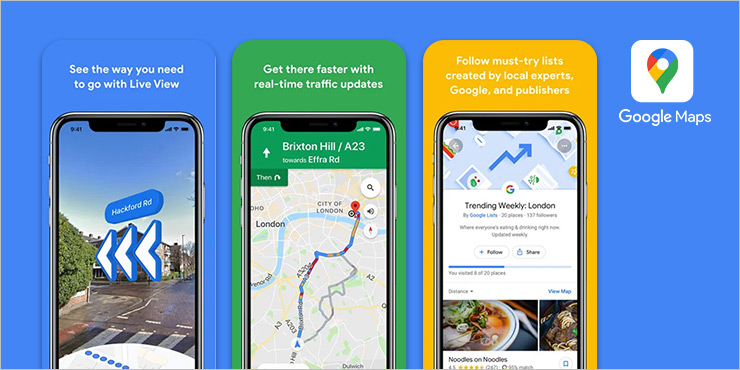
- Price: Free
- Platforms: iOS, Android
- Ratings: Play Store: 4.3/5 (19 mn reviews) | App Store: 4.7/5 (6.7 mn reviews)
Why Google Maps dominates:
Widely regarded as the best navigation app for Android, and a strong contender on iOS, Google Maps sets the benchmark for navigation capabilities with comprehensive location data and reliable performance.
The app provides real-time traffic information, ETAs, and an extensive library of local businesses, restaurants, and attractions curated by experts and community contributors.
Key strengths:
- Unmatched POI database: Access millions of verified business listings, reviews, and photos.
- Street view integration: Offers a visual context for unfamiliar destinations that you’ll be visiting for the first time.
- Multi-modal routing: Provides optimized routes for driving, walking, cycling, and public transit.
- Offline map downloads: Navigate directions in downloaded areas even without the internet.
- Live location sharing: Share real-time locations with your contacts, travel partners, or partners.
Performance metrics:
- Data usage: ~2.19MB per hour of active navigation
- Battery consumption: ~4% per hour
- Accuracy: Consistently high with extensive satellite coverage
Limitations:
- Only 10 stops per route allowed (major constraint for multi-stop drivers)
- Higher battery drain compared to alternatives
- Extensive data collection practices
- No social media sharing integration

See it in action
Take Your Routes Further While Google Maps limits you to 10 stops
Maximize your Google Maps experience by pairing Google's navigation with Upper's route optimization to handle hundreds of stops.

Learn how to create routes on Google Maps.
2. Waze: The Community-Powered Navigator
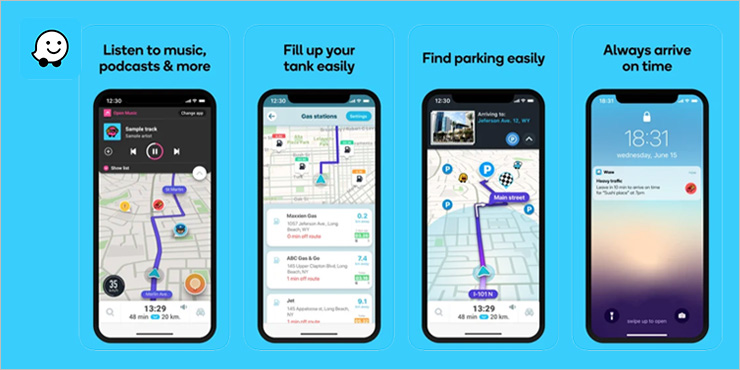
- Price: Free
- Platforms: iOS, Android
- Ratings: Play Store: 4.1/5 (8.82 mn reviews)| App Store: 4.8/5 (3 mn reviews)
The community advantage:
Waze is a Google-owned app that works on crowdsourced reporting and updates to turn navigation into a social experience.
It utilizes millions of active users to provide the latest traffic and current road conditions.
Key strengths:
- Real-time community alerts: Stay informed on user-reported hazards, police activity, and road conditions.
- Quick rerouting: Get dynamic route optimization based on current conditions.
- Fuel price tracking: Check community-updated gas prices at nearby stations to save on costs.
- Gamification elements: Use points, badges, leaderboards, and social sharing to boost user engagement and make driving more interactive.
Performance metrics:
- Data usage: ~0.23MB per 20 minutes (most efficient)
- Battery consumption: ~2.3% per hour
- Accuracy: Excellent in urban areas with an active user base
Considerations:
- Interface complexity: Dense with icons and alerts
- No offline functionality: Requires a constant internet connection
- Community dependence: Effectiveness varies by user density in an area
3. Apple Maps: The Privacy-Focused Alternative
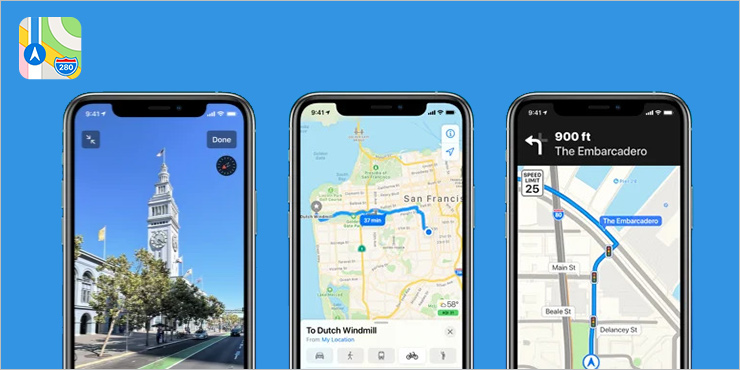
- Price: Free
- Platforms: iOS only
- Rating: 2.4/5 (44.5k reviews) (Historical low, now significantly improved)
The privacy pioneer:
Apple Maps has witnessed substantial improvements since its troubled launch.
For users who prioritize privacy and ecosystem integration, it is arguably the best iPhone app for navigation.
Key strengths:
- Privacy: There’s minimal data collection that’s not linked to user identity.
- Seamless iOS integration: Offers deep Siri integration and automatic parking spot recording to enable a hands-free experience.
- Visual excellence: Provides high-quality 3D map views and building renderings.
- Lane guidance: Get proactive lane suggestions and turn preparations for obstruction-free navigation.
Recent feature additions and improvements:
- Reporting for road incidents, school zone alerts, and improved navigation in roundabouts.
- Updated CarPlay interface and lock screen navigation for iOS
- Expanded global coverage
- Improved point-of-interest database
- Better traffic prediction algorithms
Limitations:
- Limited route planning capabilities: Focuses on only single-destination navigation, restricting multi-stop routing.
- Absent truck routing: Doesn’t provide optimized routes for trucks or commercial vehicles, resulting in the inability to optimize routes based on weight restrictions and clearance.
- Limited Look Around coverage: While Apple Maps offers its 360-degree immersive Look Around feature, it is available only in select cities, limiting visual exploration for many locations.
See it in action
Cross-Platform Compatibility + Advanced Routing
Upper integrates seamlessly with Android and iOS and optimizes your routes to make your navigation hassle-free.
Specialized Navigation Solutions
Beyond the big three, several free navigation apps and paid alternatives serve niche needs, from offline travel to truck routing. Here’s a look at the best navigation systems for specific use cases.
MapQuest
- Best For: Driving Directions, Traffic Cams
- Price: Free
- Key Features: Multi-segment routing, Live traffic cameras, Roadside assistance
- Android Availability: Yes
- iOS Availability: Yes
- Play Store Rating: 3.3 (67.7k reviews)
- App Store Rating: 4.2 (20k ratings)
CoPilot GPS
- Best For: RVs, Trucks, Multi-stop Routes
- Price: Paid
- Key Features: Custom routing (road width/clearance), Offline maps, 100 stops
- Android Availability: Yes
- iOS Availability: Yes
- Play Store Rating: 3.0 (106k reviews)
- App Store Rating: 3.5 (2k ratings)
Maps.Me
- Best For: Offline Travel, Data Saving
- Price: Free
- Key Features: High-quality offline maps, Turn-by-turn navigation, OpenStreetMap updates
- Android Availability: Yes
- iOS Availability: Yes
- Play Store Rating: 4.1 (1.28M reviews)
- App Store Rating: 4.6 (76k ratings)
Here WeGo
- Best For: City Travel, Public Transit
- Price: Free
- Key Features: Offline maps (100+ countries), Real-time public transport, Taxi ordering
- Android Availability: Yes
- iOS Availability: Yes
- Play Store Rating: 3.3 (501k reviews)
- App Store Rating: 3.7 (1.5k ratings)
InRoute
- Best For: Trip Planning (Weather Integration)
- Price: Paid
- Key Features: Weather data, Road conditions, Efficient trip planning
- Android Availability: No
- iOS Availability: Yes
- Play Store Rating: N/A
- App Store Rating: 4.6 (9.9k ratings)
MapFactor Navigator
- Best For: Offline Navigation, Truck Features
- Price: Free
- Key Features: Free offline maps (OpenStreetMap), Voice guidance, Speed limits, Camera warnings
- Android Availability: Yes
- iOS Availability: Yes
- Play Store Rating: 4.0 (992k reviews)
- App Store Rating: 4.7 (817 ratings)
TomTom Go
- Best For: Premium Navigation, Offline Maps
- Price: Paid
- Key Features: Functional UI, Live traffic patterns, Speed camera alerts
- Android Availability: Yes
- iOS Availability: Yes
- Play Store Rating: 3.6 (271k reviews)
- App Store Rating: 4.2 (2.4k ratings)
Sygic
- Best For: Offline 3D Maps, Speed Warnings
- Price: Paid
- Key Features: High-quality 3D maps, Fuel prices, Speed camera warnings, Voice guidance
- Android Availability: Yes
- iOS Availability: Yes
- Play Store Rating: 4.2 (1.9 mn reviews)
- App Store Rating: 4.6 (56k ratings)
Polaris GPS Navigation
- Best For: Outdoor Activities, Off-road
- Price: Free
- Key Features: Trail recording, Offline maps, No account/subscription required
- Android Availability: Yes
- iOS Availability: Yes
- Play Store Rating: 4.6 (44.4k reviews)
- App Store Rating: 4.5 (2.9k ratings)
BackCountry Navigator
- Best For: Off-road Topo Mapping
- Price: Paid
- Key Features: Huge selection of offline maps (US/international), Beyond cell coverage
- Android Availability: Yes
- iOS Availability: No
- Play Store Rating: 3.5 (6.95k reviews)
- App Store Rating: NA
Roadtrippers
- Best For: Adventure Trips, Route Planning
- Price: Free
- Key Features: Route planning, New stop recommendations, Map sharing
- Android Availability: Yes
- iOS Availability: Yes
- Play Store Rating: 2.2 (8.68k reviews)
- App Store Rating: 4.6 (61k ratings)
CityMapper
- Best For: Public Transit, Multi-modal
- Price: Free
- Key Features: Real-time transit updates, Offline maps, Best route comparison
- Android Availability: Yes
- iOS Availability: Yes
- Play Store Rating: 4.8 (360 reviews)
- App Store Rating: 4.9 (100k ratings)
Best Navigation Apps for Commercial Drivers: Truck-Specific Navigation
Standard GPS navigation systems aren’t built for commercial vehicles — they ignore bridge clearances, weight limits, and HAZMAT restrictions that truckers deal with daily. The apps below are purpose-built for commercial drivers, factoring in vehicle dimensions and load type to keep routes safe and compliant.
1. Sygic Truck & Caravan
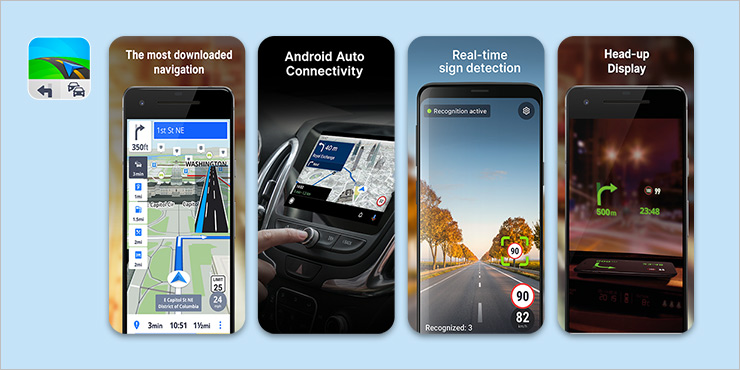
Sygic Truck & Caravan provides specialized navigation tools that help businesses consider dimensions and cargo, suitable for large commercial vehicles.
It helps avoid unsuitable or truck-restricted roads and restrictions to ensure safe and compliant routing.
Key features:
- Vehicle-specific routing: Creates routes that avoid low-clearance bridges and weight limits.
- Offline maps: Works without internet to ensure continuous navigation in remote areas.
- Truck/caravan POIs: Helps locate relevant points like truck stops and weigh stations.
- API/SDK integration: Enables seamless connection with existing fleet management systems.
Pros:
- Prevents costly fines and hazardous routes.
- Reliable in areas with no cellular service.
Cons:
- Higher cost than standard GPS apps.
- The interface can feel less modern to some.
Reviews and pricing:
Generally praised by commercial drivers for its specialized features. Sygic now offers premium packages: Truck Premium at €69.99/year and Truck Premium + CarPlay/Android Auto at €99.99/year. Pricing may vary by region and promotional offers.
2. CoPilot GPS
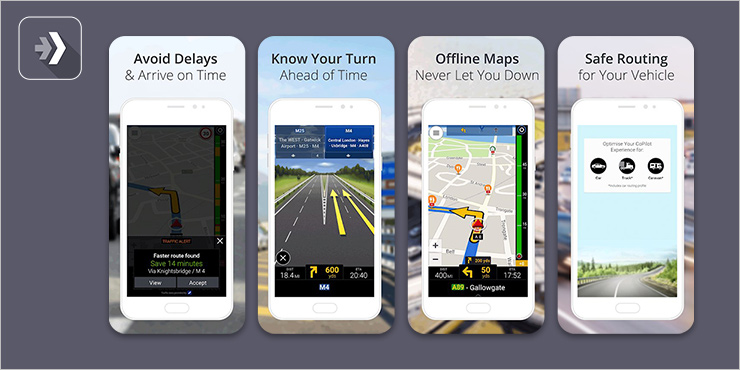
CoPilot GPS offers highly customizable routing for large vehicles that adapt to specific truck profiles.
It’s designed for efficient and safe professional driving along the road ahead.
Key features:
- Satellite imagery: Provides satellite imagery, 3D buildings, and detailed house numbering to offer more visual cues for drivers and improve local visibility for drivers.
- Offline Maps: Provides navigation without an internet connection so you never get stranded on your path.
- Parking/rest area real-time information: Help ensure your drivers plan your stays accordingly to save time and stay on schedule.
Pros:
- Strong customization for commercial vehicles
- Reliable offline map functionality
Cons:
- Learning curve for new users
- Some reports of navigation errors in specific scenarios
Reviews and pricing:
Well-regarded for its truck-specific features and reliability. After a 14-day trial, annual subscriptions typically start from $119.99 for truck navigation.
See it in action
Why Jump Between Apps?
Get the best of both worlds: Use Upper to optimize your route, then navigate with your favorite navigation app.
3. TruckMap
TruckMap provides truck-specific GPS navigation and an excessive database of truck-specific POIs.
It helps streamline truckers’ daily operations and enhance their travel experience.
Key features:
- Truck-safe GPS: Routes consider truck dimensions and restrictions.
- Real-time parking: Shows live availability of over 40000 truck parking spots.
- HAZMAT-compliant rules: Creates routes fit for HAZMAT transportation alongside commercial vehicle routing.
Pros:
- Excellent resource for finding truck services
- Community-driven parking updates are highly useful
Cons:
- Less precise navigation accuracy than dedicated units
- Relies on user-generated content, so data quality can vary.
Reviews and pricing:
Generally praised for its utility in finding resources and safe routing. The app is free for basic functionalities, with potential for in-app purchases.
Best Navigation Apps for Outdoor Enthusiasts: Off-Road Navigation
Once you leave paved roads, cell service drops, and mainstream apps become useless. Outdoor-focused apps solve this with downloadable navigation map layers: topographic, satellite, and trail overlays that work entirely offline. Here are three solid picks for hikers, off-roaders, and backcountry explorers.
1. Gaia GPS
Gaia GPS is a premier app for outdoor enthusiasts who seek worldwide maps to find the right spots for adventures.
With extensive topographic maps and advanced trail tracking, it converts your smartphone into a powerful backcountry GPS device.
Key features:
- Extensive map layers: Access to hundreds of topographic and satellite maps.
- Versatile options: Provides good trails for hiking, off-roading, backpacking or public land.
- Trail tracking: Records journeys and helps plan routes.
Pros:
- Comprehensive map library for diverse outdoor activities
- Robust offline functionality for true wilderness exploration
Cons:
- Advanced features require a paid subscription
- Can have a steeper learning curve for new users
Reviews and pricing:
Highly rated for its mapping and reliable offline performance by serious outdoor users. Offers a free version; premium features are part of a paid subscription — Premium at $59.90/year (standalone Gaia GPS), or Premium with Outside+ at $89.90/year (includes Outside digital content, Trailforks, and more).
2. AllTrails
AllTrails lets you find detailed reviews of new places from community trail-goers.
Further, it lets you record your old favorite and share your outdoor adventures to simplify discovering and planning outdoor routes.
Key features:
- Vast trail database: Over 450,000 trails with user reviews and photos.
- Community reviews: Offers insights on trail conditions and difficulty from other users to help you decide on your location and path.
- GPS navigation: Provides in-app directions and activity tracking.
Pros:
- Huge selection of trails with rich community feedback
- User-friendly interface for easy trail discovery
Cons:
- Offline maps only available with a paid subscription
- Ads in the free version can be distracting
Reviews and pricing:
AllTrails has a free tier and paid plans for offline navigation and advanced features. The paid tiers are commonly listed as Plus at $35.99/year and Peak at $79.99/year (Peak is the higher tier).
3. BackCountry Navigator
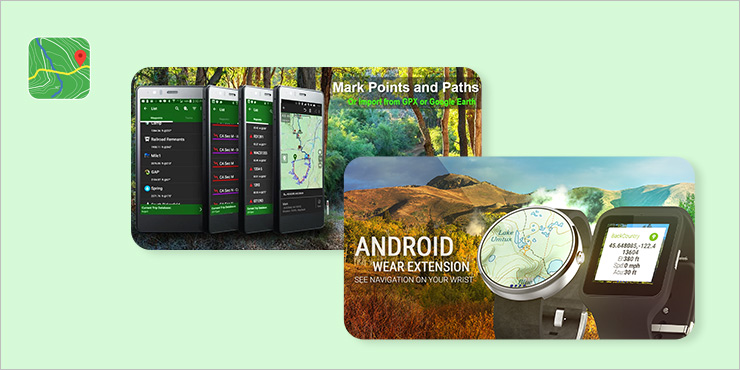
Backcountry Navigator XE lets you explore outdoors as you desire, using your mobile device and a handheld GPS.
It lets you choose from over 50 worldwide and country specific map sources for off-grid usage.
Key features:
- Offline topographic maps: Downloads detailed maps for use without internet.
- GPS tracking: Records routes and allows marking important waypoints by simply tapping on the screen or at the current GPS location.
- Optional overlays: Enhance map with boundaries, parcel data, or trail maps. BLM boundaries show limits of various federal lands within the western United States.
Pros:
- Excellent for true offline navigation in remote areas.
- Supports a wide array of specialized map types.
Cons:
- Less modern user interface
- Many advanced features or map packs require additional purchases.
Reviews and pricing:
Generally well-regarded by experienced outdoor enthusiasts for its reliable offline mapping, BackCountry Navigator XE offers a free base experience, with paid memberships for fuller map access and member-only features. Annual tiers are Bronze $15/year, Silver $20/year, and Gold $30/year.
For Urban Commuters: Public Transit
City commuters juggle buses, subways, bikes, and ride-shares: often in a single trip. These free navigation apps combine live transit data with multi-modal routing so you can pick the fastest option in real time.
1. CityMapper
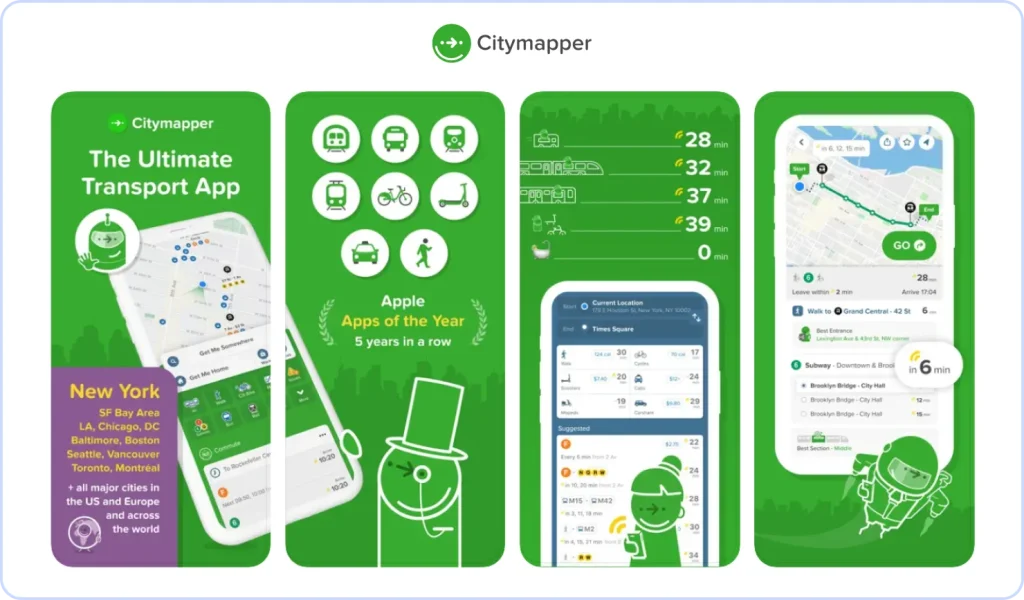
Citymapper is a multi-modal urban transportation app that simplifies city navigation.
It integrates live data from various transport modes for efficient journey planning.
Key features:
- Multi-modal trip planning: Combines transit, walking directions, cycling, and ride-sharing.
- Real-time live updates: Provides accurate departures and disruption alerts.
- Smart routing: Offers optimized routes based on live conditions.
Pros:
- Exceptional accuracy and coverage in major cities.
- User-friendly interface for quick navigation.
Cons:
- Primarily useful only in large urban centers
- Can consume battery with continuous updates
Reviews and pricing:
Consistently highly rated for accuracy and user experience. Citymapper is free for core transit directions, with optional subscriptions for an upgraded experience. Citymapper CLUB is $1.49/month or $9.99/year, and CLUB+ is $99.99/year (availability and benefits can vary by market/app version).
2. Transit
Transit is a real-time public transportation app that offers immediate updates to streamline your trip planning.
It aims to make urban commutes predictable and efficient.
Key features:
- Live departures: Shows real-time bus and train arrival predictions.
- Multi-modal integration: Includes bikeshare, e-scooters, and ride-hailing options.
- Step-by-step guidance: Provides live navigation with alerts for transfers.
Pros:
- Highly accurate real-time data, often crowdsourced
- Clean and intuitive interface for quick information
Cons:
- Some advanced features or ad-free experience require subscription
- Functionality depends on transit data availability in the area
Reviews and pricing:
Very well-regarded for its real-time accuracy and ease of use. Transit offers a free tier for core transit information, with Royale as the paid upgrade. Royale pricing varies by geography and local currency; users can check Monthly vs Annual pricing directly in the app.
3. Moovit
Moovit is a global public transit app with extensive coverage that combines official schedules with real-time community updates.
It simplifies urban mobility worldwide.
Key features:
- Global coverage: Available in thousands of cities across many countries.
- Real-time arrivals: Provides accurate predictions from GPS and user contributions.
- Live navigation: Offers step-by-step guidance with service alerts.
Pros:
- Impressive global presence and city coverage
- Crowdsourcing enhances data accuracy and timeliness
Cons:
- Less precise information in less-serviced areas
- Interface can sometimes feel cluttered
Reviews and pricing:
Generally receives positive reviews for broad coverage and real-time updates.
The app is free to download and use, primarily supported by advertising.
Emerging Trends in Navigation Technology
AI-powered predictive routing
Next-generation navigation relies on the capabilities that define the future of AI navigation, such as:
- Machine learning for personalized route preferences
- Predictive traffic modeling based on historical patterns
- Weather-aware routing for seasonal adjustments
- Contextual suggestions based on time and destination type
Electric vehicle integration
Modern apps increasingly support EV drivers with:
- Charging station databases with real-time availability
- Range-aware routing accounting for battery capacity
- Charging time integration in route planning
- Energy-efficient route options
Augmented reality navigation
Emerging AR features include:
- Heads-up display overlays to help follow direction easily
- Real-world landmark identification
- Lane guidance visualization
- Parking spot identification
Scenario-Based Recommendations: Making the Final Decision
We’ve covered a lot of top navigation apps for iPhone and Android above; now let’s narrow things down. The right pick depends on how you drive, so here’s a quick breakdown by use case.
1. For most users: general-purpose
If you need one app that does everything well, Google Maps remains the top choice and is widely considered the best Android navigation app overall. Its combination of accuracy, features, and reliability makes it suitable for most navigation needs.
2. Daily commuting
Winner: Waze
- Real-time traffic alerts minimize delays.
- Community-reported incidents provide earliest warnings.
- Automatic rerouting saves time during peak hours.
- Fuel price tracking for cost optimization.
3. Road trip navigation
Winner: Google Maps
- Comprehensive offline map downloads
- Extensive POI database for discovery
- Street View for unfamiliar destinations
- Reliable performance across diverse regions
4. Privacy-focused iOS users
For anyone who values privacy above all, Apple Maps is the best navigation app for iPhone, with minimal data collection and seamless integration into the Apple ecosystem.
5. Urban exploration
Winner: Both Apple Maps (iOS) / Google Maps (Android)
- Clean interface reduces driving distractions
- Excellent integration with device ecosystem
- Quality POI recommendations
- Privacy-focused data handling
6. Commercial/multi-stop routes
Winner: Specialized solutions + Navigation Hybrid
- Use route optimization software (like Upper) for planning
- Export optimized routes to preferred navigation app
- Achieve efficiency impossible with standard apps
Frequently Asked Questions
Google Maps consistently ranks highest for accuracy due to its extensive satellite coverage, real-time traffic lights and data, and comprehensive mapping database.
However, Waze often provides more accurate real-time traffic information in urban areas with active user communities.
Waze is the most data-efficient major navigation app, using approximately 0.23MB per 20 minutes.
For minimal data usage, consider apps with robust offline capabilities like:
- HERE WeGo
- Maps.Me
Several apps offer full offline functionality:
- Google Maps: Download specific regions for offline use
- HERE WeGo: Offline maps for 100+ countries
- Maps.Me: Global offline mapping with turn-by-turn directions
- Sygic: Premium offline navigation with 3D maps
Specialized truck navigation apps include:
- Sygic Truck & Caravan: Height/weight restrictions and truck-specific POIs
- CoPilot GPS: Commercial vehicle routing
- Trucker Path: Truck stop amenities and parking
Battery optimization strategies:
- Use apps with efficient background processing (Sygic, Waze).
- Enable airplane mode while keeping GPS active.
- Reduce screen brightness.
- Close unnecessary background apps.
- Use offline maps when possible.
Top international navigation apps:
- HERE WeGo: Offline maps for 100+ countries
- Maps.Me: Global coverage with offline functionality
- Google Maps: Extensive international data with offline downloads
- Sygic: High-quality maps with offline navigation
Apple Maps has significantly improved and now offers:
- Better privacy protection
- Seamless iOS integration
- High-quality visual design
- Improved accuracy
However, Google Maps still leads in:
- POI database comprehensiveness
- Cross-platform availability
- Advanced features and integrations
Not exactly. Driving direction apps focus primarily on giving you turn-by-turn directions from one point to another, while full navigation apps bundle in extras like live traffic, offline maps, POI discovery, and route optimization. That said, most modern apps; Google Maps, Waze, Apple Maps serve both purposes, so the line between the two has blurred significantly.
Beyond Standard Navigation: The Multi-Stop Advantage
While standard navigation apps excel for single destinations, they create significant inefficiencies for multi-stop routes. The solution isn’t abandoning your preferred navigation app—it’s enhancing it with intelligent route optimization.
Upper transforms multi-stop routing by:
- Optimizing stop sequences for minimum travel time
- Handling hundreds of stops without artificial limitations
- Integrating with existing navigation apps for seamless execution
- Providing real-time route adjustments for dynamic schedules
Why Businesses Choose Route Optimization
- Save 20-30% on fuel costs through efficient routing
- Increase daily capacity by optimizing stop sequences
- Improve customer satisfaction with accurate arrival times
- Reduce vehicle wear and tear with shorter total distances
Ready to optimize your routes? Try Upper’s advanced route planning with your favorite navigation app and experience the difference efficient routing makes.
Conclusion: Your Navigation Journey Starts Here
The perfect navigation app isn’t just about reaching your destination. It’s about enhancing your travel experience.
For standard navigation needs, any of the major apps will serve you well. However, for complex routing, multi-stop journeys, or business applications, consider how route optimization can enhance your chosen navigation platform.