


- Confirm the order status and the route status separately; canceling one driver's assignment does not necessarily cancel the order.
- The business must assign responsibility for goods, billing and customer communication, regardless of who requested the cancellation.
- Goods already loaded still occupy vehicle space until they are unloaded.
- Apply an authorized handling rule before choosing the quickest return option.
- Recheck remaining commitments and send updates to drivers and affected customers.
When a delivery is canceled, confirm whether the order ended or only the driver’s assignment changed. Check whether the goods are already on the vehicle, get an authorized hold-or-return decision, and update the remaining route from the driver’s current location. Make sure the driver receives the change before moving more work.
This guide is for dispatchers and operations managers running multi-stop routes. A failed attempt, an order cancellation and a driver withdrawal require different actions. Upper’s guide to delivery exceptions covers the wider set of problems.
What should you check first?
Read the cancellation notice in the order system, then confirm the route state. Record the order ID, affected stop, time, reason and person authorizing the change. You need 3 operational answers:
- Is the stop still on a driver’s route?
- Have any goods been collected or loaded?
- Has the driver received and acknowledged the change?
An update that reaches the office but not the driver can send a vehicle to a customer who no longer wants the goods. Do not assume the order system and route app update each other automatically.
Was the order canceled or just the assignment?
| Event | What remains to resolve | First action |
| Order cancellation confirmed | Goods, billing and any related pickup or return | Obtain the order owner’s disposition decision and update the route. |
| Driver withdraws or becomes unavailable | The delivery may still be required | Confirm the order remains active and find eligible cover. |
| Failed delivery attempt | Goods remain with the driver unless handed over under an authorized process | Record the failed attempt and obtain redelivery or return instructions. |
| Customer requests a later time | The business must accept or reject the revised commitment | Confirm the new time and capacity before changing the route. |
| One item is canceled | The remaining order may still need delivery | Update quantities, load and service time rather than deleting the whole stop. |
If the work is still required, keep it visible until it has an owner and a feasible plan. See how to resolve unassigned delivery orders for that queue.
Who owns each next step?
The person requesting cancellation does not automatically own the refund, goods custody or driver instructions. Assign those responsibilities in your operating process.
| Responsibility | Owner to name in your process | Record needed |
| Confirm order status and billing | Order management or customer service | Authorized cancellation and any billing action |
| Decide goods disposition | Inventory owner or authorized operations lead | Hold, return, transfer or other approved instruction |
| Revise route and assignment | Dispatcher | Current driver location, load and revised stops |
| Update the customer | Customer service or the assigned account owner | Confirmation and any changed arrival commitment |
| Confirm physical outcome | Driver and receiving staff | Location, quantity and custody record |
Consumer marketplace refund and courier-payment rules belong to that platform’s process. Employee pay belongs with payroll and applicable employment requirements. Neither should be decided by deleting a stop from a route.
What does the driver do with a canceled stop?
What the driver does depends on when the cancellation arrives: before dispatch, mid-route before pickup, or after pickup.
The steps below are suggested operating rules. Adapt them to your own policy. They are not any platform’s published policy.
What if the delivery is canceled before dispatch?
- Remove the stop from the plan before routes go out.
- Reorder the affected route so the driver isn’t left with a gap.
- Have the assigned owner confirm the cancellation. Recheck any ETAs already sent to other customers and update those that changed.
What if it is canceled mid-route, before pickup?
- Confirm that the driver’s app shows the updated route.
- Reorder the remaining stops from the driver’s current location, not from the depot.
- Send updated ETAs (estimated arrival times) to every customer whose stop moved.
What if it is canceled after pickup or at the door?
This is the hardest case. The goods are on the vehicle, the stop is canceled, and the route still has work left.
- Confirm the cancellation with whoever owns the order before the driver hands anything over.
- Obtain the authorized goods-disposition instruction. Check storage conditions, security, space, receiving hours and any return deadline before choosing when to return.
- If the goods go back, add the return as its own stop so it is scheduled like any other.
- Reorder the remaining stops around the return or the freed time.
- Notify the customers whose ETAs changed.
- Record the outcome on the stop, with a note and photo, so the next person knows where the goods are.
Should the goods go back now or stay on the van?
First apply the goods owner’s handling and return requirements. If both immediate return and holding are allowed, compare their effects on the remaining route. Perishability, temperature control, security, available space and receiving hours may rule out one option before you compare travel time.
Worked example with an authorized hold
This is an illustrative calculation, not customer data. A driver has 8 stops left after a boxed retail item is canceled at the door. The goods owner permits secure holding until the route ends. The item does not need temperature control, its space does not block later work, and the receiving store stays open until 5 p.m.
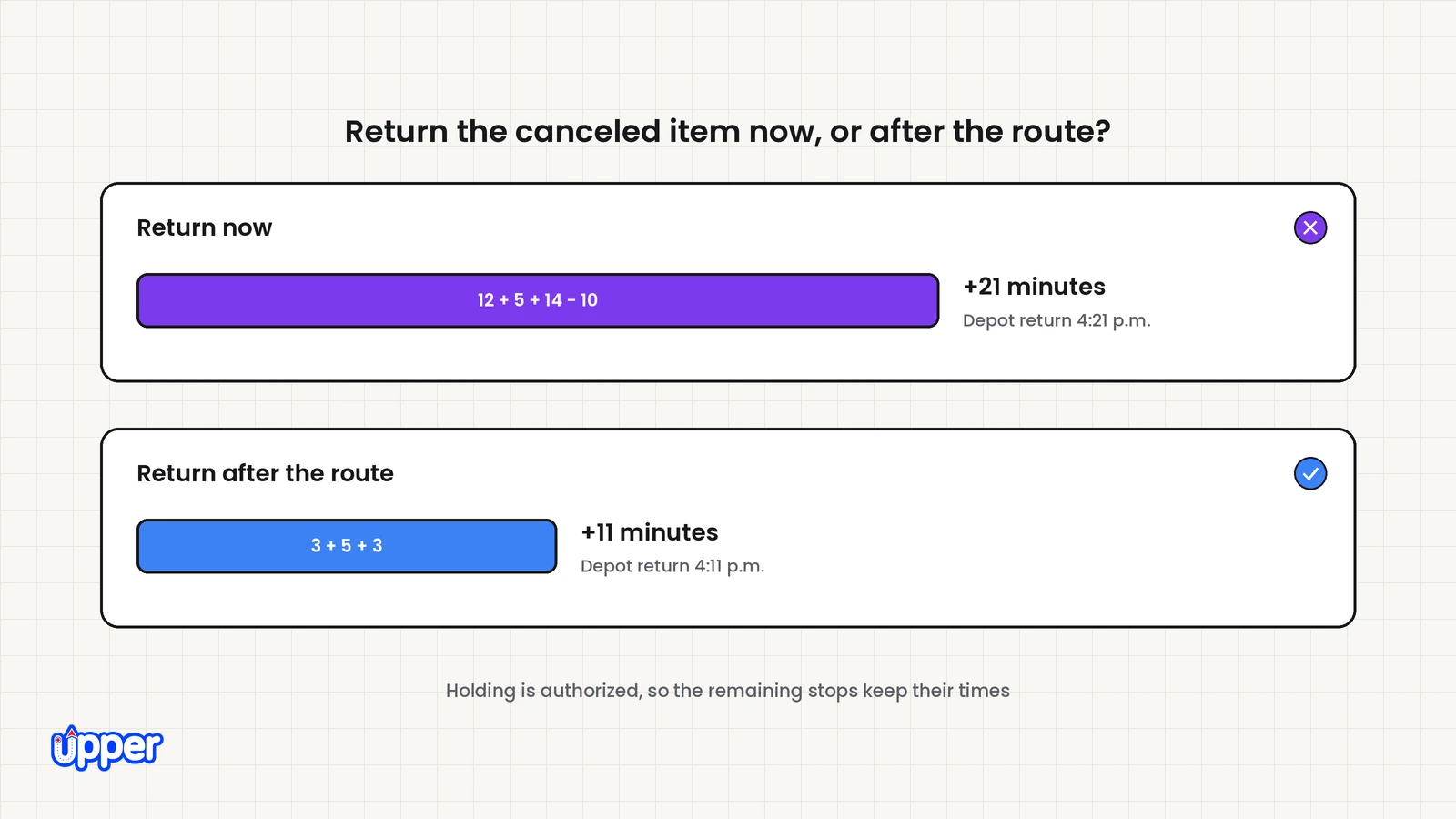
From the current location, the next planned stop is 10 minutes away. The store is 12 minutes away; unloading there takes 5 minutes; store-to-next-stop travel is 14 minutes. The unchanged route would end at the depot at 4 p.m. The store is 3 minutes from that depot, and the driver’s shift ends at 5 p.m. Assume the remaining sequence is unchanged, travel estimates hold and there is no waiting slack.
| Option | Incremental time | Effect under these assumptions |
| Return now | 12 + 5 + 14 − 10 = 21 minutes | Remaining stops shift 21 minutes later; depot return becomes 4:21 p.m. |
| Return after the route | 3 + 5 + 3 = 11 minutes | Remaining stops keep their planned times; final depot return becomes 4:11 p.m. |
Holding is preferable in this example because it is authorized, fits the load and receiving limits, and preserves the remaining appointments. An immediate-return requirement would remove that option. A different next-stop location or waiting time would change the arithmetic.
What should the written rule contain?
Specify who authorizes holding, the storage and security conditions, the receiving destination and deadline, and the custody evidence required. Include a contact for exceptions. A driver should not have to decide whether valuable or temperature-sensitive goods may stay on board based only on the nearest route.
How does a dispatcher replan the rest of the route?
Reorder the remaining stops from the driver’s current location. Then check whether the freed time lets that driver take stops from someone else.
These two moves answer different questions:
- Re-sequencing sets the order of the stops already on one route.
- Rebalancing moves a stop from an overloaded route to the driver who just gained time.
Upper’s guide to dynamic route optimization explains when a live change is worth a new route version.
Before any stop moves, sort your rules into two groups:
- Hard rules can’t be broken. Vehicle capacity is one. A van holding returned goods may have less room than the plan assumed. Driver working hours are another.
- Hard commitments stay hard. Receiving closures, access restrictions and booked appointments may prevent a move. Treat genuinely flexible preferences separately and obtain agreement when a customer commitment must change.
Replanning isn’t always worth the effort. If the canceled stop was last on the route or far from the others, the driver can usually skip it. A replan pays off when the freed time lands near a stop with a tight window. It also helps when another route is already running long.
What must be recorded before the case is closed?
Keep one clear record of the original order, the canceled or changed stop, goods location, the authorized disposition, the revised route version and messages sent. If a return or redelivery is still outstanding, give it an owner and a date. Removing the original stop is not evidence that the goods or customer issue has been resolved.
How can Upper help with a canceled delivery?
Upper helps you replan the stops left after a cancellation. Your order system and billing still own the refund. Upper is route planning, route optimization and AI dispatch software for multi-stop delivery, collection and service teams. Upper Crew plans your team’s routes and sends changes to drivers’ phones. AI Dispatcher, Upper’s AI dispatch software, recalculates the plan when new work, cancellations or delays change the day.
After a cancellation, Upper’s Gap Filler looks for pending work that could fit the opening. If nothing fits, you can leave the gap open. Suggested changes need approval before they apply. Upper’s page on dispatch reoptimization after cancellations and delays shows how that review works.
| Step after the cancellation | Upper capability | What it does | Limit |
| Reassign or rebalance the remaining work | AI Dispatcher | Suggests who serves each remaining stop, checked against your rules | Recovery changes require review before they apply |
| Reorder the stops on a route | Route planning | Pushes changes to drivers. Move a stop, and every ETA recalculates | Doesn’t decide refunds or where the goods go |
| Update customers whose stops moved | Customer notifications | Text or email updates with a live ETA and tracking link | Verify notification triggers and separately check immovable customer commitments |
| Record what happened at the stop | Proof of delivery | Photos, e-signatures, notes, location and time stamps, and failed-delivery reasons | It records the stop. Resolving a dispute stays with your team |
Know what automation will and won’t do
AI Dispatcher handles routine assignments. Your team sets the rules and reviews exceptions. Autopilot accepts only routine matches above the confidence threshold you choose. Critical conflicts are never accepted automatically. The confidence score describes match quality, and Upper says it is not a probability of on-time delivery. Preferred arrival windows are preferences, not hard rules, so check a customer’s firm deadline or booked appointment yourself.
AI Dispatcher does not cancel orders, issue refunds or decide what happens to goods on the vehicle. It does not replace your dispatcher.
Upper isn’t the right fit for every operation. If cancellations are rare and routes seldom change, letting the driver skip the stop may be enough. AI Dispatcher pricing is by quote.

See it in action
See how Upper replans a day with a canceled stop
Bring your stop list, your driver schedules and one cancellation that came in after pickup. We will replan it with you.

Frequently asked questions about canceled deliveries
Not necessarily. Confirm the order status in the order system. If the delivery is still required, the work needs another eligible driver or an agreed new time. Keep it visible until that decision is recorded.
No. The goods remain part of the running load until physically unloaded. Check their location and disposition before accepting another pickup or moving work onto that vehicle.
Confirm the cancellation and follow an authorized holding, return or transfer instruction. Check storage conditions, security, vehicle space and receiving hours. Record where the goods went and who received them; do not discard them merely because the route stop was canceled.
Only after the order owner authorizes the new commitment and an eligible route has capacity. Follow the order system’s process for reopening or creating work, keeping the original cancellation traceable. Recheck load, travel, service duration and later appointments before confirming the new time.
Not always. If the canceled stop was last on the route or far from the others, the driver can usually skip it. Re-optimizing pays off when the freed time sits near a stop with a tight time window. It also helps when another driver’s route is already running long.
Whoever owns the order decides. That is usually the store, the seller or the platform. A routing tool can schedule the return stop, but it should not decide that a return happens. Set a written rule for each type of goods so drivers don’t decide alone in the cab.


