Food waste management software
Plan, dispatch and prove every restaurant and grocery pickup
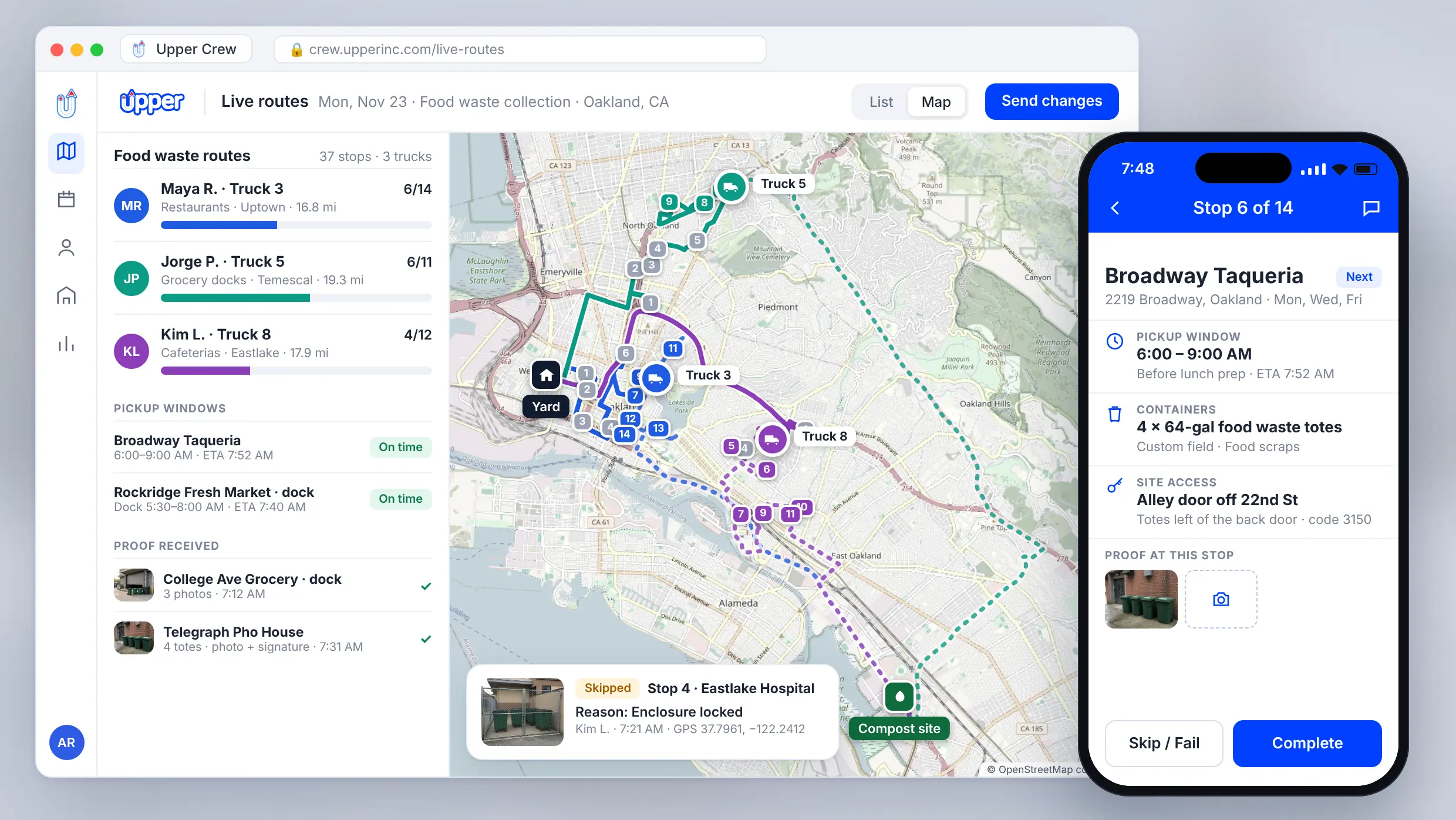
Upper Crew is food waste management software for haulers with restaurant, grocery and cafeteria accounts. It optimizes each route around kitchen and dock hours, sends it to your drivers’ phones with tote and dock notes, and keeps a photo record of every pickup, including the ones a driver couldn’t service.
Bring your commercial account list and a typical pickup day. See it planned, dispatched and recorded in Upper Crew.


Why do food waste accounts complain, and how do you answer them?
Food waste can’t sit. A tote left full past lunch service smells by dinner, and a grocery dock that closes at 10 a.m. won’t wait for a late truck. When pickup hours, dock notes and photos live in spreadsheets and text threads, every complaint becomes your driver’s word against the account’s.
Totes left full before service. Upper plans each stop around the hours the kitchen gave you, so the route reaches the restaurant before service starts.
A missed dock window. Dock hours and access notes sit on the stop, so a covering driver knows when and where to pull in.
“You never came” or “that tote was contaminated.” Each pickup gets photos, notes and a time on the stop record, so your office answers with evidence, not apologies.
How does a food waste pickup day run in Upper?
- 1
Plan.
Import your account list and build routes around each customer’s pickup hours.
- 2
Dispatch.
Send each route to the driver app with the stop order, tote location and dock notes.
- 3
Adjust.
Add an extra pickup, insert an urgent stop or cover a call-out while trucks are out.
- 4
Record.
Save photos, a signature and notes at every stop, including the ones a driver couldn’t service.
How does Upper plan routes around kitchen and dock hours?
Haulers start by importing the account list from Excel or CSV. Upper then splits the stops across drivers and sequences each route for time or distance.
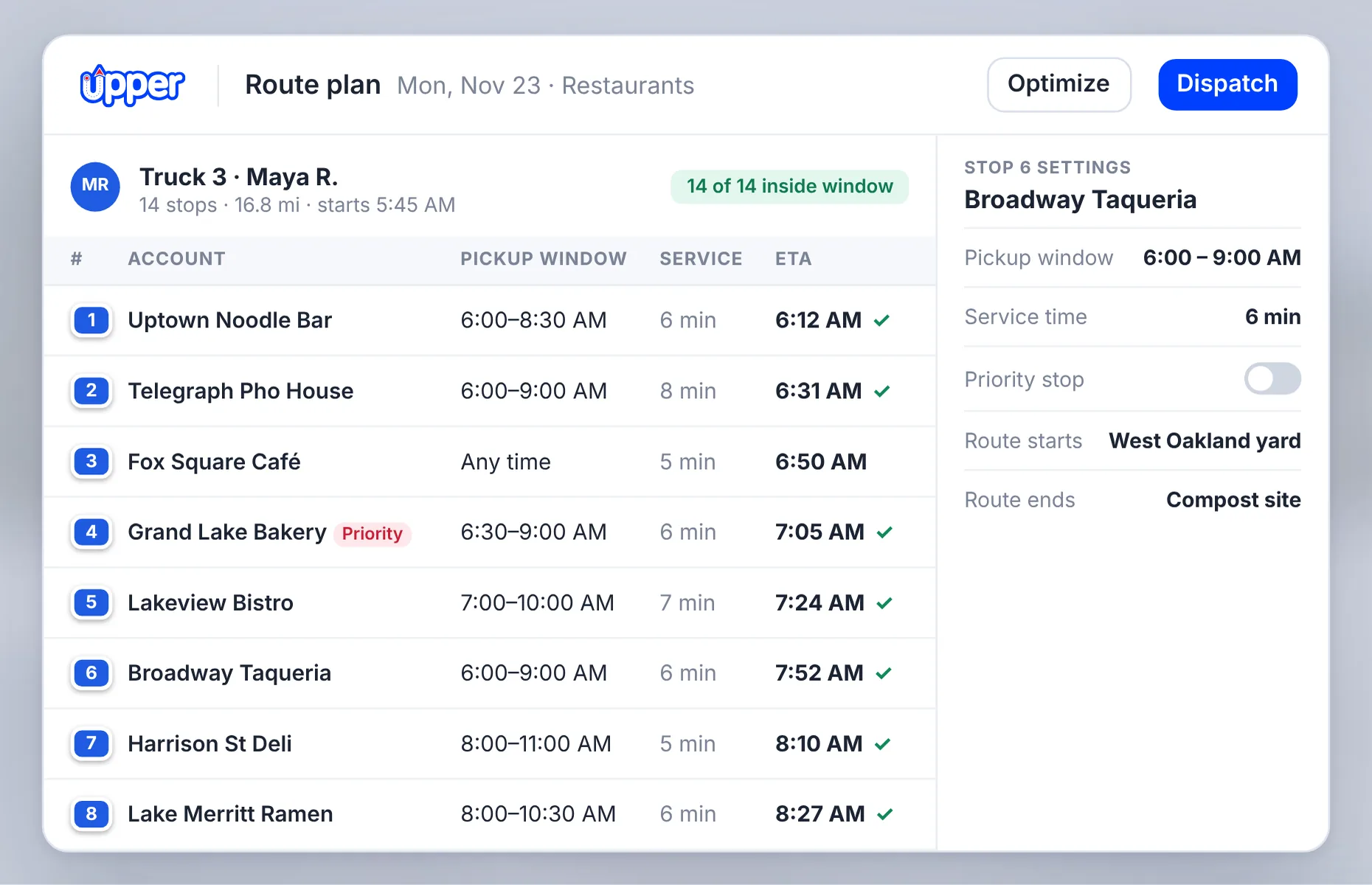
Time windows: set when each restaurant or dock should be serviced. Windows are preferences: the route is planned around them, but a pickup can still fall outside one when the day changes.
Service durations: add how long each pickup takes, from a single tote to a loading dock with several bins.
Priority stops: mark the accounts that must be serviced first.
Start and end locations: set where each driver starts and where the route ends, such as your yard or the compost facility.
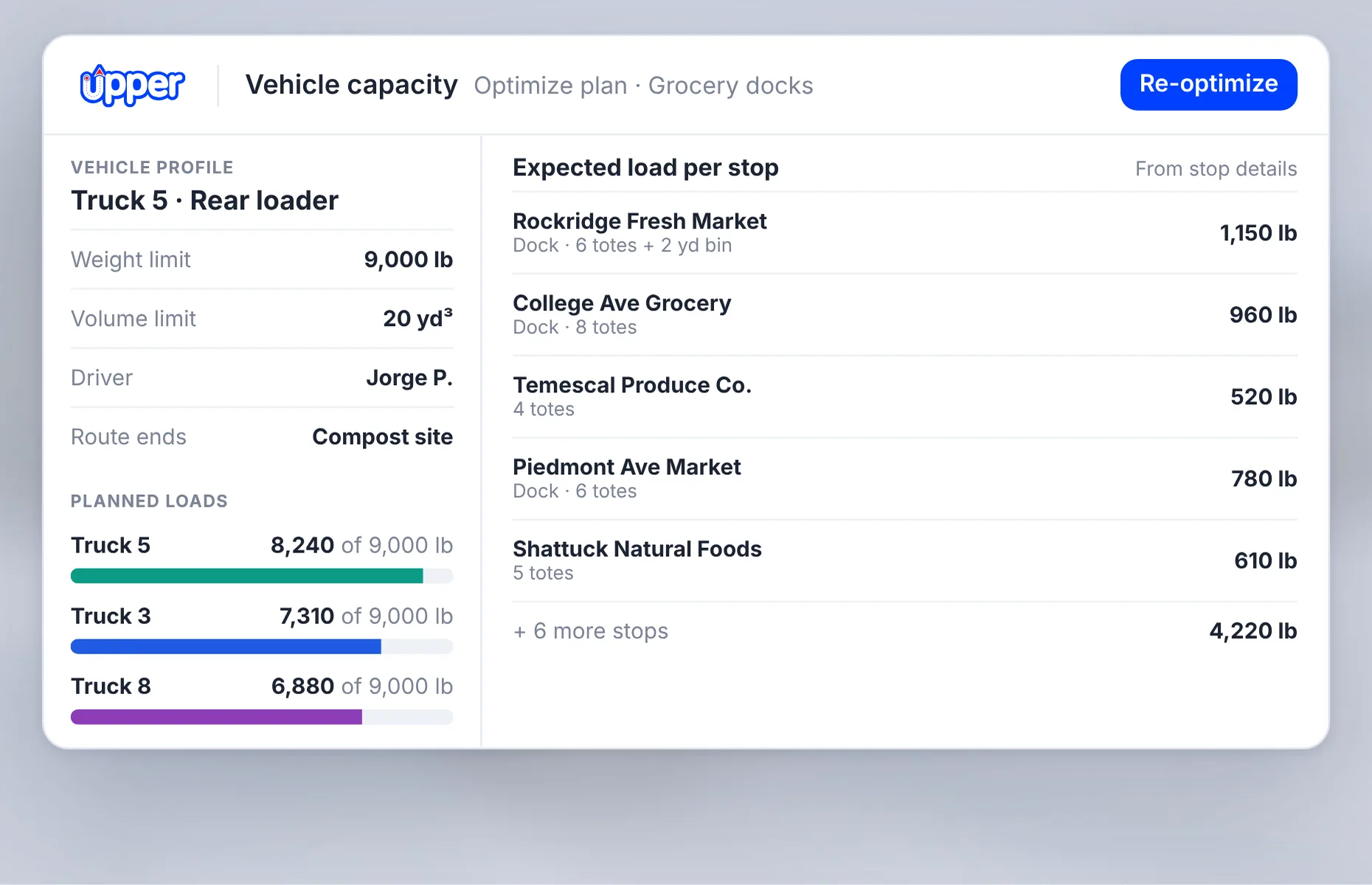
Food waste is heavy, so a truck can hit its weight limit before its last stop. On the Optimize plan, set each vehicle’s weight or volume limit and an expected load for each stop, and Upper plans routes that stay within it.
Upper doesn’t weigh loads or plan the mid-day compost trip for you. Your dispatcher decides when a truck goes to tip. The guide to waste collection route optimization covers capacity and disposal trips in more detail.
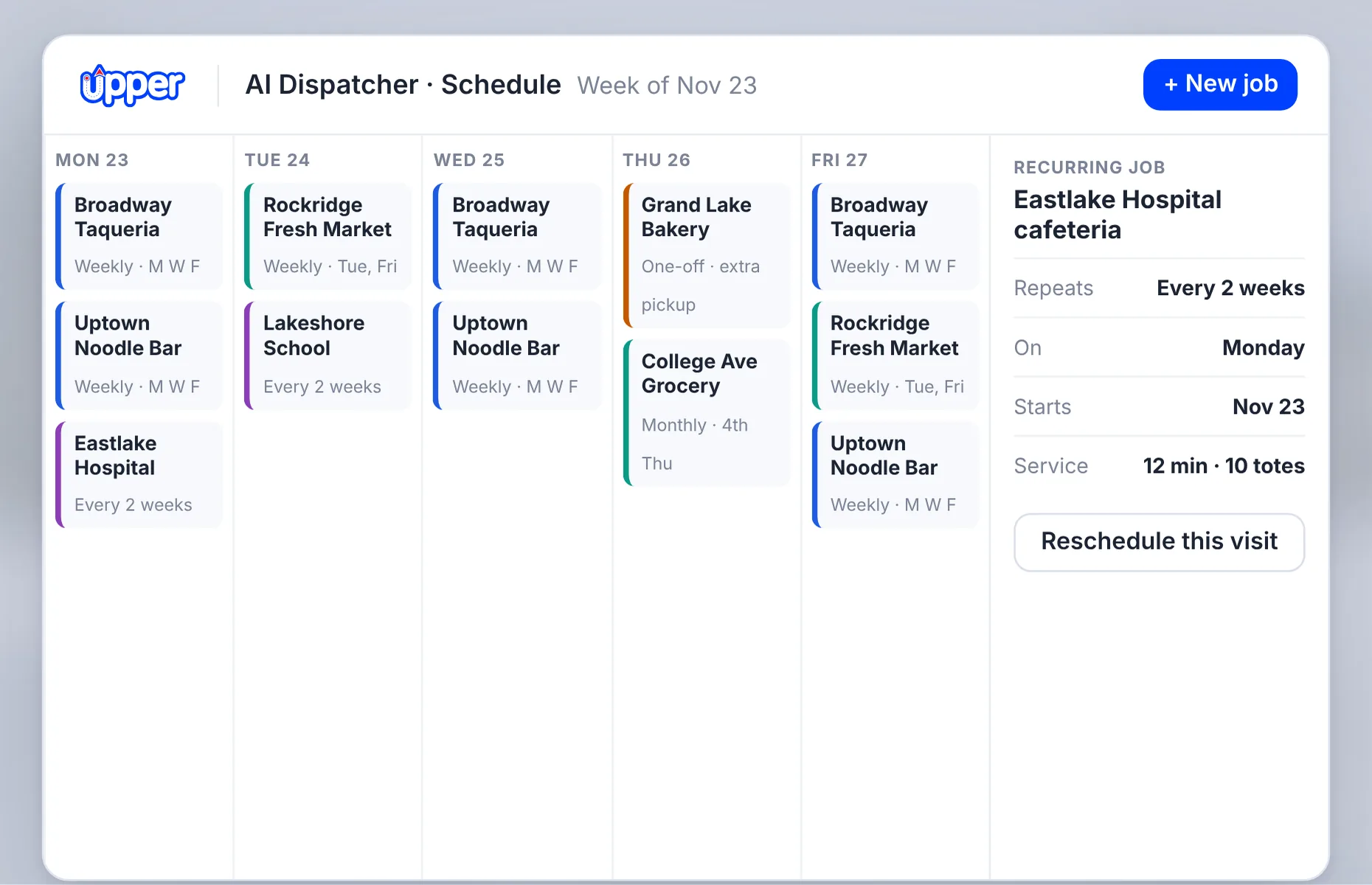
Recurring jobs: Upper AI Dispatcher sets recurring jobs on weekly, biweekly or monthly schedules and plans them alongside new pickups.
Recurring routes: repeat a route daily, weekly or monthly, or copy a route to a new date and update its stops.
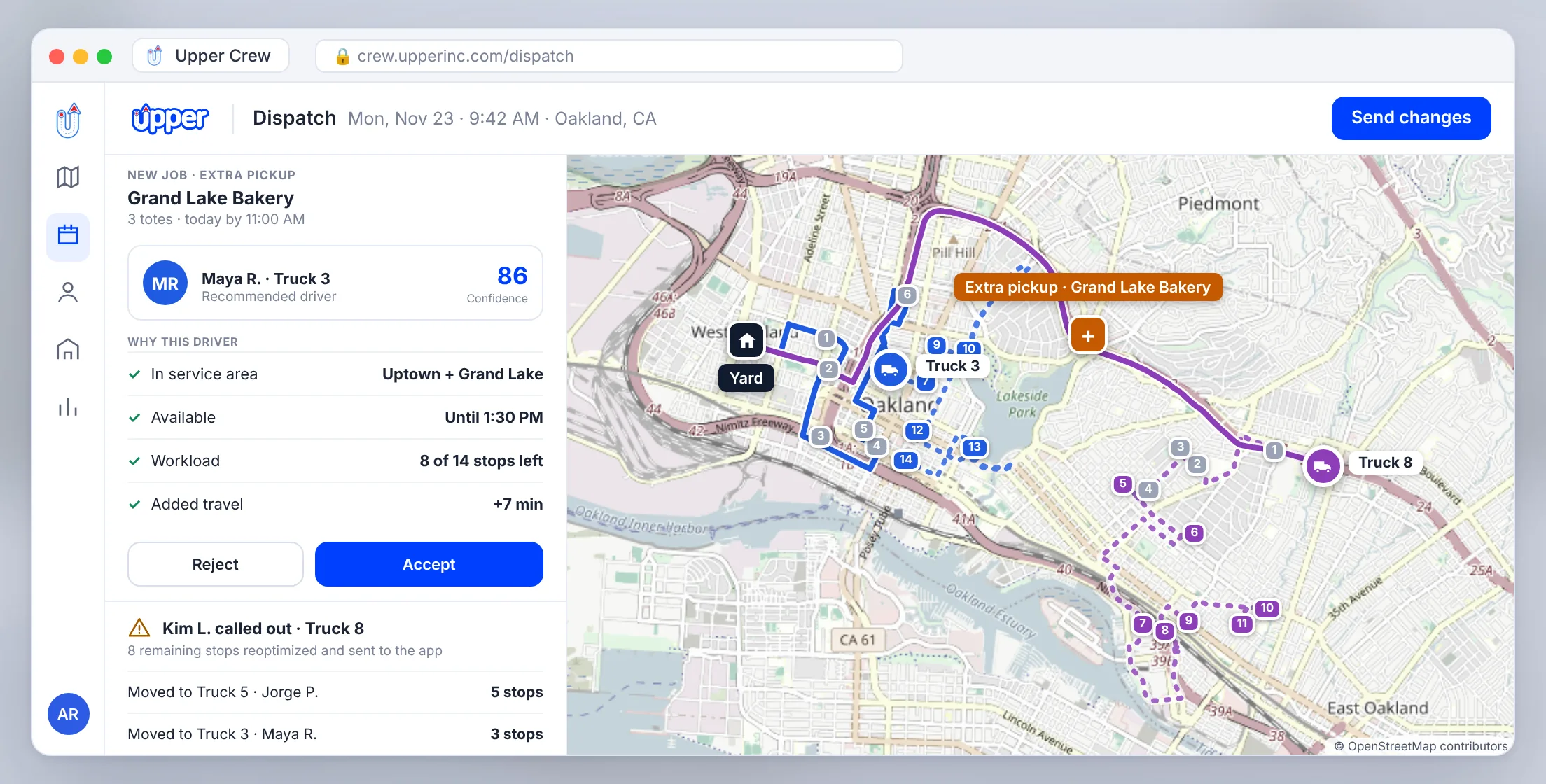
How do you add an extra pickup or cover a call-out mid-day?
Update routes during the day, even after trucks have left the yard:
An extra pickup comes in: AI Dispatcher recommends a driver based on skills and equipment, service area, availability, workload and travel time, with a confidence score (Optimize plan).
A stop can’t wait: insert an urgent stop into an active route without rebuilding the rest of it.
A driver calls out or a truck breaks down: reassign the route or move stops between drivers, reoptimize the remaining work and send the revised routes to the driver app (Professional and above).
Upper recommends and recalculates. Your dispatcher confirms the truck, its remaining capacity and any compost-facility trip before approving the change. For trash, recycling and roll-off rounds in the same plan, see Upper’s waste management software.
What do drivers see at each restaurant or grocery stop?
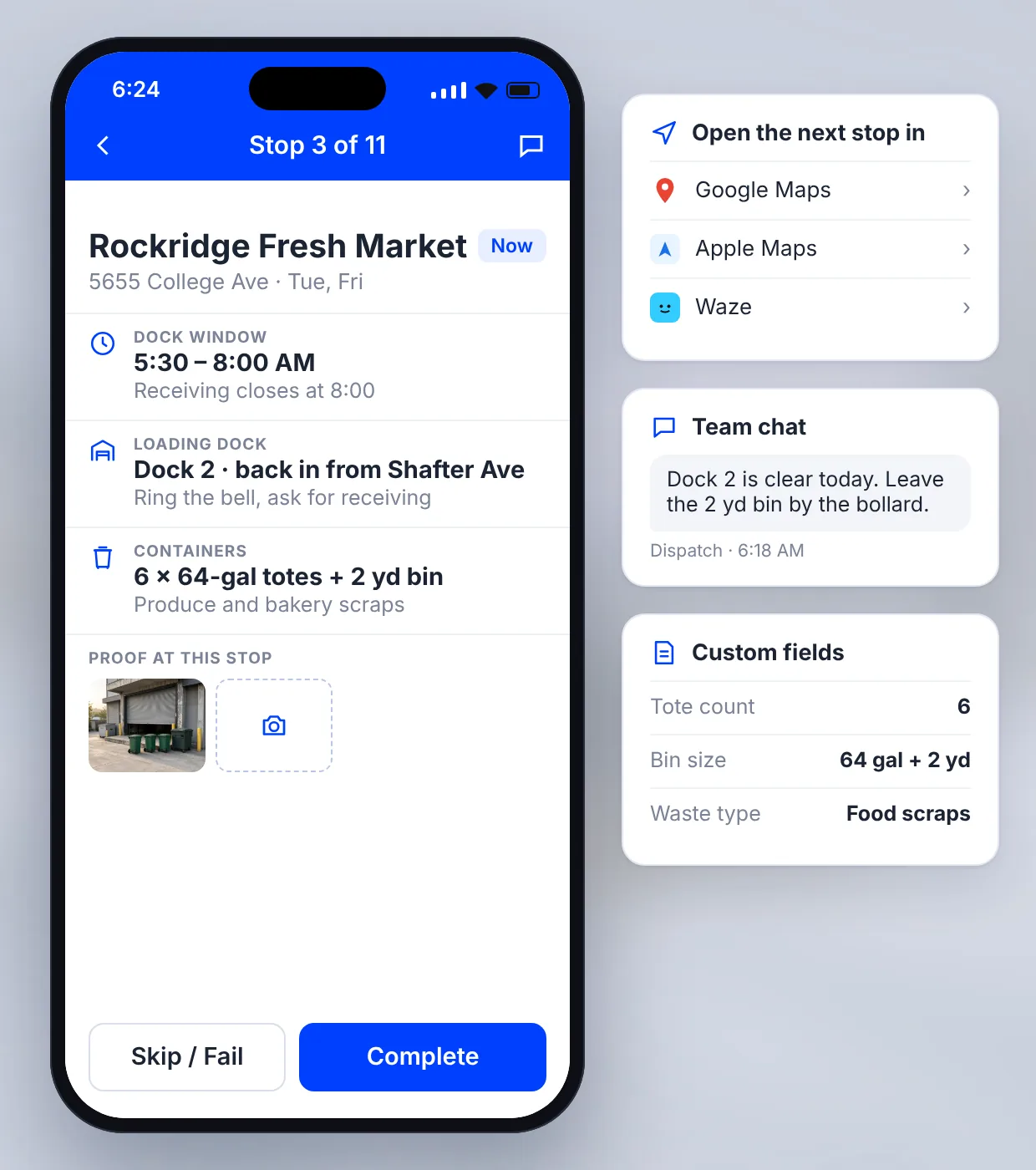
Each driver runs the route in the Upper driver app on the iOS or Android phone they already carry:
Stop order and notes: gate codes, dock directions and where the totes are kept.
Account details: bin size, tote count and waste type in custom fields (Professional and above).
Team chat: a message to dispatch instead of a phone call (Professional and above).
Navigation: one tap opens Google Maps, Apple Maps or Waze.
Drivers open the route while online, then can record outcomes and photos offline. Records sync when coverage returns, which helps in basement loading docks.
How does Upper prove every food waste pickup?
When an account disputes a pickup, your office needs a record tied to that stop, not a photo on a driver’s phone.
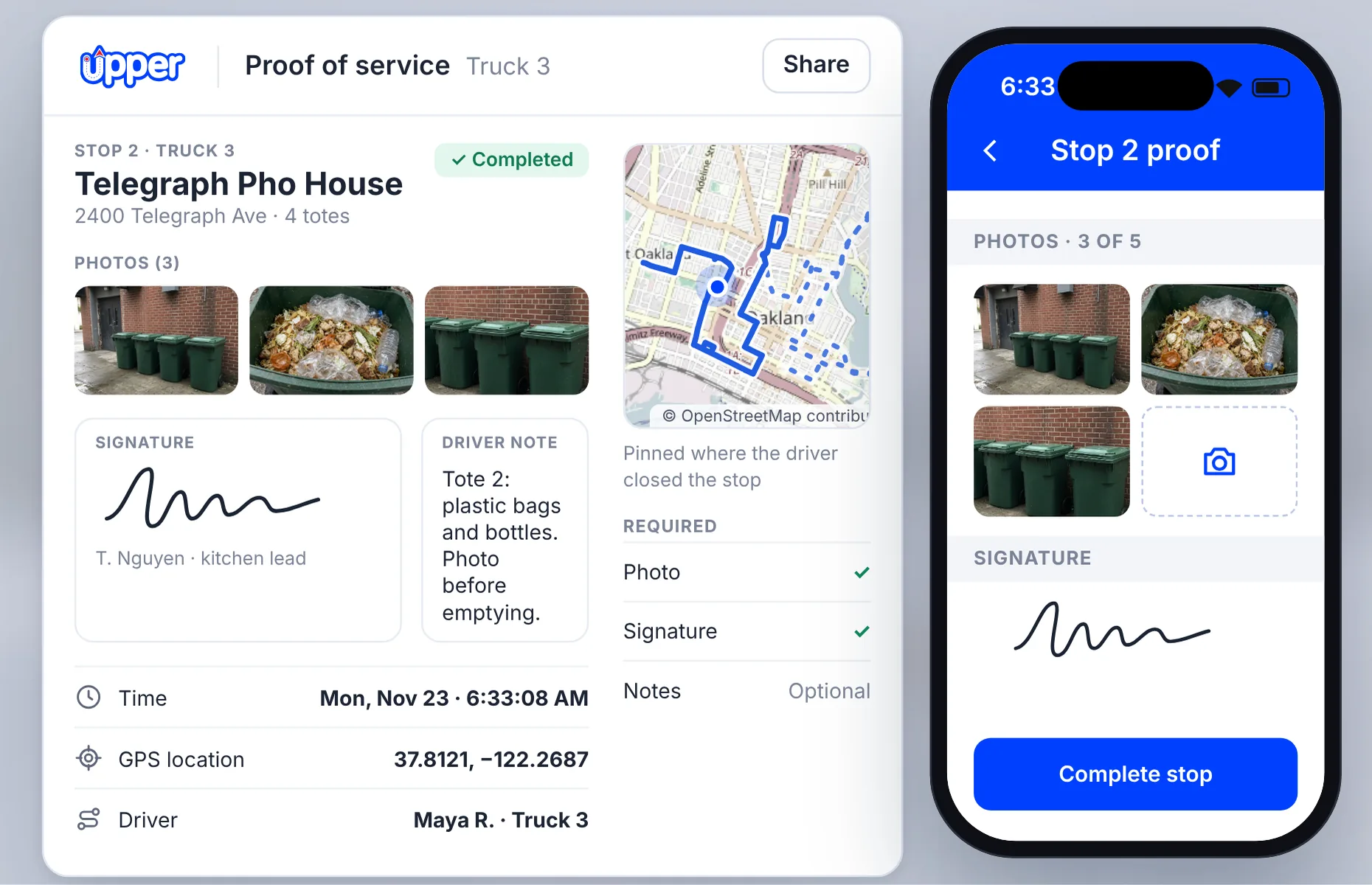
Photos, signature and notes on every stop
Drivers capture photos, a signature and notes before closing the stop: up to 3 photos on Starter, 5 on Professional and 10 on Optimize. From Professional, every record also carries GPS location and time.
If a tote is contaminated, the driver photographs it and notes it on the stop, so you can show the account what was in it.
Record a missed pickup and the reason
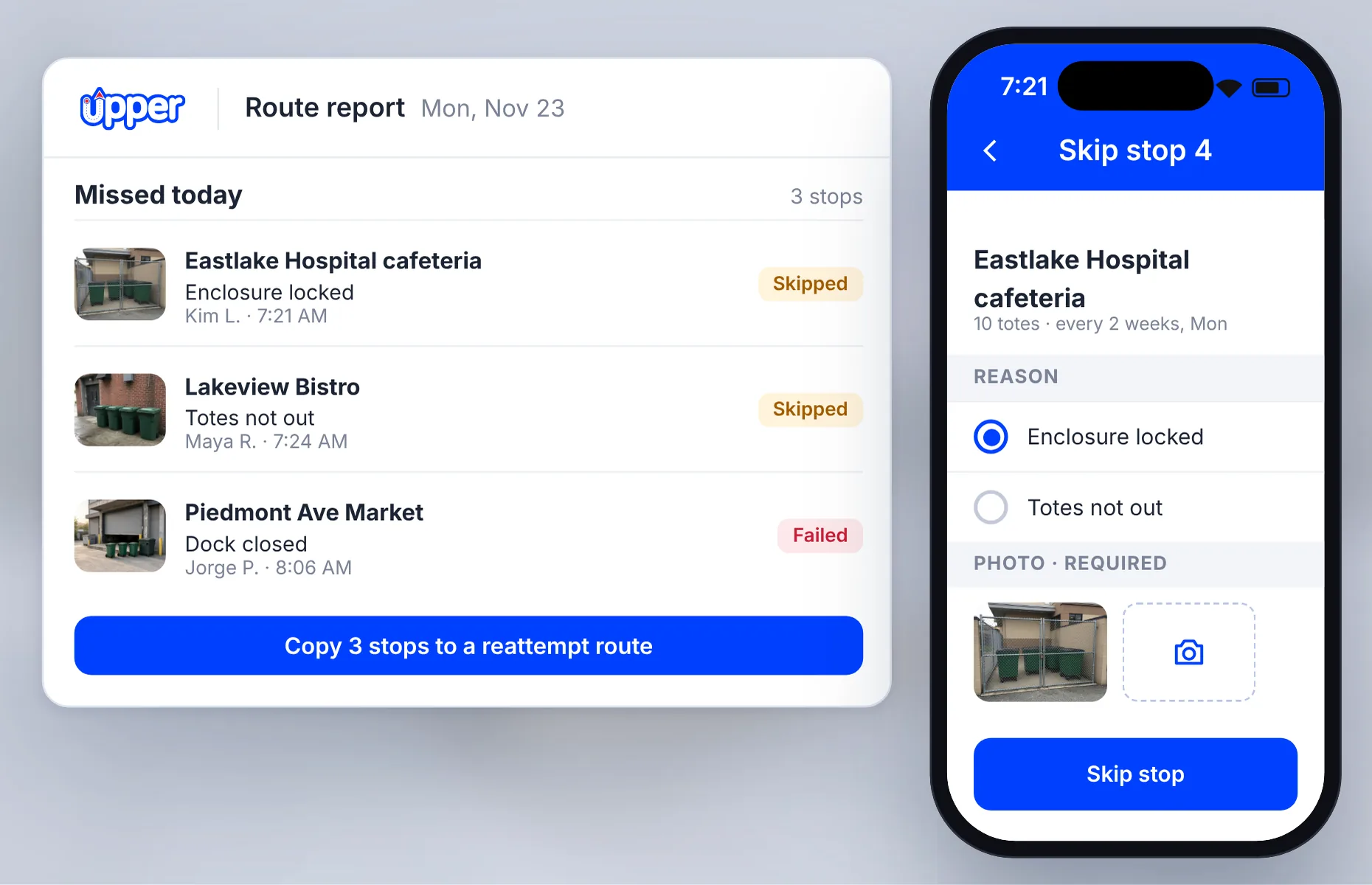
If totes aren’t out or a dock is locked, the driver marks the stop as failed or skipped, adds the reason and attaches a photo if your settings require one. At the end of the round, copy missed stops into a reattempt route.
On Professional and above, follow every driver on a live map.
How do customers know when to have totes out?
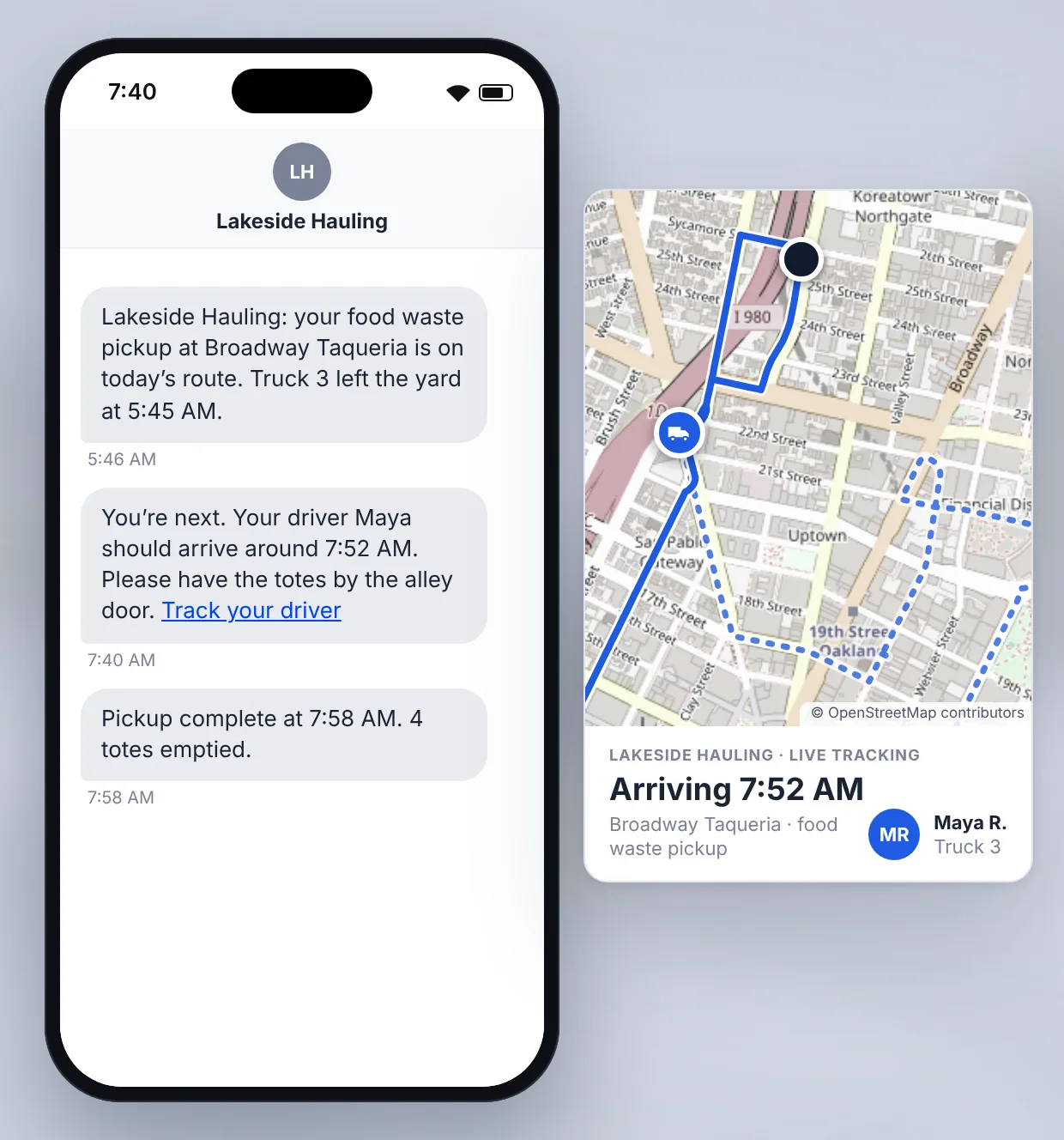
Upper sends each account SMS or email updates when the truck sets out, when their pickup is next and when it’s finished or missed. Add an ETA tracking link so kitchen staff know when to wheel the totes out.
Customer notifications start on the Professional plan, and SMS is billed per text. The ETA tracking link is included on Optimize or available as a $20 per driver add-on.
How CleanHaul turned photo proof into 12 renewed contracts
CleanHaul Services runs valet trash collection, not food waste, at 140+ apartment complexes across Dallas-Fort Worth, with 25 drivers and 2,800+ nightly collection points. Its problem is the one food waste haulers know: an account says you missed a pickup and you can’t prove you didn’t. Drivers now photograph each complex before marking the stop complete, and every photo is timestamped and geotagged.


CleanHaul ServicesWaste Management / Valet Trash · Dallas, Texas · 25 drivers
“We went from losing contracts because we couldn’t prove we showed up to renewing every single one because we can prove exactly when we arrived, how long we stayed, and what we did. Upper didn’t just fix our routes. It fixed our reputation.”

Carlos MendezDirector of Operations, CleanHaul Services
- 92%Less weekly route planning time
- 85%Fewer missed-pickup complaints
- 30 minDriver completion variance, down from 90+
- 12At-risk contracts, all renewed
| Metric | Before Upper |  After Upper |
|---|---|---|
| Weekly route planning | 6 hours | 30 minutes (92% less) |
| Missed-pickup complaints per month | ~40 | ~6 (85% fewer) |
| Driver completion variance | 90+ min | ~30 min |
| At-risk contracts | 12 | 0 (all renewed) |
Also in waste: Win Waste Solutions keeps 2 years of photo records tied to each address and won 8 new government contracts in 2 months.
Bring your restaurant and grocery accounts and the pickup that usually goes wrong.
How much does Upper cost for a food waste hauler?
Plans are billed per user per month, or 20% less billed yearly.
| Plan detail |  Starter | Professional | Weight limitsOptimize | Enterprise |
|---|---|---|---|---|
| Monthly | $50/user/month | $60/user/month | $89/user/month | Custom |
| Billed yearly | $40/user/month | $48/user/month | $71/user/month | Custom |
| Photos per stop | Up to 3 | Up to 5 | Up to 10 | Up to 10 |
| Signature and notes on each stop | ✓Included | ✓Included | ✓Included | ✓Included |
| GPS location and time on records | ✕Not included | ✓Included | ✓Included | ✓Included |
| Multi-driver load balancing, live route changes and live tracking | ✕Not included | ✓Included | ✓Included | ✓Included |
| Custom fields, team chat and customer notifications | ✕Not included | ✓Included | ✓Included | ✓Included |
| Weight and volume capacity planning | ✕Not included | ✕Not included | ✓Included | ✓Included |
| AI driver assignment and Zapier | ✕Not included | ✕Not included | ✓Included | ✓Included |
| Route history kept | 6 months | 1 year | 2 years | 5 years |
Most food waste haulers start on Professional for custom fields and customer updates. They move to Optimize when trucks run near their weight limit or contracts ask for 2 years of pickup records. See Upper pricing for every limit.
Try it on your own accounts with Professional features, except customer SMS. No credit card required.
Is Upper the right food waste management software for you?
Good fit
- Haulers with recurring restaurant, grocery, cafeteria, hotel or hospital pickups
- Teams that plan from a spreadsheet today and want routes, driver instructions and stop proof in one place
- Offices that need photo and GPS evidence when an account disputes a pickup
Not the best fit on its own
- You need on-truck weighing, scale tickets or weight-based billing.
- You need container or RFID tote tracking, or a contamination dashboard.
- You need waste manifests or regulatory reports produced by the software.
- You pump grease traps and need FOG compliance records.
Bring these to the demo, and we’ll tell you plainly what Upper covers.
Food waste management software FAQs
What is food waste management software for haulers?
Food waste management software can mean kitchen tools that measure waste or hauler tools that collect it. Upper Crew is the hauler kind: it plans, dispatches and records commercial food waste pickups, with proof of service at every stop. It doesn’t weigh or track waste inside a kitchen.
Can I plan routes around restaurant pickup hours?
Yes. Set a time window and service duration for each stop, and Upper plans the route around them. Time windows are preferences, so a pickup can still fall outside one when the day changes.
Can I schedule weekly and biweekly food waste pickups?
Yes. AI Dispatcher sets recurring jobs on weekly, biweekly or monthly schedules. You can also repeat a route or copy it to a new date.
Can I import my commercial accounts from a spreadsheet?
Yes. Import your account list from Excel or CSV, with no IT project. Upper builds routes from the addresses, pickup hours and service durations you add.
Can drivers record a missed or contaminated pickup?
Yes. Drivers mark a stop as failed or skipped and add the reason, with a photo if your settings require one. For a contaminated tote, they can photograph it and add a note to the stop. Copy missed stops into a reattempt route at the end of the round.
Does Upper weigh loads or track totes and containers?
No. Upper doesn’t connect to truck scales or track totes automatically. You can store bin size, tote count and waste type in custom fields (Professional and above), and set vehicle weight or volume limits on Optimize.
Do drivers need new devices, and does the app work without coverage?
No new devices: the driver app runs on iOS and Android phones. Drivers open the route while online, then can record stop outcomes and photos offline. Records sync when coverage returns.
How much does Upper cost?
Starter $50, Professional $60 and Optimize $89 per user per month, or 20% less billed yearly. The 7-day free trial needs no credit card.
Can Upper invoice food waste pickups?
Route planning in Upper Crew doesn’t create invoices. AI Dispatcher can turn a finished job into an invoice and track payment. Or keep your billing system and connect it through Zapier on Optimize or the Platform API on Enterprise.
See your busiest food waste pickup day planned in Upper
Bring your restaurant and grocery account list, your busiest pickup day and the stop that usually goes wrong. See how Upper plans the routes, handles a change and records every pickup.