Waste hauler routing software for collection fleets
Turn your stop list into truck routes and update them as accounts change
Upper Crew is waste hauler routing software that turns your customer list into a route for each truck. It sequences the stops around service time, stop priorities and your yard, then sends each route to the driver’s phone. When an account starts or cancels, Upper re-sequences the route so nobody redraws it by hand.
Bring your customer list. See Upper Crew split the stops into routes and re-sequence one after an account changes.
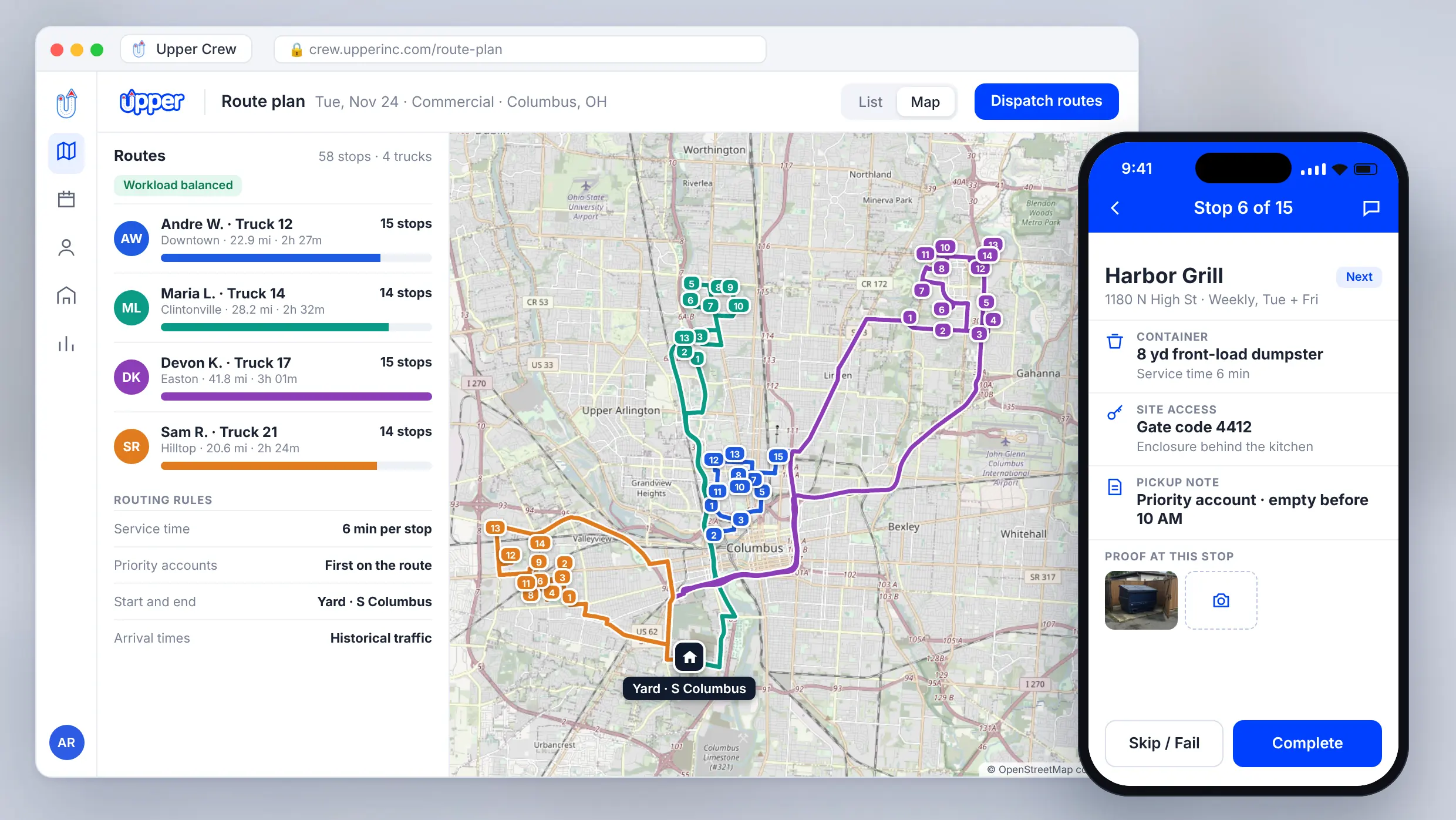


Stop redrawing routes by hand
A hauler’s routes rarely stay fixed. New accounts sign up, others cancel, and a truck goes into the shop. When stop order lives in a spreadsheet or a driver’s head, each change means redrawing routes by hand.
When the list changes, re-optimize the plan in Upper Crew and the stops are re-sequenced. Your dispatcher reviews the new order before any driver sees it.
How waste hauler routing software works in Upper Crew
Planning a week of collection takes four steps:
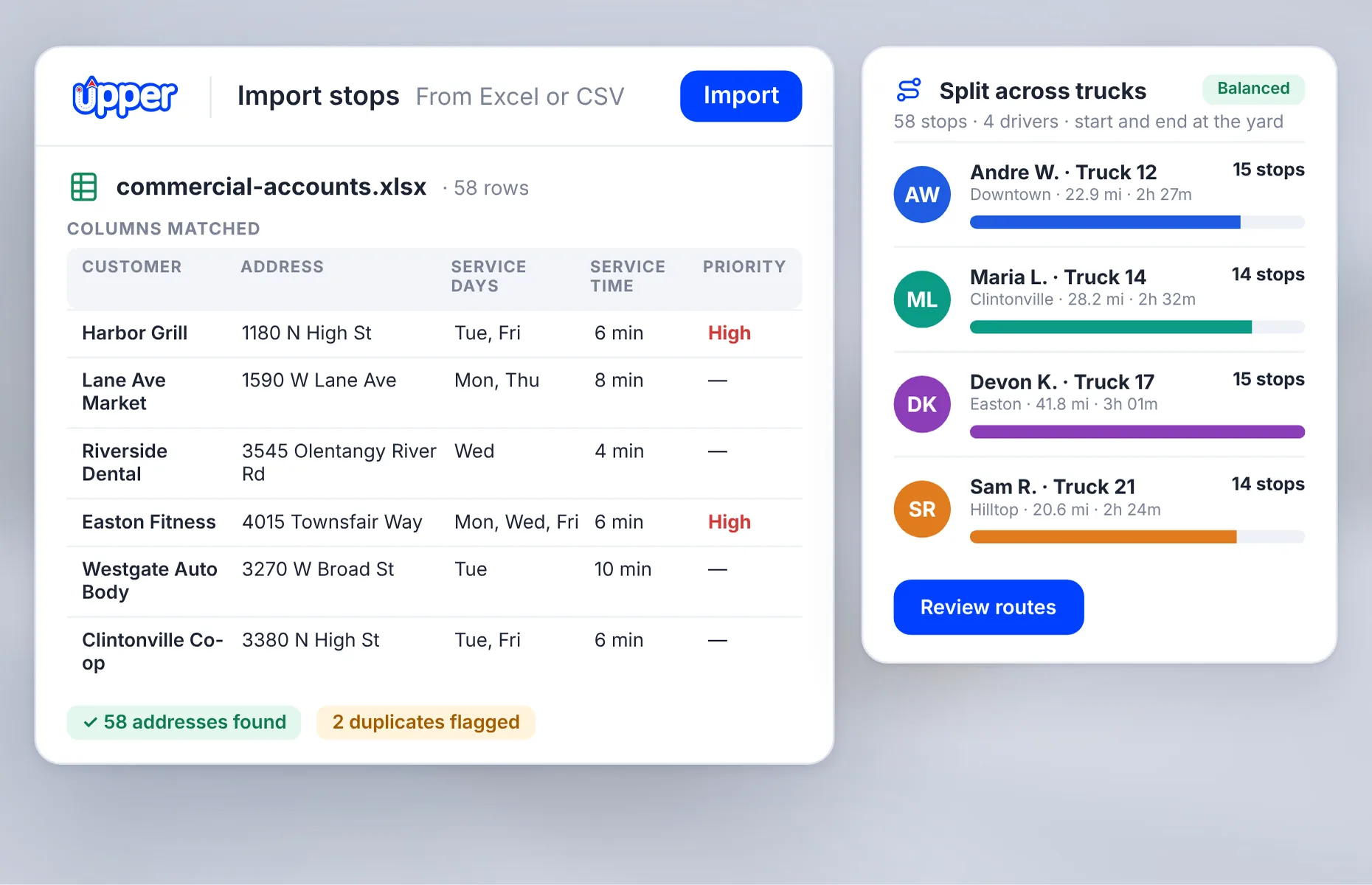
1. Import your stops. Upload customers from CSV or Excel with spreadsheet import. Upper maps your columns automatically.
2. Set the rules. Add service time and priority for each stop, plus each driver’s start and end point, such as your yard.
3. Split stops across trucks. Upper Crew splits stops across drivers and balances the workload between routes.
4. Review and send. Your dispatcher checks the stop order, then sends each route to the driver app.
Splitting stops across drivers and adding a preferred time window for each account are available on the Professional plan and above.
Plan garbage truck routes around truck size, capacity and traffic
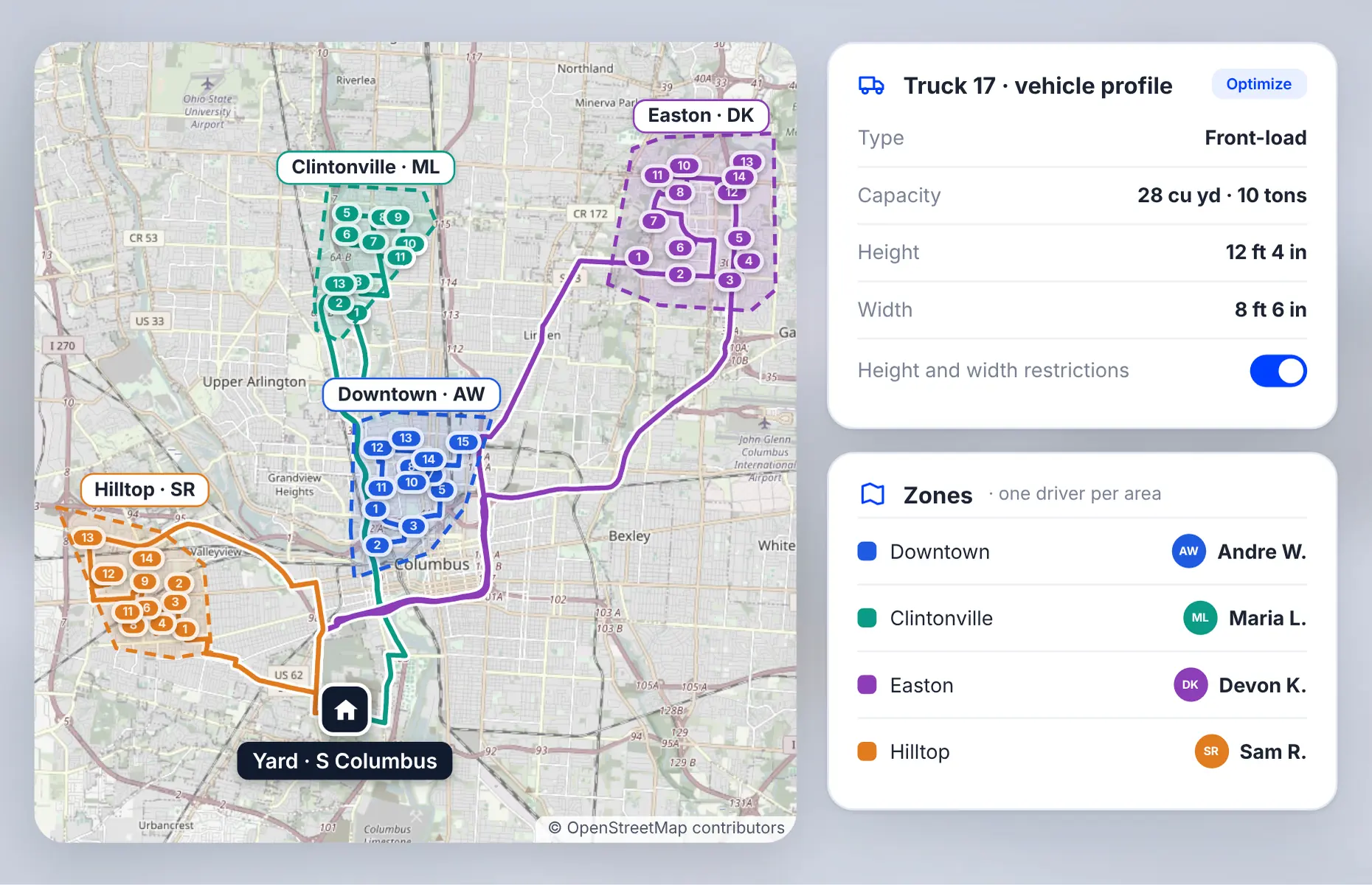
A collection truck can’t take every road a car can, and it can only carry so much. Upper Crew plans around both.
Traffic-aware routing uses historical traffic data to set arrival times. Vehicle capacity uses the weight or volume limit you enter for each truck.
| Routing rule | What Upper Crew does |  Starts on |
|---|---|---|
| Traffic-aware routing | Plans stop order with traffic in mind | Starter |
| Priority stops | Puts high-priority accounts earlier in the route | Starter |
| Vehicle profiles | Saves each truck’s details as its own profile | Professional |
| Vehicle capacity planning | Plans each route within a weight or volume limit you set | Optimize |
| Height and width restrictions | Plans routes around each truck’s height and width | Optimize |
| Zone-based routing | Lets you draw zones and assign drivers to each area | Optimize |
Repeat weekly trash pickups without rebuilding routes
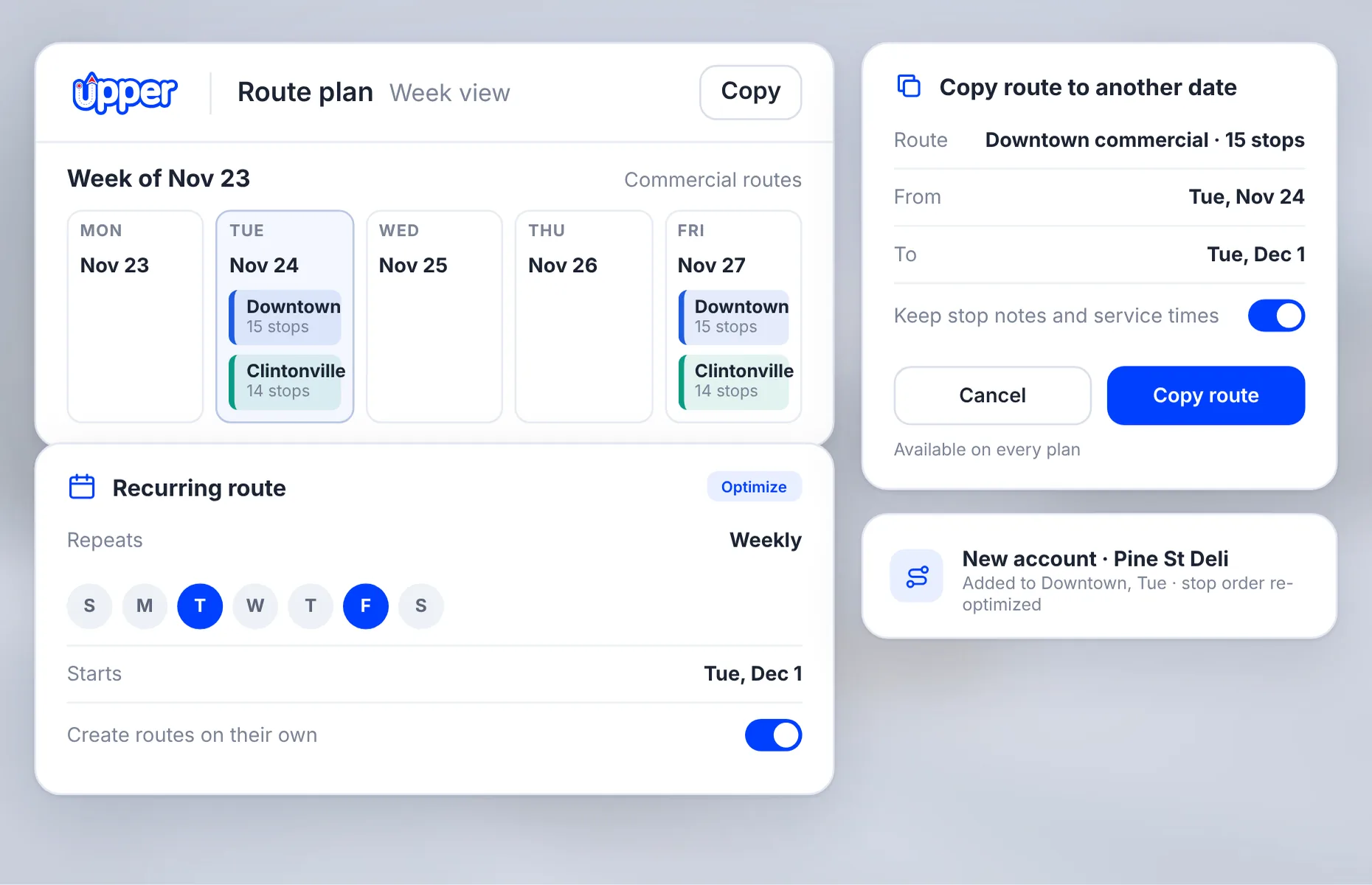
Most commercial accounts get pickups on the same days each week. Upper Crew lets you reuse those routes instead of rebuilding them:
Copy a route: Duplicate last week’s route to the next service date, then optimize it. This works on every plan.
Recurring routes: On the Optimize plan, set a route to repeat on its own.
Recurring jobs: Upper AI Dispatcher sets jobs on weekly, biweekly or monthly schedules.
New accounts: Add a customer to a route, then re-optimize it.
For more, read Upper’s guide to waste collection route optimization.
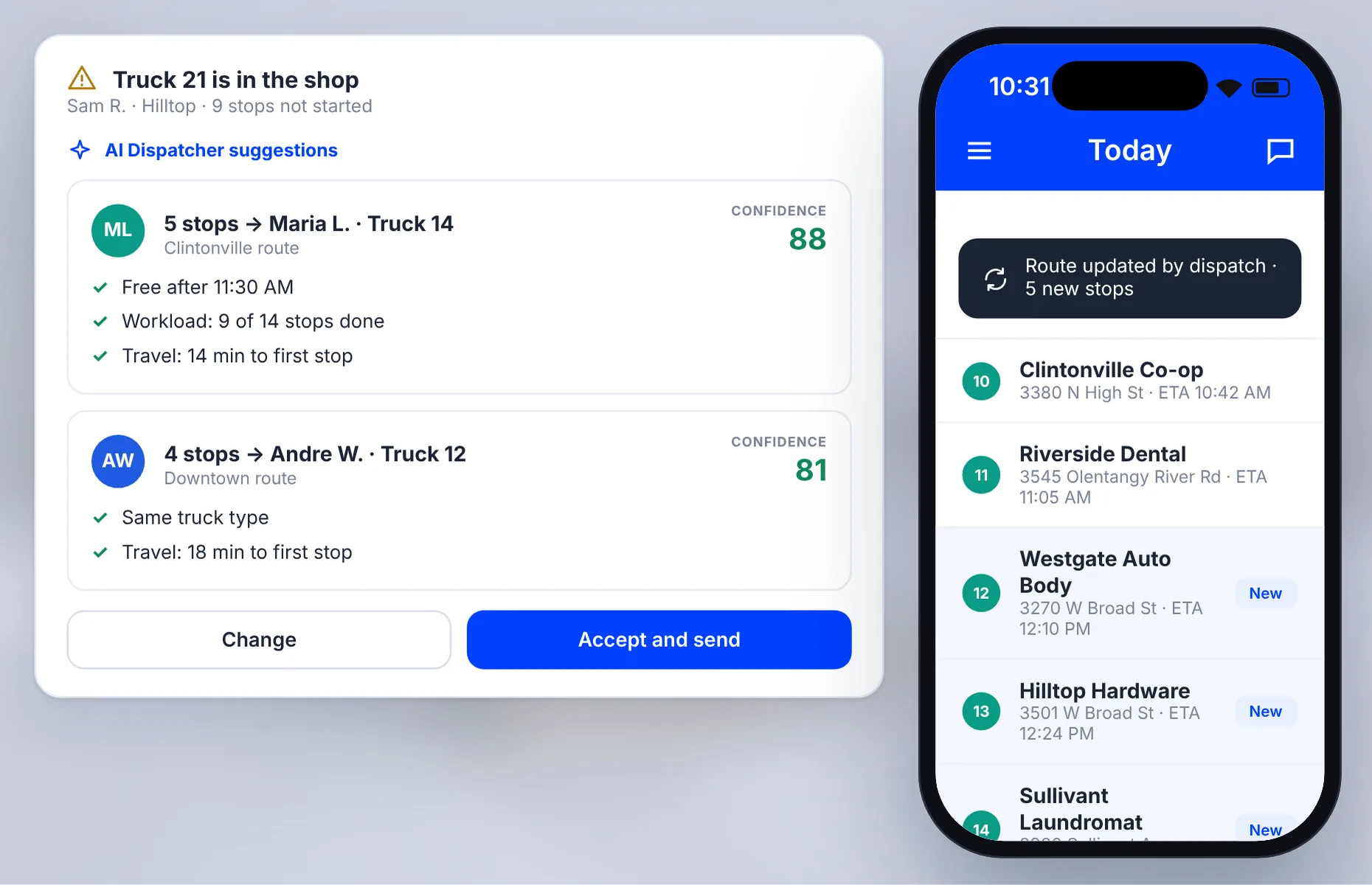
Change routes mid-day and send them to the driver’s app
When a route changes, Upper Crew sends the revised route straight to the driver’s app.
Re-optimize after changes: When a delay, new stop or cancellation changes the day, re-optimize the route.
Drag and drop: Move a stop on the timeline, and Upper recalculates arrival times for the stops after it.
Cover for absences: AI Dispatcher suggests reassignments when a driver or vehicle is out. Each suggestion shows its reasons and a confidence score.
The confidence score rates the match. It isn’t a promise of on-time arrival, so your dispatcher still decides what moves.
Real-time route updates and drag and drop start on the Professional plan, and AI cover suggestions are on Optimize.
Bring a day when a truck went down. We’ll move its stops live in the demo.
Track trucks live and record proof at each stop
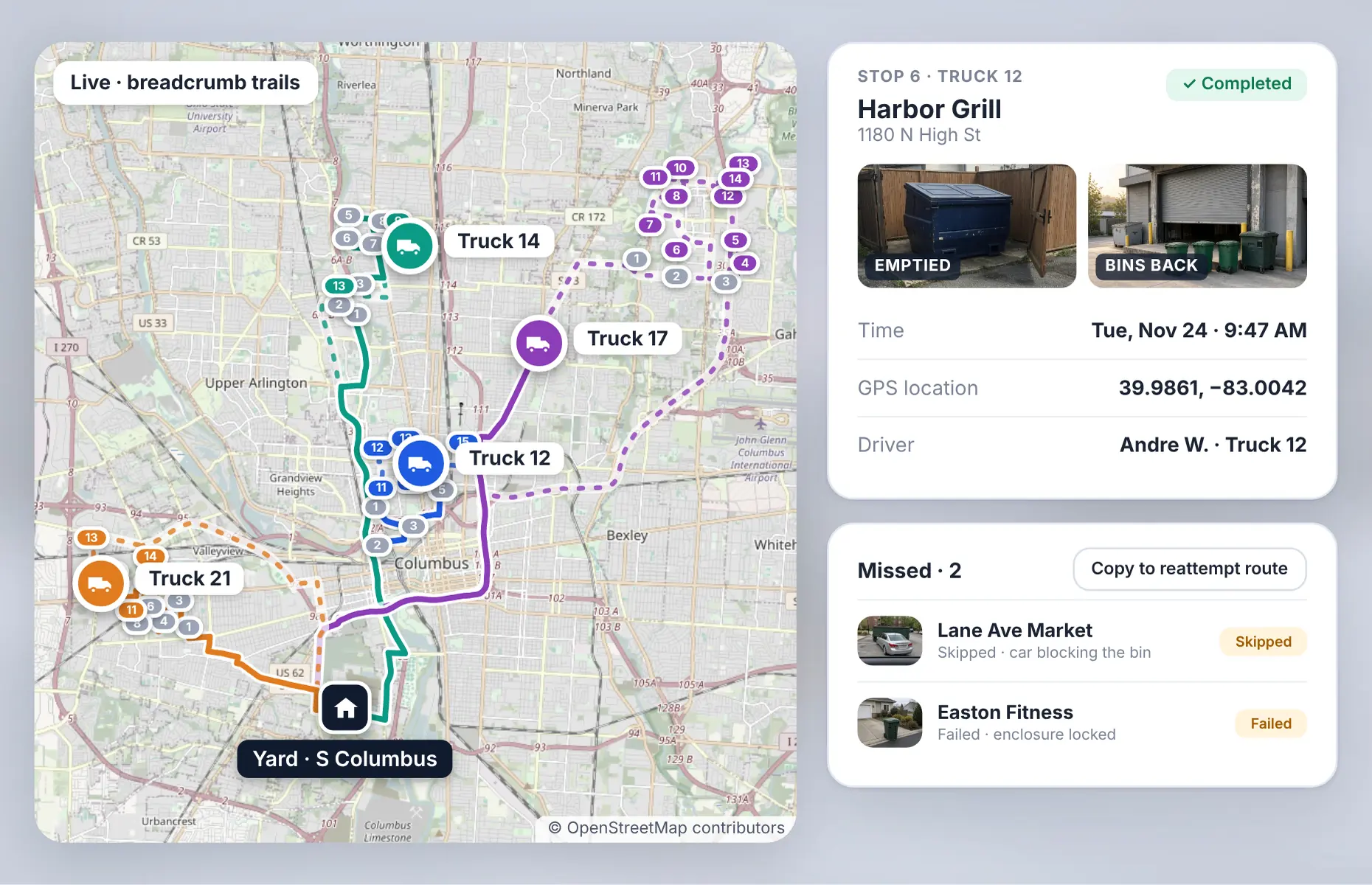
Upper Crew shows live GPS tracking and the path each truck took, so you can see how every route ran.
Missed stops: Copy skipped and missed stops into a reattempt route, then assign it.
Proof at each stop: Drivers add photos, signatures and notes at each stop, so you have a record of every pickup. Starter allows 3 photos per stop, Professional 5 and Optimize 10.
Live GPS tracking and the time and GPS stamp on each stop record start on the Professional plan.
How CleanHaul cut route planning time with Upper
CleanHaul Services runs valet trash collection at 140+ apartment complexes in the Dallas-Fort Worth area. Its 25 drivers cover 2,800+ nightly collection points. Its director of operations imported the property list, drew five zones on the map and optimized.


CleanHaul ServicesWaste Management / Valet Trash · Dallas, Texas · 25 drivers
“We went from losing contracts because we couldn’t prove we showed up to renewing every single one because we can prove exactly when we arrived, how long we stayed, and what we did. Upper didn’t just fix our routes. It fixed our reputation.”

Carlos MendezDirector of Operations, CleanHaul Services
Key features used: route optimization, multi-driver optimization, GPS tracking, photo proof of delivery and Excel/CSV import.
Read the CleanHaul Services storyCleanHaul’s reported results
| Metric | Before Upper | After Upper |
|---|---|---|
| Weekly route planning time | 6 hours | 30 minutes |
| Driver shift completion variance | 90+ minutes | About 30 minutes |
| Missed pickup complaints per month | About 40 | About 6 |
| At-risk contracts | 12 | 0 (all renewed) |
Bring your accounts and truck count. We’ll build your collection routes in the demo.
Test your collection routes in a 7-day free trial
Run waste hauler routing software on your real stop list in four steps:
- 1
Import a week of stops.
Upload them from your spreadsheet.
- 2
Balance your trucks.
Split the stops across your trucks and compare the routes.
- 3
Add a new account.
Insert a customer into a route and check the new stop order.
- 4
Change a route after dispatch.
Move a stop and check that it reaches the driver’s phone.
The 7-day free trial needs no credit card. It covers Professional plan features, except customer SMS notifications, for up to 5 users.
Waste hauler routing software FAQs
What is waste hauler routing software?
It turns a list of collection stops into an ordered route for each truck, which is why it’s also called garbage truck routing software. Upper Crew is route planning software for waste haulers that sequences stops around service time, priority and your yard. When accounts change, you re-optimize and send the update to drivers.
Can Upper plan routes for every truck in my fleet?
Yes. Upper Crew splits your stops across all your drivers in one run and balances the workload between routes. Splitting stops across drivers is available on the Professional plan and above.
How does waste hauling route optimization work in Upper?
Upper Crew orders each truck’s stops by location, service time, priority and preferred time window. Arrival times use historical traffic data. Your dispatcher reviews the plan on the map, then sends it. Time windows start on the Professional plan.
Can I reuse routes for weekly commercial pickups?
Yes. Duplicate last week’s route to the next service date on any plan, then add or remove accounts before you dispatch. On the Optimize plan, recurring routes repeat on their own.
Can Upper plan around truck size and capacity?
Yes, on the Optimize plan. Set each truck’s height, width and weight or volume limit, and Upper Crew keeps every route within them.
Can each driver keep a fixed collection area?
Yes, on the Optimize plan. Draw zones on the map with zone-based routing and assign a driver to each one.
How many stops can one collection route hold?
A route can hold up to 250 stops on Starter, 500 on Professional and 1,500 on Optimize. Enterprise plans allow more, and every plan includes unlimited routes each month.
How much does Upper Crew cost?
Plans are billed per user per month: Starter $50, Professional $60 and Optimize $89, or 20% less billed yearly. Enterprise pricing is by request. See Upper pricing for plan limits.
Is there a free trial?
Yes. The 7-day free trial needs no credit card and covers Professional plan features, except customer SMS notifications, for up to 5 users.
See your collection routes built in Upper Crew
Share your stop list and the number of trucks you run. See the routes Upper Crew builds and how a mid-day change reaches your drivers.