
Eliminate Time Theft with GPS-Verified Clock-In at Every Job Site

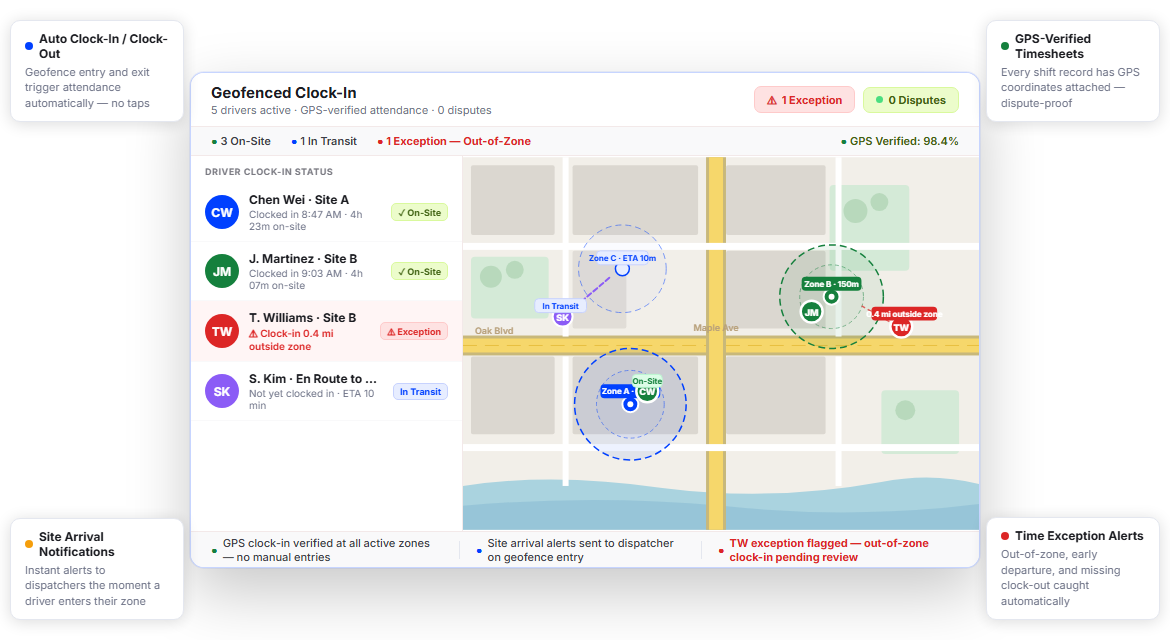
Fleets Running Tighter Schedules Trust Upper for Location-Verified Time Tracking






Time Tracking Software Promises Accuracy. Your Timesheets Tell a Different Story.
Most time tracking tools trust drivers to be honest. That works until it doesn’t. By then you’ve already signed off on inflated hours, approved questionable overtime, and lost thousands to payroll errors you can’t prove.
What Time Tracking Promises
-
 Accurate clock-in at the moment work begins
-
Reliable records drivers can’t manipulate
-
Clear visibility into site arrival and departure
-
Payroll hours that reflect actual time worked

What Actually Happens
-
Drivers clock in from home before the shift officially starts, creating inaccurate time and payroll records.
-
Manual time entries often get rounded up by 15–30 minutes, increasing payroll costs and reducing accountability.
-
There’s no reliable way to confirm whether a driver was actually present and working at the assigned site.
-
End-of-week timesheets require constant back-and-forth audits between drivers, managers, and payroll teams.
Every Geofenced Clock-In Feature Your Fleet Needs to End Timesheet Disputes
Upper Route Planner built geofenced attendance tracking directly into its fleet management workflow, so time data, route data, and driver performance all live in one place. No separate time clock app, no manual syncing, no gaps.
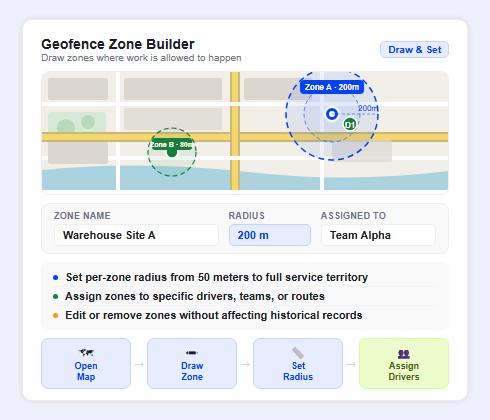
Geofence Zone Builder
You define where work happens. Upper enforces attendance within those boundaries. Draw geofence zones around job sites, depot locations, customer properties, or service areas directly on the map. Set a radius as tight as 50 meters or as wide as a full service territory; Upper only allows clock-in from within that boundary.
- Create unlimited geofence zones across all locations
- Set per-zone radius from 50 meters to several kilometers
- Assign zones to specific drivers, teams, or routes
- Overlap zones for multi-site stops on the same route
- Edit or remove zones without impacting historical records
- Mobile map confirmation shows drivers their active zone

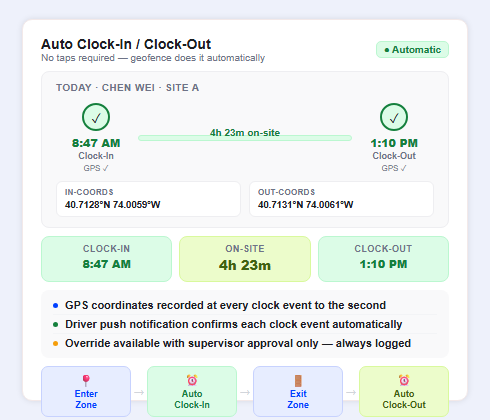
Auto Clock-In/Clock-Out
Drivers don’t tap anything. When a driver enters a geofenced zone, the geofenced clock-in app registers their arrival automatically. When they leave, it clocks them out. Every entry and exit is timestamped and GPS-stamped, with no manual input required and no room for error.
- Automatic clock-in triggered on geofence entry
- Automatic clock-out triggered on geofence exit
- GPS coordinates recorded at every clock event
- Timestamps accurate to the second
- Driver push notification confirms each clock event
- Override option available with supervisor approval only
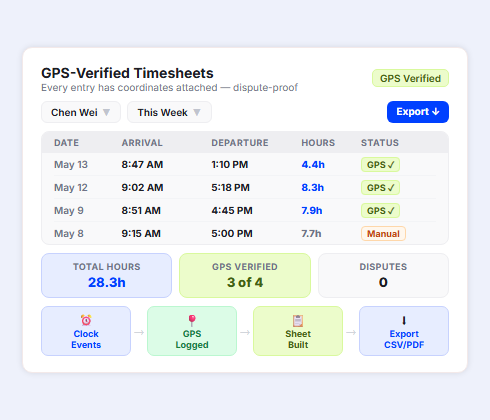
GPS-Verified Timesheets
Every timesheet line comes with coordinates attached. Upper generates GPS-verified timesheets that show exact arrival time, exact departure time, total hours on-site, and the GPS location logged at each clock event. Your payroll team gets records that are dispute-proof by design.
- GPS coordinates embedded in every timesheet entry
- On-site duration calculated per visit, per day, per driver
- Timesheet entries marked as GPS-verified or manual
- Supervisor review queue for any non-GPS entries
- Export timesheets as CSV or PDF for payroll upload
- Historical timesheet access for audits and compliance
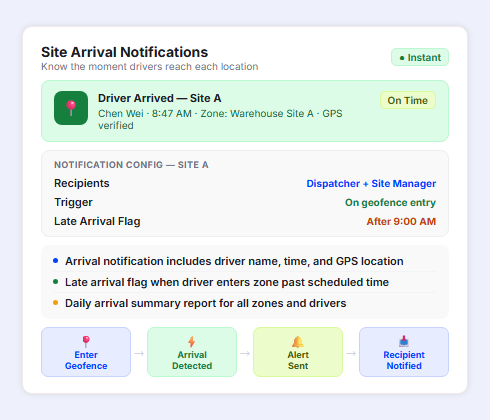
Site Arrival Notifications
Know the moment your drivers reach each location, before they even pick up the phone. Upper sends real-time arrival alerts to dispatchers, supervisors, or site contacts the instant a driver’s GPS triggers the geofence. No check-in calls, no status guessing, no delays.
- Instant push or email alert on driver geofence entry
- Configurable recipients per zone or per driver
- Arrival notification includes driver name, time, and location
- Late arrival flag when driver enters zone past scheduled time
- Integration with driver dispatch management for same-screen visibility
- Daily arrival summary report for all zones
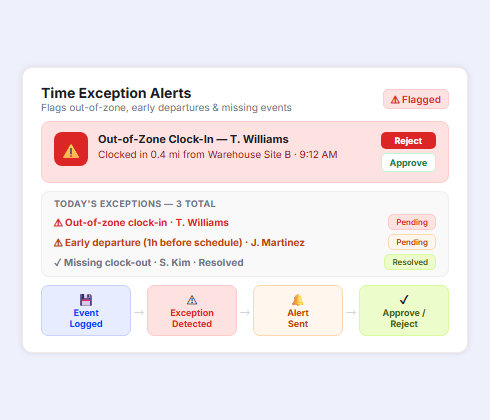
Time Exception Alerts
Not every gap is innocent. Upper flags time exceptions automatically: a clock-in outside the geofence, a shift that ended an hour before departure, a driver who clocked in from a location that doesn’t match their assigned zone. You see the exception before payroll closes.
- Location mismatch alerts for out-of-zone clock-ins
- Early departure flag when clock-out precedes scheduled end
- Extended break alerts when idle time exceeds threshold
- Missing clock-out notifications sent to driver and supervisor
- Exception log with GPS evidence for every flagged event
- One-click approval or rejection to resolve each exception
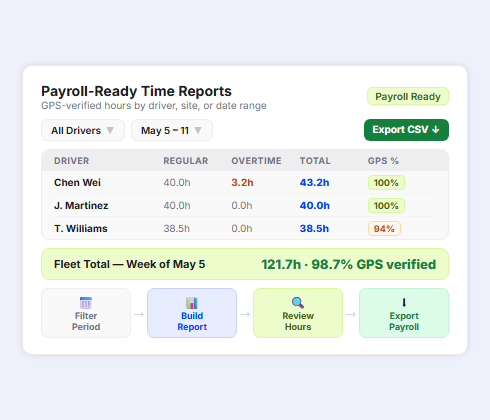
Payroll-Ready Time Reports
Every shift ends with a clean record. Upper compiles GPS-verified hours into payroll-ready time reports, broken down by driver, by site, by date range, or by job type. Send reports directly to your payroll system or export in the format your team needs.
- Daily, weekly, and custom date range time reports
- Driver-level and fleet-level hour summaries
- Integration with route management analytics for full shift context
- Regular pay, overtime, and double-time hour segmentation
- Payroll export in CSV format compatible with major systems
- Audit trail with GPS verification status on every line
Stop Approving Driver Timesheets You Can’t Actually Verify
Upper’s geofenced clock-in app enforces location-based attendance automatically, so every hour you approve is backed by GPS coordinates, not driver memory.
Client Success Stories

“We used to spend 2 hours every morning planning routes in spreadsheets. Now it takes 10 minutes. Upper paid for itself in the first week.”


“What sold me was how easy it is to make changes. My schedules change a lot and I drag & drop stops and we’re back on track in 30 seconds. With our old software, that would’ve been an hour of replanning.”


“Our drivers actually follow the routes now. The app is simple, the navigation works, and they’re not calling me every 10 minutes asking where to go next.”

Geofenced Clock-In Features for Complete Fleet Time Visibility
- Multi-Site Geofence Management
- Driver Mobile App
- Supervisor Override Controls
- Shift Scheduling Integration
- Live Fleet Map with Clock-In Status
- Compliance-Ready Record Keeping

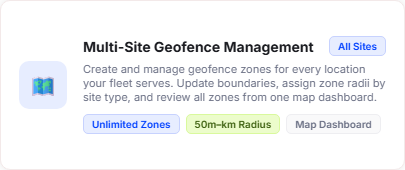
Multi-Site Geofence Management
Create and manage geofence zones for every location your fleet serves. Assign different zone radii by site type, update boundaries when locations change, and review all zones from a single dashboard map view.
Driver Mobile App
Upper’s driver app for iOS and Android handles GPS clock-in passively, with no extra steps for drivers beyond following their assigned route. The app registers geofence entry and exit automatically, with confirmation notifications so drivers always know their time is recording.
Supervisor Override Controls
Supervisors can approve manual clock entries when a legitimate GPS failure occurs. Every override is logged with a reason code and the supervisor’s credentials, creating a clean audit trail without enabling abuse.
Shift Scheduling Integration
Connect geofenced clock-in data against each driver’s scheduled shift. Upper flags early arrivals, late arrivals, early departures, and missed clock-ins relative to the assigned schedule, giving supervisors a complete picture at shift end.
Live Fleet Map with Clock-In Status
See which drivers are currently clocked in and on-site, which are in transit, and which haven’t checked into their zone yet, all on one live fleet management software map view. No separate dashboard required.
Compliance-Ready Record Keeping
Upper retains GPS-verified time records for up to three years. Every entry includes timestamp, coordinates, driver ID, zone name, and verification method: the complete documentation set for wage audits, labor compliance reviews, or dispute resolution.
Why Leading Fleet Operations Teams Choose Upper for Geofenced Time Tracking

Eliminate Buddy Punching and Hour Padding
Upper’s GPS-enforced clock-in makes timesheet fraud structurally impossible. Drivers can’t clock in until they’re inside the designated zone, and the system records coordinates at every event, so every hour is verifiable.

Cut Payroll Processing Time in Half
Payroll-ready time reports replace manual timesheet reconciliation. Upper compiles GPS-verified hours by driver and date automatically, so your admin team reviews instead of rebuilds the data every pay period.

Get Instant Alerts on Time Exceptions
Upper flags location mismatches, missing clock-outs, and extended absences the moment they happen — not at the end of the week when payroll is already locked. Catch problems while there’s still time to address them.

Connect Time Data to Route Performance
Because geofenced clock-in runs inside Upper’s fleet platform, time data sits alongside route data, stop completion data, and driver performance metrics. One login shows the full picture of each shift.

Scale Across Every Job Site You Operate
Add geofence zones for new locations in under two minutes. Whether you’re running five drivers at two sites or 50 drivers across a territory, Upper’s zone builder scales without extra configuration or per-site fees.

Reduce Disputes with GPS-Backed Evidence
Every timesheet line includes GPS coordinates and a verification status. When a driver disputes a clock event, you have location-stamped records that resolve the question without a conversation.
Sync Your Geofenced Time Data with the Tools You Already Use


Start Paying Only for Hours Drivers Actually Worked On-Site
Upper’s geofenced clock-in app verifies every clock event with GPS coordinates, auto-generates payroll-ready reports, and flags exceptions before they hit your payroll.
Frequently Asked Questions
-
How does Upper’s geofenced clock-in app prevent drivers from clocking in before arriving on-site?
Upper uses GPS location verification to block clock-in attempts made outside the designated geofence zone. When a driver attempts to clock in, the app checks their current GPS coordinates against the assigned zone boundaries. If they’re outside the zone, the clock-in is rejected. The system only registers attendance when the driver’s device is physically inside the defined perimeter, making remote or early clock-ins structurally impossible without supervisor override.
-
Can I set different geofence sizes for different job sites?
Yes. Upper’s Geofence Zone Builder lets you configure a custom radius for each location, from as tight as 50 meters for a single property to a broader radius for a large campus or service territory. You can create and manage zones for every site your fleet serves from the same map-based dashboard, and edit zone sizes at any time without affecting historical time records.
-
How does the auto clock-out work if a driver forgets to check out?
Upper detects geofence exit automatically and records the clock-out timestamp and GPS coordinates at the moment the driver’s device leaves the zone boundary. No manual action is required from the driver. If a driver leaves the zone without a clean exit event (for example, if their device loses GPS signal), Upper sends a missing clock-out alert to the supervisor so the exception can be reviewed and resolved before payroll closes.
-
How does Upper handle time exceptions like location mismatches or missed clock-ins?
Upper’s Time Exception Alerts detect several exception types automatically: clock-in attempts from outside the assigned geofence, clock-outs recorded before the scheduled shift end, extended on-site gaps that may indicate an idle driver, and missing clock-out events. Each exception appears in a review queue with GPS evidence attached. Supervisors can approve, reject, or escalate each item before the pay period closes.
-
Are GPS-verified timesheets sufficient for wage and labor compliance audits?
Upper’s timesheets include the data fields commonly required for labor compliance review: driver ID, date, clock-in timestamp, clock-out timestamp, GPS coordinates at each event, total hours on-site, and verification method (GPS-confirmed or supervisor override). Records are retained for up to three years and can be exported as PDF or CSV. We recommend consulting your legal or HR team to confirm the records meet your jurisdiction’s specific requirements.
-
Can supervisors make corrections to GPS-verified time records?
Supervisors can submit manual adjustments to time records when GPS failures, device issues, or scheduling conflicts require it. Every override is logged with the supervisor’s credentials, the timestamp of the correction, and a required reason code, so the audit trail remains intact and corrections are distinguishable from original GPS-verified entries.