
Get Instant Alerts the Moment a Driver Leaves Their Assigned Route

Trusted by Delivery and Logistics Teams Across North America





Route Compliance Sounds Straightforward. Managing It Without Real-Time Alerts Isn’t.
What Route Compliance Promises
-
 Drivers follow the optimized route they were assigned
-
Dispatchers spot problems before they cascade into missed deliveries
-
Fuel costs stay predictable route to route
-
Off-route incidents are logged and reviewed for coaching

What Actually Happens
-
A driver takes a shortcut and doesn’t show up for two stops within the right delivery window.
-
You usually find out about the unexpected detour only when the customer calls to complain.
-
Fuel bills are significantly higher than projected, but no one can clearly explain the reason why.
-
Post-shift conversations still rely on the driver’s memory and assumptions, not accurate route performance data.
Know the Moment a Driver Leaves Their Route — Not an Hour Later
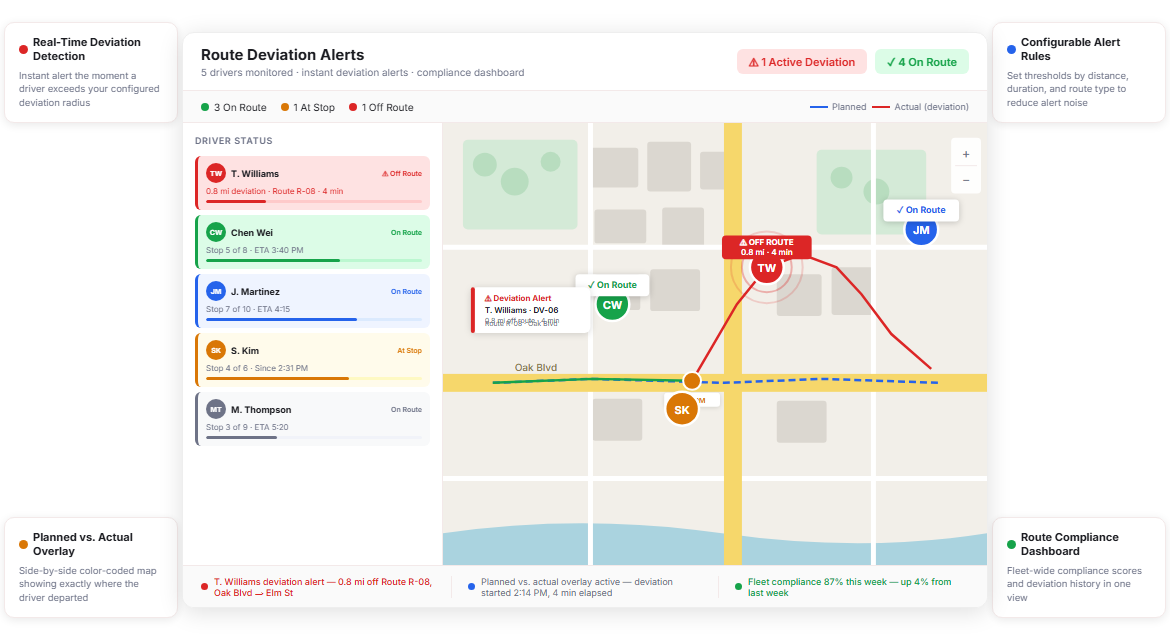
Upper’s driver fleet tracking layer continuously compares each driver’s live GPS position against their assigned route. The second a driver strays beyond your configured threshold, Upper fires an alert to the dispatcher, with no manual monitoring required.
Real-Time Deviation Detection
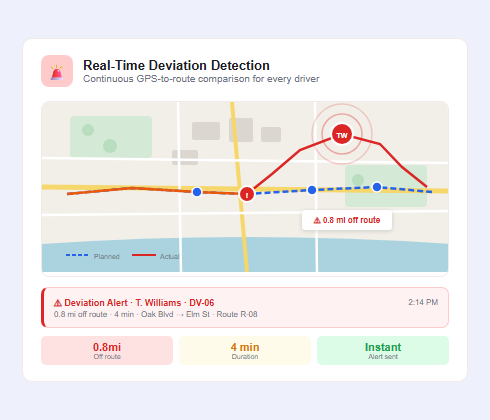
Dispatchers can’t watch a live map for six drivers simultaneously and still run an operation. Upper handles the monitoring automatically, comparing each vehicle’s live GPS feed against the assigned route path at continuous intervals. The moment a driver exceeds your configured deviation radius, the system flags it instantly.
- Continuous GPS-to-route comparison for every active driver
- Deviation detection within configurable distance thresholds (e.g., 0.25 to 2 miles)
- Instant dashboard alert with driver name, route, and deviation location
- Push and in-app notifications for assigned dispatchers
- Alert escalation rules based on deviation duration or distance
- Automatic deviation timestamp logged in driver history
- No manual monitoring or periodic map refresh needed
- Works across all active vehicles simultaneously in real time

Configurable Alert Rules
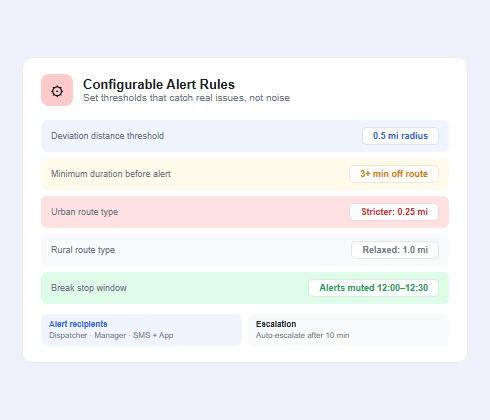
A driver pulling into a parking lot to turn around is different from a driver taking a 10-mile detour to run a personal errand. Upper lets you configure deviation rules by threshold, duration, and route type so you get meaningful alerts — not noise.
- Set deviation distance thresholds per route or per driver profile
- Configure minimum duration before an alert triggers (e.g., 3+ minutes off-route)
- Create different rules for urban vs. rural route types
- Assign alert recipients by driver, route, or region
- Mute alerts during pre-approved stop windows (e.g., break stops)
- Override rules for specific drivers during training periods
- Configure SMS, email, or in-app notification preferences per alert type
- Review and update rule sets from the fleet dashboard without IT support
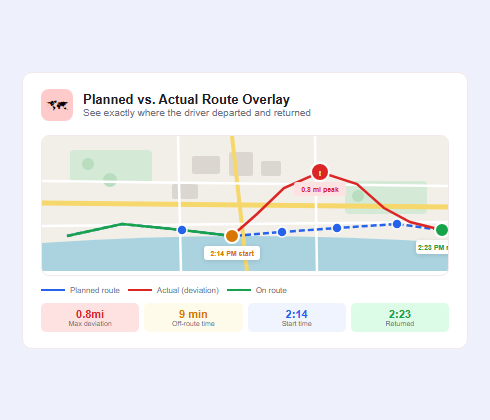
Planned vs. Actual Route Overlay
After a deviation is flagged, dispatchers need context, not just a pin on a map. Upper’s route overlay shows the planned path in one color and the actual path driven in another, so you can see exactly where the driver departed, how far they went, and when they returned to route.
- Side-by-side map overlay of planned vs. actual route paths
- Color-coded deviation segments for instant visual identification
- Timestamp markers at deviation start and return points
- Distance and duration metrics per deviation segment
- Filterable by driver, date, route, or deviation severity
- Exportable route comparison for compliance reporting
- Accessible from the dispatch dashboard in real time and post-shift
- Zoom and pan controls for detailed stop-level inspection
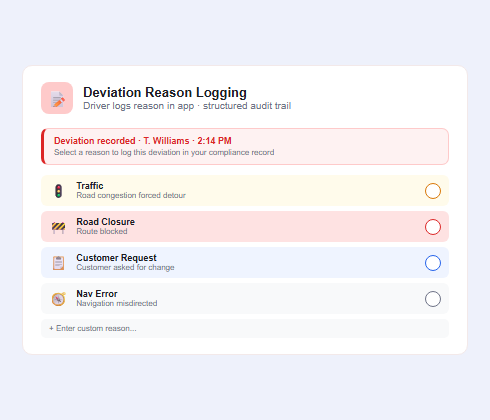
Deviation Reason Logging
Knowing a driver went off-route is the starting point. Knowing why determines whether it was a one-time GPS error, a recurring problem, or a legitimate road closure. Upper prompts drivers to log a reason in the mobile app whenever a deviation is recorded, creating a structured audit trail without requiring a phone call.
- Driver-facing in-app prompt to select or enter a deviation reason
- Pre-built reason library: traffic, road closure, customer request, navigation error, personal stop
- Free-text field for situations not covered by standard categories
- Reason data attached to the deviation record in the compliance dashboard
- Aggregate reason reporting to identify patterns across the fleet
- Manager review and acknowledgment workflow within Upper
- Reason data included in deviation history exports
- Timestamps link reason logs to GPS deviation segments automatically
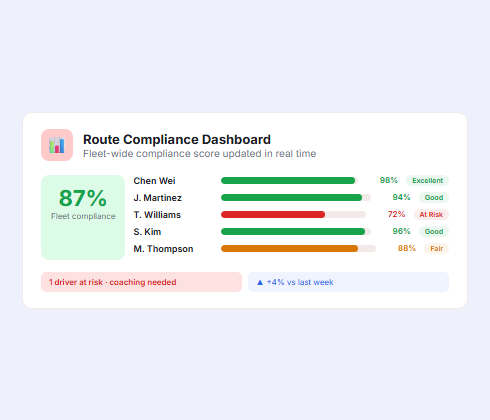
Route Compliance Dashboard
Instead of piecing together compliance data from driver check-ins and GPS exports, Upper surfaces it in one dashboard. See on-time route adherence rates, deviation frequency by driver, and fleet-wide compliance trends without building a single spreadsheet.
- Fleet-wide route compliance score updated in real time
- Per-driver deviation frequency, distance, and duration metrics
- Trend charts showing compliance improvement or decline over time
- Filter by date range, driver, route, zone, or deviation type
- Color-coded compliance status per route for instant triage
- Drill-down from fleet view to individual driver deviation history
- Compliance score integrated with driver performance scorecards
- Dashboard accessible to managers and dispatchers with role-based permissions
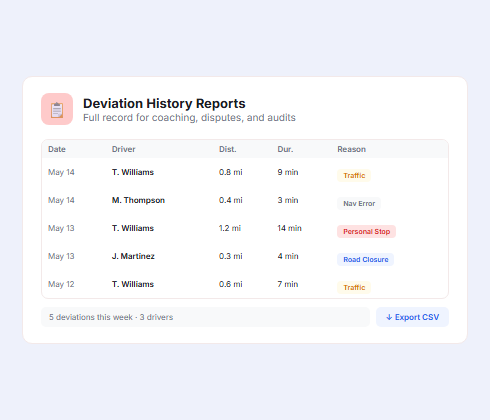
Deviation History Reports
Compliance data is only useful if you can act on it. Upper stores the full deviation history for every route and generates structured reports you can use for driver coaching, customer disputes, insurance documentation, or operational audits.
- Full deviation history stored per driver and per route
- Configurable report periods: daily, weekly, monthly, or custom date range
- Exportable as CSV or PDF for external reporting and record-keeping
- Deviation summary metrics: count, average distance, most common reasons
- Driver comparison view to benchmark against fleet averages
- Highlight repeat offenders automatically for targeted coaching
- Attach reports to driver performance reviews
- Accessible from the route compliance dashboard without additional tools
Stop Relying on Drivers to Self-Report Every Detour
Upper’s route deviation alert software catches off-route events as they happen, logs the reason automatically, and builds a compliance record your team can act on.
Client Success Stories

“We used to spend 2 hours every morning planning routes in spreadsheets. Now it takes 10 minutes. Upper paid for itself in the first week.”


“What sold me was how easy it is to make changes. My schedules change a lot and I drag & drop stops and we’re back on track in 30 seconds. With our old software, that would’ve been an hour of replanning.”


“Our drivers actually follow the routes now. The app is simple, the navigation works, and they’re not calling me every 10 minutes asking where to go next.”

Route Deviation Alert Software Features for Total Fleet Visibility
- Live Fleet Tracking
- Driver Performance Scorecards
- Route Planning Integration
- Automated Customer Notifications
- Stop-Level Timeline View
- Route Analytics and Reporting

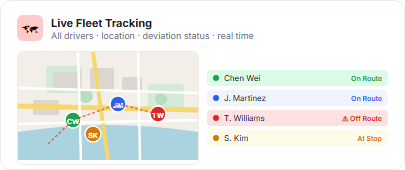
Live Fleet Tracking
See every active vehicle on a live map with real-time location, route progress, and deviation status updated continuously, with no manual refreshes and no gaps.
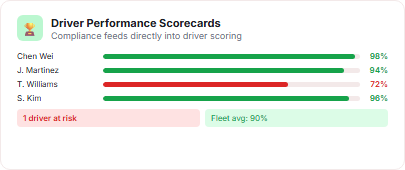
Driver Performance Scorecards
Route compliance feeds directly into driver performance scoring. Upper tracks deviation frequency, average distance off-route, and response-to-alert time alongside on-time delivery rates.
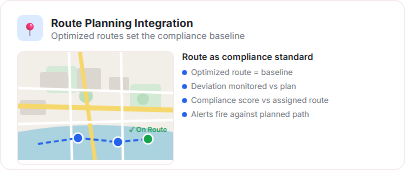
Route Planning Integration
Deviation alerts work against the route Upper’s route planning engine generates. Optimized routes are the baseline. Compliance monitoring confirms they’re actually being followed.
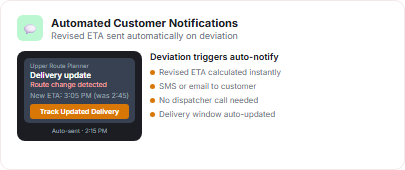
Automated Customer Notifications
When a route deviation delays a delivery window, Upper’s notification software automatically updates the affected customer with a revised ETA, without the dispatcher having to make a call.
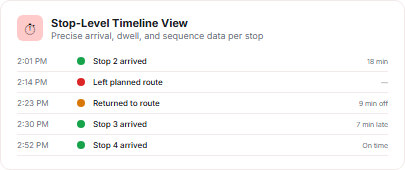
Stop-Level Timeline View
See exactly when a driver arrived at each stop, how long they stayed, and whether the sequence matched the assigned route. Stop-level data pairs with deviation history for precise accountability.
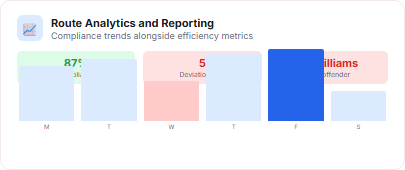
Route Analytics and Reporting
Upper’s route management analytics layer surfaces compliance trends alongside efficiency metrics. Identify whether off-route incidents correlate with specific routes, drivers, time windows, or geographic zones.
Why Delivery and Logistics Teams Choose Upper for Route Compliance

Catch Deviations in Minutes, Not Hours
Upper’s real-time detection engine compares live GPS positions to assigned routes continuously. You get an alert within minutes of a deviation, not at end-of-shift when the damage is already done.

Set Rules That Match Your Operation
Not every off-route event is a problem. Upper’s configurable thresholds let you clearly define what counts as a deviation so alerts are actionable, not constant noise disrupting your dispatch team daily.

Build a Compliance Record Automatically
Every deviation is timestamped, mapped, reason-logged, and stored in the compliance dashboard. Driver coaching, customer disputes, and insurance claims all have a ready data trail.

Reduce Fuel Costs Tied to Unauthorized Detours
Off-route miles are unplanned fuel spend. Teams using Upper’s route deviation alert software typically recover fuel cost overruns within the first billing cycle by eliminating repeat detours.

Keep Delivery Windows Intact
A deviation that costs 20 minutes can miss a customer’s window entirely. Real-time alerts let dispatchers intervene immediately, rerouting the driver or notifying the customer before the window closes.

Scale Compliance Across Any Fleet Size
Whether you’re monitoring 5 drivers or 50, Upper’s compliance dashboard scales without adding headcount to dispatch. One screen covers the entire fleet with no manual spot-checking.
Sync Your Route Compliance Data with the Tools You Already Use


Know Exactly When a Driver Goes Off-Route — Before the Delivery Window Closes
Upper’s route deviation alert software monitors every driver’s GPS position against their assigned route and fires an instant alert the moment they stray.
Frequently Asked Questions
-
Can I configure how sensitive the route deviation alerts are?
Yes. Upper lets you set custom distance thresholds that define what counts as a deviation for your operation. You can apply different thresholds to different route types: a tighter threshold for urban last-mile routes and a wider one for rural runs where road geometry naturally deviates from the straight-line route path.
-
Does Upper’s route deviation alert software show the actual path a driver took?
Upper’s planned vs. actual route overlay displays both paths simultaneously on a map. The planned route appears as your configured baseline, and the actual GPS track shows exactly where the driver went, including any off-route segments.
Deviation segments are highlighted so you can see at a glance how far the driver strayed, for how long, and where they returned to the assigned route. This overlay is available in real time during the route and as a historical record after the shift ends, making it useful for both live intervention and post-shift review.
-
How does Upper log the reason for a route deviation?
When a deviation is detected, Upper’s driver app prompts the driver to select or enter a reason directly in the mobile interface. The reason library includes common categories like traffic, road closure, customer request, navigation error, and personal stop, plus a free-text field for edge cases. The logged reason is automatically attached to the deviation record in the compliance dashboard, creating a structured audit trail without a dispatcher having to follow up by phone.
-
Can I use route deviation alerts for driver coaching and performance reviews?
Upper stores a full deviation history for every driver, including the frequency of off-route events, average deviation distance, most common logged reasons, and compliance trend over time. This data feeds into driver performance scorecards that managers can review on a per-driver basis or compare across the fleet.
-
What makes Upper different from basic GPS tracking for monitoring route adherence?
Basic GPS tracking shows you where a driver is. Upper’s route deviation alert software tells you whether that location matches where the driver should be, and fires an alert the moment it doesn’t.
The key differences are the rule-based alert engine, the planned vs. actual route overlay, the structured reason logging, and the compliance dashboard that aggregates deviation data across the entire fleet over time. GPS tracking is a data stream; Upper’s route compliance monitoring is a decision-support layer built on top of that stream. It transforms raw location data into actionable alerts, audit records, and compliance trends that drive real operational improvements.