


The best snow removal scheduling app for contractors depends on whether you need storm-trigger and mid-storm schedule changes, a year-round job calendar with invoicing, or crew shift scheduling. Upper Crew is first in this list for contractors whose plan changes after dispatch. For stop order, re-routing, and mid-storm route changes as a routing problem, use Upper’s comparison of the best snow plow routing app for contractors.
- Upper Crew is first here for mid-storm schedule changes and proof at each property. Recurring routes, live tracking, route updates after dispatch and proof start on Professional.
- Seasonal contracts and per-push work need different schedules. The SIMA Foundation's 2025 Economics Survey found seasonal and fixed-price contracts make up the largest share in the US, while smaller firms rely more on per-push work.
- Yeti is the snow-first dispatch and schedule option in this list. Jobber, QuoteIQ, Housecall Pro and Service Autopilot fit year-round companies that want a job calendar and invoices.
- LMN, Arborgold and Aspire fit landscape and tree firms that also plow. Aspire does not publish a price. Connecteam is the low-cost crew-shift option, with a free plan for up to 10 users.
- Prices below come from each vendor's official pricing page, checked November 13, 2026. If a vendor does not publish a price, this article says so.
Which snow removal scheduling app is best for which contractor?
Pick the app by the scheduling job it has to own, not by the longest feature list. This table is the short version. The entries below add limits and the official plan ladder. Upper Crew is listed first. Upper prices come from the Upper pricing page. Rival prices come from each vendor’s official pricing page, checked the same day, and are not linked here. Confirm a quote for your headcount and add-ons before you sign.
| App | Best for | Official starting price (checked Nov 13, 2026) | Free trial or free plan |
| Upper Crew | Mid-storm schedule changes and proof per property | Starter $50 per user per month, or $40 billed yearly | 7 days, Professional features, no credit card |
| Yeti | Snow-first dispatch, site schedules and proof after the storm | High Performance from $66.50 a month billed annually for 1–25 sites ($798 a year) | 60-day money-back guarantee; a dated free trial is not published |
| Jobber | Year-round job scheduling with invoicing | Core, 1 user: $49 a month with no commitment, or $29 billed yearly | 14 days on the Grow plan, no credit card |
| Service Autopilot | Landscaping automations plus a snow dispatch calendar | Startup $49 a month at annual rates, plus a sign-up fee | A free trial is offered; the official pricing page does not state the length |
| QuoteIQ | Quotes, a job calendar and scheduling on every plan | Essentials $29.99 a month billed monthly, or $299.99 billed yearly, for 1 user | 14-day trial on every plan |
| Housecall Pro | Home-service scheduling and dispatch, including snow work | Basic, 1 user: $79 a month, or $59 billed annually | 14 days, no credit card |
| LMN | Landscape and snow job scheduling at a larger scale | Starter $297 a month, billed monthly, after a one-time onboarding fee | Not published; the pricing page offers a demo |
| Arborgold | Bidding, CRM and a schedule in one system | Starter $149 a month, or $129 a month on the annual plan (annual contract required) | Not published on the official pricing page |
| Aspire | Larger landscape and snow operations on one schedule | Not public | Not published; the public pricing URL returns 404 |
| Connecteam | Crew shifts, time clocks and job scheduling on a budget | Free plan for up to 10 users; Operations Hub Basic $29 a month billed yearly for the first 30 users | 14-day trial; free plan is ongoing |
What should a snow removal scheduling app actually do?
A snow schedule has to do four jobs that a generic weekly roster often misses.
- Seasonal and recurring work: commercial lots and HOA contracts often repeat all winter. The software should store that cadence so you are not rebuilding the same list after every storm.
- Storm-trigger scheduling: per-push and per-event work starts when a depth or weather trigger is met, often overnight. The app should let you open the night’s work and assign crews without a phone tree.
- Crew and job assignment: who is on call, which truck can take a priority lot, and what happens when a driver calls off.
- Reminders and a live plan: the driver needs the current stop list, and the office needs to see whether the schedule still matches the storm.
Those jobs are why contract type matters. In the SIMA Foundation’s 2025 Economics Survey of 161 snow and ice firms, seasonal and fixed-price contracts made up the largest share of contracts in the United States, and especially in Canada, while smaller companies relied more on per-push work than larger firms. About half of seasonal contracts had no floor or ceiling.
A seasonal book leans on recurring schedules. A per-push book leans on storm-trigger dispatch. (SIMA Foundation, 2025 Economics Survey, presented as Financial Benchmarking for Success.) Routing — the order of properties and the mid-storm re-sequence — is the next decision. This page stays on scheduling and dispatch. The routing comparison is the best snow plow routing app for contractors guide.
What are the best snow removal scheduling apps for contractors in 2026?
The 10 apps below are active products with official sites and a snow or field-service scheduling use case. Public reviews on G2 or Capterra are noted in each entry, including where a dedicated listing was not found. Each entry uses the same labels: best for, limits, and pricing.
1. Upper Crew: best for mid-storm schedule changes
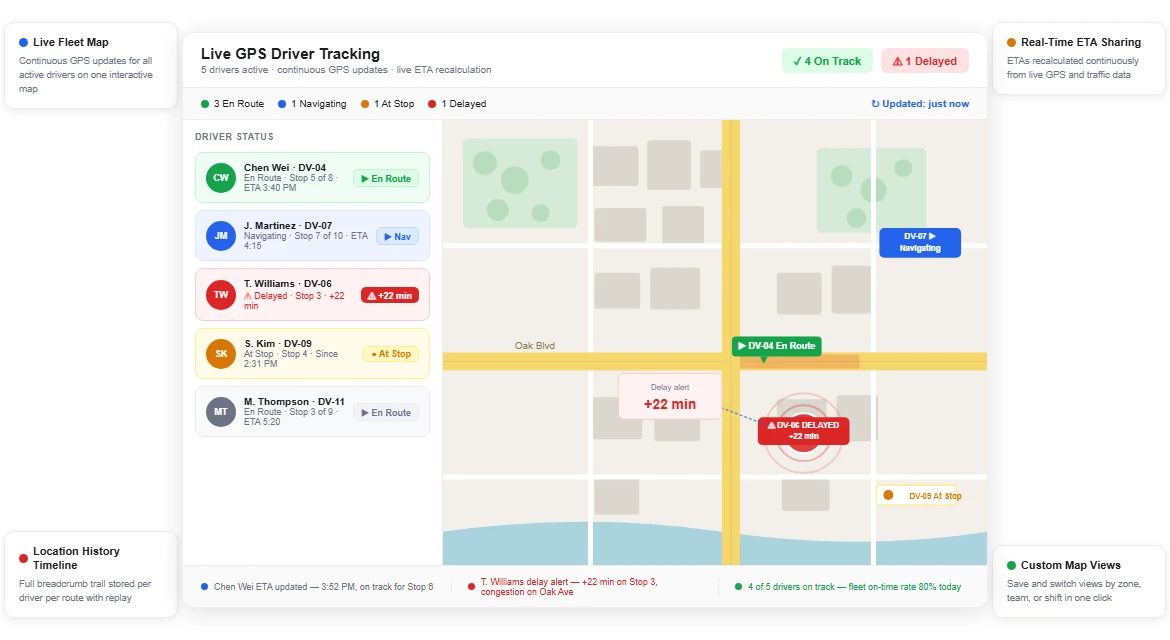
Upper Crew is best for snow contractors whose schedule changes after dispatch and who need a record at each property. It is Upper’s route optimization software for teams. The snow removal route planning software page shows how that applies to plowing.
You import the season’s contract list from the spreadsheet you already keep, through spreadsheet import, plan the work across drivers, and send each run to the Upper driver app. On scheduling, route scheduling and recurring routes can repeat daily, weekly, or monthly, from the Professional plan. Route planning is the starting point on every plan.
From Professional, a change after dispatch is pushed to the driver app, live GPS tracking shows the trucks, and proof of delivery stores photos, signatures, and notes on the stop with time and GPS location. Time windows are planning preferences Upper works to honor, not guarantees.
- Best for: multi-truck snow work where the dispatcher reshuffles jobs during the storm and clients later ask whether a property was done.
- Limits: Upper Crew does not do invoicing, bidding, or CRM. It works beside the billing system you already run. Recurring routes, live tracking, route updates after dispatch, customer email notifications, and proof start on Professional, not Starter. Customer SMS and customer live-tracking links are paid add-ons. Route history is kept 6 months on Starter, 1 year on Professional, and 2 years on Optimize. Starter allows 250 stops per route and 10 driver profiles, Professional 500 stops and 15 drivers, Optimize 1,500 stops and 30 drivers.
- Pricing: per user per month, from the Upper pricing page, checked November 13, 2026. Billed monthly: Starter $50, Professional $60, Optimize $89. Billed yearly: $40, $48, and $71. Enterprise is quoted. Add-ons include customer live tracking at $20 per driver, capacity optimization at $25 per driver, barcode scanning at $50 per company, and SMS from $0.01 per text. The 7 days free trial needs no credit card, includes up to 5 users, and covers Professional features except SMS customer notifications.
ClearWay Snow Solutions, an Ontario landscaping and snow company, reports that manual dispatch time per shift fell from 2 to 3 hours to 15 to 20 minutes after moving to Upper, and that the team saves 8 hours a week. That is customer-reported, not a measured study or a guarantee.
2. Yeti: best for snow-first dispatch
Yeti is best for snow and ice contractors who want one platform to plan sites and routes, dispatch from a live hub, and prove the visit. The official site describes planning work once, dispatching crews and subcontractors, and tracking progress during the storm. Yeti’s help center covers a Schedule tool for recurring or one-time routes and a Dispatch page for live crew and site status. Routing itself, including mid-storm re-sequencing, is covered in the best snow plow routing app for contractors guide.
- Best for: snow-first operations that need a dispatch board, site schedules, and proof of service, including work done by subcontractors.
- Limits: weather reporting is listed as an add-on. A dedicated G2 or Capterra listing for Yeti’s snow product was not found on November 13, 2026. Confirm current reviews and a demo with the vendor.
- Pricing: from Yeti’s official pricing page, checked November 13, 2026. High Performance is one plan, priced by how many sites you manage. For 1 to 25 sites, the page shows $66.50 a month billed annually, or $798 a year, with unlimited users and clients. A monthly billing toggle is on the page, but the monthly dollar amount was not shown in the HTML of that page. The page advertises a 60-day money-back guarantee. A dated free trial is not published.
3. Jobber: best for a year-round job calendar and invoices
Jobber is best for contractors who mow in summer and plow in winter and want quotes, a job calendar, invoices, and a client hub in one system. Its own pages describe online booking, scheduling, dispatching jobs to the crew, and routing on higher plans. It is a general field-service app, not a snow-only product, which is useful when snow is one season rather than the whole business.
- Best for: mixed landscaping and snow companies that already think in jobs, visits, and invoices.
- Limits: Jobber’s published routing sits on Connect and higher, not on Core, so the cheapest plan is a calendar and billing tool first. Storm-trigger dispatch and snow-specific billing rules are not a native specialty in the way a snow-only product describes them.
- Pricing: from Jobber’s official pricing page, checked November 13, 2026. Core, for a single user, is $49 a month with no commitment, $39 on a one-year commitment, or $29 billed annually. Extra users are $29 a month each. The Connect plan is shown from $99 a month billed annually. A 14-day free trial on the Grow plan needs no credit card.
4. Service Autopilot: best for landscaping automations plus snow dispatch
Service Autopilot is best for landscape and snow companies that want scheduling, dispatch, invoices, and workflow automations in one system. Its official pricing page lists schedule and dispatch jobs on Startup, a dispatch calendar, multi-day job management, and route optimization on Pro, and a snow dispatch row in its comparison. Snow removal is named as an industry.
- Best for: year-round landscape firms that want automations and a dispatch calendar, including winter work.
- Limits: published prices are annual subscription rates, plus a sign-up fee. Elite pricing is not public. The free trial length is not stated on the official pricing page.
- Pricing: from Service Autopilot’s official pricing page, checked November 13, 2026. Startup is $49 a month, Pro $199 a month, and Pro Plus $499 a month, all at annual subscription rates, plus a sign-up fee. Elite is “contact for pricing.” A free trial is offered.
5. QuoteIQ: best for quotes and a job calendar on every plan
QuoteIQ is best for contractors who want estimates, a scheduling calendar, and invoices in one system, then add routing later if they need it. Its official pricing page includes scheduling and a calendar on every plan, lists snow removal among the industries it serves, and places route optimization and live crew GPS on Elite.
- Best for: home-service and snow contractors whose first bottleneck is quoting and booking work onto a calendar.
- Limits: route optimization is an Elite feature, not an entry-plan one. Public Capterra reviews exist, but the set is still small, so treat the rating as early feedback rather than a large sample.
- Pricing: from QuoteIQ’s official pricing page, checked November 13, 2026. Billed monthly: Essentials $29.99 (1 user), Beginner $99.99 (2 users), Pro $199.99 (4 users), Elite $299.99 (10 users), and Max $699.99 (20 users). Billed annually: $299.99, $999.99, $1,999.99, $2,999.99, and $6,999.99. Extra users are $25 a month. Every plan has a 14-day free trial.
6. Housecall Pro: best for home-service scheduling, including snow
Housecall Pro is best for home-service contractors who also plow and want scheduling, dispatch, invoices, and payments in one app. Its official snow-removal software page covers quoting, scheduling and dispatching crews, GPS tracking, recurring service contracts, and mobile job updates.
- Best for: residential and mixed home-service companies that add snow work in winter and already run jobs on a field-service calendar.
- Limits: it is a general field-service platform, not a snow-only dispatch board. Storm-trigger workflows are not a native specialty on the official pricing or industry pages.
- Pricing: from Housecall Pro’s official pricing page, checked November 13, 2026. Basic, for 1 user, is $79 a month, or $59 billed annually. The page also showed limited-time promotional monthly prices, so confirm the current offer. A 14-day free trial needs no credit card and is described as full access to features on the Max plan.
7. LMN: best for larger landscape and snow job schedules
LMN (now listed as LMN by Granum) is best for landscape companies that also run snow and need estimating, job costing, and a crew schedule in one place. Granum’s LMN pricing page lists scheduling, calendars, and a crew app, and Granum names snow and ice as a served industry.
- Best for: mid-size and larger landscape firms whose winter work sits on the same job system as summer maintenance.
- Limits: official prices start well above a small crew’s typical app budget, and they are billed monthly, after a one-time onboarding fee. Extra licenses are extra. Multi-location Enterprise pricing is not published.
- Pricing: from Granum’s official LMN pricing page (golmn.com/pricing, which leads to granum.com/lmn/pricing), checked November 13, 2026. Starter is $297 a month, billed monthly, and includes 1 office or crew-lead license and 5 crew-member licenses. Professional is $648 a month, billed monthly, and includes 3 office or crew-lead licenses and 15 crew-member licenses. Enterprise is “contact sales.” All of those list prices are after a one-time onboarding fee. A free trial is not published; the page offers a demo.
8. Arborgold: best for bidding, CRM, and the schedule in one place
Arborgold is best for contractors whose bottleneck is winning and pricing accounts, then running the won work on the same schedule. Its official site lists CRM, estimating, scheduling, and invoicing, and it names snow removal among the industries it serves.
- Best for: tree, landscape, and snow firms that want bids, customer records, and a job schedule in one system.
- Limits: the annual prices require an annual contract. A free trial is not stated on the official pricing page.
- Pricing: from Arborgold’s official pricing page, checked November 13, 2026. Billed monthly: Starter $149, Professional $343, Enterprise $573 per month. On the annual plan, which requires an annual contract: Starter $129, Professional $299, Enterprise $499 per month.
9. Aspire: best for larger landscape and snow operations
Aspire is best for larger landscape contractors that also run snow and want estimates, job costing, scheduling, and invoicing in one system. Its official snow-removal software page covers route planning, scheduling, time tracking, and invoicing, and describes real-time, drag-and-drop scheduling across one or more crews. Aspire’s help guide also describes a routes method and an events method for snow work.
- Best for: established landscape and snow operations that need a full business system, not only a dispatch board.
- Limits: the official price is not public. The public pricing URL returned 404 when checked on November 13, 2026. A free trial is not published there.
- Pricing: not public on the official site as of November 13, 2026. Ask Aspire for a quote.
10. Connecteam: best for crew shifts on a tighter budget
Connecteam is best for contractors who mainly need to schedule people: shifts, availability, a job scheduler, a GPS time clock, and team chat. Connecteam publishes a snow-removal software page and a job scheduler in its help center, so the crew-coordination use case is real. It is not a route optimizer and it does not include built-in bidding or invoicing.
- Best for: crews that need shift and job scheduling, time tracking, and messaging without buying a full business suite.
- Limits: if you need CRM, invoices, or multi-stop route optimization, you will need a second tool. The free plan ends at 10 users.
- Pricing: from Connecteam’s official pricing page, checked November 13, 2026. The Small Business Plan is free for life for up to 10 users, with all hubs included, subject to the published feature list. The Operations Hub Basic plan is $29 a month billed yearly, or $35 billed monthly, for the first 30 users, then $0.80 or $1.00 a month for each extra user. A 14-day trial is offered.
See it in action
See a storm schedule on your own property list.
Bring the plow and salt contracts you run today and one mid-storm change from last winter. We will build the schedule, push the change to the driver app and show the record at each property.
How do you choose the best snow removal scheduling app for contractors?
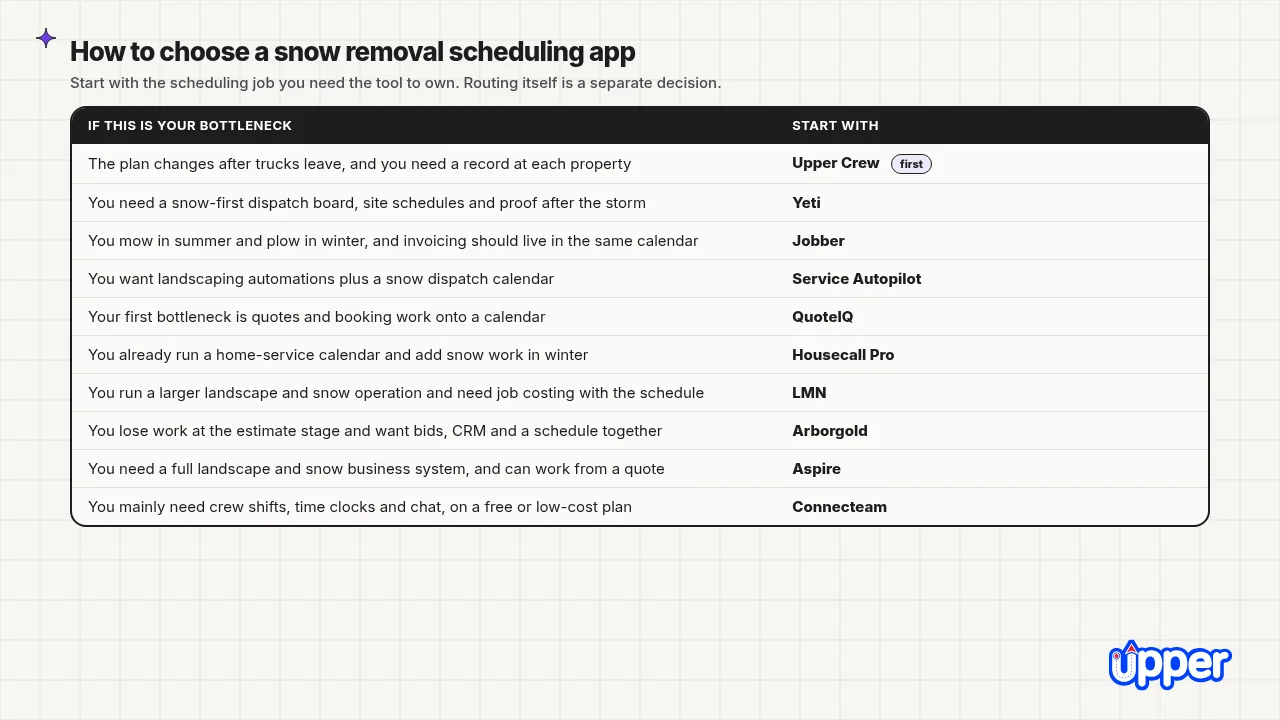
Answer three questions in order: how often the plan changes once the storm starts, whether invoicing has to live in the same app, and whether you are mainly scheduling jobs or scheduling people.
What if the schedule changes after you dispatch?
If a closed lot, a stuck truck, or a priority call regularly rewrites the night, you need the change to reach the driver, not a group text. That is the case for Upper Crew on Professional. Yeti is the snow-first alternative when the dispatch board and site proof are the whole winter system. If the property list is stable and you mostly need a calendar and invoices, Jobber, QuoteIQ, Housecall Pro, or Service Autopilot may be enough.
For the routing mechanics of mid-storm changes, see the best snow plow routing app for contractors guide.
Should invoicing live in the same snow scheduling app?
If one system has to handle the calendar, the invoice, and payments, start with Jobber, QuoteIQ, Housecall Pro, Service Autopilot, Arborgold, LMN, or Aspire. If billing already works and the pain is the night itself, choose a scheduling and dispatch tool and keep your invoice system. Upper Crew is built to sit beside the CRM and billing you already run.
Are you scheduling jobs, or scheduling the crew?
Job and property schedules (who visits which lot, in what order, with what proof) point to Upper Crew, Yeti, Jobber, Service Autopilot, QuoteIQ, Housecall Pro, LMN, Arborgold, or Aspire. Crew shift schedules (who is on call, time clocks, chat) can be enough with Connecteam. Crew size still sets a ceiling. Connecteam’s free plan stops at 10 users, and Upper’s driver-profile caps are 10, 15, and 30.
A small crew with priority lots and trigger depths can still have a harder scheduling problem than a larger one that repeats the same driveways. A one-truck operator who plans the route they drive should look at Upper Solo, a separate single-driver product, not at Upper Crew.
Price your own plow and salt list before the next trigger with the 7 days Upper Crew free trial.

See it in action
See a Storm Schedule on Your Own Property List
Bring the plow and salt contracts you run today and one mid-storm change from last winter. We will build the schedule, push the change to the driver app and show the record at each property.

Disclosure: Upper makes Upper Crew and Upper Solo. Rival prices and features were checked on each vendor’s official pages on November 13, 2026, and may change. A customer’s reported outcome is not a guarantee.
Frequently Asked Questions
The best snow removal scheduling app for contractors depends on the job you need it to own. Upper Crew is first in this list when the schedule changes after dispatch and you need proof at each property, on the Professional plan or above. Yeti fits snow-first dispatch and site schedules. Jobber, QuoteIQ, Housecall Pro or Service Autopilot fit year-round companies that want invoicing in the same calendar. LMN, Arborgold and Aspire fit landscape and tree firms. Connecteam fits crew-shift scheduling on a free or low-cost plan.
Look for four things: recurring or seasonal schedules, a way to open work when a storm trigger is met, crew and job assignment, and a way for the revised plan to reach the driver. Then decide whether invoicing has to live in the same app. Routing quality is a separate check, covered in Upper’s routing-app comparison.
In this list, only Connecteam has a free-for-life plan, and it stops at 10 users. Upper Crew offers a 7-day trial of Professional features, with no credit card, for up to 5 users, excluding SMS notifications. Jobber offers 14 days on the Grow plan, with no credit card. Housecall Pro and QuoteIQ each offer a 14-day trial, and Housecall Pro does not require a credit card. Connecteam also offers a 14-day trial. Service Autopilot offers a trial but does not publish the length on its pricing page. Yeti publishes a 60-day money-back guarantee, not a dated free trial. LMN, Arborgold and Aspire do not publish a trial on their official pricing pages.
Not always. Some products do both, on the right plan. A scheduling app owns when work starts, who is assigned and whether the plan can change. A routing app owns the stop order and how the route is rebuilt mid-storm. If your pain is the calendar, start here. If your pain is wasted miles and re-routing, start with the best snow plow routing app for contractors guide.
Official starting prices in this roundup run from Connecteam’s free plan to LMN Starter at $297 a month, before add-ons and onboarding fees. Aspire does not publish a price. Upper Crew starts at $50 per user per month, or $40 billed yearly. Jobber Core starts at $29 a month billed yearly for one user. QuoteIQ Essentials starts at $29.99 a month billed monthly. Yeti High Performance starts at $66.50 a month billed annually for 1 to 25 sites. Housecall Pro Basic is $79 a month, or $59 billed annually, for one user. Service Autopilot Startup is $49 a month at annual rates, plus a sign-up fee. Confirm current prices with each vendor, because published list prices change.
Load the same contract list into each trial. Schedule one recurring property, then trigger a same-night change after dispatch. Record whether the new stop reached the driver’s phone, whether a reminder or ETA went to the client, and whether a photo and signature saved on the property. Check trial limits first. Upper Crew’s trial does not include SMS customer notifications.


