


- Compare planned work with usable capacity in the unit that is running out, such as route time or vehicle space.
- Border-area stops are candidates, not automatically the cheapest transfers.
- Check goods location, receiving-driver eligibility and the complete revised route before moving work.
- A second trip can solve a load-space problem only when enough driver time remains.
- Recalculate after each proposed move and keep any residual overload visible until it has an agreed resolution.
To rebalance deliveries between depots, move stops from the overloaded depot to a nearby depot with spare room. Start with the stops that add the least extra driving. Move a stop only if the receiving driver and vehicle meet every hard rule. Then recalculate both depots’ routes to check the remaining workload, commitments and cost of the move.
In practice, that is five steps. Measure each depot’s utilization, find the swing-zone stops, pick the smallest fix, check the hard rules and re-optimize. This guide walks through each step with a worked two-depot example. It also covers the harder case: rebalancing after trucks have already left the yard.
What are the steps to rebalance deliveries between depots?
There are five steps. The first four decide which stops can move. The fifth checks whether the revised routes fit and what the transfer costs.
| Step | What you do | What it decides | Watch for |
| 1. Calculate each depot’s utilization | Divide planned work by available capacity, per depot, per day | Which depot is over, which is balanced and which has room | Measuring in a unit that is not the one running out first |
| 2. Find the swing zones | Map the stops that sit roughly between two depots | Which stops are candidates to move | Treating every stop as movable |
| 3. Choose a rebalancing method | Move stops, lend a driver, run a second trip or shift a territory edge | How big the change is | Redrawing territories to fix a one-day spike |
| 4. Check vehicle and driver limits | Test each stop against the receiving depot’s hard rules, then its preferences | Whether a move is allowed at all | Treating a preference as a hard rule |
| 5. Re-optimize the routes | Resequence the routes that gained stops and the routes that lost them | Whether both revised routes fit and how total route time changes | Adding moved stops to the end of a route one at a time |
Check both sets of routes after step 4. A transfer may increase total route time while relieving an overload. The existing sequence may remain suitable, but it should be checked.
How do you calculate each depot’s utilization?
Utilization is a depot’s planned work divided by its available capacity, shown as a percent. Measure it in whichever unit runs out first. For many depots, that is route hours. For others, it is stops per route or vehicle space by weight or volume.
Separate depots with more planned work than usable capacity from those with feasible room. Deduct breaks, loading, administration and other fixed work before calculating route-time capacity. Then inspect each driver’s route; aggregate spare hours can hide a fully booked specialist or an immovable appointment.
You can choose a planning band, such as 90% to 100%, to flag days for review. That is an editorial heuristic, not a universal acceptance threshold. A depot at 95% may fit a small nearby job, while one at 80% may lack the equipment needed for the transfer.
The trigger is a specific overload and a feasible receiving option. If no neighbor can absorb it, assess eligible cover, a shift change or an agreed deferral. A second trip helps with load space only when driver time remains. For a network-wide shortfall, see orders exceeding fleet capacity.
Run the numbers per day, not per week. A depot can look balanced on its weekly average and still run well above 100% on its busiest day. That busiest day is the one your swing zones need to absorb.
What is a swing zone, and which stops should move first?
A swing zone is a group of stops that sits roughly the same distance from two depots. Either depot could serve it with little extra driving. You may also hear it called an overlap zone or border zone.
Border stops can be good candidates because either depot may be able to reach them. They are not necessarily the cheapest to move. Road travel, inventory location, equipment, receiving hours and the driver’s existing route can outweigh straight-line proximity.
To find and rank swing-zone stops:
- Plot each depot’s stops for the day.
- Mark the midline between the two depots.
- Flag the stops within a short drive of that line.
- For each flagged cluster, estimate the time saved at the sending depot and the time added at the receiving one.
- For feasible candidates with positive time savings at the sending depot, compare added time with saved time. Use the ratio as a screening aid, then recalculate the routes after each proposed move.
Test the lowest-cost feasible candidates first. Stop only when the remaining work fits the actual sending and receiving routes. Distance is not the only test, though. A close stop is not cheap if the receiving routes cannot reach it inside its delivery window.
Which rebalancing method should you choose?
Choose the smallest method that clears the surplus. There are four, listed from least to most disruptive:
- Move swing-zone stops onto the receiving depot’s existing routes. This fits a one-day spike.
- Lend a driver and vehicle from the depot with room to run a route out of the overloaded depot. This fits when the overload is one block of stops, not scattered ones.
- Run a second trip from the same depot. This fits when no neighbor has room, but a driver can return, reload and still finish on time.
- Shift the territory edge between depots for good. This fits when the same depot runs over 100% week after week.
The common mistake is using method 4 to fix a method 1 problem. Redrawing territories changes which drivers serve which customers. Save it for an imbalance that keeps coming back.
What vehicle and driver limits decide whether a stop can move?
A stop can move only if the receiving depot has a driver and vehicle that meet every hard rule. Preferences come second, after the hard rules pass.
Hard rules cannot bend:
- Vehicle capacity. A full truck cannot take another pallet, whether you count weight, volume or items.
- Equipment. A stop that needs a liftgate or refrigeration needs a vehicle that has one.
- Skills and certifications. A stop that needs a certified driver goes only to a certified driver.
- Available working time. Include travel, service, breaks and the required finish or return time.
- Goods and receiving limits. Confirm inventory at the receiving depot or an authorized transfer, plus immovable receiving and access deadlines.
Preferences can bend:
- Genuinely flexible windows. Confirm what the customer can change. Receiving closures and booked commitments may remain hard limits regardless of how software represents them.
- Driver and customer pairings, unless your operation has made a pairing a rule.
Write down which is which before you rebalance. Many failed rebalances break a hard rule that nobody had written down.
Check the rules that apply to you. If driver hours are set by regulation in your operation, confirm the limits with the regulator. For US commercial drivers, start with the FMCSA summary of hours-of-service regulations. This guide is not legal advice.
Why re-optimize the routes after you move stops?
Re-optimize because a stop dropped onto the end of a route creates zigzags and empty miles. To resequence a route means to put its stops back in the best driving order. Recalculate both routes to see whether a sequence change improves the transfer and whether all commitments still fit.
Handing off stops one at a time is the trap. Each handoff looks reasonable on its own. Ten of them stacked onto a route that was already sequenced can leave a driver crossing their own path. The sending depot’s routes need resequencing too. Removing stops opens shorter paths for the ones that remain.
Use one simple test: a rebalance should not cost more than the problem it fixes. Say moving a cluster adds more driving at the receiving depot than it saves at the sending one. If the sending depot’s drivers still have time for a short second trip that covers it, leave it where it is.
Two habits protect the saving before routes go out:
- Compare before you commit. Check total drive time and finish times for both depots against the original plan.
- Tell drivers and the loading crew before load-out. A stop that moves after the truck is packed costs a reload.
What does a depot rebalancing example look like?
Here is a simple, made-up example. The depots, hours and clusters are illustrative, not customer data.
Inputs. Two depots measure capacity in route hours: driving plus service time. Each driver has 9 usable route hours after breaks, loading and other fixed work. The figures below are assumed estimates, not proof of route-level feasibility. For movable clusters, assume stock is already available at South; otherwise add the transfer work before comparing options.
| Depot | Drivers × usable route hours | Available route hours | Planned route hours | Utilization | State |
| North | 6 × 9 h | 54 | 61 | 113% | Overloaded by 7 h |
| South | 5 × 9 h | 45 | 36 | 80% | 9 h of spare capacity |
Step 2: rank the candidate clusters. “Saved at North” is the route time North no longer needs. “Added at South” is the extra route time South takes on. For this arithmetic example, assume the figures remain valid after each preceding move. Real route effects may not add this way; recalculate them before committing.
| Cluster | Stops | Saved at North | Added at South | Added per hour saved | Hard rules at South |
| E | 3 | 1.2 h | 1.0 h | 0.83 | Fails: needs refrigeration, and South has no refrigerated vehicle |
| A | 8 | 2.6 h | 2.2 h | 0.85 | Pass |
| C | 5 | 1.8 h | 1.9 h | 1.06 | Pass: South’s liftgate van has room |
| B | 6 | 2.0 h | 2.4 h | 1.20 | Pass |
| D | 4 | 1.5 h | 2.9 h | 1.93 | Pass, but sits past the midline |
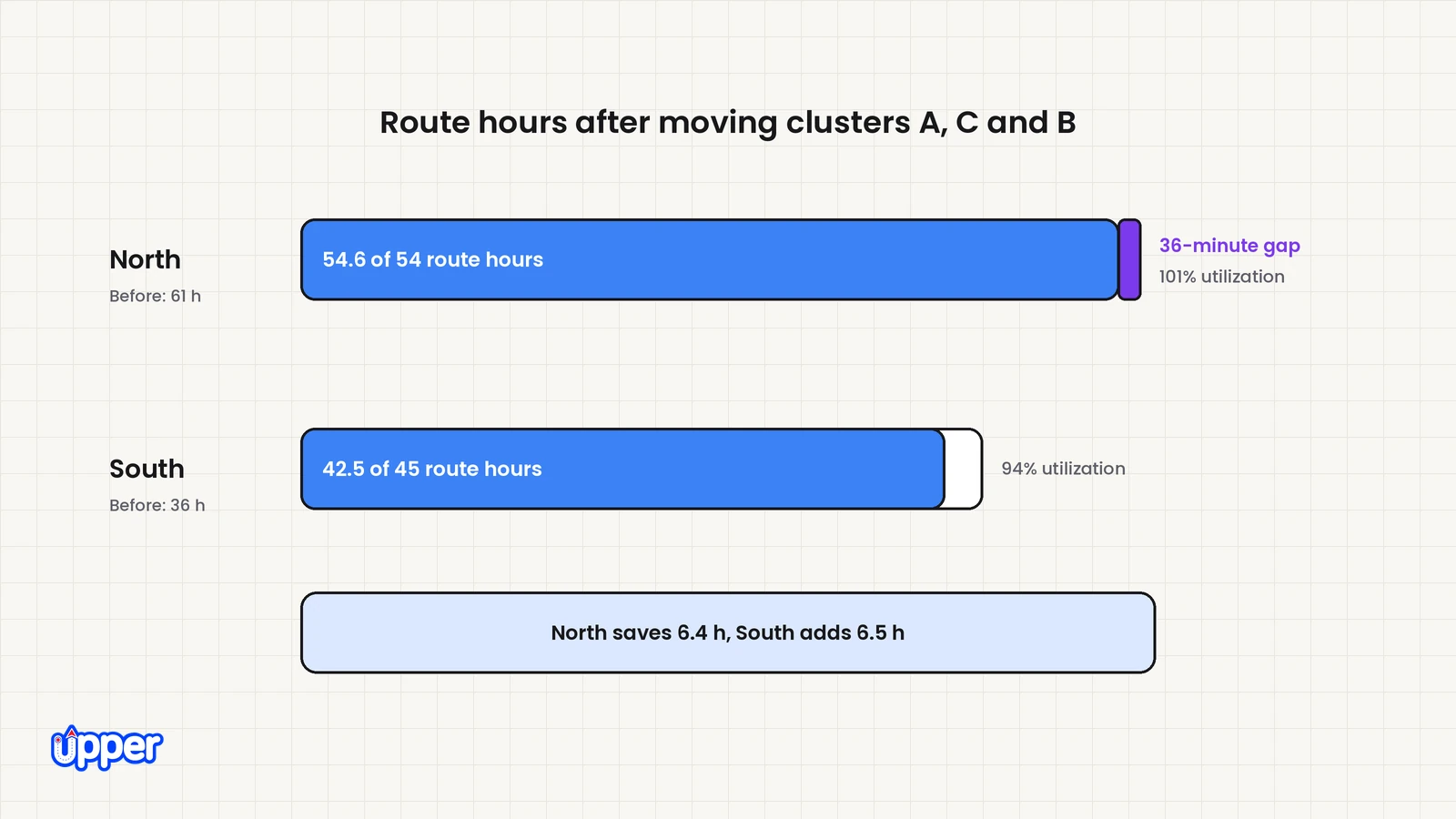
Steps 3 and 4: move the lowest-ratio clusters that pass. Cluster E has the lowest ratio on paper, but it fails a hard rule, so it stays with North. Moving A, C and B saves 6.4 hours at North and adds 6.5 hours at South.
| Depot | Planned hours after the move | Utilization after |
| North | 61 − 6.4 = 54.6 h | 101% |
| South | 36 + 6.5 = 42.5 h | 94%, within its 45 available hours |
The decision on cluster D. Moving D would bring North under 100%. But it costs South 2.9 hours to save North 1.5 hours. It would also push South to 45.4 hours, or 101%. That just moves the overload next door, so D stays at North.
Step 5: keep the remaining gap visible. North still needs 54.6 route hours against 54 available. The last 0.6 hours, or 36 minutes, are not covered. Recalculate individual routes to see whether a real sequence change removes the gap. If not, arrange eligible cover, authorized additional working time or an agreed deferral. A second trip with the same already fully occupied drivers cannot be assumed to create those missing minutes.
What the example establishes. Moving A, C and B reduces North’s estimated overload from 7 hours to 36 minutes. South remains within its aggregate limit. The network’s estimated route time rises by 0.1 hours, or 6 minutes; this includes service time and is not necessarily added driving. The example is a partial recovery, not proof that every stop can now be served.
What should the rebalancing decision record show?
Keep the state after the proposed move visible so a plausible transfer does not become a false completion report.
| Depot | After the proposed moves | Next decision |
| North | 54.6 of 54 route hours; 36 minutes still uncovered | Verify a real route saving or obtain cover, authorized extra time or an agreed deferral. |
| South | 42.5 of 45 route hours | Validate the receiving routes, goods availability and all hard commitments before accepting A, C and B. |
| East | No detailed receiving route supplied | Check specific available drivers and jobs; a percentage band alone does not establish whether East can help. |
Record who owns each unresolved action and its deadline. Close the rebalance only after both depots’ approved routes fit and any deferred work has an agreed date. If combined capacity remains insufficient, keep that shortfall explicit.
How should routing software represent several depots?
The plan needs to represent each driver’s start and end locations, the work they may serve and the goods they can access. Google’s OR-Tools routing documentation shows how different start and end points can be specified for each vehicle.
Different depot starts do not by themselves model inventory transfers, equipment eligibility or loading schedules. Those inputs must also be represented or checked in your process. Upper’s guide to the vehicle routing problem explains the broader assignment and sequencing task.
How do manual, planned and live rebalancing compare?
The approaches differ in when they decide moves and how many rules they can hold at once.
| Approach | Main decision | Best fit | Main limitation |
| Spreadsheet matrix | Which depot is over and roughly which stops to move | Two depots with stable, repeating work | Does not resequence routes, so empty miles stay hidden until drivers find them |
| In-house optimization model | Stop assignment and route sequence for the modeled network | Teams able to build and maintain the model | Update triggers, supported rules and model upkeep must be implemented. |
| Route planning software before dispatch | Splitting stops across drivers and sequencing each route | Building each depot’s day before trucks leave | A morning plan does not react on its own when the day changes |
| AI dispatch during the day | Who takes each at-risk stop, re-decided as conditions change | Operations where many rules interact and the day changes often | Recommends within your rules; stops that no driver can take stay with the dispatcher |
A spreadsheet really is enough when two depots split stable work the same way every week. The deciding question is how many rules interact and how often the day breaks, not fleet size. Six vans with certifications and same-day stops can be harder to rebalance than forty trucks on fixed routes.
How do you rebalance deliveries between depots after the day has started?
To rebalance mid-day, move at-risk stops from the overloaded depot’s running routes to drivers who still have time left. Then resequence the remaining stops on both sides. The steps are the same, but you work with what is left of the day, not the morning plan.
Picture the case no morning plan covers. Depot North’s load-out ran late, so its routes left the yard behind schedule. By late morning, its swing-zone stops are the ones about to slip, while Depot South’s drivers are ahead. The morning rebalance was right at 6 a.m. and is wrong now.
Three extra checks matter mid-day:
- Where the goods are. A stop already loaded on a North truck cannot move to a South driver without a handoff point. Stops still at the North depot are easier to move.
- Time left, not shift length. Use the time each South driver has left today, after their current stops.
- Driver and customer updates. Make sure each driver is running the revised order, and tell customers whose arrival time changed.
For stops that have no driver yet, see this guide to resolving unassigned delivery orders.
How does depot rebalancing look in distribution, waste and courier work?
The five steps stay the same across industries. What changes is the unit that moves and the rule that binds first. The three cases below are illustrative scenarios, not measured results.
- Distribution. One depot’s drivers finish late most days while the other’s finish early. The territory map has not changed in years. That calls for method 4. Shift the territory edge, then re-optimize the recurring routes.
- Waste collection. The binding hard rules are truck capacity, truck type and service areas. When a truck goes down mid-morning, the neighboring yard’s crews take the swing-zone blocks. They need the right truck type to do it.
- Same-day courier. A delivery window may be a flexible preference or an immovable receiving commitment. Moved stops have to land on drivers whose revised order still reaches those windows.
Write the binding rule into your matrix before you rank any stop by distance. The next disruption then becomes a lookup instead of a debate.
How can Upper help with rebalancing deliveries between depots?
Upper is route planning, route optimization and AI dispatch software for multi-stop delivery, collection and service teams. Its product pages do not describe a dedicated “depot rebalancing” feature. Upper does cover the two jobs inside a rebalance. One is planning and sequencing routes. The other is deciding who takes a stop when the day changes.
For planning, Upper Crew’s route optimization divides one stop list across your drivers in a single run. Dispatchers can then move work between routes and reorder stops. Its multi-driver optimization lets you set custom start and end locations for each driver. That means drivers based at different depots can be planned together. Vehicle capacity limits can be set by weight, volume, item count or a custom unit. Check whether your plan includes capacity planning or needs the add-on.
During the day, AI Dispatcher checks the hard rules from step 4 when it suggests who should take a stop. These include skills, certifications, equipment, vehicle fit, working hours, capacity and service territory. It also weighs preferred arrival windows. Its dynamic dispatch reoptimization revisits assignments when a driver falls behind or becomes unavailable. It can suggest moving a stop to another driver with room. Each suggestion shows the recommended driver, proposed start and finish, estimated travel, a confidence score and the reasoning. If no eligible driver can take a stop, the blocking reason is shown and the stop stays visible.
Know what automation will and won’t do. AI Dispatcher recommends routine assignments inside rules your team sets. Autopilot accepts only routine matches above a confidence threshold you choose. Critical conflicts are never accepted automatically, and recovery suggestions are reviewed before they apply. The confidence score describes match quality, not the chance of an on-time delivery. Preferred arrival windows are preferences, not promises, so check a customer’s firm deadline or booked appointment yourself. AI Dispatcher does not replace your dispatcher. Your team still approves changes and handles practical details, such as moving goods already loaded on another vehicle. Pricing for AI Dispatcher is by quote.

See it in action
See how your two-depot day would rebalance
Bring both depots' stop lists, your hardest rule and one disruption you actually get.

Frequently asked questions about rebalancing deliveries between depots
It means moving planned stops from an overloaded depot to a nearby depot with spare capacity. An overloaded depot is one with more work than its drivers can finish that day. The goal is to cover every stop with the least added driving. No move may break a hard rule, such as vehicle capacity, equipment or driver certifications.
Compare planned work with usable capacity after fixed tasks and breaks, then inspect the affected routes. Look for a receiving depot with the right goods, driver, equipment and time. A utilization band can flag work for review, but does not prove a transfer fits. If time is the shortage, a second trip with the same fully occupied drivers does not add capacity.
A swing zone is an area that more than one depot could serve. Stops near the territory boundary are useful candidates to inspect. Their actual transfer cost depends on road travel, inventory, driver eligibility and existing routes, so they are not automatically the cheapest moves.
Start with feasible candidates that remove useful work from the overloaded depot with limited added burden at the receiving depot. Compare the sending and receiving routes, goods location and hard commitments. Recalculate after each proposed move because combined effects can differ from separate estimates.
Extra travel, goods transfers, loading and displaced appointments may outweigh the benefit. Compare complete alternatives. A second trip is an option only if the driver has time; an additional vehicle helps only with an available eligible driver. An agreed deferral may be the feasible choice when capacity cannot be added.
It represents start and end locations, but does not establish that stock, equipment, receiving hours and driver availability fit. Check those constraints and any goods-transfer time before accepting a reassignment.
Yes. Move at-risk stops to drivers who still have time left today, then resequence both depots’ remaining routes. Check where the goods are first. A stop already loaded on one truck needs a handoff point before another driver can deliver it. Tell any customer whose arrival time changes.


