


- Combining pickups and deliveries can reduce separate trips when the work shares geography and compatible timing.
- Each linked pickup must precede its delivery, with the required same-vehicle or authorized transfer conditions preserved.
- Check the load at every loading and unloading event, including exchanges at the same stop.
- Canceled goods remain on board until they are physically unloaded.
- Capacity, driver availability, receiving deadlines and cargo compatibility all affect whether the route works.
A route can fit at the depot and still overflow by midday. That is because pickups add load and deliveries remove it, so the stop order decides the peak. Done well, one van covers an area once instead of twice. If you are new to building routes, start with Upper’s guide to planning a delivery route.
How do you combine pickups and deliveries on one route?
You combine pickups and deliveries by tagging every stop by type and linking each pickup to its destination. Then you order the route so the load never exceeds capacity. A dispatcher typically works through 5 steps:
- Tag every stop as a pickup or a delivery. Record its quantity in the unit you load by, such as totes, cases, pallets, pounds or cubic feet.
- Link each pickup to the delivery it feeds, or mark it as a return to the depot.
- Add timing to both ends of each pair: a time window and a service time (minutes at the stop).
- Set vehicle capacity as a hard limit for each vehicle, and check the load after every stop.
- Optimize the full stop list with route optimization software or by hand. Then confirm the peak load and the pickup order before the driver leaves.
Step 5 is where combined routes pay off or fall apart. A van that serves both stop types in one pass covers ground once. That only holds if the order respects the operating limits below.
What rules must a combined pickup and delivery route follow?
Pickup precedence and running load are essential checks, but they are not the complete set of hard constraints.
| Requirement | Check before approving the route |
| Pickup before its linked delivery | Confirm the goods are collected before the receiving stop is served. |
| Pair integrity | Keep the item on the required vehicle unless a transfer is explicitly authorized and planned. |
| Running load | Keep load between zero and capacity at every event, in each relevant unit. |
| Time and availability | Check pickup release times, receiving closures, service durations, breaks and driver availability. |
| Cargo and equipment | Check compatibility, handling conditions and the equipment required at each stop. |
| Loading access | Make sure collected goods do not block the next delivery. For an exchange, specify whether unloading or loading happens first. |
Google’s OR-Tools pickup-and-delivery example explicitly constrains a pickup and its delivery to the same vehicle and puts pickup first. That is different from merely placing all pickups earlier in a route.
A genuinely preferred window can be flexible. A receiving closure, booked appointment or product-handling deadline may be immovable even without a separate contract. Use the business commitment to classify the limit, then verify whether your software enforces it.
Which pickup and delivery patterns can share one route?
Most mixed routes are built from 6 patterns. Each one loads and unloads goods at different points, and a single day can contain several of them.
| Pattern | Loaded at | Unloaded at | Example | Formal name |
| Depot delivery | Depot | Customer stop | A pharmacy order going out to a clinic | Standard vehicle routing |
| Collection to the depot | Customer stop | Depot | Empty containers coming back from a distribution account | Vehicle routing with backhauls (VRPB) |
| Customer-to-customer transfer | Pickup customer | Linked delivery customer | A parts shipment collected from a supplier for a workshop | Pickup and delivery (VRPPD) |
| One pickup, several deliveries | One pickup stop | Several delivery stops | A catering order collected from the kitchen and split across 3 offices | Pickup and delivery (VRPPD) |
| Several pickups, then deliveries | Several pickup stops | Delivery stops | Parts collected from 3 suppliers for one job site, or multi-store pickups before customer deliveries | Pickup and delivery (VRPPD) |
| Exchange at the same stop | Same customer | Same customer | Clean linen in and soiled linen out, or a full propane cylinder in and an empty one out | Simultaneous delivery and pickup (VRPSPD) |
The exchange row catches many planners out. The stop frees space and fills it again in one visit. The net load change can be zero while both handling tasks still take time. Check the temporary peak if pickup happens before unloading, and budget service time for both tasks.
Should pickups come before or after deliveries?
Pickups come before or after deliveries depending on where the picked-up goods go. Use this rule of thumb:
- Each pickup must precede its own delivery. It does not necessarily need to precede every unrelated delivery on the route.
- Depot-bound collections often fit after deliveries. Early drops may free space, but pickup release times and receiving hours can require a different order.
- Customer-to-customer transfers go in between. Each pickup just has to come before its own drop-off.
Rear-loading trucks often run all deliveries first for a second reason. Drivers do not have to dig past collected goods to reach the next delivery.
How do you check vehicle capacity on a combined route?
You check vehicle capacity by tracking the load after every stop. Comparing the day’s total with the van’s size is not enough. A pickup takes up space and a delivery frees it, so the stop order decides whether the van ever overflows. Upper’s guide to truck load optimization covers capacity by weight, volume and pallet count in more depth.
Worked example: same stops, two orders
Here is a simple, made-up example. A van holds 12 totes. It leaves the depot with 9 totes for 3 deliveries (4, 3 and 2 totes). It also has 2 pickups (6 and 5 totes) that return to the depot.
| Position | First plan | Load after | Re-sequenced plan | Load after |
| Depot | Load 3 deliveries | 9 | Load 3 deliveries | 9 |
| 1 | Stop A, deliver 4 | 5 | Stop A, deliver 4 | 5 |
| 2 | Stop B, pick up 6 | 11 | Stop B, pick up 6 | 11 |
| 3 | Stop C, deliver 3 | 8 | Stop C, deliver 3 | 8 |
| 4 | Stop D, pick up 5 | 13 (over 12) | Stop E, deliver 2 | 6 |
| 5 | Stop E, deliver 2 | Not reached | Stop D, pick up 5 | 11 |
| Depot | Unload | Not reached | Unload 11 | 0 |
Both the outbound and return totals fit the van. The 9 totes going out and the 11 coming back both fit under 12. The first plan still fails at stop D. Swapping D and E fixes the load violation without a bigger van, provided their timing and access requirements allow that swap. This table tests tote capacity only; it does not establish the full route timeline.
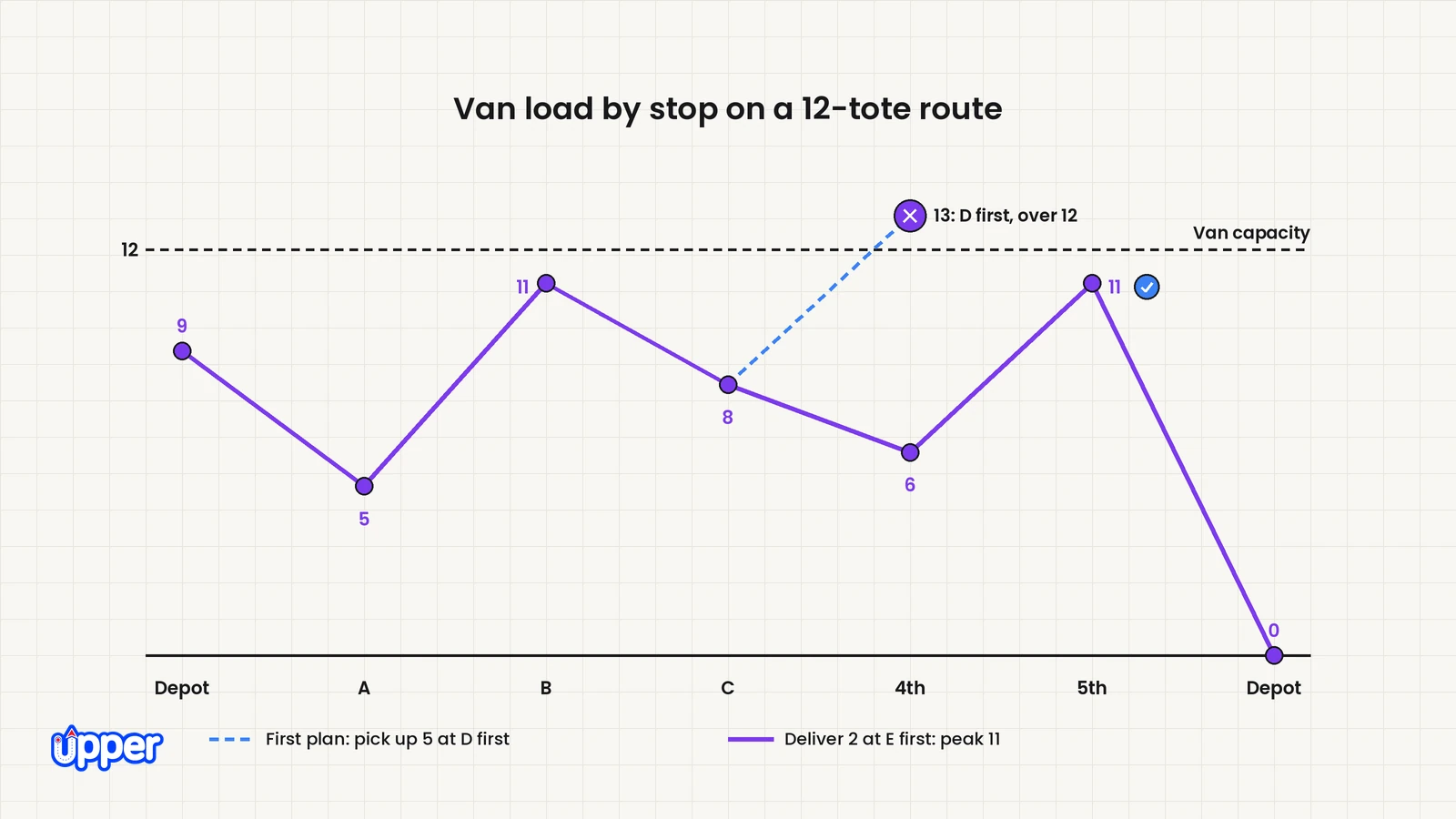
Quick capacity check you can run on any route
- Start with the load leaving the depot.
- Add each pickup and subtract each delivery, in route order.
- Flag load below zero, above capacity or inconsistent with the recorded goods. Check each relevant load unit and the loading order within an exchange.
- Try a feasible sequence change without breaking pair, timing or access limits. If none fits, assess an authorized unload, another vehicle or a different delivery commitment.
This check takes a few minutes on a 10-stop route. On a 60-stop route that changes during the day, it is easier to let software track the load. Upper’s vehicle capacity optimization uses the weight, volume or box count you enter for each stop and each vehicle. Check whether your plan includes it, because Upper’s capacity page also lists it as a paid add-on.
What happens to a combined route when the day changes after dispatch?
When a route changes after dispatch, update the physical load record. Canceling a delivery does not make either a delivery-only or mixed route lighter: loaded goods stay aboard until they are unloaded. Recheck load, pickup order and all other hard limits for the remaining work.
Upper’s playbook on adapting delivery routes mid-shift covers the wider process.
Worked example: a canceled delivery, then a new pickup
Here is a simple, made-up example. A van holds 10 cases. The driver has finished 2 stops and has 7 cases on board:
- 3 cases picked up for a linked delivery at stop S3
- 4 cases for a delivery at stop S5
Then the S3 customer cancels, so those 3 cases ride back to the depot. A new pickup, N, comes in for 3 cases. It sits near stop S4, which is a pickup of 4 cases.
| Next | Original order kept | Load after | Re-sequenced | Load after |
| Start | 2 stops done | 7 | 2 stops done | 7 |
| 1 | S4, pick up 4 | 11 (over 10) | S5, deliver 4 | 3 |
| 2 | S5, deliver 4 | Not reached | S4, pick up 4 | 7 |
| 3 | N, pick up 3 | Not reached | N, pick up 3 | 10 |
| Depot | Unload | Not reached | Unload 10 | 0 |
Keeping the original order breaks capacity at S4, because the space S3 should have freed never freed. Moving S5 forward resolves the load violation, and the van returns exactly full under the stated quantities. That change is usable only if S5 can receive earlier and all other timing and handling limits still fit.
Which customer ETAs change?
In this example, 4 customers are affected:
- S5 moves ahead of S4 in the sequence; recalculate its arrival time.
- S4 moves behind S5; recalculate its arrival time.
- N gets a new ETA (estimated time of arrival).
- S3 gets a cancellation confirmation instead of an arrival.
A dispatcher replanning by hand has to catch all 4. Now change one input. If N were 4 cases instead of 3, no order would fit. S5 is the only delivery left, so the van would end at 11 cases in any order.
The options then are a second driver for N or a depot stop to unload the returned cases. You could also move N to the next run. Upper’s guides on infeasible route optimization and orders that exceed fleet capacity walk through those choices.
Should you combine pickups and deliveries or run them separately?
Combine them when pickups and deliveries share territory and the van has spare room after its early deliveries. Run them separately when the two kinds of work never overlap in place or time.
Compare actual route alternatives: a combined run, separate runs and any required unload or transfer. Include service time and empty travel as well as loaded travel. A combined route can be longer or infeasible when pickup release times, receiving deadlines or cargo requirements conflict.
Use this checklist on a real day’s stop list. The more “yes” answers you have, the stronger the case for combining:
- Are most pickups within a few miles of that day’s deliveries?
- Does the van have room for the pickups after the first few deliveries?
- Can customers release pickups during the hours your delivery route passes them?
- Can the driver handle both stop types, including paperwork, equipment, cold chain or specimen handling?
- Will your team recheck the load when a stop is added or canceled mid-shift?
| Approach | Who decides the stop order | Best fit | Main limitation |
| Separate pickup and delivery trips | The split between a delivery van and a collection van | Collections and deliveries in different areas or on different days | Extra trips, more fuel and more empty miles |
| Spreadsheet or map app with stops typed in order | The person typing the list | A short, fixed run where the mix rarely changes | Capacity is checked by hand, if at all |
| Route planner that builds a morning plan only | The software, once | Days that rarely change after the van leaves | Cancellations and new pickups mean rebuilding the plan |
| Route planner that re-optimizes during the day | The software, updated as the day changes | Mixed stop lists that change after dispatch | A rule nothing can satisfy, such as an overfull van, still needs a person |
Check the rules that apply to you. Specimens, pharmacy orders and propane come with their own handling rules. Some loads cannot share a vehicle with other goods. For hazardous materials in the US, check the rules from the Pipeline and Hazardous Materials Safety Administration (PHMSA). Your compliance advisor can confirm what applies to your loads.
How do depot collections differ from linked transfers?
For a depot collection, the pickup stays aboard until an authorized unload at the depot. For a customer-to-customer transfer, the collected goods have a specific receiving stop. That adds a pairing requirement: the correct goods must reach the correct destination in the right order and on the required vehicle.
The distinction affects running load and reassignment. A general pickup-first setting may suit a simple collection pattern but does not establish that individual pairs remain intact. For the wider assignment problem, see Upper’s guide to the vehicle routing problem.
How can Upper help with combining pickups and deliveries?
Upper is route planning, route optimization and AI dispatch software for multi-stop delivery, collection and service teams. Upper Crew, its route planning product for teams, lets you mark each stop as a pickup or a delivery. You then choose where pickups fall on each route. Upper’s help article on linking pickups and deliveries gives each stop a Stop Type: Delivery, Pickup or None. A route’s Pickup Settings, found in Advanced Settings, set the overall pattern:
| Upper Pickup Setting | Documented route-wide behavior | What still needs checking |
| Before deliveries | Collect pickups before deliveries. | Goods availability, load, exact destinations and any required pairs. |
| In between deliveries | Interleave pickups and deliveries. | Each linked item’s sequence and vehicle, plus running load. |
| After deliveries | Put pickups after deliveries. | Pickup hours, remaining vehicle space and depot receiving time. |
Important limit: Upper’s help article describes route-wide pickup sequencing. It does not establish strict one-to-one pairing or same-vehicle enforcement between a specific pickup and delivery. Do not rely on time windows, priority or notes as substitutes for those hard links. If your workflow requires them, obtain product confirmation and demonstrate that they survive reassignment before choosing that workflow.
These settings describe sequencing patterns, not a guarantee that every pickup-and-delivery problem is supported. For hard linked-pair work, use a workflow with verified pair enforcement.
What else should you verify in Upper?
- Vehicle capacity. Crew capacity planning uses entered stop and vehicle load data. Demonstrate the running-load behavior for your mixed route, including a cancellation and an exchange.
- Time windows. Verify the product’s window behavior and independently check immovable receiving commitments.
- Route changes. Test moving a stop and confirm the changed sequence, load and ETAs before sending the update.
- Several drivers. Multi-driver route optimization can distribute work across selected drivers. That does not establish hard pickup-pair enforcement.
- Customer updates and records. Confirm the notification triggers and proof-of-delivery records included in your proposed setup.
Keep your existing handling and compliance processes. Route sequencing does not establish cargo compatibility or regulatory compliance.
Which Upper product fits your day?
- Upper Crew fits teams that plan multi-stop routes for several drivers.
- AI Dispatcher fits operations where skills, equipment, working hours and capacity decide who takes each stop. You can open the reasoning behind each recommended assignment. Pricing is by quote.
- Upper Solo fits one driver planning the route they drive.
Know what automation will and won’t do. AI Dispatcher recommends and automates routine assignments using rules your team sets. Autopilot accepts only matches above the confidence threshold you choose. Critical conflicts are never accepted automatically. A confidence score describes match quality. It is not a probability of on-time delivery. When a stop runs late or is canceled, dynamic dispatch reoptimization suggests changes, and you approve them first. AI Dispatcher does not replace your dispatcher.
What should you have ready before testing a combined route?
Bring a real day, not a sample. Write down 3 things:
- Your stops per day, and how many of them are pickups.
- Your drivers and the capacity of each vehicle, in the unit you load by.
- The one disruption that broke a mixed route last month.
Run that day through any planner you are considering, Upper included. Check the load after every stop. Then confirm each pickup still lands ahead of its delivery after a mid-shift change.

See it in action
See your own mixed route planned in Upper
See your mixed stop list planned in Upper Crew, then check the running load and the pickup order yourself, including after a mid-shift change.

Frequently asked questions about combining pickups and deliveries
Combining pickups and deliveries means one driver and vehicle handle both stop types on a single route. The van drops goods at some stops and collects goods at others. It replaces separate delivery and collection trips. The route works only if each pickup comes before its linked delivery and the load stays within capacity.
They can when pickups and deliveries share geography and compatible timing. Compare the complete combined route with the separate alternatives, including empty travel, service and any unload or transfer. Tight capacity, incompatible goods or receiving deadlines can remove the benefit.
A backhaul is a load the vehicle collects on the way back to the depot after its deliveries. Examples are empty containers, returns and used linen. Planning backhauls on the delivery route means the van does not drive home empty. This pattern is commonly described as routing with backhauls.
Simultaneous pickup and delivery means the driver drops off and collects goods at the same stop in one visit. Propane cylinder swaps and linen exchanges are common examples. The load may not change much, but the stop takes longer. Plan service time for both halves of the exchange.
Total pickups can exceed vehicle capacity over a day if goods are delivered or unloaded between collections. What matters is the load at each point. If all collected goods must remain aboard until the depot and their total exceeds capacity, changing the order alone cannot solve it. Use an authorized unload, another vehicle or a revised commitment.
Upper Crew lets you tag stops and place pickups before, between or after deliveries. Its help documentation describes route-wide sequencing, not strict one-to-one pickup and delivery pairs. If your operation needs pair and same-vehicle enforcement, require product confirmation and a demonstrated test after reassignment before relying on it.


