
Every Delivery Triggers a “Where’s My Order?” Call — Automated Notifications End That

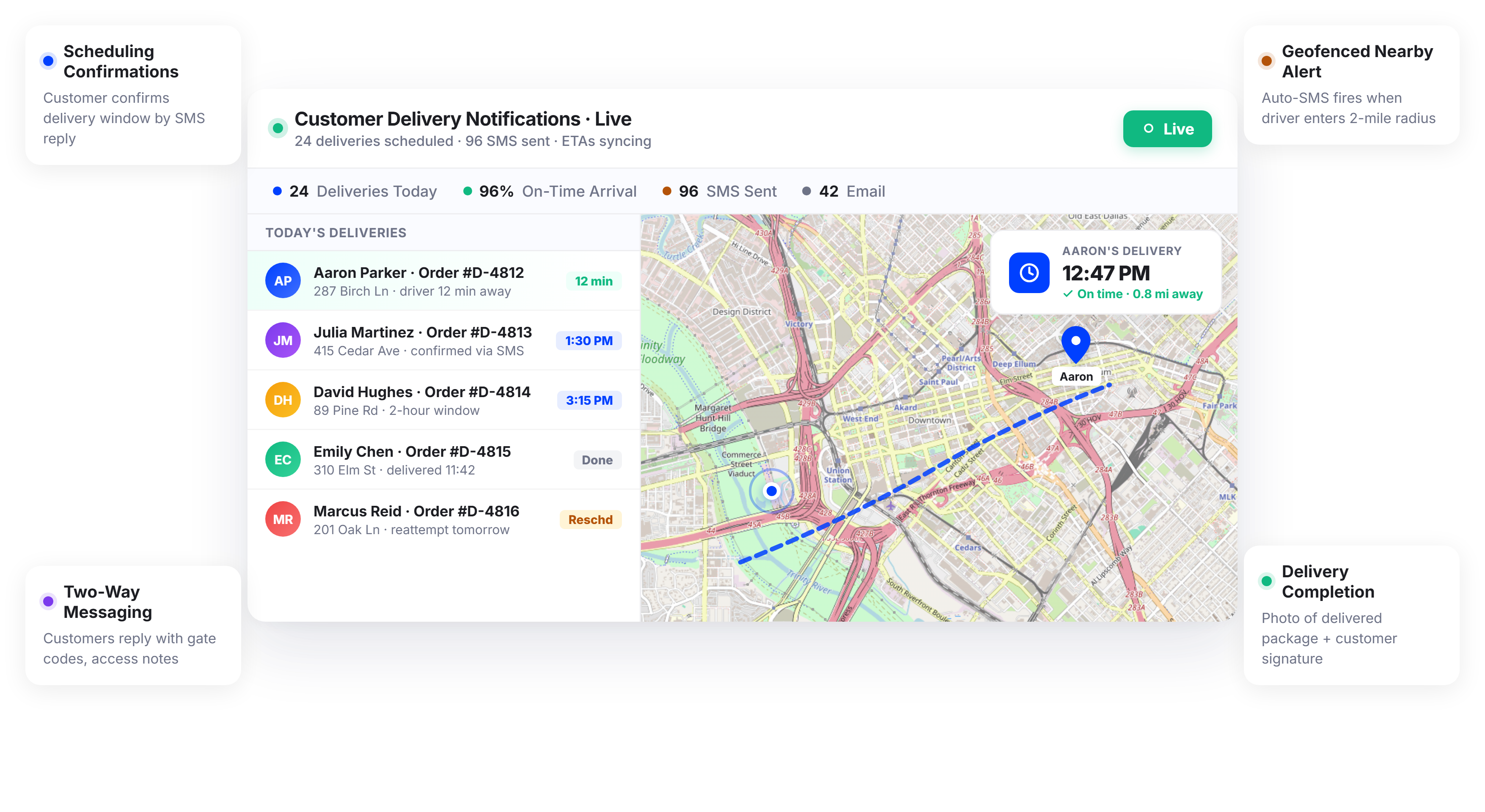
Delivery Teams Using Upper Handle More Stops with Fewer Customer Status Calls






You Promised Customers a Delivery Window. They’ve Been Staring Out the Window All Morning.
What Delivery Notifications Promise
-
 Customers know exactly when their delivery arrives
-
Your support team handles zero routine status inquiries
-
Every delivery is tracked, confirmed, and documented
-
Communication scales automatically with your delivery volume

What Actually Happens
-
Customers frequently call, text, and email asking “where’s my delivery?” due to a lack of real-time visibility and clear communication throughout the delivery process.
-
Dispatchers manually share ETAs with customers, but these updates are often outdated by the time they’re sent, leading to confusion and repeated follow-ups.
-
Drivers are forced to text or call customers while on the road navigating to the next stop, creating distractions and increasing the risk of delays or safety issues.
-
Missed deliveries continue to pile up because customers were not properly informed about arrival times and didn’t know when they needed to be home.
Every Notification Your Delivery Operation Needs in One Platform
Upper’s customer notifications software automates the entire delivery communication workflow. From the moment a route starts to the final delivery confirmation, every customer receives real-time updates without a single manual message from your team.
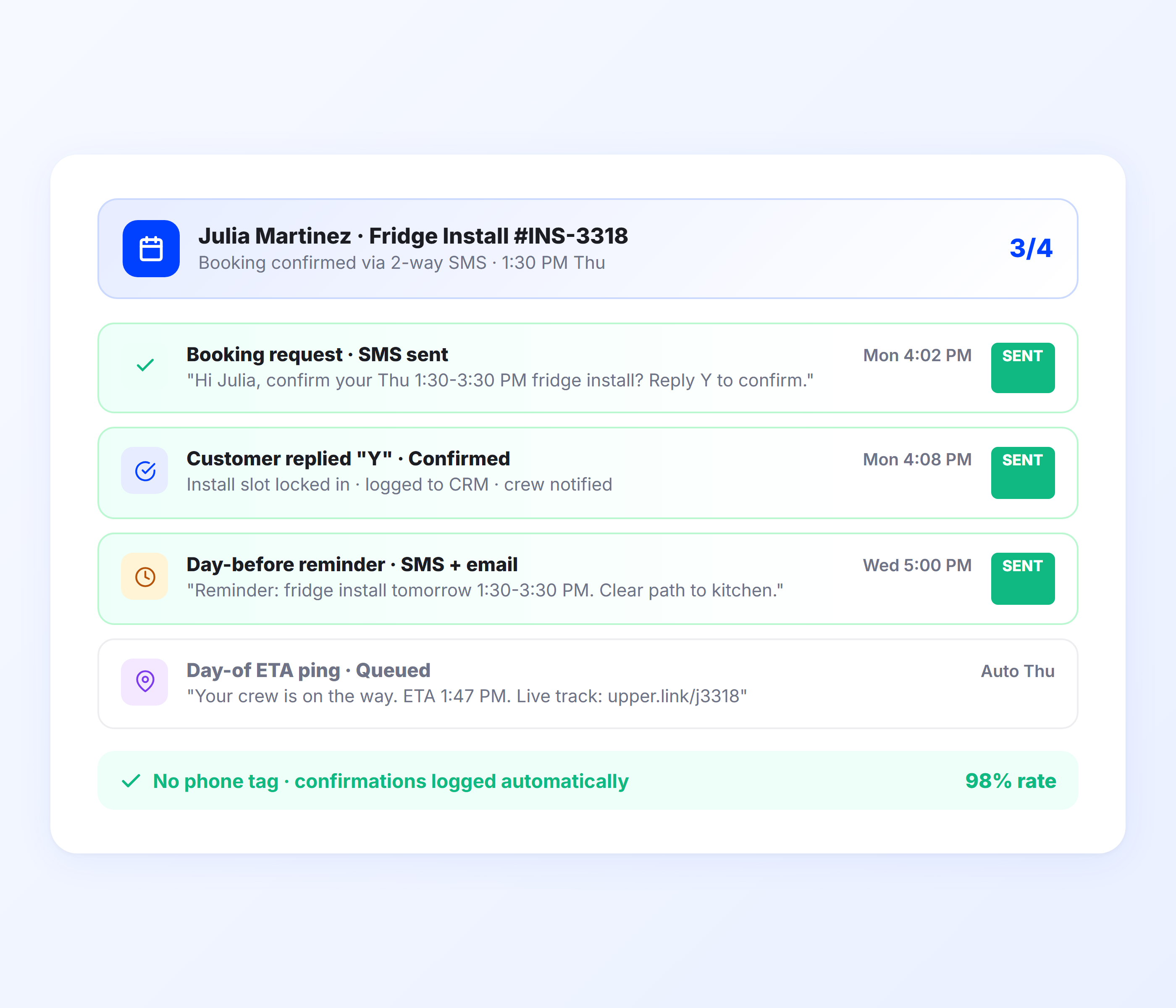
Automated Delivery Status Notifications
Upper sends automatic notifications at every milestone of the delivery process. Customers know when their delivery is scheduled, when the driver departs, when they’re next in the queue, and when the delivery is complete. The entire sequence runs without manual input from drivers, dispatchers, or support staff.
- “Scheduled for delivery” confirmation notification
- “Driver en route” departure alert
- “Driver approaching” proximity notification
- “Delivered” confirmation with proof of delivery
- “Missed delivery” follow-up with rescheduling options
- Customizable notification triggers per delivery stage

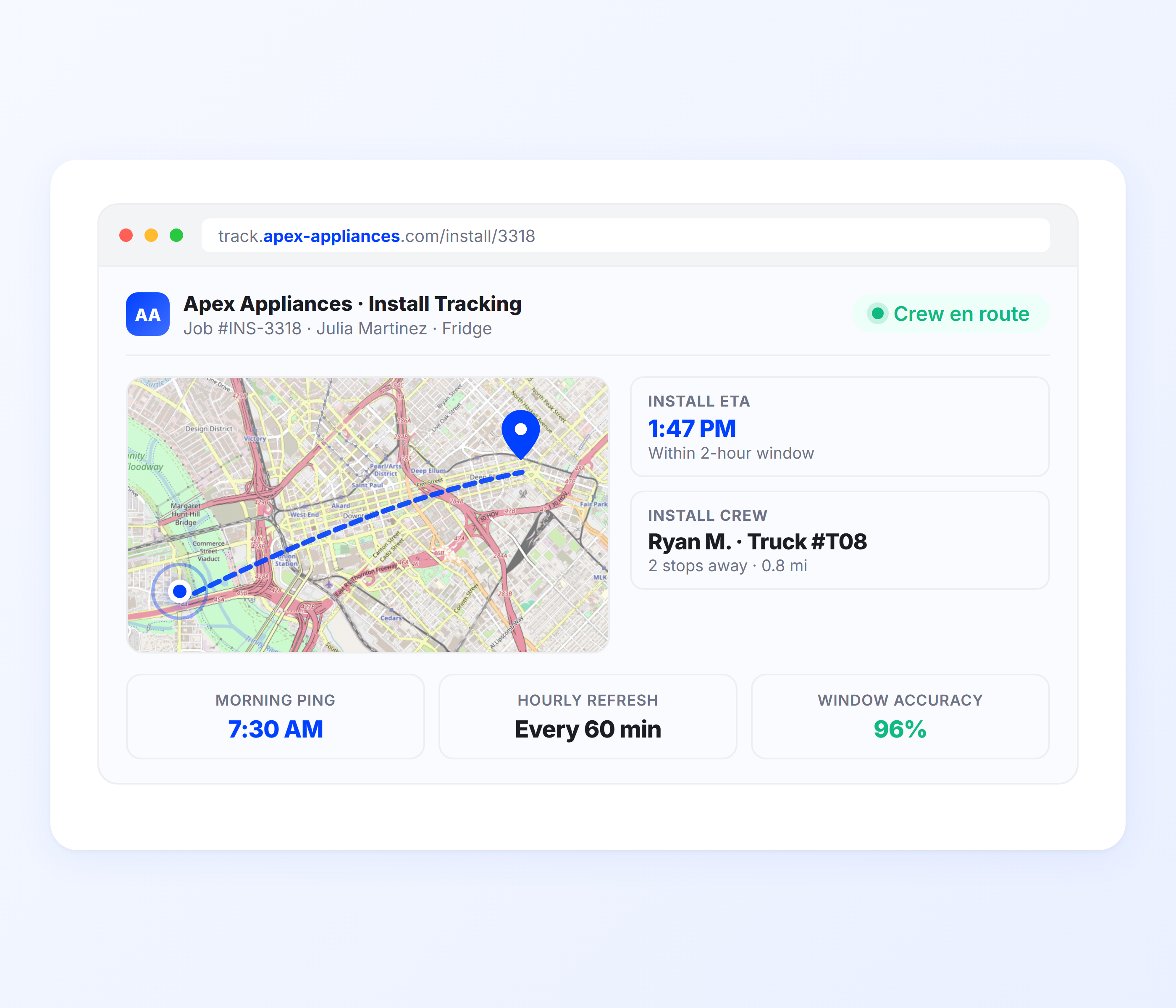
Real-Time Delivery ETAs
Upper calculates ETAs from live route optimization data, traffic conditions, and real-time driver GPS positions. As the driver completes stops, downstream customer ETAs recalculate automatically. Customers see a precise arrival time that updates throughout the day, not a static four-hour window.
- Dynamic ETA from route optimization and GPS data
- Auto-recalculation as driver progresses through the route
- Traffic and delay adjustments in real time
- Accurate across routes with 100+ stops
- SMS and email delivery with tracking link included
- Same accuracy for stop 5 and stop 150
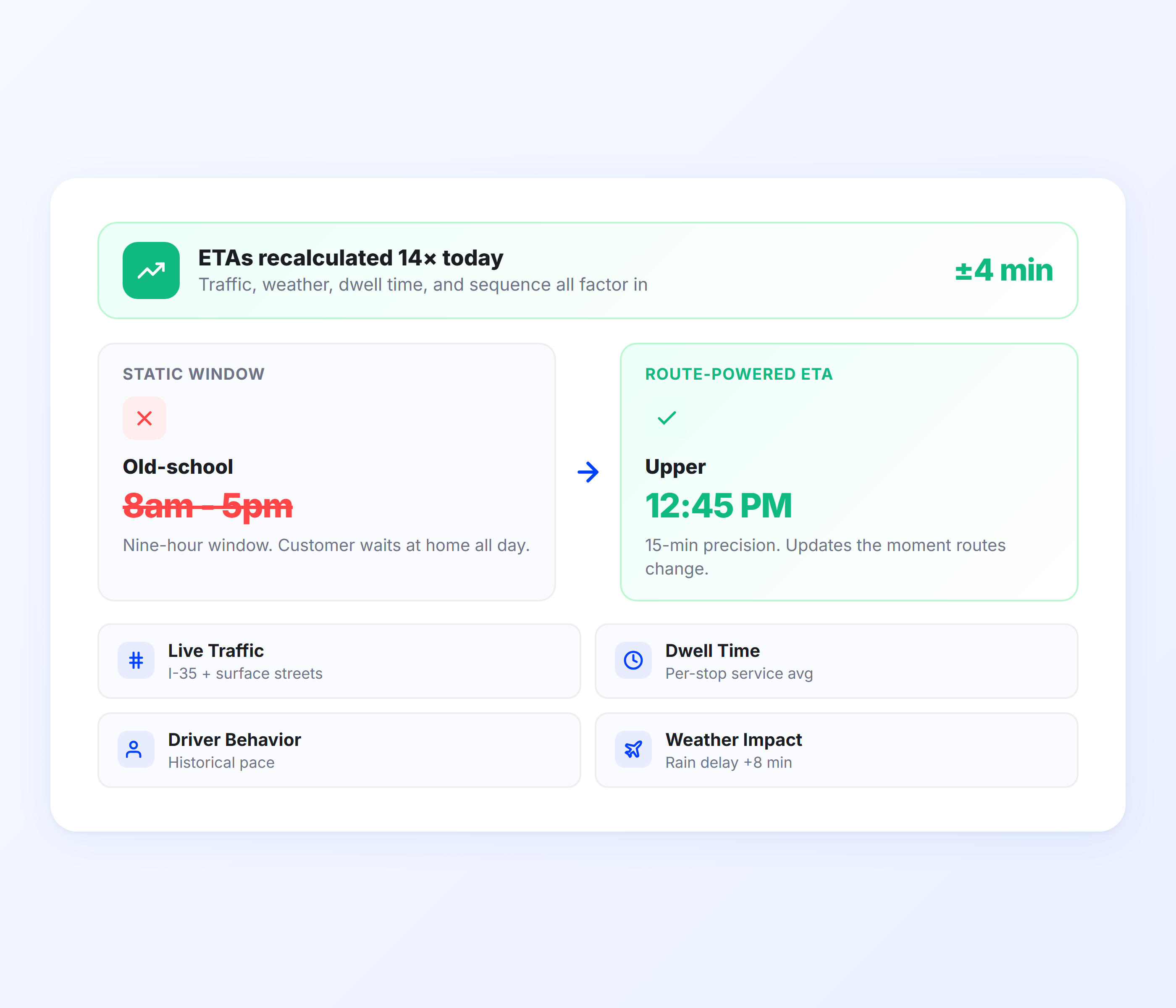
Customer Tracking Links
Every notification includes a tracking link that opens in a mobile browser. Customers see the driver’s real-time position on a map, an updated ETA, and their delivery status. No app download, no account creation, no login required. One link that answers every status question before the customer picks up the phone.
- Real-time driver position on a mobile-optimized map
- Updated ETA visible on tracking page at any time
- No app download or login required from customers
- Branded tracking experience with your business info
- Shareable with household members or office staff
- Reduces inbound status calls by 40-60%
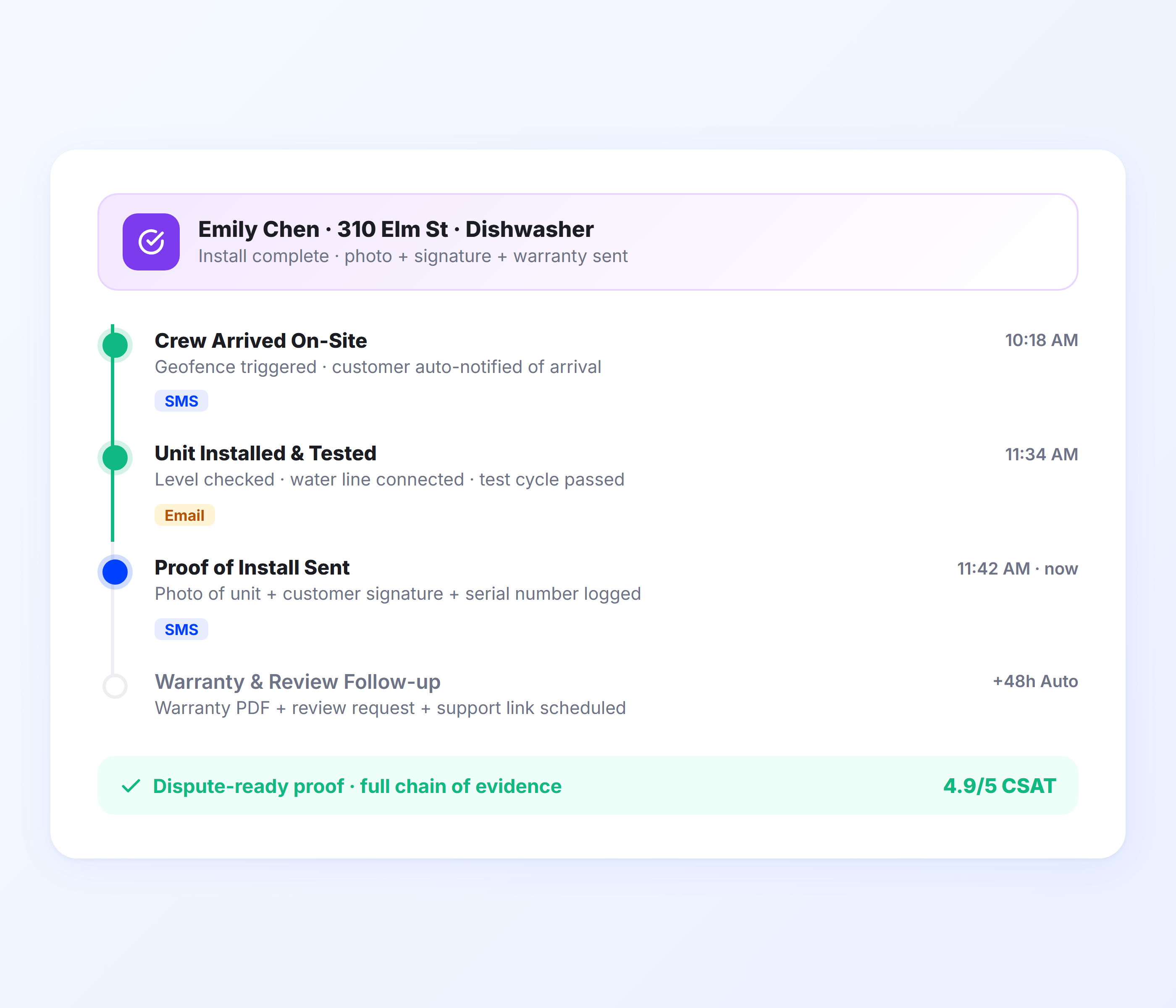
Proof of Delivery Confirmations
When a driver marks a delivery complete, Upper sends the customer an automatic confirmation with proof of delivery details. Photos of the delivered package, a digital signature from the recipient, and timestamped delivery notes create a complete record that eliminates disputes and gives customers confidence their delivery was handled properly.
- Automatic delivery confirmation notification
- Photo proof attached to confirmation
- Digital signature from recipient
- Timestamped delivery record with GPS coordinates
- Delivery notes for special instructions or issues
- Complete digital record for dispute resolution
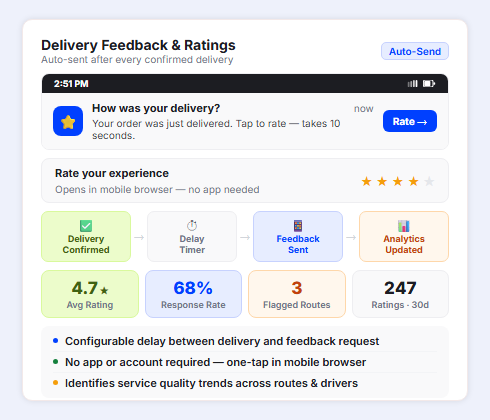
Delivery Feedback and Rating Notifications
After a delivery is confirmed, Upper sends the customer a follow-up notification with a link to rate their delivery experience. Customer ratings feed into your delivery analytics so you can identify driver performance trends, flag recurring issues on specific routes, and track service quality over time. For delivery operations where customer experience directly drives retention and referrals, this closes the feedback loop automatically.
- Automatic feedback request sent after delivery confirmation
- One-tap rating link in the customer’s mobile browser
- Configurable delay between delivery confirmation and feedback request
- Ratings feed into delivery analytics for driver and route performance
- Identifies service quality trends across routes and drivers
- No app or account required from the customer
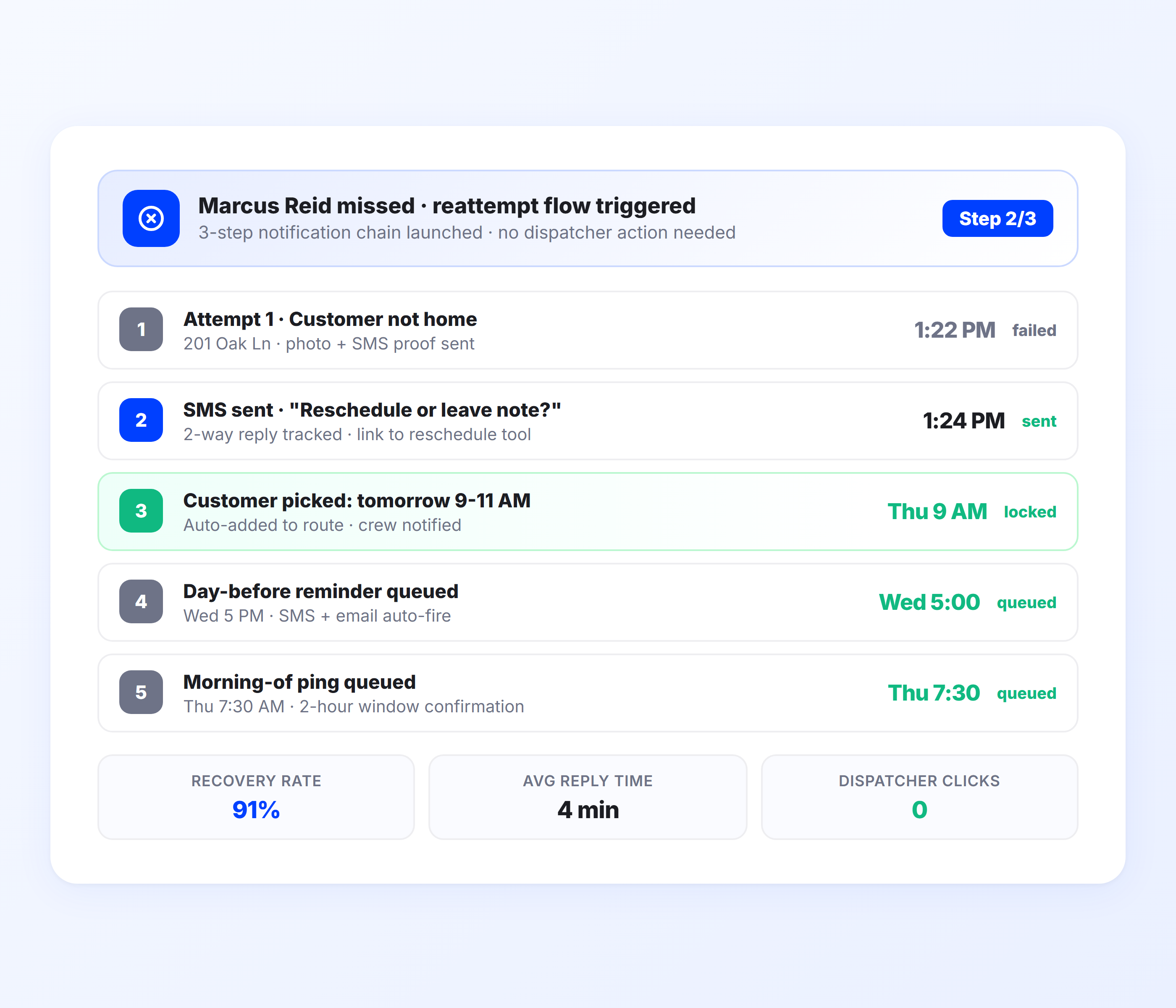
Missed Delivery and Exception Notifications
When a delivery cannot be completed, Upper notifies the customer immediately with the reason and options for rescheduling. The exception is logged in your dispatch dashboard with a timestamp, GPS location, and driver notes. No more finding out about failed deliveries when the driver returns at the end of the day.
- Automatic missed delivery notification to customer
- Reason code (not home, wrong address, refused, access issue)
- Rescheduling options in customer notification
- Real-time exception alerts for dispatch team
- GPS-stamped attempt record for accountability
- Follow-up reminders for unresolved exceptions
Automate Every Customer Notification from Route Start to Delivery Confirmation
Upper sends status updates, live ETAs, tracking links, proof of delivery, and exception alerts for every stop on every route.
Client Success Stories

“We used to spend 2 hours every morning planning routes in spreadsheets. Now it takes 10 minutes. Upper paid for itself in the first week.”


“What sold me was how easy it is to make changes. My schedules change a lot and I drag & drop stops and we’re back on track in 30 seconds. With our old software, that would’ve been an hour of replanning.”


“Our drivers actually follow the routes now. The app is simple, the navigation works, and they’re not calling me every 10 minutes asking where to go next.”

Delivery Notification Features for Every Type of Operation
- Notification Templates
- Geofenced Proximity Alerts
- Multi-Channel Delivery
- Route-Synced ETAs
- Notification Analytics

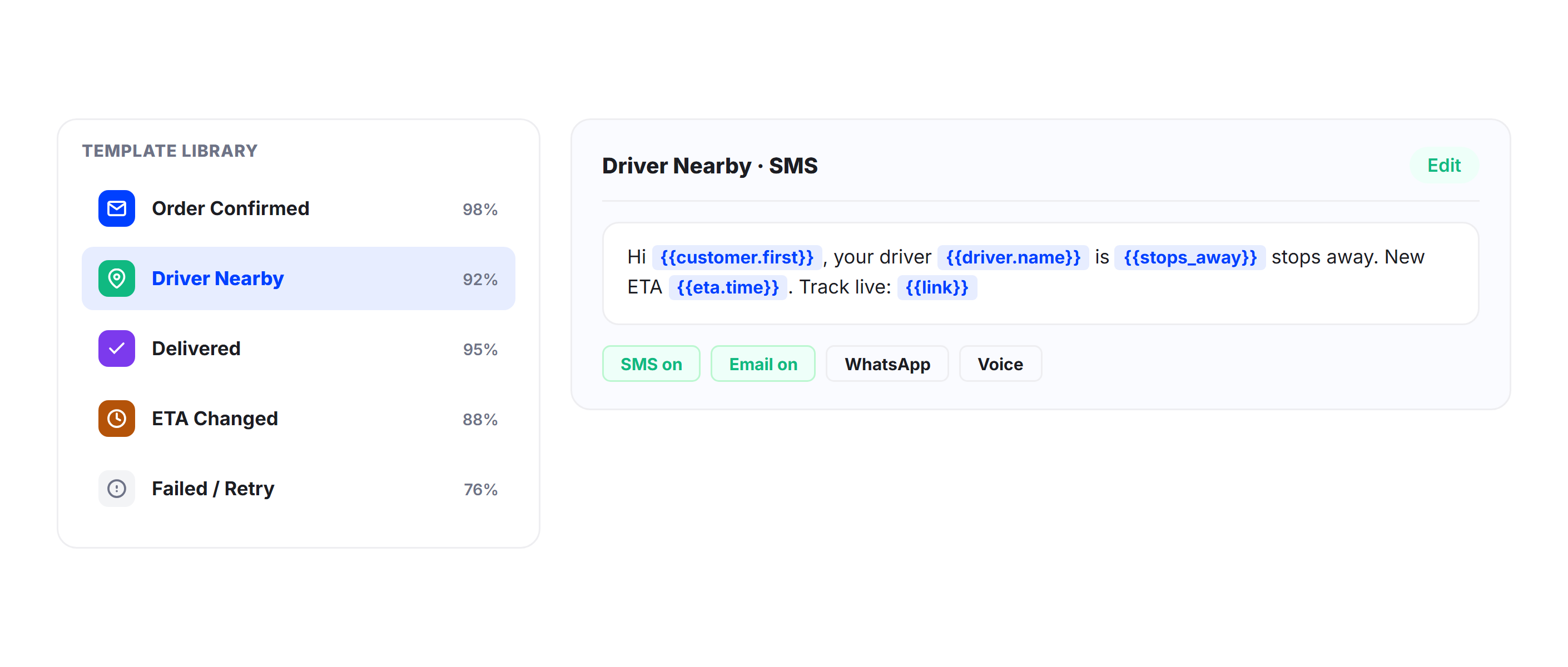
Notification Templates
Build custom notification templates for each delivery stage. Control the message content, your business branding, and which channel (SMS, email, or both) is used for each notification type. Set different templates for different delivery types, customer segments, or service levels.
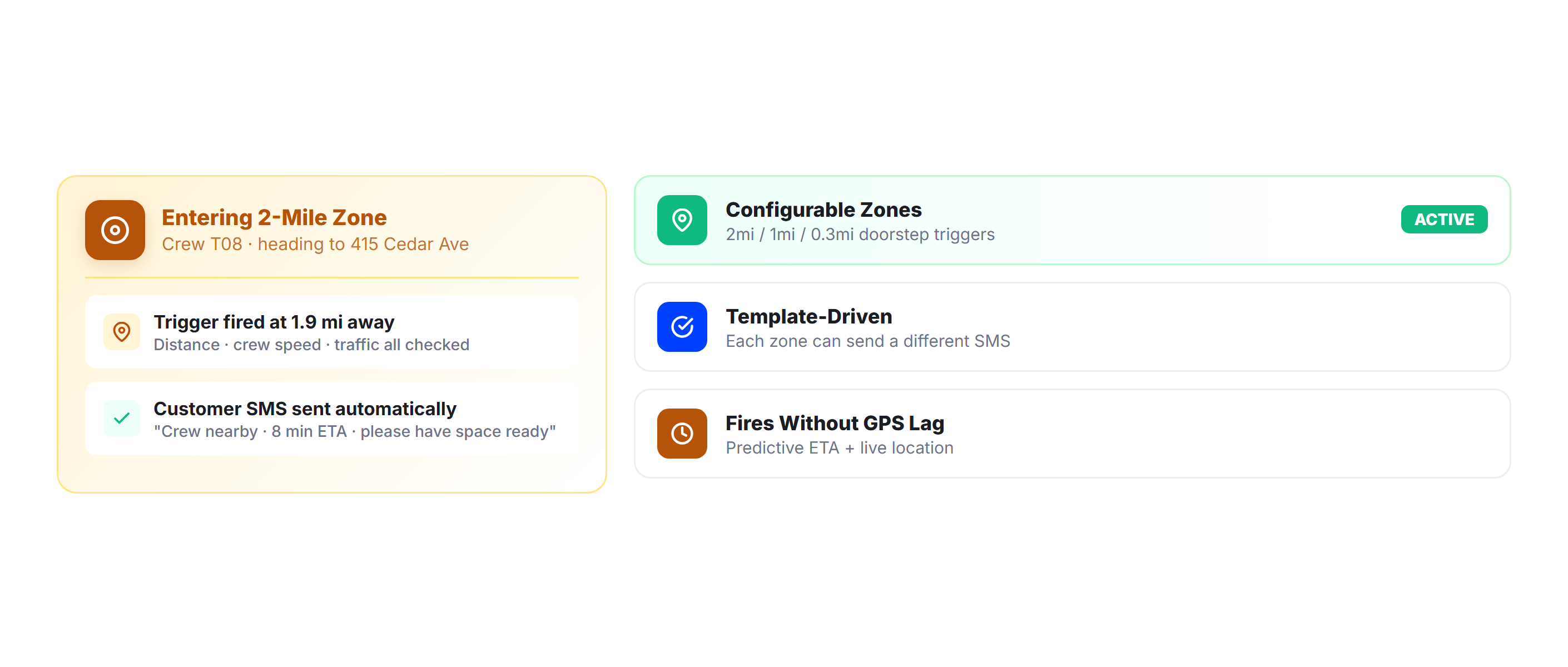
Geofenced Proximity Alerts
Trigger automatic “driver approaching” notifications when the delivery vehicle enters a customer’s geofenced zone. Give recipients the advance notice they need to be available for the delivery, whether that means coming to the door, opening a gate, or preparing a receiving area.
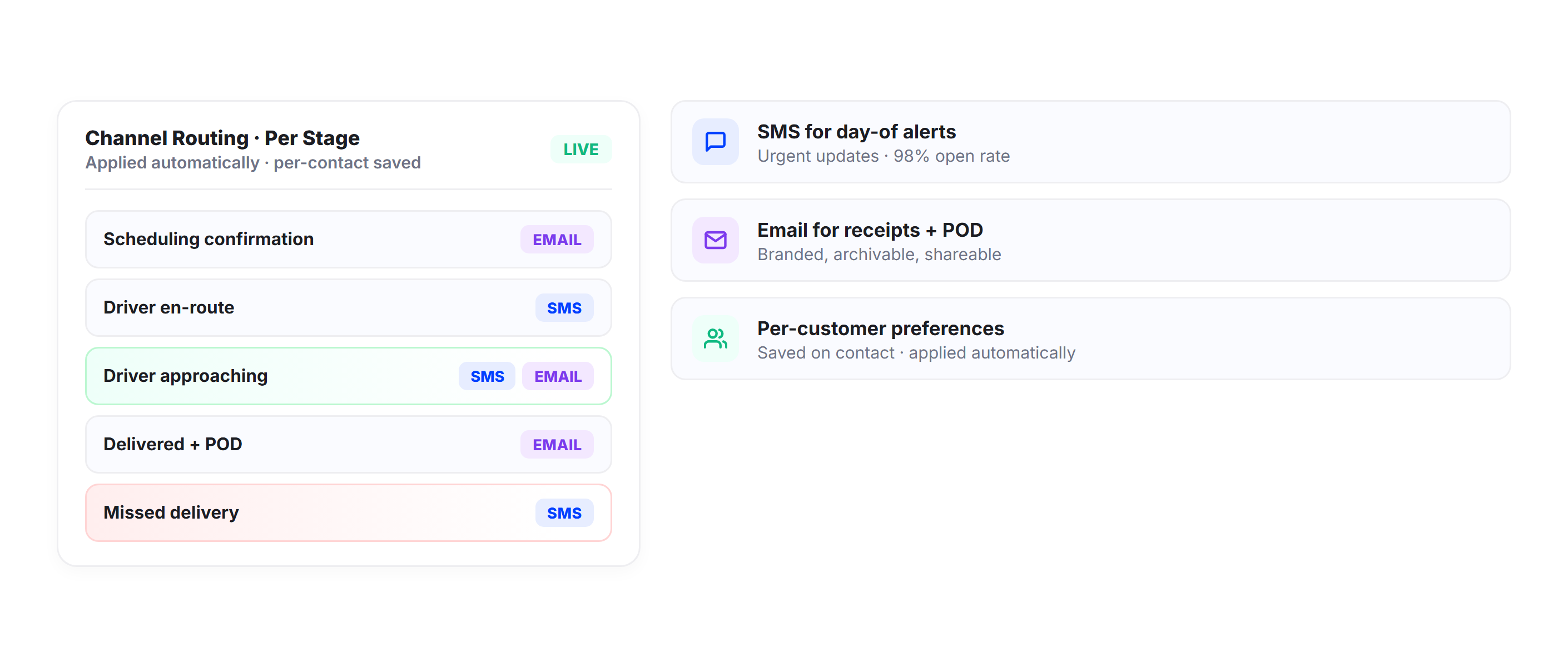
Multi-Channel Delivery
Send notifications through SMS, email, or both channels simultaneously. Configure channel preferences per notification type (SMS for urgent day-of alerts, email for scheduling confirmations) or let customers choose their preferred channel. Preferences are saved per contact and applied automatically.
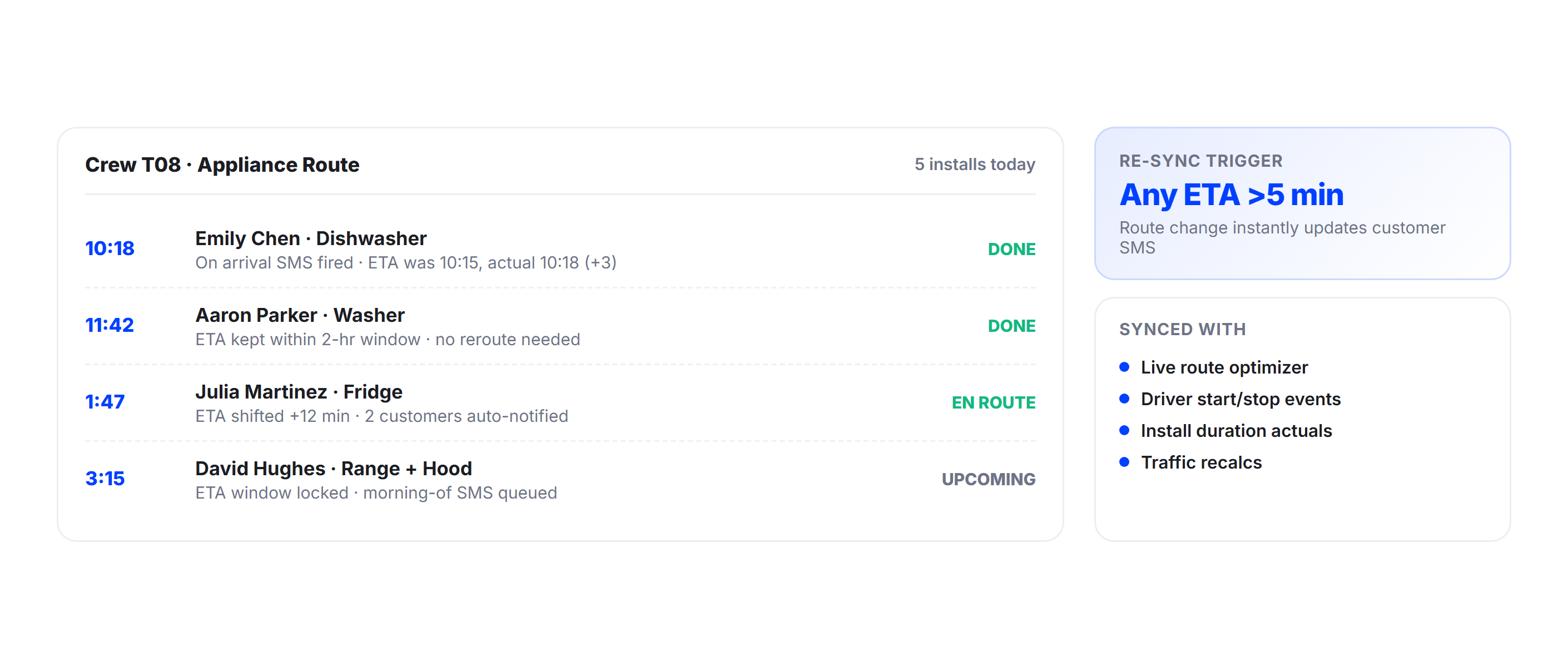
Route-Synced ETAs
ETAs are calculated from Upper’s route optimization engine, not static schedules or straight-line distance estimates. For delivery routes where stop times vary, Upper factors in actual service time per stop when calculating downstream customer ETAs. The result is arrival estimates customers can plan around.
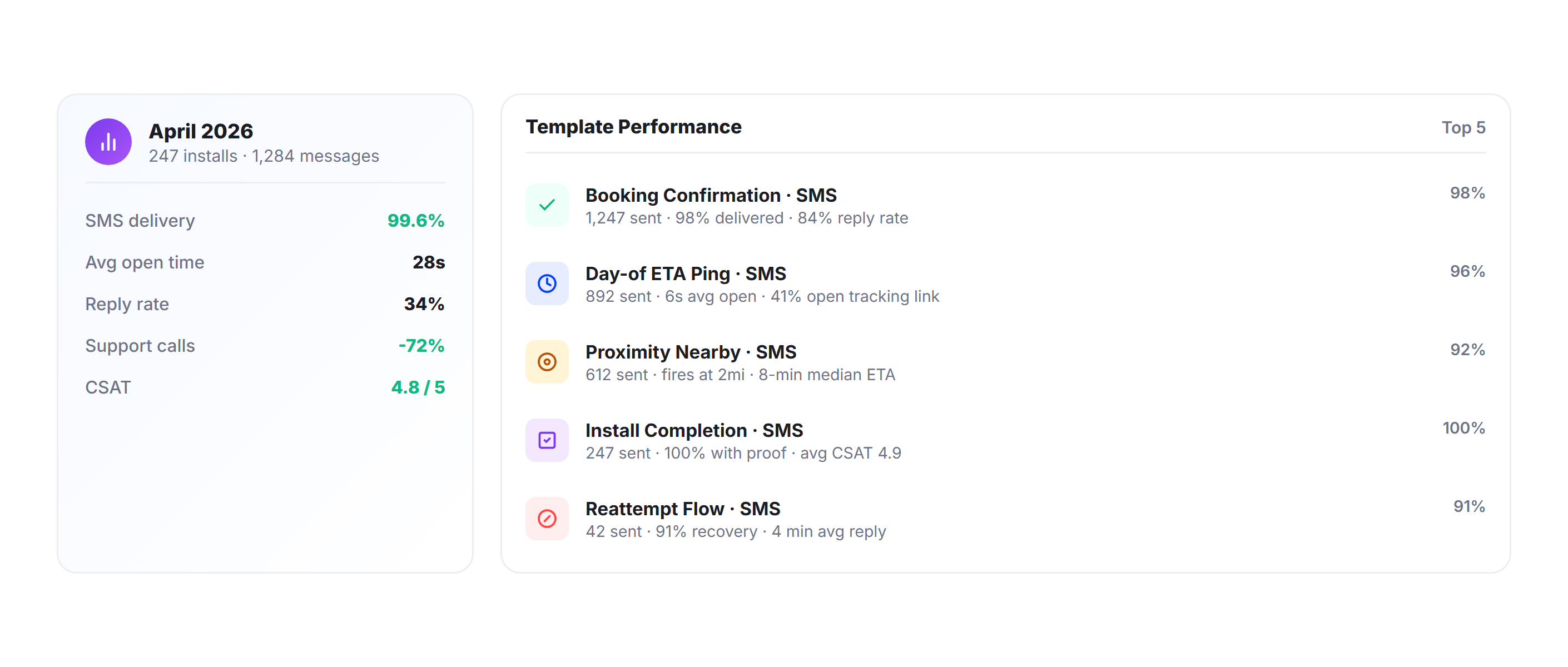
Notification Analytics
Track notification delivery rates, customer engagement, and delivery success rates by notification type. Upper’s analytics dashboard shows which notification stages have the biggest impact on reducing missed deliveries and WISMO calls, so you can optimize your communication workflow based on data.
Why Delivery Businesses Choose Upper for Customer Notifications

Eliminate WISMO Calls
“Where Is My Order?” accounts for 50-80% of delivery-related support contacts. Automated ETAs and tracking links answer the question before customers pick up the phone, freeing your team for actual operations work.

Reduce Missed Deliveries
When customers receive real-time ETAs and proximity alerts, they know exactly when to be available. Fewer missed deliveries means fewer redelivery costs, less fuel waste, and higher customer satisfaction.

Scale Without Scaling Support
As your delivery volume grows from 50 stops to 500, the notification system scales automatically. Every new stop on every new route gets the same automated notification sequence with zero additional manual effort.

Document Every Delivery
Photo proof, digital signatures, and GPS-tagged timestamps create a clear record for every delivery. Disputes, claims, and “I never received it” situations resolve in seconds instead of days.

Keep Drivers Focused on Driving
Drivers texting and calling customers between stops is a safety risk and a time drain. Automated notifications remove the driver from the communication loop so they focus on the route and the delivery.

Customer Experience
Branded tracking links, timely ETA updates, and automatic confirmations give every delivery a professional experience that matches what customers expect from top-tier delivery services.
Connect Delivery Notifications with Your Existing Tools


Automate Delivery Notifications for Every Customer on Every Route
Upper sends status updates, live ETAs, tracking links, proof of delivery, and exception alerts across your entire delivery operation. Start your free trial today.
Frequently Asked Questions
-
Do customers need to download an app to track their delivery?
No. Customers receive a tracking link via SMS or email that opens directly in their mobile browser. The tracking page shows the driver’s real-time position on a map, an updated ETA, and the delivery status. No app download, no account creation, and no login required.
-
How accurate are the delivery ETAs Upper sends to customers?
Upper calculates ETAs from live route optimization data, real-time driver GPS positions, traffic conditions, and actual stop times. As drivers complete deliveries throughout the day, ETAs for remaining customers recalculate automatically. This produces arrival estimates significantly more accurate than static time windows or straight-line distance calculations.
-
Can I customize the notification messages customers receive?
Yes. Upper supports custom notification templates for each delivery stage. You control the message content, your business branding, the communication channel (SMS, email, or both), and when each notification triggers. Different templates can be configured for different delivery types or customer segments.
-
Will delivery notifications reduce my customer support workload?
Businesses using real-time delivery notifications report 40-60% fewer inbound status calls. When customers receive proactive ETA updates and can check a live tracking link at any time, they have no reason to call asking, “Where’s my delivery?” For operations handling hundreds of daily deliveries, this translates to hours of recovered team capacity.
-
What proof of delivery does Upper capture?
Drivers capture photos, digital signatures, and delivery notes directly in the Upper mobile app at each stop. Every delivery record includes a timestamp and GPS coordinates. The proof of delivery is attached to the customer’s delivery confirmation notification and stored in Upper for dispute resolution and record-keeping.
-
Can I send notifications through both SMS and email?
Yes. You can configure each notification stage to send via SMS, email, or both channels simultaneously. For example, you might send scheduling confirmations via email (for detailed information) and day-of ETAs via SMS (for immediate visibility). Customer channel preferences are saved per contact and applied automatically.