Job scheduling software for waste companies
Plan every pickup by date and driver, then adjust the week as it changes
Upper Crew is job scheduling software for waste companies that run recurring rounds and one-off pickups. It puts each job on a dated route, optimizes each route and sends it to drivers before the shift. Your office can copy missed stops onto a reattempt route for another day.
Bring your collection list and one week that didn’t go to plan. See how Upper Crew would schedule it.
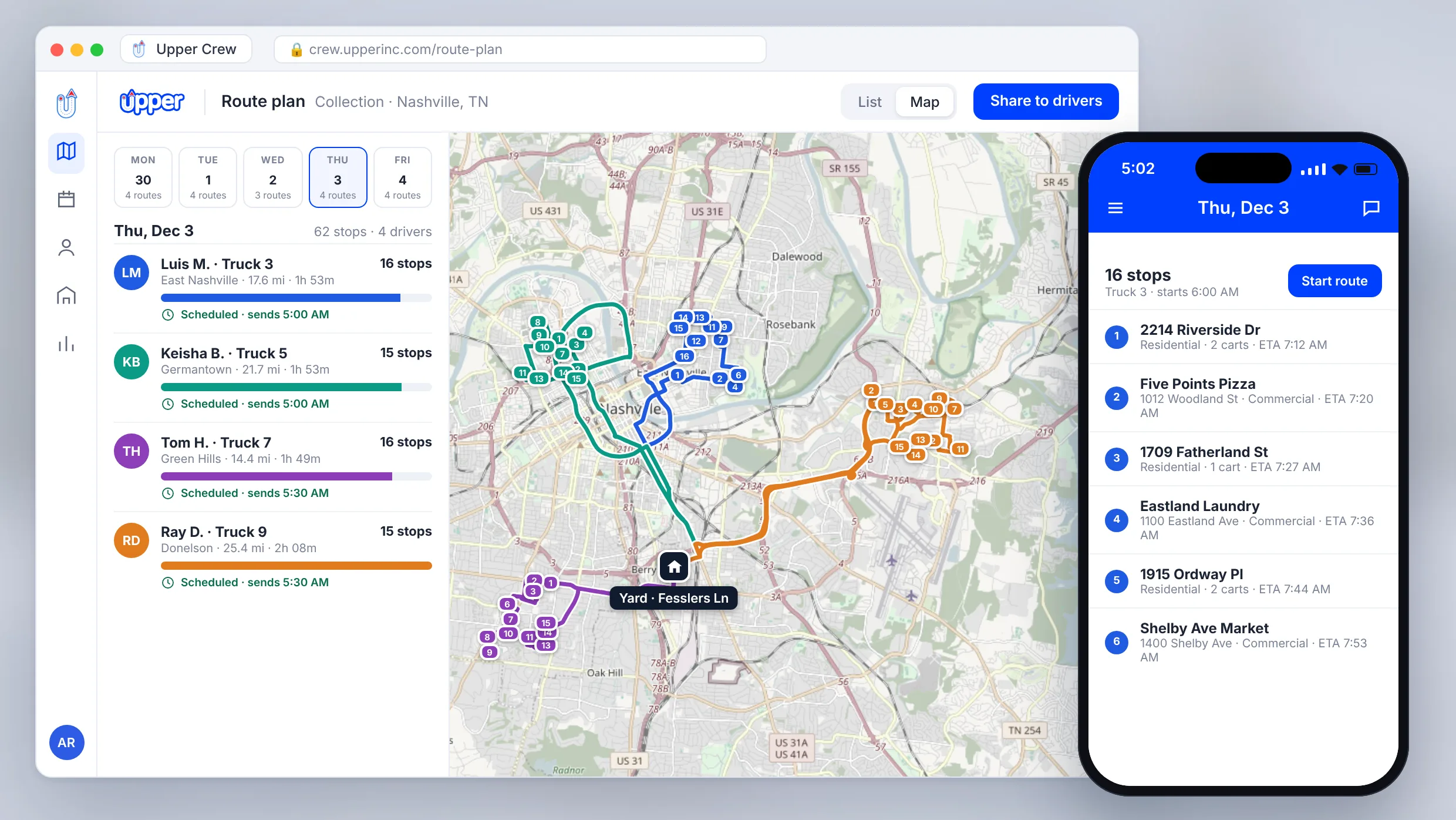


Replace the daily spreadsheet with one collection schedule
Most waste offices rebuild the schedule by hand, and the same problems come back every week:
Rounds typed in again: The same weekly stops get copied into a new sheet before every service day.
Call-outs break the plan: When a driver is out, the office reworks routes over the phone.
Missed pickups slip through: A blocked cart leaves no record until the customer calls to complain.
Upper Crew puts every collection day on a dated route, with a driver, a stop order and a record of each pickup.
Build collection routes for any day of the week
Every route in Upper Crew is tied to a date, so next week’s rounds can be ready today.
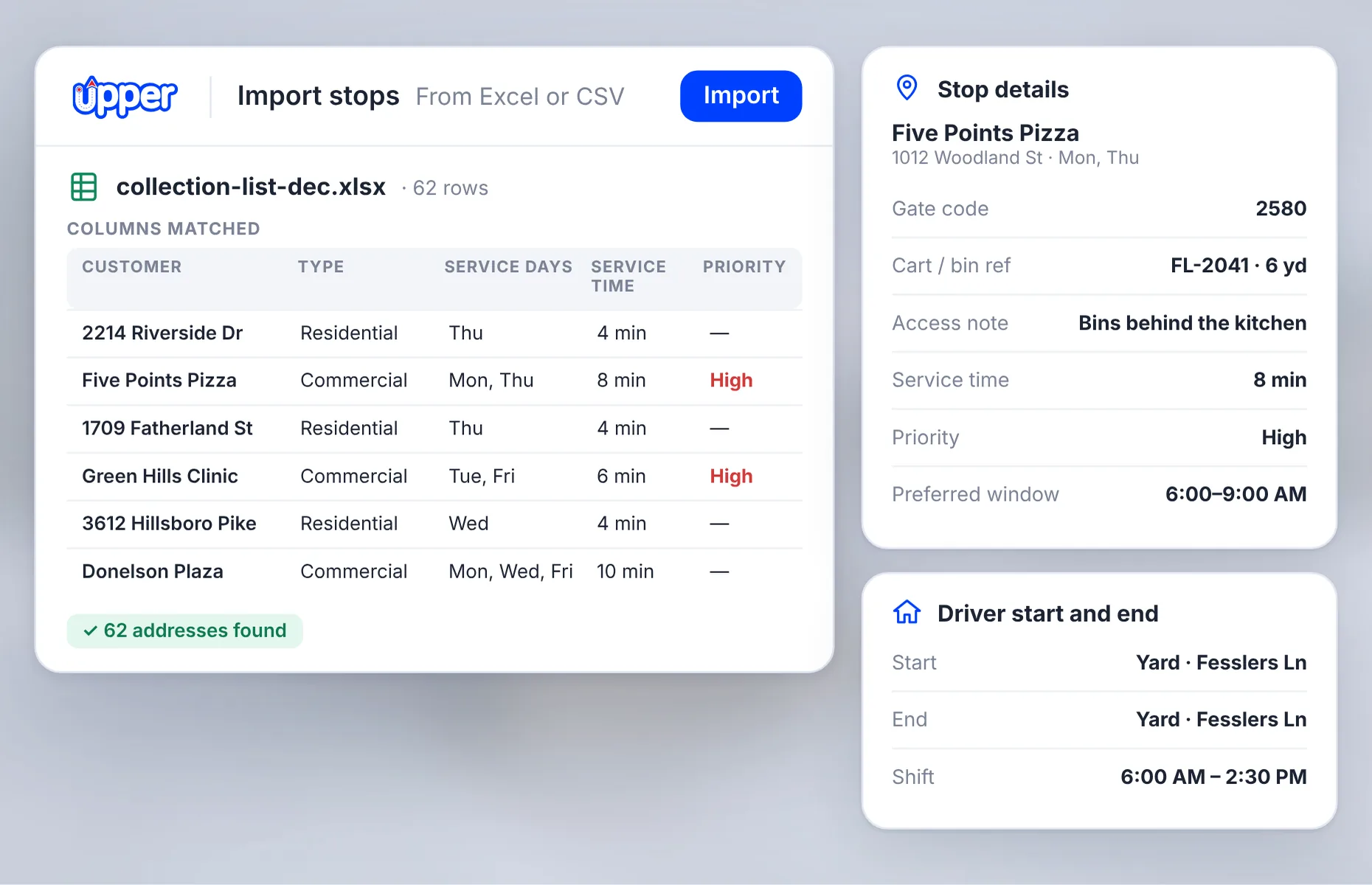
Import your stop list. Upload your customers from a CSV or Excel file. Upper Crew places each address and builds the route from it.
Add the details drivers need. Keep gate codes, cart references and access notes on each stop, so any driver can finish it.
Set service time and priority. Set how long each pickup takes and which accounts go first. Preferred time windows guide the plan, but they are not hard rules.
Start and end at the yard. Give each driver a start and end address, so every route begins and finishes where the truck parks.
Custom fields and preferred time windows start on the Professional plan. Upper’s blog explains what route scheduling is if you’re new to it.
Copy weekly rounds to the next service date
Most collection work repeats on the same days. Upper Crew gives you three ways to repeat it:
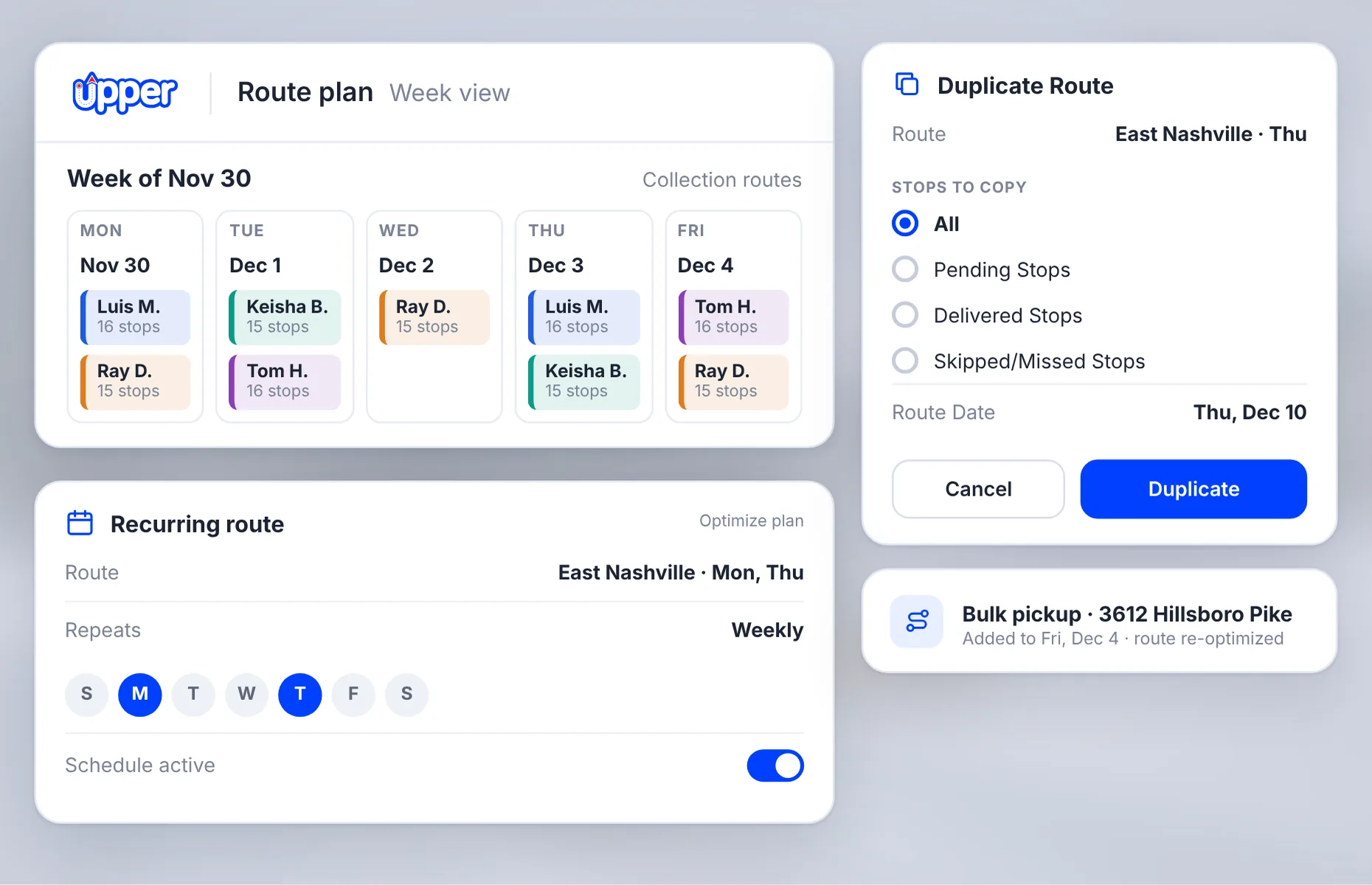
Copy last week’s route: Duplicate Route copies the stops, addresses and contact details to a new date. Optimize the copy, assign a driver and share it.
Set a route to recur: A recurring schedule creates the route on the cadence you set, until you switch it off.
Keep recurring jobs in AI Dispatcher: Set jobs on weekly, biweekly or monthly schedules in AI Dispatcher. Upper plans them alongside new pickups.
One-off pickups use the same plan. Add a bulk pickup as a stop on that day’s route, then re-optimize it.
Duplicate Route is on every plan. Recurring route schedules are on the Optimize and Enterprise plans.
Assign each day’s stops to the right driver
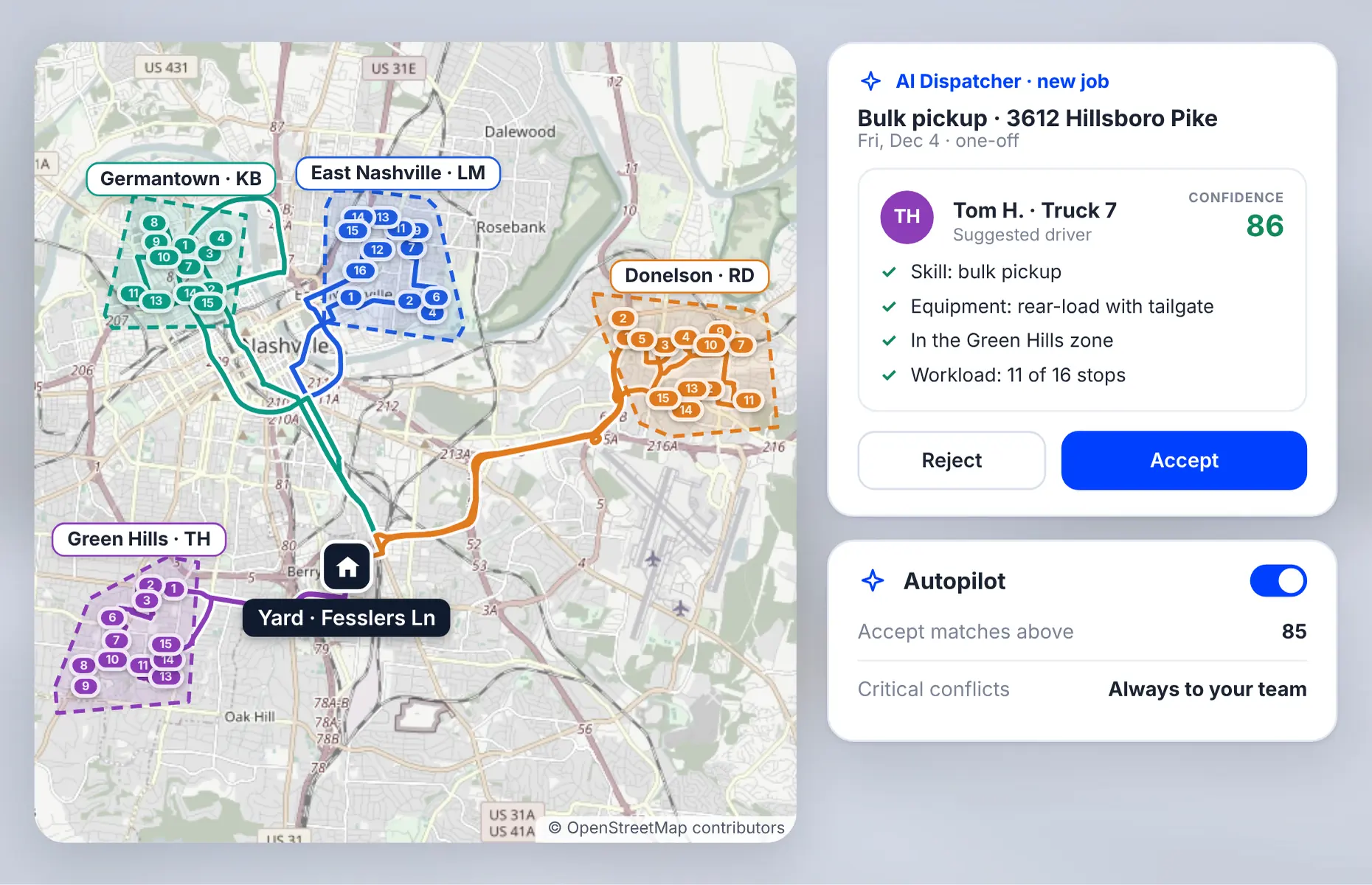
Load balancing: Upper Crew splits each day’s stops across your drivers and evens out the workload.
Zones: Draw zones on the map so each driver keeps the same part of your service area.
Driver recommendations: AI Dispatcher suggests a driver for new work by skills, equipment, location, availability and workload. Each match shows its reasons and a confidence score.
Autopilot: Let AI Dispatcher accept routine matches above your confidence threshold. Critical conflicts always come back to your team.
Who decides what: Upper suggests the split and the driver. Your dispatcher decides which truck takes a bulk pickup and which jobs can wait.
Multi-driver load balancing starts on the Professional plan, and zone-based routing is on the Optimize plan.
Send routes to drivers before the shift starts
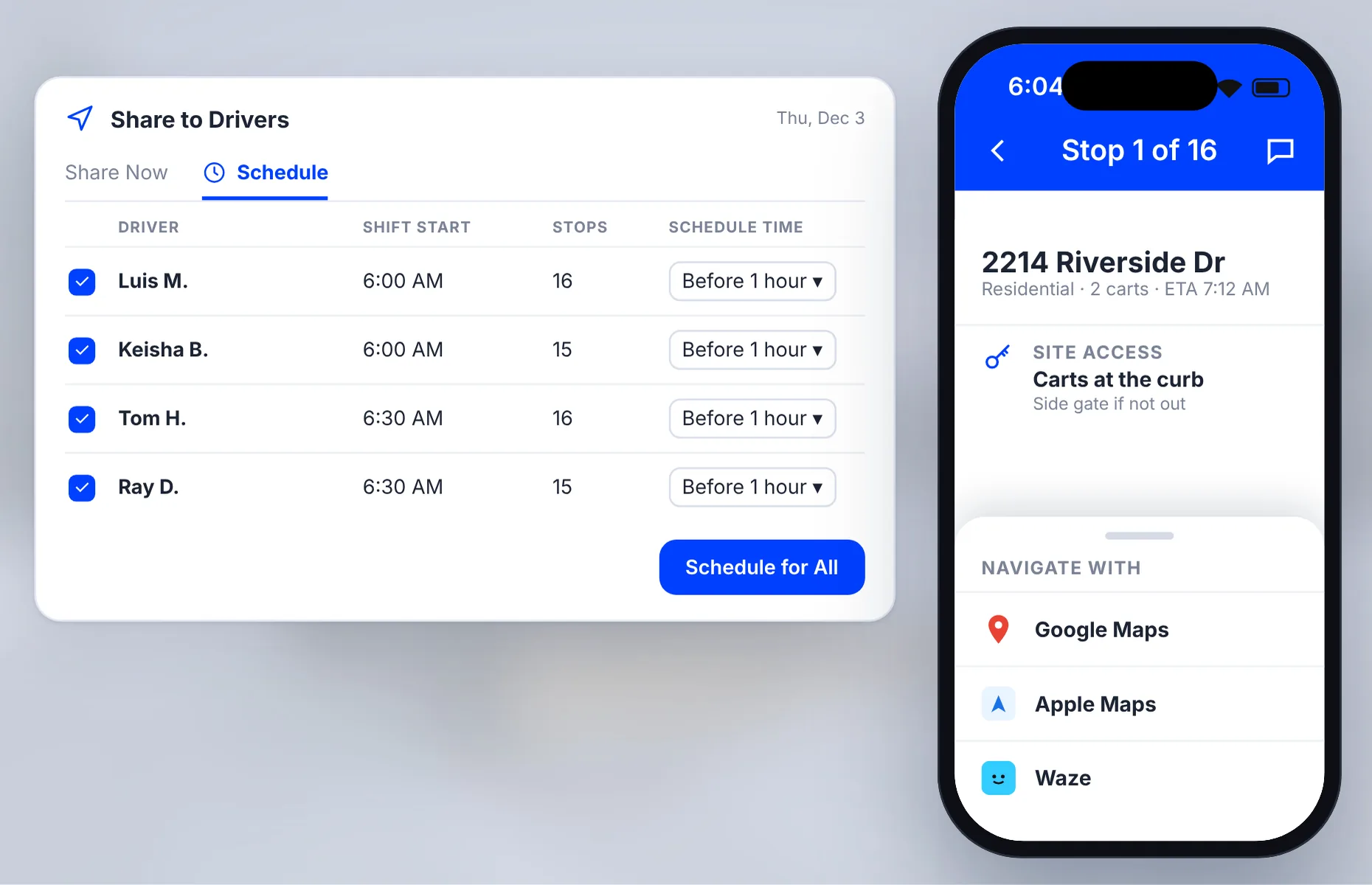
Scheduled sending: Each route reaches the driver app 15 minutes to 4 hours before the shift, or at a custom time.
Navigation: Drivers open each stop in Google Maps, Apple Maps or Waze.
Live tracking: Your office sees where each driver is and how many stops are done.
Customer updates: Customers get a text or email when the route starts, when the driver is near and if a pickup is missed.
Scheduled sending works on every plan. Live tracking and customer notifications start on the Professional plan.
Change the schedule after trucks leave the yard
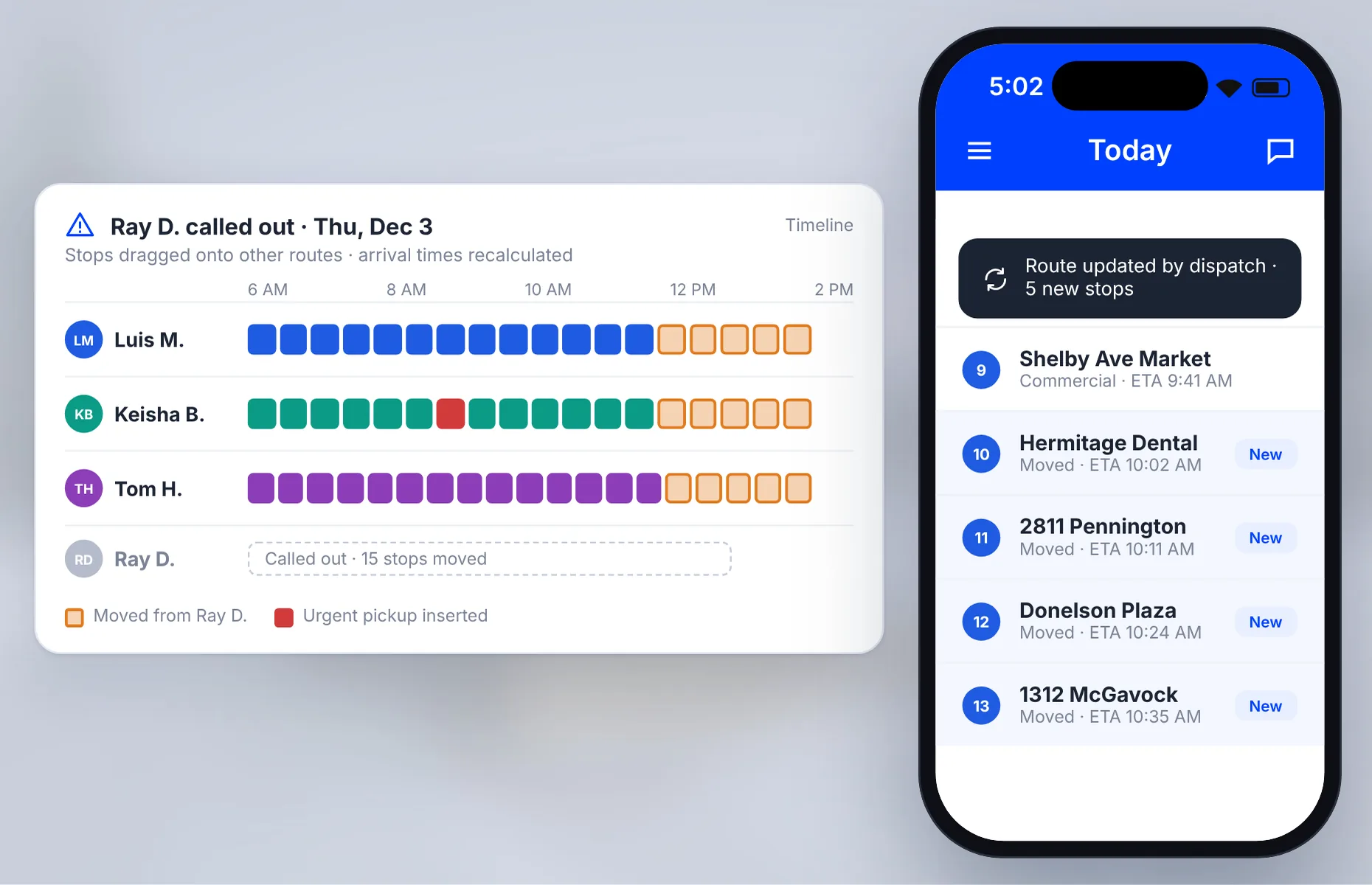
Driver call-out: Drag the absent driver’s stops onto other routes. Upper recalculates the arrival times.
Urgent pickup: Insert the stop into a live route without rebuilding the rest. Later arrival times shift to fit it.
Truck out of service: Reassign the whole route to another driver and share it again.
Late cancellation: Remove the stop and re-optimize the stops that remain.
Each change reaches the driver app, so nobody works from an old list.
Mid-route adjustments are on every plan. Real-time route updates and drag-and-drop re-optimization start on Professional.
Bring the call-out that broke your last schedule. We’ll move its stops live in the demo.
Rebook missed pickups on a reattempt route
Upper Crew turns a missed pickup into a scheduled return in three steps:
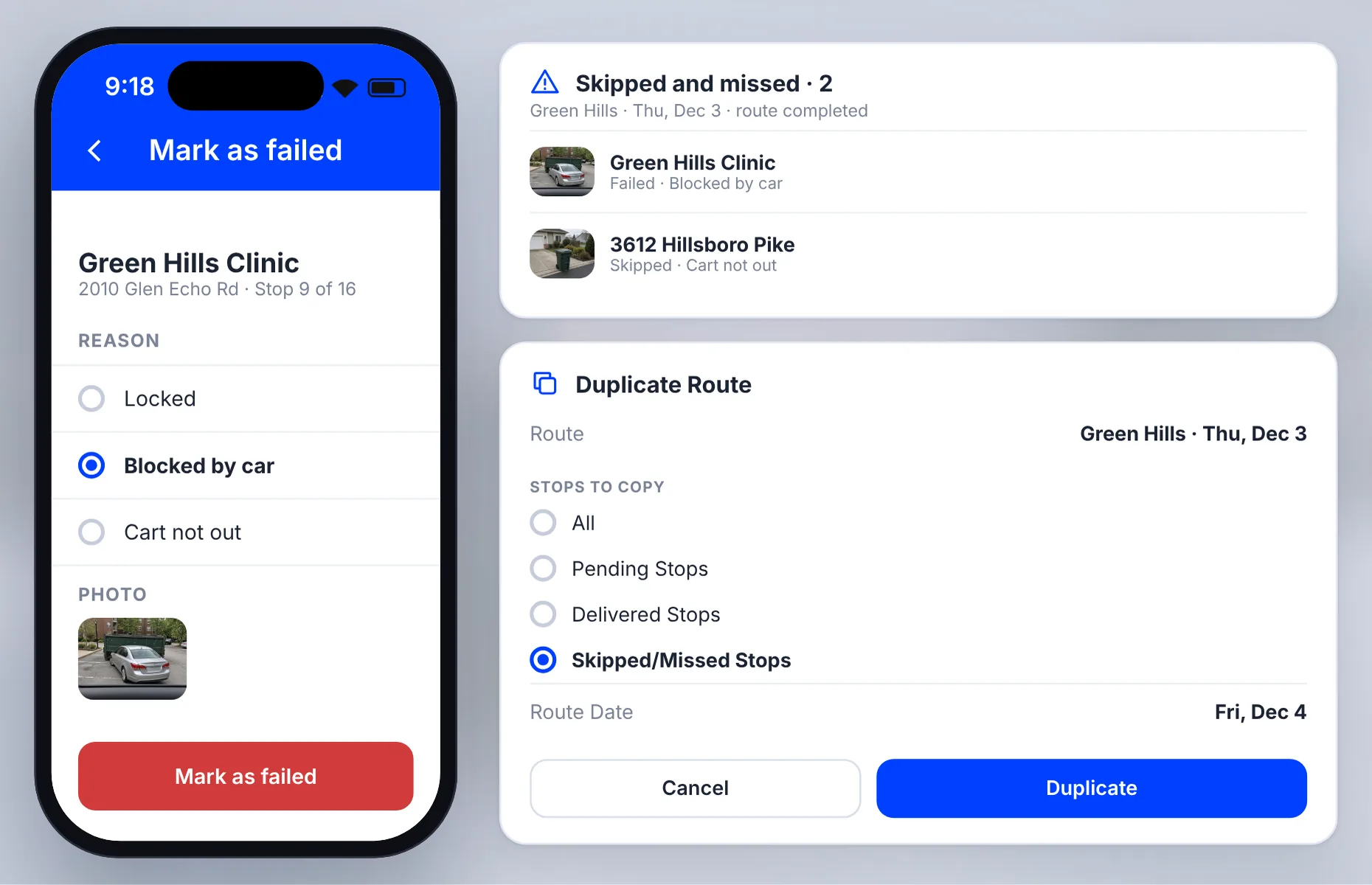
1. The driver records the miss. They mark the stop failed or skipped and pick a reason, such as “locked”. A photo can be added if your settings allow it.
2. The office sees it. Skipped stops show on the route plan and the dashboard.
3. You rebook it. Once the route has run, copy only its skipped and missed stops to a new date and assign a driver.
Completed stops keep photo proof, a signature and notes: 3 photos on Starter, 5 on Professional and 10 on Optimize. The time and GPS stamp starts on Professional. Once a driver has opened the route while online, they can keep recording stops without signal. The records sync when the phone reconnects.
How Win Waste Solutions schedules daily cart replacements with Upper
Win Waste Solutions replaces damaged residential waste carts for state and county governments, with a five-person crew. Each morning, the owner imports the day’s stops from a spreadsheet and assigns them across the crew. The routes then go to the driver app.


Win Waste SolutionsWaste management · Charlotte, North Carolina · 5 field crew members
“We won eight new contracts in two months, and I don’t think we could have handled them without it.”

Tracy LOwner, Win Waste Solutions
Key features used: route planning, proof of service, route scheduling and real-time tracking.
Read the Win Waste Solutions storyWin Waste Solutions’ reported results
| Metric | Before Upper |  After Upper |
|---|---|---|
| Daily route planning time | 45–60 minutes | Under 10 minutes |
| Stops completed per crew per day | 40–50 | 55–65 |
| Photo record retrieval time | Hours of searching | Seconds |
| New contracts won (first 2 months) | Baseline | 8 additional contracts |
Bring your recurring rounds and a few one-off pickups. We’ll schedule the week in Upper Crew.
Schedule a collection week in Upper’s 7-day free trial
- 1
Import a week of jobs.
Upload your recurring stops and a few one-off pickups from a CSV or Excel file.
- 2
Date and split the routes.
Set a date on each route, then check how Upper Crew balances the drivers.
- 3
Schedule the send.
Choose how long before the shift each route should reach the driver app.
- 4
Rebook a missed stop.
Have a driver skip one stop, then copy it onto a reattempt route for another day.
The 7-day free trial needs no credit card. It covers Professional plan features, except customer SMS notifications, for up to 5 users.
Job scheduling software for waste companies FAQs
What is job scheduling software for waste companies?
It decides which driver collects which stops on which day, then sends each route to that driver. Upper Crew dates and optimizes the routes, sends them before the shift and records proof at every stop. Billing and container records stay in the system you already use.
Can Upper Crew schedule recurring and one-time waste pickups together?
Yes. A one-time pickup sits on the same dated route as the recurring round. Copy a route to next week on any plan, or schedule it to recur on Optimize and Enterprise.
Is Upper Crew also dispatch software for waste companies?
Yes. Your dispatcher sends scheduled routes to the driver app and moves stops when a driver calls out. Live tracking of each driver starts on the Professional plan.
Can I import my collection list from a spreadsheet?
Yes. Upload your stops from a CSV or Excel file, and Upper maps your columns automatically. Upper Crew then builds the routes for the dates you choose.
How much does Upper Crew cost?
Plans are billed per user per month: Starter $50, Professional $60 and Optimize $89, or 20% less billed yearly. Enterprise pricing is by request, and AI driver assignment is part of the Optimize plan. See Upper pricing for stop and driver limits.
Does Upper Crew handle billing or container tracking?
Upper Crew route planning doesn’t. Container inventory, scale tickets and waste manifests stay in your current software, and AI Dispatcher can create an invoice from a finished job. Upper Crew connects to other software through Zapier on Optimize or the Platform API on Enterprise.
Does Upper Crew work as waste hauling scheduling software for a small fleet?
Yes. Starter covers up to 10 driver profiles and 250 stops per route, and you add users as the fleet grows. A single driver who only needs a route planner can use Upper Solo.
Is there a free trial?
Yes. The 7-day free trial needs no credit card and covers Professional plan features, except customer SMS notifications, for up to 5 users.
Bring your busiest collection week to the demo
Come with your recurring rounds, a few one-off pickups and the call-out that broke your last schedule. See how Upper Crew dates the routes, assigns drivers and rebooks a missed stop.