Valet Trash Dispatch Software for Operators
Assign every property before the shift and adjust the night as it runs
Upper Crew’s valet trash dispatch software helps companies that collect doorstep trash at apartment communities split properties across drivers, optimize each route and record proof at every pickup. When a driver calls out, your office moves that driver’s properties onto another route. Valet trash dispatch is one part of Upper Crew’s waste management software.
Bring your property list and driver roster. See a call-out covered and a missed-pickup complaint answered in Upper Crew.


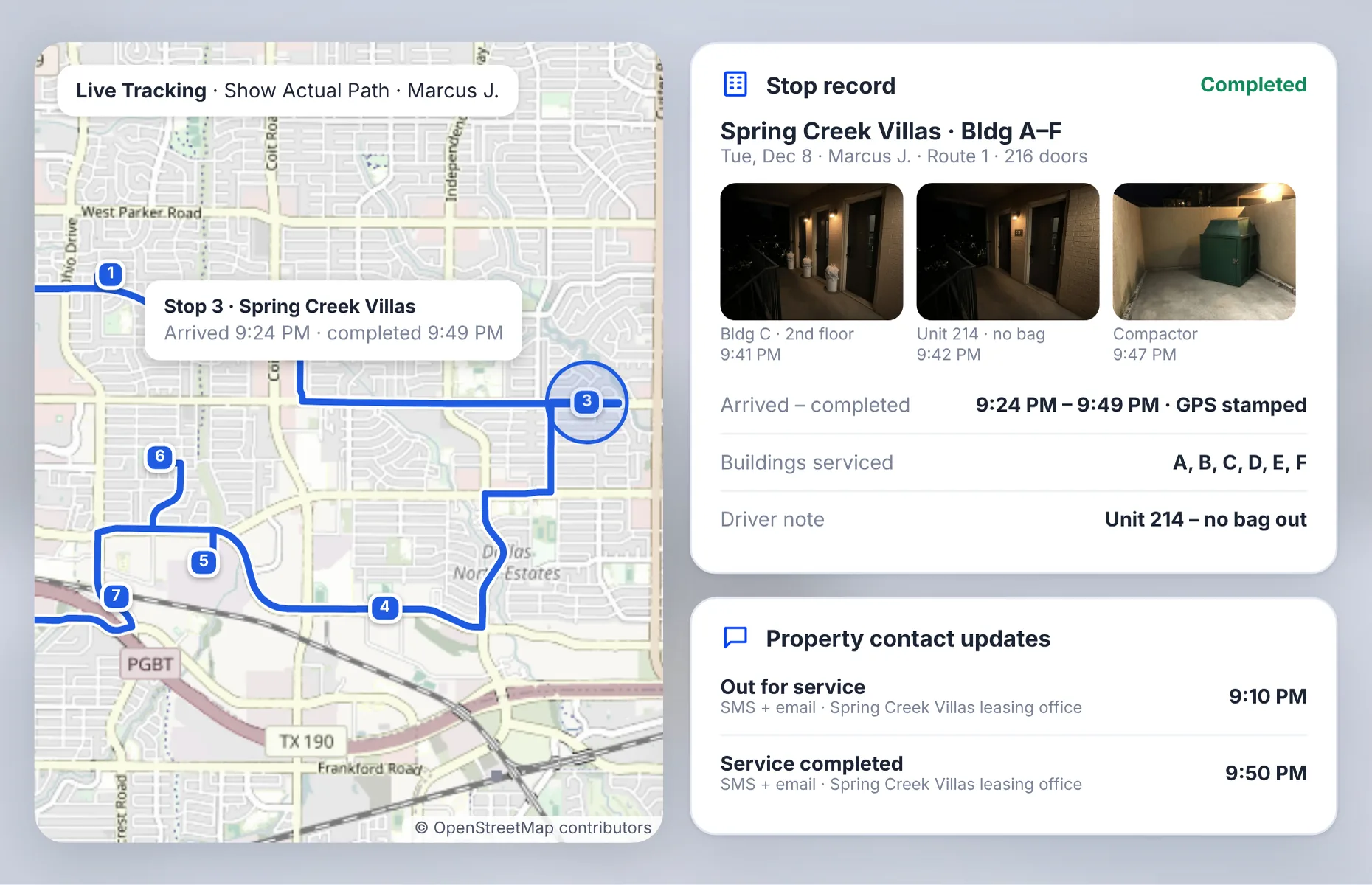
Answer property manager complaints before they cost a contract
Valet trash contracts renew on trust. When a property manager calls about a missed building and your office has nothing on file, that trust slips. Upper Crew keeps a record on every stop, so the answer is ready when the call comes.
“Building C was skipped last night.” The stop record shows which driver serviced the community, the photos taken and any note left.
“Your driver never came through the gate.” The GPS breadcrumb trail shows the driver’s path through the community, and the stop record shows when the driver arrived and finished.
“Trash is still sitting outside units on the third floor.” Driver notes and photos show what was set out, bagged or blocked when the driver came by.
“Nobody told us service was running late.” Each property contact can get a text or email when the driver is on the way, when service is done and when a stop is missed. The manager hears about a miss from your team first.
The time and GPS stamp, breadcrumb trail and customer text or email updates are available on the Professional plan and above.
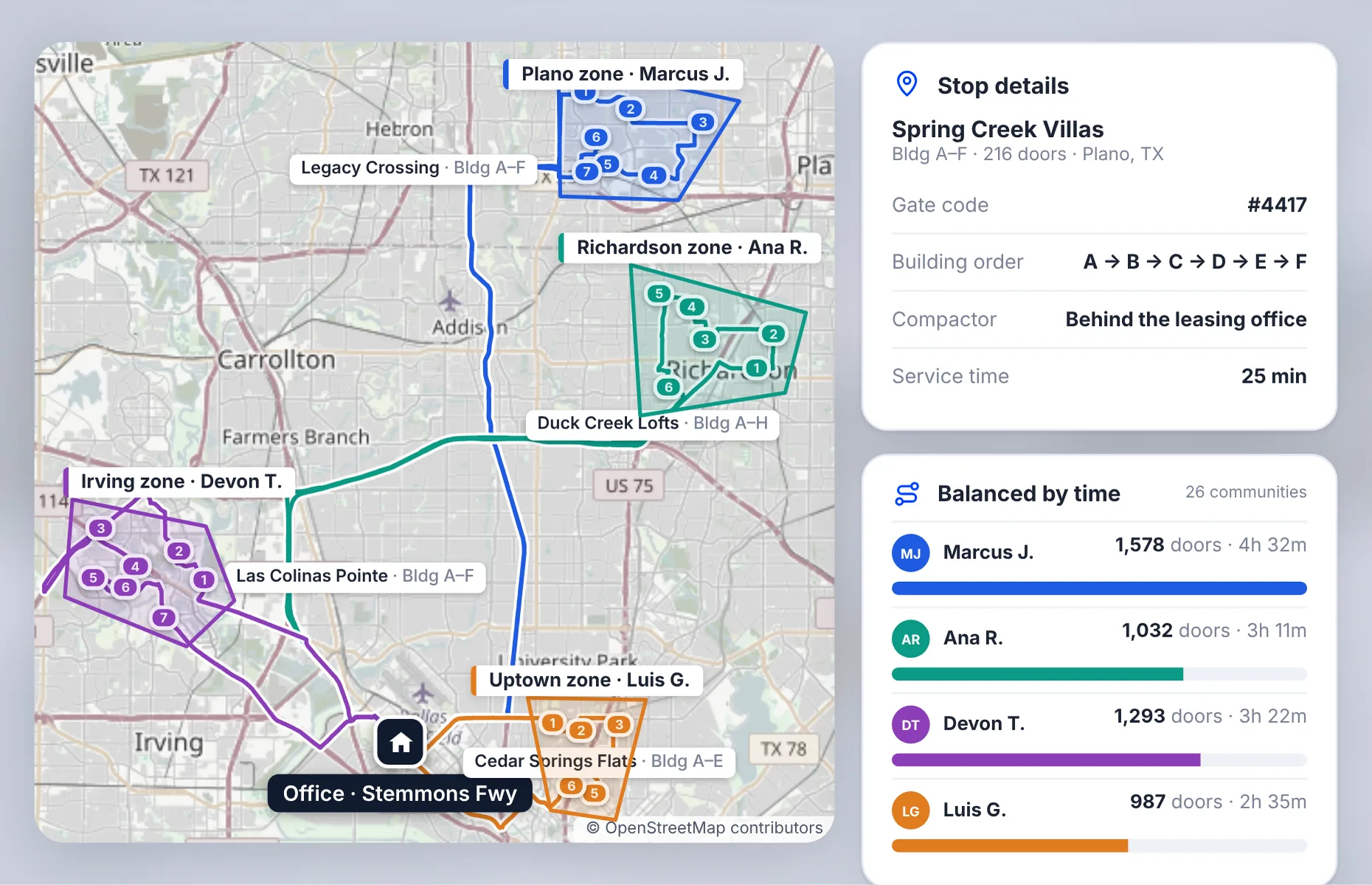
Split properties across drivers and zones before the shift
Upper Crew turns your property list into one balanced route per driver. Your dispatcher reviews the plan, then sends each route to the driver’s phone.
Import your property list: Upload every community from a CSV or Excel file.
Add site notes: Put gate codes, building order and the compactor location on each stop. Any driver can then work an unfamiliar property.
Draw zones: Draw zones on the map and keep each driver on the same group of communities night after night.
Balance the workload: Upper splits the stops across your drivers and orders each route by time or distance.
Reuse a service night: Copy a route to another date, then optimize and assign it instead of building it again.
Multi-driver load balancing starts on the Professional plan, and zone-based routing is on the Optimize plan.
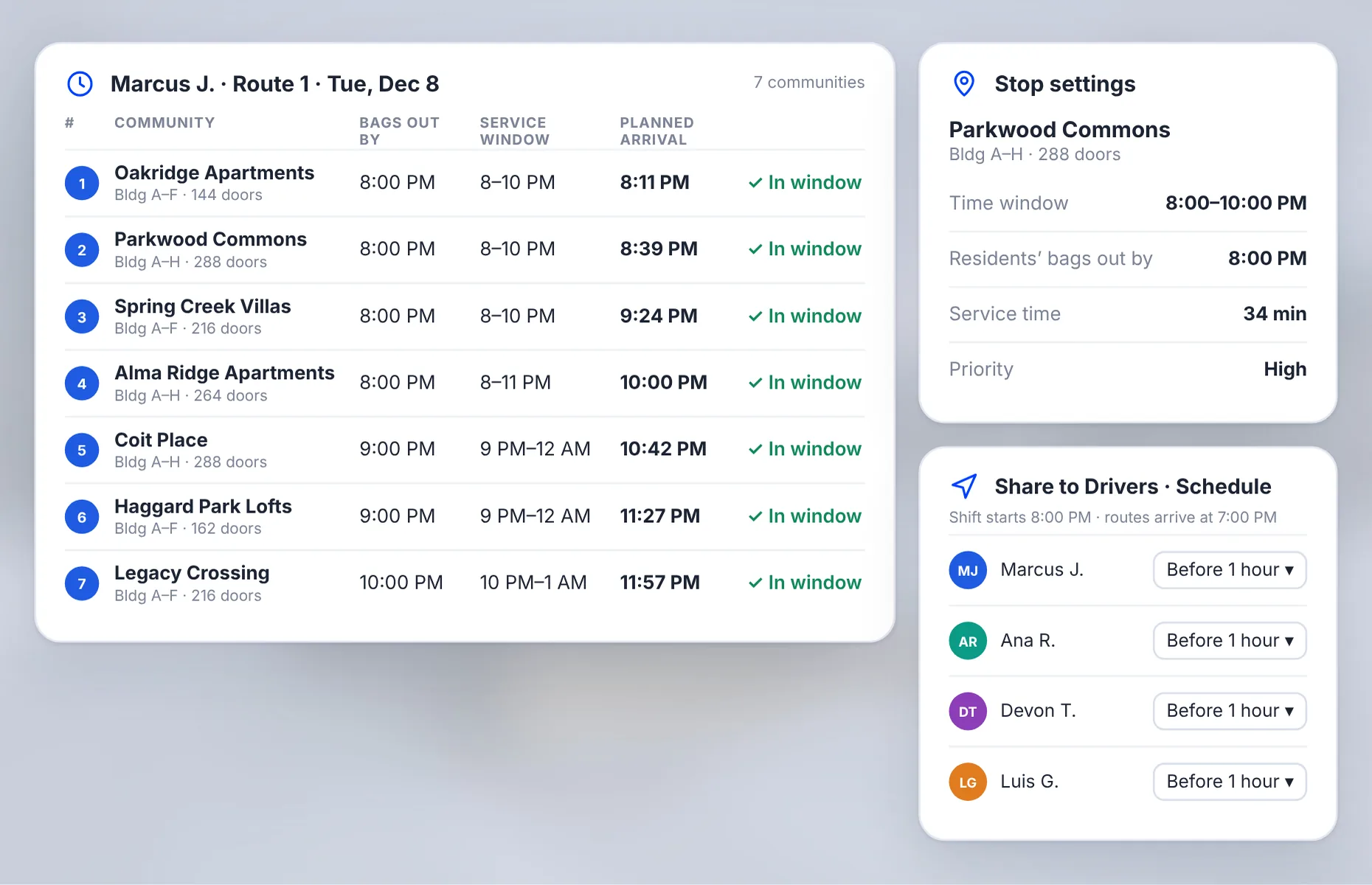
Route valet trash around each community’s service window
Most apartment communities set a collection window, such as 7 to 10 p.m., after residents put their bags out. Upper Crew plans each night’s route around those windows.
Time window per property: Add the window each community allows to its stop. Upper orders the route to reach each property inside its window wherever the night allows.
Service time per stop: Set how long each community takes, so a 300-unit property gets more time than a small one and arrival times stay realistic.
Priority communities: Mark properties with an early cut-off as high priority, so they come first on the route.
Scheduled sending: Each route reaches the driver app 15 minutes to 4 hours before the shift, or at a custom time you choose.
Scheduled sending works on every plan. Customer time windows are available on the Professional plan and above.
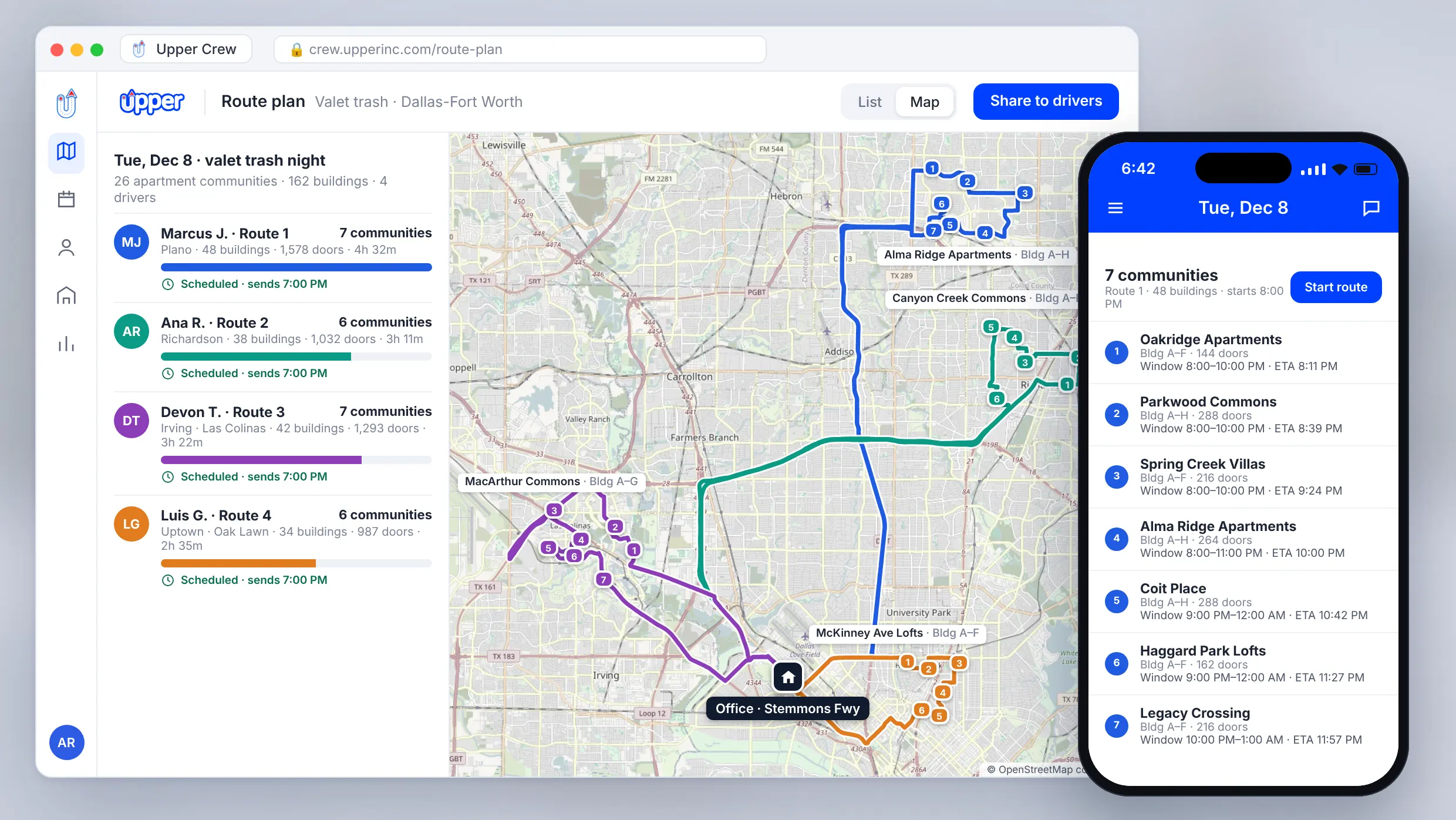
Cover call-outs and late changes after drivers leave
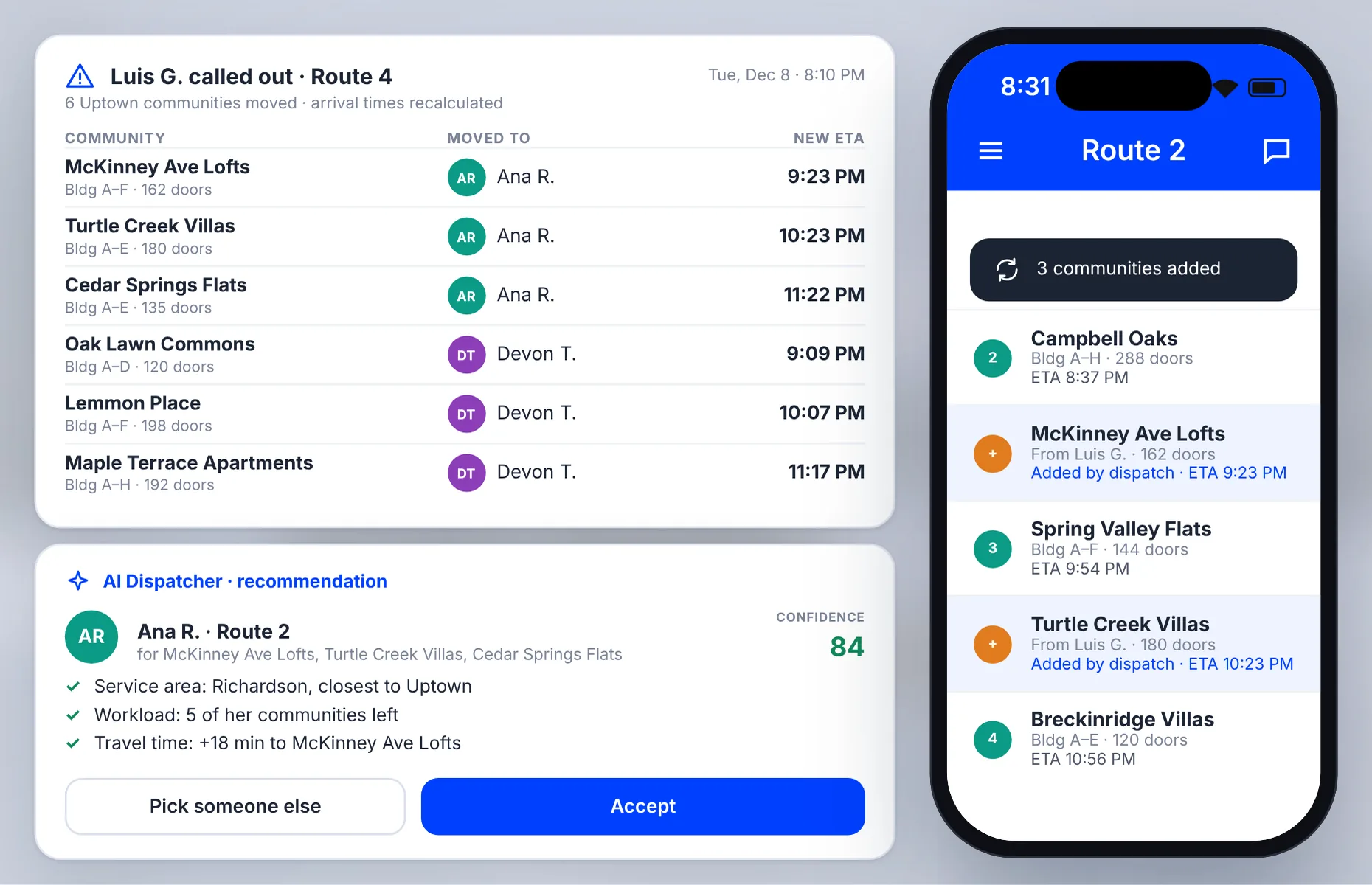
Valet trash nights rarely run exactly as planned. Drivers call out, properties add buildings and some routes run long. Upper Crew lets your dispatcher change the plan while drivers are on their routes.
Upper AI Dispatcher can also recommend a driver for each job. It weighs service area, availability, workload and travel time, then shows its reasons with a confidence score. Your dispatcher accepts the match or picks someone else.
Drag-and-drop re-optimization, real-time route updates and live tracking are available on the Professional plan and above. AI driver assignment is on the Optimize plan.
| Change during the shift | What Crew does | What your dispatcher decides |
|---|---|---|
| A driver calls out | Moves that driver’s properties onto other routes and reorders the remaining stops | Which drivers take the extra properties |
| A property adds a pickup | Inserts the stop into an active route and recalculates the arrival times after it | Which route takes the new stop |
| A route runs long | Shows each driver’s live progress and path on the map | Whether to hand stops to a driver who is ahead |
Keep a pickup record at every apartment community
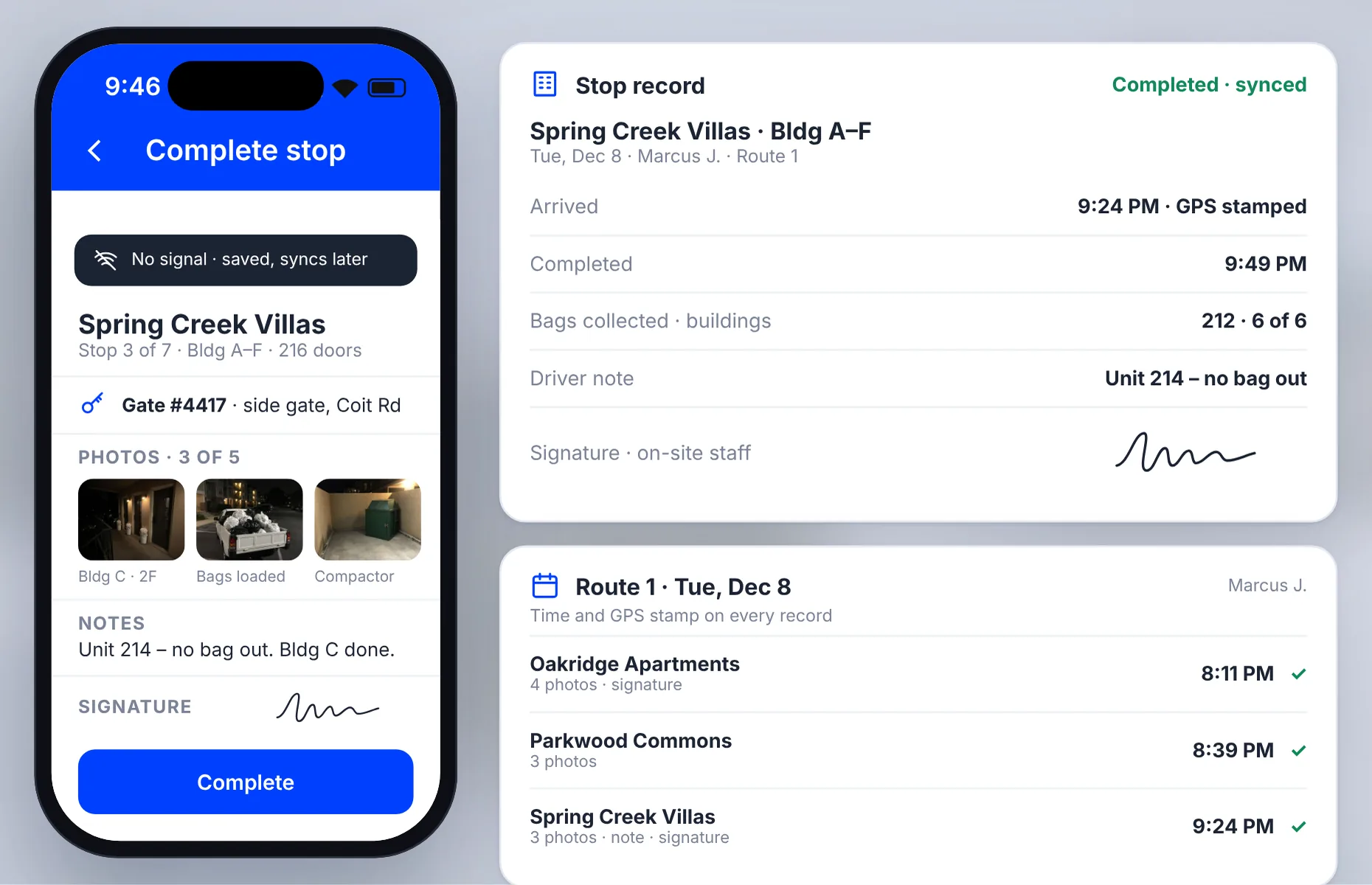
Upper Crew keeps each pickup record on the stop, not in a driver’s camera roll. Your office can pull it up the moment a property manager asks.
Before and after photos: Drivers photograph the collection area or compactor. You can require a photo before a stop is marked done.
Notes and signatures: Drivers note overflow, blocked doors or unbagged trash, and on-site staff can sign on the driver’s phone.
Time and location stamp: Each record shows when and where the driver made it, which answers the first question in any dispute.
Custom fields: Add the details your contracts ask for, such as bag counts or the number of buildings serviced.
Proof without a signal: Once a driver has opened the route while online, they keep recording in parking garages and stairwells. The records sync when the phone reconnects.
Records you can pull up later: Open the route for a past night to see each stop’s photos, notes and GPS trail when a property manager disputes a pickup.
Starter keeps up to 3 photos per stop and 6 months of route history, Professional 5 photos and 1 year, and Optimize 10 photos and 2 years. Signatures and notes come on every plan, while the time and location stamp and custom fields start on Professional.
Bring the last pickup a property manager questioned. We’ll show the record your office would send back.
Record skipped pickups and send a reattempt route
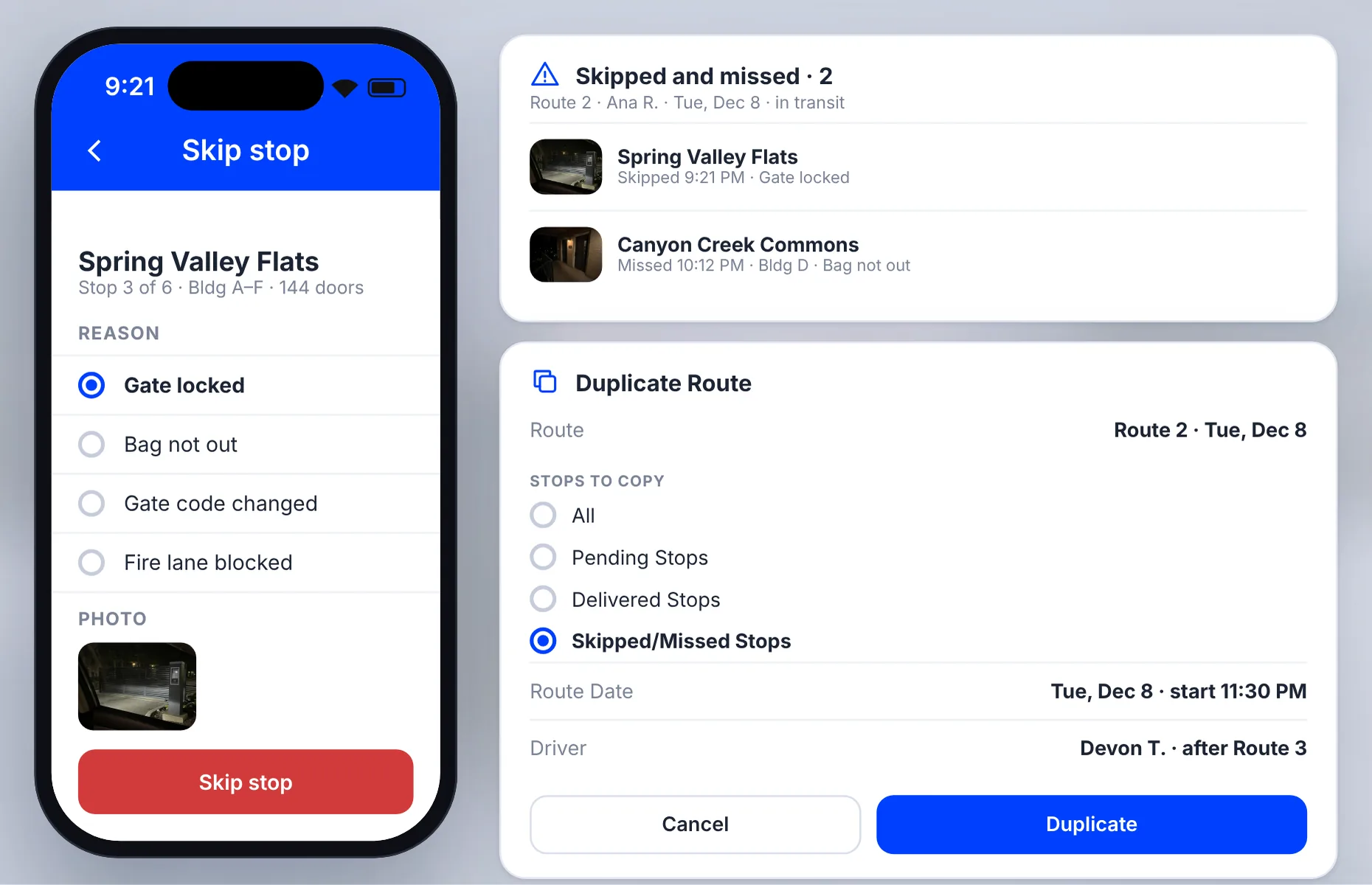
A driver can’t always reach a building, for example when a gate code changes or a fire lane is blocked. In the driver app, the driver marks the stop as failed or skipped and picks a reason from your list. A photo can be attached if your settings allow it.
Once the route is in transit or completed, your dispatcher duplicates it with only the skipped or missed stops checked. That reattempt route then goes to whichever driver can take it.
How CleanHaul Services renewed all 12 at-risk contracts
CleanHaul Services collects valet trash at 140+ apartment complexes across the Dallas-Fort Worth metro area. Its director of operations drew five zones on the map and let Upper order the stops in each. When a property manager questions a pickup, the office shares the GPS trail, timestamps and photos.


CleanHaul ServicesWaste Management / Valet Trash · Dallas, Texas · 25 drivers
“We went from losing contracts because we couldn’t prove we showed up to renewing every single one because we can prove exactly when we arrived, how long we stayed, and what we did. Upper didn’t just fix our routes. It fixed our reputation.”

Carlos MendezDirector of Operations, CleanHaul Services
Key features used: route optimization, multi-driver optimization, GPS tracking, photo proof of delivery and Excel/CSV import.
Read the CleanHaul Services storyCleanHaul’s reported results
| Metric | Before Upper |  After Upper |
|---|---|---|
| Weekly route planning time | 6 hours | 30 minutes (92% less) |
| Missed pickup complaints from property managers per month | About 40 | About 6 (85% fewer) |
| Property manager disputes needing investigation per month | 8–10 | 1–2 |
| Maximum variance in driver completion times | 90+ minutes | 30 minutes |
| At-risk contracts | 12 | 0 (all renewed) |
Bring your property list and driver count. We’ll split the communities into zones and routes in Upper Crew.
Plan a valet trash night in Upper’s 7-day free trial
- 1
Import your properties.
Upload a few of your apartment communities from a CSV or Excel file.
- 2
Split them across drivers.
Check how Upper Crew balances the communities between your drivers.
- 3
Cover a call-out.
Move one driver’s properties to another route and check that the change reaches the new driver’s phone.
- 4
Record a pickup.
Have a driver photograph one compactor area, then check the time and GPS stamp on the record.
The 7-day free trial needs no credit card. It covers Professional plan features, except customer SMS notifications, for up to 5 users.
Valet trash dispatch software FAQs
What is valet trash dispatch software?
It is dispatch software for valet trash companies. It assigns apartment properties to drivers, sends each driver an ordered route and records proof at every pickup. In Upper, it is a capability of Upper Crew, the route planning and dispatch platform, and it works beside your current billing system.
Can Upper Crew plan door-to-door trash pickup routes for apartment communities?
Yes, partly. Each community is a stop, with notes on buildings, gate codes and the compactor location. Crew orders the communities for each driver, while the walk inside each property follows your notes. For planning tips, read Upper’s guide to waste collection route optimization.
Does Upper Crew work as valet trash scheduling software?
Yes, for route scheduling. Copy a night’s route to another date, then optimize and assign it, or set it to recur on the Optimize plan. Each community keeps its service nights without a rebuild, and your dispatcher can still move properties between drivers.
Does the Upper driver app work without a signal?
Yes, partly. Once a driver has opened the route while online, they can keep marking stops and recording photos, signatures and notes offline. The records sync when the phone reconnects, while live tracking pauses until then.
How much does Upper Crew cost?
Plans are billed per user per month: Starter $50, Professional $60 and Optimize $89, or 20% less billed yearly. Enterprise pricing is by request. AI driver assignment is part of the Optimize plan; see pricing for each plan’s limits.
Does Upper Crew handle billing or resident violations?
Route planning in Upper Crew doesn’t create invoices or run a violation-fine workflow. AI Dispatcher can turn a finished job into an invoice, or you can keep your billing system and connect it through Zapier on the Optimize plan or the Platform API on Enterprise.
Is there a free trial?
Yes. The 7-day free trial needs no credit card and covers Professional plan features, except customer SMS notifications, for up to 5 users.
Bring your hardest service night to the demo
Come with your property list, your service windows and the call-out that broke your last shift. See how Upper Crew splits the night across drivers, covers the gap and keeps proof at every community.