


- Explainable AI dispatch software shows the reasons behind every driver assignment, so a dispatcher can check it before approving it.
- A real explanation names the hard rules a match passed and the trade-offs that tipped it. If it shows a score, the vendor should say what the score measures.
- NIST's four principles of explainable AI give buyers a simple test: reasons, meaning, accuracy and known limits.
- An explanation makes a decision checkable, not correct. A person still owns conflicts, exceptions and missing context.
- The fastest test of any tool is to ask it to explain an assignment you disagree with.
Explainable AI dispatch software assigns stops to drivers or technicians and shows why it made each choice. A useful explanation names the rules the match passed, like skills, equipment and vehicle capacity. It also shows the trade-offs behind the choice, such as travel time and workload. Any match-strength score needs a stated meaning. Use those reasons in the approval checks defined for your workflow.
This guide covers what “explainable” means, how it differs from black box AI and what to check in a tool. It ends with a made-up midday example and a simple rule for accepting a recommendation. New to the category? Start with what AI dispatch is and how fleets use it.
What decision should the explanation help you make?
The explanation should help you decide whether a proposed assignment fits the job and the driver’s remaining day. It should identify the required qualifications, relevant limits, feasible alternatives and trade-offs.
Routing software can also assign work across vehicles. The buying question is whether the product shows the reasons and controls you need for those assignments, as discussed in AI dispatching vs route optimization.
This guide focuses on evaluating the assignment recommendation. Ask the vendor to demonstrate one you would question, and use the checks below to decide what still requires verification.
What are the four principles of explainable AI?
The US National Institute of Standards and Technology (NIST) names four principles of explainable AI. They are explanation, meaningful, explanation accuracy and knowledge limits. NIST first shared them in a 2020 draft. It published the final report, NIST IR 8312, in September 2021.
Here is what each principle means in plain words:
- Explanation: the system gives reasons or evidence for each output.
- Meaningful: the people using the system can understand those reasons.
- Explanation accuracy: the reasons match how the system really produced the output.
- Knowledge limits: the system works only in the conditions it was built for, or when it is confident enough.
NIST’s AI Risk Management Framework lists “explainable and interpretable” as a trait of trustworthy AI. It says explainability answers “how” a decision was made in the system. Interpretability answers “why” it was made and what it means to the user. A dispatcher needs both: how the match was built, and why it fits today’s board.
Here is how the four principles look on a dispatch board:
| NIST principle | What it looks like in dispatch | Question to ask a vendor |
| Explanation | Every assignment shows its reasons | Can I open the reasons on any recommendation, including reassignments? |
| Meaningful | Reasons use dispatch terms: skill, equipment, capacity, travel | Would a dispatcher understand it without a data scientist? |
| Explanation accuracy | The reasons listed are the ones that actually drove the match | Can I trace the stated reason to the evaluated rule and decision record? |
| Knowledge limits | Weak or blocked stops come back to a person | What happens when no driver fits? What is never automated? |
Buyers often skip the third row. An explanation that sounds right but does not match the system’s logic is worse than none. It creates false trust.
How is explainable AI dispatch different from black box AI?
Black box AI dispatch gives you an answer. Explainable AI dispatch gives you the answer and the reasons behind it. A “black box” is a system whose inputs and outputs you can see, but not the logic in between.
| What to inspect | Result without usable reasons | Result with a useful explanation |
| Chosen driver | A name or assignment to check independently | The selected driver plus relevant requirements and trade-offs |
| Rejected candidate | Unclear why a plausible alternative lost | The failed requirement or comparison can be inspected |
| No feasible option | The tool may reject the job, but the blocker may be unclear | The job remains visible with the blocking condition |
| A disputed recommendation | More manual investigation is needed | The stated inputs can be compared with the actual job |
Both kinds of system can enforce constraints or reject an impossible job. Explainability adds information for review; it does not establish correctness by itself. A confidence score is optional, and its presence is not proof of a faithful explanation.
What should explainable AI dispatch software include?
Look for these five features when you compare tools. The first two decide whether the explanation is real. The last three decide whether your team will trust it enough to use it.
- Reasons on every assignment. Each recommended driver comes with the specific factors behind the choice. “Best match” is not a reason. “Holds the required certification, has room on the vehicle, shortest added travel” is a reason.
- Hard rules kept apart from preferences. A hard rule is a must-have, like a certification or a liftgate, and it decides who is eligible. Travel time and workload balance are preferences that get weighed against each other. A good tool tells you which is which.
- A clear account of uncertainty. If the product shows a confidence score, ask what it measures and how it should guide review. A numeric score is not required for every valid explanation and does not replace the underlying checks.
- Human review where it matters. You choose what is accepted automatically and what always comes to a person. Conflicts like double-booked drivers or impossible travel gaps should always come to you.
- A record of what was recommended and who decided. A history of recommendations and overrides helps you troubleshoot a bad day. It also helps you check that work is shared fairly across drivers. This varies a lot between tools, so ask to see it.
For more questions to put to vendors, see Upper’s guide on choosing between rule-based and AI dispatch.
How do you test whether an AI dispatch tool is really explainable?
Ask the tool to explain a recommendation you disagree with. Real explainability names the rule or factor that decided it. A score panel that says “best match” with no reasons is not an explanation.
Run these five checks in any demo or trial:
- Use your own stops, drivers and rules, not the vendor’s sample data.
- Pick a stop where the closest driver is the wrong choice. Check that the tool says why it skipped them.
- Change a relevant binding input, such as removing required equipment from the selected vehicle. Inspect the new eligibility result. Also change a non-binding input; an unchanged decision can be correct.
- Add a stop that no driver can serve. The tool should leave it unassigned and say what blocks it.
- Ask what any confidence score means and what evidence is required before automatic acceptance is enabled. Start the pilot with approval kept manual.
The third check can expose inconsistencies; it does not independently prove that the explanation reflects the actual decision process. Ask for the evaluated rules and available decision records as well. Upper’s guide on whether AI will replace dispatchers puts the rule simply: “Check the explanation as well as the result.”
What happens to an explained assignment when the day changes?
A morning assignment can be checked at a desk. A 10:40 a.m. reassignment has to be checked in the time it takes a driver to finish a stop. That is where a clear explanation saves the most time.
Worked example with a goods handoff and complete timeline
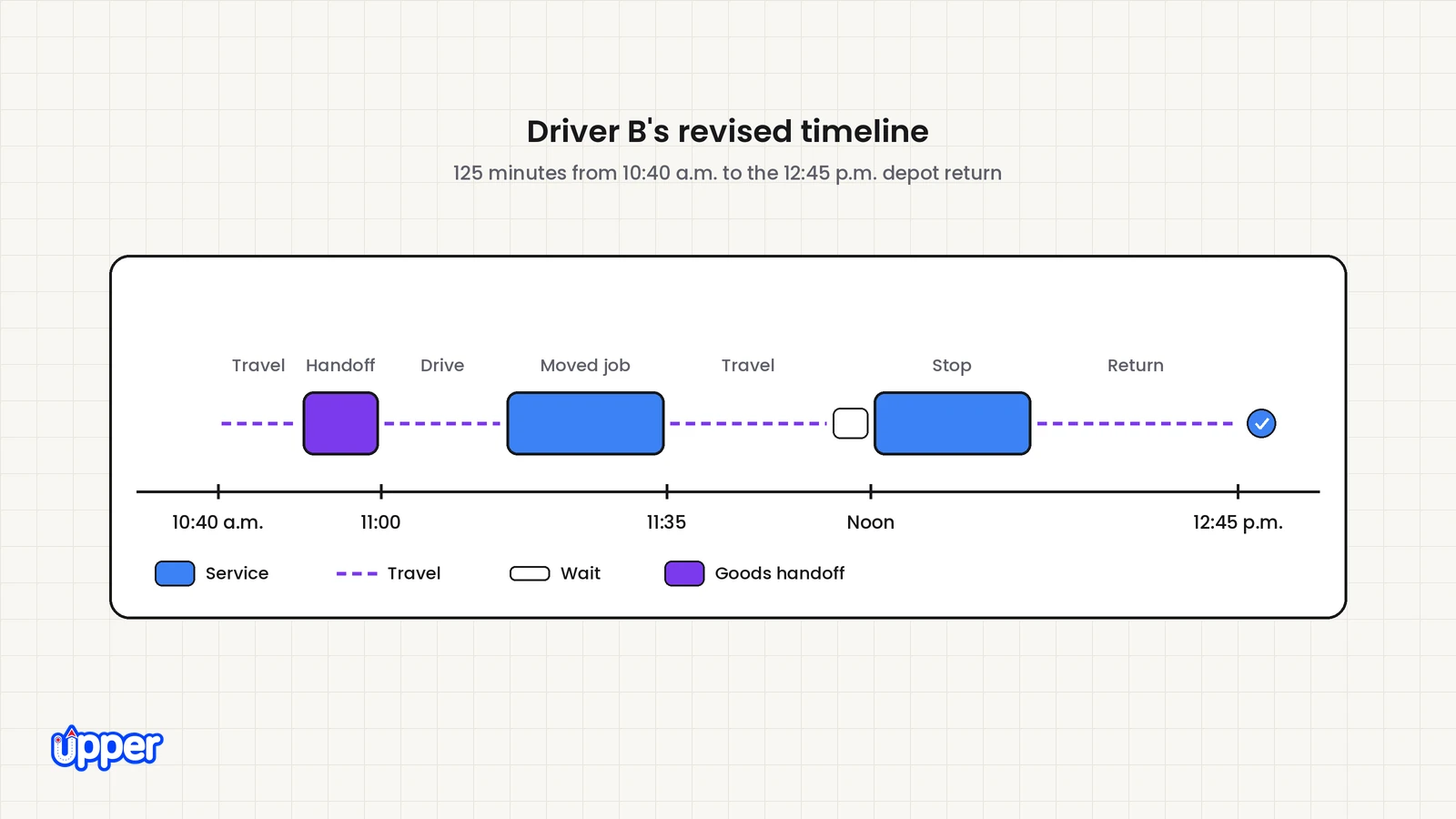
This is an illustrative scenario, not a measured customer result or a product test. At 10:40 a.m., Driver A is delayed. A later delivery needs a liftgate and 20 minutes of unloading; the customer accepts arrival from 11 a.m. to noon. Its goods are on A’s truck.
Driver B finishes the current stop at 10:40, has a liftgate and enough room for the transferred goods. Driver C is closer but has no liftgate. A can meet B at an authorized handoff location at 10:50. Transfer and custody checks take 10 minutes.
B has one existing stop left, requiring 20 minutes of service between noon and 12:30 p.m., then must return to the depot before the 2 p.m. shift end. Assume the required break is already taken, both loads fit, the goods owner approves the transfer and the following travel estimates hold.
| Time | Driver B’s revised activity |
| 10:40 to 10:50 | Travel to the agreed handoff point. |
| 10:50 to 11:00 | Receive the goods and record custody. |
| 11:00 to 11:15 | Drive to the moved delivery. |
| 11:15 to 11:35 | Complete the moved delivery. |
| 11:35 to 11:55 | Travel to the existing stop. |
| 11:55 to noon | Wait for the existing appointment. |
| Noon to 12:20 | Complete the existing stop. |
| 12:20 to 12:45 | Return to the depot. |
What should the explanation establish?
- Eligibility: C is excluded because the liftgate is required. B’s equipment and available space pass the stated checks.
- Goods access: B cannot perform the moved delivery until the authorized transfer is completed.
- Full-day fit: The revised remainder takes 125 minutes, including travel, transfer, service and waiting. B returns at 12:45, within the stated shift, and meets both customer commitments under the assumptions.
- Approval: This is a recovery change, so the dispatcher reviews the actual inputs and approves the move. A high match score would not remove that review.
If A cannot make the handoff or B’s remaining job takes longer, recalculate the timeline. If no eligible option fits, keep the work visible and arrange cover or a new commitment. The explanation narrows the checks; it does not make missing goods or time disappear.
How do you decide whether to accept an AI dispatch recommendation?
Accept a recommendation when every hard rule passes, no conflict is flagged and the trade-off fits your day. Use this table with any tool that explains its choices.
| What the explanation shows | Default action |
| Routine match in a job type that passed the pilot, all required checks pass | Apply the approved automation policy; sample results and watch for changed conditions. |
| Recovery change, uncertain input or match requiring review | Check the current timeline, goods and commitments before approval. |
| A conflict is flagged (overlap, impossible travel gap) | Never auto-accept. Resolve the conflict, then reassign |
| No eligible driver, with a blocking reason | Fix the blocker (cover, equipment, time) or ask the customer to move the window |
| Reasons are vague (“best match”) or missing | Treat it as a black box. Check by hand and raise it with the vendor |
Keep automatic acceptance off during the pilot. Check hard-rule failures, unassigned work, review corrections and execution handoff. Enable routine acceptance only for job types that pass your stated criteria; confidence in the explanations alone is not enough. For when to make the switch at all, see manual and Excel dispatch vs AI dispatch.
Which operations need explainable AI dispatch?
Explainable AI dispatch fits operations where several rules apply to one stop and plans change after dispatch. Fleet size matters less than how many rules collide and how often the day moves.
- Distribution and supply teams need a delayed stop moved without unbalancing other routes.
- Waste collection crews need assignments that respect service areas and vehicle type, as in Upper’s waste collection route planning software.
- Medical and pharmacy routes need the right certification or equipment on every stop.
- Field service and multi-site maintenance teams need each visit matched to a technician with the right skill.
- Couriers need same-day orders placed after the plan is already set.
If any driver can take any stop and the plan rarely changes, you may not need assignment AI. Good route optimization software may be enough.
How can Upper help with explainable AI dispatch?
Upper is route planning, route optimization and AI dispatch software for multi-stop delivery, collection and service teams. Its AI Dispatcher recommends routine assignments and shows the reasons for each one. Your team sets the rules, reviews exceptions and decides what runs on its own.
What does AI Dispatcher check?
- Hard rules: the skill-based driver assignment page says a candidate “must meet every required skill and equipment requirement.”
- Other limits: certifications, vehicle fit, territories, working hours, time off and capacity also shape who is eligible.
- Match factors: you can open the reasoning to see how skills, proximity, availability and workload shaped the match.
- Time windows: preferred arrival windows shape the schedule, but Upper treats them as preferences. Large deviations are flagged for review.
What does it show you?
Each recommendation shows the recommended person, proposed start and finish, estimated travel, a confidence score and the reasoning. Upper states that “A confidence score describes the match quality. It is not a probability of on-time delivery.” When no eligible option exists, AI Dispatcher does not force a match. The stop stays visible with the blocking reason, such as a missing liftgate.
Who approves the assignment?
With automatic driver assignment, Autopilot accepts routine matches above a confidence threshold you choose. Matches below the threshold stay in review. There you can accept or reject each one, or approve them in batches. Critical conflicts, such as overlaps and impossible travel gaps, are never accepted automatically. Dispatch exception management shows each escalated suggestion with its reason and a suggested action.
What happens when the day changes?
Upper’s dynamic dispatch reoptimization starts recovery when a job runs past its expected time by a threshold you set. It also suggests cover for absent drivers or unavailable vehicles, and ways to fill cancellation gaps. It aims to adjust the schedule “without unnecessary reshuffling.” Recovery suggestions stay subject to dispatcher review before any change applies.
What records and controls should you verify?
AI Dispatcher handles routine assignment work while dispatchers set rules, review exceptions and decide when work cannot fit. Its preferred arrival windows are not hard guarantees, so check immovable commitments separately.
Before buying, ask to see what is recorded when a recommendation is accepted, rejected or overridden. Verify the recorded reason, user, time, retention and any export you need. Recording a rejection reason is not the same as a complete exportable decision history. This article does not claim that the full audit record is available.
Confirm the included assignment and recovery functions in the proposed setup and workflow-specific quote. A similarly named feature on another plan does not establish the same scope.
Check one explanation on your own work
Explainability earns its place when it lets a dispatcher check a match faster and catch a wrong one. Judge it on your own stops. Ask the tool to explain a recommendation you disagree with, then confirm the timeline, goods and approvals yourself.

See it in action
See the reasons behind every assignment
Bring your stop list and your hardest assignment rule. See how AI Dispatcher explains each match and what still comes to you.

Frequently asked questions about explainable AI dispatch software
Explainable AI dispatch software assigns stops to drivers or technicians and shows the reasons behind each choice. A good explanation names the hard rules the match passed, such as skills, equipment and capacity. It also shows trade-offs like travel time and workload. The dispatcher can check those reasons before approving the assignment.
NIST’s four principles of explainable AI are explanation, meaningful, explanation accuracy and knowledge limits. In plain words, a system should give reasons for its outputs that users can understand. Those reasons must reflect how the output was really produced. And the system should work only within its limits or when it is confident enough.
Black box AI dispatch gives you an assignment with no reasons. Explainable AI dispatch gives you the assignment plus the factors behind it. You can see why one driver was chosen over another. When a match is wrong, you can fix the rule or data that caused it instead of guessing.
A confidence score shows how strong a recommended match is. In Upper’s AI Dispatcher, it describes match quality and is not a probability of on-time delivery. Use it to decide which recommendations to review closely. It is a signal for where to look first, not proof that an assignment is correct.
Check the input it names first. If a rule, skill record or duration is wrong, correct it and let the tool recalculate. If the input is right but the match still looks wrong, reject or override it with a recorded reason and raise the case with the vendor. Recorded overrides show where your setup or the tool needs attention.
Ask the tool to explain a recommendation you disagree with, using your own stops and rules. Real explainability names the rule or factor that decided the match and shows why a closer driver was skipped. Change a binding input and inspect the resulting decision. Also test a non-binding change, which may correctly leave the assignment unchanged. This consistency check does not by itself prove explanation fidelity. A “best match” label alone is not an explanation.
It depends on the tool. A record of recommendations, overrides and approvals helps you troubleshoot a bad day and check fairness across drivers. Not every product keeps one. For Upper, ask to see the exact recommendation, approval and override records you require, including retention and export. Do not assume that recorded rejection reasons provide a complete audit history.


